
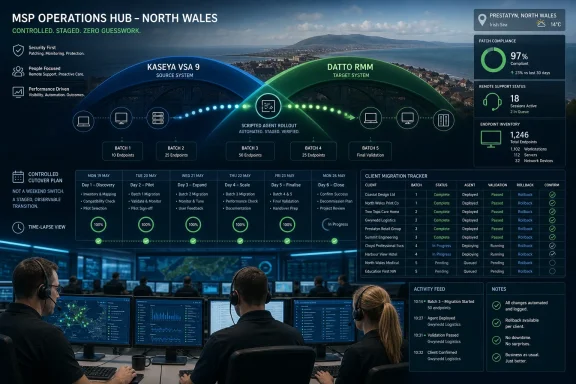
Stability IT, a managed service provider in Prestatyn, North Wales, moved from Kaseya VSA 9 to Datto RMM by scripting the new agent deployment through VSA itself, migrating clients in batches, and running both platforms briefly until each customer was confirmed on the new system. The result, according to Kaseya’s case study, was not a dramatic weekend cutover but a controlled operational handoff. That distinction matters because RMM migrations usually fail less from technology than from disorder. Stability IT’s story is really about what happens when an MSP treats tool consolidation as a business redesign rather than a procurement exercise.
The easy reading of the case is that Stability IT swapped one Kaseya remote monitoring and management platform for another. That is true as far as it goes, but it misses the operational point. The company was moving from a stack that had grown in layers toward a platform model where remote access, patching, security, backup, and documentation increasingly orbit the same control plane.
Stability IT supports roughly 80 clients and around 2,000 endpoints with a team of about 20 technicians. Nearly all of its work is remote, which means the RMM is not back-office plumbing. It is the daily workbench, the customer experience, and the difference between a 10-minute fix and a ticket that drags through the afternoon.
The company’s earlier setup reflected the way many MSP stacks evolve. ScreenConnect handled remote support, WSUS handled patching, PRTG handled monitoring, and other products filled in the remaining gaps. Each tool did a job, but the work of stitching them together fell on technicians.
That fragmentation is tolerable when an MSP is smaller. At scale, it becomes a tax on every ticket, every compliance check, and every new customer onboarding. Stability IT’s migration shows why many providers are now less interested in best-of-breed purity and more interested in reducing the number of places where operational truth can hide.
That kind of stack is familiar to Windows admins because it mirrors the old enterprise rhythm. Build a server. Configure a role. Monitor the monitor. Then discover, often too late, that the thing meant to enforce consistency has quietly drifted out of compliance.
The pain point was not that WSUS never worked. It was that Stability IT could not always know quickly when it had stopped working. Mark Davies, the company’s managing director, described cases where the team would only discover a client’s patching state after logging into the WSUS server and finding a problem.
For MSPs, that uncertainty is more dangerous than a visible failure. A failed patch job with an alert can be worked. A failed patching process that remains invisible becomes a compliance risk, a security exposure, and eventually a credibility problem with customers who assume their provider already knows.
But the case study frames VSA 9 less as a mistake than as a stage in maturity. Stability IT had to learn what it wanted from a full endpoint management platform before it could judge the next one. Once technicians were accustomed to automation, integrated monitoring, and centralized patching, their expectations changed.
That is where Datto RMM entered the story. Kaseya worked with Stability IT on a pilot migration for one client, giving technicians a chance to compare the two platforms directly rather than absorb a top-down tool mandate. The internal reaction, according to Davies, was immediate: technicians wanted to know why all clients were not already on Datto RMM.
This is a detail worth lingering on. In MSP operations, technician acceptance is not a soft metric. If the people handling tickets believe a platform is faster, clearer, and less obstructive, that affects ticket velocity, morale, escalation rates, and customer satisfaction.
The company used VSA 9 to deploy the Datto RMM agent across customer environments. It scripted the rollout, moved clients in batches, and confirmed each migration before removing that client from VSA. For several weeks, technicians could work in either system depending on where a customer still lived.
That temporary dual-platform period was not inefficiency. It was risk control. Instead of demanding that every endpoint, technician, and workflow cross the bridge at once, Stability IT let the migration proceed in daily increments.
Davies’ account of the process is almost boring, which is exactly the point. The team would arrive in the morning and find that another client had moved over. Kaseya provided hands-on support for the first client, then Stability IT took over the rest independently.
This is the kind of migration pattern IT leaders should prefer: scripted, reversible in practice, observable, and free from theatrical deadlines. A smooth migration is rarely smooth because the tool is magical. It is smooth because the operating model assumes something will need checking.
The remaining roughly 3 percent are not described as unknown failures. They are customers with policies that prevent automatic Windows updates, monitored so Stability IT can still see where they stand. That distinction matters because mature patch management is not merely about pushing updates; it is about knowing which exceptions are intentional.
For Windows environments, patching is where abstract security promises become operational reality. A dashboard does not eliminate the complexity of Microsoft updates, application compatibility, maintenance windows, reboots, or customer-specific constraints. But it does change the provider’s posture from hunting for status to managing visible exceptions.
That shift is especially important for customers pursuing Cyber Essentials certification, where patching timelines can become part of the compliance conversation. If a server must be patched within 14 days, the MSP needs evidence, not optimism. Central visibility gives technicians and account managers a shared basis for that conversation.
There is also a labor argument here. Every hour spent nursing a WSUS server at one customer is an hour not spent improving automation across all customers. The more Stability IT could turn patching into a policy-and-exception workflow, the more its technicians could operate like fleet managers instead of site custodians.
Stability IT reports more than 50 percent faster remote support, with most support calls now resolved in under 10 minutes and a target of first-contact resolution within 15 minutes. Those numbers come from the vendor case study, so they should be read as customer-reported outcomes in a marketing context. Still, they align with the operational logic of reducing friction in the technician’s primary workspace.
Datto RMM’s Web Remote is now Stability IT’s default remote access method, according to Davies. The Agent Browser also lets technicians perform tasks on a machine without taking over the user’s session. That is a small-sounding distinction with large practical consequences.
Anyone who has supported end users remotely knows the cost of interruption. Taking over a session can halt a customer’s work, create awkward pauses, and turn a background fix into a foreground event. If technicians can inspect, run tasks, or gather information without fully commandeering the desktop, support becomes less invasive.
The consent workflow also plays into trust. When a technician connects, the user sees a prompt identifying the technician by name and must approve the session. In a world of remote support scams and credential theft, explicit identity and consent are not just user-experience niceties. They are part of the security theater that actually deserves to exist.
The appeal is obvious for MSPs. If one subscription covers endpoint management, security, backup, and automation, the provider can simplify procurement and potentially improve margin without changing customer pricing. Stability IT says it has seen an 8 percent margin increase on managed services since consolidating onto Kaseya 365 Endpoint.
That commercial result is not incidental. MSPs sell standardization as much as they sell support. The more uniform the underlying stack, the easier it becomes to train technicians, automate common tasks, price services, and onboard new clients.
But there is a real trade-off. Consolidation concentrates dependency. If an MSP builds heavily around one vendor’s platform, it gains integration and leverage but reduces the practical freedom to swap out individual layers later. The operational win can become a strategic lock-in if the vendor’s roadmap, pricing, or support quality diverges from the MSP’s needs.
That does not make Stability IT’s decision wrong. It makes it a decision with a shape. The company appears to have judged that the gains from integration, technician productivity, and margin outweighed the risks of deeper dependence on Kaseya’s ecosystem.
Kaseya 365 Endpoint Backup changed the economics. With backup included in the broader subscription and managed through Datto RMM, Stability IT could protect workstations it previously would not have bothered with and charge customers for storage on top. Davies called it a “game changer” because it made workstation backup easier to offer as an additional built-in service.
This is the MSP flywheel in miniature. A capability that is too awkward to deploy becomes a niche service or an exception. A capability that is easy to deploy becomes a standard offer. Once it is standard, it becomes easier to explain, price, monitor, and renew.
There is a customer education angle too. Many small and mid-market clients understand server backup because servers feel important. Workstations are often treated as disposable until a lost laptop, failed SSD, or ransomware incident proves otherwise. Bundled endpoint backup gives the MSP a way to turn that latent risk into a practical service conversation.
The more interesting point is that backup did not win here as a standalone product. It won because it became adjacent to the tool technicians already use. In MSP operations, adjacency is power.
Documentation has always been one of the MSP industry’s chronic weak spots. Everyone agrees it matters. Everyone promises to maintain it. Then the ticket queue spikes, a senior technician solves a problem from memory, and the knowledge base falls out of date again.
Integrating documentation into the technician’s workflow does not solve the cultural problem by itself. But it reduces the distance between knowing and doing. If the remote session, credentials, client context, and endpoint state are closer together, technicians are less tempted to improvise outside the system.
There is also a security implication. Password handling is safer when credentials do not have to be copied, pasted, messaged, or verbally relayed through ad hoc channels. The fewer manual moves a technician makes with privileged information, the fewer opportunities there are for leakage or error.
In that sense, Stability IT’s consolidation story is not only about speed. It is about reducing the number of informal practices that grow around fragmented tools.
Yet the pattern behind the numbers is credible because it matches what MSPs routinely experience. Centralized patch policy tends to outperform scattered WSUS oversight when the provider has many clients. Faster remote access tends to improve ticket resolution when remote support is the default operating mode. Bundled licensing can improve margin when it replaces several overlapping subscriptions.
The more important lesson is not that Datto RMM will reproduce Stability IT’s metrics for every MSP. It is that operational simplification creates measurable surfaces. Once patching, remote support, backup, security, and documentation move closer together, the MSP can start managing performance as a system.
This is where the story moves beyond Kaseya. The MSP market is under pressure from customer security expectations, compliance frameworks, technician shortages, and margin compression. Tool sprawl makes all of those problems worse because it forces providers to spend scarce labor reconciling systems instead of improving service.
Stability IT’s move is therefore less a one-off success story than an example of where the industry is heading. The winning MSP stack is increasingly the one that lets a smaller team manage more endpoints with fewer blind spots.
That sequence is transferable. Whether the destination is Datto RMM, another RMM, Intune-centered management, or a hybrid endpoint platform, the core migration pattern remains useful. Start with a controlled pilot. Build deployment automation. Preserve visibility during the transition. Remove the old agent only after the new one is operational.
The use of VSA 9 to deploy the Datto RMM agent is particularly elegant. The old system became the delivery mechanism for the new one. That reduces manual endpoint handling and turns a potentially chaotic uninstall-reinstall process into a managed rollout.
It also sends a message to technicians. A migration that respects their workflow is more likely to earn their trust. A migration that dumps them into a new console on Monday morning and calls it transformation is just another management decision they have to survive.
Stability IT’s move from VSA 9 to Datto RMM lands because it was not framed as a leap of faith. It was a staged migration from fragmented work toward a more centralized operating model, with technicians validating the tool before the whole customer base moved. For Windows admins and MSPs watching their own stacks accrete portals, agents, and renewal dates, the forward signal is clear: the next productivity gain may not come from adding another tool, but from finally making the existing ones stop arguing with each other.
 Stability IT Did Not Just Replace an RMM
The easy reading of the case is that Stability IT swapped one Kaseya remote monitoring and management platform for another. That is true as far as it goes, but it misses the operational point. The company was moving from a stack that had grown in layers toward a platform model where remote access, patching, security, backup, and documentation increasingly orbit the same control plane.Stability IT supports roughly 80 clients and around 2,000 endpoints with a team of about 20 technicians. Nearly all of its work is remote, which means the RMM is not back-office plumbing. It is the daily workbench, the customer experience, and the difference between a 10-minute fix and a ticket that drags through the afternoon.
The company’s earlier setup reflected the way many MSP stacks evolve. ScreenConnect handled remote support, WSUS handled patching, PRTG handled monitoring, and other products filled in the remaining gaps. Each tool did a job, but the work of stitching them together fell on technicians.
That fragmentation is tolerable when an MSP is smaller. At scale, it becomes a tax on every ticket, every compliance check, and every new customer onboarding. Stability IT’s migration shows why many providers are now less interested in best-of-breed purity and more interested in reducing the number of places where operational truth can hide.
The Old Stack Was Functional Until It Became Friction
ScreenConnect gave Stability IT remote control, but not the broader automation and endpoint governance the business needed as it expanded. WSUS could patch Windows machines, but only through a site-by-site model that required infrastructure at each customer location. PRTG could monitor networks, but it did not solve the bigger question of how technicians should manage endpoints as a unified fleet.That kind of stack is familiar to Windows admins because it mirrors the old enterprise rhythm. Build a server. Configure a role. Monitor the monitor. Then discover, often too late, that the thing meant to enforce consistency has quietly drifted out of compliance.
The pain point was not that WSUS never worked. It was that Stability IT could not always know quickly when it had stopped working. Mark Davies, the company’s managing director, described cases where the team would only discover a client’s patching state after logging into the WSUS server and finding a problem.
For MSPs, that uncertainty is more dangerous than a visible failure. A failed patch job with an alert can be worked. A failed patching process that remains invisible becomes a compliance risk, a security exposure, and eventually a credibility problem with customers who assume their provider already knows.
VSA 9 Was the Bridge, Not the Destination
The move from ScreenConnect and disconnected tooling into VSA 9 was Stability IT’s first real consolidation step. VSA 9 brought patching, monitoring, automation, and remote support into one RMM environment. For a company that had been operating without a full RMM, that was a meaningful upgrade.But the case study frames VSA 9 less as a mistake than as a stage in maturity. Stability IT had to learn what it wanted from a full endpoint management platform before it could judge the next one. Once technicians were accustomed to automation, integrated monitoring, and centralized patching, their expectations changed.
That is where Datto RMM entered the story. Kaseya worked with Stability IT on a pilot migration for one client, giving technicians a chance to compare the two platforms directly rather than absorb a top-down tool mandate. The internal reaction, according to Davies, was immediate: technicians wanted to know why all clients were not already on Datto RMM.
This is a detail worth lingering on. In MSP operations, technician acceptance is not a soft metric. If the people handling tickets believe a platform is faster, clearer, and less obstructive, that affects ticket velocity, morale, escalation rates, and customer satisfaction.
The Migration Worked Because It Refused to Be Heroic
Most failed migrations have a mythology problem. Someone wants a clean break, a big-bang weekend, a heroic all-hands effort that proves the team can muscle through complexity. Stability IT chose the opposite.The company used VSA 9 to deploy the Datto RMM agent across customer environments. It scripted the rollout, moved clients in batches, and confirmed each migration before removing that client from VSA. For several weeks, technicians could work in either system depending on where a customer still lived.
That temporary dual-platform period was not inefficiency. It was risk control. Instead of demanding that every endpoint, technician, and workflow cross the bridge at once, Stability IT let the migration proceed in daily increments.
Davies’ account of the process is almost boring, which is exactly the point. The team would arrive in the morning and find that another client had moved over. Kaseya provided hands-on support for the first client, then Stability IT took over the rest independently.
This is the kind of migration pattern IT leaders should prefer: scripted, reversible in practice, observable, and free from theatrical deadlines. A smooth migration is rarely smooth because the tool is magical. It is smooth because the operating model assumes something will need checking.
Patching Became a Dashboard Problem Instead of a Server Problem
The strongest operational claim in the case study is patching. Stability IT moved from a WSUS model requiring a server at each client site to Datto RMM’s centralized patch policy and compliance view. Kaseya says the company now maintains more than 97 percent patch compliance across more than 1,800 endpoints.The remaining roughly 3 percent are not described as unknown failures. They are customers with policies that prevent automatic Windows updates, monitored so Stability IT can still see where they stand. That distinction matters because mature patch management is not merely about pushing updates; it is about knowing which exceptions are intentional.
For Windows environments, patching is where abstract security promises become operational reality. A dashboard does not eliminate the complexity of Microsoft updates, application compatibility, maintenance windows, reboots, or customer-specific constraints. But it does change the provider’s posture from hunting for status to managing visible exceptions.
That shift is especially important for customers pursuing Cyber Essentials certification, where patching timelines can become part of the compliance conversation. If a server must be patched within 14 days, the MSP needs evidence, not optimism. Central visibility gives technicians and account managers a shared basis for that conversation.
There is also a labor argument here. Every hour spent nursing a WSUS server at one customer is an hour not spent improving automation across all customers. The more Stability IT could turn patching into a policy-and-exception workflow, the more its technicians could operate like fleet managers instead of site custodians.
Remote Access Is Where Technicians Decide Whether a Platform Is Real
Remote access is often treated as a feature inside an RMM comparison matrix. For an all-remote support organization, it is closer to the steering wheel. If it is slow, unreliable, or awkward, every other feature inherits the frustration.Stability IT reports more than 50 percent faster remote support, with most support calls now resolved in under 10 minutes and a target of first-contact resolution within 15 minutes. Those numbers come from the vendor case study, so they should be read as customer-reported outcomes in a marketing context. Still, they align with the operational logic of reducing friction in the technician’s primary workspace.
Datto RMM’s Web Remote is now Stability IT’s default remote access method, according to Davies. The Agent Browser also lets technicians perform tasks on a machine without taking over the user’s session. That is a small-sounding distinction with large practical consequences.
Anyone who has supported end users remotely knows the cost of interruption. Taking over a session can halt a customer’s work, create awkward pauses, and turn a background fix into a foreground event. If technicians can inspect, run tasks, or gather information without fully commandeering the desktop, support becomes less invasive.
The consent workflow also plays into trust. When a technician connects, the user sees a prompt identifying the technician by name and must approve the session. In a world of remote support scams and credential theft, explicit identity and consent are not just user-experience niceties. They are part of the security theater that actually deserves to exist.
The Kaseya Portfolio Is the Strategy and the Trade-Off
Stability IT’s migration is also a case study in Kaseya’s broader portfolio strategy. Datto RMM became the core, but the company also uses or is moving customers toward Datto AV, Datto EDR, Kaseya 365 Endpoint Backup, IT Glue, and MyGlue integrations. The operational pitch is simple: fewer portals, fewer renewal cycles, fewer awkward seams.The appeal is obvious for MSPs. If one subscription covers endpoint management, security, backup, and automation, the provider can simplify procurement and potentially improve margin without changing customer pricing. Stability IT says it has seen an 8 percent margin increase on managed services since consolidating onto Kaseya 365 Endpoint.
That commercial result is not incidental. MSPs sell standardization as much as they sell support. The more uniform the underlying stack, the easier it becomes to train technicians, automate common tasks, price services, and onboard new clients.
But there is a real trade-off. Consolidation concentrates dependency. If an MSP builds heavily around one vendor’s platform, it gains integration and leverage but reduces the practical freedom to swap out individual layers later. The operational win can become a strategic lock-in if the vendor’s roadmap, pricing, or support quality diverges from the MSP’s needs.
That does not make Stability IT’s decision wrong. It makes it a decision with a shape. The company appears to have judged that the gains from integration, technician productivity, and margin outweighed the risks of deeper dependence on Kaseya’s ecosystem.
Backup Moved From Infrastructure Chore to Sellable Service
Endpoint backup is one of the more revealing parts of the story because it shows how tool consolidation changes not just operations but packaging. Stability IT previously used Veeam in a model that required attention to available space on a physical server at the client site and whether a workstation could reach that local infrastructure. That is a lot of conditional effort for machines that many customers do not even think to protect.Kaseya 365 Endpoint Backup changed the economics. With backup included in the broader subscription and managed through Datto RMM, Stability IT could protect workstations it previously would not have bothered with and charge customers for storage on top. Davies called it a “game changer” because it made workstation backup easier to offer as an additional built-in service.
This is the MSP flywheel in miniature. A capability that is too awkward to deploy becomes a niche service or an exception. A capability that is easy to deploy becomes a standard offer. Once it is standard, it becomes easier to explain, price, monitor, and renew.
There is a customer education angle too. Many small and mid-market clients understand server backup because servers feel important. Workstations are often treated as disposable until a lost laptop, failed SSD, or ransomware incident proves otherwise. Bundled endpoint backup gives the MSP a way to turn that latent risk into a practical service conversation.
The more interesting point is that backup did not win here as a standalone product. It won because it became adjacent to the tool technicians already use. In MSP operations, adjacency is power.
Documentation Became Part of the Ticket Flow
The IT Glue and MyGlue integrations are less dramatic than patch compliance or margin expansion, but they may matter just as much day to day. Stability IT technicians can inject passwords directly into RMM remote control sessions from IT Glue. That is the kind of small workflow improvement that rarely headlines a case study but quietly compounds across hundreds of tickets.Documentation has always been one of the MSP industry’s chronic weak spots. Everyone agrees it matters. Everyone promises to maintain it. Then the ticket queue spikes, a senior technician solves a problem from memory, and the knowledge base falls out of date again.
Integrating documentation into the technician’s workflow does not solve the cultural problem by itself. But it reduces the distance between knowing and doing. If the remote session, credentials, client context, and endpoint state are closer together, technicians are less tempted to improvise outside the system.
There is also a security implication. Password handling is safer when credentials do not have to be copied, pasted, messaged, or verbally relayed through ad hoc channels. The fewer manual moves a technician makes with privileged information, the fewer opportunities there are for leakage or error.
In that sense, Stability IT’s consolidation story is not only about speed. It is about reducing the number of informal practices that grow around fragmented tools.
The Numbers Are Marketing, but the Operational Pattern Is Credible
A vendor case study is not an independent audit. The 97 percent patch compliance figure, the 50 percent faster remote support claim, and the 8 percent margin increase all come from a customer success narrative published by Kaseya. Readers should treat them as reported outcomes, not universal benchmarks.Yet the pattern behind the numbers is credible because it matches what MSPs routinely experience. Centralized patch policy tends to outperform scattered WSUS oversight when the provider has many clients. Faster remote access tends to improve ticket resolution when remote support is the default operating mode. Bundled licensing can improve margin when it replaces several overlapping subscriptions.
The more important lesson is not that Datto RMM will reproduce Stability IT’s metrics for every MSP. It is that operational simplification creates measurable surfaces. Once patching, remote support, backup, security, and documentation move closer together, the MSP can start managing performance as a system.
This is where the story moves beyond Kaseya. The MSP market is under pressure from customer security expectations, compliance frameworks, technician shortages, and margin compression. Tool sprawl makes all of those problems worse because it forces providers to spend scarce labor reconciling systems instead of improving service.
Stability IT’s move is therefore less a one-off success story than an example of where the industry is heading. The winning MSP stack is increasingly the one that lets a smaller team manage more endpoints with fewer blind spots.
The Lesson for Windows Shops Is Hidden in the Cutover
The most concrete lesson for Windows-focused MSPs and internal IT teams is not “buy Datto RMM.” It is that migration design matters as much as platform selection. Stability IT lowered risk by piloting one client, listening to technician feedback, scripting deployment through the incumbent tool, and overlapping old and new systems until each customer was confirmed.That sequence is transferable. Whether the destination is Datto RMM, another RMM, Intune-centered management, or a hybrid endpoint platform, the core migration pattern remains useful. Start with a controlled pilot. Build deployment automation. Preserve visibility during the transition. Remove the old agent only after the new one is operational.
The use of VSA 9 to deploy the Datto RMM agent is particularly elegant. The old system became the delivery mechanism for the new one. That reduces manual endpoint handling and turns a potentially chaotic uninstall-reinstall process into a managed rollout.
It also sends a message to technicians. A migration that respects their workflow is more likely to earn their trust. A migration that dumps them into a new console on Monday morning and calls it transformation is just another management decision they have to survive.
Stability IT’s Migration Playbook Has a Few Sharp Edges
Stability IT’s case is strongest when read as a practical operating model rather than a product endorsement. The details that matter are concrete, repeatable, and mostly unglamorous. They show how an MSP can turn consolidation from a sales slogan into a sequence of controlled changes.- Stability IT used its existing VSA 9 deployment to script the Datto RMM agent rollout, turning the old platform into the migration vehicle rather than treating it as dead weight.
- The company moved clients in batches and kept technicians working across both systems for several weeks, reducing the risk of a disruptive cutover.
- Centralized patch management replaced site-by-site WSUS oversight, giving the team a single view of compliance across more than 1,800 endpoints.
- Remote support improved because technicians gained faster access, a browser-based workflow, and tools that could perform tasks without taking over the user’s session.
- Kaseya 365 Endpoint changed the commercial model by bundling capabilities Stability IT had previously bought separately, contributing to a reported 8 percent managed-services margin increase.
- The deeper Kaseya integration simplified daily operations, but it also increased the importance of vendor trust, roadmap alignment, and exit planning.
Stability IT’s move from VSA 9 to Datto RMM lands because it was not framed as a leap of faith. It was a staged migration from fragmented work toward a more centralized operating model, with technicians validating the tool before the whole customer base moved. For Windows admins and MSPs watching their own stacks accrete portals, agents, and renewal dates, the forward signal is clear: the next productivity gain may not come from adding another tool, but from finally making the existing ones stop arguing with each other.
References
- Primary source: Kaseya
Published: 2026-06-22T10:52:07.866506
Loading…
www.kaseya.com - Related coverage: help.vsa10.kaseya.com
Loading…
help.vsa10.kaseya.com - Related coverage: help.vsa9.kaseya.com
Loading…
help.vsa9.kaseya.com - Related coverage: helpdesk.kaseya.com
Loading…
helpdesk.kaseya.com - Related coverage: datto.com
Loading…
www.datto.com - Related coverage: help.kaseya.com
Loading…
help.kaseya.com