

AWS’s Part 3 walkthrough of Outposts server recovery with third‑party storage lays out a practical, code‑backed pattern for achieving stateful high availability on on‑prem Outposts servers: monitor EC2 instance health with CloudWatch, send alarms through SNS, and run a Lambda that relaunches the instance on a secondary Outposts server while reattaching boot and data LUNs on a shared SAN/NVMe array. This approach converts the Outposts server pair + validated external storage into an N+1 resilient platform with a zero‑data‑loss RPO (because the storage array holds the authoritative boot/data volumes) and an RTO bounded by EC2 launch time.
AWS Outposts servers bring AWS compute and networking to on‑premise locations while keeping the management plane and APIs consistent with the parent AWS Region. Outposts servers expose EC2 instance store for ephemeral/local workloads, but they can also attach validated external block storage from vendors such as NetApp, Pure Storage, Dell PowerStore, and HPE—enabling persistent boot and data volumes that survive an Outposts server failure. That third‑party storage integration is the foundation for the automated relaunch (failover) pattern described in the walkthrough.
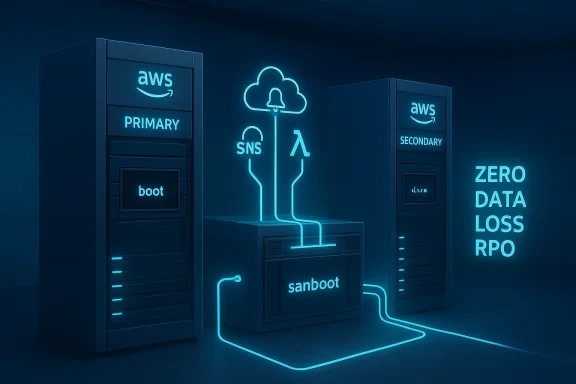
The core idea is straightforward: run critical EC2 instances with their OS/data volumes hosted on a shared storage array that both Outposts servers can access. Use CloudWatch to detect an instance‑level failure (StatusCheckFailed_Instance), publish an SNS notification, and invoke Lambda to relaunch the instance in a secondary Outpost subnet using a preconfigured launch template that reconnects the instance to the existing SAN/NVMe volumes. The instance store on the Outposts server only holds the iPXE helper boot image; the actual system and application data remain on SAN LUNs managed by the storage appliance.
This AWS Outposts third‑party storage relaunch pattern fills a crucial gap for organizations that must run stateful, low‑latency workloads on‑prem while still wanting cloud‑style automation for recovery. It blends proven storage practices (LUNs, initiator hygiene, snapshots) with AWS automation primitives (CloudWatch alarms, SNS, Lambda, CloudFormation) and third‑party vendor integrations. The result is a practical N+1 design that can deliver very low RPOs and manageable RTOs—if you invest in storage operations, network service‑link resiliency, and rigorous failure‑drill discipline before trusting it in production.
Source: Amazon Web Services (AWS) Enabling high availability of Amazon EC2 instances on AWS Outposts servers (Part 3) | Amazon Web Services
 Background / Overview
AWS Outposts servers bring AWS compute and networking to on‑premise locations while keeping the management plane and APIs consistent with the parent AWS Region. Outposts servers expose EC2 instance store for ephemeral/local workloads, but they can also attach validated external block storage from vendors such as NetApp, Pure Storage, Dell PowerStore, and HPE—enabling persistent boot and data volumes that survive an Outposts server failure. That third‑party storage integration is the foundation for the automated relaunch (failover) pattern described in the walkthrough.The core idea is straightforward: run critical EC2 instances with their OS/data volumes hosted on a shared storage array that both Outposts servers can access. Use CloudWatch to detect an instance‑level failure (StatusCheckFailed_Instance), publish an SNS notification, and invoke Lambda to relaunch the instance in a secondary Outpost subnet using a preconfigured launch template that reconnects the instance to the existing SAN/NVMe volumes. The instance store on the Outposts server only holds the iPXE helper boot image; the actual system and application data remain on SAN LUNs managed by the storage appliance.
Architecture: how the automated EC2 relaunch pattern works
High‑level components
- Outposts servers (primary + secondary) — physical servers located at the site; each is represented by an Outpost subnet and supports a subset of EC2 instance types. One acts as the primary where the app normally runs; the other is the recovery target.
- Third‑party storage array — NetApp, Pure Storage, Dell PowerStore, or HPE—provides boot and data volumes (LUNs or NVMe namespaces) that are accessible from either Outposts server. These arrays are validated by AWS and integrated to present block targets to Outposts instances.
- iPXE helper AMI / instance store bootstrap — a small AMI (iPXE) runs on instance store to initiate SAN boot (sanboot) and wire up the third‑party boot LUN as the OS root. iPXE’s sanboot command is the mechanism used to mount iSCSI or NVMe‑over‑TCP targets before handing off to the OS.
- Monitoring and automation plane — CloudWatch alarm on StatusCheckFailed_Instance → SNS notification → Lambda function that uses an existing launch template for the secondary Outpost subnet to relaunch the EC2 instance and attach the existing storage volumes. A CloudFormation stack can provision the monitoring, alarm, SNS topic, Lambda, and necessary IAM roles.
Why this model delivers zero‑data‑loss RPO
Because the OS and application volumes are hosted on the SAN/FlashArray (not the ephemeral instance store), a relaunched EC2 instance on another Outposts server can immediately reattach the same volumes and continue from the last committed block. Provided the storage array is configured for durability (replication/RAID/available spare capacity) and the volume is in a consistent state at failover, the RPO is effectively zero—the only data window is any in‑memory writes on the failed host. The blog emphasizes using the appliance’s built‑in durability and backups as part of a robust operational model.Step-by‑step walkthrough (operational summary)
The walkthrough in AWS’s post bundles an interactive "launch wizard" script together with template generation and a CloudFormation stack. Below is the distilled sequence, adapted into an operational runbook you can follow or automate.- Prepare the storage array:
- Create boot and data volumes (LUNs or NVMe namespaces) and present them to a storage target (SVM/initiator group for NetApp, FlashArray volume mapping for Pure Storage, etc.).
- Ensure authentication and target interface (iSCSI IQNs, CHAP, NVMe over TCP credentials) are configured. Make IQNs unique per instance to avoid SAN corruption.
- Launch a helper EC2 instance on the primary Outpost:
- Use the iPXE AMI or launch‑wizard script to boot off the instance store while iPXE runs sanboot against the 3rd‑party storage boot LUN.
- Specify instance type, key pair, security group, IAM instance profile, and any user data scripts needed to finalize guest OS configuration.
- Generate EC2 launch templates:
- Create one launch template for the primary Outpost (for documentation/failback) and one for the secondary Outpost that will be used by automated recovery.
- Templates should contain the networking/subnet (Outpost subnet), instance type, tag naming convention, and importantly, the user‑data snippet that re‑executes iPXE or runs scripts to connect to the SAN volumes upon boot.
- Deploy the automation stack:
- Use the supplied CloudFormation stack to create:
- CloudWatch metric alarm for StatusCheckFailed_Instance on the primary instance.
- SNS topic for notifications.
- Lambda function with least‑privilege IAM role that can call EC2 RunInstances using the secondary launch template, attach volumes, and update tags or DNS as required.
- Optionally choose “notification only” during setup if you prefer manual verification before failover.
- Test failover and failback:
- Perform planned failure drills: simulate instance failure (or power off primary Outposts server in a test lab), observe the alarm firing, and verify Lambda launches the instance on the secondary Outpost and attaches the volumes.
- Failback is manual in the referenced solution to avoid accidental data divergence; use the primary launch template after verifying primary server health.
Deep dive: storage connectivity and boot mechanics
iPXE sanboot and third‑party block arrays
The walkthrough relies on iPXE’s sanboot support to boot from remote block devices (iSCSI or NVMe‑over‑TCP). iPXE constructs a sanboot command line (for example, sanboot iscsi:target_ip::::iqn) to attach the target LUN as the root device before handing control to the OS loader. Because this handshake happens in early boot, the Outposts instance store only needs to host the small iPXE helper; the OS loads from the SAN LUN. iPXE docs provide the command syntax and examples used by this pattern.Supported protocols and vendor integrations
AWS has validated both iSCSI and NVMe‑over‑TCP boot workflows for selected vendors. The recent Outposts updates and blog posts announce support for NetApp and Pure Storage boot volumes and expanded validation with Dell PowerStore and HPE Alletra, meaning customers can select the vendor and protocol that best fits their environment and performance/latency needs. Verify the exact firmware, OS, and protocol compatibility matrix with the vendor before production deployment.Important storage operational rules
- Unique initiator IQNs: Duplicate IQNs across instances can lead to LUN access conflicts and data corruption. Make sure IQNs are unique or use initiator groups that strictly map hosts. The blog explicitly warns about IQN uniqueness.
- Volume locking and multipath: If you intend to attach the same volume to multiple hosts (e.g., clustered filesystems), use vendor‑supported multipathing and fencing mechanisms. For single‑instance mounts, ensure the recovery workflow detaches the device cleanly from the failed host before reattaching.
- Snapshots and backups: Even though the array provides durability, integrate regular snapshots and offsite backups for protection against logical corruption, ransomware, or operator error. Vendor solutions often offer application‑consistent snapshot tools for Windows and Linux guests.
Monitoring, alarms, and automation logic
Which metric to monitor
Use the EC2 status check metric that reflects instance reachability: StatusCheckFailed_Instance (or the combined StatusCheckFailed). This metric increments when the instance fails its internal status checks; CloudWatch alarms on this metric can trigger notifications or automated actions. AWS’s EC2 documentation explains that instance status checks reflect the virtual instance's internal health and that CloudWatch alarms can be used to trigger recovery actions.How the Lambda relaunch works (typical logic)
- Receive SNS notification with the failed instance ID and the CloudWatch alarm context.
- Validate whether failover should proceed (e.g., check a "manual approval" tag, recent maintenance windows, or a secondary health probe). This is important for avoiding cascading actions on transient failures.
- Invoke EC2 RunInstances with the secondary launch template and pass tags/metadata that the instance recovery scripts use to reattach LUNs.
- Optionally: update DNS records or Elastic Network Interfaces, reattach Elastic IPs if external reachability is required, and push a post‑boot health check that reverses the failover lock once the instance is stable.
CloudFormation as the single source of truth
Packaging the alarm, SNS topic, Lambda, IAM roles, and launch template metadata into a CloudFormation stack means you can reproduce the same recovery policy across multiple Outposts sites consistently. The walkthrough’s CloudFormation stack conventionally prefixes stacks with autorestart‑<instanceName> to make lifecycle management and cleanup straightforward.Networking and the service link: an essential caveat
The recovery logic assumes the secondary Outposts server has a working service link back to the parent Region so EC2 and the control plane can coordinate instance creation and networking. For high availability of the service link itself, AWS’s Outposts High Availability whitepaper provides guidance on designing redundant service link connectivity and anchor points in the parent Region. Without a resilient service link, the secondary Outpost may be unreachable from the control plane, which blocks automated relaunch. Validate your network path and implement a highly available service link following AWS recommendations.Operational considerations, gotchas and risks
1) Data consistency and split‑brain risks
- If both Outposts servers can access the same LUNs, you must avoid scenarios where two instances mount the same filesystem read/write concurrently without coordination. That can cause corruption. The safe pattern is single‑attach volumes (one instance at a time) and ensure the automation only attaches a volume after confirming the previous host is truly down or the LUN was cleanly detached. The AWS post and vendor docs stress correct initiator and multipath configuration.
2) IQN and initiator lifecycle
- When automating many replacements, ensure initiator entries on the storage appliance are dynamic or that your automation can create/delete initiator groups and mapping cleanly. Orchestrate unique IQNs per logical instance to avoid collisions. The launch wizard in the sample repo can generate IQNs but you must enforce uniqueness.
3) Instance store limits and boot helper state
- Outposts servers use EC2 instance store for non‑durable local boot helpers (iPXE). When you terminate an EC2 instance, the iPXE AMI and any instance store contents are lost—this is expected. The walkthrough’s cleanup steps call out that terminating the EC2 instance does not delete SAN volumes on the third‑party array; operator cleanup of initiators and LUN mappings on the array is required. Recognize this separation of concerns in your runbooks.
4) Security posture and IAM
- The Lambda doing relaunches needs precise, least‑privilege IAM permissions (ec2:RunInstances, ec2
 escribeInstances, ec2:CreateTags, ec2:AttachVolume, kmsecrypt if volumes are encrypted, etc.). Rotate IAM keys and use a role for the Lambda. CloudFormation can scaffold the correct IAM role template.
5) Testing and proven failback procedures
- The walkthrough deliberately places failback into manual control. That conservative stance is sensible: runbooks should include pre‑failback validation steps (consistency checks, storage snapshots, test restores) to avoid reintroducing corrupted data to the primary. The blog recommends regular failure drills to validate behavior under real failure conditions.
Recommended testing matrix (failure drill checklist)
- Simulate an application crash (kill process) and confirm CloudWatch alarms for StatusCheckFailed_Instance trigger an SNS notification.
- Simulate a kernel panic or OS hang; validate that the Lambda violates transient failures and only relaunches when appropriate.
- Simulate full Outposts server loss (in lab or maintenance window) and validate secondary Outpost relaunch and volume attachment.
- Validate data integrity by running application‑level checks (database consistency checks, application smoke tests).
- Validate failback: restore the primary server, run tests against primary volumes, and perform manual failback while observing for data divergence.
Best practices and operational checklist
- Use CloudFormation to version and replicate your recovery stack across sites.
- Keep iPXE and helper AMIs hardened and locked-down; only allow required outbound connections to storage targets.
- Enforce unique IQNs per instance and automate initiator cleanup on the storage array.
- Configure SAN array durability features (snapshots, replication, RAID) and test restores regularly.
- Harden Lambda and SNS permissions, and log all automated recovery actions for forensic auditing.
When this pattern is a good fit — and when it isn’t
This automated relaunch pattern is well suited to workloads that:- Require low RPO and can tolerate an RTO equal to instance launch time.
- Can be booted and recovered via LUN attach semantics (traditional block‑attached OS or clustered applications with proper fencing).
- Run at locations where installing validated third‑party arrays alongside Outposts is operationally and economically acceptable.
- Your application expects immediate network identity continuity (e.g., hardware MAC binding), unless you implement additional NAT/Elastic IP/DNS automation.
- You cannot accept the operational overhead of managing initiators, LUN mappings, and storage array lifecycle.
- Your storage array does not support the required protocol or multipathing semantics for safe attachment/detachment.
Clean up and lifecycle management
The walkthrough calls out a pragmatic teardown sequence for lab/CI use:- Terminate the EC2 instance (verify Instance state = Terminated).
- Delete the EC2 launch templates created (primary and recovery; automated names include lt‑<instanceName>).
- Delete the CloudFormation stack used for automation (stack names typically start with autorestart‑<instanceName>).
- Clean up initiators, initiator groups, and LUNs on the third‑party storage array to avoid stale mappings.
Final analysis: strengths, limitations, and operational advice
Strengths- Practical zero‑data‑loss recovery: using shared third‑party storage for boot and data volumes eliminates data replication delays and delivers a near‑zero RPO when correctly configured.
- Reuses standard AWS primitives: CloudWatch, SNS, Lambda, and CloudFormation are used in a predictable, auditable way enabling easy governance and repeatability.
- Vendor flexibility: customers can pick a validated vendor (NetApp, Pure, Dell, HPE) with which they already have operational expertise, reducing integration friction.
- Operational complexity on the SAN side: correct initiator management, multipathing, and fencing are non‑trivial and require storage ops skill. Missteps can cause corruption.
- Service link dependency: the secondary Outpost must maintain a healthy service link for automated relaunch. Design the network for service link redundancy.
- Manual failback in the reference pattern: while conservative, manual failback increases operational load and requires a well‑tested playbook.
- Build and validate an automated test harness that performs a full end‑to‑end failure drill quarterly.
- Maintain a runbook for storage ops that includes automated scripts for initiator creation/removal and LUN mapping logs.
- Harden and audit the Lambda automation path—keep the policy minimal and the logs immutable.
This AWS Outposts third‑party storage relaunch pattern fills a crucial gap for organizations that must run stateful, low‑latency workloads on‑prem while still wanting cloud‑style automation for recovery. It blends proven storage practices (LUNs, initiator hygiene, snapshots) with AWS automation primitives (CloudWatch alarms, SNS, Lambda, CloudFormation) and third‑party vendor integrations. The result is a practical N+1 design that can deliver very low RPOs and manageable RTOs—if you invest in storage operations, network service‑link resiliency, and rigorous failure‑drill discipline before trusting it in production.
Source: Amazon Web Services (AWS) Enabling high availability of Amazon EC2 instances on AWS Outposts servers (Part 3) | Amazon Web Services