

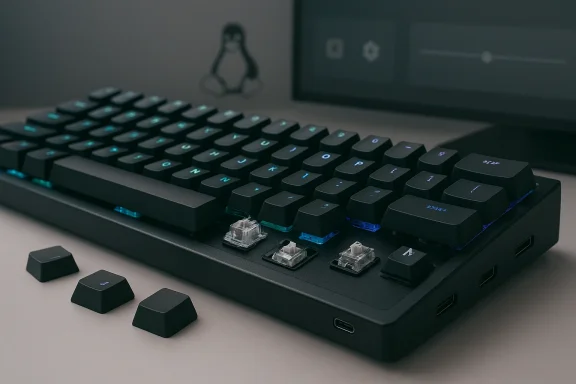
System76’s popular Launch family of mechanical keyboards received a clear cosmetic and materials upgrade on March 4, 2026: the entire lineup has been refreshed in Prism Black, now shipping with corrosion-resistant doubleshot PBT shine-through keycaps, continued open-source firmware, and the same configurable, removable-switch design that made the series a favorite among Linux users and power typists. The update is subtle on the surface but meaningful in practice—System76 has doubled down on durability and cross-platform usability while leaning into the aesthetic many buyers prefer: understated, black, and built to last.
System76 introduced the Launch series several years ago as an open-source, configurable mechanical keyboard family designed to complement its desktops and laptops. The family includes the compact 76% Launch, the full-size Launch Heavy, and the more wallet-friendly Launch Lite. From day one, the line emphasized:
In a crowded mechanical keyboard market where many vendors chase RGB skins and low-cost manufacturing, System76’s strategy is to double down on:
However, buyers whose primary decision drivers are low price or maximum aftermarket keycap compatibility should weigh alternatives. The Launch family still commands a premium, and the unique layout and manufacturing choices mean it will never be the cheapest option on the table.
If you’re a professional or Linux-first user who values a no-nonsense, durable keyboard that keeps your layout with you and supports deep remapping without vendor lock-in, the Prism Black Launch lineup is a very defensible buy. If you’re a hobbyist seeking the absolute most flexible aftermarket mod scene at the lowest price, shop around and check specs carefully.
For buyers who prize durability, cross-platform configurability, and a professional look, the Prism Black Launch line is now an even more persuasive option in the premium mechanical keyboard market.
Source: TechPowerUp System76 Updates Launch Keyboard Lineup with Prism Black Models | TechPowerUp}
 Background / Overview
System76 introduced the Launch series several years ago as an open-source, configurable mechanical keyboard family designed to complement its desktops and laptops. The family includes the compact 76% Launch, the full-size Launch Heavy, and the more wallet-friendly Launch Lite. From day one, the line emphasized:- Open-source firmware (System76’s QMK-based fork) and configurator tools that run on Linux, Windows, and macOS.
- A split-spacebar layout that remaps hard-to-reach keys under the thumbs for ergonomic efficiency.
- Hot-swappable switches on most SKUs and an integrated SuperSpeed USB hub on the larger models.
- Build quality centered on milled aluminum chassis manufactured in Denver, USA.
What’s new in the Prism Black refresh
Materials and finish
- The new models ship in Prism Black, a matte, dark finish applied to the milled aluminum chassis. System76 highlights the build as made in Denver, maintaining its domestic manufacturing emphasis.
- Keycaps are now doubleshot PBT shine-through, which delivers two benefits: longevity (PBT resists the glossy “keycap shine” that forms on ABS over time) and improved RGB diffusion because the legends are translucent without sacrificing surface durability.
Lighting, hub, and storage claims
- System76 reiterates the Launch family’s per-key RGB capability and the ability to save profiles onboard, meaning custom layouts and lighting persist when you move the keyboard between machines.
- The company also calls out the built-in SuperSpeed USB hub (multiport on the full-size models) and quantifies its performance by claiming the hub can move large files very quickly—for example, “1 terabyte of video in 15 minutes via USB 3.2 Gen 2.” That figure aligns roughly with the raw bandwidth available to USB 3.2 Gen 2 (around 10 Gbps), though real-world throughput varies with drives and cable quality.
Switch options and ergonomics
- The Launch family remains configurable with multiple switch options. System76 lists the following factory switch choices and approximate actuation characteristics:
- Kailh Box Silent Pink — linear, ~35 g actuation force (quiet).
- Kailh Box Silent Brown — tactile, ~50 g.
- Kailh Box Jade — clicky, ~70 g.
- Kailh Box Royal — clicky/clacky, ~75 g.
- Magnetic feet for a roughly 15% incline remain available as an ergonomic option, and the split-spacebar layout keeps the Launch’s distinctive approach to thumb remapping.
Firmware, configurator, and updates
- The Launch family continues to run a System76 fork of QMK, with an official System76 Keyboard Configurator app available on Linux (Pop!_OS), Windows, and macOS. System76 has documented firmware update steps and the keyboard unlock sequence (for example, Fn + Esc on most Launch models) that are required before flashing firmware.
- Firmware updates are distributed via fwupd and the company’s Firmware Manager on Linux; alternate methods are available for users on Arch or other distros. System76 has historically pushed firmware fixes and feature updates, and it continues to provide clear support documentation for updating.
Technical specifications at a glance
- Build: Milled aluminum chassis, Prism Black finish (US-manufactured).
- Keycaps: Doubleshot PBT shine-through.
- Layouts: Launch (76%), Launch Heavy (full-size with numpad), Launch Lite (compact, hubless).
- Switch options: Kailh Box Silent Pink, Silent Brown, Jade, Royal (hot-swappable on supported SKUs).
- Lighting: Per-key RGB with onboard storage for profiles.
- Connectivity: USB-C (central) plus SuperSpeed USB hub (full-size models expose USB-A/C hub ports capable of USB 3.x speeds).
- Firmware: System76’s QMK fork; configurable via System76 Keyboard Configurator on Linux, Windows, macOS.
- Price points (manufacturer component store): Launch Kit listed around $175, Launch Heavy Kit around $199, with switch packs and keycap sets sold separately.
Why this matters: strengths and opportunities
1. Durability and long-term value
Upgrading from ABS to doubleshot PBT keycaps is a meaningful durability improvement. PBT resists surface glossing and oils from fingertips, and the doubleshot construction ensures legends never fade because they are molded rather than printed. For buyers who type heavily and expect their keyboard to look and feel the same for years, this change improves the Launch’s long-term value proposition.2. Made-in-USA manufacturing and quality control
System76’s emphasis on domestic manufacturing—milled aluminum assembled in Denver—appeals to buyers who value tight quality control, repairability, and minimized overseas supply-chain surprises. For a premium SKU, this manufacturing model can justify price premiums to a community that cares about hardware provenance.3. Cross-platform configurability and onboard profiles
The System76 Keyboard Configurator and onboard profile storage remain key differentiators. Unlike many keyboards that tie users to vendor software on Windows, the Launch line is explicitly cross-platform. Saving layouts to the keyboard means professional users who split time between machines (or between Linux and Windows) don’t have to reapply their mapping each time.4. Open-source firmware and community trust
The continued use of an open QMK-based firmware keeps the Launch family attractive to tinkerers and Linux users. Open firmware permits community audits, custom contributions, and a level of transparency seldom offered by closed peripheral vendors.5. Choice and modularity
Hot-swappability, multiple switch options, swappable keycap sets, and optional accessories (magnetic feet, alternate keycap kits) let users tailor the device to their needs without buying a new keyboard. That modular approach extends the product lifecycle and reduces e-waste.Risks, limitations, and cautionary points
1. Price premium vs. competitor value
System76’s pricing places the Launch often in a premium bracket for mechanical keyboards. While the build and US manufacturing are strong selling points, buyers must weigh whether the extra cost versus popular alternatives (Keychron, Drop, or other boutique brands) is justified by the combination of materials and domestic manufacturing.2. Firmware update friction and historical issues
System76’s Launch family has a solid history of firmware updates, but the ecosystem has seen user reports of update friction, particularly around the need to unlock the keyboard prior to flashing and some past failures reported by users in community channels. While the company now provides step-by-step guidance and supports fwupd, buyers should be prepared to follow the documented unlock and recovery procedures should an update fail.3. Bottom-row and keycap compatibility
The Launch layout departs from the common OEM bottom-row standards, which historically has limited third-party keycap compatibility for certain kits. Users who want to swap custom keycap sets beyond System76’s own options should check compatibility carefully before purchasing third-party sets, especially for the spacebar and modifier keys.4. Hub power and real-world throughput
System76 advertises SuperSpeed hub performance and uses marketing numbers (for example, moving “1 TB in 15 minutes” over USB 3.2 Gen 2). While those figures align with maximum theoretical bandwidth, real-world throughput depends on the attached storage device, cable quality, and host capabilities. Buyers relying on the hub for sustained multi-gigabyte transfers should validate performance with their drives and may prefer direct connections to dedicated docks for mission-critical throughput.5. Fragmentation between upstream QMK and System76’s fork
System76 runs a vendor-maintained QMK fork. That offers the advantage of features tuned for the Launch line, but it can create divergence from upstream QMK. Power users who want to use upstream QMK tooling—or maintain a single firmware base across multiple keyboards—should be aware of potential differences.How the Prism Black Launch positions System76 in the market
System76’s Launch has always been less about chasing RGB spectacle and more about offering a workhorse, modular, and open input device. The Prism Black refresh reinforces that position: the finish and material upgrade speak to durability and understated professionalism rather than gimmicks.In a crowded mechanical keyboard market where many vendors chase RGB skins and low-cost manufacturing, System76’s strategy is to double down on:
- Hardware engineering and materials (milled aluminum + PBT keycaps).
- Software openness (QMK-based firmware, cross-platform configurator).
- Made-in-USA manufacturing and accessory modularity.
Who should buy a Prism Black Launch (and which model)
- Buy the Launch (76%) if you want a compact layout with the split-spacebar ergonomics and onboard hub features while keeping desk real estate fairly small.
- Buy the Launch Heavy (full-size) if you need a number pad, more physical keys for macros, and the integrated SuperSpeed multiport hub—useful for a workstation with many peripherals.
- Buy the Launch Lite if you prefer a smaller footprint and want the Launch ergonomics at a lower price point (note: Launch Lite is hubless, making it more portable but less feature-rich for desktop hub use).
- Linux-first developers and sysadmins who value open firmware and cross-platform configurability.
- Content creators and professionals who will take advantage of onboard profiles and the hub for peripherals and storage connectivity.
- Power typists who prioritize keyfeel, switch variety, and durable keycaps.
Practical buying and setup recommendations
- Check compatibility before swapping keycaps
- If you plan to use third-party keycaps, verify the bottom-row sizes and spacebar split. System76 sells keycap sets designed for the Launch family; third-party sets may not match perfectly.
- Choose your switches deliberately
- The listed switch force and feel vary significantly (linear silent vs tactile vs clicky). If you can, try similar switches in other keyboards before committing, especially if you share a workspace that requires quiet operation.
- Update firmware carefully
- Follow System76’s documented unlock procedure (e.g., Fn + Esc) prior to firmware updates. If a firmware update fails, consult support documentation for recovery steps; power-cycling and reconnecting after update attempts are commonly required.
- Test the USB hub with your drives
- If you rely on the keyboard’s hub for large transfers, verify performance with your actual drives and cables. For critical transfers, a direct connection to a host or a dedicated dock may still be preferable.
- Backup your layouts
- Even though the Launch stores profiles onboard, keep a copy of your custom layouts and lighting presets outside the keyboard (export profiles in the configurator) for quick recovery.
- Factor in total cost of ownership
- Consider whether you’ll need extra accessories—alternate keycap sets, different switch packs, or a wrist rest—and include those in the budget when comparing to competing keyboards.
Real-world considerations and community signals
- System76’s community channels and forum posts show consistent interest in the Launch family: users appreciate the build quality and configurability but raise questions from time to time about firmware update flows and third-party keycap compatibility. These community signals are useful for prospective buyers: the Launch family benefits from active stewardship by System76, but users should be ready to engage with a small learning curve.
- Repairability and the hot-swappable nature of the chassis reduce long-term replacement needs; users can refresh switches or keycaps without discarding the whole unit.
Final analysis: is the Prism Black refresh worth it?
The Prism Black refresh is a strategic, low-risk upgrade that enhances the Launch family’s durability and aesthetics without changing the core product DNA. For users who value:- longevity (doubleshot PBT keycaps),
- openness (QMK-based firmware and cross-platform configurator),
- build quality (milled aluminum, made-in-USA),
- modularity (hot-swappable switches, extensive accessory ecosystem),
However, buyers whose primary decision drivers are low price or maximum aftermarket keycap compatibility should weigh alternatives. The Launch family still commands a premium, and the unique layout and manufacturing choices mean it will never be the cheapest option on the table.
If you’re a professional or Linux-first user who values a no-nonsense, durable keyboard that keeps your layout with you and supports deep remapping without vendor lock-in, the Prism Black Launch lineup is a very defensible buy. If you’re a hobbyist seeking the absolute most flexible aftermarket mod scene at the lowest price, shop around and check specs carefully.
Closing thoughts
System76’s Prism Black update is a textbook example of iterating where it matters: materials and finish, not a bloated feature chase. It reinforces the Launch family’s mission—deliver a serious, configurable keyboard for serious users—and does it in a way that improves longevity and desk aesthetics without forsaking the open-source roots that attracted its core audience.For buyers who prize durability, cross-platform configurability, and a professional look, the Prism Black Launch line is now an even more persuasive option in the premium mechanical keyboard market.
Source: TechPowerUp System76 Updates Launch Keyboard Lineup with Prism Black Models | TechPowerUp}