

TaskSlinger, a new native Windows utility from developer Thomas Klemenc, entered open beta in May 2026 as a Windows 10 and Windows 11 x64 system-monitoring app pitched as a faster, cleaner replacement for Microsoft’s built-in Task Manager. That is a narrow claim with a broad resonance, because Task Manager is one of the few Windows tools almost every power user trusts under pressure. If a third-party developer can make it feel meaningfully faster without turning it into another bloated “optimizer,” Microsoft has a small but telling problem on its hands. The story is not that Task Manager is obsolete; it is that Windows users keep looking outside Windows for the version of Windows they wish Microsoft would ship.
Task Manager is not glamorous software. It is the place users go when something has already gone wrong: a browser has eaten memory, a game has locked up, a startup app is overstaying its welcome, or a driver is making the machine feel haunted. Its value has always been psychological as much as technical. When Windows stutters, Task Manager is supposed to be the thing that does not.
That expectation is why complaints about sluggishness land harder here than they would against a settings page or a bundled media app. A monitoring tool that hesitates while the monitored system is struggling feels like a fire extinguisher with a boot animation. Microsoft can add tabs, graphs, dark mode, efficiency icons, and new hardware counters, but the first test remains brutally simple: does it appear instantly when the user needs answers?
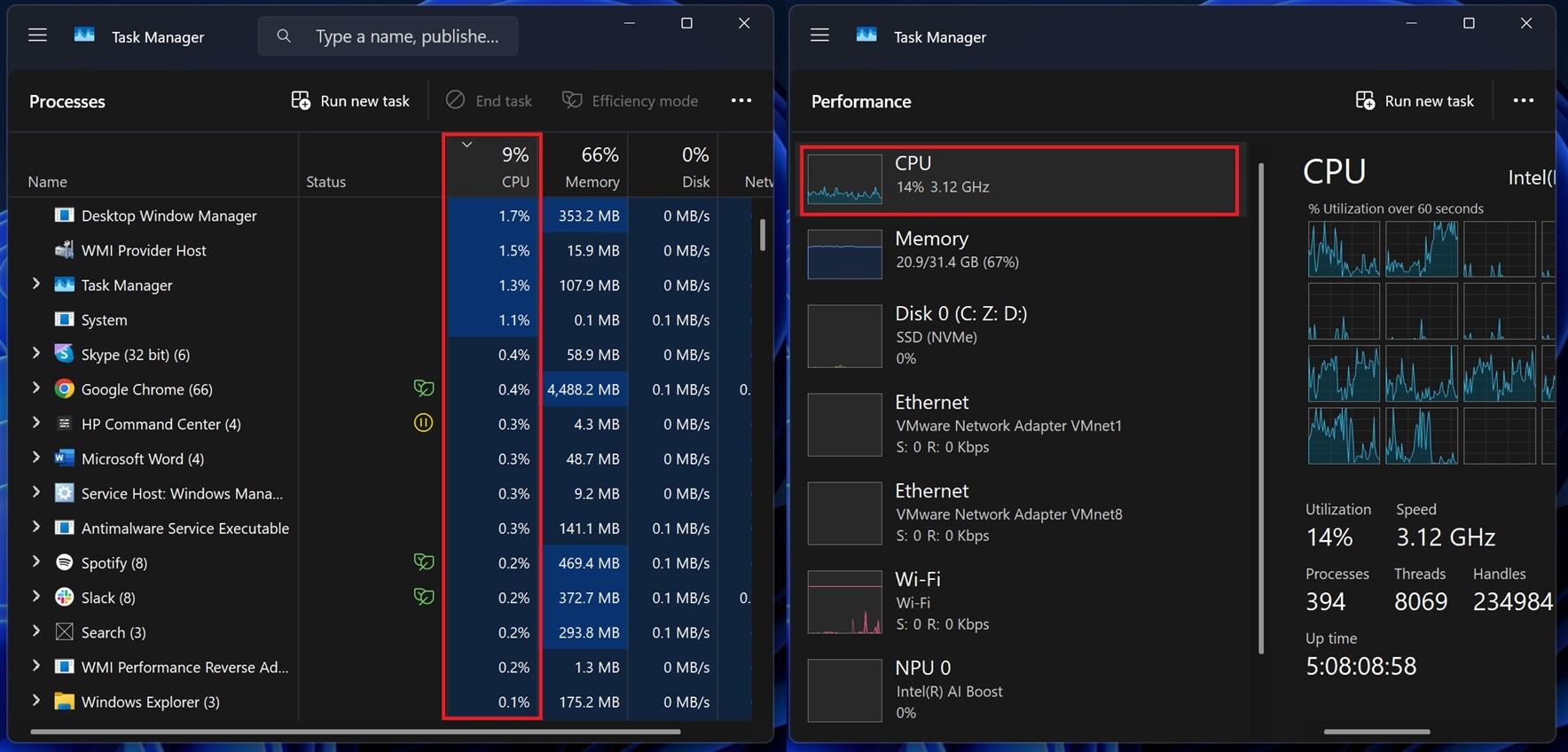
Windows 11’s Task Manager is not the abandoned relic some critics imply. Microsoft has continued to modernize it, including better alignment with the Windows 11 design language, improved metrics, and more attention to newer hardware such as NPUs in AI PCs. But redesigning a trusted utility is a delicate exercise. Every layer of polish that makes it look more current also invites the old enthusiast suspicion that Microsoft has traded immediacy for framework fashion.
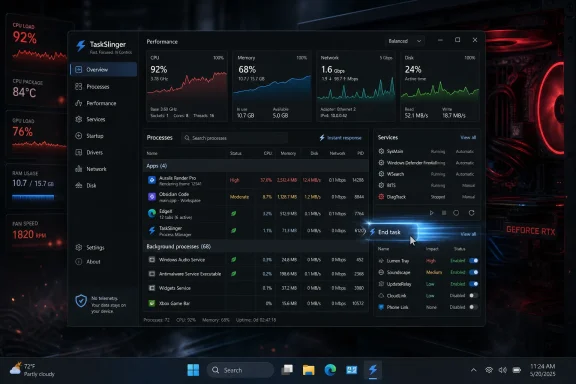
TaskSlinger is stepping directly into that suspicion. Its pitch is almost engineered for the WindowsForum audience: native C++, custom UI framework, Direct3D rendering, dense system telemetry, no telemetry collection, and a layout aimed at people who leave a process monitor open all day. In other words, it is not trying to be cute. It is trying to be the utility you reach for when cute has failed.
That matters because many Windows enthusiasts are not actually asking Microsoft to freeze the operating system in 2009 amber. They want modern Windows to feel as responsive as old Windows felt on the hardware of its time. The difference is subtle but important. Users are not allergic to rounded corners, dark themes, or animation; they are allergic to the feeling that the operating system’s own instruments are fighting them.
TaskSlinger’s developer frames the app around exactly that frustration. The beta promises fast tab switching, live monitoring with minimal delay, and enough density for developers, system tuners, support engineers, and power users. It is a performance argument wrapped in a usability argument: a task manager should be fast because its entire reason for being is to explain slowness elsewhere.
The technical choices are part of the branding. Native C++ and Direct3D rendering do not automatically make a utility good, secure, or reliable, but they send a message to a community tired of Electron-shaped memory footprints and webview-shaped compromises. In a world where too many desktop apps feel like websites wearing an installer, “not an embedded web view” has become a feature in itself.
That is also why TaskSlinger’s beta status cuts both ways. On one hand, it explains the rough edges and gives the developer room to evolve the tool. On the other, system-monitoring utilities sit close enough to sensitive workflows that trust will not be granted simply because the app feels fast. Power users may experiment quickly; enterprise admins will move slowly, if at all.
That is real progress. It is also not the whole complaint. When enthusiasts say Task Manager feels sluggish, they are not always talking about missing counters or insufficiently modern graphs. They are talking about launch time, input latency, refresh behavior, and whether the tool still feels responsive while the rest of the machine is under load.
This is the trap of platform stewardship. Microsoft has to build for hundreds of millions of machines, accessibility requirements, localization, enterprise policies, supportability, telemetry pipelines, security boundaries, and compatibility expectations that outlive many third-party projects. A solo developer can optimize for a narrower audience and move with less ceremony. But the user holding Ctrl+Shift+Esc during a runaway process does not grade on institutional difficulty.
The company’s broader performance messaging around Windows 11 has also created a higher bar. Microsoft has made repeated claims about faster updates, improved efficiency, and better use of modern hardware. That makes every slow-feeling inbox utility more conspicuous. If the OS is being sold as leaner and more intelligent, the diagnostic tools have to feel like evidence of that claim, not exceptions to it.
TaskSlinger’s existence is therefore less a direct indictment than a pressure test. It asks whether Microsoft’s native tools can still satisfy the users who care about the small pauses everyone else learns to ignore. Those users are not the majority, but they are often the people friends, families, and workplaces ask when Windows misbehaves.
A task manager replacement has to overcome that history immediately. It sees process names, paths, services, startup entries, network connections, and other clues about how a machine is used. Even if a tool is benign, the category itself demands restraint. A privacy promise is not enough, but without one, the conversation ends early.
This is where TaskSlinger’s beta will face its most important test. Enthusiasts may accept a closed-source beta from a known developer for experimentation, especially on a spare machine or lab box. Administrators responsible for fleets will ask harder questions: how is it distributed, how is it updated, what privileges does it request, how does it behave under endpoint protection, and what is the long-term business model?
The “free beta” label leaves one of those questions open. The developer has not committed, at least in the public pitch, to what production pricing or licensing will look like. That is not suspicious by itself; beta software often discovers its model after it discovers its audience. But Windows users have been trained to ask what the catch is, and system utilities rarely get the benefit of innocence for long.
There is also a difference between no telemetry and verifiable no telemetry. A claim on a website is a starting point. Reproducible builds, open-source code, third-party analysis, clear update mechanisms, and transparent privacy documentation would turn that claim into something more durable. If TaskSlinger wants to move from enthusiast curiosity to trusted toolkit, it will need to make its trust story as polished as its interface.
TaskSlinger is entering a space where “more powerful than Task Manager” is not a new promise. The differentiator is the attempt to combine modern interface design, live telemetry density, and responsiveness in a package that feels less like an advanced forensic tool and more like a daily driver. That is a smart lane. Process Explorer is beloved, but it is not trying to be a sleek Windows 11-native dashboard.
The same applies to Resource Monitor, Performance Monitor, Windows Terminal commands, PowerShell, WMI, ETW tooling, vendor utilities, and endpoint management consoles. Windows already has many ways to answer performance questions. The problem is fragmentation. The built-in Task Manager is approachable but limited; the deeper tools are powerful but scattered and often intimidating.
TaskSlinger’s feature set suggests an attempt to collapse some of that gap. Processes, performance, services, startup apps, connections, and system information are all common troubleshooting stops. If a single tool can make those views fast, searchable, and legible, it earns a place even if it never replaces Microsoft’s default utility.
That “if” is doing a lot of work. A task manager replacement must be boringly correct. CPU, memory, disk, GPU, network, service state, startup status, and process ownership all need to be accurate enough that users can act on them. A beautiful tool that misreports the machine is worse than an ugly one that tells the truth.
For those users, TaskSlinger looks immediately interesting. Developers can keep an eye on processes and network connections while testing. Support technicians can use it as a quick triage dashboard. System tuners can compare startup entries and service states without bouncing through multiple Windows consoles. Hardware hobbyists can watch live resource behavior while pushing a machine through games, compilers, local AI workloads, or synthetic benchmarks.
That does not mean it belongs on every production endpoint tomorrow. Beta software that reads system state and manages processes deserves caution, especially in managed environments. Even if TaskSlinger does nothing dangerous, support teams have to think about version drift, user confusion, policy conflicts, and the simple fact that Microsoft support will default back to Microsoft tools when troubleshooting Windows.
There is also the question of privilege. Users often expect task managers to elevate, terminate stubborn processes, manage services, and expose information that normal apps cannot see. The more powerful TaskSlinger becomes, the more carefully it must handle permissions, warnings, and failure modes. A fast interface is valuable; a fast path to breaking a production service is less charming.
The right posture for now is curiosity with containment. Try it where experimentation is safe. Compare its readings against Task Manager, Resource Monitor, and Process Explorer. Watch network behavior. Read release notes. Treat the beta as a promising tool, not a new default religion.
Microsoft should not fear that ecosystem. Windows has always been healthier when third-party developers can improve the experience around the edges. The danger for Microsoft is when those edge improvements begin to look like corrections to first-party neglect. If users routinely reach outside the OS for basic file management, cleanup, monitoring, or configuration, the platform’s default experience starts to feel like a lowest-common-denominator shell around a community-made toolkit.
That is especially awkward in Windows 11 because Microsoft has spent years emphasizing coherence. The OS is supposed to look modern, guide users toward safer defaults, and take better advantage of contemporary hardware. But coherence is not just visual. It is behavioral. A modern UI that feels slower than the old one is not a modernization win; it is a reminder that design systems cannot paper over latency.
TaskSlinger’s marketing understands this. It does not merely say “we have more columns.” It says the tool should never feel heavy. That sentence lands because it expresses a standard users already held for Task Manager. Microsoft trained people to believe the emergency tool should be quick; now independent developers are using that expectation against Microsoft’s own implementation.
The irony is that Microsoft has some of the best performance and diagnostic engineers in the industry. Windows contains tooling capabilities most users never see, and the Sysinternals suite remains a gold standard. The challenge is not that Microsoft cannot build a faster task manager. It is that the inbox tool has to serve too many constituencies, and the enthusiasts are no longer waiting patiently for the perfect compromise.
That scrutiny is a gift if the developer can absorb it. A task manager replacement benefits from edge cases: multi-GPU systems, hybrid CPUs, high-core-count workstations, unusual service configurations, domain-joined machines, VPN-heavy laptops, Hyper-V hosts, Windows 10 holdouts, and Windows 11 Insider builds. No private test matrix can fully mimic the chaos of real Windows PCs.
The app’s stated support for Windows 10 and Windows 11 x64 also puts it in an interesting position. Windows 10 remains present in homes and businesses even after the end of mainstream free security updates, while Windows 11 continues moving into AI PC territory. A utility that spans both worlds can appeal to users who are not fully sold on Microsoft’s upgrade narrative but still want modern tooling.
The caveat is that Windows internals shift. Per-process network statistics, GPU counters, NPU visibility, efficiency modes, protected processes, and security boundaries can behave differently across releases. TaskSlinger’s long-term quality will depend on how quickly it tracks those changes without becoming fragile. A fast beta is easy to admire; a reliable diagnostic tool across years of Windows updates is much harder to build.
Microsoft, meanwhile, should treat the reaction as signal rather than noise. The users cheering for TaskSlinger are not necessarily anti-Microsoft. Many are the same people who defend Windows, deploy Windows, troubleshoot Windows, and explain Windows to everyone else. When they say a core utility should feel faster, they are telling Microsoft exactly where polish still has practical consequences.
The more realistic outcome is that TaskSlinger becomes part of the growing kit of third-party Windows utilities that make Microsoft’s defaults look conservative. That is still significant. Utilities often influence expectations before they influence market share. If enough users experience a faster, denser, cleaner monitoring interface, the built-in Task Manager will be judged against that feeling.
For Microsoft, the fix is not to copy every third-party feature. It is to remember what category Task Manager belongs to. This is emergency software. It should launch fast, update clearly, degrade gracefully under load, and never make the user wonder whether the diagnostic tool has become part of the problem.
For TaskSlinger, the opportunity is to stay disciplined. The Windows utility graveyard is full of apps that began as lightweight replacements and slowly became control panels, cleaners, tweak suites, and monetization funnels. The strongest version of TaskSlinger is the one that keeps its promise narrow: show what Windows is doing, do it quickly, and do not get in the user’s way.
That is why a task manager replacement can generate more attention than its feature list might suggest. It touches the anxiety underneath modern Windows. Users want visibility because they suspect the operating system is doing more than it used to. They want speed because they suspect modern UI layers are costing them something. They want privacy because they have seen too many utilities turn diagnostics into data collection.
TaskSlinger’s claim is appealing because it answers those anxieties in the language enthusiasts understand. Native code. Custom rendering. No telemetry. Live graphs. Fast switching. Practical views. It is almost a manifesto against the idea that every modern desktop app must feel abstracted away from the machine it is supposed to manage.
The proof, of course, will be in daily use. A monitoring tool earns loyalty not on the first launch but on the fiftieth, when the CPU is pegged, the fan is screaming, and the user needs to know which process to blame. If TaskSlinger is still fast then, the hype will look less like novelty and more like a challenge Microsoft should answer.
 Task Manager Became a Symbol Before It Became a Target
Task Manager is not glamorous software. It is the place users go when something has already gone wrong: a browser has eaten memory, a game has locked up, a startup app is overstaying its welcome, or a driver is making the machine feel haunted. Its value has always been psychological as much as technical. When Windows stutters, Task Manager is supposed to be the thing that does not.That expectation is why complaints about sluggishness land harder here than they would against a settings page or a bundled media app. A monitoring tool that hesitates while the monitored system is struggling feels like a fire extinguisher with a boot animation. Microsoft can add tabs, graphs, dark mode, efficiency icons, and new hardware counters, but the first test remains brutally simple: does it appear instantly when the user needs answers?
Windows 11’s Task Manager is not the abandoned relic some critics imply. Microsoft has continued to modernize it, including better alignment with the Windows 11 design language, improved metrics, and more attention to newer hardware such as NPUs in AI PCs. But redesigning a trusted utility is a delicate exercise. Every layer of polish that makes it look more current also invites the old enthusiast suspicion that Microsoft has traded immediacy for framework fashion.
TaskSlinger is stepping directly into that suspicion. Its pitch is almost engineered for the WindowsForum audience: native C++, custom UI framework, Direct3D rendering, dense system telemetry, no telemetry collection, and a layout aimed at people who leave a process monitor open all day. In other words, it is not trying to be cute. It is trying to be the utility you reach for when cute has failed.
The New Challenger Is Selling Latency, Not Nostalgia
The most interesting thing about TaskSlinger is that it does not appear to be selling itself as a retro clone. It borrows the job of Task Manager, not necessarily its old visual identity. The screenshots and product positioning lean modern: grouped processes, compact resource meters, performance graphs, service views, startup app management, network connections, and machine information in a clean custom interface.That matters because many Windows enthusiasts are not actually asking Microsoft to freeze the operating system in 2009 amber. They want modern Windows to feel as responsive as old Windows felt on the hardware of its time. The difference is subtle but important. Users are not allergic to rounded corners, dark themes, or animation; they are allergic to the feeling that the operating system’s own instruments are fighting them.
TaskSlinger’s developer frames the app around exactly that frustration. The beta promises fast tab switching, live monitoring with minimal delay, and enough density for developers, system tuners, support engineers, and power users. It is a performance argument wrapped in a usability argument: a task manager should be fast because its entire reason for being is to explain slowness elsewhere.
The technical choices are part of the branding. Native C++ and Direct3D rendering do not automatically make a utility good, secure, or reliable, but they send a message to a community tired of Electron-shaped memory footprints and webview-shaped compromises. In a world where too many desktop apps feel like websites wearing an installer, “not an embedded web view” has become a feature in itself.
That is also why TaskSlinger’s beta status cuts both ways. On one hand, it explains the rough edges and gives the developer room to evolve the tool. On the other, system-monitoring utilities sit close enough to sensitive workflows that trust will not be granted simply because the app feels fast. Power users may experiment quickly; enterprise admins will move slowly, if at all.
Microsoft Has Been Improving the Wrong Part of the Argument
To Microsoft’s credit, Task Manager has not stood still. Windows 11 has added visual modernization, richer hardware awareness, and more consistency in how certain metrics are presented. The emergence of Copilot+ PCs and NPU-equipped systems has forced the company to expose new categories of silicon to users who increasingly want to know where workloads are actually running.That is real progress. It is also not the whole complaint. When enthusiasts say Task Manager feels sluggish, they are not always talking about missing counters or insufficiently modern graphs. They are talking about launch time, input latency, refresh behavior, and whether the tool still feels responsive while the rest of the machine is under load.
This is the trap of platform stewardship. Microsoft has to build for hundreds of millions of machines, accessibility requirements, localization, enterprise policies, supportability, telemetry pipelines, security boundaries, and compatibility expectations that outlive many third-party projects. A solo developer can optimize for a narrower audience and move with less ceremony. But the user holding Ctrl+Shift+Esc during a runaway process does not grade on institutional difficulty.
The company’s broader performance messaging around Windows 11 has also created a higher bar. Microsoft has made repeated claims about faster updates, improved efficiency, and better use of modern hardware. That makes every slow-feeling inbox utility more conspicuous. If the OS is being sold as leaner and more intelligent, the diagnostic tools have to feel like evidence of that claim, not exceptions to it.
TaskSlinger’s existence is therefore less a direct indictment than a pressure test. It asks whether Microsoft’s native tools can still satisfy the users who care about the small pauses everyone else learns to ignore. Those users are not the majority, but they are often the people friends, families, and workplaces ask when Windows misbehaves.
The Privacy Pitch Is Really a Trust Pitch
TaskSlinger’s “no telemetry” claim is not a decorative line on the website. It is central to why a third-party system utility can get attention in 2026. The Windows utility ecosystem has been shaped by years of cleanup tools, driver updaters, debloaters, bundled offers, subscription nags, opaque analytics, and “optimization” suites that make experienced users flinch.A task manager replacement has to overcome that history immediately. It sees process names, paths, services, startup entries, network connections, and other clues about how a machine is used. Even if a tool is benign, the category itself demands restraint. A privacy promise is not enough, but without one, the conversation ends early.
This is where TaskSlinger’s beta will face its most important test. Enthusiasts may accept a closed-source beta from a known developer for experimentation, especially on a spare machine or lab box. Administrators responsible for fleets will ask harder questions: how is it distributed, how is it updated, what privileges does it request, how does it behave under endpoint protection, and what is the long-term business model?
The “free beta” label leaves one of those questions open. The developer has not committed, at least in the public pitch, to what production pricing or licensing will look like. That is not suspicious by itself; beta software often discovers its model after it discovers its audience. But Windows users have been trained to ask what the catch is, and system utilities rarely get the benefit of innocence for long.
There is also a difference between no telemetry and verifiable no telemetry. A claim on a website is a starting point. Reproducible builds, open-source code, third-party analysis, clear update mechanisms, and transparent privacy documentation would turn that claim into something more durable. If TaskSlinger wants to move from enthusiast curiosity to trusted toolkit, it will need to make its trust story as polished as its interface.
The Real Competition Is Sysinternals, Not Just Task Manager
The obvious comparison is Windows Task Manager, but the shadow comparison is Sysinternals Process Explorer. For decades, Process Explorer has been the power-user answer to “Task Manager, but more.” It offers deeper process inspection, handles, DLL views, signatures, process trees, and a reputation earned through years of technical credibility under Microsoft’s own umbrella.TaskSlinger is entering a space where “more powerful than Task Manager” is not a new promise. The differentiator is the attempt to combine modern interface design, live telemetry density, and responsiveness in a package that feels less like an advanced forensic tool and more like a daily driver. That is a smart lane. Process Explorer is beloved, but it is not trying to be a sleek Windows 11-native dashboard.
The same applies to Resource Monitor, Performance Monitor, Windows Terminal commands, PowerShell, WMI, ETW tooling, vendor utilities, and endpoint management consoles. Windows already has many ways to answer performance questions. The problem is fragmentation. The built-in Task Manager is approachable but limited; the deeper tools are powerful but scattered and often intimidating.
TaskSlinger’s feature set suggests an attempt to collapse some of that gap. Processes, performance, services, startup apps, connections, and system information are all common troubleshooting stops. If a single tool can make those views fast, searchable, and legible, it earns a place even if it never replaces Microsoft’s default utility.
That “if” is doing a lot of work. A task manager replacement must be boringly correct. CPU, memory, disk, GPU, network, service state, startup status, and process ownership all need to be accurate enough that users can act on them. A beautiful tool that misreports the machine is worse than an ugly one that tells the truth.
A Beta Utility Can Be Useful Without Being Ready for Every Desk
There is a reason this kind of app spreads first among enthusiasts. The people most annoyed by Task Manager’s compromises are also the people most willing to try unsigned, beta, or niche utilities. They have test machines, restore points, virtual machines, and enough experience to know when a tool is misbehaving.For those users, TaskSlinger looks immediately interesting. Developers can keep an eye on processes and network connections while testing. Support technicians can use it as a quick triage dashboard. System tuners can compare startup entries and service states without bouncing through multiple Windows consoles. Hardware hobbyists can watch live resource behavior while pushing a machine through games, compilers, local AI workloads, or synthetic benchmarks.
That does not mean it belongs on every production endpoint tomorrow. Beta software that reads system state and manages processes deserves caution, especially in managed environments. Even if TaskSlinger does nothing dangerous, support teams have to think about version drift, user confusion, policy conflicts, and the simple fact that Microsoft support will default back to Microsoft tools when troubleshooting Windows.
There is also the question of privilege. Users often expect task managers to elevate, terminate stubborn processes, manage services, and expose information that normal apps cannot see. The more powerful TaskSlinger becomes, the more carefully it must handle permissions, warnings, and failure modes. A fast interface is valuable; a fast path to breaking a production service is less charming.
The right posture for now is curiosity with containment. Try it where experimentation is safe. Compare its readings against Task Manager, Resource Monitor, and Process Explorer. Watch network behavior. Read release notes. Treat the beta as a promising tool, not a new default religion.
Windows 11’s Utility Gap Keeps Creating Openings
TaskSlinger is part of a larger pattern around Windows 11. When users dislike or distrust a built-in experience, independent developers rush into the gap with tools that promise to be lighter, cleaner, more native, more private, or simply less annoying. File Explorer alternatives, cleanup utilities, debloaters, package managers, screenshot tools, launcher replacements, and taskbar modifiers all tell variations of the same story.Microsoft should not fear that ecosystem. Windows has always been healthier when third-party developers can improve the experience around the edges. The danger for Microsoft is when those edge improvements begin to look like corrections to first-party neglect. If users routinely reach outside the OS for basic file management, cleanup, monitoring, or configuration, the platform’s default experience starts to feel like a lowest-common-denominator shell around a community-made toolkit.
That is especially awkward in Windows 11 because Microsoft has spent years emphasizing coherence. The OS is supposed to look modern, guide users toward safer defaults, and take better advantage of contemporary hardware. But coherence is not just visual. It is behavioral. A modern UI that feels slower than the old one is not a modernization win; it is a reminder that design systems cannot paper over latency.
TaskSlinger’s marketing understands this. It does not merely say “we have more columns.” It says the tool should never feel heavy. That sentence lands because it expresses a standard users already held for Task Manager. Microsoft trained people to believe the emergency tool should be quick; now independent developers are using that expectation against Microsoft’s own implementation.
The irony is that Microsoft has some of the best performance and diagnostic engineers in the industry. Windows contains tooling capabilities most users never see, and the Sysinternals suite remains a gold standard. The challenge is not that Microsoft cannot build a faster task manager. It is that the inbox tool has to serve too many constituencies, and the enthusiasts are no longer waiting patiently for the perfect compromise.
The Enthusiast Verdict Will Be Ruthless and Useful
TaskSlinger’s next few months will probably matter more than its launch week. Early excitement around Windows utilities can fade quickly once users discover missing features, crashes, inaccurate counters, antivirus friction, or unclear update behavior. The same community that rewards snappy native apps will dissect them mercilessly.That scrutiny is a gift if the developer can absorb it. A task manager replacement benefits from edge cases: multi-GPU systems, hybrid CPUs, high-core-count workstations, unusual service configurations, domain-joined machines, VPN-heavy laptops, Hyper-V hosts, Windows 10 holdouts, and Windows 11 Insider builds. No private test matrix can fully mimic the chaos of real Windows PCs.
The app’s stated support for Windows 10 and Windows 11 x64 also puts it in an interesting position. Windows 10 remains present in homes and businesses even after the end of mainstream free security updates, while Windows 11 continues moving into AI PC territory. A utility that spans both worlds can appeal to users who are not fully sold on Microsoft’s upgrade narrative but still want modern tooling.
The caveat is that Windows internals shift. Per-process network statistics, GPU counters, NPU visibility, efficiency modes, protected processes, and security boundaries can behave differently across releases. TaskSlinger’s long-term quality will depend on how quickly it tracks those changes without becoming fragile. A fast beta is easy to admire; a reliable diagnostic tool across years of Windows updates is much harder to build.
Microsoft, meanwhile, should treat the reaction as signal rather than noise. The users cheering for TaskSlinger are not necessarily anti-Microsoft. Many are the same people who defend Windows, deploy Windows, troubleshoot Windows, and explain Windows to everyone else. When they say a core utility should feel faster, they are telling Microsoft exactly where polish still has practical consequences.
The Useful Lesson Is Smaller Than the Hype
TaskSlinger does not need to kill Task Manager to matter. Most Windows users will keep using the built-in tool because it is already there, trusted by default, documented everywhere, and integrated into the operating system. Even many enthusiasts will keep both: Task Manager for the quick check, Process Explorer for deep inspection, and TaskSlinger for the live dashboard if it proves itself.The more realistic outcome is that TaskSlinger becomes part of the growing kit of third-party Windows utilities that make Microsoft’s defaults look conservative. That is still significant. Utilities often influence expectations before they influence market share. If enough users experience a faster, denser, cleaner monitoring interface, the built-in Task Manager will be judged against that feeling.
For Microsoft, the fix is not to copy every third-party feature. It is to remember what category Task Manager belongs to. This is emergency software. It should launch fast, update clearly, degrade gracefully under load, and never make the user wonder whether the diagnostic tool has become part of the problem.
For TaskSlinger, the opportunity is to stay disciplined. The Windows utility graveyard is full of apps that began as lightweight replacements and slowly became control panels, cleaners, tweak suites, and monetization funnels. The strongest version of TaskSlinger is the one that keeps its promise narrow: show what Windows is doing, do it quickly, and do not get in the user’s way.
The Beta’s Promise Fits a Very Specific Windows Moment
TaskSlinger has arrived at a time when Windows users are unusually sensitive to performance claims. Microsoft is asking them to accept heavier AI integration, new hardware categories, stricter requirements, evolving update models, and a steady migration of legacy surfaces into modern frameworks. Some of those changes are defensible. Some are overdue. But all of them raise the same question: is the machine becoming more capable, or merely more complicated?That is why a task manager replacement can generate more attention than its feature list might suggest. It touches the anxiety underneath modern Windows. Users want visibility because they suspect the operating system is doing more than it used to. They want speed because they suspect modern UI layers are costing them something. They want privacy because they have seen too many utilities turn diagnostics into data collection.
TaskSlinger’s claim is appealing because it answers those anxieties in the language enthusiasts understand. Native code. Custom rendering. No telemetry. Live graphs. Fast switching. Practical views. It is almost a manifesto against the idea that every modern desktop app must feel abstracted away from the machine it is supposed to manage.
The proof, of course, will be in daily use. A monitoring tool earns loyalty not on the first launch but on the fiftieth, when the CPU is pegged, the fan is screaming, and the user needs to know which process to blame. If TaskSlinger is still fast then, the hype will look less like novelty and more like a challenge Microsoft should answer.
The Signal Windows Power Users Should Not Ignore
TaskSlinger is still beta software, but the concrete implications are already clear enough for anyone who maintains, tunes, or troubleshoots Windows PCs.- TaskSlinger is a native Windows 10 and Windows 11 x64 utility that positions itself as a faster, cleaner alternative to the built-in Task Manager.
- The app’s appeal rests on responsiveness, dense live monitoring, and a custom Direct3D-rendered interface rather than on nostalgia for older Windows tools.
- Its no-telemetry claim is important, but long-term trust will depend on transparent updates, predictable behavior, and continued scrutiny from the community.
- The beta may be useful for enthusiasts, developers, lab machines, and support workflows, but managed enterprise environments should evaluate it cautiously before broad deployment.
- Microsoft’s Task Manager remains the default standard, yet TaskSlinger shows that users still believe core Windows utilities should be faster, sharper, and less encumbered.
References
- Primary source: Neowin
Published: 2026-05-23T22:20:13.129060

A "faster, cleaner replacement" for one of Windows 11's most useful native tools is here
For anyone looking for it, a "faster, cleaner," and more responsive "replacement" for one of Windows 11's most essential built-in productivity and system tools is here. www.neowin.net
- Related coverage: windowscentral.com
Fluent Cleaner might be the best CCleaner alternative Windows 11 users have been waiting for
Fluent Cleaner is a modern open-source alternative to CCleaner with deeper Windows 11 cleanup tools, extensions, and a native WinUI design. www.windowscentral.com
- Related coverage: windowsforum.com

TaskSlinger Beta for Windows: Faster, Cleaner Task Manager Replacement
TaskSlinger entered open beta in May 2026 as a native Windows 10 and Windows 11 x64 system-monitoring utility that positions itself as a faster, cleaner replacement for Microsoft’s built-in Task Manager. Its pitch is simple: the tool Windows users reach for when the machine feels slow should not... windowsforum.com
- Related coverage: techspot.com
- Related coverage: makeuseof.com

5 Powerful Alternatives to the Windows Task Manager
The Windows Task Manager is good, but it lacks a few features. Try these alternative task managers for Windows instead! www.makeuseof.com
- Related coverage: deskmodder.de

TaskSlinger - Moderner Windows Task-Manager
Microsoft hat den eigenen Task-Manager schon um einiges verbessert gegenüber früher. Aber vielleicht seid ihr ja noch auf der Suche nach einem Ersatz für den Task-Manager. Jetzt kann der TaskSlinger ausprobiert werden, der derzeit in einer Beta als Freeversion genutzt…www.deskmodder.de
- Related coverage: ticktick.com
Windows - TickTick
TickTick: Your all-in-one productivity app. Manage tasks, calendars, habits, and more. Sync across all devices. Start for free!www.ticktick.com
- Official source: learn.microsoft.com

Windows 24h2 Task Manager NPU and Power Settings - Microsoft Q&A
Server 2025 I get NPU in Task Manager and other good power settings. Windows 11 24H2 I do not. Using same drivers/chipset. Both have the same 'kernel' number 26100.1742. Please confirm that Windows 11 24h2 does support NPU in task manager and…learn.microsoft.com - Official source: support.microsoft.com
Windows 11, version 24H2 update history - Microsoft Support
 support.microsoft.com
- Related coverage: windowslatest.com
Windows 11 24H2's Task Manager new CPU usage formula rolls out to everyone
With Windows 11 24H2 KB5058411 (May 2025 Update), the Processes tab formula for CPU usage now matches the Performance and Users tabs. www.windowslatest.com
- Related coverage: tomshardware.com
Windows 11 Version 24H2 updates are faster and require less CPU usage — Microsoft claims up to 45.6% faster installation times and 25% lower CPU utilization
Microsoft has streamlined the Windows Update process, saving users time and valuable CPU resources.www.tomshardware.com
- Related coverage: techradar.com
- Related coverage: pcworld.com

Windows 11 now uses a smarter CPU usage number in Task Manager
If you prefer the old CPU usage numbers, you can still find those with a simple tweak. www.pcworld.com
- Related coverage: pcgamer.com
- Official source: microsoft.com
- Related coverage: techrounder.com
- Official source: news.microsoft.com