

Microsoft’s latest Copilot update folds AI directly into the social fabric of Teams, enabling real-time, multi-person co-creation inside group chats and shared sessions — a move that turns Copilot from a solo assistant into an active collaborator for teams.
Microsoft has been steadily repositioning Copilot from an embedded assistant inside individual Office apps into a cross‑surface productivity hub. The Fall 2025 wave formalizes that trajectory by introducing a shared session model (branded in previews as Groups or Teams Mode) where a single Copilot instance participates in multi‑person chats, maintains shared context, and helps convert conversation into action.
This shift reflects two broader industry dynamics. First, enterprises increasingly prefer AI that reduces context-switching — letting teams draft, iterate and export deliverables without leaving their collaboration space. Second, software vendors are competing to embed generative AI directly into communication channels (rather than forcing users into separate AI apps), making the chat thread itself a workspace for ideation and delivery. Microsoft’s updates were highlighted publicly in late October 2025 and have been rolled out in staged previews, U.S.-first, through Windows Insider and Copilot app packages.
Source: Blockchain News Microsoft Copilot Launches Teams Mode: AI-Powered Co-Creation for Teams Workflow Optimization | AI News Detail
 Background
Microsoft has been steadily repositioning Copilot from an embedded assistant inside individual Office apps into a cross‑surface productivity hub. The Fall 2025 wave formalizes that trajectory by introducing a shared session model (branded in previews as Groups or Teams Mode) where a single Copilot instance participates in multi‑person chats, maintains shared context, and helps convert conversation into action.This shift reflects two broader industry dynamics. First, enterprises increasingly prefer AI that reduces context-switching — letting teams draft, iterate and export deliverables without leaving their collaboration space. Second, software vendors are competing to embed generative AI directly into communication channels (rather than forcing users into separate AI apps), making the chat thread itself a workspace for ideation and delivery. Microsoft’s updates were highlighted publicly in late October 2025 and have been rolled out in staged previews, U.S.-first, through Windows Insider and Copilot app packages.
What Teams Mode (Copilot Groups) actually is
Core concept
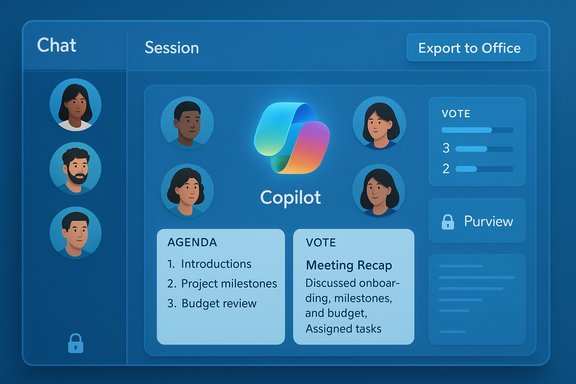
At its core, Teams Mode — also seen in documentation and previews under the name Copilot Groups — makes Copilot a visible, link‑inviteable member of a multi‑person chat. Once present, Copilot has a teamwide view of the conversation and can perform facilitation, synthesis, drafting and task management on behalf of the group. This is not merely a private one‑to‑one assistant expanded to more inputs; it’s a shared session model where outputs are intended to reflect and be editable by the entire group.Key capabilities (practical view)
- Shared sessions with invite links: create a session, invite up to a stated participant cap, and everyone interacts with the same Copilot context.
- Real‑time generation and iteration: Copilot proposes outlines, drafts, or planning options inline for participants to accept, remix, or edit.
- Summaries and decisions: thread summaries, pros/cons lists, and vote tallying to move teams from debate to decision faster.
- Action extraction and task assignment: Copilot can split conversations into actionable follow‑ups and assign owners.
- Export to Office formats: the flow shortens the path from idea to deliverable by exporting chat content into editable Word (.docx), Excel (.xlsx), PowerPoint (.pptx) or PDF outputs. Previews describe an export affordance that surfaces for longer responses.
Limits and rollout notes
Current preview behavior has explicit guardrails: this Copilot participant is scoped to multi‑person group chats (not meeting chats or one‑on‑one chats in some configurations), and availability is staged — often U.S. consumer and Insider previews first, then broader enterprise rollouts governed by tenant controls and licensing. Expect availability to vary by client, tenant settings, and license type in the initial months.The user experience: how Teams Mode changes day‑to‑day work
Teams Mode is designed to reduce the friction that normally comes when teams convert chat brainstorming into documents and plans. Instead of copying chat text into Word or juggling multiple tabs, teams can:- Co‑brainstorm in one thread and ask Copilot to surface “three draft agendas” from the conversation.
- Run a short internal poll and have Copilot tally votes and summarize consensus.
- Generate a starter slide deck from a bulleted chat recap and export it for final edits.
Technical underpinnings and infrastructure
Model strategy and orchestration
Microsoft’s public messaging and developer materials confirm a hybrid strategy: in‑house MAI family models (voice, vision, image variants) are part of the Copilot stack, while multi‑model orchestration is used where appropriate. This gives Microsoft flexibility to route workloads to the most suitable model for a task (text reasoning, speech synthesis, image generation, etc.. Copilot Studio and the Copilot APIs enable organizations to tune or wire agents into Teams workflows.Latency and scale
Delivering low‑latency, synchronous multi‑participant experiences requires cloud capacity at scale. Microsoft routes Copilot workloads on Azure, leveraging regional presence and optimizations introduced across 2024–2025 to ensure consistent performance for real‑time interactions. The staged preview and participant caps (the preview documentation cites up to 32 participants) are practical measures to balance concurrency and latency during rollout.Security, governance, and auditing
Enterprises will be paying close attention to the Copilot Control System, Microsoft’s governance framework for Copilot and agents. The framework bundles security and governance controls, tenant‑level management, auditing and measurement tools, and integrations with Microsoft Purview and Defender. Notable enterprise capabilities include:- Activity and audit logs for Copilot interactions and agent behavior.
- Policy controls for what content Copilot may surface (restricted content discovery, DLP integration, retention and deletion controls).
- Managed security enhancements in Copilot Studio to reduce risk from injection and agent misuse, plus admin controls and environment routing.
Business implications: value, adoption and monetization
What the feature enables
For teams in marketing, product, consulting, and software development, Teams Mode reduces time from idea to deliverable by collapsing drafting, review and export into a single conversation flow. Previews and vendor messaging emphasize shorter project cycles, faster ideation and reduced administrative overhead. In practical terms, this means fewer context switches and more time spent on higher‑value, judgmental work.Adoption signals and caution about headline numbers
Many industry briefings and Microsoft statements highlight strong demand for Copilot capabilities, but exact paid‑seat numbers have fluctuated in public reporting. Some circulated figures — for example, a cited number of “over 1 million paid Copilot seats as of September 2024” — do not appear in Microsoft’s verified disclosures and should be treated cautiously. Microsoft’s public statements have sometimes given composite metrics (monthly active users across Copilot families, or “hundreds of thousands of customers”), but detailed paid‑seat tallies are not consistently published in a single, verifiable number. Readers and procurement teams should rely on current Microsoft licensing pages and earnings transcripts for hard seat counts.Pricing and ROI framing
Microsoft has been packaging Copilot capabilities into tiers (Microsoft 365 Copilot, role‑based Copilots/agents, and the new individual Premium bundles). Pricing and packaging decisions matter: groups that can quantify time saved in drafting, meeting follow‑ups and content production are typically best placed to justify premium subscriptions. That said, every organization should run short pilots with telemetry and a simple ROI metric set (time to draft, edits required, number of follow‑ups avoided) before wide rollouts.Market context (verified and cautious claims)
- Industry research broadly predicts accelerated enterprise adoption of AI in collaboration tools, and analyst coverage highlights substantial productivity potential when AI augments team workflows. However, specific numeric forecasts (percentage increases in productivity, GDP addends or market valuations) are highly sensitive to study methodology and timeframe and should be validated against the original reports. When vendor or consultancy claims are used in business cases, require the underlying methodology and assumptions.
Governance, ethics and operational risk
Privacy and regulatory considerations
Teams Mode amplifies governance obligations because Copilot now reasons across multi‑user contexts and potentially grounds responses in shared documents and connectors. The Copilot Control System and Microsoft Purview provide mechanisms for:- Excluding sensitive content from Copilot processing.
- Auditing interactions for legal holds and eDiscovery.
- Fine‑grained admin controls for connector usage and agent lifecycle management.
Bias mitigation and safety
Shared AI sessions increase the chance that group prompts amplify inadvertent biases or erroneous assumptions. Microsoft’s updates include Real Talk modes (intended to surface counter‑arguments and prevent simple agreement) and tooling to reduce hallucination, but teams should adopt an explicit review step for any AI‑generated output used in public or high‑stakes materials. Independent red‑teaming and a small human‑in‑the‑loop policy remain best practice.Operational risk and agent governance
The new agent features and multi‑agent orchestration enable powerful automation but also increase attack surface and complexity. Copilot Studio’s managed security enhancements emphasize “secure by default” patterns (e.g., federated identity credentials, pipelines to move agents into production, and audit tools) to mitigate these risks — but they require disciplined lifecycle governance and skilled makers.How IT leaders should approach rollout (practical playbook)
- Start with a representative pilot team (6–12 users) and measure time‑to‑artifact for three core tasks (meeting recap → agenda → slide starter).
- Configure restrictive connectors and test Restricted Content Discovery rules to ensure sensitive sites are not surfaced by Copilot.
- Enable audit logs and retention policies in Purview; collect adoption telemetry to feed a 60‑day adoption review.
- Train users on prompt hygiene, review responsibility, and escalation channels for hallucinations or questionable outputs.
- Iterate licensing decisions based on measured time saved and risk profile — larger teams with repeated drafting and meeting load will see the highest ROI.
Competitive landscape and what makes Microsoft’s approach distinct
Several vendors embed AI into collaboration stacks, but Microsoft’s differentiators are:- Deep native integration across Windows, Edge, and Microsoft 365 apps — enabling exportable artifacts and cross‑app grounding.
- A governance framework (Copilot Control System + Purview) aligned to enterprise compliance workflows.
- An agent and studio ecosystem (Copilot Studio, Agent Store) enabling tailored, low‑code agents that can operate inside Teams.
Strengths and risks — a balanced assessment
Strengths
- Seamless co‑creation: reduces context switching and accelerates ideation‑to‑artifact pipelines.
- Enterprise governance: Copilot Control System and Purview integrations give IT the tools to operationalize compliance.
- Extensible agent ecosystem: Copilot Studio and multi‑agent orchestration let organizations build custom automations that work inside Teams.
Risks and potential blind spots
- Over‑trust and hallucinations: AI drafts can be convincing but incorrect; teams must continue human verification before publishing.
- Governance complexity: effective use requires policy work, DLP tuning and administrative discipline — a nontrivial lift for many organizations.
- Unclear headline metrics: some public claims about seat counts and productivity gains are inconsistent across vendor and analyst citations; any procurement case should demand transparent, auditable pilot metrics.
The outlook: where Teams Mode goes next
Expect Microsoft to expand Teams Mode in these directions over 2026:- Broader enterprise availability with tenant-level provisioning and admin templates for safe adoption.
- Voice and multimodal co‑creation inside Teams (voice‑driven drafting and image/code generation within shared sessions). Voice mode enhancements and the Mico avatar point to this likely direction.
- Richer agent orchestration — teams of agents that coordinate tasks across HR, IT and project management inside Teams channels using multi‑agent flows exposed by Copilot Studio.
Conclusion
Teams Mode (Copilot Groups) signals a pivotal step in how enterprise AI is used day‑to‑day: the assistant becomes a shared collaborator inside the conversational fabric of Teams, not just a private tool attached to an individual. The practical benefits — faster ideation, fewer context switches, one-click exports into Office formats — are real and visible in previews, but realizing them at scale requires a sober approach to governance, pilot measurement, and human oversight. Microsoft’s combination of cross‑app integration, agent tooling and governance controls gives CIOs the technical building blocks; the challenge now is operational: configure, pilot, measure, and iterate before broad rollout. Note: several third‑party numeric claims and aggregated adoption figures circulating in commentary (for example, specific seat counts or precise GDP impact numbers) vary by source and are not uniformly verifiable from Microsoft’s public disclosures; treat those headline metrics as directional until supported by original reports or Microsoft earnings statements.Source: Blockchain News Microsoft Copilot Launches Teams Mode: AI-Powered Co-Creation for Teams Workflow Optimization | AI News Detail
