

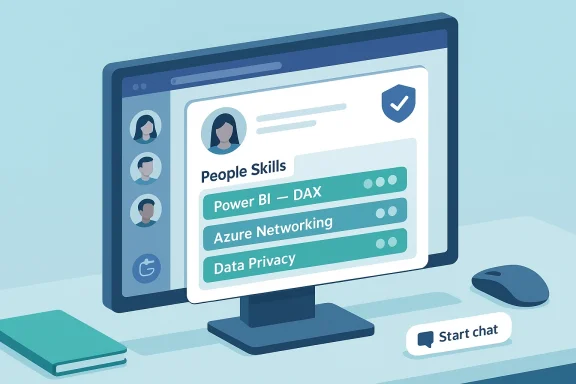
Microsoft is rolling People Skills into the Microsoft Teams profile card experience, meaning employees will soon be able to view colleagues’ declared skills directly inside Teams — a change that promises to make finding internal expertise faster, but also raises governance, accuracy and adoption questions that IT and HR teams must confront before flipping the switch.
Background
Microsoft has steadily expanded the amount of contextual, people-centered data that appears inside Microsoft 365 surfaces: profile cards, the People companion, Copilot-enabled summaries and other directory-driven surfaces are designed to surface who does what without leaving your flow of work. Those investments include new profile-card fields (pronunciation, presence, work-location signals) and the People companion used in Windows and Teams to surface contextual prompts about a contact. The People Skills capability sits in that same family: a structured way for employees to publish area-of-expertise tags and for organizations to surface skill inventories at scale.Microsoft’s documentation and roadmap entries consistently remind administrators that rollout timing and feature availability are tenant-gated and subject to change; similar Teams features have appeared on the Message Center and the Microsoft 365 Roadmap with rollout windows that shifted as Microsoft refined the experience and admin controls. That pattern underlines the practical need for IT teams to treat announced dates as planning signals rather than fixed deadlines.
What the change actually does
At-a-glance: the user experience
- When the update ships, a user who opens a colleague’s Teams profile card will see a People Skills section listing that colleague’s declared skills and expertise areas.
- The skills shown come from the People Skills/People profile store inside Microsoft 365, where users can manage, add, or endorse skills depending on tenant configuration and available licensing.
- From a practical perspective, the new surface reduces friction: rather than searching SharePoint pages, Teams channels, or corporate directories, users can quickly confirm who has the right skills for a task and start a conversation or meeting from the same card.
How People Skills is intended to be used
People Skills is designed primarily for internal discovery: helping hiring managers, project leads, and peers identify colleagues with required capabilities (for example, “Power BI — DAX,” “Azure Networking,” or “Data Privacy”). Organizations can also use People Skills as a near-real-time inventory to spot skill gaps and target training or internal staffing. Where organizations combine People Skills with learning platforms and Copilot-driven suggestions, the system can point colleagues to learning resources — accelerating upskilling in the flow of work.Why this matters — practical benefits
1. Faster, more accurate internal sourcing
Teams is the place where most day-to-day collaboration happens. Adding skills to profile cards reduces context switching and gives managers a simple way to triage resource questions in chat or during meetings. Rather than a slow search, a simple glance can point you to subject-matter experts.2. Better utilization of informal expertise
Many organizations have hidden expertise — people who have project experience but aren’t listed on org charts. Structured skills metadata makes those contributions visible and actionable across business units.3. Shorter staffing cycles for cross-functional work
For short-term initiatives and task forces, speed matters. A visible skills layer speeds identification, outreach and negotiation about availability, lowering time-to-staff for temporary project teams.4. Stronger alignment between learning and demand
When People Skills is combined with L&D or learning-recommendation engines, HR and managers can see skills gaps and immediately recommend training or microlearning — an approach that supports continuous learning in the flow of work. Tools that map skills to learning content reduce the friction between recognition of a gap and action to close it.Risks, limitations and real-world friction
No enterprise feature is purely beneficial; the People Skills expansion carries operational, cultural and technical risks that organizations must plan for.Accuracy, signal-to-noise and the “empty card” problem
- If users don’t populate their profiles, profile cards will be empty or misleading — a common result in many internal directory rollouts. Without incentives or governance, People Skills risks becoming another unused field. This is a well-known adoption challenge for profile-driven features and requires active change management.
- Conversely, over-population or uncurated lists can create noise: generic, inflated skill claims (“Python,” “Excel”) with no context about depth make discovery less useful. Taxonomy and depth (novice/intermediate/expert) matter.
Staleness and lifecycle management
Skills change: people move teams, gain experience or lose day-to-day exposure. Without processes that require periodic validation or manager sign-off, the skill inventory will age quickly. Organizations must plan for lifecycle policies — how skills are reviewed and retired.Privilege creep and access controls
Skills metadata can feed downstream processes (staffing, performance conversation, learning nudges). Organizations need to control who can see and export skills data. Admins and HR should document who can query skills inventories and how that data can be used in staffing or performance decisions.Bias and hiring consequences
Skills tags can codify informal biases if they’re used uncritically. For example, if project staffing favors those who self-promote on skills lists, quieter but highly capable contributors may be overlooked. Governance must include HR perspectives to ensure equitable use.Licensing and feature gating
Some People and Copilot features are tied to specific Microsoft 365 bundles (Copilot, Viva) and tenant settings. Organizations should not assume that the skills surface will be available to every user by default — licensing and tenant configuration may restrict who can edit or use People Skills. Treat licensing assumptions carefully and validate against your tenant’s license entitlements.Governance and privacy: the non-negotiables
Turning on People Skills for Teams profile cards is a product decision — but the much harder work is governance.- Define a clear purpose statement: Why are you surfacing skills? Who benefits, and how will the data be used?
- Control visibility by role: Decide whether everyone can see skills, or whether access should be limited (for example, HR, managers, or internal recruiters).
- Create retention and validation policies: Require periodic confirmation (every 6–12 months) and a manager verification flow for core role skills.
- Tie People Skills to learning offers — not punitive actions: Use skills data to recommend upskilling and mobility, not as the sole criterion for eligibility for promotions or staffing.
- Audit queries and exports: Log who queries and exports skill inventories to reduce misuse or accidental exposure.
Licensing, admin controls and rollout cadence
Teams features that rely on People and Copilot capabilities are frequently layered behind licensing and tenant controls. Microsoft has split several Copilot-era features between paid Copilot add-ons and capabilities that come with Viva or other bundles — and tenants often must opt in to staged rollouts through the Message Center. That means:- Validate licensing: Confirm which users in your tenant have the necessary Copilot/Viva or People licenses that enable People Skills edit or view access.
- Monitor Message Center: Microsoft pushes tenant-specific rollout and admin guidance through Message Center posts; admins should track the MC IDs related to People Skills and related Teams profile-card updates.
- Pilot selectively: Use Targeted Release or a small pilot group before wide organizational rollout — a pattern Microsoft itself recommends for many staged Teams features.
Implementation checklist — from pilot to production
- Inventory current profile usage
- Measure how many employees have any skills populated today.
- Identify core teams where skills-based discovery would deliver immediate value (e.g., data teams, security, cloud operations).
- Align taxonomy and depth
- Choose a skills taxonomy (role-based categories + proficiency bands).
- Limit open-ended tags at pilot stage to reduce noise.
- Decide visibility and access controls
- Who can edit skills? Who can view/export?
- Configure tenant policies and role-based access in the admin center.
- Integrate learning and HR flows
- Hook People Skills to learning recommendations so skills gaps yield action.
- Ensure HR understands how skills will be used in staffing and succession planning.
- Pilot and measure
- Run a 4–8 week pilot with a cross-functional group.
- Track discovery speed, staffing time, and user satisfaction.
- Communicate and incent
- Launch a communications plan explaining benefits, privacy protections and how to update profiles.
- Consider lightweight incentives — recognition, profile-completion clinics, manager-run verification drives.
- Iterate and govern
- Reassess taxonomy and lifecycle rules every 6 months.
- Publish audit and export logs for transparency.
Integration opportunities and technical notes
Where the data lives
Skills metadata is surfaced by Microsoft 365 People profile services and indexed for use by Microsoft Graph and other Microsoft 365 surfaces. That means integration points exist for:- HR and identity systems (to sync job titles and role mappings)
- Learning platforms (to map training to skills)
- Copilot/agents for in-flow recommendations
Copilot and People Skills
When combined with Copilot and the People companion, skills data can be used to power prompts like “Find someone who can do X” or to auto-suggest meeting participants with required skills — but many Copilot behaviors are tenant-grounded and require paid Copilot licensing for full tenant-aware capabilities. Do not assume Copilot will automatically enrich or surface People Skills without explicit licensing and tenant configuration.Practical scenarios — quick wins and traps
Quick wins
- Field service scheduling: Match technicians with specific device-expertise tags for rapid dispatch.
- Project staffing: Quickly assemble cross-functional sprints by filtering skills on profile cards.
- Mentoring: Pair junior staff seeking a skill with an expert visible in the People Skills layer.
Traps to avoid
- Using skills as a single source of truth for promotion or compensation decisions without corroborating evidence.
- Launching globally without taxonomy alignment — you’ll get conflicting tags and poor signal.
- Leaving profile fields optional and unpromoted — low adoption equals low value.
Recommendations for IT leaders
- Start with a concise policy: publish purpose, scope and retention rules before any technical rollout.
- Use a small pilot: pick teams where the benefit is immediate and measurable; iterate taxonomy from pilot feedback.
- Combine incentives with friction: require manager verification for role-critical skills while making other skills easy to add.
- Protect privacy: treat skills as HR-adjacent data and apply the same risk assessments you would for other people-data.
- Budget for licensing: verify which Copilot or Viva license plans in your tenant include People Skills editing or viewing and budget accordingly.
Conclusion
Embedding People Skills into Microsoft Teams profile cards is a logical step in Microsoft’s broader strategy: make contextual, people-centered knowledge available where work happens. The result can be a meaningful productivity win — faster discovery, smarter staffing, and clearer links between skill demand and learning supply. But the feature’s value is conditional: it requires taxonomy discipline, governance, a pilot-first approach, and honest work by HR and IT to keep the directory accurate and purposeful.If your organization is thinking about enabling People Skills in Teams, treat the feature as both a product and a program: deploy the technical switch only after you’ve defined policy, piloted the taxonomy, and committed to the human work needed to keep skills current. That approach turns a simple UI enhancement into a durable, measurable capability rather than another set of empty profile cards.
Source: Windows Central Finding an internal expert in Microsoft Teams is about to get much easier
