

Microsoft quietly put a small but remarkably useful tool out to pasture:
In late 2023 Microsoft listed
The good news is that the strengths PSR embodied—compactness, shareability, and structured reproduction—are straightforward to re-create with small investments: scripted capture pipelines, standardized packaging, careful redaction, and enterprise-controlled AI summarization where appropriate. Organizations that act now—inventory dependencies, choose a replacement architecture, and automate packaging—will not only survive the deprecation but can improve their capture governance and diagnostic throughput in the process.
If there is a single product-design lesson in the PSR story, it is this: when a vendor retires a low-level utility, they should preserve the workflows and output formats the tool enabled or provide clear, supported migration paths. A modernized PSR—retaining step-level exports and adding optional, privacy-first summarization—would have been an elegant compromise. That ship may have sailed for the inbox PSR, but the concept is alive: build the lightweight, structured repro pipeline you need and insist it be a first-class citizen of your support tooling stack.
Source: Neowin It's a shame that Microsoft deprecated Steps Recorder (PSR) in Windows
Steps Recorder (historically PSR.exe), the tiny troubleshooting utility that produced compact, annotated step-by-step archives used by help desks and system administrators for nearly two decades. What looked like a minor housekeeping decision—consolidating inbox capture tools—creates a practical, operational gap for organizations that relied on PSR’s structured output and low-bandwidth workflows.
 Background
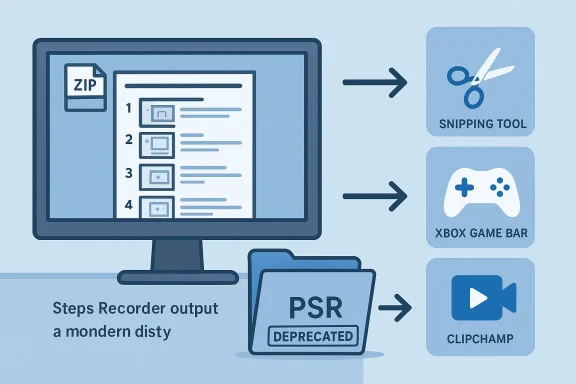
Steps Recorder was introduced as part of the Windows support toolbox in the Windows 7 era and became a quietly indispensable aid for troubleshooting user-reported problems. With a single click a user could record a sequence of interactions; when they stopped recording, PSR produced a single compressed archive containing an MHTML (web archive) document with annotated screenshots, textual descriptions of clicks and basic actions, and metadata—easy to open in a browser and hand off to support staff. That compact, step-focused artifact was the feature’s defining advantage.In late 2023 Microsoft listed
Steps Recorder as deprecated and began steering users to modern inbox capture tools such as the Snipping Tool, Xbox Game Bar, and Clipchamp. The stated rationale was consolidation: maintain and invest in a smaller number of richer, centrally maintained capture apps rather than preserving multiple legacy utilities. On paper that’s defensible; in practice the shift replaces a structured, lightweight file format with unstructured video and edited clips, and that trade-off matters for operational workflows.Why PSR mattered: the practical case
Compact, structured artifacts
Steps Recorder exported a single zipped package containing an .mht document and images that together formed a readable, step-by-step reproduction of user activity. That single-file pattern made sharing, versioning, and archival straightforward—especially in enterprise ticketing systems where attachments are indexed and stored. For many frontline teams this single-file, text+image format was far preferable to multi-minute video clips.Low bandwidth, fast triage
Because PSR’s outputs were predominantly screenshots plus a short textual trace, the files were typically a fraction of the size of a video recording of equivalent diagnostic value. For help desks handling dozens or hundreds of incoming reproductions per day, that size difference compounded into real cost and time savings—faster uploads, lower storage/bandwidth charges, and easier programmatic ingestion.Step focus and readability
PSR’s default output was step-centric: numbered actions, contextual screenshots, and inline comment capability meant engineers could skim to the core issue without watching a timeline. This structured signal reduced cognitive load during triage, letting a human reviewer quickly locate the failing step and the visible UI state at that moment. Videos communicate motion and timing, but they rarely produce a ready-made step list without manual annotation or automated transcription.What Microsoft recommended — and why it’s not an apples-to-apples replacement
Microsoft directed users to three inbox options as replacements:Snipping Tool— now extended to include short screen recordings, OCR, and sharing capabilities.Xbox Game Bar— optimized for application and game recording with performance telemetry.Clipchamp— a full-featured editor for capture and post-production workflows.
Snipping Tool is the closest fit for ad-hoc captures and short recordings; however, it produces unstructured video or separate image files rather than a single step-packaged MHTML archive. Xbox Game Bar is tuned for performance capture and gameplay telemetry; Clipchamp targets editing and distribution. The trade-off is clear: Microsoft gains consolidation and richer capture features, but loses the tiny, structured artifact many IT teams depended on.The operational impact — why some teams are rightly upset
Support organizations and sysadmin teams face several concrete consequences from PSR’s deprecation:- Increased upload and storage costs as videos replace screenshots.
- Slower triage: engineers must watch or transcode video or extract frames rather than scan a step list.
- Loss of programmatic parsing: PSR’s text+image package was straightforward to parse; ingesting video requires additional processing and compute.
- Privacy and governance risk surface changes: modern tools often integrate cloud features and sharing flows that need re-evaluation for compliance.
Could PSR have evolved instead of being retired?
The obvious path that many in the community suggested was a modernization of PSR’s concept rather than its removal: keep the step-capture model and add optional AI-powered summarization and extraction. That vision is attractive and, in many ways, feasible:- Capture the same lightweight step package as PSR did.
- Run an optional on-device summarization model or a corporate inference endpoint to produce a concise digest for engineers.
- Retain a verifiable traceability link to the original screenshots so human reviewers can confirm facts.
- Data locality and privacy: feeding screenshots that may contain credentials or PII into cloud LLMs raises compliance issues. Any AI integration must have robust, privacy-first architecture (on-device or enterprise-run inference) and clear user controls.
- Cost and performance: image-to-text summarization at scale requires compute and engineering investment; naive cloud-based approaches would quickly become expensive for high-volume help desks.
- Accuracy and trust: LLM outputs can hallucinate. For a support workflow, the model’s output must be clearly labeled as a suggestion and linked back to the original artifacts for verification.
Security, privacy, and governance: what to watch for now
Deprecation of a tool like PSR is an opportunity to tighten policies, not a reason to ignore them. Teams should proactively address capture governance:- Inventory where PSR was used and identify replacement patterns now in use.
- Define permitted capture tools and sources. Restrict or sandbox cloud-backed capture features on managed devices that handle sensitive data.
- Update ticket templates to require a redaction checklist: hide credentials, blur PII, and confirm that attachments have been reviewed.
- Where automated summarization or AI is used, prefer on-premise or corporate-controlled inference endpoints and retain raw artifacts for auditability.
Practical alternatives and migration patterns
For teams that relied on PSR’s single-file, step-focused workflow, there are pragmatic replacement patterns—none of them perfect, but all workable.Short-term, low-effort options
- Adopt
Snipping Toolfor quick screenshots and short recordings for ad-hoc issues. Train agents to request specific screenshots keyed to a short step list in the ticket. - Use
Xbox Game Baronly when performance telemetry or application-level recording is required.
Recreate PSR-like artifacts (recommended for high-volume teams)
- Standardize a capture tool such as
ShareXorPowerToysfor automated screenshots. - Implement a small packaging script that:
- Collects the screenshots and timestamps.
- Generates a plain-text step list (user-provided or automated).
- Packages everything into a single zipped HTML or Markdown file for easy viewing and archival.
- Integrate optional redaction: either an automated blur step or a mandatory human review before upload.
If you plan to use AI summarization
- Use local models or enterprise inference endpoints only.
- Label AI output clearly and keep the original artifacts available for verification.
- Monitor model accuracy and log corrections to avoid reliance on confidently wrong suggestions.
Recommended migration checklist for IT managers
- Inventory dependencies: list teams and processes that used
Steps Recorderand quantify their artifacts. - Choose a replacement pattern: for most, either
Snipping Tool(ad-hoc) or a scriptedShareX+ packaging pipeline (high-volume) will work. - Update runbooks and ticket templates: include explicit instructions on capture, redaction, and required metadata.
- Pilot and measure: run a two-week trial with a representative team to measure upload times, storage usage, triage time, and agent satisfaction.
- Automate where possible: package screenshots and logs into a single zipped artifact for consistency.
- Enforce governance: restrict cloud inference for sensitive captures and ensure retention policies are applied.
Strengths and weaknesses of Microsoft’s decision — a balanced appraisal
Strengths
- Consolidation reduces maintenance overhead. Maintaining fewer inbox utilities allows Microsoft to focus development on higher-impact capture apps that get store updates more frequently.
- Modern tools are richer.
Snipping Tool,Xbox Game Bar, andClipchampprovide stronger capture fidelity, integrated editing, and distribution features for content creators and many casual troubleshooting scenarios.
Weaknesses / risks
- Loss of a unique lightweight format. PSR’s step-focused archive wasn’t flashy, but it was uniquely suited to rapid triage and programmatic workflows; removing it forces teams into heavier workflows or engineering workarounds.
- Operational cost for enterprises. Videos inflate storage and bandwidth usage, and downstream ingestion and AI processing costs can rise dramatically.
- Privacy surface shift. Modern capture tools frequently integrate sharing and cloud features; enterprises must audit these behaviors to prevent data leakage.
Where claims are unverifiable or speculative
Some community suggestions — in particular the precise product roadmap motivations inside Microsoft or internal cost/telemetry rationale — remain speculative without an explicit Microsoft engineering statement. The files and community reporting reliably show deprecation, recommended alternatives, and the format/behavior of PSR’s artifacts; claims about internal decision-making processes or unreleased product plans should therefore be treated as plausible analysis rather than confirmed fact. I flag these as conjectural rather than definitive.The AI angle — why the timing matters
The rise of LLMs and image understanding models makes the idea of an AI-augmentedSteps Recorder especially tantalizing: capture steps, then run an on-device or enterprise-model summarizer to produce a concise diagnostic brief for engineers. This would preserve PSR’s core strength—compact reproducible artifacts—while solving the “wall-of-text” issue that previously annoyed some support staff. But the practical constraints are real: privacy, compute cost, and the need for verifiable outputs all complicate any straightforward AI integration. Until those are solved with enterprise-grade controls, the safer choice for many organizations is to build their own PSR-like pipelines and optionally feed sanitized summaries to AI under strict governance.Conclusion
Steps Recorder was a modest utility whose real value was procedural rather than glamorous: it turned user interactions into compact, annotated packages that scaled well inside high-volume support workflows. Microsoft’s decision to deprecate PSR in favor of richer inbox capture apps fits a defensible engineering story—simplify, consolidate, and invest in a smaller set of tools. But the practical impact on enterprise support workflows is non-trivial: heavier artifacts, higher costs, and the loss of a structured, programmatically friendly format.The good news is that the strengths PSR embodied—compactness, shareability, and structured reproduction—are straightforward to re-create with small investments: scripted capture pipelines, standardized packaging, careful redaction, and enterprise-controlled AI summarization where appropriate. Organizations that act now—inventory dependencies, choose a replacement architecture, and automate packaging—will not only survive the deprecation but can improve their capture governance and diagnostic throughput in the process.
If there is a single product-design lesson in the PSR story, it is this: when a vendor retires a low-level utility, they should preserve the workflows and output formats the tool enabled or provide clear, supported migration paths. A modernized PSR—retaining step-level exports and adding optional, privacy-first summarization—would have been an elegant compromise. That ship may have sailed for the inbox PSR, but the concept is alive: build the lightweight, structured repro pipeline you need and insist it be a first-class citizen of your support tooling stack.
Source: Neowin It's a shame that Microsoft deprecated Steps Recorder (PSR) in Windows
