

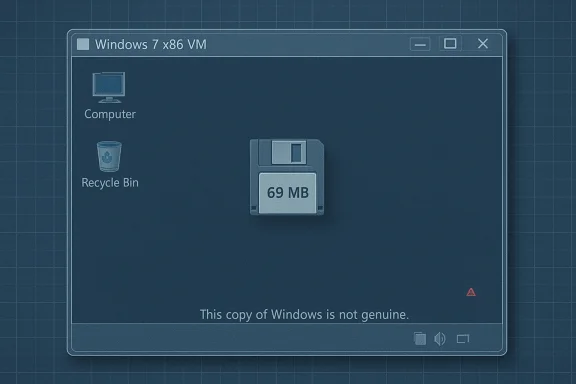
A veteran tinkerer has produced a bootable Windows 7 x86 image that measures just 69.0 MB on disk, a headline‑grabbing proof‑of‑concept that boots to a desktop but deliberately strips so much of the user‑mode plumbing that “virtually nothing can run” without manually restoring missing libraries and services.
Windows has always been treated as a layered platform: a compact kernel and core subsystems under a sprawling user‑mode runtime and a large Component Store (WinSxS). Enthusiast projects over the past decade have repeatedly shown how far that userland can be pruned while leaving a bootable system behind. Recent community work — notably Tiny11 and Nano11 builds for Windows 11 — demonstrated repeatable, scripted techniques for removing inbox apps and applying aggressive compression to produce multi‑gigabyte savings; the same engineering levers underpin the Windows 7 69 MB experiment.
Microsoft itself has explored small footprints: a demonstration of Windows Server’s Nano Server in 2015 showed a disk footprint around 400 MB, and later Microsoft pivoted to a Nano Server base container image of under 300 MB for containerized scenarios. Those server‑side reductions were focused on headless, service‑only scenarios rather than general‑purpose desktops — a distinction that matters for any attempt to shrink a consumer OS such as Windows 7.
A minimal command‑line program depends on a smaller subset of userland: the PE loader, ntdll.dll, kernel32.dll and a CRT (or statically linked binary). If you can supply those DLLs and a compatible CRT, a simple console utility that calls low‑level Win32 APIs could run — which is why some tiny builds are still useful for test harnesses or device‑driver smoke tests.
However, in Xeno’s published image the author warns that standard runtime libraries and CRTs are among the missing components. That means anyone who wants to run even simple CLI binaries will likely need to extract a handful of DLLs out of a licensed Windows installation and layer them into the VM — a manual, error‑prone process and one that raises licensing/distribution issues if not done carefully.
Whether Microsoft should ship a “Slim Desktop” edition is a policy and product decision. The engineering community has already shown the feasibility of narrow, serviceable profiles; the hard part is balancing security, updateability, driver compatibility and enterprise manageability. Community experiments highlight what is technically possible and what trade‑offs would be required for a supported, minimal off‑the‑shelf product.
But it is not a product. For practical use — whether retro gaming, lab appliances, or compact test VMs — the responsible path is clear: build from official media, restore the minimal runtime your workload requires, keep systems isolated, and automate the pipeline so others can reproduce and audit it. In short: admire the engineering, learn from it, but treat the tiny image as an experiment, not a replacement for a supported, patched operating system.
Source: theregister.com Windows 7 slimmed down to 69 MB
 Background
Windows has always been treated as a layered platform: a compact kernel and core subsystems under a sprawling user‑mode runtime and a large Component Store (WinSxS). Enthusiast projects over the past decade have repeatedly shown how far that userland can be pruned while leaving a bootable system behind. Recent community work — notably Tiny11 and Nano11 builds for Windows 11 — demonstrated repeatable, scripted techniques for removing inbox apps and applying aggressive compression to produce multi‑gigabyte savings; the same engineering levers underpin the Windows 7 69 MB experiment.Microsoft itself has explored small footprints: a demonstration of Windows Server’s Nano Server in 2015 showed a disk footprint around 400 MB, and later Microsoft pivoted to a Nano Server base container image of under 300 MB for containerized scenarios. Those server‑side reductions were focused on headless, service‑only scenarios rather than general‑purpose desktops — a distinction that matters for any attempt to shrink a consumer OS such as Windows 7.
What XenoPanther delivered — the facts
- A compressed distribution (a small VMware virtual disk and VM config inside an archive) that reproduces a bootable Windows 7 x86 install with an on‑disk size reported at 69.0 MB.
- The image boots to a desktop shell; screenshots from the author show the standard Windows genuine/activation checks remain detectable (the build shows “This copy of Windows is not genuine”).
- The author frames the release as a technical experiment rather than a usable product, explicitly warning that “virtually nothing can run” because critical user‑mode libraries (common dialog boxes, common controls, CRTs, shell DLLs and servicing scaffolding) are missing.
How you get Windows down to 69 MB
There are two broad techniques repeated across tiny‑Windows projects, and both appear to be in use in Xeno’s experiment.1. Surgical pruning
Builders remove entire classes of components that are not strictly required to reach a shell prompt:- Inbox apps, optional Win32/UWP components, language packs and fonts
- Shell integrations and COM plumbing (comdlg32, comctl32, shell32)
- CRTs and runtime libraries used by most third‑party applications
- Drivers and multimedia subsystems, plus WinSxS servicing metadata
2. Aggressive compression
Microsoft’s image servicing tools support high‑ratio compression modes (LZX/LZMS /Compress:recovery) and CompactOS‑style mechanisms that trade CPU and RAM for on‑disk byte savings. Community builders use these options when exporting a serviced WIM/ESD to reduce the footprint dramatically. Combine careful removals with recovery‑grade compression and you can compress the remaining runtime down from gigabytes to megabytes in extreme cases.What’s missing — and why that matters
In the 69 MB image, the most consequential absences are the user‑mode libraries and service scaffolding that ordinary Windows apps and UI controls rely on:- Common Controls and dialog plumbing (comctl32, comdlg32) — removes Open/Save dialogs and many UI widgets.
- Shell DLLs (shell32 and friends) — breaks shell extensions and many Explorer behaviors.
- CRT and runtime libraries (msvcrt, specific MSVCRT variants) — prevents most compiled apps from starting.
- WinSxS servicing scaffolding and component manifests — prevents safe servicing and updates.
- Device, audio/video and advanced driver stacks — reduces hardware compatibility and multimedia capability.
Could a basic CLI app run?
Short answer: possibly, but with caveats.A minimal command‑line program depends on a smaller subset of userland: the PE loader, ntdll.dll, kernel32.dll and a CRT (or statically linked binary). If you can supply those DLLs and a compatible CRT, a simple console utility that calls low‑level Win32 APIs could run — which is why some tiny builds are still useful for test harnesses or device‑driver smoke tests.
However, in Xeno’s published image the author warns that standard runtime libraries and CRTs are among the missing components. That means anyone who wants to run even simple CLI binaries will likely need to extract a handful of DLLs out of a licensed Windows installation and layer them into the VM — a manual, error‑prone process and one that raises licensing/distribution issues if not done carefully.
Practical use cases and limits
This kind of experiment is not intended as a consumer desktop release. But it does have narrow, practical uses:- Educational artifact: Shows the minimal binary set the kernel and a basic shell require — useful for teaching Windows internals and reverse‑engineering.
- Micro‑VMs and ephemeral test harnesses: Extremely small images are convenient for disposable test VMs, CI jobs, or boot‑validation scenarios where size and fast pull times matter more than serviceability.
- Retro gaming / legacy software experiments: A slightly expanded “Tiny7” that restores a curated set of Win32 runtime DLLs could be a compact platform for old games or legacy installers — if it’s constructed from an official ISO and documented reproducibly.
Legal, licensing and safety considerations
There are concrete legal and security hazards that hobbyists and admins must appreciate.- Redistributing Microsoft system files can be legally problematic. That is why responsible builders typically publish scripts and a repeatable pipeline that starts from an official Microsoft ISO rather than shipping prebuilt trimmed images that contain Microsoft binaries. If a project distributes a trimmed Windows image with Microsoft DLLs embedded, it risks takedown or legal exposure.
- Activation and licensing remain user responsibilities. Stripping the OS does not bypass activation; screenshots from the 69 MB image still show genuine/activation checks. Users must retain valid licenses and comply with Microsoft terms.
- Security and updateability are broken by design. Removing the Component Store and servicing stack (WinSxS) makes an image unserviceable — it cannot be patched via Windows Update in a safe or supported way. That produces a long‑lived security risk for any system that is networked.
How to make a useful Tiny7 (if that’s your goal)
If the goal is a compact but practical Windows 7 variant that runs legacy apps, the following sequence describes the tradeoffs and steps required.- Start from an official Windows 7 ISO and an automated offline servicing pipeline (DISM) to preserve legal and supply‑chain integrity.
- Define a minimal runtime list: include the PE loader, ntdll.dll/kernel32.dll, a compact CRT set, comctl32/comdlg32, and basic shell DLLs (shell32). These are the components most apps expect.
- Keep WinSxS servicing metadata if you want to allow future updates; removing it shrinks size dramatically but kills updateability. Decide which you value more.
- Use targeted compression (LZMS/LZX, /Compress:recovery) only after the runtime set is stable, and test runtime memory and CPU costs — recovery compression increases runtime decompression work.
- Automate and document the build in scripts so other builders can reproduce it from the same starting ISO; publish the scripts rather than binary images.
Technical caveats and verification notes
- Claims that an image “fits on a floppy” or “is usable for X purpose” are alluring, but those claims require exact configuration context. A build that boots and shows a desktop may still be missing dozens of API entry points that certain software depends on; treat tiny images as smoke tests rather than usable systems.
- Compression tradeoffs matter. Recovery‑grade compression yields impressive on‑disk density but increases memory usage and decompression overhead at runtime; in constrained RAM environments that can backfire. Always test the target workload with the chosen compression settings.
- Some public reports and archives assert the 69 MB artifact was packaged as a 40.4 MB 7‑zip archive on Archive.org. Community maintainers advise caution: prefer a reproducible script that starts from a licensed ISO rather than importing an unknown prebuilt archive. Treat third‑party hosting claims as something to verify before downloading.
Strengths of the demonstration
- Clarifies Windows internals boundaries. The experiment is a precise way to show what the kernel and shell need to initialize a GUI. That clarity has educational value for engineers, reverse‑engineers, and OS researchers.
- Sparks constructive community work. A compact proof‑of‑concept can seed follow‑on builds that trade a small amount of space for practical compatibility, mirroring the Tiny11 and Nano11 communities’ progression from novelty to usable variants.
- Useful for micro‑VM scenarios. Where a throwaway test VM is needed quickly and download size matters, extremely small images are valuable for fast CI/QA cycles or for embedded testing scenarios.
Risks and downsides — a clear warning
- Security: An unserviceable, heavily pruned image cannot be patched reliably. Operating such a system on a network is a high‑risk proposition.
- Stability and maintainability: Removing servicing mechanisms makes repair difficult; small, fragile images are brittle when third‑party software or drivers are introduced.
- Legal exposure: Redistributing Microsoft binaries without authorization can lead to takedowns or worse; responsible practice is to publish build scripts that start from an official ISO.
- User confusion: End users may mistakenly treat a tiny build as a supported, secure alternative to a fully patched OS. That is incorrect and dangerous in production or consumer contexts.
The bigger picture: community vs. vendor responsibility
The tiny‑Windows ecosystem demonstrates two points: first, much of Windows’ on‑disk bulk is optional for many specific use cases; second, Microsoft has historically produced smaller server‑and‑container footprints when they aligned with an operational model (e.g., Nano Server for containers). Community builders have filled demand where Microsoft has not offered a supported, compact desktop SKU. That gap is what projects like Tiny11 and NTDEV’s derivatives exploit — and it’s precisely the reason enthusiasts continue to experiment with extreme pruning.Whether Microsoft should ship a “Slim Desktop” edition is a policy and product decision. The engineering community has already shown the feasibility of narrow, serviceable profiles; the hard part is balancing security, updateability, driver compatibility and enterprise manageability. Community experiments highlight what is technically possible and what trade‑offs would be required for a supported, minimal off‑the‑shelf product.
Practical recommendations for tinkerers and admins
- Always build locally from an official ISO when experimenting. Don’t download unknown prebuilt images unless you can verify provenance.
- Run experiments inside isolated VMs with snapshots. Use host‑only or isolated NAT networking to avoid exposing an unpatched system.
- Publish and prefer scripts (DISM/ADK pipelines) that reproduce the build steps rather than sharing trimmed Windows binaries. That reduces legal risk and improves auditability.
- If the goal is to run legacy software, add back the smallest set of runtime DLLs and test iteratively. Expect the image size to grow as you restore compatibility.
Conclusion
The 69 MB Windows 7 experiment is a brilliant technical stunt and a revealing research artifact. It shows, in stark terms, the delta between what the kernel needs to present a GUI and what the broader Windows ecosystem expects for day‑to‑day functionality. As a teaching tool and a conversation starter about bloat, image servicing and the tradeoffs between minimality and maintainability, it delivers enormous value.But it is not a product. For practical use — whether retro gaming, lab appliances, or compact test VMs — the responsible path is clear: build from official media, restore the minimal runtime your workload requires, keep systems isolated, and automate the pipeline so others can reproduce and audit it. In short: admire the engineering, learn from it, but treat the tiny image as an experiment, not a replacement for a supported, patched operating system.
Source: theregister.com Windows 7 slimmed down to 69 MB
