

A Time‑of‑Check/Time‑of‑Use (TOCTOU) race in the SoftFileLock implementation of the widely used Python package filelock (tracked as CVE‑2026‑22701) allows a local attacker who can create symbolic links to interpose between permission checks and file creation, producing silent lock failures, denial‑of‑service conditions, and the risk of unintended operations on attacker‑controlled files; the issue has been patched upstream in filelock 3.20.3.
filelock provides a platform‑independent mechanism for simple inter‑process file locking in Python programs. Its intent is straightforward: create a lock file on disk to serialize access to shared resources across processes. Because of platform differences, filelock implements several locking strategies, including UnixFileLock, WindowsFileLock, and a fallback SoftFileLock used where native file‑locking primitives (like fcntl) are missing or unsuitable. The vulnerability sits specifically in the SoftFileLock code path.
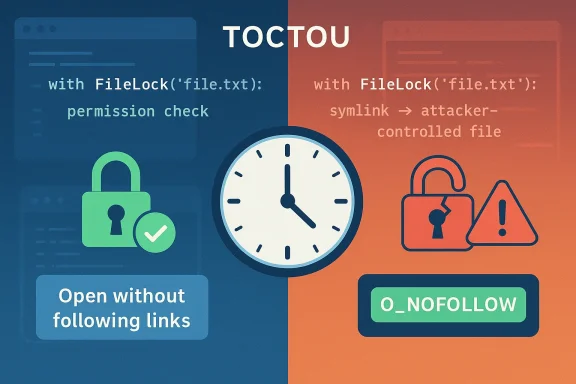
TOCTOU bugs are a well‑known class of race conditions: the program checks a condition (time‑of‑check), then later performs an operation assuming the condition still holds (time‑of‑use). An attacker capable of racing the interval between check and use can change the environment so the assumption is invalid. In this case, an attacker can create a symlink after the permission check but before the code actually creates the lock file, causing the open operation to operate on the attacker’s chosen target instead of a genuine lock file.
This vulnerability was disclosed publicly in January 2026, assigned CVE‑2026‑22701, and fixed in the filelock 3.20.3 release. Multiple distributor advisories and package teams (Ubuntu, SUSE, and other Linux vendors) have issued updates to their packaged variants of python‑filelock.
Additionally, filelock is used indirectly by many projects. Where filelock is vendored into an application (packaged inside a larger project) or included as a subdependency in a container image, those deployments need to be inventoried and updated. Dependency scanning tools will often flag filelock versions .20.3.
This is a straightforward, correct defensive change: preventing the open operation from following symlinks closes the primary attack vector. However, the real world remains messy because not all runtimes or platforms provide O_NOFOLLOW, and many deployments may continue to use older packaged versions for weeks or months.
Historically, similar TOCTOU and symlink attacks have been leveraged in post‑compromise operations as low‑effort ways to sabotage services or escalate local file‑system access to produce broader impacts (for example, by corrupting backup files or lock files used by scheduled jobs). The practical risk is environment‑dependent: multiuser shared hosts, CI agents, and some containerized deployments present much more favorable conditions for an attacker to win the necessary race.
(For context inside our own collected files and community reporting, earlier threads and advisories have discussed TOCTOU issues affecting filelock and similar components — these discussions highlight the recurrence of this class of bug and the importance of defensive file‑opening flags and restrictive directory permissions in multiuser systems. )
Checklist (short):
Conclusion: patch promptly, verify your supply chain, and treat soft locking code as security‑critical in multiuser deployments.
Source: MSRC Security Update Guide - Microsoft Security Response Center
 Background / Overview
filelock provides a platform‑independent mechanism for simple inter‑process file locking in Python programs. Its intent is straightforward: create a lock file on disk to serialize access to shared resources across processes. Because of platform differences, filelock implements several locking strategies, including UnixFileLock, WindowsFileLock, and a fallback SoftFileLock used where native file‑locking primitives (like fcntl) are missing or unsuitable. The vulnerability sits specifically in the SoftFileLock code path.TOCTOU bugs are a well‑known class of race conditions: the program checks a condition (time‑of‑check), then later performs an operation assuming the condition still holds (time‑of‑use). An attacker capable of racing the interval between check and use can change the environment so the assumption is invalid. In this case, an attacker can create a symlink after the permission check but before the code actually creates the lock file, causing the open operation to operate on the attacker’s chosen target instead of a genuine lock file.
This vulnerability was disclosed publicly in January 2026, assigned CVE‑2026‑22701, and fixed in the filelock 3.20.3 release. Multiple distributor advisories and package teams (Ubuntu, SUSE, and other Linux vendors) have issued updates to their packaged variants of python‑filelock.
How the bug works: a technical breakdown
The vulnerable window
At the heart of the defect is the _acquire() method in SoftFileLock. The function performs a writable‑file check (raise_on_not_writable_file()) and then proceeds to create or open the lock file with a call equivalent to os.open(...). The check establishes that the path is writable, but there is a small, exploitable time window between that check and the actual os.open() call. An attacker who can create a filesystem entry at the lock path during that window can replace the expected regular file with a symbolic link that points at an unintended target. When the application finally calls os.open(), the system follows the symlink (in implementations that do not guard against link‑following), and the operation applies to the attacker’s target.Consequences of following a symlink
If os.open() follows the symlink and opens the attacker‑chosen target, the caller may:- Fail to obtain a true exclusive lock, allowing concurrent processes to believe they hold exclusive access when they do not.
- Truncate or otherwise mutate the wrong file (if O_TRUNC or other destructive flags are used).
- Perform subsequent file operations that unexpectedly operate on attacker‑controlled data.
Why SoftFileLock was chosen and why it became a vector
SoftFileLock exists as a cross‑platform fallback when native advisory locks or fcntl semantics aren’t available. That portability comes at a cost: the implementation attempts to reproduce lock semantics using ordinary file operations, which makes it more susceptible to classic filesystem race conditions than kernel‑mediated locking primitives. The vulnerability demonstrates that fallback code paths are not merely convenience code—they are security‑critical and must be designed with the same adversarial model as kernel or platform code.Scope: which systems and applications are affected
- Affected package: python‑filelock (the PyPI package “filelock”), versions earlier than 3.20.3.
- Affected component: specifically the SoftFileLock code path (file src/filelock/_soft.py in upstream repo).
- Typical exploit vector: local users with write or symlink capability in lock directories (shared /tmp /var/run / application temp directories) can mount the attack.
Additionally, filelock is used indirectly by many projects. Where filelock is vendored into an application (packaged inside a larger project) or included as a subdependency in a container image, those deployments need to be inventoried and updated. Dependency scanning tools will often flag filelock versions
.20.3.Severity and exploitability — what the numbers say
Public vulnerability databases converge on a medium severity rating for CVE‑2026‑22701, with a typical CVSS v3.1 score around 5.3. The critical attributes driving that score are:- Attack vector: Local (AV:L) — the attacker must already have some local access to the filesystem where lock files are created.
- Privileges required: Low (PR:L) — an unprivileged user who can create symlinks can exploit the race under normal Unix permissions.
- Impact: Availability‑first with some integrity consequences — lock failures (denial of serialization) and potential unintended file modifications.
What the upstream fix changed
Upstream changed the SoftFileLock open semantics to use flags that prevent following symlinks where the platform supports them, notably adding O_NOFOLLOW to the open() call when available. The patch was added in a commit referenced by advisory metadata and shipped as part of filelock 3.20.3. Where platforms do not support O_NOFOLLOW, the change attempts to fail gracefully or encourage the use of the platform‑specific lock implementations instead of the soft fallback.This is a straightforward, correct defensive change: preventing the open operation from following symlinks closes the primary attack vector. However, the real world remains messy because not all runtimes or platforms provide O_NOFOLLOW, and many deployments may continue to use older packaged versions for weeks or months.
Practical mitigation and patching playbook (for administrators)
- Inventory: Find every place filelock is installed or bundled.
- Check system packages (apt, rpm, zypper) for python‑filelock and the packaged version.
- Check virtual environments and site‑packages via pip:
pip show filelockorpip list --format=columns. - Inspect containers and images for vendored filelock instances. Use your CI pipeline to fail builds that include vulnerable versions.
- Patch or upgrade:
- Upgrade to filelock 3.20.3 or later. This is the canonical fix and should be your first action for any environment where upgrades are feasible.
- Temporary workarounds (if you cannot upgrade immediately):
- Avoid using SoftFileLock in security‑sensitive code. Where possible, switch to UnixFileLock or WindowsFileLock, which rely on native locking primitives that are not vulnerable to symlink TOCTOU in the same way.
- Restrict filesystem permissions and directory ownership so untrusted users cannot create or modify lock paths; consider
chmod 700or dedicated per‑application lock directories that are not world‑writable. - Use process isolation or containerization to ensure untrusted users cannot race lock files used by privileged services.
- Monitor and alert on symlink creation in lock paths using filesystem event monitors (inotify/auditd) or file‑integrity tools. Detecting repeated symlink creation attempts is a strong indicator of attempted exploitation.
- Detection and verification:
- Search logs and application error messages for silent lock acquisition failures or unexpected concurrency anomalies.
- Use host package managers and vendor advisories (Ubuntu USN, SUSE security notices) to confirm that the OS/supplied package has been updated.
- For developers and CI:
- Add dependency checks that fail the build when transitive dependencies include vulnerable filelock versions.
- Consider private static checks that assert locks are created with O_NOFOLLOW (where applicable) or that fallback lock implementations are not used in production artifacts.
Developer guidance and secure coding recommendations
- Prefer native locking primitives when available. Where the runtime supports fcntl or Windows LockFileEx, use them; fallback soft‑locks are inherently more brittle.
- When creating files that must not follow symlinks, open the file with O_NOFOLLOW | O_EXCL | O_CREAT where available, and handle the ENOENT/ EEXIST/ ELOOP error modes explicitly.
- Avoid predictable lock file paths in world‑writable directories. Use per‑user or per‑instance directories that limit the set of principals able to race lock creation.
- Add application‑level verification after acquiring a lock: for example, check that the newly created lock file is a regular file (not a symlink) and that its inode/ownership matches expectations before performing critical operations.
- Include unit and integration tests that simulate adversarial symlink races. A robust test harness that injects symlink creation during lock acquisition can expose similar TOCTOU windows before shipping code.
- Where availability is critical, make higher‑level design choices that reduce reliance on filesystem locks—use socket binding to a per‑instance port, database‑backed locks, or other centralized coordination primitives in high‑risk deployments.
Detection recipes and incident response notes
- Audit hosts for vulnerable versions:
- On Debian/Ubuntu:
apt list --installed | grep filelockand cross‑check against the vendor advisory. - In Python virtual environments:
pip show filelockorpython -c "import filelock; print(filelock.[B]version[/B])". - Container image scanning: run your image scanner and mark images with filelock .20.3 for rebuild.
- Monitor for behavioral indicators:
- Repeated lock acquisition failures or race-like errors in application logs.
- Repeated short‑lived symlink creations in directories where your app creates lock files (instrument with auditd, inotify, or a container runtime hook).
- Unexpected file truncation events on application data files that correlate with lock operations.
- Triage steps if you suspect exploitation:
- Isolate the affected host or process if it’s providing critical services and the lock issue is causing availability or data integrity problems.
- Collect filesystem metadata for the lock path and the target files (inode numbers, link counts, ownership) to reconstruct the attack timeline.
- Identify the local account(s) or container(s) that created the symlink and review recent process activity and account usage.
- If the attacker performed destructive operations (truncation), restore from verified backups and rothsed by collateral access.
Wider context and supply‑chain implications
filelock is a small, focused library; still, its pervasiveness as a dependency and frequent vendoring into larger projects means vulnerabilities like CVE‑2026‑22701 have outsized operational impact. Distributors, container images, CI runners, and third‑party applications occasionally carry older versions of dependencies that are overlooked by routine patching. The vendor and distribution advisories (Ubuntu, SUSE) that followed the disclosure are a reminder to treat transitive dependencies with the same urgency as direct dependencies.Historically, similar TOCTOU and symlink attacks have been leveraged in post‑compromise operations as low‑effort ways to sabotage services or escalate local file‑system access to produce broader impacts (for example, by corrupting backup files or lock files used by scheduled jobs). The practical risk is environment‑dependent: multiuser shared hosts, CI agents, and some containerized deployments present much more favorable conditions for an attacker to win the necessary race.
(For context inside our own collected files and community reporting, earlier threads and advisories have discussed TOCTOU issues affecting filelock and similar components — these discussions highlight the recurrence of this class of bug and the importance of defensive file‑opening flags and restrictive directory permissions in multiuser systems. )
Strengths and weaknesses of the upstream response
Strengths:- Upstream implemented the right technical fix—prevent symlink following at open time—and released a point version (3.20.3). This is the canonical, low‑risk corrective action.
- Multiple vendors and distributions pushed advisories and packages quickly (Ubuntu, SUSE, vendor feeds), which helps reduce the exposure window for packaged deployments.
- Coverage gaps remain where platforms do not support O_NOFOLLOW or where filelock is vendored into third‑party binary artifacts and not updated automatically.
- The attack is local, so environments that permit untrusted users (shared hosting, multiuser build agents, container images with multiple tenants) remain at materially elevated risk.
- Detection is non‑trivial: the bug can cause silent lock failures (logic errors without obvious stack traces), making discovery through logs alone difficult unless you proactively look for lock anomalies or symlink creation patterns.
Final assessment and recommended next steps
CVE‑2026‑22701 is not an instant worm‑style crisis, but it is a practical, exploitable weakness with real availability and integrity consequences in the right operational context. The correct immediate response is straightforward: inventory, patch to filelock 3.20.3, and verify that any packaged or vendored copies have been updated. For high‑risk environments—shared hosts, CI runners, multi‑tenant containers—apply defensive hardening (restrict lock directories, replace SoftFileLock usage) and enable monitoring that looks for suspicious symlink creation.Checklist (short):
- Inventory filelock usage across your estate.
- Upgrade to filelock 3.20.3 where possible.
- For unpatchable systems, migrate off SoftFileLock, restrict permissions, and monitor for symlink activity.
- Update CI/image build rules to reject vulnerable filelock versions.
Conclusion: patch promptly, verify your supply chain, and treat soft locking code as security‑critical in multiuser deployments.
Source: MSRC Security Update Guide - Microsoft Security Response Center
