

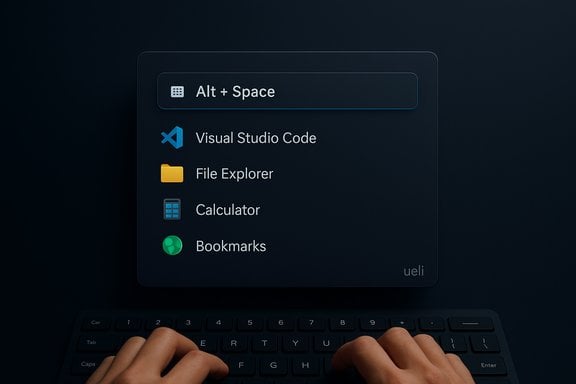
Ueli is the lightweight, keyboard‑first launcher many Windows users will appreciate — a fast, cross‑platform alt+space experience that feels native, tucks into a minimal workflow, and solves a simple but persistent problem: opening unpinned apps and files without reaching for the mouse.
Background / Overview
Ueli started as an open, cross‑platform keystroke launcher with a focus on speed, simplicity, and keyboard‑driven workflows. It runs on Windows, macOS, and Linux and ships with an extensions system (called “Extensions” since v9) that exposes built‑in utilities like app search, a calculator, currency conversion, browser bookmark search, and system commands. The project is published openly on GitHub and distributed via official channels such as the Microsoft Store and package managers. The appeal is straightforward: press a single hotkey (default Alt + Space), type what you want, and press Enter — apps, folders, bookmarks, simple calculations and scripted workflows appear instantly. The interaction model reduces mouse travel and keeps your hands on the keyboard, which is precisely why many users trade the Start menu for a dedicated launcher.Why Ueli matters in 2025
The productivity gap Ueli fills
Windows search and the Start menu have improved, but they still introduce friction in keyboard‑first workflows: discoverability, web-first results, or the need to unhide an auto‑hidden taskbar when a window covers the desktop. Ueli eliminates that friction with a single, low‑latency prompt that appears even when applications are fullscreen. That’s a small change that compounds into measurable time savings for frequent context switches.Cross‑platform consistency
For people who use multiple operating systems, Ueli’s near‑identical interface on Windows, macOS and Linux is a meaningful advantage: once you learn the hotkeys and commands, you can move between machines without a retraining cost. The GitHub project and packaged builds explicitly support those platforms and recommend official distribution channels like the Microsoft Store or the project website.Deep dive: Features and day‑to‑day use
Instant access and responsiveness
- Default hotkey: Alt + Space (customizable). This invokes the prompt from any context — even when other windows fill the screen — eliminating the need to reveal the taskbar.
- Fuzzy search: Ueli uses fuzzy matching to surface apps and files without exact typing, which reduces cognitive load and speeds lookups.
- Low overhead: the app is lightweight and designed to be always available without noticeable system impact.
Built‑in extensions you’ll actually use
Ueli ships with a curated set of built‑in extensions that cover common needs out of the box:- Application Search — fast app launching and favorites.
- File/Folder search and quick open actions.
- Calculator with operator precedence.
- Browser Bookmarks search (for a handful of common browsers).
- Currency Converter and Base64/Color conversion utilities.
- System Commands — shutdown, sleep, empty recycle bin, etc.
- Workflows — sequences of actions to automate starting a session (open apps, folders, or run commands).
Appearance and configuration
Ueli emphasizes a clean, Windows‑friendly aesthetic and exposes visual options such as theme selection, search bar sizing, and a few layout tweaks. Settings are accessible from the UI and many behaviors — like favorite prioritization and which extensions are enabled — are toggles rather than long configuration files.Installation and platform notes
- Windows: install from the Microsoft Store or use winget: winget install Ueli -s msstore. If you prefer manual installers, GitHub releases are available but unsigned builds may be blocked by Windows Defender SmartScreen.
- macOS: download the app from the official site or releases; macOS Gatekeeper may prompt you to Open Anyway because binaries are not always signed or notarized.
- Linux: distribution packages and manual downloads exist; global hotkeys may require extra configuration under Wayland.
What Ueli does well
- Speed and low latency: the prompt appears instantly and returns results fast, even on large catalogs.
- Keyboard‑first ergonomics: designed for people who refuse to touch the mouse for app launches and quick tasks.
- Workflows: built‑in automation for common multi‑app start routines reduces repetitive steps.
- Cross‑platform parity: consistent behavior across Windows, macOS and Linux means fewer surprises for multi‑OS users.
Where Ueli falls short (and what to watch out for)
Small extension ecosystem
One persistent critique is that Ueli ships with roughly around 20 extensions and currently lacks a thriving community marketplace for third‑party add‑ons. That means the launcher covers general use cases well (calculator, bookmarks, currency conversion), but it doesn’t match rivals that offer hundreds of community extensions for niche integrations. Multiple hands‑on reviews and the launcher’s documentation corroborate this limitation. If you rely on deep integrations (e.g., advanced cloud services, IDE commands, or unusual tools), Ueli may feel constrained.Plugin extensibility & customization nuances
While Ueli’s Extensions model is pluggable in the source tree, the end‑user experience for adding community extensions is not as polished as platforms that host extension stores or third‑party repositories. The v9 rewrite renamed “plugins” to “extensions” and required some older plugins to be reworked, which is likely part of the growing pains for a project that has evolved substantially. For users who prize a huge third‑party ecosystem, that’s a tradeoff to accept.Not a full Start‑menu replacement for everyone
Ueli is built to complement or replace search and quick app launching, but it doesn’t zombify the entire Start menu experience: some settings, recommended items, and deep system UI behaviors are still handled by Windows natively. Users who want a complete visual Start overhaul (tile reorganization, aesthetic Start replacements) will still need separate tools.Security, privacy and reliability considerations
- Use official distribution channels: GitHub releases, the Microsoft Store and official website builds reduce the risk of tampered installers. The GitHub README explicitly recommends the Microsoft Store or the official site.
- Unsigned binaries: manual downloads may be unsigned on macOS and Windows; that will trigger Gatekeeper/SmartScreen warnings and is expected behavior from the project because of distribution costs. Treat unsigned installers with caution; prefer store/package manager installs when available.
- Extension telemetry & permissions: the shipped extensions do things like read bookmarks or perform file searches — operations that require local access. There’s no indication the extension model exfiltrates data by default, but users should audit which extensions are enabled and review permissions for anything that reaches into browsers or network services. Applying a minimal‑enabled approach (only enable what you need) reduces surface area.
How Ueli compares to popular alternatives
Ueli vs PowerToys Run
PowerToys Run is a zero‑cost, Microsoft‑supported launcher that comes with PowerToys. It’s fast and integrated but intentionally less configurable than some third‑party launchers. Ueli offers more built‑in utilities (Workflows, currency conversion, bookmarks) and cross‑platform parity, while PowerToys Run remains a safe, native choice for strictly Windows environments. Choose PowerToys Run for official support and smaller attack surface; choose Ueli for extra utilities and cross‑OS consistency.Ueli vs Flow Launcher / Wox / Raycast
- Flow Launcher and Wox have extensive plugin ecosystems and tight integration with external indexers (Everything), which power users love for deep extensibility.
- Raycast (macOS primary, Windows preview) and Flow have broad extension stores and cloud sync options that Ueli lacks.
If you depend on a huge library of third‑party extensions or need specific integrations, contenders like Flow Launcher or Raycast are better suited. Ueli’s advantage is simplicity and a focused, curated set of high‑utility extensions.
Practical setup: recommended configuration for a clean, fast workspace
- Install Ueli from the Microsoft Store or winget to avoid unsigned binary prompts.
- Set the hotkey to Alt + Space (default) or a combo that avoids conflicts. Use Alt + Space to save both hands.
- Open Settings → Extensions and enable only the features you need (Application Search, Calculator, Browser Bookmarks, Workflows). This reduces noise and memory footprint.
- Create a “start work” Workflow that opens your browser to the necessary tabs, your editor, and project folders. Bind it to a memorable command like work:start.
- Add frequently used items to Favorites from the additional actions menu to keep them at the top of results.
Realistic expectations and troubleshooting
- If a hotkey fails on some Linux Wayland sessions, bind a custom system shortcut or use the toggle CLI to show the main window — the README documents known Wayland caveats.
- If you rely on browser bookmarks, test the Browser Bookmarks extension against your browser — some browsers require explicit profiles or paths to be discovered. The extension supports common browsers, but browser diversity can complicate discoverability.
- When upgrading between major versions (notably the v8 → v9 rewrite), settings incompatibilities can occur; keep a backup of your config if you rely on precise behavior. Release notes and changelogs warn users about incompatible settings across major rewrites.
Verdict: who should try Ueli — and who should skip it
Try Ueli if:- You value a fast, keyboard‑first app launcher that reduces mouse travel and stays out of your way.
- You run multiple desktop OSes and want a consistent launcher across machines.
- You appreciate curated built‑in features like Workflows, quick system commands, and a compact toolset without plugin noise.
- You rely on a large third‑party extension ecosystem for specialized integrations (go for Flow Launcher, Wox or Raycast).
- You need an officially signed, vendor‑backed launcher and prefer Microsoft‑maintained tooling over community projects; in that case, PowerToys Run is a safer, more conservative choice.
Final thoughts and practical takeaway
Ueli brings a polished, minimal, and keyboard‑first launcher experience to Windows and other platforms. In a world where small friction — the extra mouse move to reveal a taskbar — can break flow dozens of times per day, a quick alt+space launcher can feel like a disproportionately large win. Its Workflows feature and curated extensions make it exceptionally useful for everyday tasks, and the app’s cross‑platform parity is an underrated advantage for people who hop between machines.That said, Ueli’s intentionally limited extension ecosystem is both a strength and a weakness: it keeps the experience focused and low overhead, but it won’t satisfy users who depend on hundreds of community plugins for bespoke workflows. Cross‑checking the project’s documentation, community writeups and package listings shows it’s actively maintained and packaged across ecosystems; still, prefer store or package‑manager installs to tighten security and avoid unsigned binary prompts. If your goal is a cleaner, faster workflow and you prefer keeping your hands on the keyboard, install Ueli, set the hotkey (Alt + Space), enable the extensions you need, and try a Workflow or two. The setup takes minutes, but the day‑to‑day convenience compounds quickly — and that’s exactly the kind of small productivity upgrade that makes Ueli worth trying.
Source: MakeUseOf This is the Windows 11 launcher everyone should try but nobody talks about
