

UGREEN’s Maxidok 17-in-1 arrives at exactly the right moment for the Thunderbolt 5 era: a premium dock that tries to solve more than one desktop problem at once. It is not just a port expander, but a storage hub, a multi-display controller, and a serious workstation accessory built for creators, developers, and power users who want fewer compromises on their desks. The standout feature is the built-in M.2 PCIe 4.0 SSD slot, which turns the dock into something more ambitious than the usual “USB ports plus Ethernet” formula, while the headline limitation is equally clear: 2.5Gb Ethernet may feel modest for some high-end users.
Thunderbolt docks have spent years evolving from simple convenience accessories into desk-center infrastructure. Early models were mostly about solving the basic laptop problem: too few ports, not enough legacy connectivity, and the annoyance of unplugging everything every time you left the office. Over time, premium docks became more ambitious, adding higher-power laptop charging, faster networking, and support for increasingly complex monitor configurations.
The arrival of Thunderbolt 5 changes the standard again. With more bandwidth to work with, dock makers can support faster external storage, more display headroom, and a bigger pile of peripherals without the same bottlenecks that defined earlier generations. That matters because modern laptop users often want desktop-class behavior from a machine that still needs to be portable. The dock becomes the bridge between those two identities.
UGREEN’s Maxidok 17-in-1 sits in that newer category of “everything hubs,” where the product is no longer just a cable convenience but an input/output strategy. The company is clearly targeting buyers who already own premium laptops and want a single attachment point for monitors, card readers, audio gear, network access, USB accessories, and local expansion storage. The inclusion of an internal SSD slot shows that UGREEN understands how creator workflows have shifted toward portable, modular, and frequently moved data sets.
That positioning also explains why the product is being compared to high-end competitors such as CalDigit’s TS5 Plus. In this class, buyers are not choosing between “good enough” and “not good enough.” They are choosing between equally premium docks with different strengths: one may offer better Ethernet, another quieter cooling, another more power delivery, and another a feature that solves a specific workflow problem. UGREEN’s answer is to make the dock itself part of the storage ecosystem, which is a more unusual and potentially more compelling angle.
The product’s naming also tells a story. “17-in-1” is not merely marketing inflation; it signals a deliberate attempt to satisfy a wide spread of user demands in one enclosure. That includes front-access convenience, rear-mounted fixed wiring, and enough bandwidth to serve multiple displays and storage devices simultaneously. In practical terms, that means the dock is trying to reduce the number of separate boxes on the desk.
It also creates a new kind of portability. Instead of carrying an external SSD separately, the user can keep a drive permanently installed inside the dock and have it available to any connected Thunderbolt 5 laptop. UGREEN says the slot supports M.2 sizes from 2230 to 2280, with capacities up to 8TB, which broadens its appeal to different storage budgets and workflows.
Key design advantages include:
On the back, the dock adds three USB-A 3.2 Gen 2 ports, a separate 3.5mm audio input and microphone input, DisplayPort 1.4, 2.5Gb Ethernet, two downstream Thunderbolt 5 ports, and a Kensington lock slot. This is the sort of layout that acknowledges real-world cable habits rather than idealized cable management fantasies. Frequently used accessories go where you can reach them; permanent connections go where you can hide them.
The SD and microSD readers are UHS-II class, and the review notes that they worked simultaneously without issue. That may sound minor, but it is exactly the kind of friction point that separates a premium dock from a merely expensive one. A dock that can handle two card readers at once is more valuable to photographers and video editors than one that looks impressive on paper but stalls in real use.
One notable tradeoff is that the native display output is DisplayPort, not HDMI. That is not a flaw, but it does mean some users will need adapters if their monitor setup is HDMI-based. In a premium dock, this is less of a technical problem than a convenience problem, yet convenience is precisely why buyers pay for this class of product.
That said, the headline specs depend on the host laptop. With a Thunderbolt 5 system, the dock can stretch its legs. With a Thunderbolt 4 or USB4 laptop, the performance drops to dual 2K displays at 120Hz each according to the review. That distinction is vital because buyers may be tempted to see the dock as future-proof without realizing that the host machine still defines the ceiling.
The refresh-rate claims are especially interesting because they show how far desktop docking has advanced. A dock used to be a compromise point where display performance was reduced to make room for convenience. Thunderbolt 5 is changing that equation, allowing docks to function much closer to native desktop behavior than before. That makes the Maxidok 17-in-1 feel like a real workstation platform rather than a peripheral afterthought.
Important implications:
At the same time, the dock’s downstream Thunderbolt 5 ports each provide 15W of charging, which is enough for smaller peripherals but not enough to meaningfully power everything. That is acceptable, but it does place UGREEN slightly behind some rivals in outright power flexibility. The review’s comparison to the CalDigit TS5 Plus makes that point plainly: CalDigit offers better laptop charging and faster Ethernet, but it lacks the integrated SSD slot.
It is also worth noting that charging requirements vary widely across modern laptops. Many content-creation notebooks, workstation machines, and gaming laptops can draw enough power that only a handful of docks truly qualify as “single-cable everything” solutions. The Maxidok’s 140W ceiling will be sufficient for many users, but not all. In a premium market, almost enough is sometimes enough, but only when the rest of the dock is compelling.
A few practical observations stand out:
That matters because premium workflows increasingly involve local storage over the network. Photographers moving image libraries, video editors accessing shared assets, and developers syncing large repos may all benefit from faster wired networking. In those cases, 10Gb Ethernet can become more than a luxury; it can become a real productivity advantage. The review explicitly notes that CalDigit’s TS5 Plus pushes up to 10Gb, which gives it a networking edge.
That is why this omission is worth discussing even if it will not matter to every buyer. In high-end docks, the networking choice is often a proxy for the audience the manufacturer really had in mind. UGREEN seems to have aimed at creators and power users broadly, but not necessarily at the most network-intensive subset of that group.
The lack of vertical flexibility is a practical compromise. A dock that supports both orientations can be easier to place in tight offices or behind monitors, but it also complicates thermal design and chassis structure. UGREEN appears to have prioritized stability and cooling predictability over placement versatility.
Usability also benefits from the little touches. The power button and LED indicator are not glamorous, but they help users know whether the dock is live, sleeping, or disconnected. That reduces confusion in multi-device setups where one loose cable can make the whole arrangement feel unreliable.
CalDigit appears stronger on pure dock fundamentals: better charging, more ports, passive cooling, and 10Gb Ethernet. UGREEN, on the other hand, brings the internal M.2 SSD slot, front-access card readers, and a port mix that feels especially appealing to creators who need quick local storage integrated into the dock itself. That is not a trivial difference. For many buyers, the SSD feature may be more useful than a slightly better Ethernet port.
Comparative strengths:
That trend should continue as Thunderbolt 5 becomes more common. The more bandwidth laptop makers expose, the more room accessory brands have to rethink what a dock can be. If UGREEN’s approach succeeds, expect more rivals to explore built-in storage, more elaborate display claims, and higher expectations for workflow-specific features instead of generic port count inflation.
Source: Windows Central https://www.windowscentral.com/hard...-1-u716-thunderbolt-5-docking-station-review/
 Background
Thunderbolt docks have spent years evolving from simple convenience accessories into desk-center infrastructure. Early models were mostly about solving the basic laptop problem: too few ports, not enough legacy connectivity, and the annoyance of unplugging everything every time you left the office. Over time, premium docks became more ambitious, adding higher-power laptop charging, faster networking, and support for increasingly complex monitor configurations.The arrival of Thunderbolt 5 changes the standard again. With more bandwidth to work with, dock makers can support faster external storage, more display headroom, and a bigger pile of peripherals without the same bottlenecks that defined earlier generations. That matters because modern laptop users often want desktop-class behavior from a machine that still needs to be portable. The dock becomes the bridge between those two identities.
UGREEN’s Maxidok 17-in-1 sits in that newer category of “everything hubs,” where the product is no longer just a cable convenience but an input/output strategy. The company is clearly targeting buyers who already own premium laptops and want a single attachment point for monitors, card readers, audio gear, network access, USB accessories, and local expansion storage. The inclusion of an internal SSD slot shows that UGREEN understands how creator workflows have shifted toward portable, modular, and frequently moved data sets.
That positioning also explains why the product is being compared to high-end competitors such as CalDigit’s TS5 Plus. In this class, buyers are not choosing between “good enough” and “not good enough.” They are choosing between equally premium docks with different strengths: one may offer better Ethernet, another quieter cooling, another more power delivery, and another a feature that solves a specific workflow problem. UGREEN’s answer is to make the dock itself part of the storage ecosystem, which is a more unusual and potentially more compelling angle.
Design Philosophy and Product Positioning
UGREEN has clearly designed the Maxidok 17-in-1 to be a desk anchor rather than a travel accessory. Its size, vented chassis, and two-tone styling all point to a permanent workstation role. That is important because Thunderbolt 5 docks are increasingly purchased by users who want to create a stable, repeatable desktop setup around a premium laptop.The product’s naming also tells a story. “17-in-1” is not merely marketing inflation; it signals a deliberate attempt to satisfy a wide spread of user demands in one enclosure. That includes front-access convenience, rear-mounted fixed wiring, and enough bandwidth to serve multiple displays and storage devices simultaneously. In practical terms, that means the dock is trying to reduce the number of separate boxes on the desk.
Why the Built-in SSD Slot Matters
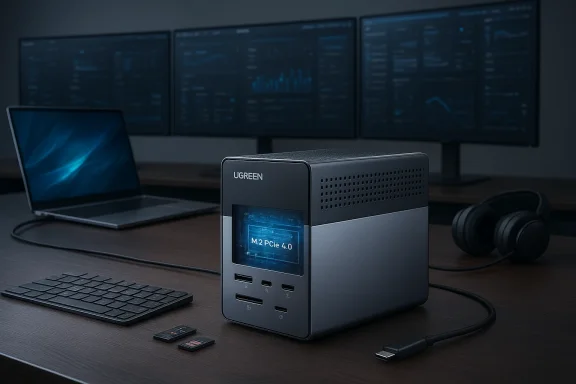
The most interesting design choice is the M.2 PCIe 4.0 SSD slot. That slot allows the dock to function not just as a connectivity layer, but as a storage layer too. For users who move between systems, keep work files local, or need fast scratch space for media projects, that is an elegant solution.It also creates a new kind of portability. Instead of carrying an external SSD separately, the user can keep a drive permanently installed inside the dock and have it available to any connected Thunderbolt 5 laptop. UGREEN says the slot supports M.2 sizes from 2230 to 2280, with capacities up to 8TB, which broadens its appeal to different storage budgets and workflows.
Key design advantages include:
- A built-in NVMe SSD bay for integrated storage expansion
- A desk-friendly form factor built for permanent setups
- A front panel that prioritizes quick-access devices
- A rear panel that keeps the cable clutter out of sight
- Support for a wide range of SSD lengths from 2230 to 2280
- A premium finish that matches high-end laptops and monitors
Ports and Connectivity
The port layout is one of the strongest signs that UGREEN understood the target audience. On the front, the dock offers three USB-C 3.2 Gen 2 ports rated at 10Gbps, along with UHS-II SD and microSD card readers, a 3.5mm combo audio jack, a power button, and an LED indicator. That front-panel convenience matters more than many people expect because it handles the fast-turnaround tasks that happen constantly on a productive desk.On the back, the dock adds three USB-A 3.2 Gen 2 ports, a separate 3.5mm audio input and microphone input, DisplayPort 1.4, 2.5Gb Ethernet, two downstream Thunderbolt 5 ports, and a Kensington lock slot. This is the sort of layout that acknowledges real-world cable habits rather than idealized cable management fantasies. Frequently used accessories go where you can reach them; permanent connections go where you can hide them.
Front Panel Convenience
The front panel is built for frequent swapping. That is especially valuable for creators using card media, for remote workers connecting headsets, and for users who cycle through USB-C accessories during the day. UGREEN also claims that two of the front USB-C ports can share 60W total charging, or roughly 30W each if divided evenly, which makes them suitable for phones, tablets, controllers, and smaller devices.The SD and microSD readers are UHS-II class, and the review notes that they worked simultaneously without issue. That may sound minor, but it is exactly the kind of friction point that separates a premium dock from a merely expensive one. A dock that can handle two card readers at once is more valuable to photographers and video editors than one that looks impressive on paper but stalls in real use.
Rear Panel Practicality
The rear panel is where the Maxidok 17-in-1 reveals its workstation DNA. Three USB-A ports keep legacy peripherals alive, while the separate audio and microphone jacks preserve compatibility with older desktop habits and pro-audio-ish setups. The inclusion of two downstream Thunderbolt 5 ports also extends flexibility, allowing users to daisy-chain or feed additional devices without giving up the main upstream connection.One notable tradeoff is that the native display output is DisplayPort, not HDMI. That is not a flaw, but it does mean some users will need adapters if their monitor setup is HDMI-based. In a premium dock, this is less of a technical problem than a convenience problem, yet convenience is precisely why buyers pay for this class of product.
Display Support and Bandwidth
The display story is where Thunderbolt 5 docks either shine or fall apart. UGREEN’s Maxidok 17-in-1 makes an aggressive claim: with the right laptop, it can drive three external 4K displays at 144Hz each, or dual 8K displays at 60Hz. If you reduce the workload to dual 4K panels, the dock can reportedly push them up to 240Hz. Those are not casual office numbers; they are enthusiast-grade display capabilities aimed squarely at users with expensive monitors and modern machines.That said, the headline specs depend on the host laptop. With a Thunderbolt 5 system, the dock can stretch its legs. With a Thunderbolt 4 or USB4 laptop, the performance drops to dual 2K displays at 120Hz each according to the review. That distinction is vital because buyers may be tempted to see the dock as future-proof without realizing that the host machine still defines the ceiling.
What This Means in Practice
For creators and multitaskers, triple-display support is not about vanity. It is about keeping timelines, source material, communication tools, and reference apps visible without constantly switching windows. For traders, developers, and analysts, the benefits are similar: more visible information means fewer context switches and better workflow density.The refresh-rate claims are especially interesting because they show how far desktop docking has advanced. A dock used to be a compromise point where display performance was reduced to make room for convenience. Thunderbolt 5 is changing that equation, allowing docks to function much closer to native desktop behavior than before. That makes the Maxidok 17-in-1 feel like a real workstation platform rather than a peripheral afterthought.
Important implications:
- Thunderbolt 5 owners get the full feature set
- Thunderbolt 4/USB4 users get a more limited experience
- High-refresh productivity setups now have more dock options
- Multi-monitor workflows are becoming a central dock use case
- DisplayPort-first designs still create some adapter friction
Power Delivery and Charging Strategy
Charging is one of the areas where premium dock buyers tend to be unforgiving. If a dock is supposed to replace a charging brick, it needs to do the job cleanly and consistently. The Maxidok 17-in-1 offers up to 140W of charging power on the upstream Thunderbolt 5 connection, which is enough to handle many premium laptops, even if some competing docks are more generous.At the same time, the dock’s downstream Thunderbolt 5 ports each provide 15W of charging, which is enough for smaller peripherals but not enough to meaningfully power everything. That is acceptable, but it does place UGREEN slightly behind some rivals in outright power flexibility. The review’s comparison to the CalDigit TS5 Plus makes that point plainly: CalDigit offers better laptop charging and faster Ethernet, but it lacks the integrated SSD slot.
The Tradeoff Between Power and Features
This is where product strategy gets interesting. UGREEN appears to have chosen to allocate budget and internal space toward storage integration and port density rather than maximizing every charging metric. That is a reasonable call if the target user values workflow consolidation more than charging bragging rights.It is also worth noting that charging requirements vary widely across modern laptops. Many content-creation notebooks, workstation machines, and gaming laptops can draw enough power that only a handful of docks truly qualify as “single-cable everything” solutions. The Maxidok’s 140W ceiling will be sufficient for many users, but not all. In a premium market, almost enough is sometimes enough, but only when the rest of the dock is compelling.
A few practical observations stand out:
- Upstream charging is strong enough for many high-end laptops
- Downstream charging is modest but serviceable
- Power strategy favors stability over excess
- Users with very power-hungry notebooks should check OEM requirements
- The dock’s feature mix may matter more than wattage alone
Ethernet and Networking Limits
The most obvious compromise on the Maxidok 17-in-1 is 2.5Gb Ethernet. For many users, that is more than enough. It is well above the old 1Gb standard and should satisfy fast broadband, NAS access, and typical office networking. But for a dock that aims at the top tier, 2.5Gb can feel a little conservative.That matters because premium workflows increasingly involve local storage over the network. Photographers moving image libraries, video editors accessing shared assets, and developers syncing large repos may all benefit from faster wired networking. In those cases, 10Gb Ethernet can become more than a luxury; it can become a real productivity advantage. The review explicitly notes that CalDigit’s TS5 Plus pushes up to 10Gb, which gives it a networking edge.
Who Will Notice the Difference?
Most ordinary office users will not. If your network bottleneck is your ISP or a standard router, 2.5Gb is already plenty. But if you have a NAS, a 10Gb backbone, or a high-speed internal workflow, the difference between 2.5Gb and 10Gb can be large enough to affect actual time spent waiting.That is why this omission is worth discussing even if it will not matter to every buyer. In high-end docks, the networking choice is often a proxy for the audience the manufacturer really had in mind. UGREEN seems to have aimed at creators and power users broadly, but not necessarily at the most network-intensive subset of that group.
Networking takeaways
- 2.5Gb Ethernet is good for mainstream premium use
- 10Gb would have made the dock more future-proof
- NAS-heavy users may prefer rival models
- The dock still fits well in most home offices
- This is a compromise, not a dealbreaker
Thermal Design, Layout, and Day-to-Day Usability
Docking stations are easy to judge on spec sheets and harder to judge on a crowded desk. The Maxidok 17-in-1 uses angled venting and a compact, premium enclosure that looks built for passive confidence rather than flashy attention. The review notes that it is attractive but large, and also points out a limitation: it can only be used in a horizontal orientation. For some desks, that will be a non-issue. For others, it will matter more than expected.The lack of vertical flexibility is a practical compromise. A dock that supports both orientations can be easier to place in tight offices or behind monitors, but it also complicates thermal design and chassis structure. UGREEN appears to have prioritized stability and cooling predictability over placement versatility.
Why Thermals Matter More Than Aesthetics
A premium dock that runs hot or behaves inconsistently is worse than a less impressive one that stays solid. That is especially true for an SSD-equipped dock, where sustained heat can affect storage behavior over time. UGREEN includes thermal padding and a cover for the internal M.2 slot, which suggests that the company understands the importance of heat management around the drive bay.Usability also benefits from the little touches. The power button and LED indicator are not glamorous, but they help users know whether the dock is live, sleeping, or disconnected. That reduces confusion in multi-device setups where one loose cable can make the whole arrangement feel unreliable.
Everyday usability points
- Horizontal-only design may constrain placement
- Venting suggests a focus on stable cooling
- SSD thermal management is built into the design
- Front-panel access improves daily convenience
- Status indicators reduce setup confusion
Comparison With Key Rivals
UGREEN is entering a segment where rivals already have strong reputations, and that makes comparison unavoidable. The review directly places the Maxidok 17-in-1 against the CalDigit TS5 Plus, which is a smart benchmark because it has the same general premium positioning and similar price. Both are high-end Thunderbolt 5 docks intended for serious desk users, but they prioritize different strengths.CalDigit appears stronger on pure dock fundamentals: better charging, more ports, passive cooling, and 10Gb Ethernet. UGREEN, on the other hand, brings the internal M.2 SSD slot, front-access card readers, and a port mix that feels especially appealing to creators who need quick local storage integrated into the dock itself. That is not a trivial difference. For many buyers, the SSD feature may be more useful than a slightly better Ethernet port.
The Feature Tradeoff
This is where the Maxidok 17-in-1 becomes compelling. It does not necessarily beat every rival across every metric, but it offers a more distinctive answer to the question, “What if my dock also solved storage?” That added functionality makes it easier to justify a premium purchase, especially when the dock is already discounted at launch. The review notes a launch offer that brings the price down from $499.99 to $390, which makes the package look even more competitive.Comparative strengths:
- UGREEN: integrated SSD slot and strong display support
- UGREEN: creator-friendly front card-reader access
- CalDigit: stronger Ethernet and passive cooling
- CalDigit: better charging behavior
- Both: premium Thunderbolt 5 positioning
- Both: appropriate for serious workstation use
Strengths and Opportunities
UGREEN’s Maxidok 17-in-1 stands out because it solves several problems at once instead of excelling at just one. Its strongest opportunity is among users who want a premium, future-facing dock that also reduces the need for a separate external SSD. For the right laptop owner, it can simplify the entire desktop setup.- Built-in M.2 PCIe 4.0 SSD slot adds real workflow value
- Thunderbolt 5 support keeps the dock ahead of older standards
- Triple 4K@144Hz display support is a major creator and multitasker win
- 15 downstream ports make it highly flexible
- UHS-II card readers help photographers and media users
- 140W upstream charging is strong enough for many premium laptops
- Launch pricing makes the value proposition more attractive
Risks and Concerns
The Maxidok 17-in-1 is not without compromise, and the biggest risk is that some buyers will expect a flawless top-tier dock when the product is really a set of tradeoffs tuned toward a specific audience. Its limitations are reasonable, but they are still limitations. That matters because premium users tend to notice every compromise very quickly.- 2.5Gb Ethernet may feel underpowered to network-heavy users
- 15W Thunderbolt charging on downstream ports is modest
- DisplayPort-first design may require HDMI adapters
- Horizontal-only use reduces placement flexibility
- Thunderbolt 5 features depend on having a compatible laptop
- Some users may prefer passive cooling over an active or vented design
- Premium pricing can still feel high if the SSD slot is unused
Looking Ahead
The Maxidok 17-in-1 points toward a future where docks become smarter, more specialized, and more deeply integrated into the workflow. The days of treating docks as glorified port splitters are over. Users now want docks that can also manage storage, reduce cable clutter, improve display flexibility, and serve as semi-permanent desk companions. UGREEN is clearly betting that the next premium dock buyer wants more than ports; they want infrastructure.That trend should continue as Thunderbolt 5 becomes more common. The more bandwidth laptop makers expose, the more room accessory brands have to rethink what a dock can be. If UGREEN’s approach succeeds, expect more rivals to explore built-in storage, more elaborate display claims, and higher expectations for workflow-specific features instead of generic port count inflation.
What to Watch Next
- Wider adoption of Thunderbolt 5 laptops and peripherals.
- Whether other dock makers add built-in SSD bays.
- Competitive responses around 10Gb Ethernet.
- Improved firmware and display compatibility across mixed monitor setups.
- Launch pricing and long-term discount stability.
- Real-world thermal behavior during extended SSD and display loads.
Source: Windows Central https://www.windowscentral.com/hard...-1-u716-thunderbolt-5-docking-station-review/
