

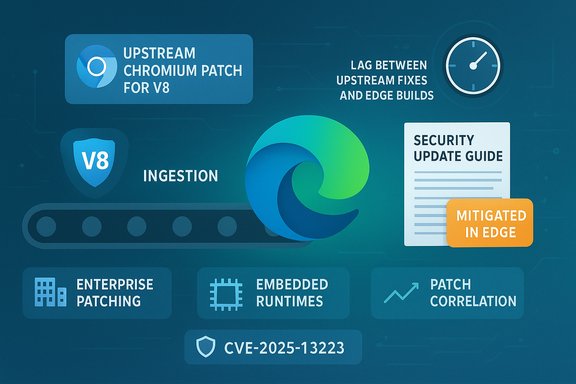
Chromium’s V8 type‑confusion flaw tracked as CVE‑2025‑13223 is listed in Microsoft’s Security Update Guide because Microsoft Edge (the Chromium‑based browser) consumes Chromium’s V8 engine — the Security Update Guide entry is the downstream signal that tells Edge customers whether Microsoft has ingested the upstream Chromium fix and shipped an Edge build that is no longer vulnerable.
Chromium is an open‑source browser platform that supplies core subsystems — including Blink (rendering) and V8 (JavaScript and WebAssembly engine) — to many widely used browsers. When a security issue is discovered in an upstream component such as V8, Google/Chromium assigns a CVE and publishes a Chromium/Chrome release that contains the remediation. Downstream vendors like Microsoft then ingest the upstream change into their own product trees, run vendor‑level testing, and ship a vendor‑specific update. Microsoft records the upstream CVE in its Security Update Guide (SUG) to declare the remediation status of Microsoft products such as Edge; that is why a Chromium CVE appears on Microsoft’s SUG even though the root bug lives in Chromium upstream.
CVE‑2025‑13223 is publicly described as a type‑confusion bug in V8 that can lead to heap corruption. Public trackers classify the vulnerability as high severity and indicate the flaw could be triggered remotely by crafted web content, making it a high‑impact candidate for drive‑by exploitation if an attacker successfully chains it with other primitives. Independent trackers list the upstream affected Chromium/Chrome boundary and note the remediation landed in the Chromium 142 branch; until Microsoft ingests that remediation and ships Edge builds that include it, Edge installations may remain exposed.
Source: MSRC Security Update Guide - Microsoft Security Response Center
 Background / Overview
Chromium is an open‑source browser platform that supplies core subsystems — including Blink (rendering) and V8 (JavaScript and WebAssembly engine) — to many widely used browsers. When a security issue is discovered in an upstream component such as V8, Google/Chromium assigns a CVE and publishes a Chromium/Chrome release that contains the remediation. Downstream vendors like Microsoft then ingest the upstream change into their own product trees, run vendor‑level testing, and ship a vendor‑specific update. Microsoft records the upstream CVE in its Security Update Guide (SUG) to declare the remediation status of Microsoft products such as Edge; that is why a Chromium CVE appears on Microsoft’s SUG even though the root bug lives in Chromium upstream.CVE‑2025‑13223 is publicly described as a type‑confusion bug in V8 that can lead to heap corruption. Public trackers classify the vulnerability as high severity and indicate the flaw could be triggered remotely by crafted web content, making it a high‑impact candidate for drive‑by exploitation if an attacker successfully chains it with other primitives. Independent trackers list the upstream affected Chromium/Chrome boundary and note the remediation landed in the Chromium 142 branch; until Microsoft ingests that remediation and ships Edge builds that include it, Edge installations may remain exposed.
What the Security Update Guide entry actually means
The SUG is a downstream status report
- The Security Update Guide entry for a Chromium CVE does not imply Microsoft authored the bug. It records that the CVE exists in upstream Chromium and states whether Microsoft has shipped Edge builds that contain the upstream fix. This gives enterprise administrators a single authoritative place to determine Edge’s exposure status for a given CVE.
Why Microsoft documents upstream CVEs
- Edge is built on Chromium. A patch upstream in Chrome does not automatically flow into Microsoft Edge at the same moment because Microsoft must ingest, test, and ship the change. The SUG closes that timing/operational gap by mapping the CVE to the Microsoft product builds that include the ingestion. This mapping is vital for compliance reporting and patch‑management decisions in enterprise environments.
Practical interpretation
- When the SUG lists “Mitigated” or shows an Edge build number, that is the authoritative signal that Microsoft considers Edge remediated for that particular CVE. Enterprise teams should use this SUG mapping as their source of truth rather than inferring protection from Chrome release notes alone.
Why type‑confusion in V8 is treated as high risk
V8’s attack surface and impact
- V8 executes JavaScript and WebAssembly, running untrusted code delivered by web pages and web apps. Type confusion occurs when the engine interprets an object or value as the wrong internal type, and in highly optimized engines like V8, that mismatch can be leveraged to corrupt memory, create arbitrary read/write primitives, leak addresses, and ultimately achieve arbitrary code execution. Given the remote nature of the attack vector (visiting a web page), the impact is classified as high.
Historical precedent
- Memory‑safety and type‑confusion bugs in V8 have been exploited in the wild in past years. Because such bugs can be chained into sandbox escapes and system compromise, vendors prioritize fixes and often withhold low‑level exploit details until a large majority of users are patched to limit weaponization.
CVSS and severity
- Public trackers assign high CVSS scores to V8 type‑confusion bugs because they are network‑accessible, have low attack complexity, and require little or no privileges — factors that increase the likelihood and impact of exploitation. Independent advisory databases list CVE‑2025‑13223 with a high impact profile consistent with these properties.
How to see your browser version and confirm whether you’re protected
The quickest, most reliable way to confirm protection is to check your browser’s version string and compare it to the remediation build listed in Microsoft’s Security Update Guide for CVE‑2025‑13223.Microsoft Edge (desktop: Windows, macOS, Linux) — step‑by‑step
- Open Microsoft Edge.
- Type edge://settings/help into the address bar and press Enter, or open the three‑dot menu → Help and feedback → About Microsoft Edge.
- The About page displays the full Edge version string and automatically checks for updates; if an update is available it will download and prompt you to Restart to apply it.
- For more granular metadata, type edge://version into the address bar — that page shows the full version string, the underlying Chromium revision and V8 version used to build that Edge release. Use the full string when cross‑checking with the SUG entry.
Google Chrome (desktop)
- Open Chrome → Menu → Help → About Google Chrome (or chrome://settings/help). The About page shows the exact Chrome version and triggers an update check. For a more detailed readout, use chrome://version.
Mobile (Edge on Android/iOS)
- Open Edge → Settings → About (or App Info in the OS). Mobile releases are distributed via the Play Store or App Store and may not display the precise Chromium revision; consult vendor advisories for mapping mobile builds to upstream Chromium fixes.
Embedded Chromium (Electron apps, kiosks, WebView2)
- Many applications bundle their own Chromium runtime and do not auto‑update with the browser. Check the application’s About menu or vendor release notes for the embedded Chromium revision. Treat embedded runtimes as separate patching tasks and inventory them as part of your remediation plan.
Mapping Chromium / Chrome fixes to Edge: ingestion lag and operational reality
- Chrome and Edge use related but not identical release schedules. When Google ships a Chrome fix, downstream vendors must import (ingest) the change, adapt it to vendor packaging, run compatibility and security tests, and publish their own release. That ingestion window introduces a lag — sometimes hours, sometimes days — during which Chrome users might already be patched while Edge users are still awaiting Microsoft’s Edge build. SUG entries exist specifically to communicate when Microsoft has completed ingestion and shipping.
- For administrators: do not assume parity with Chrome. Use Microsoft’s Security Update Guide and Edge release notes to determine the exact Edge build that contains the fix; then compare that against reported build strings from endpoints. Automate this mapping where possible via your EMM/patch‑management tools.
Step‑by‑step: confirm protection for an individual machine
- Open Edge and visit edge://version. Copy the full version string (for example: 142.0.7444.xxx).
- Open Microsoft’s Security Update Guide and find the CVE entry for CVE‑2025‑13223. Note the Mitigated / Fixed in Edge build number Microsoft lists. (The SUG entry is the authoritative downstream signal.
- If your Edge version is equal to or newer than the SUG‑listed build, your browser is considered patched for that CVE. If it’s older, update Edge and relaunch; if you cannot update immediately, apply compensating controls (see next section).
Immediate actions and mitigation guidance
- For individual users:
- Update Microsoft Edge now (About → check for updates). Enable automatic updates if not already active.
- Consider temporarily avoiding high‑risk browsing (banking, admin consoles) until updates are confirmed on critical devices.
- For enterprise / security teams:
- Inventory all endpoints and applications that consume Chromium (Edge, Chrome, Electron apps, kiosk images, WebView2). Many embedded runtimes require vendor updates independent of the system browser.
- Collect full version strings from endpoints via management tooling and compare them against the SUG remediation boundary. Automate this where possible.
- Prioritize patching for privileged users, internet‑facing machines, and systems that process untrusted web content.
- If you cannot patch immediately, apply compensating controls: network filtering/URL allow‑listing, restrict browsing on high‑value machines, or temporarily switch sensitive tasks to a non‑Chromium browser (e.g., Firefox) where appropriate. Monitor EDR for anomalous browser behavior (renderer crashes, suspicious child processes) while rollouts complete.
Detection and incident response considerations
- Tune telemetry to detect unusual renderer crashes or memory corruption events that may indicate attempted exploitation. Collect crash dumps and process memory snapshots where possible for forensic analysis. Because exploit details are sometimes withheld until patches are widely deployed, vendors and incident responders often rely on crash telemetry, unusual process trees, and post‑exploit indicators to detect exploitation attempts.
- Treat serious V8 issues as high‑priority incidents: they are remotely reachable and have historically been used as the first stage in sandbox escape and compromise chains. Escalate accordingly and align patching timelines with incident response priorities.
Critical analysis — strengths, gaps and residual risks
Strengths (what vendors are doing right)
- Upstream/original‑discoverer disclosures and rapid upstream patches: Chromium and Chrome teams typically move quickly to fix V8 flaws once identified. Public trackers and vendor release notes make upstream remediation boundaries available promptly.
- Microsoft’s SUG provides an authoritative downstream record mapping upstream CVEs to shipped Edge builds, which is crucial for enterprise compliance and patch verification.
Gaps and operational friction
- Ingestion lag remains a real operational risk: enterprises which only track Chrome release notes (and not Microsoft’s SUG or Edge release notes) can mistakenly assume Edge is protected as soon as Chrome is patched. That assumption can leave endpoints vulnerable during the ingestion window.
- Embedded Chromium runtimes (Electron apps, kiosks, vendor appliances) are frequently overlooked. Those runtimes often remain on pinned Chromium revisions long after browsers update, creating persistent blind spots in many organizations.
Residual risks and realistic timelines
- Even after Microsoft ships a patched Edge build, organizational patch rollouts introduce additional lag. Enterprises should assume a realistic window between vendor remediation and universal endpoint protection and should plan compensating controls accordingly.
Cross‑checking claims and sources — verification notes
- Independent trackers and advisory databases list CVE‑2025‑13223 as a V8 type‑confusion issue with a high‑severity profile and identify Chromium/Chrome 142.x as the remediation branch. These independent records align with the operational explanation in Microsoft’s SUG mapping and the expected ingestion process for Edge.
- When a claim about active exploitation appears without corroborating vendor telemetry or official advisories, treat it as unverified. Public trackers sometimes indicate “exploited in the wild” for V8 issues, but organizations should rely on vendor or CERT advisories and observed telemetry to confirm active exploitation against their environment. Flag such claims with caution and prioritize vendor guidance.
Practical checklist (quick reference)
- For individual users:
- 1. Open Edge → edge://settings/help. Update and restart if necessary.
- 2. Confirm edge://version shows a build equal to or newer than the SUG remediation build.
- 3. Enable automatic updates.
- For enterprises:
- 1. Inventory all Chromium consumers (Edge, Chrome, Electron apps, WebView2).
- 2. Pull full version strings from endpoints; compare to the SUG “fixed in” Edge build for CVE‑2025‑13223.
- 3. Prioritize patching for high‑value systems and apply compensating controls until rollouts complete.
Conclusion
CVE‑2025‑13223 is a serious type‑confusion vulnerability in Chromium’s V8 engine with a high potential impact if weaponized. The presence of this CVE in Microsoft’s Security Update Guide is not an admission of fault by Microsoft, but an operational declaration: it tells Edge users whether Microsoft has ingested and shipped the upstream fix. The authoritative way to confirm protection is to compare your Edge version (edge://version or About) against the SUG’s “fixed in” Edge build and to patch any out‑of‑date endpoints immediately. For enterprises, the necessary actions extend beyond browser updates: inventory embedded Chromium runtimes, automate version checks against SUG mappings, and apply compensating controls where immediate patching isn’t feasible. Vigilance, automation, and a reliance on authoritative downstream records (SUG + Edge release notes) are the best defenses while the ecosystem continues to manage the upstream→downstream flow of critical browser fixes.Source: MSRC Security Update Guide - Microsoft Security Response Center
