

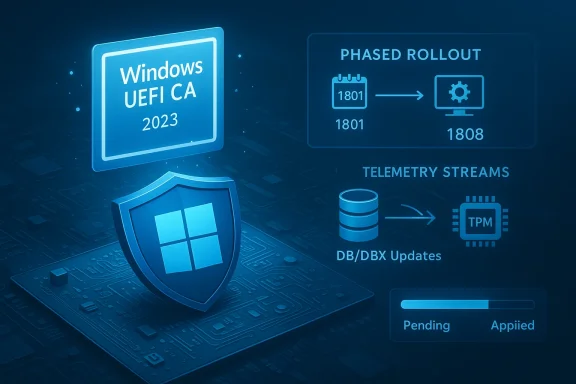
Microsoft’s staged refresh of the Secure Boot signing chain is working exactly as designed — it is a phased, telemetry-gated update that may produce informational TPM‑WMI events (including Event ID 1801) and transient “under observation” messages in Event Viewer, but those logs alone are not a sign of system compromise or immediate failure; they are status indicators that Windows and OEM firmware are coordinating to apply the new Windows UEFI CA 2023 certificate safely. (support.microsoft.com (support.microsoft.com
Background: why the Secure Boot certificate refresh matters
Secure Boot was introduced to PC platforms to stop tampered or unsigned boot components from running before the OS loads. Microsoft and the ecosystem relied on certificate authorities established around 2011 to sign boot managers and related components. Those certificates were never meant to last forever; the industry planned a generational refresh so boot‑time cryptographic signatures stay trustworthy as signing algorithms, operational practices, and attacker techniques evolve.The new signing chain — commonly referred to as Windows UEFI CA 2023 — is the replacement CA Microsoft and OEM partners are deploying so that future bootloader/boot manager updates are signed by a certificate that remains valid well beyond the original 2011 keys. Microsoft’s deployment strategy bundles the new CA into Windows servicing packages and coordinates with OEM firmware updates so the new certificate ends up either embedded in UEFI firmware or written into the firmware Secure Boot variables at the appropriate time. (support.microsoft.com (support.microsoft.com
Why this matters now: the 2011‑era Microsoft CA certificates are scheduled to start hitting expiration windows in 2026. If systems are not migrated to the new CA then, future boot‑level updates or signed boot managers could fail validation, producing degraded boot‑time security and compatibility issues. Microsoft’s phased rollout is intended to avoid edge‑case bricking and to allow OEMs and administrators to validate firmware behavior before a device is updated. (support.microsoft.com
What changed in February 2026 (what KB5077181 does and why you saw logs)
The February 10, 2026 cumulative update for Windows 11 (KB5077181) included logic to expand the telemetry and targeting data that determine whether a device is “ready” to receive the new Secure Boot certificates. That update does not forcibly rewrite every machine’s firmware; instead, it broadens Windows’ ability to stage certificate enrollment on devices that meet health and compatibility thresholds. In short: KB5077181 is a rollout enabler and safety filter, not a direct firmware flasher. (support.microsoft.comWhat that results in on real machines:
- Windows will report that new certificates are available to the operating system and whether the device is currently under observation or considered high‑confidence for applying the change. Those status messages are surfaced via TPM‑WMI events in Event Viewer.
- Event ID 1801 is logged as an error-level signal that the operating system has the updated certificate objects but the device’s firmware has not yet applied them — a synchronisation state. It is a cue for administrators to investigate if a device never progresses, but on consumer devices it commonly clears itself as the coordinated rollout continues. (support.microsoft.com
- Event ID 1808 is informational and indicates the certificates have been applied to firmware and the boot manager signature has been updated to the 2023 key. Event IDs 1034 and 1036 indicate DBX/DB updates were applied successfully and are part of the same family of notifications. (support.microsoft.com
How to verify the Windows UEFI CA 2023 certificate is present (step‑by‑step)
There are two practical verification angles: (A) check the Secure Boot databases from the OS, and (B) confirm the firmware‑applied status via Event Viewer.A. Verify from PowerShell (OS‑level checks)
Open PowerShell as Administrator and run the commands below. These are the core checks used by administrators and community troubleshooters.- Check the active DB (the variable that controls what the firmware trusts at boot):
[System.Text.Encoding]::ASCII.GetString((Get-SecureBootUEFI db).bytes) -match 'Windows UEFI CA 2023' - If the command returns True, the new CA certificate is already present in the active DB that Windows sees. If False, the OS has not yet had the certificate pushed into its active DB.
- Check the firmware default DB (this shows whether the certificate is baked into firmware and will survive a Secure Boot key factory reset):
[System.Text.Encoding]::ASCII.GetString((Get-SecureBootUEFI dbdefault).bytes) -match 'Windows UEFI CA 2023' - If this returns True, the certificate is embedded in your motherboard/UEFI and you generally won’t need a BIOS update. If False, Windows may need to write it into NVRAM, or your OEM might provide firmware that includes it.
- Confirm Secure Boot is enabled:
Confirm-SecureBootUEFI - This returns True when Secure Boot is active. If Secure Boot is disabled, DB/DBX updates cannot be trusted to protect boot-time integrity until it’s enabled and keys are in place.
- Some DB operations require a restart (and in a few cases two restarts) to commit into firmware NVRAM. If something looks unchanged after the first attempt, reboot and recheck.
B. Verify using Event Viewer (firmware status)
Open Event Viewer → Windows Logs → System and filter by Event Source “TPM‑WMI.” The events to look for:- Event ID 1808 (Information) — “This device has updated Secure Boot CA/keys.” This shows the firmware already has the 2023 CA and the boot manager has been updated. (support.microsoft.com
- Event ID 1801 (Error) — “Updated Secure Boot certificates are available on this device but have not yet been applied to the firmware.” This indicates the OS has the new certs staged or available but the firmware hasn’t imported them yet; often marked with a BucketConfidenceLevel such as “Under Observation.” Presence of 1801 is not immediate cause for alarm. (support.microsoft.com
- Event ID 1034 / 1036 (Information) — DBX/DB variable updates processed successfully. These confirm that revocation lists and allowed certificate entries were applied at the firmware level. (support.microsoft.com
Interpreting the logs: when to act and when to wait
- If your machine shows Event ID 1808, you are done. The certificate is applied and your system is in the new, supported signing chain. No action required.
- If your machine shows Event ID 1801 and the PowerShell checks show the DB does not contain the 2023 CA in firmware (dbdefault False) but the active DB includes it, this is a synchronized state where Windows has staged the update but the firmware has not yet accepted it — often because Microsoft’s telemetry gating is still determining it’s safe to proceed on that model. Wait a few days and allow Windows Update to continue. (support.microsoft.com
- If Event ID 1801 persists for many weeks and the firmware default DB does not contain the CA, check for OEM BIOS/UEFI updates for your model. Some older firmware requires a vendor update to accept DB writes or to bake the CARoot into firmware NVRAM. OEM advisories have model lists and minimum firmware versions for compatibility.
Practical remediation steps (consumer and admin workflows)
If you want to proactively move the process along (enterprise admins or experienced power users), follow these steps in order. Each step is designed to minimize risk.- Backup and prepare:
- Export or copy BitLocker recovery keys and suspend BitLocker if you will be performing firmware resets. A firmware/DB reset can trigger BitLocker recovery.
- Ensure you have administrative rights and recent system restore points (if available).
- Install Windows updates:
- Ensure the device has installed the latest SSU and LCU (servicing stack and cumulative updates). Microsoft’s guidance is that the DB update capability has been present in Windows updates since early 2024; you need the current servicing to participate. (support.microsoft.com
- Re-run PowerShell verification:
- Use the Get‑SecureBootUEFI db and dbdefault checks shown earlier. Reboot once or twice as recommended by the update guidance.
- If Windows Update didn’t apply the certificate but you have administrator control and must act now (enterprise only):
- Set the AvailableUpdates registry flag and trigger the scheduled Secure Boot update task:
Code:Set-ItemProperty -Path "HKLM:\SYSTEM\CurrentControlSet\Control\SecureBoot" -Name "AvailableUpdates" -Value 0x40 Start-ScheduledTask -TaskName "\Microsoft\Windows\PI\Secure-Boot-Update" - Reboot once or twice and check the PowerShell and Event Viewer status again. This is the same programmatic approach Microsoft documents for controlled deployments and lab testing. (support.microsoft.com
- If the update still fails and your firmware does not accept writes:
- Check the OEM support page for BIOS/UEFI updates that add the Windows UEFI CA 2023 cert to firmware. Many vendors published per‑model guidance and minimum firmware revisions. Apply vendor recommendations before re-attempting DB writes.
- Never resort to insecure shortcuts:
- Avoid toggling Secure Boot off/on, enabling Setup Mode, or wiping keys solely to “fix” Event Viewer messages. These actions are often the root cause of post‑update boot failures reported on community sites. If you have already forced key resets and the device won’t boot, OEM recovery media or vendor recovery instructions are typically the fix — not a second random key clear. (reddit.com
Enterprise considerations: planning and phased deployment
For IT teams managing fleets, Microsoft’s official guidance is conservative: pilot the DB update on representative test devices first, validate boot utilities (recovery images, imaging tools, custom WinPEs), and then roll out per hardware‑firmware cohorts. Microsoft documents controlled procedures (including the AvailableUpdates registry approach and Group Policy/MDM distribution options) so administrators can sequence firmware and OS updates in a way that avoids mass disruption. (support.microsoft.comKey enterprise checklist:
- Inventory models and firmware revisions; group devices by OEM and BIOS build.
- Ensure recovery and provisioning media are updated and signed appropriately for the 2023 CA family (Linux shims, custom WinPE, PXE environments may need updates).
- Pilot DB and DBX changes with BitLocker suspend procedures in place.
- Monitor TPM‑WMI telemetry and Event IDs 1801/1808/1034 as acceptance signals.
Known pitfalls and real‑world reports
Community reporting since the February rollout highlights a few recurring themes:- Devices on alternative servicing branches (for example, hotpatch or special hotfix channels) received different update sets and therefore showed different behaviors: some saw the KB5077181 change and progressed, others did not until the correct servicing baseline was applied. That’s expected given Microsoft’s phased targeting and channeling. (reddit.com
- Users who manually cleared Secure Boot keys to "fix" update errors have occasionally produced Secure Boot violations and temporary unbootability. This reinforces the guidance: don’t clear keys unless instructed by OEM support. (reddit.com
- Some specialized devices (servers, IoT) or older hardware may never be able to accept OS‑driven DB writes and will instead require an OEM firmware update that bakes the new CA into NVRAM. Vendor advisories are the authoritative list for those models.
Quick reference: What the most important event IDs mean
- 1808 (Information) — Firmware has the new Windows UEFI CA 2023 applied and boot manager updated. Good state. (support.microsoft.com
- 1801 (Error) — OS has updated certificates available but they have not yet been applied to firmware. Usually benign; check firmware state and allow the staged rollout. (support.microsoft.com
- 1034 / 1036 (Information) — DBX/DB variable updates were applied successfully. These confirm revocation and allowlist changes were processed. (support.microsoft.com
Final verdict and recommended next steps for readers
- The Filmogaz summary you cited is consistent with Microsoft’s published rollout strategy: the change is a planned Secure Boot CA refresh, included in Windows servicing and coordinated with OEM firmware; Event Viewer messages are part of the normal telemetry/staging process and usually do not require user action. Treat Event ID 1801 as a status flag, not an emergency. (support.microsoft.com
- If you are a consumer on a supported Windows 11 device: ensure Windows Update is current, don’t clear Secure Boot keys, and allow the phased update to complete. Use the PowerShell checks earlier to confirm presence if you’re curious. (support.microsoft.com
- If you are an IT admin: pilot carefully, use the AvailableUpdates registry toggle only in controlled test groups, and follow OEM firmware advisories for models that require vendor updates. Update your recovery and provisioning images to be compatible with the 2023 CA before broad rollouts. (support.microsoft.com
Closing analysis: strengths and risks of Microsoft’s approach
Strengths- Microsoft’s phased, telemetry‑gated rollout reduces the risk of a single update causing wide‑scale boot failures. The staged model allows Microsoft and OEMs to hold back devices that present known firmware quirks, minimizing harm to end users. (support.microsoft.com
- Including the new CA into firmware by default on new systems (starting 2024 shipments) minimizes future update burden for newer hardware and simplifies long‑term lifecycle management. (theverge.com
- A gradual rollout increases the short‑term complexity for administrators who manage mixed vintages of hardware and multiple servicing channels; mismatched update branches (e.g., hotpatch vs. normal LCU) can yield inconsistent device states across a fleet. (reddit.com
- Users who are not careful — especially those who manually clear keys or toggle Setup Mode — risk making systems unbootable or triggering BitLocker recovery. Uncoordinated manual fixes are the leading cause of incidents reported on community forums. (reddit.com
Conclusion: verify, monitor, and do not panic — but do take reasonable steps (patch Windows, keep firmware updated, and back up BitLocker keys) to ensure your system completes the transition to Windows UEFI CA 2023 before the 2011 certificates enter their expiration window.
Source: FilmoGaz Verify Windows 11’s New 2023 Secure Boot Certificates Installation
