

Vade Secure’s Office 365 add-on promises native, AI-driven email protection that layers on top of Microsoft’s defenses — a welcome development for organizations facing increasingly sophisticated phishing and malware campaigns, but one that raises practical integration, privacy, and operational questions for IT teams evaluating layered email security.
Office 365 (now Microsoft 365) dominates enterprise email and collaboration, and attackers have responded by escalating targeted email threats such as spear phishing, account takeover, and polymorphic malware delivered by attachment or malicious links. In response, email security vendors have shifted from gateway-based filtering to cloud-native, API-based protections that operate inside tenants and on delivered mailboxes. Vade Secure — now operating under the name Vade and offering solutions branded for Microsoft 365 — released a native Office 365 add-on that claims to do exactly that: provide API-level integration, perform real-time behavioral and click-time analysis using machine learning, and layer with Microsoft’s native controls rather than replacing them. This article summarizes the product claims, examines how the technology maps to Microsoft’s recommended third-party integration modes, cross-checks vendor assertions against independent documentation, and gives IT teams a practical evaluation checklist and mitigation guidance before deployment.
Companies that pair a disciplined pilot, a contractual data-handling review, and careful coordination with Microsoft Defender settings can gain a potent additional layer of protection. Organizations that skip those steps risk operational friction or exposure through overly broad permissions and unvetted telemetry transfers. Treat vendor marketing claims about telemetry and “best-in-class” catch rates as starting points for scrutiny, and insist on independent testing and contractual assurances before full deployment.
Source: BetaNews New tool provides email protection for Office 365
 Background
Office 365 (now Microsoft 365) dominates enterprise email and collaboration, and attackers have responded by escalating targeted email threats such as spear phishing, account takeover, and polymorphic malware delivered by attachment or malicious links. In response, email security vendors have shifted from gateway-based filtering to cloud-native, API-based protections that operate inside tenants and on delivered mailboxes. Vade Secure — now operating under the name Vade and offering solutions branded for Microsoft 365 — released a native Office 365 add-on that claims to do exactly that: provide API-level integration, perform real-time behavioral and click-time analysis using machine learning, and layer with Microsoft’s native controls rather than replacing them. This article summarizes the product claims, examines how the technology maps to Microsoft’s recommended third-party integration modes, cross-checks vendor assertions against independent documentation, and gives IT teams a practical evaluation checklist and mitigation guidance before deployment.What Vade (Vade Secure) says it delivers
Core technical claims
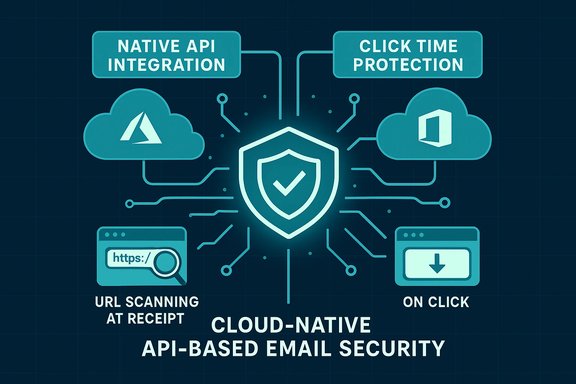
- Native API integration with Office 365 / Microsoft 365, deployed on Microsoft Azure and intended to operate without MX record changes or an external quarantine. This architecture lets administrators authorize scanning and filtering via API access to mail flows and mailboxes.
- Machine learning–driven, real-time behavioral analysis of entire messages — headers, body, URLs and attachments — using models trained on a global telemetry corpus. Early press materials cited training data from “more than 500 million inboxes”; later corporate messaging and awards referenced a growth to over a billion protected mailboxes across Vade’s ecosystem. These telemetry numbers are part of the vendor’s threat-intelligence claims.
- URL crawling and click-time protection: suspicious URLs are crawled at receipt and again when a user clicks, following redirections to detect final landing pages that are fraudulent. This approach is designed to catch one-time or delayed phishing destinations that evade static URL lists.
- Behavioral anti-spear-phishing: the product builds anonymous profiles of employee communication patterns to detect spoofing and unusual senders; when spoofing or impersonation is suspected, the system can inject a customizable banner into inbound messages to warn users.
- Polymorphic malware detection beyond signature scanning: the vendor describes algorithms that analyze origin, content, and context of attachments to detect unknown or polymorphic malware that signature-based AV engines miss.
- MSP- and partner-focused deployment: the add-on targets Microsoft partners, CSPs and MSPs with a cloud-native, multi-tenant approach and the ability to deploy via Azure Marketplace.
How the product aligns (and conflicts) with Microsoft’s integration guidance
API-based post-delivery scanning vs. traditional gateway filtering
Microsoft documents two mainstream models for integrating third-party email security:- Gateway-level (MX) filtering, where mail is filtered before delivery and MX records point to the third-party provider. This is a long-established model but often requires DNS changes and can complicate features like Safe Links and Safe Attachments. Microsoft recommends specific connector and Enhanced Filtering for Connectors settings if MX records are changed.
- API-based post-delivery scanning, where a third-party service gains delegated access (commonly via Microsoft Graph API) to scan messages in mailboxes after messages are delivered to Exchange Online. This model supports “no MX-change” deployments and enables scanning of internal messages and mailbox content, but it requires full mailbox access and strict security controls. Microsoft explicitly documents this integration mode and warns administrators about scope, permissions, and link-wrapping interactions.
Link wrapping and Safe Links interactions
Microsoft Defender for Office 365’s Safe Links rewrites URLs to allow detonation and reputation checks when a user clicks. Microsoft documentation warns that double link-wrapping — where a non-Microsoft service rewrites links and Microsoft’s Safe Links also wraps them — can break protection features or create incompatibilities. Vendors integrating via post-delivery scanning are advised to coordinate link-wrapping behavior and, in many cases, to disable non-Microsoft link wrapping to let Safe Links function as intended. That advisory applies directly to solutions that crawl and rewrite URLs. Any evaluation of Vade’s click-time URL crawling should include testing for Safe Links compatibility and policy coordination.Independent validation and caveats
Claims verified by independent documents
- The product launch and feature set (native Office 365 integration, Azure-hosted, API-based scanning, click-time URL analysis, and behavioral anti-spear-phishing) are confirmed in vendor press releases and contemporaneous reporting. Those sources provide consistent public documentation of the architecture and capabilities the vendor advertises.
- Microsoft’s technical guidance for third-party integrations corroborates the viability and trade-offs of the API/post-delivery approach, including the need for careful permission granting and the potential interactions with Microsoft Defender features like Safe Links. This confirms that the model is supported — and that administrators must follow Microsoft’s best practices.
Claims that require cautionary framing
- Telemetry and effectiveness figures: statements such as “leverages data from more than 500 million inboxes” or “best-in-class catch rate” are vendor-provided metrics and marketing language. While vendor telemetry growth (e.g., later claims of more than one billion protected mailboxes) can be independently observed in successive press releases, catch rate and comparative efficacy require third-party AV/anti-phishing testing and reproducible test methodology to verify. Independent, controlled comparative tests (from AV test labs or independent analysts) are necessary to substantiate such competitive claims; absent those, treat efficacy claims as vendor marketing.
- Privacy and data residency: operating inside a tenant and scanning mailboxes raises legitimate questions about where telemetry and extracted content are stored, how long it’s retained, and what anonymization guarantees exist. Vendor materials describe anonymous profiling for spear-phishing detection, but IT teams must obtain contractual SLA, data processing addendum, and residency assurances before deployment. These details are not fully verifiable in generic press materials and require contract-level review. Flag this as a due-diligence requirement.
- Operational false-positive risk: machine learning models that operate at the behavioral level can produce false positives that affect business mail flow. Microsoft forums and admin communities report that any change to filtering — Microsoft’s own or third-party — can cause delivery issues and false positives if policies aren’t tuned. Expect to plan for pilot testing, allowlist/skip-list configuration, and user‑education when adding a second layer.
Strengths: what Vade’s approach gets right
- Layered defense is pragmatic. Microsoft’s built-in protections like Exchange Online Protection (EOP) and Defender for Office 365 address many threats, but attackers still succeed with targeted or zero-day techniques. A layered, complementary solution that integrates natively and scans internal mail can reduce the residual risk left after EOP. The vendor’s API model explicitly targets that exact space.
- Click-time analysis addresses evasive phishing. Phishing campaigns increasingly use one-time links or redirect chains that evade static lookups. Scanning at click-time — especially with redirection-following and detonation — improves the chance of catching ephemeral or delayed malicious destinations. That capability aligns with modern phishing tactics.
- No MX change simplifies deployment for many tenants. Organizations reluctant to change DNS or rework mail flow can adopt API-first solutions more quickly. This lowers friction for CSPs and MSPs wanting to offer email security add-ons without major mailbox migration work.
- MSP-friendly features. Marketplace availability, multi-tenancy, and partner program positioning make the product simple to resell and manage for providers that already operate in the Microsoft ecosystem. For MSPs focused on Microsoft 365 customers, this is useful.
Risks and operational trade-offs: what to audit before committing
1. Permission model and least privilege
API-based scanning commonly requires wide mailbox permissions. Confirm which OAuth scopes the vendor requests, insist on least-privilege scopes where possible, and require transparent logging of access. If a vendor requests "full access" or admin-level Graph permissions, negotiate constraints and aggressive audit logging. Microsoft’s documentation flags this exact concern for administrators when granting third-party services mailbox access.2. Link-wrapping, Safe Links, and feature conflicts
Test interactions with Safe Links and Safe Attachments in a sandbox tenant. Microsoft’s guidance warns of double wrapping and recommends coordination. Where possible, disable non-Microsoft link wrapping if it conflicts with Defender features, or work with the vendor to provide a compatible workflow.3. Data handling, telemetry, and compliance
Get contractual clarity on:- What message metadata and content are extracted and stored.
- Where telemetry and extracted content are hosted (region, Azure tenant).
- Retention periods and anonymization protocols for behavioral profiles.
- Breach notification and data-subject access procedures (for GDPR or equivalent requirements).
4. False positives and business continuity
Prepare a pilot and rollback plan:- Start with a small user group (security, IT, and a few business units).
- Validate false-positive rates and adjust policies.
- Document an escalation playbook for inadvertent block/deny decisions.
- Coordinate event response between Microsoft support and the vendor to avoid confusion when messages are blocked or quarantined.
5. Incident response and auto-remediation
Vendors often advertise “auto-remediate” features that can remove malicious messages post-delivery. While convenient, this capability must be paired with robust logging, reversible actions, and human-in-the-loop review for edge cases. Confirm the vendor’s documentation about how automatic deletions, quarantines, or recalls are recorded and reversed if necessary.Practical evaluation checklist for IT teams
- Obtain the vendor’s technical whitepaper and deployment architecture diagram showing:
- OAuth scopes and Graph API permissions required.
- Message flow for post-delivery scanning.
- Where telemetry is stored and how it’s anonymized.
- Run a staged pilot with diverse mail patterns (internal-only flows, calendar invites, automated system messages) to expose false positives.
- Test Safe Links / Safe Attachments interactions and confirm whether the vendor’s URL crawling or wrapping conflicts with Microsoft Defender behavior.
- Require a DPA, SOC2 or ISO27001 evidence, and data-residency guarantees for regulated workloads.
- Validate MSP multi-tenancy and role-based admin controls for delegated management by partners.
- Check auto-remediation behavior and ensure robust logging, alerting, and reversal processes.
- Confirm support SLAs, escalation paths, and contact points for combined incidents spanning Microsoft and the vendor.
Practical deployment pattern (recommended sequence)
- Discovery & scoping — map email flows, regulatory constraints, and internal systems that send email (automated notifications, ticket systems). This identifies potential false-positive vectors.
- Sandbox pilot — create test users and a small production pilot group, configure API integration, and run simulated phishing to validate detection and false-positive rates.
- Policy tuning — refine detection thresholds, allowlists, and banner templates for impersonation warnings.
- Gradual ramp — increase user population, monitor incident metrics, and collect user feedback.
- Full roll-out & continuous monitoring — integrate vendor telemetry into your SIEM, automate incident tickets for suspect messages, and retain a documented rollback plan.
Competitive perspective: where this fits in the market
Vade’s native integration is part of a broader trend where email-security vendors optimize for Microsoft 365 by offering API- or Graph-based add-ons rather than legacy gateway appliances. This approach has become common among Microsoft-focused vendors, especially MSP-targeted offerings. The main differentiators in the market now are telemetry scale, the sophistication of ML models, integration maturity with Defender and Safe Links, MSP tooling, and operational safeguards like automated remediation with strong audit trails. Vendor claims about dataset size (hundreds of millions to billions of mailboxes) are useful signals but not substitutes for independent lab testing and operational proof points.Final assessment: when Vade’s approach makes sense — and when to pause
- Choose a native API-based add-on like Vade when:
- You run Microsoft 365 and want to avoid MX changes.
- You need click-time protection and internal message scanning.
- You are an MSP or reseller that needs multi-tenant, partner-focused tooling and rapid deployment via Azure Marketplace.
- You have the governance, compliance review, and security-maturity to manage delegated mailbox access and data-sharing agreements.
- Exercise caution or delay adoption when:
- You have strict data residency rules or cannot accept third-party mailbox access without full contractual assurances.
- Your organization cannot tolerate additional false positives without extended pilot periods.
- You rely heavily on Microsoft Defender for Office 365 features that might conflict with third-party link wrapping and you cannot coordinate policy changes.
Conclusion
Vade’s Office 365 add-on neatly packages capabilities many organizations now need: API-native deployment, click-time URL analysis, behavioral anti-spear-phishing, and MSP-friendly tooling. Those are meaningful advantages in a landscape where attackers weaponize legitimate collaboration platforms. The solution’s architecture aligns with Microsoft’s supported post-delivery integration patterns, but the practical risks — mailbox permission scopes, Safe Links interactions, compliance and data residency, false positives, and vendor-provided efficacy claims — make deliberate evaluation essential.Companies that pair a disciplined pilot, a contractual data-handling review, and careful coordination with Microsoft Defender settings can gain a potent additional layer of protection. Organizations that skip those steps risk operational friction or exposure through overly broad permissions and unvetted telemetry transfers. Treat vendor marketing claims about telemetry and “best-in-class” catch rates as starting points for scrutiny, and insist on independent testing and contractual assurances before full deployment.
Source: BetaNews New tool provides email protection for Office 365
