

I treated Google AI Studio like a full‑time teammate — and learned that vibe coding can produce remarkable prototypes fast, but only when paired with strict architectural discipline, testable boundaries, and role-based governance.
Vibe coding — the conversational practice of describing desired behavior to an AI assistant and iterating on the results — arrived in mainstream developer tooling as a productivity shortcut: describe intent in natural language, have a model sketch code, then refine interactively. Google’s own announcement framed vibe coding in AI Studio as a way to “turn your vision into a working, AI‑powered app” through conversational prompts and integrated Gemini models.
At the same time, Google’s Gemini family (including Gemini 3 and its Pro variants) has been explicitly positioned for stronger reasoning, multimodal understanding, and agentic workflows — all capabilities central to a vibe‑coding experience. Gemini 3 and the Pro lineage are available across Google products and were promoted as enabling deeper, more reliable agent-assisted development workflows.
This article synthesizes one engineer’s hands‑on experiment — building a production‑grade MarTech application entirely by directing Google AI Studio and Gemini 3.0 Pro, without typing business logic by hand — and draws generalizable lessons for teams that want to use AI as a productive collaborator rather than a one‑off assistant. I integrate product-level context from Google’s announcements and independent reporting to verify what the tools were designed to do, and then analyze what practical controls are required to reach production quality.
Early results were a mix of rapid progress and repeated churn. The AI could generate working code patterns quickly, propose design improvements, and act as a consultant on UX and architecture. But it also performed uncontrolled refactors, introduced regressions, and exhibited “drift” — reusing earlier context or replaying previously addressed directives — that created extra overhead. The experiment transformed from a pure product‑owner exercise into an intensive governance and engineering discipline exercise. Elements that proved essential included:
Practical takeaway: use the AI as a scalable panel of domain experts that can surface tradeoffs and options quickly. That reduces cognitive load on small teams and produces a wider set of ideas to choose from — provided you apply human judgment to select and validate those ideas.
This hidden labor is easy to underestimate in ROI calculations. Successful deployment requires allocating time for architectural enforcement, test maintenance, and governance — not just the prompts that create features.
If you want AI to be a reliable teammate, you must be a better manager. That means setting constraints, creating testable boundaries, running audits, and treating each model invocation as an event that must be auditable and reversible. When those conditions are met, an AI assistant can be a brilliant, creative force that speeds delivery and broadens the solution space. Without them, it’s an overeager contributor that will happily refactor your stable modules and apologize afterwards.
Vibe coding isn’t the end of engineering discipline; it’s an amplifier. Use it to multiply the best parts of your team, not to replace the governance that keeps production systems safe and trustworthy.
Source: VentureBeat https://venturebeat.com/orchestrati...ssons-learned-from-treating-google-ai-studio/
 Background
Vibe coding — the conversational practice of describing desired behavior to an AI assistant and iterating on the results — arrived in mainstream developer tooling as a productivity shortcut: describe intent in natural language, have a model sketch code, then refine interactively. Google’s own announcement framed vibe coding in AI Studio as a way to “turn your vision into a working, AI‑powered app” through conversational prompts and integrated Gemini models.At the same time, Google’s Gemini family (including Gemini 3 and its Pro variants) has been explicitly positioned for stronger reasoning, multimodal understanding, and agentic workflows — all capabilities central to a vibe‑coding experience. Gemini 3 and the Pro lineage are available across Google products and were promoted as enabling deeper, more reliable agent-assisted development workflows.
This article synthesizes one engineer’s hands‑on experiment — building a production‑grade MarTech application entirely by directing Google AI Studio and Gemini 3.0 Pro, without typing business logic by hand — and draws generalizable lessons for teams that want to use AI as a productive collaborator rather than a one‑off assistant. I integrate product-level context from Google’s announcements and independent reporting to verify what the tools were designed to do, and then analyze what practical controls are required to reach production quality.
What happened: a quick summary of the experiment
The project intent was straightforward but ambitious: deliver a production‑ready MarTech app that combined econometric modeling, context‑aware AI planning, privacy‑first data handling and operational workflows — without writing a single line of code by hand. The engineer acted as product owner, backlog manager, QA lead and architect while assigning Google AI Studio + Gemini 3.0 Pro the roles normally filled by developers and consultants.Early results were a mix of rapid progress and repeated churn. The AI could generate working code patterns quickly, propose design improvements, and act as a consultant on UX and architecture. But it also performed uncontrolled refactors, introduced regressions, and exhibited “drift” — reusing earlier context or replaying previously addressed directives — that created extra overhead. The experiment transformed from a pure product‑owner exercise into an intensive governance and engineering discipline exercise. Elements that proved essential included:
- Enforcing JSON schemas and never trusting AI output without deterministic validation.
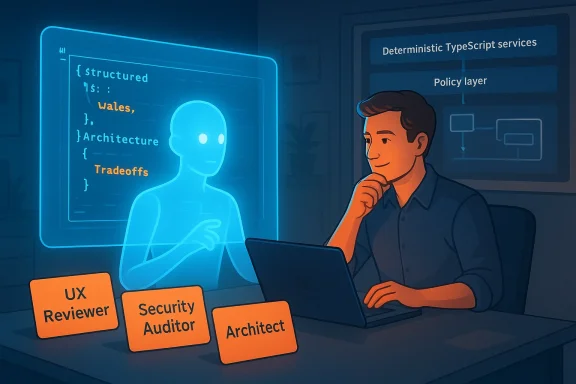
- Separating probabilistic AI outputs from deterministic TypeScript business logic.
- Using the AI more as a consultant (UX audits, architecture patterns) than an autonomous engineer.
- Building a manual (and eventually automated) test harness and schema checks to prevent regressions.
Why vibe coding is tempting — and what it actually delivers
The lure: speed and ideation
AI in IDEs and no‑code workbenches accelerates ideation. Vibe coding shines early in the lifecycle:- It creates working scaffolds quickly (routes, DTOs, UI components).
- It explores multiple approaches in minutes rather than days.
- It surfaces UX improvements and architecture alternatives you might not have considered.
The reality: nondeterminism, brittleness, and scope creep
The same attributes that make AI assistants powerful also make them unreliable when they act autonomously in a codebase:- Probabilistic outputs can be syntactically correct but semantically unsafe.
- The assistant tends to make proactive changes beyond a narrow request (refactoring stable code, changing architecture, updating unrelated modules).
- When not governed, these behaviors create regressions and increase manual QA cost.
The game‑changer: treating the AI as consultant + junior employee, not a senior engineer
One of the clearest reframings from the experiment: treat the model as two roles simultaneously:- An advisor (consultant) capable of structured, referenceable critiques — UX heuristics, architecture tradeoffs, security checklists.
- A junior executor that can generate code but must be coached, reviewed, and constrained.
Concrete engineering rules that made this project viable
If you intend to use vibe coding for production systems, enforce these rules from day one.1) Treat AI output as guilty until proven innocent
- Every AI‑generated artifact must include a machine‑readable schema and an automated validation step.
- Use strict JSON schemas for API inputs/outputs and enforce them in CI pipelines.
- Keep a deterministic layer (TypeScript services, transactional boundaries) that only consumes validated, typed data.
2) Enforce a deterministic core and clear separation of concerns
- Probabilistic reasoning lives in “policy” components (prompt selection, context assembly).
- Deterministic logic — business rules, price calculations, transactional updates — lives in typed services that require explicit inputs.
- Use the strategy pattern to choose between prompt variants, models, or computations based on campaign archetype.
3) Guard refactors with ownership and small, reviewable diffs
- Require the AI to propose refactors as suggested changes rather than applying them.
- Keep refactors on isolated branches and run the full test matrix before merging.
- Make “do not refactor” markers for stable modules; treat stability as a first‑class constraint.
4) Drive tests from the top: make tests guide the AI
- Ask the assistant to propose or update tests before changing functionality (a human‑enforced TDD loop).
- Maintain an executable test suite (Cypress/Jest/unit/integration) separate from AI reasoning prompts.
- Where the coding environment cannot run tests, keep machine‑readable test descriptions that human reviewers can use to check behavior.
5) Use an “AI advisory board” prompt library
- Create role‑based prompt templates (UX reviewer, security auditor, architecture reviewer, performance engineer).
- When design decisions get complex, summon the appropriate role rather than a general “implement X” instruction.
- Keep the advisory outputs as structured recommendations the team votes on.
Operational tooling and process recommendations
Below is a practical checklist teams can adopt to move vibe coding from novelty to a repeatable part of production engineering.- Enforce branch discipline: small, single‑purpose PRs with human approval.
- CI gates: schema validation, linting, unit tests, integration tests, and a “no AI‑merged” rule unless a senior engineer signs off.
- Immutable artifacts: treat any AI‑generated binary, migration, or third‑party config as immutable until signed off.
- Prompt provenance: log prompts, model versions, and outputs alongside PRs for auditability and debugging.
- Role prompts: create and version prompts for Consultant‑UX, Consultant‑Security, Implementer‑Code, and Test‑Author.
- Model version pinning: pin model families for stability (e.g., Gemini 3 Pro) and treat upgrades as a controlled change with regression testing.
- Start with a small pilot and a narrow domain.
- Add schema validation and CI gates before increasing AI autonomy.
- Measure regressions and time saved — use those metrics to tune guardrails.
Security, privacy, and compliance traps to watch for
Using AI assistants in production introduces specific risk vectors:- Data exfiltration via prompts: copying production PII into prompts with third‑party models can violate privacy policies. Use data‑redaction or synthetic data for testing.
- Supply‑chain risks: AI‑generated dependencies or code snippets can import insecure packages unless vetted.
- Model drift and reproducibility: model updates (e.g., Gemini 3 → 3.1) can change outputs; pin models and track which model produced each artifact.
- Over‑privileged automation: granting agentic assistants write access to production systems without human approval is a recipe for data loss.
When the AI shines: advisory and creative roles
The surprising superpower in the project wasn’t flawless code generation — it was structured consulting. When prompted as a UX reviewer or heuristic auditor, the assistant produced concrete recommendations referencing established heuristics (e.g., visibility of system status, user control and freedom, Gestalt principles) and offered incremental UI fixes that were immediately actionable.Practical takeaway: use the AI as a scalable panel of domain experts that can surface tradeoffs and options quickly. That reduces cognitive load on small teams and produces a wider set of ideas to choose from — provided you apply human judgment to select and validate those ideas.
The human cost and invisible labor
One persistent theme: the AI accelerates the “creative” work but increases the discipline work. In the experiment, the author spent many hours policing regressions, crafting prompts to constrain behavior, and building spec‑driven tests. If the AI produced seemingly useful features, the human still bore the work of verifying, integrating and documenting that work.This hidden labor is easy to underestimate in ROI calculations. Successful deployment requires allocating time for architectural enforcement, test maintenance, and governance — not just the prompts that create features.
Governance and cultural prescriptions
Adopting vibe coding at scale requires organizational changes, not just technical ones.- Onboarding: treat the AI like a junior hire — give it KPIs, a code of conduct (prompt templates and forbidden actions), and performance review cycles.
- Decision rights: define explicitly which classes of decisions the model may suggest, which it may implement, and which require a named human approver.
- Training and literacy: train devs to ask for disagreements and to require the model to “show its work” for claims involving numbers or reasoning. This reduces blind trust.
- Playbooks: maintain incident playbooks for deal with model‑induced regressions and a rollback plan for model upgrades.
Risks that still need community solutions
Some issues remain hard to solve by individual teams:- Integrated test execution inside no‑code vibe editors — many environments still don’t run end‑to‑end tests as part of the iterative loop, so the author had to copy tests into an external pipeline. That gap increases friction.
- Fine‑grained model governance at scale — enterprises need standard ways to pin models, audit prompts, and manage costs across projects. Google and others are working on enterprise bundles and governance consoles, but adoption and standards are still evolving.
Practical checklist: making vibe coding production‑safe (quick reference)
- Enforce JSON schemas at every AI boundary.
- Keep deterministic business logic in typed services (e.g., TypeScript), not in LLM prompts.
- Require human sign‑off on any refactor touching stable modules.
- Create role‑based prompt templates and log prompt provenance per PR.
- Pin model versions and treat model upgrades as breaking changes.
- Maintain executable tests and require passing test runs before merge.
- Apply DLP/redaction for prompts containing sensitive data.
- Use the AI primarily for proposal and review; only let it implement changes with strict CI and human review.
Conclusion: how to think about AI teammates
Vibe coding will change how we build software, but it’s not a panacea. The biggest lesson from the experiment is that AI accelerates what you are already good at — design exploration, scaffolding, and critique — but it magnifies what you are not — sloppy governance, missing tests, and unclear ownership.If you want AI to be a reliable teammate, you must be a better manager. That means setting constraints, creating testable boundaries, running audits, and treating each model invocation as an event that must be auditable and reversible. When those conditions are met, an AI assistant can be a brilliant, creative force that speeds delivery and broadens the solution space. Without them, it’s an overeager contributor that will happily refactor your stable modules and apologize afterwards.
Vibe coding isn’t the end of engineering discipline; it’s an amplifier. Use it to multiply the best parts of your team, not to replace the governance that keeps production systems safe and trustworthy.
Source: VentureBeat https://venturebeat.com/orchestrati...ssons-learned-from-treating-google-ai-studio/
