

Microsoft Azure CTO Mark Russinovich said in a recent Microsoft Dev Docs video that Win32, the desktop Windows API rooted in the Windows 95 era, remains a first-class Windows programming surface in 2026 despite decades of attempted replacements and modernization efforts. That admission is less a confession of technical embarrassment than a rare moment of corporate clarity. Windows 11 is not a clean break from the 1990s; it is a negotiated settlement with them. The operating system’s biggest strength, and its most stubborn constraint, is that the past still boots.
The easy headline is that Windows 11 “still runs on 1990s code.” The more useful reading is that Microsoft’s desktop operating system still depends on a programming contract from the 1990s because breaking that contract would break the Windows economy.
Win32 is not merely some dusty museum wing inside Windows. It is the API surface behind generations of desktop software, admin utilities, engineering tools, line-of-business applications, installers, shell extensions, device utilities, security agents, creative apps, and the strange bespoke executables that keep entire companies running. It persists because Windows was never just a consumer operating system; it was an application compatibility platform with a Start button attached.
That distinction matters. Apple has repeatedly shown a willingness to amputate old architectures, APIs, connectors, processors, and workflows in exchange for platform coherence. Microsoft has historically made a different bargain: Windows users may complain about legacy cruft, but they also expect programs written for another era to keep functioning after a feature update, a hardware refresh, or an office-wide migration.
Russinovich’s remark lands because it punctures the marketing language around “modern Windows.” Windows 11 may wear rounded corners, Copilot branding, Dev Drive, Passkeys, Widgets, and a redesigned Settings app, but underneath that surface sits an operating system still shaped by the old rule: do not strand the software estate.
The Win32 API gave developers direct access to the system in a way that mattered for real desktop software. It was suitable for native C and C++ applications, it could reach hardware and low-level system features, and it sat at the center of the Windows desktop model. Even as .NET, WPF, Windows Forms, UWP, WinRT, Electron, WebView2, WinUI, and the Windows App SDK entered the picture, Win32 remained the common gravitational field.
That is why the phrase “first-class API surface” is important. Win32 is not merely tolerated as a backward-compatibility bridge. Microsoft still documents it, supports it, and wraps newer technologies around it. Many modern Windows development paths are not replacements for Win32 so much as layered accommodations beside it.
For enterprise developers, that is not a failure. It is predictability. A tool that manipulates windows, watches processes, installs services, talks to drivers, manages files, integrates with the shell, and survives across releases is more valuable than a fashionable framework with uncertain strategic backing.
WinRT and the Universal Windows Platform were supposed to move Windows toward a more secure, store-friendly, touch-aware, sandboxed model. The vision made sense in the Windows 8 era, when Microsoft feared that tablets and app stores would define the next decade of computing. But traditional Windows developers looked at the restrictions, the packaging model, the store dependency, and the limited desktop reach, and many chose not to bet their businesses on it.
UWP was not technically worthless. It brought useful ideas around sandboxing, app lifecycle, permissions, and modern UI patterns. But it never became the universal answer implied by its name. Windows users still wanted full desktop applications, enterprises still needed deep system integration, and developers still needed to reach customers who lived outside the Microsoft Store.
The result was strategic scar tissue. When Microsoft later pushed WinUI, Project Reunion, and then the Windows App SDK, developers heard the echoes of earlier transitions. They wanted to know not just whether the framework was elegant, but whether it would still be favored five years later. On Windows, technical merit is only half the adoption story; institutional memory is the other half.
Microsoft itself has leaned heavily into that model. Teams, Clipchamp, and the new Outlook reflect a broader industry bet that the desktop can become a delivery shell for web experiences. From a product management perspective, this solves real problems: features can roll out faster, interfaces can be shared across platforms, and cloud services can become the center of the application rather than an add-on.
But Windows users are not wrong to complain about the cost. Web-wrapped apps often feel heavier than their native predecessors, especially on modest hardware or in environments where dozens of background processes already compete for memory and CPU. For a company that still sells Windows as the home of serious desktop productivity, replacing lean native tools with browser-adjacent experiences can feel like an abdication.
This is where Win32’s continued presence becomes awkward for Microsoft. The company cannot credibly claim native desktop development is obsolete when its own operating system, tools, and customers still depend on it. The web app strategy may be good for Microsoft 365 velocity, but it does not erase the need for native software that respects the machine.
The irony is delicious: tools created outside the official Windows product experience became so essential that Microsoft bought the company behind them and eventually treated parts of that toolkit as platform infrastructure. Sysmon’s move into Windows as an optional, in-box component is not just a security feature. It is an admission that the unofficial admin layer became part of the official operating system’s nervous system.
Sysmon’s role is especially telling. It is not a consumer-facing flourish meant to sell laptops at retail. It is a telemetry and monitoring tool used by defenders to log process creation, network connections, file timestamp changes, and other signals that matter during incident response. Baking it into Windows reduces the operational gap between what security teams need and what the base OS historically provided.
That is Windows at its most honest. The platform evolves not by erasing the old ecosystem, but by absorbing the parts that prove indispensable. Yesterday’s power-user download becomes tomorrow’s optional feature.
This is why Windows often feels internally inconsistent. The operating system contains multiple control surfaces, multiple UI generations, multiple settings paths, multiple app frameworks, and multiple assumptions about what a desktop application is allowed to do. Some of that messiness is poor product discipline. Much of it is the visible residue of compatibility.
Administrators understand the tradeoff better than most consumers. The same backward compatibility that keeps a 15-year-old accounting package alive can also keep weak defaults, brittle installers, old dependencies, unsigned helper tools, and invasive endpoint agents in circulation. The same openness that allows powerful management software also gives malware authors decades of behavioral expectations to exploit.
Microsoft has tried to square this circle with layers: Smart App Control, virtualization-based security, Windows Defender Application Control, App Control for Business, sandboxing, Store policies, driver signing, memory integrity, and more. But layered defense is not the same as a clean-slate design. Windows security engineering often means making an old city safer without demolishing the streets.
That estate does not vanish because Microsoft’s design language changes. A hospital workstation, a factory control terminal, a legal document system, or a government records application may depend on software whose business logic outlived its original developers. The cost of replacing that software is not simply a rewrite; it is validation, retraining, compliance review, integration testing, procurement, and risk.
This is why Microsoft cannot behave like a startup operating system vendor. It carries the weight of accumulated customer decisions. When a Windows update breaks a printer workflow, a VPN client, a medical device utility, or a tax application, the problem is not just a bug; it is a breach of the implicit bargain that made Windows dominant.
Win32 remains central because enterprises paid Microsoft, directly and indirectly, to keep it central. The company may prefer a more modern app model, but its most valuable customers prefer continuity with a migration path attached.
That approach is more realistic than the old UWP pitch. Instead of telling developers to move into a new house, Microsoft is offering to renovate rooms in the house they already occupy. Existing Win32, WPF, and Windows Forms applications can adopt some modern capabilities without becoming entirely different products.
This is smart platform politics. Developers who have been burned by abrupt framework enthusiasm are more likely to accept incremental modernization. They can improve UI, packaging, app lifecycle behavior, and access to newer Windows features while preserving proven code and business logic.
But the compromise also reveals Microsoft’s limits. If the future of Windows development must be compatible with so many pasts, it will inevitably be less clean than a single canonical app model. The Windows App SDK can reduce fragmentation; it cannot pretend fragmentation never happened.
The better criticism is not that old code exists. Old code exists everywhere important. Banking systems, compilers, network stacks, aircraft systems, databases, and operating systems all carry old abstractions because stable interfaces are valuable. The question is whether the old abstraction blocks necessary progress.
In Windows, the answer is mixed. Win32 enables an unmatched software library and deep system utility ecosystem. It also complicates attempts to make Windows more secure, more battery-efficient, more coherent, and more predictable. The same API surface that lets an administrator inspect the machine can let a poorly behaved app sprawl across it.
This is the grown-up version of the story. Windows 11 is not embarrassing because it has old foundations. It is difficult because those foundations are still economically productive.
The trouble for Microsoft is that Windows 11 often exposes its internal layering through inconsistent experience. Some dialogs look modern; others appear transported from another decade. Some settings have moved into the new Settings app; others still require Control Panel, MMC snap-ins, registry edits, Group Policy, PowerShell, or vendor utilities. A modern shell can only hide so much archaeology.
Power users often defend the older interfaces because they are dense, fast, and reliable. Newer surfaces sometimes look friendlier while offering fewer controls. This creates a strange inversion: the modern UI can feel cosmetic, while the legacy UI feels authoritative.
That perception matters. If Microsoft wants users and admins to trust modernization, the new layers must be better, not merely newer. Replacing a compact native tool with a slower web experience, or a precise management console with a simplified settings pane, trains Windows users to cling harder to the past.
This matters because endpoint visibility is no longer a luxury reserved for large security operations centers. Ransomware, credential theft, living-off-the-land techniques, and supply-chain compromises have made process lineage, network connection logging, and suspicious persistence detection relevant to midsize organizations and even advanced home labs.
Native Sysmon does not magically secure Windows. It still needs configuration, collection, storage, analysis, and people or tools capable of making sense of the events. But its presence as an optional Windows component signals that Microsoft understands the baseline has shifted.
The deeper lesson is that legacy and security are not opposites. A mature platform can turn long-lived internal knowledge into defensive leverage. The trick is to expose it in a way that helps administrators without widening the attack surface or drowning teams in noise.
If Microsoft reduces some Copilot integration or reworks native shell experiences, that should not be read as a retreat from AI. It is more likely an acknowledgment that the Windows desktop has limited tolerance for experiments that interrupt established workflows. People may accept AI assistance in context; they are less forgiving when the operating system feels like an ad surface or a funnel.
That is another reason Win32’s persistence matters. It represents the part of Windows that is not easily subordinated to a quarterly product narrative. The desktop app model predates subscriptions, app stores, cloud dashboards, and AI assistants. It serves users who still judge the PC by whether their tools run reliably.
Microsoft can add AI to Windows, and it will. But the company cannot forget that Windows remains the place where people run everything else. The shell may chase the future, but the platform must keep faith with the work.
A more native, less cluttered, more predictable Start experience would fit the same pattern as Microsoft’s Win32 acceptance. Users are not asking Windows to freeze in 1995. They are asking it to modernize without treating productivity muscle memory as an obstacle.
The worst Windows changes are the ones that confuse novelty with progress. The best ones preserve the user’s mental model while removing friction underneath. That is why compatibility is not merely binary. An app launching is one form of compatibility; a workflow still making sense is another.
Windows 11’s challenge is to modernize at both levels. It must support the old executable and the old expectation that the PC belongs first to the person using it.
That humility should inform how Microsoft designs the next stage of Windows. A platform with Windows’ reach should avoid forcing developers into brittle bets. It should provide stable bridges, clear roadmaps, and migration paths that do not punish cautious customers.
It should also be honest about deprecation. The worst outcome is not that old APIs live forever; it is that developers cannot tell which new APIs will live long enough to justify investment. Microsoft’s modern Windows strategy works only if developers believe it is additive rather than another turn of the wheel.
Win32 survived because it became infrastructure. If Microsoft wants the Windows App SDK, WinUI, WebView2, or future AI APIs to have similar staying power, it has to earn that status through consistency, not keynote energy.
Windows has always been less pure than its rivals and more useful than its critics want to admit. Its future will not be won by finally escaping the 1990s, because too much of the world’s work still depends on promises made there. The better version of Windows 11, and whatever follows it, will be the one that treats compatibility as a foundation to strengthen rather than a mess to cosmetically hide.
Source: TechRepublic Microsoft: Windows 11 Still Runs on 1990s Code
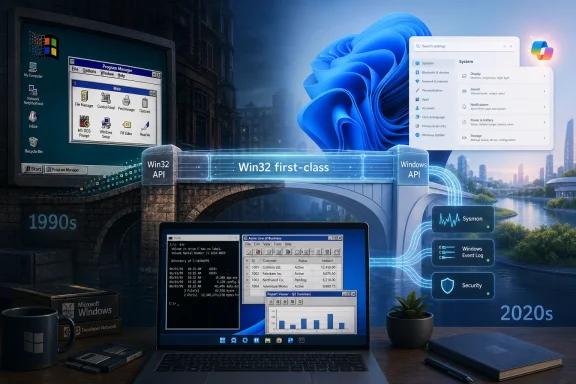 Windows 11 Is Modern Because It Refuses to Start Over
The easy headline is that Windows 11 “still runs on 1990s code.” The more useful reading is that Microsoft’s desktop operating system still depends on a programming contract from the 1990s because breaking that contract would break the Windows economy.Win32 is not merely some dusty museum wing inside Windows. It is the API surface behind generations of desktop software, admin utilities, engineering tools, line-of-business applications, installers, shell extensions, device utilities, security agents, creative apps, and the strange bespoke executables that keep entire companies running. It persists because Windows was never just a consumer operating system; it was an application compatibility platform with a Start button attached.
That distinction matters. Apple has repeatedly shown a willingness to amputate old architectures, APIs, connectors, processors, and workflows in exchange for platform coherence. Microsoft has historically made a different bargain: Windows users may complain about legacy cruft, but they also expect programs written for another era to keep functioning after a feature update, a hardware refresh, or an office-wide migration.
Russinovich’s remark lands because it punctures the marketing language around “modern Windows.” Windows 11 may wear rounded corners, Copilot branding, Dev Drive, Passkeys, Widgets, and a redesigned Settings app, but underneath that surface sits an operating system still shaped by the old rule: do not strand the software estate.
Win32 Won Because It Was Useful, Not Pretty
Win32’s endurance is not nostalgia. Developers did not keep using it because they were emotionally attached toCreateWindowEx, message pumps, registry calls, or decades-old naming conventions. They kept using it because it worked, because it exposed the machine honestly, and because Microsoft never produced a successor that fully matched its reach.The Win32 API gave developers direct access to the system in a way that mattered for real desktop software. It was suitable for native C and C++ applications, it could reach hardware and low-level system features, and it sat at the center of the Windows desktop model. Even as .NET, WPF, Windows Forms, UWP, WinRT, Electron, WebView2, WinUI, and the Windows App SDK entered the picture, Win32 remained the common gravitational field.
That is why the phrase “first-class API surface” is important. Win32 is not merely tolerated as a backward-compatibility bridge. Microsoft still documents it, supports it, and wraps newer technologies around it. Many modern Windows development paths are not replacements for Win32 so much as layered accommodations beside it.
For enterprise developers, that is not a failure. It is predictability. A tool that manipulates windows, watches processes, installs services, talks to drivers, manages files, integrates with the shell, and survives across releases is more valuable than a fashionable framework with uncertain strategic backing.
Microsoft’s Replacement Attempts Taught Developers to Wait
The survival of Win32 also reflects a trust problem Microsoft created for itself. Over the past two decades, the company repeatedly suggested that the future of Windows app development belonged somewhere else, only to retreat, rename, reframe, or rebuild the pitch.WinRT and the Universal Windows Platform were supposed to move Windows toward a more secure, store-friendly, touch-aware, sandboxed model. The vision made sense in the Windows 8 era, when Microsoft feared that tablets and app stores would define the next decade of computing. But traditional Windows developers looked at the restrictions, the packaging model, the store dependency, and the limited desktop reach, and many chose not to bet their businesses on it.
UWP was not technically worthless. It brought useful ideas around sandboxing, app lifecycle, permissions, and modern UI patterns. But it never became the universal answer implied by its name. Windows users still wanted full desktop applications, enterprises still needed deep system integration, and developers still needed to reach customers who lived outside the Microsoft Store.
The result was strategic scar tissue. When Microsoft later pushed WinUI, Project Reunion, and then the Windows App SDK, developers heard the echoes of earlier transitions. They wanted to know not just whether the framework was elegant, but whether it would still be favored five years later. On Windows, technical merit is only half the adoption story; institutional memory is the other half.
The Web App Detour Solved Distribution and Inflamed Performance Complaints
While Microsoft struggled to make a clean native successor stick, much of the software industry took a detour through the web. Chromium-based wrappers and web-backed desktop apps promised faster iteration, cross-platform reach, shared codebases, and a staffing model aligned with the modern developer market. For companies shipping productivity software across Windows, macOS, Linux, and browsers, the appeal was obvious.Microsoft itself has leaned heavily into that model. Teams, Clipchamp, and the new Outlook reflect a broader industry bet that the desktop can become a delivery shell for web experiences. From a product management perspective, this solves real problems: features can roll out faster, interfaces can be shared across platforms, and cloud services can become the center of the application rather than an add-on.
But Windows users are not wrong to complain about the cost. Web-wrapped apps often feel heavier than their native predecessors, especially on modest hardware or in environments where dozens of background processes already compete for memory and CPU. For a company that still sells Windows as the home of serious desktop productivity, replacing lean native tools with browser-adjacent experiences can feel like an abdication.
This is where Win32’s continued presence becomes awkward for Microsoft. The company cannot credibly claim native desktop development is obsolete when its own operating system, tools, and customers still depend on it. The web app strategy may be good for Microsoft 365 velocity, but it does not erase the need for native software that respects the machine.
Sysinternals Becoming Native Is the Perfect Windows Metaphor
Russinovich’s own career provides the neatest symbol of Windows’ compatibility bargain. Sysinternals began in the 1990s as a set of independent tools for understanding what Windows was really doing. Administrators, developers, malware analysts, and power users adopted utilities like Process Explorer, Autoruns, PsExec, and Sysmon because they exposed details that Windows itself often hid or simplified.The irony is delicious: tools created outside the official Windows product experience became so essential that Microsoft bought the company behind them and eventually treated parts of that toolkit as platform infrastructure. Sysmon’s move into Windows as an optional, in-box component is not just a security feature. It is an admission that the unofficial admin layer became part of the official operating system’s nervous system.
Sysmon’s role is especially telling. It is not a consumer-facing flourish meant to sell laptops at retail. It is a telemetry and monitoring tool used by defenders to log process creation, network connections, file timestamp changes, and other signals that matter during incident response. Baking it into Windows reduces the operational gap between what security teams need and what the base OS historically provided.
That is Windows at its most honest. The platform evolves not by erasing the old ecosystem, but by absorbing the parts that prove indispensable. Yesterday’s power-user download becomes tomorrow’s optional feature.
Compatibility Is a Feature Until It Becomes a Tax
The case for Win32 is strong, but it is not free. Every compatibility promise becomes a cost center. Every supported behavior, however obscure, limits what Microsoft can simplify later. Every ancient application that must keep working becomes one more edge case in testing, security hardening, UI modernization, and deployment.This is why Windows often feels internally inconsistent. The operating system contains multiple control surfaces, multiple UI generations, multiple settings paths, multiple app frameworks, and multiple assumptions about what a desktop application is allowed to do. Some of that messiness is poor product discipline. Much of it is the visible residue of compatibility.
Administrators understand the tradeoff better than most consumers. The same backward compatibility that keeps a 15-year-old accounting package alive can also keep weak defaults, brittle installers, old dependencies, unsigned helper tools, and invasive endpoint agents in circulation. The same openness that allows powerful management software also gives malware authors decades of behavioral expectations to exploit.
Microsoft has tried to square this circle with layers: Smart App Control, virtualization-based security, Windows Defender Application Control, App Control for Business, sandboxing, Store policies, driver signing, memory integrity, and more. But layered defense is not the same as a clean-slate design. Windows security engineering often means making an old city safer without demolishing the streets.
Enterprises Bought the Past and Still Expect Support
For large organizations, the persistence of Win32 is not an abstract developer story. It is procurement history made executable. Enterprises invested in Windows software for decades, built internal tools around it, trained staff on it, automated workflows through it, and negotiated vendor contracts that assumed the desktop would remain stable.That estate does not vanish because Microsoft’s design language changes. A hospital workstation, a factory control terminal, a legal document system, or a government records application may depend on software whose business logic outlived its original developers. The cost of replacing that software is not simply a rewrite; it is validation, retraining, compliance review, integration testing, procurement, and risk.
This is why Microsoft cannot behave like a startup operating system vendor. It carries the weight of accumulated customer decisions. When a Windows update breaks a printer workflow, a VPN client, a medical device utility, or a tax application, the problem is not just a bug; it is a breach of the implicit bargain that made Windows dominant.
Win32 remains central because enterprises paid Microsoft, directly and indirectly, to keep it central. The company may prefer a more modern app model, but its most valuable customers prefer continuity with a migration path attached.
The Windows App SDK Is a Compromise, Not a Revolution
Microsoft’s current developer strategy looks less like replacement and more like coexistence. The Windows App SDK offers modern APIs, WinUI 3, Fluent design, and a release cadence decoupled from the operating system. Crucially, it is designed to work with existing desktop application models rather than demanding that developers abandon them wholesale.That approach is more realistic than the old UWP pitch. Instead of telling developers to move into a new house, Microsoft is offering to renovate rooms in the house they already occupy. Existing Win32, WPF, and Windows Forms applications can adopt some modern capabilities without becoming entirely different products.
This is smart platform politics. Developers who have been burned by abrupt framework enthusiasm are more likely to accept incremental modernization. They can improve UI, packaging, app lifecycle behavior, and access to newer Windows features while preserving proven code and business logic.
But the compromise also reveals Microsoft’s limits. If the future of Windows development must be compatible with so many pasts, it will inevitably be less clean than a single canonical app model. The Windows App SDK can reduce fragmentation; it cannot pretend fragmentation never happened.
The “Ancient Code” Framing Misses the Engineering Reality
Calling Win32 “1990s code” is rhetorically satisfying, but technically imprecise. An API is a contract, not a frozen chunk of source code dragged unchanged through every Windows release. The implementation beneath Win32 has evolved across NT generations, 64-bit transitions, security changes, display model rewrites, high-DPI work, ARM support, and countless internal refactorings.The better criticism is not that old code exists. Old code exists everywhere important. Banking systems, compilers, network stacks, aircraft systems, databases, and operating systems all carry old abstractions because stable interfaces are valuable. The question is whether the old abstraction blocks necessary progress.
In Windows, the answer is mixed. Win32 enables an unmatched software library and deep system utility ecosystem. It also complicates attempts to make Windows more secure, more battery-efficient, more coherent, and more predictable. The same API surface that lets an administrator inspect the machine can let a poorly behaved app sprawl across it.
This is the grown-up version of the story. Windows 11 is not embarrassing because it has old foundations. It is difficult because those foundations are still economically productive.
Users Feel the Layers Even When They Cannot Name Them
Most Windows users do not know whether an app is Win32, UWP, WinUI, WPF, Electron, WebView2, or something else. They know whether it launches quickly, respects dark mode, scales correctly on a high-DPI monitor, updates without drama, drains the battery, litters the startup list, or behaves like a website pretending to be a program.The trouble for Microsoft is that Windows 11 often exposes its internal layering through inconsistent experience. Some dialogs look modern; others appear transported from another decade. Some settings have moved into the new Settings app; others still require Control Panel, MMC snap-ins, registry edits, Group Policy, PowerShell, or vendor utilities. A modern shell can only hide so much archaeology.
Power users often defend the older interfaces because they are dense, fast, and reliable. Newer surfaces sometimes look friendlier while offering fewer controls. This creates a strange inversion: the modern UI can feel cosmetic, while the legacy UI feels authoritative.
That perception matters. If Microsoft wants users and admins to trust modernization, the new layers must be better, not merely newer. Replacing a compact native tool with a slower web experience, or a precise management console with a simplified settings pane, trains Windows users to cling harder to the past.
Security Teams May Be the Biggest Winners of Pragmatism
The Sysmon integration points toward a more promising form of modernization: do not remove the old power; make it easier to deploy safely. Security teams have long depended on Sysinternals, Windows Event Logs, PowerShell, ETW, and third-party EDR platforms to understand endpoint behavior. Bringing richer telemetry closer to the base OS can raise the floor for defenders.This matters because endpoint visibility is no longer a luxury reserved for large security operations centers. Ransomware, credential theft, living-off-the-land techniques, and supply-chain compromises have made process lineage, network connection logging, and suspicious persistence detection relevant to midsize organizations and even advanced home labs.
Native Sysmon does not magically secure Windows. It still needs configuration, collection, storage, analysis, and people or tools capable of making sense of the events. But its presence as an optional Windows component signals that Microsoft understands the baseline has shifted.
The deeper lesson is that legacy and security are not opposites. A mature platform can turn long-lived internal knowledge into defensive leverage. The trick is to expose it in a way that helps administrators without widening the attack surface or drowning teams in noise.
Copilot Hype Meets the Desktop Reality Layer
The Win32 discussion also lands at a time when Microsoft is recalibrating parts of the Windows 11 experience around AI, search, and the Start menu. Over the past few years, Windows has often seemed less like an operating system with cloud features and more like a cloud strategy looking for available pixels. Users noticed.If Microsoft reduces some Copilot integration or reworks native shell experiences, that should not be read as a retreat from AI. It is more likely an acknowledgment that the Windows desktop has limited tolerance for experiments that interrupt established workflows. People may accept AI assistance in context; they are less forgiving when the operating system feels like an ad surface or a funnel.
That is another reason Win32’s persistence matters. It represents the part of Windows that is not easily subordinated to a quarterly product narrative. The desktop app model predates subscriptions, app stores, cloud dashboards, and AI assistants. It serves users who still judge the PC by whether their tools run reliably.
Microsoft can add AI to Windows, and it will. But the company cannot forget that Windows remains the place where people run everything else. The shell may chase the future, but the platform must keep faith with the work.
The Start Menu Is Still a Treaty Document
Few Windows features reveal Microsoft’s tensions better than the Start menu. Every redesign is treated as a referendum on whether the company understands its users. That may seem disproportionate until you remember that the Start menu is not just a launcher; it is the symbolic front door to decades of software habits.A more native, less cluttered, more predictable Start experience would fit the same pattern as Microsoft’s Win32 acceptance. Users are not asking Windows to freeze in 1995. They are asking it to modernize without treating productivity muscle memory as an obstacle.
The worst Windows changes are the ones that confuse novelty with progress. The best ones preserve the user’s mental model while removing friction underneath. That is why compatibility is not merely binary. An app launching is one form of compatibility; a workflow still making sense is another.
Windows 11’s challenge is to modernize at both levels. It must support the old executable and the old expectation that the PC belongs first to the person using it.
The Real Lesson From Win32’s Survival
The Russinovich quote is striking because it admits something platform vendors usually avoid saying plainly: nobody really knows which abstractions will survive. Engineers in the 1990s did not expect Win32 to remain central in 2026. Today’s developers should be equally humble about which current frameworks, runtimes, and AI interfaces will matter in 2056.That humility should inform how Microsoft designs the next stage of Windows. A platform with Windows’ reach should avoid forcing developers into brittle bets. It should provide stable bridges, clear roadmaps, and migration paths that do not punish cautious customers.
It should also be honest about deprecation. The worst outcome is not that old APIs live forever; it is that developers cannot tell which new APIs will live long enough to justify investment. Microsoft’s modern Windows strategy works only if developers believe it is additive rather than another turn of the wheel.
Win32 survived because it became infrastructure. If Microsoft wants the Windows App SDK, WinUI, WebView2, or future AI APIs to have similar staying power, it has to earn that status through consistency, not keynote energy.
A Thirty-Year API Still Sets the Terms of the Next Upgrade
The practical reading for WindowsForum readers is not that Windows 11 is secretly obsolete. It is that the operating system’s future will continue to be shaped by the software it cannot abandon. That has consequences for upgrades, app choices, security baselines, and how organizations should interpret Microsoft’s platform promises.- Windows 11’s reliance on Win32 is a compatibility strategy, not simply a failure to modernize.
- Developers should treat Microsoft’s newer app frameworks as incremental tools unless their project genuinely benefits from a full rewrite.
- Administrators should expect legacy desktop applications to remain part of Windows planning for the foreseeable future.
- Security teams should watch native Sysmon closely because in-box telemetry can simplify deployment but still requires disciplined configuration.
- Users should judge Microsoft’s modernization by performance, reliability, and workflow respect rather than by whether an interface looks newer.
Windows has always been less pure than its rivals and more useful than its critics want to admit. Its future will not be won by finally escaping the 1990s, because too much of the world’s work still depends on promises made there. The better version of Windows 11, and whatever follows it, will be the one that treats compatibility as a foundation to strengthen rather than a mess to cosmetically hide.
Source: TechRepublic Microsoft: Windows 11 Still Runs on 1990s Code
