

Microsoft has quietly rolled out a new developer tool that aims to remove much of the friction that has kept many cross‑platform teams from building first‑class Windows apps: the Windows App Development CLI — known in preview as winapp — an open‑source, opinionated command‑line utility that centralizes project bootstrapping, manifest and certificate management, identity injection for debugging, and MSIX packaging, and is being distributed both as a WinGet package and as an npm module for Node/Electron workflows.
Windows development has historically bifurcated into two flows: the Visual Studio/MSBuild ecosystem that exposes the platform’s full capabilities, and a scatter of cross‑platform workflows (Electron, Node, Rust, Dart, CMake) that often shipped as “wrapped” apps with limited OS integration. That gap left features such as package‑identity‑gated APIs, smooth notifications, background tasks, and many Windows App SDK integrations out of reach for teams that didn’t embrace Visual Studio tooling.
The new winapp CLI is positioned as a pragmatic bridge: one scriptable surface to automate the repetitive plumbing — SDK provisioning, manifest scaffolding, certificate generation, debug identity injection, and MSIX packaging — so cross‑platform toolchains can more easily adopt Windows native features. The preview is offered via WinGet for system installation and as an npm package for JavaScript/Electron projects.
Key capabilities called out in the preview include:
Important caveat: granting package identity changes how the OS perceives the process and may enable privileged features. This is powerful for development, but it must be controlled and audited in team and CI workflows.
Practical CI hooks mentioned in the preview include GitHub Actions/Azure DevOps workflows and deterministic restore semantics to ensure reproducible packaging on ephemeral build runners. Pinning the CLI version in CI is recommended to avoid unintended API churn.
Recommended enterprise controls:
However, caution is warranted:
The preview places Microsoft’s tooling strategy where it arguably should be: helping developers build great experiences without forcing a single IDE or workflow onto every team. If the community and Microsoft keep the projections and templates current — and if security and CI integration are treated as first‑class problems — winapp has the potential to materially improve Windows app quality and adoption among cross‑platform projects.
Source: Petri IT Knowledgebase First Ring Daily: Hold the Command Line - Petri IT Knowledgebase
 Background
Windows development has historically bifurcated into two flows: the Visual Studio/MSBuild ecosystem that exposes the platform’s full capabilities, and a scatter of cross‑platform workflows (Electron, Node, Rust, Dart, CMake) that often shipped as “wrapped” apps with limited OS integration. That gap left features such as package‑identity‑gated APIs, smooth notifications, background tasks, and many Windows App SDK integrations out of reach for teams that didn’t embrace Visual Studio tooling.The new winapp CLI is positioned as a pragmatic bridge: one scriptable surface to automate the repetitive plumbing — SDK provisioning, manifest scaffolding, certificate generation, debug identity injection, and MSIX packaging — so cross‑platform toolchains can more easily adopt Windows native features. The preview is offered via WinGet for system installation and as an npm package for JavaScript/Electron projects.
What winapp actually does — high level
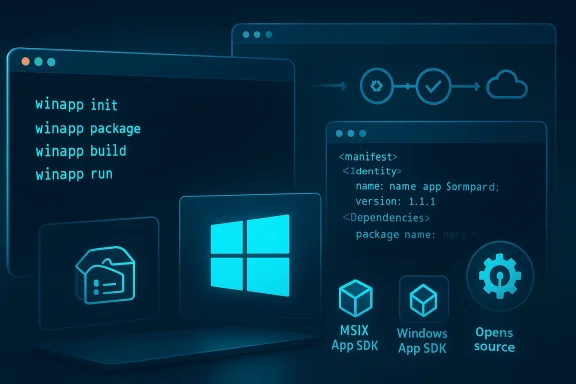
At its core, winapp is an orchestration and developer‑experience tool. It does not replace the Windows App SDK, Visual Studio, or MSIX primitives; instead, it automates and unifies common tasks to speed up the development inner loop.Key capabilities called out in the preview include:
- Workspace initialization that pulls required SDKs, generates language projections (C++/WinRT initially), and scaffolds AppxManifest assets and project wiring.
- Automated manifest and asset updates — icons, logos and AppxManifest.xml edits.
- Self‑signed development certificate generation and optional installation for sideload testing.
- One‑command packaging into MSIX, including signing operations that can produce store‑ready or sideload packages.
- Package identity injection for debugging: grant temporary package identity to unpackaged executables or to running Electron processes so identity‑gated APIs can be exercised without a full install.
- Targeted integrations for Electron / Node.js: npm distribution, scaffolding for native add‑ons preconfigured for the Windows App SDK, and commands to inject debug identities into Node/Electron processes.
- Experimental Node projections that aim to surface Windows AI APIs to JavaScript/TypeScript, labeled experimental in early previews.
winapp init, winapp restore, winapp create‑debug‑identity, winapp manifest update‑assets, winapp cert generate, and winapp pack --cert. These are intended to compress a previously multi‑step, error‑prone workflow into a compact, scriptable surface suitable for local use and CI.Why this matters for Windows app development
There are three concrete reasons the CLI could change developer behavior:- Lowered activation cost for Windows features. By making package identity and manifests accessible during local debugging, winapp shortens the loop for testing APIs that historically required building and installing an MSIX package. That reduces friction for teams experimenting with platform features.
- Better cross‑platform parity. Electron and other cross‑platform apps often ship as thin wrappers. Enabling those toolchains to adopt OS integrations more smoothly means user experiences on Windows may become more native — better windowing, notifications, and optional on‑device AI features — without forcing a Visual Studio migration.
- CI/CD friendliness and reproducibility. A command‑driven tool that pins SDKs and can run in ephemeral build agents makes packaging, signing, and artifact creation reproducible and automatable in CI pipelines. This reduces build flakiness and environment drift.
Technical deep dive
Init, restore, and environment reproducibility
Thewinapp init workflow promises to be the most transformative feature from a day‑to‑day productivity standpoint. A single command can:- Download and configure the specific Windows SDK and Windows App SDK bits required for a project.
- Generate language projections (C++/WinRT initially) and scaffolding.
- Produce a reproducible manifest and development certificate suited to the project.
winapp restore to rebuild exact SDK states in ephemeral build agents.Package identity and debug identity injection
One of the most interesting technical primitives is the CLI’s ability to inject package identity into running processes during development. This lets unpackaged binaries and Electron processes behave like installed packages for API testing, thereby enabling access to identity‑gated APIs without full packaging and registration. The preview provides commands likewinapp create‑debug‑identity and Electron‑specific helpers such as winapp node add‑electron‑debug‑identity.Important caveat: granting package identity changes how the OS perceives the process and may enable privileged features. This is powerful for development, but it must be controlled and audited in team and CI workflows.
MSIX packaging, signing, and CI integration
winapp pack bundles build outputs into MSIX packages and can sign them. The CLI supports signing with generated development certificates for local flows and can be integrated with production signing keys in CI — though teams must secure signing secrets carefully.Practical CI hooks mentioned in the preview include GitHub Actions/Azure DevOps workflows and deterministic restore semantics to ensure reproducible packaging on ephemeral build runners. Pinning the CLI version in CI is recommended to avoid unintended API churn.
Electron and Node.js integrations
Because Electron is the most ubiquitous cross‑platform desktop framework, the winapp preview includes:- An npm distribution for Node/Electron scenarios.
- Scaffolding that configures native add‑ons to use the Windows App SDK where applicable.
- Process‑level identity injection for Electron, enabling
npm startloops to exercise identity‑required features that used to need heavy packaging steps.
Experimental Windows AI projections
The preview mentions experimental Node projections that surface Windows AI APIs to JavaScript/TypeScript. These are explicitly experimental and may rely on platform components or Insider builds for some capabilities; they should be treated as proof‑of‑concepts rather than production‑ready APIs at this stage. Teams planning to leverage on‑device AI must confirm OS and hardware prerequisites before committing to a release schedule.Strengths: where winapp delivers immediate value
- Dramatically shorter inner loop. Developers can test identity‑gated APIs without packaging and installing MSIX every time, which speeds experimentation and reduces cognitive overhead.
- Scriptability and CI compatibility. A CLI integrates naturally into existing pipelines and can help standardize SDK and manifest states across dev machines and build agents.
- Encourages MSIX adoption. By automating packaging and signing, winapp lowers one major barrier that has kept many teams from using MSIX for distribution.
- Open source model. Being open invites community templates, projections, and ecosystem contributions that can quickly improve coverage for Rust, Dart, and other ecosystems.
Risks and operational caveats
No developer convenience tool is free of risk. The preview exposes three primary categories of concern:1) Security and trust
- Self‑signed certificates and automated identity injection are convenient but can be abused if handled carelessly. Development certificates must never be shipped with production artifacts. Teams should create strict processes to ensure dev certs and debug hooks are removed before release.
- Process injection mechanics must be audited. Any mechanism that can alter process identity at runtime could be evaluated as an attack surface. Organizations should require clear provenance and logging for any identity‑injection operations.
2) Supply chain and CI secrets
- Packaging and signing requires secure handling of signing keys (PFX files) and secrets in CI. The CLI’s automation increases the avenues for leakage if secrets are not properly vaulted and rotated. Treat signing credentials as high‑value secrets.
3) Platform and fragmentation concerns
- Winapp creates a second, first‑class path alongside Visual Studio’s matured packaging workflows. While this increases choice, it also increases documentation surface and places a maintenance burden on Microsoft and contributors to keep projections and templates current across languages and toolchains. Teams should validate feature coverage for their specific stack and pin versions in CI to mitigate regressions.
Impact on specific ecosystems
Electron
Electron developers stand to gain the most immediate value. The ability to inject debug identity into running processes and scaffold native modules preconfigured to the Windows App SDK enables Electron apps to adopt native experiences (e.g., toast notifications, richer windowing, background tasks) with less friction. However, the integration depth will vary by app — teams with heavy native components will still need proper packaging and possibly Visual Studio workflows.Rust, Dart, and native C++
The CLI’s projections and scaffolds are intended to broaden language access to Windows APIs. Early support focuses on C++/WinRT, with other ecosystems slated to gain templates and hooks over time. The effectiveness of these projections will depend on community contributions and Microsoft’s maintenance of language bindings. Teams should pilot representative projects before committing.JavaScript/TypeScript and on‑device AI
Experimental Node projections for Windows AI APIs could lower the barrier for adding on‑device AI features to cross‑platform apps. This is promising, but the preview explicitly labels these bindings as experimental; many Windows AI APIs are tied to specific OS builds and hardware acceleration stacks and may not be universally available. Treat these features as experimental until the projections and platform dependencies are stabilized.Practical checklist for teams evaluating winapp
- Install and evaluate locally:
- For system install: run the WinGet package suggested in the preview.
- For Electron projects: install the npm module as a dev dependency and try
winapp init. - Try the identity injection workflow on a small sample and verify what identity‑gated APIs you can exercise without packaging.
- Treat any generated certificates as secrets:
- Store production signing keys in a vault.
- Ensure dev certs are never committed to source control.
- Rotate dev certs periodically and remove them from shared machines after use.
- Pin winapp and SDK versions in CI, and test upgrades in isolated runners before fleet rollout.
- Audit identity injection operations and logs; limit the capability to trusted developer machines and staging CI agents.
- If planning to use Windows AI features, document OS and device prerequisites and plan fallbacks for unsupported hardware.
Enterprise concerns and governance
For organizations, winapp is both an opportunity and a governance challenge. The CLI reduces developer friction and can accelerate feature parity across platforms, but it also introduces new operational objects to manage: developer certificates, debug identities, and CI signing flows.Recommended enterprise controls:
- Define a policy for dev vs production signing and enforce it through CI gates.
- Use secret management and key‑vaulting for signing keys and rotate them regularly.
- Restrict identity injection commands to privileged development or test environments and log all uses for auditability.
- Pilot the tool with security, compliance, and build teams before organization‑wide adoption.
Where claims require caution
Several promising claims in the preview are demonstrably powerful but require pragmatic verification:- Any performance or security claims tied to process injection should be validated through independent auditing and code review before use in sensitive environments. The technique must not be blindly trusted simply because the tool is published by the platform vendor.
- Experimental projections (Node/AI bindings) should be considered proof‑of‑concepts; their availability and performance may differ across Windows versions and devices. Teams must verify prerequisites and policy implications before rolling them into production.
The broader picture: what this means for Windows and cross‑platform development
Microsoft shipping an opinionated CLI aimed explicitly at non‑Visual‑Studio toolchains is a meaningful signal. It acknowledges that cross‑platform frameworks matter and that many developers prefer to iterate outside the Visual Studio bubble. If winapp succeeds, it could:- Encourage wider adoption of MSIX by removing packaging friction.
- Raise the base level of Windows integration for cross‑platform apps, improving user experience.
- Create new patterns for secure, scriptable packaging and testing in CI.
Final verdict and recommendations
The Windows App Development CLI (winapp) is a sensible, developer‑centric attempt to solve tangible pain points. Its preview shows thoughtful features that lower the activation cost for Windows features and make native integration more accessible to Electron, Node, Rust, and other ecosystems. The open‑source approach and dual distribution (WinGet + npm) make experimentation straightforward.However, caution is warranted:
- Treat identity injection and generated certificates as sensitive capabilities and govern them with policies, secrets management, and auditing.
- Pilot on representative projects to validate projections and packaging flows before committing to a production release schedule.
- Pin CLI and SDK versions in CI and test upgrades in isolated runners to avoid disruptions.
The preview places Microsoft’s tooling strategy where it arguably should be: helping developers build great experiences without forcing a single IDE or workflow onto every team. If the community and Microsoft keep the projections and templates current — and if security and CI integration are treated as first‑class problems — winapp has the potential to materially improve Windows app quality and adoption among cross‑platform projects.
Source: Petri IT Knowledgebase First Ring Daily: Hold the Command Line - Petri IT Knowledgebase
