

WinBoat is an ambitious, open‑source project that lets Linux users run real Windows applications by launching a KVM/QEMU Windows guest inside a container and compositing individual program windows into the native Linux desktop — a pragmatic middle ground between Wine/Proton compatibility layers and a full, dedicated virtual machine.
WinBoat packages a polished Electron front end that automates creating and managing a Windows virtual machine inside Docker or Podman, then uses a small “guest server” plus FreeRDP and Windows RemoteApp to present individual Windows app windows on the host desktop. This design gives true Windows API compatibility (because it runs an actual Windows guest) while avoiding the constant context‑switch of living inside a separate desktop session. The project is free, open source and licensed under the MIT license, with released builds (AppImage, .deb/.rpm and unpacked binaries) on the project’s GitHub and distribution site. The maintainers label WinBoat as work in progress and continue to iterate on stability, features and compatibility.
Recent releases (v0.9.0 and later) have added Podman support, improved UWP app discovery, app filtering and other tweaks that expand use cases and polish the UX. That progress shows the maintainers are actively addressing practical gaps, but the GPU story remains the long pole.
That said, the pragmatic reader must balance convenience against operational cost: host‑level setup, security posture, licensing, and the current lack of robust GPU acceleration are real constraints that make WinBoat a targeted tool rather than a universal replacement. Try it where its strengths map to your needs, and treat the more sensational claims (exact counts of Windows 10 holdouts, universal app compatibility) with caution — verify with multiple sources and test the specific apps you rely on before committing.
Source: gHacks Technology News Run any Windows app on Linux with WinBoat, it's free and open source - gHacks Tech News
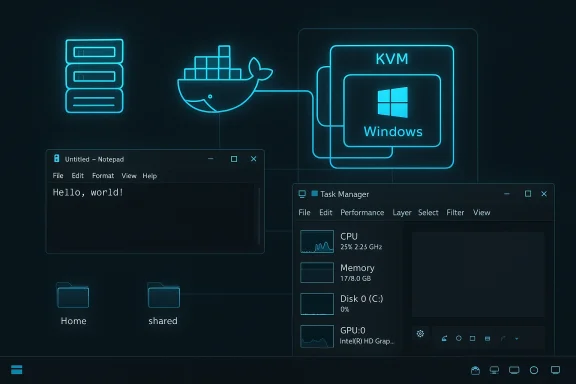 Background / Overview
WinBoat packages a polished Electron front end that automates creating and managing a Windows virtual machine inside Docker or Podman, then uses a small “guest server” plus FreeRDP and Windows RemoteApp to present individual Windows app windows on the host desktop. This design gives true Windows API compatibility (because it runs an actual Windows guest) while avoiding the constant context‑switch of living inside a separate desktop session. The project is free, open source and licensed under the MIT license, with released builds (AppImage, .deb/.rpm and unpacked binaries) on the project’s GitHub and distribution site. The maintainers label WinBoat as work in progress and continue to iterate on stability, features and compatibility. How WinBoat works — the architecture explained
Three layers: management, virtualization, and compositing
- Management: an Electron GUI validates host prerequisites, configures the virtual hardware, and launches container stacks. The GUI aims to be friendly, but it deliberately refuses to proceed if core prerequisites (KVM, Docker, FreeRDP, etc. aren’t correctly met.
- Virtualization: WinBoat runs a full Windows VM (QEMU/KVM) inside a Docker or Podman container. That VM runs genuine Windows binaries and drivers, so application compatibility for user‑space software is very high.
- Compositing/IPC: The host connects to Windows via FreeRDP and RemoteApp to present each Windows program window as if it were native to the Linux desktop. Filesystem bind mounts (for example the user’s home directory) provide seamless file sharing between host and guest.
Minimum system requirements (what to plan for)
WinBoat’s documented minimums are modest for a virtualized Windows experience but non‑negotiable in practice:- RAM: At least 4 GB (8 GB recommended for a smoother experience).
- CPU: At least 2 threads; multicore hosts help.
- Storage: ~32 GB free in the partition selected for the VM/container.
- Platform: KVM (VT‑x / AMD‑V) enabled in BIOS/UEFI.
- Container runtime: Docker or Podman (Docker Desktop is explicitly unsupported).
- Auxiliary software: Docker Compose v2 and FreeRDP v3+ (for RemoteApp audio support).
Installing and getting started — a practical checklist
The WinBoat installer checks for several host‑side preconditions and will block progress until they pass. In practical terms, the setup sequence boils down to these steps:- Enable virtualization (KVM/VT‑x/AMD‑V) in UEFI/BIOS.
- Install and enable Docker (rootful Docker recommended) and Docker Compose v2. Add your user to the docker group so the GUI can control containers without root on every action.
- Install FreeRDP (version 3.x or later) on the host so RDP/RemoteApp sessions support the compositing features WinBoat expects.
- Download a Windows ISO (WinBoat can help pull official ISOs if needed) and let the app provision a VM/container.
- Finalize virtual hardware (CPU, RAM, disk), choose whether to mount your Linux home into Windows, and proceed with unattended installation.
What it actually feels like to use
Day‑to‑day workflow
Once installed and running, WinBoat shows a compact control UI with status (CPU/RAM/disk), a list of discovered Windows apps, and an Apps tab where you can launch a program like Notepad++ or Task Manager. Those apps appear as individual windows on the Linux desktop (no visible Windows shell required), or you can switch to the full Windows desktop if needed. Installing programs inside the guest is identical to a normal Windows install: download the EXE/MSI into the VM and run the installer.Real‑world performance
- Productivity apps that are CPU and memory bound (editors, office suites, many utilities) generally work well and are often perfectly usable.
- GPU‑heavy workloads (modern games, hardware‑accelerated creative apps like Premiere) struggle because host GPU acceleration and reliable passthrough are not solved in WinBoat’s stable releases yet. Expect either CPU fallbacks or outright failures for demanding graphics tasks.
Strengths — why WinBoat matters
- Maximum API fidelity: Because apps run inside an actual Windows guest, edge cases Wine cannot handle are often solved out of the box. This is the single biggest advantage for specialized or legacy Windows software.
- Per‑app seamlessness: RemoteApp compositing via FreeRDP can make Windows windows feel native on Linux, reducing workflow friction compared with switching to a full‑screen VM.
- Automated provisioning: WinBoat automates image download, unattended Windows install, and application discovery — a major productivity boost over manual VM setup.
- Open source and actively developed: The project is MIT‑licensed, hosted on GitHub, and has an active community and incremental releases that add features like Podman support and UWP app visibility.
Risks, caveats and operational realities
1) Host setup friction and privilege surface
WinBoat needs a rootful container runtime and KVM. That combination increases the attack and administrative surface on multi‑user or corporate machines. In managed environments, rootful Docker and direct KVM access may be disallowed or monitored, creating operational and compliance issues. The WinBoat installer intentionally rejects unsupported configurations (rootless Docker, Docker Desktop, etc., which protects users from broken installs but also increases the technical bar for adoption.2) No silver bullet for GPU acceleration
GPU passthrough or a paravirtualized 3D stack is the hardest problem here. WinBoat’s maintainers and community are exploring paths (paravirtual drivers, indirect display techniques), but today WinBoat does not provide a dependable, production‑grade GPU acceleration story. For creatives and gamers who rely on hardware acceleration or kernel‑level anti‑cheat drivers, a dedicated VM with VFIO passthrough or remaining on Windows is the pragmatic choice.3) Peripherals, USB and drivers can be flaky
USB passthrough varies by runtime (Podman vs Docker) and distribution; some features such as smartcard passthrough or certain vendor drivers can be inconsistent. If your workflow relies on hardware dongles, capture cards, or vendor kernels/drivers, expect testing and possible failure.4) Licensing and legal responsibilities
WinBoat automates the Windows install, but it does not alter Microsoft’s licensing rules. Running a Windows image still requires adherence to Microsoft’s license and activation policies; organizations should validate entitlements before deploying WinBoat at scale.Alternatives and where WinBoat fits
- Wine / Bottles: best for low friction and no Windows license requirement; excellent for many productivity apps and older games, but incomplete on edge cases and kernel‑level features. Bottles brings a GUI wrapper and recipe management to Wine.
- Proton (Steam): game-focused Wine derivative with deep per‑title tuning; generally the first choice for gaming through Steam.
- Traditional VM (Virt‑Manager, VirtualBox, QEMU): the most compatible option for full hardware control and GPU passthrough (with VFIO) but requires manual setup and often a second GPU or complex passthrough.
- WinBoat: the best compromise when you want high Windows compatibility for user‑space apps and easy per‑app integration, but can live without reliable GPU acceleration or advanced passthrough.
Real‑world reports and community signals
Early adopters praise WinBoat’s core idea and UI polish, and many report success running productivity tools like Notepad++ and ShareX, and even heavyweight apps such as Photoshop and Microsoft Office in some configurations. However, community threads and hands‑on reviews consistently highlight the setup friction — Docker/KVM configuration, Docker daemon permissions, and distribution quirks — as the main adoption barrier. WinBoat’s strict prerequisite checks surface real misconfigurations but also increase the time to first successful run for inexperienced users.Recent releases (v0.9.0 and later) have added Podman support, improved UWP app discovery, app filtering and other tweaks that expand use cases and polish the UX. That progress shows the maintainers are actively addressing practical gaps, but the GPU story remains the long pole.
Security considerations — what to watch for
- Running a rootful container runtime elevates the host access requirements; secure your Docker daemon, and avoid running WinBoat on unmanaged or shared systems without appropriate safeguards.
- Bound mounts (host home mounted into the Windows guest) are convenient but broaden the attack surface; treat these mounts like network shares and apply the same hygiene (backups, access controls, scanning).
- Because Windows runs inside the container, Windows‑side malware or misconfiguration can still affect files shared with the host; maintain usual Windows security practices inside the guest (patching, limited admin accounts, and careful software provenance).
Practical advice and troubleshooting tips
- If the WinBoat installer claims Docker isn’t running: ensure the Docker daemon is enabled and that your user is in the docker group. On many distros you’ll need to run sudo systemctl enable --now docker and log out/in after adding the group. Community threads show this is one of the most common stumbling blocks.
- Prefer the packaged AppImage or distribution package (deb/rpm) for your distribution; building from source is useful for development, but introduces extra dependencies (Node.js, Go) and time.
- For multi‑monitor or HiDPI users, experiment with WinBoat’s Display and App Scaling settings to avoid oversized or fullscreen windows unexpectedly. These toggles solve many of the reported UI scaling oddities.
The Windows 10 userbase — what is verifiable and what is estimated
A claim you’ll see in many roundups and forum threads is that “over a billion users are still on Windows 10, and many of those PCs cannot upgrade to Windows 11.” That statement mixes verifiable facts with estimates and needs careful framing.- Verifiable: Microsoft announced in 2020 that Windows 10 had reached over one billion monthly active devices. That milestone is official and documented.
- Evolving context: By mid‑2025, Microsoft and industry trackers published combined active device numbers for Windows 10 and 11 that change by reporting window; independent analysts and trackers show Windows 10 still accounted for a large installed base (tens to hundreds of millions) as late as mid‑2025. Those figures vary by methodology and sampling.
- Estimated: The oft‑quoted “400 million PCs cannot upgrade to Windows 11” is an aggregate estimate derived from compatibility scans, market share snapshots and device age distributions — useful for scale but not a precise census. Treat such headline numbers as model‑based estimates rather than audited counts.
Verdict — who should try WinBoat today?
WinBoat is best for:- Linux users who need one or a handful of Windows productivity apps that must run on real Windows (specialized corporate tools, vendor utilities, niche creative apps) and where GPU acceleration is not essential.
- Tinkerers who are comfortable configuring Docker/KVM and can tolerate occasional troubleshooting and beta‑era rough edges.
- Users who require reliable GPU acceleration for gaming or creative workloads today.
- Environments where installing and running rootful Docker or enabling KVM is prohibited by policy.
- Casual users who expect a single click, zero‑configuration experience — the preflight checks are strict by design.
Conclusion
WinBoat is a creative and well‑engineered attempt to bring the best of two worlds together: the compatibility of a real Windows guest and the desktop integration of a Linux native app. Its open‑source nature and active development mean the project will continue to improve, and recent updates already expanded Podman support and UWP handling. For many Linux users who need occasional access to Windows‑only programs — especially CPU‑bound productivity apps — WinBoat is compelling.That said, the pragmatic reader must balance convenience against operational cost: host‑level setup, security posture, licensing, and the current lack of robust GPU acceleration are real constraints that make WinBoat a targeted tool rather than a universal replacement. Try it where its strengths map to your needs, and treat the more sensational claims (exact counts of Windows 10 holdouts, universal app compatibility) with caution — verify with multiple sources and test the specific apps you rely on before committing.
Source: gHacks Technology News Run any Windows app on Linux with WinBoat, it's free and open source - gHacks Tech News
