

Windows 11 is entering a rare and welcome phase: Microsoft appears to be reversing course on several decisions that frustrated power users, IT admins, and longtime Windows fans. In March 2026, the company said it is reducing unnecessary Copilot entry points, restoring more taskbar customization, and giving users more control over Windows Update behavior. That does not mean the era of Windows complaints is over, but it does suggest Microsoft is finally treating customer feedback as a product signal rather than background noise.
For years, the dominant complaint about Windows 11 was not that it lacked ambition, but that it often seemed to ignore restraint. Microsoft pushed Copilot into places where many users did not ask for it, removed familiar interface flexibility, and repeatedly introduced update behavior that made reliability feel negotiable. The result was a strange contradiction: an operating system meant to serve the broadest possible audience began to feel less customizable, less predictable, and less respectful of users’ time.
That is why the March 2026 Windows quality message matters. Microsoft did not merely announce a feature drop or a polished new interface. It framed the changes as a response to community feedback, with explicit references to taskbar repositioning, update control, AI placement, and reliability. In other words, the company is not just shipping new capabilities; it is acknowledging that some of its prior choices created friction that Windows itself had no business creating.
The shift is especially notable because it cuts across both consumer and enterprise concerns. Consumers want a desktop that feels personal, calm, and predictable. IT teams want updates that can be scheduled, deferred, and recovered from without drama. By touching both sides of that equation, Microsoft is signaling that “Windows quality” is no longer a marketing phrase; it is being used as a corrective strategy.
There is also a broader strategic reality behind the move. Microsoft spent much of 2024 and 2025 trying to define Windows through AI, especially Copilot, and through cloud-managed update control. That vision was not inherently wrong, but it often arrived with a blunt edge. The 2026 messaging suggests the company has learned an important lesson: platform ambition works better when it is paired with operational humility.
Windows 11 arrived with a more modern design language, but also with a more opinionated stance. The centered taskbar, reduced legacy customization, and heavier emphasis on Microsoft services all signaled a cleaner vision, yet many longtime users experienced the changes as loss rather than progress. The tension was never purely aesthetic. It was about control, habit, muscle memory, and the sense that a PC should adapt to its owner rather than the other way around.
The introduction of Copilot intensified that tension. Microsoft has been aggressively pursuing AI across its product line, and Windows was always going to be a central stage for that effort. But there is a difference between integrating AI into workflows and embedding AI into every possible surface. The former can be helpful. The latter can feel like product strategy overriding product sense.
At the same time, update quality continued to shape perception. Windows updates are not just maintenance in the abstract; they determine whether a machine is ready when needed. When updates become noisy, disruptive, or unstable, even users who do not care about the mechanics start caring about the consequences. Microsoft’s recent messaging suggests it understands that a beautiful interface cannot compensate for software that behaves unpredictably.
This matters because Copilot was never merely a feature. It was a strategy. Microsoft pushed the assistant through Windows, across dedicated keys, and into application workflows, trying to make AI feel omnipresent and inevitable. The problem was that users could feel the architecture behind the curtain. When every app starts nudging toward the same assistant, the experience stops feeling helpful and starts feeling opportunistic.
The rollback is also a subtle product-design victory for restraint. A photo editor, screenshot tool, widget surface, or basic text editor should work first as a utility. If AI helps in those contexts, great. If it exists only to surface the same assistant prompt again and again, it becomes clutter. That distinction seems obvious now, but Microsoft spent enough time ignoring it that the correction feels meaningful.
There is also a broader trust issue here. Users do not reject AI merely because they dislike novelty; many reject it because they do not trust the motives behind the placement. When a company keeps inserting the same assistant into unrelated surfaces, people assume the goal is adoption metrics, not user benefit. Pulling back from that approach is not just a UX adjustment. It is a trust repair exercise.
For most casual users, the taskbar sitting at the bottom is fine. For power users, ultrawide monitor owners, vertical display enthusiasts, and people who prefer a specific information layout, bottom-only placement has always felt unnecessarily rigid. Windows 11’s earlier restriction was one of those design choices that did not create a better default so much as remove an old option. The loss was not dramatic in a demo, but it was profound in daily use.
This is where Microsoft’s turnaround is culturally important. Returning the feature does more than please a niche audience. It sends a message that old flexibility is not automatically obsolete. In a mature operating system, respecting legacy workflows can be as important as shipping new ones. Sometimes the best modernization is simply not breaking what worked.
There is also a competitive implication. macOS has long maintained its own design philosophy, but Windows has historically won loyalty through flexibility. When Microsoft removes flexibility, it gives up one of its classic advantages. Restoring it is not just customer service; it is competitive self-preservation.
This is not a trivial quality-of-life tweak. It is a recognition that an operating system should not behave like an impatient tenant. People need control over reboot timing, especially on laptops used for travel, meetings, or batch work. For enterprises, the stakes are even higher because update windows are tied to maintenance policies, user support tickets, and compliance requirements.
Microsoft has been moving steadily toward more modern update orchestration for a while, including quality update policies in Intune and broader management options for admins. Those tools matter, but tools only solve half the problem. The other half is the user experience of the device itself, which is where surprise restarts and awkward setup behavior have done the most damage.
That said, the proof will be in implementation. If Microsoft improves control but buries the options in obscure menus, the win will be limited. If it simplifies the decision points and gives clear status feedback, then the update experience may finally stop feeling like a recurring ambush.
This is especially relevant because Windows 11 has lived through a prolonged period of scrutiny over update issues, driver problems, and occasional regressions that reached far beyond enthusiasts. Even when the actual failure rate was lower than online panic suggested, the recurring pattern shaped public perception. Users remember the pain of a bad reboot far more vividly than the success of a good month.
Microsoft’s revised tone also reflects a strategic reality: trust is now a feature. In an era where AI can be patched into the OS almost anywhere, reliability becomes the differentiator that keeps users from feeling like guinea pigs. That matters not just for IT departments but for everyday customers who simply want their computer to work without drama.
There is also a reputational benefit if Microsoft gets this right. For years, critics have had an easy story: Windows is getting bloated, unstable, and increasingly centered on Microsoft’s agenda. A genuine quality turnaround would not erase that criticism overnight, but it would make it harder to argue that the company is deaf to the market.
Sign-in problems are uniquely annoying because they happen at the exact moment a user wants to begin work. If face unlock fails too often, or fingerprint unlock requires repeated attempts, the issue becomes symbolic. It tells users the platform can’t handle the simplest secure entry point consistently, and that weakens confidence in the rest of the stack.
Microsoft’s attention to handheld sign-in is also interesting because it acknowledges that Windows is no longer just a desktop OS with a laptop mode. Gaming handhelds, detachable devices, and hybrid form factors have turned login into a more varied interaction problem. Better gamepad support for PIN setup is a small example of Microsoft responding to a device class that would have been fringe a few years ago.
That is why the Windows Hello work is strategically larger than its press-release footprint. The less users notice authentication, the more trustworthy the platform feels. That is the kind of quality improvement that quietly pays off for years.
For consumers, the headline wins are obvious. A more customizable taskbar, fewer Copilot interruptions, and less disruptive updates should all make Windows feel less nagging and more usable. For enterprises, those same changes matter because they reduce employee friction and lower the risk of help desk incidents. When a platform is less annoying, productivity usually improves even if nobody can quantify it neatly.
That said, enterprise customers will judge Microsoft less by announcement language and more by the consistency of its rollout tools. IT departments need policy controls, update rings, and reliable servicing behavior. Microsoft has already been strengthening its management story through Intune and quality update policy options, which makes the broader quality message more credible than if it were starting from zero.
The broader business implication is that Microsoft may be trying to recover goodwill before Windows frustration calcifies into long-term apathy. Apathy is dangerous because it makes users stop expecting improvement. Once that happens, even good updates get ignored or doubted.
The clearest sign of responsiveness is that the changes line up almost perfectly with user grievances. People asked for taskbar flexibility. They complained about Copilot being shoved into too many places. They disliked update disruption. Microsoft’s response addresses exactly those themes, which makes it harder to dismiss the announcement as vague PR.
Still, listening is not the same thing as lasting change. Many tech companies have moments of public contrition followed by a return to old habits once the heat dies down. Windows users know this pattern well. That is why skepticism remains healthy even in the face of positive signals.
The second test will be cultural. Microsoft needs to prove that “quality” now outranks “surprise.” That means fewer intrusive defaults, fewer app-level detours into AI, and fewer update behaviors that punish ordinary use cases. It also means the company should treat feedback as more than a slogan, especially because Windows users have a long memory and a low tolerance for repeating the same debate every release cycle.
Source: How-To Geek Windows 11 is improving: 4 ways Microsoft is listening to its customers in 2026
 Overview
For years, the dominant complaint about Windows 11 was not that it lacked ambition, but that it often seemed to ignore restraint. Microsoft pushed Copilot into places where many users did not ask for it, removed familiar interface flexibility, and repeatedly introduced update behavior that made reliability feel negotiable. The result was a strange contradiction: an operating system meant to serve the broadest possible audience began to feel less customizable, less predictable, and less respectful of users’ time.That is why the March 2026 Windows quality message matters. Microsoft did not merely announce a feature drop or a polished new interface. It framed the changes as a response to community feedback, with explicit references to taskbar repositioning, update control, AI placement, and reliability. In other words, the company is not just shipping new capabilities; it is acknowledging that some of its prior choices created friction that Windows itself had no business creating.
The shift is especially notable because it cuts across both consumer and enterprise concerns. Consumers want a desktop that feels personal, calm, and predictable. IT teams want updates that can be scheduled, deferred, and recovered from without drama. By touching both sides of that equation, Microsoft is signaling that “Windows quality” is no longer a marketing phrase; it is being used as a corrective strategy.
There is also a broader strategic reality behind the move. Microsoft spent much of 2024 and 2025 trying to define Windows through AI, especially Copilot, and through cloud-managed update control. That vision was not inherently wrong, but it often arrived with a blunt edge. The 2026 messaging suggests the company has learned an important lesson: platform ambition works better when it is paired with operational humility.
Background
Windows has always been a compromise machine. It has to satisfy gamers, enterprise administrators, students, creators, and casual users, all on the same platform. Historically, Microsoft has survived by being flexible enough to absorb criticism and broad enough to support wildly different workflows. When that balance breaks, users notice quickly, because Windows is not just an app or a service; it is the operating environment for work, school, play, and everything in between.Windows 11 arrived with a more modern design language, but also with a more opinionated stance. The centered taskbar, reduced legacy customization, and heavier emphasis on Microsoft services all signaled a cleaner vision, yet many longtime users experienced the changes as loss rather than progress. The tension was never purely aesthetic. It was about control, habit, muscle memory, and the sense that a PC should adapt to its owner rather than the other way around.
The introduction of Copilot intensified that tension. Microsoft has been aggressively pursuing AI across its product line, and Windows was always going to be a central stage for that effort. But there is a difference between integrating AI into workflows and embedding AI into every possible surface. The former can be helpful. The latter can feel like product strategy overriding product sense.
At the same time, update quality continued to shape perception. Windows updates are not just maintenance in the abstract; they determine whether a machine is ready when needed. When updates become noisy, disruptive, or unstable, even users who do not care about the mechanics start caring about the consequences. Microsoft’s recent messaging suggests it understands that a beautiful interface cannot compensate for software that behaves unpredictably.
Why this moment feels different
What changed in 2026 is not that Microsoft suddenly discovered feedback. It is that the company’s public language now sounds more defensive in a productive way. Instead of promising the next bold transformation, it is promising fewer interruptions, more control, and better craftsmanship. That is a healthier tone for an operating system.- Taskbar customization is being treated as a legitimate user request, not a niche demand.
- Copilot placement is being made more selective rather than more pervasive.
- Windows Update is being recast as something users should be able to plan around.
- Reliability is being called out as a core product requirement, not a side benefit.
Copilot Is Being Pulled Back to Where It Makes Sense
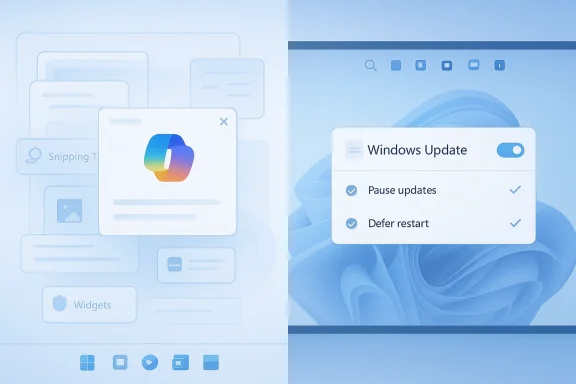
Microsoft’s most striking admission is that some Copilot entry points were unnecessary. In the March 2026 Windows quality post, the company said it is reducing unnecessary Copilot entry points, starting with Snipping Tool, Photos, Widgets, and Notepad. That is not a retreat from AI, but it is a clear acknowledgement that not every utility needs to be an AI gateway.This matters because Copilot was never merely a feature. It was a strategy. Microsoft pushed the assistant through Windows, across dedicated keys, and into application workflows, trying to make AI feel omnipresent and inevitable. The problem was that users could feel the architecture behind the curtain. When every app starts nudging toward the same assistant, the experience stops feeling helpful and starts feeling opportunistic.
The rollback is also a subtle product-design victory for restraint. A photo editor, screenshot tool, widget surface, or basic text editor should work first as a utility. If AI helps in those contexts, great. If it exists only to surface the same assistant prompt again and again, it becomes clutter. That distinction seems obvious now, but Microsoft spent enough time ignoring it that the correction feels meaningful.
The difference between integration and intrusion
There is a useful line between AI that augments a task and AI that interrupts one. Microsoft appears to be moving back toward that line. In practical terms, that should mean fewer gratuitous buttons, fewer repetitive prompts, and fewer moments where a user wonders why a simple action now has a Copilot detour.- Useful AI appears when it reduces effort.
- Intrusive AI appears when it increases decision fatigue.
- Well-crafted integration feels optional but available.
- Forced integration feels like product management won the argument over UX.
There is also a broader trust issue here. Users do not reject AI merely because they dislike novelty; many reject it because they do not trust the motives behind the placement. When a company keeps inserting the same assistant into unrelated surfaces, people assume the goal is adoption metrics, not user benefit. Pulling back from that approach is not just a UX adjustment. It is a trust repair exercise.
Taskbar Positioning Returns a Long-Ignored Power-User Favorite
The return of taskbar repositioning is the kind of change that sounds tiny to executives and enormous to the people who actually use Windows all day. Microsoft says it is introducing the ability to move the taskbar to the top or sides of the screen, describing it as one of the top asks it has heard from users. That sentence alone tells you how long the feature has been missing and how obvious the demand became.For most casual users, the taskbar sitting at the bottom is fine. For power users, ultrawide monitor owners, vertical display enthusiasts, and people who prefer a specific information layout, bottom-only placement has always felt unnecessarily rigid. Windows 11’s earlier restriction was one of those design choices that did not create a better default so much as remove an old option. The loss was not dramatic in a demo, but it was profound in daily use.
This is where Microsoft’s turnaround is culturally important. Returning the feature does more than please a niche audience. It sends a message that old flexibility is not automatically obsolete. In a mature operating system, respecting legacy workflows can be as important as shipping new ones. Sometimes the best modernization is simply not breaking what worked.
Why taskbar placement still matters
It is tempting to dismiss taskbar positioning as cosmetic. It is not. The taskbar helps define workflow rhythm, reading direction, and spatial memory. Some users want it at the top because their eyes already live near the top edge of the screen. Others want it on the side because they want more vertical room for documents and browsers. On a large display, that difference becomes very real.- Top placement can reduce mouse travel for users who keep active windows near the middle.
- Side placement can free up vertical space for spreadsheets, code, and documents.
- Custom layouts support specialized setups, especially multi-monitor rigs.
- User control often improves satisfaction more than purely visual redesigns.
There is also a competitive implication. macOS has long maintained its own design philosophy, but Windows has historically won loyalty through flexibility. When Microsoft removes flexibility, it gives up one of its classic advantages. Restoring it is not just customer service; it is competitive self-preservation.
Update Control Is Becoming More Human
If Copilot generated the most visible backlash, Windows Update generated the most recurring frustration. Microsoft’s 2026 commitment includes more direct control over updates, the ability to skip updates during device setup, restart or shut down without installing them, and longer pause options. It also promises fewer automatic restarts and notifications, which is exactly the kind of language users wanted to hear years ago.This is not a trivial quality-of-life tweak. It is a recognition that an operating system should not behave like an impatient tenant. People need control over reboot timing, especially on laptops used for travel, meetings, or batch work. For enterprises, the stakes are even higher because update windows are tied to maintenance policies, user support tickets, and compliance requirements.
Microsoft has been moving steadily toward more modern update orchestration for a while, including quality update policies in Intune and broader management options for admins. Those tools matter, but tools only solve half the problem. The other half is the user experience of the device itself, which is where surprise restarts and awkward setup behavior have done the most damage.
Consumer convenience versus enterprise discipline
For home users, the biggest win is simple: fewer surprises. A laptop should not decide that a shutdown is actually an update install party at the exact moment a user needs to leave. For businesses, the benefit is predictability. Predictability lowers support cost, and support cost is where bad update design eventually shows up on a balance sheet.- Setup skips can speed first boot and device handoff.
- Deferred reboots help users preserve work sessions.
- Longer pauses give people breathing room during critical periods.
- Fewer notifications reduce update fatigue and alert blindness.
That said, the proof will be in implementation. If Microsoft improves control but buries the options in obscure menus, the win will be limited. If it simplifies the decision points and gives clear status feedback, then the update experience may finally stop feeling like a recurring ambush.
Stability and Reliability Are Finally Back on the Front Page
One reason Windows lost goodwill is that users do not forgive instability easily, especially when it is tied to core OS behavior. Microsoft’s 2026 message emphasizes quality, reliability, and more predictable updates. That may sound modest compared with flashy AI announcements, but it is arguably the most important shift in the entire communication. A desktop operating system earns trust by being boring in the right places.This is especially relevant because Windows 11 has lived through a prolonged period of scrutiny over update issues, driver problems, and occasional regressions that reached far beyond enthusiasts. Even when the actual failure rate was lower than online panic suggested, the recurring pattern shaped public perception. Users remember the pain of a bad reboot far more vividly than the success of a good month.
Microsoft’s revised tone also reflects a strategic reality: trust is now a feature. In an era where AI can be patched into the OS almost anywhere, reliability becomes the differentiator that keeps users from feeling like guinea pigs. That matters not just for IT departments but for everyday customers who simply want their computer to work without drama.
What “quality” really means in Windows
Quality in Windows is not one thing. It includes performance, sign-in reliability, update resilience, driver compatibility, and the general sense that the system will not surprise you. If one of those areas slips, the entire product feels weaker because Windows is a system of dependencies.- Better baseline stability reduces support escalations.
- Fewer regressions improve confidence in monthly servicing.
- Clearer recovery paths help when something still goes wrong.
- Better feedback loops should help Microsoft catch issues earlier.
There is also a reputational benefit if Microsoft gets this right. For years, critics have had an easy story: Windows is getting bloated, unstable, and increasingly centered on Microsoft’s agenda. A genuine quality turnaround would not erase that criticism overnight, but it would make it harder to argue that the company is deaf to the market.
Windows Hello and Sign-In Reliability Matter More Than They Seem
Microsoft’s quality post also mentions improving Windows Hello, including more reliable facial recognition, faster fingerprint sign-in, and smoother secure sign-in on gaming handhelds like the ROG Xbox Ally X. That may look like a small item compared with taskbar changes or update policy, but biometric reliability is one of the everyday touchpoints that shapes whether a system feels polished or flaky.Sign-in problems are uniquely annoying because they happen at the exact moment a user wants to begin work. If face unlock fails too often, or fingerprint unlock requires repeated attempts, the issue becomes symbolic. It tells users the platform can’t handle the simplest secure entry point consistently, and that weakens confidence in the rest of the stack.
Microsoft’s attention to handheld sign-in is also interesting because it acknowledges that Windows is no longer just a desktop OS with a laptop mode. Gaming handhelds, detachable devices, and hybrid form factors have turned login into a more varied interaction problem. Better gamepad support for PIN setup is a small example of Microsoft responding to a device class that would have been fringe a few years ago.
Biometrics as a trust signal
Reliable sign-in is about more than speed. It is about confidence and continuity. If Windows Hello works smoothly, users barely think about it. If it hiccups, the friction immediately colors the whole session. That is why biometric quality is often underappreciated by feature roadmaps but deeply appreciated by real users.- Fast unlocks reduce friction at the start of every session.
- Fewer retries make the system feel dependable.
- Better handheld support broadens the platform’s modern device story.
- Secure convenience is the sweet spot Microsoft needs to preserve.
That is why the Windows Hello work is strategically larger than its press-release footprint. The less users notice authentication, the more trustworthy the platform feels. That is the kind of quality improvement that quietly pays off for years.
Enterprise and Consumer Impact Are Not the Same Story
The same Windows changes can look very different depending on who is using them. Consumers care most about convenience, familiarity, and the sense that the PC respects their time. Enterprises care about consistency, manageability, support overhead, and policy enforcement. Microsoft’s 2026 quality push appears designed to help both groups, but the practical benefits will not be identical.For consumers, the headline wins are obvious. A more customizable taskbar, fewer Copilot interruptions, and less disruptive updates should all make Windows feel less nagging and more usable. For enterprises, those same changes matter because they reduce employee friction and lower the risk of help desk incidents. When a platform is less annoying, productivity usually improves even if nobody can quantify it neatly.
That said, enterprise customers will judge Microsoft less by announcement language and more by the consistency of its rollout tools. IT departments need policy controls, update rings, and reliable servicing behavior. Microsoft has already been strengthening its management story through Intune and quality update policy options, which makes the broader quality message more credible than if it were starting from zero.
Two audiences, two definitions of “better”
Consumers want Windows to feel less bossy. Enterprises want it to feel more predictable. Microsoft is trying to satisfy both by making the OS more configurable and less disruptive without undermining its security model. That is a hard balance, but it is the correct one.- Consumers benefit from personalization and reduced clutter.
- IT admins benefit from more manageable update timing.
- Support teams benefit when fewer users report avoidable friction.
- Microsoft benefits when the platform appears responsive instead of stubborn.
The broader business implication is that Microsoft may be trying to recover goodwill before Windows frustration calcifies into long-term apathy. Apathy is dangerous because it makes users stop expecting improvement. Once that happens, even good updates get ignored or doubted.
Why This Looks Like a Response to Real Backlash
Microsoft’s 2026 pivot did not happen in a vacuum. It came after a long stretch of criticism around Windows 11’s interface decisions, AI overreach, and update pain points. The company’s own language suggests that it has spent months reviewing feedback and treating it as input worth acting on. That is notable because it implies the complaints were loud enough, sustained enough, and commercially relevant enough to move the product roadmap.The clearest sign of responsiveness is that the changes line up almost perfectly with user grievances. People asked for taskbar flexibility. They complained about Copilot being shoved into too many places. They disliked update disruption. Microsoft’s response addresses exactly those themes, which makes it harder to dismiss the announcement as vague PR.
Still, listening is not the same thing as lasting change. Many tech companies have moments of public contrition followed by a return to old habits once the heat dies down. Windows users know this pattern well. That is why skepticism remains healthy even in the face of positive signals.
The credibility test ahead
The real question is whether Microsoft continues to iterate in the same direction after the initial rollout. If the company ships these changes, measures satisfaction, and keeps backing away from intrusive defaults, it may rebuild trust. If it does one quarter of user-friendly corrections and then resumes pushing unwanted behaviors, the goodwill will evaporate quickly.- Announcing customer-first changes is easy.
- Shipping them reliably is harder.
- Maintaining them across releases is hardest of all.
- Reversing course again would damage credibility more than doing nothing.
Strengths and Opportunities
Microsoft’s new direction has real upside because it aligns product behavior with what users have been saying for years. If the rollout is executed well, Windows 11 can recover some of the confidence it lost by appearing overmanaged, overstuffed, and underresponsive. The opportunity is not just to fix a few complaints; it is to reframe Windows as a platform that can still evolve without alienating its core audience.- Restored taskbar flexibility gives power users a reason to re-engage.
- Reduced Copilot clutter can make Windows feel less noisy and more intentional.
- Better update control lowers everyday frustration for consumers and admins.
- Improved Windows Hello strengthens the perception of polish.
- More predictable servicing can reduce support tickets and downtime.
- A stronger feedback loop may help Microsoft avoid repeat mistakes.
- Less bloat perception could improve the broader Windows brand.
Risks and Concerns
The biggest risk is that Microsoft could turn this into a temporary apology tour rather than a permanent design principle. Users have heard promises before, and trust is hard to win back once people believe the company is optimizing for engagement, telemetry, or platform lock-in instead of actual usability. The other danger is that new flexibility arrives in fragments, hidden behind different build channels, confusing documentation, or uneven device support.- Feature rollout delays could make the changes feel more symbolic than real.
- Inconsistent availability may frustrate both consumers and enterprises.
- Hidden settings would blunt the value of “more control.”
- Copilot creep could resume in another form if Microsoft gets impatient.
- Update regressions would quickly undo goodwill.
- Taskbar behavior differences across form factors could create confusion.
- Skepticism may remain high until the changes survive several releases.
Looking Ahead
What happens next will determine whether this is a genuine pivot or just a well-timed course correction. The first visible test will be how quickly the new taskbar options, update controls, and Copilot adjustments show up in Insider builds and how stable they are when they arrive. If Microsoft can deliver them without creating new problems, it will have taken a real step toward restoring trust.The second test will be cultural. Microsoft needs to prove that “quality” now outranks “surprise.” That means fewer intrusive defaults, fewer app-level detours into AI, and fewer update behaviors that punish ordinary use cases. It also means the company should treat feedback as more than a slogan, especially because Windows users have a long memory and a low tolerance for repeating the same debate every release cycle.
- Insider build behavior will show whether these promises are solid or experimental.
- Release consistency will determine whether users trust the changes.
- Enterprise policy support will matter for broader adoption.
- Microsoft’s next Copilot moves will reveal whether restraint is real.
- Update quality over the next few cycles will either validate or undermine the new narrative.
Source: How-To Geek Windows 11 is improving: 4 ways Microsoft is listening to its customers in 2026
