

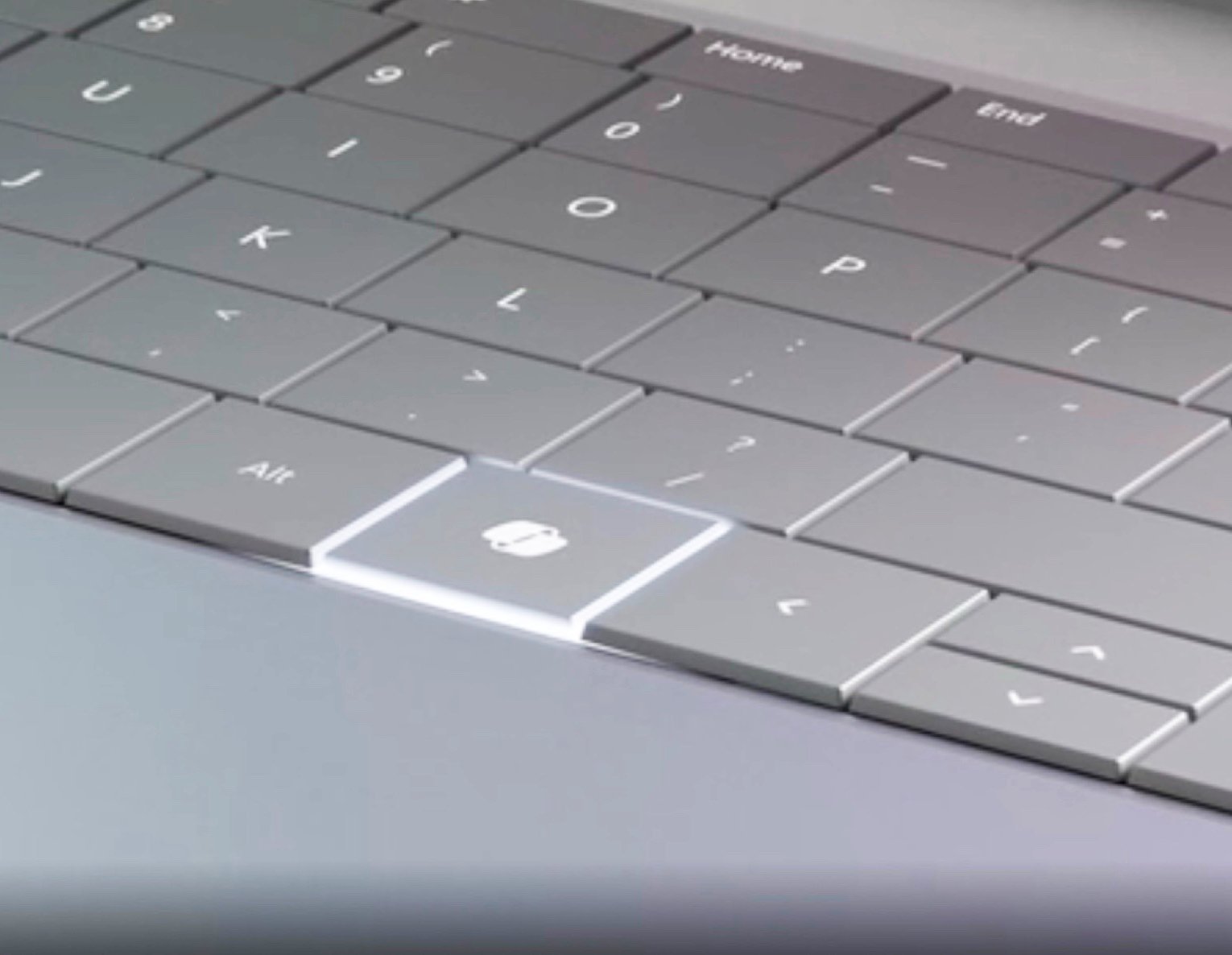
Microsoft says a Windows 11 update later in 2026 will let PCs with a dedicated Copilot key remap that key to either Right Ctrl or the Context menu key from Settings > Bluetooth & devices > Keyboard. The change is small in surface area and large in symbolism. After two years of treating the keyboard as prime real estate for its AI ambitions, Microsoft is quietly conceding that a hardware shortcut is not the same thing as user demand. The Copilot key is becoming what it arguably should have been from day one: a configurable key, not a corporate billboard.
That was always a risky bet because keyboards are not blank canvases. They are maps of habits, accessibility workflows, gaming controls, terminal muscle memory, remote-desktop rituals, and application-specific shortcuts accumulated over decades. The right side of a laptop keyboard may look expendable to a product marketing team, but to power users it can be the difference between a comfortable workflow and a constant irritation.
Microsoft’s support language now admits the core problem without quite saying the quiet part loudly. Users who relied on Right Ctrl or the Context menu key for shortcuts and assistive technologies ran into workflow challenges on devices where those keys were displaced. That is not a niche edge case in the way vendors sometimes use the phrase; it is the predictable result of changing a physical input device for a software strategy that had not yet earned that hardware permanence.
The new remapping option will not turn the Copilot key into a fully programmable macro key. It is narrower than that: users will be able to make it behave as Right Ctrl or as the Context menu key. But the narrowness is part of the story. Microsoft is not opening the door to keyboard freedom so much as patching the specific wound created by replacing keys that already had jobs.
A key is more persuasive than a dialog box. It sits there whether or not the user asked for it, whether or not the assistant is useful, and whether or not the feature behind it changes next month. For Microsoft, the key turned Copilot from a software service into a daily invitation. For users who did not want that invitation, it turned into a reminder that the PC industry can still confuse distribution with adoption.
The strongest critique of the Copilot key was never that a shortcut to AI is inherently bad. Many users do want faster access to search, chat, automation, coding help, or system assistance. The problem was the presumption that this one Microsoft service deserved privileged placement at the expense of established keyboard functions. Hardware should be conservative precisely because software fashions change quickly.
That mismatch has only become more visible as Microsoft has adjusted the Copilot experience across Windows. The company has moved through taskbar integrations, app-specific AI buttons, branded entry points, and rethinks of where Copilot should appear. Against that moving target, a dedicated key looked less like confidence and more like overcommitment.
Right Ctrl matters for people who use both hands for shortcuts, for left-handed mouse users, for accessibility software, for remote environments, for virtual machines, for terminal emulators, for certain games, and for applications that distinguish between left and right modifier keys. It can also matter because the shortcut someone can perform reliably is often the shortcut they have used for years. Replacing it is not merely changing an input; it is interrupting a learned physical routine.
The Context menu key has a quieter but similarly real constituency. It provides keyboard access to right-click menus, and while Shift+F10 exists as an alternative, replacement shortcuts are not always equivalent. Dedicated keys are especially important when users are navigating without a mouse, using screen readers, operating with limited mobility, or working in software where focus and selection behavior make context access more than a convenience.
This is where Microsoft’s remapping move has an accessibility dimension that should not be treated as a footnote. A keyboard layout that removes familiar access paths can impose a cost on users least able to absorb arbitrary change. Giving those users a Settings-level way back to established behavior is not a luxury feature; it is a belated correction.
The difference between a native Settings toggle and a third-party hack is trust. Sysadmins can document a supported setting. Accessibility trainers can point users to a standard control panel. Help desks can troubleshoot behavior without first discovering which utility intercepted which key chord. A remap buried in a personal script may solve one user’s problem, but it does not repair the platform contract.
That contract is particularly important because the Copilot key is not a conventional key in the way users might assume. On many devices, it has been treated as a shortcut combination rather than a simple scan-code replacement for Right Ctrl. That distinction helps explain why remapping could behave inconsistently across tools, remote sessions, virtualization layers, and applications that handle low-level keyboard input differently.
Microsoft’s coming implementation should reduce that mess, but it will not erase every caveat. The company has already warned that after remapping the Copilot key to Right Ctrl, some combinations involving the physical Left Shift key and the remapped Right Ctrl may not work consistently on all keyboards. The suggested workaround is to use the physical Right Shift key for those shortcuts, which is practical enough as advice and revealing enough as an admission.
Keyboard behavior is a stack, not a sticker. Firmware, scan codes, driver interpretation, OS-level shortcuts, application hooks, accessibility tools, and remote-session handling all participate. A remap can be good enough for most typing and many shortcuts, while still failing in the exact multi-key combination that matters to a particular user.
That is why the Copilot key controversy has never been only about Copilot. It is about the modern PC industry’s willingness to let platform strategy alter hardware assumptions before the software layer is mature enough to compensate. Users can forgive a new icon or an unwanted app more easily than a keyboard change, because the keyboard sits beneath everything else they do.
The safer design would have been obvious: add a configurable key without removing a legacy key, or ship the key as programmable from the beginning. Some manufacturers may have had limited room on compact laptop layouts, but that constraint cuts both ways. If space is scarce, the argument for preserving high-utility legacy keys becomes stronger, not weaker.
The company’s more recent retreat from some “unnecessary Copilot entry points” suggests a different lesson is taking hold. Users do not reject AI because it lacks buttons. They reject AI when the button appears before the value is clear, when the workflow interruption is more obvious than the payoff, or when branding gets layered onto simple features that do not need a chatbot-shaped identity.
This is a familiar Microsoft pattern. The company is at its best when it turns ambitious platform ideas into dependable infrastructure. It is at its worst when it mistakes surface area for inevitability. Windows users have seen this in search, widgets, Teams integration, Edge prompts, and now Copilot: the harder a feature is pushed into the shell, the more users ask whether they are being served or steered.
The Copilot key is especially sensitive because the keyboard has a democratic purity that Windows itself often lacks. A key press should do what the user expects. If it does something else because a vendor wants to promote a strategic product, resentment is not a failure of imagination from users. It is feedback.
That created a strange asymmetry. Microsoft could revise Copilot in software, rename experiences, move buttons, or change how the assistant appears. PC buyers, meanwhile, were left with a permanently printed keycap where a familiar key used to be. In the long life of a laptop, that is a lot of commitment to a feature category still in flux.
For enterprise buyers, the issue is not just annoyance. Fleet standardization depends on predictable input behavior across models, vendors, and refresh cycles. A support script that assumes Right Ctrl exists can break when a new batch of laptops ships with Copilot branding instead. A remote-access workflow that depends on distinct modifier keys can become a help-desk ticket. A small physical difference becomes a deployment variable.
This is why the coming Settings option should be welcomed by IT departments even if they never cared about Copilot as a consumer feature. It gives administrators a more supportable path to normalize behavior across hardware. The obvious next step would be policy control, because in managed environments a user-facing toggle is only half the answer.
Microsoft has not framed this as an enterprise management story, but it should. If Windows is going to keep absorbing AI features at the shell level, organizations need ways to decide where those features appear, which shortcuts they occupy, and how they interact with accessibility and compliance requirements. The Copilot key is merely the most visible test case.
Windows 11’s relationship with context menus has also been uneasy. The operating system introduced a simplified right-click menu that looked cleaner but often forced users into “show more options” detours for legacy commands. Microsoft has continued refining that experience, but the broader point remains: context access is a core Windows interaction, not a decorative relic.
A physical Context menu key can make that interaction faster and more accessible. It gives users a way to invoke commands without moving to a mouse, hunting for a small target, or relying on a two-key substitute. In that sense, remapping the Copilot key to Context menu is not just an escape hatch from AI. It is a return to a more Windows-native model of interaction.
This option may also be the better choice on devices where the Copilot key replaced the Context menu key rather than Right Ctrl. A one-size-fits-all remap would have solved only part of the problem. By offering both legacy targets, Microsoft is at least recognizing that OEM layouts varied and that users should be able to restore the function they actually lost.
But it is also worth being clear about what this does not do. It does not make the Copilot key a fully user-programmable key. It does not guarantee perfect behavior across every keyboard combination. It does not undo the fact that many buyers had to discover after purchase that a familiar key had been replaced. And it does not resolve the deeper question of how much Windows hardware should be shaped around services that may evolve faster than the devices themselves.
The update also lands later than it should have. If Microsoft knew that manufacturers were replacing Right Ctrl or Context menu keys in 2024, the remap should have been ready when those machines shipped. A physical layout change that affects accessibility and shortcuts should not require two years of user adaptation before the official remedy appears.
Still, late is better than never, and this particular fix will matter in daily use. It will let a frustrated laptop owner stop treating the Copilot key as a dead zone. It will reduce dependence on unsupported tools. It will give some accessibility workflows a cleaner path back to expected behavior. For a small Settings addition, that is a meaningful practical gain.
The lesson is that AI needs permission, not just placement. A feature earns a key by becoming indispensable, not by being assigned one during a platform campaign. The keyboard is the wrong place to test whether users can be nudged into a habit, because keyboards encode habits that already exist.
Microsoft understands this in other parts of Windows, at least when it chooses to. Power users are often given toggles, policies, compatibility modes, and legacy pathways because Windows succeeds by carrying old workflows forward while layering new ones on top. The Copilot key violated that instinct. It removed before it persuaded.
A programmable key would have been the more Windows-like answer. Let users bind it to Copilot, Search, an app, a macro, mute, screenshots, dictation, a password manager, a terminal, or nothing at all. If Copilot is valuable, users will choose it. If it is not, a forced key will not fix that.
Microsoft’s AI Key Meets the Muscle Memory It Displaced
The Copilot key arrived in 2024 with the kind of fanfare usually reserved for platform shifts. Microsoft described it as a major change to the Windows keyboard, and PC makers dutifully began shipping laptops where the new key often replaced the Right Ctrl key or, on some layouts, the Context menu key. The intended message was blunt: AI was not merely another app or sidebar, but a new layer of personal computing deserving its own physical affordance.That was always a risky bet because keyboards are not blank canvases. They are maps of habits, accessibility workflows, gaming controls, terminal muscle memory, remote-desktop rituals, and application-specific shortcuts accumulated over decades. The right side of a laptop keyboard may look expendable to a product marketing team, but to power users it can be the difference between a comfortable workflow and a constant irritation.
Microsoft’s support language now admits the core problem without quite saying the quiet part loudly. Users who relied on Right Ctrl or the Context menu key for shortcuts and assistive technologies ran into workflow challenges on devices where those keys were displaced. That is not a niche edge case in the way vendors sometimes use the phrase; it is the predictable result of changing a physical input device for a software strategy that had not yet earned that hardware permanence.
The new remapping option will not turn the Copilot key into a fully programmable macro key. It is narrower than that: users will be able to make it behave as Right Ctrl or as the Context menu key. But the narrowness is part of the story. Microsoft is not opening the door to keyboard freedom so much as patching the specific wound created by replacing keys that already had jobs.
The Copilot Button Was a Strategy Before It Was a Feature
The timing matters. The Copilot key appeared as Microsoft and its hardware partners were pushing the idea of the AI PC, and then the more specific Copilot+ PC category. The company’s pitch was that local neural processing, generative AI features, and a more assistant-shaped Windows experience would define the next refresh cycle. A physical Copilot key helped make that pitch tangible on store shelves.A key is more persuasive than a dialog box. It sits there whether or not the user asked for it, whether or not the assistant is useful, and whether or not the feature behind it changes next month. For Microsoft, the key turned Copilot from a software service into a daily invitation. For users who did not want that invitation, it turned into a reminder that the PC industry can still confuse distribution with adoption.
The strongest critique of the Copilot key was never that a shortcut to AI is inherently bad. Many users do want faster access to search, chat, automation, coding help, or system assistance. The problem was the presumption that this one Microsoft service deserved privileged placement at the expense of established keyboard functions. Hardware should be conservative precisely because software fashions change quickly.
That mismatch has only become more visible as Microsoft has adjusted the Copilot experience across Windows. The company has moved through taskbar integrations, app-specific AI buttons, branded entry points, and rethinks of where Copilot should appear. Against that moving target, a dedicated key looked less like confidence and more like overcommitment.
The Right Ctrl Key Is Not a Spare Tire
To casual users, Right Ctrl may seem redundant. There is another Ctrl key on the left, after all, and many people never consciously press the one on the right. That is the sort of reasoning that makes sense in a conference room and fails immediately in the hands of users who actually depend on keyboard symmetry.Right Ctrl matters for people who use both hands for shortcuts, for left-handed mouse users, for accessibility software, for remote environments, for virtual machines, for terminal emulators, for certain games, and for applications that distinguish between left and right modifier keys. It can also matter because the shortcut someone can perform reliably is often the shortcut they have used for years. Replacing it is not merely changing an input; it is interrupting a learned physical routine.
The Context menu key has a quieter but similarly real constituency. It provides keyboard access to right-click menus, and while Shift+F10 exists as an alternative, replacement shortcuts are not always equivalent. Dedicated keys are especially important when users are navigating without a mouse, using screen readers, operating with limited mobility, or working in software where focus and selection behavior make context access more than a convenience.
This is where Microsoft’s remapping move has an accessibility dimension that should not be treated as a footnote. A keyboard layout that removes familiar access paths can impose a cost on users least able to absorb arbitrary change. Giving those users a Settings-level way back to established behavior is not a luxury feature; it is a belated correction.
Settings Finally Catches Up With the Workarounds
Before this promised update, users were not completely helpless. PowerToys, AutoHotkey-style approaches, registry workarounds, and small utilities have all circulated as ways to tame the Copilot key. Some systems already exposed limited customization, such as redirecting the key toward another app. But a workaround is not the same as an operating-system guarantee, especially in managed environments.The difference between a native Settings toggle and a third-party hack is trust. Sysadmins can document a supported setting. Accessibility trainers can point users to a standard control panel. Help desks can troubleshoot behavior without first discovering which utility intercepted which key chord. A remap buried in a personal script may solve one user’s problem, but it does not repair the platform contract.
That contract is particularly important because the Copilot key is not a conventional key in the way users might assume. On many devices, it has been treated as a shortcut combination rather than a simple scan-code replacement for Right Ctrl. That distinction helps explain why remapping could behave inconsistently across tools, remote sessions, virtualization layers, and applications that handle low-level keyboard input differently.
Microsoft’s coming implementation should reduce that mess, but it will not erase every caveat. The company has already warned that after remapping the Copilot key to Right Ctrl, some combinations involving the physical Left Shift key and the remapped Right Ctrl may not work consistently on all keyboards. The suggested workaround is to use the physical Right Shift key for those shortcuts, which is practical enough as advice and revealing enough as an admission.
A Small Caveat Exposes a Bigger Hardware Problem
The Left Shift caveat is easy to overlook, but it says something important about the limits of software repair. When a key is removed from the physical layout and replaced with a special-purpose key, the operating system can emulate some of the old behavior. It cannot always perfectly recreate the electrical, firmware, and rollover characteristics of the key that used to be there.Keyboard behavior is a stack, not a sticker. Firmware, scan codes, driver interpretation, OS-level shortcuts, application hooks, accessibility tools, and remote-session handling all participate. A remap can be good enough for most typing and many shortcuts, while still failing in the exact multi-key combination that matters to a particular user.
That is why the Copilot key controversy has never been only about Copilot. It is about the modern PC industry’s willingness to let platform strategy alter hardware assumptions before the software layer is mature enough to compensate. Users can forgive a new icon or an unwanted app more easily than a keyboard change, because the keyboard sits beneath everything else they do.
The safer design would have been obvious: add a configurable key without removing a legacy key, or ship the key as programmable from the beginning. Some manufacturers may have had limited room on compact laptop layouts, but that constraint cuts both ways. If space is scarce, the argument for preserving high-utility legacy keys becomes stronger, not weaker.
Microsoft Is Learning That AI Entry Points Are Not AI Adoption
Microsoft has spent the last few years testing how many doors into Copilot Windows can tolerate. There was the taskbar button, the sidebar era, app integrations, keyboard branding, Edge tie-ins, and increasingly broad attempts to thread AI through ordinary Windows experiences. Some of those integrations may prove useful over time. Others have felt like distribution tactics searching for a habit.The company’s more recent retreat from some “unnecessary Copilot entry points” suggests a different lesson is taking hold. Users do not reject AI because it lacks buttons. They reject AI when the button appears before the value is clear, when the workflow interruption is more obvious than the payoff, or when branding gets layered onto simple features that do not need a chatbot-shaped identity.
This is a familiar Microsoft pattern. The company is at its best when it turns ambitious platform ideas into dependable infrastructure. It is at its worst when it mistakes surface area for inevitability. Windows users have seen this in search, widgets, Teams integration, Edge prompts, and now Copilot: the harder a feature is pushed into the shell, the more users ask whether they are being served or steered.
The Copilot key is especially sensitive because the keyboard has a democratic purity that Windows itself often lacks. A key press should do what the user expects. If it does something else because a vendor wants to promote a strategic product, resentment is not a failure of imagination from users. It is feedback.
PC Makers Inherited Microsoft’s Bet and Users Inherited the Friction
OEMs did not act in a vacuum. When Microsoft signals that a new Windows-era device should include a Copilot key, hardware partners have strong incentives to follow. The key becomes part of the visual language of modern Windows laptops, a marker that a machine belongs to the AI PC generation even before the buyer understands what that means.That created a strange asymmetry. Microsoft could revise Copilot in software, rename experiences, move buttons, or change how the assistant appears. PC buyers, meanwhile, were left with a permanently printed keycap where a familiar key used to be. In the long life of a laptop, that is a lot of commitment to a feature category still in flux.
For enterprise buyers, the issue is not just annoyance. Fleet standardization depends on predictable input behavior across models, vendors, and refresh cycles. A support script that assumes Right Ctrl exists can break when a new batch of laptops ships with Copilot branding instead. A remote-access workflow that depends on distinct modifier keys can become a help-desk ticket. A small physical difference becomes a deployment variable.
This is why the coming Settings option should be welcomed by IT departments even if they never cared about Copilot as a consumer feature. It gives administrators a more supportable path to normalize behavior across hardware. The obvious next step would be policy control, because in managed environments a user-facing toggle is only half the answer.
Microsoft has not framed this as an enterprise management story, but it should. If Windows is going to keep absorbing AI features at the shell level, organizations need ways to decide where those features appear, which shortcuts they occupy, and how they interact with accessibility and compliance requirements. The Copilot key is merely the most visible test case.
The Context Menu Option Is More Than Nostalgia
Allowing the key to become the Context menu key is an interesting choice because the Context menu key itself has been quietly disappearing from many compact layouts for years. Its absence has not generated the same backlash as the loss of Right Ctrl, but it matters to keyboard-first users. Restoring it through the Copilot key acknowledges that not every valuable input has mass-market visibility.Windows 11’s relationship with context menus has also been uneasy. The operating system introduced a simplified right-click menu that looked cleaner but often forced users into “show more options” detours for legacy commands. Microsoft has continued refining that experience, but the broader point remains: context access is a core Windows interaction, not a decorative relic.
A physical Context menu key can make that interaction faster and more accessible. It gives users a way to invoke commands without moving to a mouse, hunting for a small target, or relying on a two-key substitute. In that sense, remapping the Copilot key to Context menu is not just an escape hatch from AI. It is a return to a more Windows-native model of interaction.
This option may also be the better choice on devices where the Copilot key replaced the Context menu key rather than Right Ctrl. A one-size-fits-all remap would have solved only part of the problem. By offering both legacy targets, Microsoft is at least recognizing that OEM layouts varied and that users should be able to restore the function they actually lost.
The Win for Users Is Real, But Narrow
There is a temptation to treat this update as Microsoft “listening to feedback,” and in the narrow sense that is fair. Users complained, workarounds proliferated, support issues surfaced, and Microsoft is adding a setting. That is better than digging in.But it is also worth being clear about what this does not do. It does not make the Copilot key a fully user-programmable key. It does not guarantee perfect behavior across every keyboard combination. It does not undo the fact that many buyers had to discover after purchase that a familiar key had been replaced. And it does not resolve the deeper question of how much Windows hardware should be shaped around services that may evolve faster than the devices themselves.
The update also lands later than it should have. If Microsoft knew that manufacturers were replacing Right Ctrl or Context menu keys in 2024, the remap should have been ready when those machines shipped. A physical layout change that affects accessibility and shortcuts should not require two years of user adaptation before the official remedy appears.
Still, late is better than never, and this particular fix will matter in daily use. It will let a frustrated laptop owner stop treating the Copilot key as a dead zone. It will reduce dependence on unsupported tools. It will give some accessibility workflows a cleaner path back to expected behavior. For a small Settings addition, that is a meaningful practical gain.
The Lesson Microsoft Should Take Is About Permission
The durable lesson is not that Microsoft should abandon AI in Windows. AI features will continue to spread through the operating system, developer tools, productivity apps, and device hardware. Some of them will be useful, and some may become mundane in the best way: reliable enough that people stop arguing about them.The lesson is that AI needs permission, not just placement. A feature earns a key by becoming indispensable, not by being assigned one during a platform campaign. The keyboard is the wrong place to test whether users can be nudged into a habit, because keyboards encode habits that already exist.
Microsoft understands this in other parts of Windows, at least when it chooses to. Power users are often given toggles, policies, compatibility modes, and legacy pathways because Windows succeeds by carrying old workflows forward while layering new ones on top. The Copilot key violated that instinct. It removed before it persuaded.
A programmable key would have been the more Windows-like answer. Let users bind it to Copilot, Search, an app, a macro, mute, screenshots, dictation, a password manager, a terminal, or nothing at all. If Copilot is valuable, users will choose it. If it is not, a forced key will not fix that.
What This Remap Says About the Copilot PC Hangover
The most concrete reading of this update is simple: Microsoft is lowering the cost of a hardware decision that irritated enough users to matter. The broader reading is that the first wave of AI PC marketing is being disciplined by normal PC reality. People still care about keyboards, shortcuts, accessibility, fleet management, and whether their laptop behaves predictably.- Microsoft plans to add a Windows 11 Settings option later in 2026 that remaps the Copilot key to Right Ctrl or the Context menu key.
- The setting is intended for newer PCs where the Copilot key replaced one of those legacy keys, creating workflow and accessibility problems for some users.
- The remap will be more supportable than PowerToys, AutoHotkey-style scripts, or small third-party utilities, especially in business and accessibility contexts.
- Microsoft warns that some Left Shift plus remapped Right Ctrl combinations may not work consistently on all keyboards.
- The change is a practical win for users, but it also confirms that the Copilot key shipped before Microsoft had fully accounted for the workflows it displaced.
- The episode should push Microsoft and OEMs toward configurable hardware keys rather than service-specific keys that may age faster than the devices they ship on.
References
- Primary source: thurrott.com
Published: Mon, 18 May 2026 14:35:04 GMT
Loading…
www.thurrott.com - Official source: support.microsoft.com
Understand updates to the Copilot key on Windows devices | Microsoft Support
Understand updates to the Copilot key on Windows devices support.microsoft.com
- Related coverage: windowscentral.com

Don't like Windows 11's Copilot key? Microsoft confirms it will let you remap it later this year
Windows 11's special Copilot Key has not been the popular hit that Microsoft was hoping it would be, and has now confirmed plans to let users remap the button back to its old functionality. www.windowscentral.com
- Related coverage: tomsguide.com
Loading…
www.tomsguide.com - Related coverage: notebookcheck.net
Microsoft frees the Copilot key from AI
Since 2024, Microsoft has almost forced laptop manufacturers to install a keyboard with a Copilot key. Until now, this key has been practically useless for users who did not want to use Microsoft's AI assistant. This is set to change later this year. www.notebookcheck.net
- Related coverage: windowsforum.com

Windows 11 2026 Update: Remap the Copilot Key to Right Ctrl or Context Menu
Microsoft has confirmed that a Windows 11 update arriving later in 2026 will let users remap the dedicated Copilot key on newer PCs so it behaves as either the Context Menu key or the Right Ctrl key. That sounds like a small concession, but it is really an admission that Microsoft’s most visible... windowsforum.com
- Related coverage: windowslatest.com

Windows 11 24H2 update will let you replace Copilot key with a context menu shortcut
Windows 11 might let you remap the Copilot key in future updates. This may help Microsoft avoid complaints from unsatisfied Copilot users. www.windowslatest.com
- Related coverage: tomshardware.com

How to Add a Dedicated Copilot Key to any Windows 11 or 10 PC, No New Keyboard Required
With a little effort, you can turn any key into the copilot key.www.tomshardware.com
- Related coverage: tweaktown.com

Hate the dedicated Copilot key on your Windows 11 laptop? Tiny new tool can change it back to right Ctrl
Reverting the Copilot key to right CTRL should be an option provided by Microsoft - or indeed remapping it to something else - but it isn't. www.tweaktown.com
- Related coverage: u3ahavelocknorth.com
Loading…
www.u3ahavelocknorth.com