
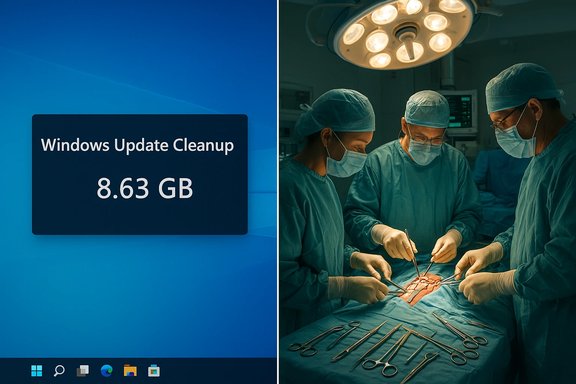
Users installing Windows 11’s 24H2 updates found their machines mysteriously “heavier” — an 8.63 GB Windows Update cache that resisted cleanup tools — while, in a very different arena, surgeons at Burjeel Medical City in Abu Dhabi executed a painstaking 10‑hour microsurgical replantation to save a labourer’s severed forearm; both stories—one technical and systemic, the other clinical and human—showcase how complexity, contingency, and specialist expertise shape outcomes in modern life.
Source: Petri IT Knowledgebase https://petri.com/podcast/windows-1...d-arm-in-complex-10-hour-surgery/ar-AA1Ui7GC]
 Background
Windows 11 24H2: a new update model with an unexpected side effect
Microsoft’s Windows 11 24H2 introduced an update delivery approach known as checkpoint cumulative updates (CCUs). The design goal: make monthly rollups and feature servicing smaller and faster by building future updates from recent “checkpoints” rather than always referencing the original RTM bits. In practice, the mechanism changed how the component store and update cache are composed during and after installation, and it coincided with widespread reports that Disk Cleanup and other familiar tools showed an 8.63 GB “Windows Update Cleanup” entry that users could not remove. Community and technical reporting captured the confusion and frustration around what looked like an undeletable allocation of disk space.Burjeel Medical City: high‑stakes microsurgery
Separately, Burjeel Medical City reported a complex forearm replantation in which a 50‑year‑old worker who suffered a mid‑forearm amputation after a lathe accident was transported and treated by a multidisciplinary surgical team. The operation lasted around ten hours and included bony fixation, microvascular arterial and venous anastomoses, nerve and tendon repairs, and later skin grafting. The patient reached the specialised facility within the critical ischemia window, enabling microsurgical revascularisation and subsequent rehabilitation planning.Windows 11 Update “Weight” — What happened, exactly?
The headline symptom
After installing Windows 11 24H2, many users reported a new Disk Cleanup entry labelled “Windows Update Cleanup” with an 8.63 GB size. Attempts to remove it using Disk Cleanup, Settings > Storage > Temporary files, Component Store (DISM) cleanup, or manual file deletions reportedly failed to change the displayed number, leaving users convinced that space was being “hogged” by the OS. Community threads and tech outlets documented multiple anecdotal reproductions of the symptom.The technical cause (as understood)
- Checkpoint Cumulative Updates change the update pipeline. Instead of always building a delta against the original RTM image, updates are anchored to more recent “checkpoints,” which reduces download sizes and improves serviceability.
- That change affects how Windows tracks, stores, and later attempts to reclaim update-related components. The Disk Cleanup UI and categorisation logic relied on assumptions about update artifacts that were altered by the checkpoint approach.
- Multiple investigations and Microsoft community threads indicate that the Disk Cleanup entry is primarily a reporting or bookkeeping anomaly rather than necessarily an accurate reflection of physically reserved blocks on disk. In short: the number shown may be inflated or stale while actual on‑disk usage is smaller.
Microsoft’s acknowledgement and the vendor response
Microsoft’s support forums and community Q&A entries indicate awareness of the issue and describe it as related to the checkpoint update implementation. Messaging has characterised the symptom as something Microsoft is tracking and planning to remediate in subsequent cumulative updates; meanwhile guidance emphasises caution about manual interventions that tamper with servicing store components. Independent reporting corroborated Microsoft’s acceptance of the problem and anticipated fixes.For IT professionals and power users: technical analysis and remediation guidance
Why the problem matters in practice
- On devices with ample storage, the symptom is primarily an annoyance; perceived used space triggers confusion but may not prevent normal operations.
- On systems with tight storage (ultrabooks, small SSDs, embedded devices), a misreported multi‑GB entry can push users into capacity planning and prompt risky manual cleanups that may damage servicing integrity.
- Enterprise fleets face a governance issue: if automatic cleanup tools show inconsistent states, operators must decide whether to accept the temporary reporting error or take intrusive remediation steps at scale.
Safe, stepwise approach for admins and enthusiasts
- Verify actual disk usage: use built-in tools (Storage settings, Disk Management, third‑party block‑level analysers) to compare reported values to actual free space. Don’t rely solely on Disk Cleanup’s UI.
- Avoid manual deletion of servicing store contents or Windows\WinSxS edits unless under documented guidance from Microsoft; such deletions can compromise updateability.
- Use sanctioned cleanup tools in the order recommended by Microsoft: Settings > Storage > Temporary files first, then Disk Cleanup (Clean up system files), then DISM Component Store cleanup (for example, DISM /Online /Cleanup-Image /StartComponentCleanup), but understand these may not affect the reported 8.63 GB entry if it’s a reporting artifact.
- For enterprise environments, stage the 24H2 rollout and test on a pilot cohort. Maintain recovery media and validated system images before mass deployment. Treat updates as controlled experiments with rollback/restore plans.
Risks of risky workarounds
Manual deletions of update components, indiscriminate registry hacks, or removal of files from the Component-Based Servicing (CBS) store are the most common community-suggested “fixes.” These carry real risk:- Breaking the update chain and preventing future cumulative updates.
- Causing inconsistent provisioning of Appx/MSIX packages or driver reinstallation issues.
- Making rollback paths (Windows.old) invalid or incomplete, increasing recovery complexity.
Beyond the symptom: what this reveals about modern OS servicing
Complexity trade-offs
Checkpoint cumulative updates are an engineering trade: smaller downloads and faster installs at the cost of added complexity in servicing logic and state-tracking. That complexity increases the chance that existing maintenance tools (built with prior update models in mind) will misreport or mismanage state.Testing and transparency gaps
The incident shows that even mature vendors can ship changes that interact unexpectedly with long-standing utilities. It underscores the need for:- Better telemetry and public post‑mortems when update regressions appear.
- Expanded test matrices that include cleanup and provisioning scenarios, both for consumer and constrained devices.
- Clearer documentation of servicing internals so sysadmins can make informed decisions instead of relying on manual, risky workarounds.
The Burjeel replantation — clinical narrative, technical detail, and significance
The case in brief
A 50‑year‑old worker suffered a traumatic mid‑forearm amputation after getting his hand caught in a lathe. Emergency services and the employer’s first responders preserved the severed part and transported the patient to a local hospital, which then transferred him to Burjeel Medical City (BMC) for advanced microsurgical care. The BMC surgical team performed a ten‑hour operation to reattach bones, vessels, nerves and tendons, restore circulation with arterial/venous anastomoses, and stabilise the limb for recovery and rehabilitation. A staged approach included immediate revascularisation followed by skin grafting three days later. The patient received transfusions and was monitored closely for reperfusion injury; early reports indicated some return of movement and an ongoing physiotherapy plan.Surgical steps and technical detail
- Initial resuscitation and nerve block to stabilise the patient and plan microsurgery.
- Bench dissection of the amputated limb to identify muscle, nerve, vascular, and tendon structures.
- Rigid bony fixation using plates and screws to restore forearm length and alignment.
- Microsurgical repair of two arteries and four veins to re-establish arterial inflow and venous drainage — critical to limb survival.
- Tendon and nerve repair to optimise the chance of functional recovery.
- Skin closure and subsequent grafting where tissue loss occurred; limb elevation and cast immobilisation to protect repairs.
- Anticoagulation and blood transfusion support (six units reported) to manage intraoperative losses and mitigate thrombosis risk.
Why this replantation matters clinically
- The time window: Replantation success strongly correlates with ischemia time. The “golden” period for major limb replantation is commonly cited as under six hours for warm ischemia; appropriate tissue preservation and prompt transfer helped make the surgery feasible. The patient’s arrival within that window was decisive.
- Injury type: The case included crush‑avulsion elements rather than a clean transection; these injuries increase difficulty because they often involve extensive soft‑tissue and vessel damage and higher rates of tissue loss or necrosis. Microsurgical skill and team coordination matter more in such scenarios.
- Multidisciplinary care: Successful limb salvage depends not only on the operating surgeon but on prehospital care, anaesthesia management, blood bank availability, nursing, radiology, and rehabilitative services. This case illustrates coordinated high‑complexity care in a tertiary facility.
Risks, prognosis, and rehab
- Immediate risks: thrombosis of microvascular anastomoses, infection, reperfusion complications (cardiac/renal), and partial skin necrosis.
- Medium‑term goals: wound healing, prevention of contracture, and staged tendon/nerve reconstructions if necessary.
- Long‑term functional outcomes: dependent on nerve regeneration rates (approximately 1–3 mm/day under good conditions), tendon healing, and intensive physiotherapy. Recovery of fine motor function and strength can take months to years and may not be complete. The initial postoperative reports of spontaneous movement are encouraging but not definitive of final recovery.
Cross‑cutting analysis: system design vs human skill
These two stories—one about update servicing and one about life‑saving microsurgery—might seem unrelated, but both highlight shared themes that matter to Windows users and a wider audience.1) Complexity invites fragile failure modes
- In software, adding optimisation layers (checkpoint updates) introduced a subtle failure mode in housekeeping tools. The fix requires careful coordination between servicing logic and cleanup utilities.
- In medicine, the human body’s response to trauma and reperfusion adds complexity to surgical plans; even the most technically successful revascularisations can be undermined by infection, necrosis, or systemic complications.
2) Expertise and processes mitigate but do not eliminate risk
- Experienced IT teams stage updates, pilot them, and keep recovery images handy to reduce operational surprises; that process is the analogue of emergency stabilization and staged specialist referral in trauma care. Both fields depend on protocols that dramatically improve outcomes when followed.
3) Communication and transparency are essential
- Users and admins need accurate messaging about what an OS is actually doing to avoid needless panic or dangerous workarounds. The Disk Cleanup anomaly shows how misleading UI reporting can trigger harmful behavior.
- In clinical care, transparent explanations about prognosis and staged recovery set realistic expectations and support adherence to rehabilitation — crucial for functional outcomes.
Strengths, limitations, and potential risks in both stories
Windows update issue — strengths and positives
- The CCU model is a legitimate engineering improvement: smaller download footprints and faster installs help networks and end users. When it works as designed, it reduces bandwidth, patch windows, and user friction.
Windows update issue — limitations and risks
- The interaction with established cleanup tools revealed a governance gap: observability (UI accuracy) failed; that gap can prompt risky user actions or enterprise misconfigurations.
- Enterprise risk: incorrect cleanup visibility may mask real storage shortfalls on constrained devices, causing application failures or blocked updates when free space is actually low.
Burjeel replantation — strengths and positives
- Rapid prehospital care, proper preservation of the amputated part, and access to a microsurgical team were decisive strengths that enabled limb salvage.
- The successful anastomosis of multiple vessels and the staged approach to skin grafting reflect high surgical competence and institutional readiness.
Burjeel replantation — limitations and risks
- Prognosis uncertainty: crush‑avulsion injuries carry higher rates of partial failure, infection, and long-term functional deficits. Rehabilitation resource needs are significant and protracted.
- Socioeconomic factors: return to work, long‑term disability accommodations, and access to ongoing therapy will shape the patient’s real-world outcome as much as surgical technical success.
Practical takeaways and actionable advice
For Windows users and IT teams
- Verify before you act: confirm actual disk usage with storage analysis tools before attempting servicing store edits.
- Stage and pilot feature updates in managed environments; maintain clean recovery media and test rollbacks.
- When in doubt, avoid ad hoc deletions in Windows\WinSxS or Component Store; wait for vendor patches or follow official KB guidance.
For clinicians and hospitals (and an adjacent lesson for organisations)
- Time is critical: in traumatic limb amputation, early preservation and rapid transfer to a specialised centre maximize salvage chances. Systems that enable quick triage and transfer save tissue.
- Multidisciplinary coordination — surgical, anaesthetic, blood bank, and rehabilitation services — is essential and must be practised ahead of crises, the same way incident response runbooks can make IT updates safer.
Verification notes and caveats
- The Windows 11 24H2 “8.63 GB” issue has been widely reported and discussed in community forums and tech press; Microsoft’s own community Q&A and support channels recognise the symptom as linked to checkpoint servicing and are tracking fixes. The claim that the 8.63 GB entry is largely a reporting anomaly rather than guaranteed physical allocation is supported by Microsoft community responses and independent reporting.
- The Burjeel Medical City replantation is reported in regional press coverage summarising the clinical course, surgical team, and patient progress; that coverage forms the basis for the clinical details presented here. Where independent corroboration beyond regional reporting is absent, the description follows what the reporting describes and flags the usual clinical caveats about prognosis and staged recovery. The specific surgical timings, transfusion counts, and team composition cited are drawn from the published report. Readers should treat immediate postoperative function as a promising sign, not a guarantee of full recovery.
- If any claim here requires absolute, forensic verification (for example, precise KB numbers, exact on‑disk allocations, or peer‑reviewed surgical outcomes), that should be confirmed against the primary vendor KBs, hospital press releases, or peer‑reviewed clinical case reports. The Windows servicing situation in particular continues to evolve with subsequent cumulative updates; consult Microsoft’s Release Health and the latest KB notes for the definitive status if you manage production fleets.
Conclusion
The two items under review—an apparently “weight‑gaining” Windows 11 update and a successful 10‑hour limb replantation at Burjeel Medical City—illustrate two sides of complexity in modern systems. In software, architectural optimisations that reduce download sizes can create new, unintuitive failure modes that demand clearer observability and measured operational responses. In medicine, years of microsurgical practice, coordinated systems of care, and rapid decision‑making can literally restore lost function under the most demanding conditions. Both stories reward a measured, process‑driven response: stage major changes, protect recovery paths, rely on specialists for critical interventions, and prioritise transparency so that users—whether administrators or patients—can make informed, low‑risk decisions.Source: Petri IT Knowledgebase https://petri.com/podcast/windows-1...d-arm-in-complex-10-hour-surgery/ar-AA1Ui7GC]
