

Microsoft’s Windows 11 25H2 preview line just received a substantial cumulative update—Build 26220.7523 (KB5072043)—that accelerates the Copilot-first strategy on the desktop, surfaces a developer-focused Agent Launchers framework, and bundles a long list of accessibility and reliability fixes alongside an explicit set of known issues Insiders should expect.
Windows 11’s 25H2 servicing track continues to be delivered as an enablement-driven family of builds (the 26220.xxxx series), where the same binary can be shipped across channels while Microsoft enables or gates features server‑side. That model reduces install time and compatibility churn for devices already on 24H2, but it creates staggered visibility: two identical machines may show different features depending on hardware, region, licensing (for example, Microsoft 365 Copilot entitlements), and the user’s Insider settings. This build follows that pattern and is being distributed to both Dev and Beta channels during a temporary parity window. Technically, Build 26220.7523 is a cumulative Insider preview (packaged as KB5072043) that primarily focuses on enabling and refining agentic and Copilot-driven experiences while addressing a broad set of quality regressions. Microsoft’s public announcement and mirrored community summaries confirm the package and its intent to roll features out gradually with opt‑in toggles for Insiders.
Administrators and power users should treat this build as an important preview: a useful testbed for agent integrations and Copilot workflows, but not yet a candidate for widespread production deployment. Validate in pilots, confirm telemetry and compliance boundaries, and plan staged rollouts as Microsoft resolves the remaining regressions and expands management tooling.
Build 26220.7523 is available now to Insiders in the Dev and Beta channels under the KB5072043 umbrella. Install only on test systems or managed pilots until the outstanding Start, file‑context, and Bluetooth issues are confirmed fixed for your hardware.
Source: Neowin https://www.neowin.net/news/windows...th-new-features-and-fixes-in-build-262207523/
 Background / Overview
Windows 11’s 25H2 servicing track continues to be delivered as an enablement-driven family of builds (the 26220.xxxx series), where the same binary can be shipped across channels while Microsoft enables or gates features server‑side. That model reduces install time and compatibility churn for devices already on 24H2, but it creates staggered visibility: two identical machines may show different features depending on hardware, region, licensing (for example, Microsoft 365 Copilot entitlements), and the user’s Insider settings. This build follows that pattern and is being distributed to both Dev and Beta channels during a temporary parity window. Technically, Build 26220.7523 is a cumulative Insider preview (packaged as KB5072043) that primarily focuses on enabling and refining agentic and Copilot-driven experiences while addressing a broad set of quality regressions. Microsoft’s public announcement and mirrored community summaries confirm the package and its intent to roll features out gradually with opt‑in toggles for Insiders. What’s new in Build 26220.7523 — Quick summary
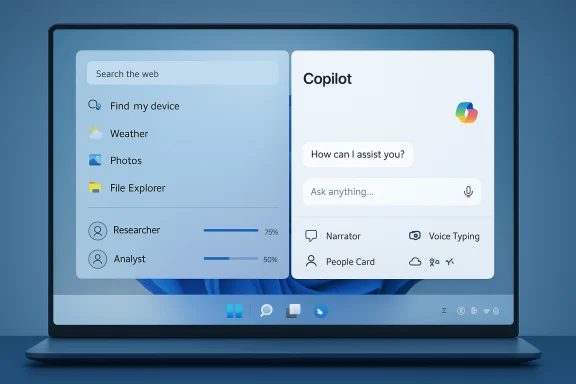
- Ask Copilot on the taskbar: An opt‑in taskbar composer (a compact “pill”) that brings together local search, Microsoft 365 Copilot chat, Copilot Voice, and Copilot Vision inputs. Initial commercial rollouts are U.S.-gated for customers with Microsoft 365 Copilot licenses.
- Agents on the taskbar: Running AI agents (for example, Researcher or Analyst) can be visible on the taskbar with hover previews and progress indicators; they notify when jobs complete. This is being staged for commercial Insiders.
- Agent Launchers framework: A developer-facing registration and discovery framework that lets apps register AI agents so they become discoverable systemwide (Start, Search, Ask Copilot, etc.. Microsoft’s documentation explains the JSON manifest, On-Device Registry (ODR), and the App Actions contract required to make agents invocable.
- Accessibility improvements: New personalization controls for Narrator announcement order, expanded Voice Access setup, and visual improvements to Voice Typing.
- File Explorer collaboration cues: People icons and a consumer-oriented Windows People Card show who recently interacted with cloud files, and on-hover quick actions are available for collaboration workflows.
- Quality and reliability fixes: Improvements to File Explorer search indexing, mitigation for a recent Windows Update 0x800F0922 regression, Adaptive Brightness fixes, lock/login screen hangs, and a raft of other platform reliability items.
- Known issues: Start menu click/no-open regressions, taskbar auto-hide misbehavior, File Explorer context menu crashes on some systems, and Bluetooth battery reporting issues remain under investigation.
Deep dive: Ask Copilot on the taskbar
What it does and how it behaves
Ask Copilot is designed as a one-click, hybrid surface that mixes local discovery with generative assistance. When enabled via Settings → Personalization → Taskbar → Ask Copilot, the taskbar pill will:- Return lightning-fast local results (apps, files, settings) using existing Windows Search APIs.
- Offer a seamless jump into Microsoft 365 Copilot chat (text), Copilot Voice (speech), and Copilot Vision (screen region upload) where supported.
- Allow users to escalate from a local search hit to a Copilot action (for example, “Summarize this document” or “Extract bullet points”), subject to license and tenant context for commercial customers.
Why this matters
Placing Copilot on the taskbar is a deliberate UI strategy: it reduces friction and normalizes AI assistance as part of everyday desktop workflows. For organizations with Microsoft 365 Copilot licenses, Ask Copilot promises tighter context (Work IQ) integration that can make the assistant more useful in knowledge work scenarios. For consumers, it shortens the distance between “I want help” and “I have an answer.” The trade-off is management complexity: hardware gating, licensing, and regional restrictions mean centralized decision-making is required for enterprise rollouts.What Agent Launchers mean for developers and the platform
A standardized integration path
Agent Launchers are a robust, documented platform for third-party and first-party agents to integrate with Windows. Microsoft’s Agent Launchers on Windows docs and developer tutorials show a clear registration and invocation model:- Agents register via a JSON agent manifest and an App Action that accepts required entities (agentName, prompt). Agents can be registered statically in an app package or dynamically using the On‑Device Registry (ODR).
- The runtime exposes discovery APIs (odr list-app-agents) and guarantees that invocation opens an interactive UI rather than running silently in the background. That helps maintain transparency for users.
Developer guidance (practical)
- Implement an App Action that accepts
agentNameandprompttext entities. - Test App Actions using the App Actions Testing Playground and validate invocation.
- Package agentDefinition.json and declare your app extension (com.microsoft.windows.ai.appAgent) in your manifest for static registration, or use odr.exe to register dynamically for runtime flexibility.
Platform implications and governance
Agents are designed to be interactive, context-aware, and action-capable. That raises governance questions: what privileges can agents exercise? How are agent actions audited? Microsoft’s early guidance emphasizes sandboxing, low‑privilege execution, and audit logs, but enterprise-grade management surfaces (policies to restrict agent behavior, logging back-ends, SIEM hooks) are still maturing. Admins should treat Agent Launchers as a new application surface to be included in their threat models and application inventories.Accessibility and input improvements
Build 26220.7523 includes several accessibility refinements that matter for real-world use:- Narrator personalization: Users can now reorder and select which properties are announced for different control types (buttons, sliders, checkboxes). This level of control reduces verbosity and lets users tailor output to their workflows.
- Voice Typing and Voice Access adjustments: Visual distractions are reduced and setup flows simplified, improving accessibility onboarding.
Reliability fixes and known regressions
Build 26220.7523 delivers a broad set of stability remedies:- File Explorer: Reduced duplicate indexing operations (faster searches), fixes for white flashes when navigating, and improved handling for secondary drives.
- Windows Update: Mitigation for an uptick in error 0x800F0922 seen by some Insiders.
- Adaptive Brightness: Fixed behavior where adaptive brightness didn’t work after rebooting.
Security, privacy, and compliance considerations
The Copilot and agent surfaces introduce two key operational questions:- Data flows and telemetry: While Ask Copilot is permissioned and local search remains local by default, invoking Copilot chat, Copilot Vision, or Microsoft 365 Copilot will send content to cloud services when required (and when the user consents). Administrators should review tenant-level Copilot settings, DLP policies, and conditional access configurations before enabling Ask Copilot broadly.
- Agent capabilities and auditability: Agents are designed to be visible and user-driven, but because they can take multi-step actions, organizations need to confirm audit trails and ensure agents cannot be misused to exfiltrate data or perform privileged changes. At present, enterprise management tooling for agents is evolving—plan for staged pilots and include agents in existing application security reviews.
Recommendation for IT admins and power users
- For Insiders and enthusiasts: Install the build on non-production hardware if you want to test Ask Copilot and Agent Launchers. Use Feedback Hub to report issues and expect staged visibility—features may be server-gated.
- For enterprise pilots: Start with a small, representative pilot group that includes knowledge workers who will use Microsoft 365 Copilot. Validate Work IQ context handling, DLP boundaries, and single sign-on flows before expanding. Audit and logging validation is essential.
- For broad production rollouts: Delay until the known Start/menu/File Explorer regressions are resolved for your hardware profiles. Use Windows Update for Business, WSUS, or Autopatch to stage the enablement package. Maintain rollback plans and confirm vendor driver/firmware compatibility.
Step-by-step checklist to evaluate Build 26220.7523 (recommended pilot plan)
- Inventory: Identify sample devices with representative hardware classes (Copilot+ NPU devices, standard laptops, docking stations, enterprise images).
- Backup & Snapshot: Create system restore points and image backups for quick rollback.
- Apply Build: Use a controlled update channel (Release Preview or managed ring) and enable the Insider toggle only on pilot machines.
- Functional Validation: Test Ask Copilot, agent invocation, and App Actions for any integrated enterprise apps.
- Compliance Tests: Run DLP, conditional access, and EDR rules while triggering Copilot/Agent flows.
- Performance & Power: Record battery and thermal behavior under representative workloads.
- User Acceptance: Collect feedback from pilots on privacy dialogs, latency, and task flows.
- Expand or Revert: Based on telemetry and feedback, either expand pilot, delay, or roll back.
Strengths and notable improvements
- Platform consistency for agents: Agent Launchers offer a much-needed unified developer model that simplifies discovery and invocation of AI agents across the OS. This reduces fragmentation for the ecosystem.
- Desktop-first Copilot integration: Ask Copilot’s taskbar placement is a smart UX play that lowers the activation cost for helpful AI behavior and blends search and assistance coherently.
- Accessibility focus: Practical improvements to Narrator and voice input show Microsoft continuing to prioritize assistive experiences across updates.
- Reliability and performance work: The fix set addresses important regressions (search indexing, update error mitigation, brightness), reflecting responsiveness to community-reported issues.
Risks, trade-offs, and open questions
- Fragmented visibility: Server-gated, entitlement-based rollout means inconsistent user experiences; troubleshooting and support require awareness of feature gating per device/account.
- Privacy and compliance complexity: Copilot and agents involve cross-boundary data flows (local → cloud). Organizations will need stronger telemetry visibility and DLP enforcement to maintain compliance.
- Maturity of management tooling: While Agent Launchers are well-documented, enterprise-grade policy surfaces and SIEM integration for agent actions are still emerging. Expect further management controls in later releases.
- Known regressions may affect productivity: Start/menu and File Explorer context menu issues mean this build is not yet appropriate for broad production use.
Final analysis — what this build signals about Microsoft’s direction
Build 26220.7523 is consequential not because it drastically remakes Windows’ visual language, but because it advances the agentic and Copilot-oriented strategy at the OS level. Agent Launchers standardize how AI assistants integrate with Windows; Ask Copilot puts generative assistance in the primary affordance users glance at daily (the taskbar); accessibility enhancements make the AI experience more inclusive; and the long list of fixes shows Microsoft balancing innovation with operational hygiene. Taken together, these moves indicate Microsoft is pivoting Windows toward a platform that treats AI agents as first‑class citizens while still wrestling with rollout complexity, privacy controls, and enterprise manageability.Administrators and power users should treat this build as an important preview: a useful testbed for agent integrations and Copilot workflows, but not yet a candidate for widespread production deployment. Validate in pilots, confirm telemetry and compliance boundaries, and plan staged rollouts as Microsoft resolves the remaining regressions and expands management tooling.
Build 26220.7523 is available now to Insiders in the Dev and Beta channels under the KB5072043 umbrella. Install only on test systems or managed pilots until the outstanding Start, file‑context, and Bluetooth issues are confirmed fixed for your hardware.
Source: Neowin https://www.neowin.net/news/windows...th-new-features-and-fixes-in-build-262207523/
