

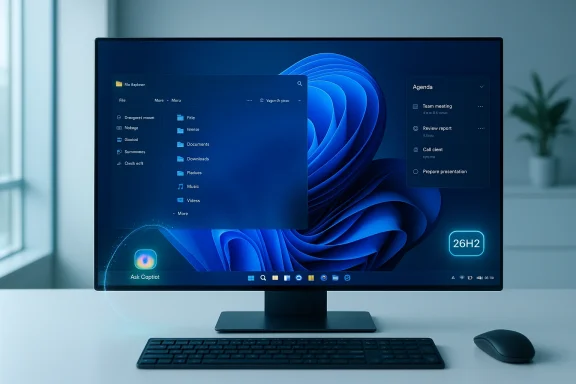
Microsoft’s next Windows 11 milestone—branded internally as the 26H2 era—is shaping up to be less a dramatic visual overhaul and more a decisive step in folding AI into everyday Windows workflows, with the taskbar and File Explorer getting the most visible changes. Early previews show Microsoft treating 26H2 as an enablement package that flips switches for features already delivered through monthly updates, while also resetting the support clock for organizations that adopt it.
Windows feature updates have shifted in recent years from heavy reinstall-style upgrades to lighter, service-driven releases. The enablement-package model—first seen in recent Windows updates—means the platform binaries for new capabilities are already present on updated systems; the package simply activates them. That has two practical consequences: installs are faster, and enterprises gain a new support baseline without a full OS rewrite. Microsoft documentation and IT guidance make this explicit for the 25H2 path and the same pattern carries into 26H2.
Timing and support windows are important operational facts for IT. Public reporting and Microsoft channels indicate Microsoft is likely to target a late-September to early-October 2026 general availability window for the 26H2 enablement milestone, with Insider builds exposing features earlier. Adopting the enablement package historically resets mainstream servicing windows—consumer SKUs usually receive 24 months and enterprise/education SKUs 36 months of support—making the version number a practical planning hinge for patch scheduling and compliance.
Key behavior and UX notes from preview coverage:
Previews reveal more than cosmetic changes: Copilot integration is expanding inside File Explorer. Microsoft is testing contextual Copilot actions—right-click AI actions that can summarize documents, run Bing Visual Search on images, blur/remove backgrounds, and run quick edits without launching a full editor. There are hints of a dockable Copilot panel beside the preview pane that could host dialog-based interactions with files. These features appear in Insider builds and are being iterated rapidly.
Practical implications:
Benefits:
Other smaller but practical improvements scattered through 26H2 previews include:
Security and trust considerations:
Source: TechRepublic Microsoft to Showcase AI in Windows 11 26H2 Taskbar, File Explorer
 Background / Overview
Windows feature updates have shifted in recent years from heavy reinstall-style upgrades to lighter, service-driven releases. The enablement-package model—first seen in recent Windows updates—means the platform binaries for new capabilities are already present on updated systems; the package simply activates them. That has two practical consequences: installs are faster, and enterprises gain a new support baseline without a full OS rewrite. Microsoft documentation and IT guidance make this explicit for the 25H2 path and the same pattern carries into 26H2.Timing and support windows are important operational facts for IT. Public reporting and Microsoft channels indicate Microsoft is likely to target a late-September to early-October 2026 general availability window for the 26H2 enablement milestone, with Insider builds exposing features earlier. Adopting the enablement package historically resets mainstream servicing windows—consumer SKUs usually receive 24 months and enterprise/education SKUs 36 months of support—making the version number a practical planning hinge for patch scheduling and compliance.
What’s new: Ask Copilot on the taskbar
A shift in how users ask questions
One of the most palpable changes in previews is a taskbar-level composer called Ask Copilot. When enabled in personalization settings, the traditional search box can be replaced with this compact, natural-language input that routes queries to local apps, files, and system settings while also using Copilot’s interpretation layer to surface actionable results. The underlying Windows search index remains intact; Copilot acts as an intent layer over that index rather than replacing local indexing.Key behavior and UX notes from preview coverage:
- The composer accepts plain-language queries (for example, “dim screen brightness” or “show last week’s downloads”) and links them to Settings or local files.
- Copilot will not automatically access local files—explicit sharing or file uploads are required for Copilot to ingest private docs. This is a deliberate privacy boundary in the preview experience.
Why this matters
Putting Copilot on the taskbar changes the ergonomics of system search: it aims to reduce friction for routine tasks and introduce AI assistance as a first-class OS surface. For many users this will feel like a productivity gain; for IT and privacy teams it raises questions about telemetry, consent defaults, and how agentic features are governed.File Explorer: structural cleanup and deeper Copilot hooks
Context menus and reduced clutter
File Explorer is receiving a visible structural cleanup. Right-click menus are being reorganized into grouped sections, with less-frequent actions nested to reduce visual noise. OneDrive actions are grouped into their own section, and common file tasks (compress, copy path, rotate image) land under clearer file-management headings. This is part usability improvement, part response to user feedback about bloated menus. ([pcworld.com](Windows 11 26H2 is coming: Meet all the new features in the file contextPreviews reveal more than cosmetic changes: Copilot integration is expanding inside File Explorer. Microsoft is testing contextual Copilot actions—right-click AI actions that can summarize documents, run Bing Visual Search on images, blur/remove backgrounds, and run quick edits without launching a full editor. There are hints of a dockable Copilot panel beside the preview pane that could host dialog-based interactions with files. These features appear in Insider builds and are being iterated rapidly.
Practical implications:
- Quick image edits and summaries could save users countless app switches for repetitive content tasks.
- Copilot-in-Explorer raises DLP and compliance considerations: organizations will need to define whether Copilot can operate on corporate content and under what policies. The integration path suggests Microsoft is building permission prompts and enterprise controls, but those will need to be validated in your environment.
Performance, WebView2, and the Agenda view
Agenda returning—implemented with WebView2
The Agenda view (synced Outlook appointments visible in Notification Center) makes a retution uses Microsoft’s WebView2 runtime for rendering the interface. WebView2 is an embedded browser component (based on Chromium/Edge) that makes web‑based UI integration straightforward across Windows. That convenience comes with a tradeoff: review commentary in preview channels flagged WebView2’s runtime memory footprint as substantial for small UI widgets—reports have cited figures around 100 MB for the Agenda component in some previews. While 100 MB is small relative to entire system RAM on modern machines, it is significant for what used to be a trivial, native UI element.What IT should watch for
- Memory and process count: Embedded WebView2 instances multiply processes and memory overhead. On constrained devices or dense VM hosts, teams should benchmark the impact.
- Update surface: WebView2 is updated via Edge updates—teams should track update behaviour and ensure safeguards for managed environments.
- Performance regressions: Some users reported visual or responsiveness regressions when multiple WebView2 widgets are active in shell surfaces; this should be part of pilot testing.
Security tooling: Sysinternals System Monitor and professional features
A notable inclusion in previews is an optional integration of Sysinternals System Monitor (Sysmon) and related tooling as an in-OS optional capability rather than a separate download. Normally Sysinternals tools are packaged outside Windows and consumed by IT teams; folding them into the OS as optional features simplifies access for defenders and incident responders but also changes management expectations.Benefits:
- Easier deployment: Admins can enable Sysinternals capabilities as part of Windows image configuration.
- Better telemetry: Pre-built hooks into Windows logging and Eventing could reduce time to detection.
- Configuration drift: Default Sysinternals settings may not match enterprise defenses; governance and hardened configuration will be essential.
- Attack surface: Additional privileged tooling on endpoints increases the importance of securing local agent telemetry and access controls.
Gaming mode, multimedia, and small improvements
Microsoft previews an optional full-screen gaming mode that transforms the desktop into a console-like dashboard to prioritize input, reduce background activity, and extend battery life for gaming on portable devices. This is an optional toggle in Gaming settings that requires a restart. Early notes suggest it’s a shell-level switch that reduces background processes and surfaces controller-friendly navigation built on the existing Xbox app stack.Other smaller but practical improvements scattered through 26H2 previews include:
- Expanded camera controls (pan, tilt support where hardware allows).
- Emoji 16.0 adoption for updated symbol sets.
- Fixes for taskbar auto-hide glitches and desktop icon rearrangements.
- Voice Access language expansion (e.g., Netherlands support).
- Improved File Explorer tooltips and custom folder naming.
Agentic AI: convenience and governance risks
Microsoft’s direction for Windows—as an “agentic OS” where small background agents can act on behalf of users—was articulated broadly in recent roadmaps. Agentic scenarios include automatic file organization, draft emails composed by Copilot, and long-running background tasks invoked from the taskbar. Microsoft frames these as opt-in and sandboxed using a Model Context Protocol (MCP) that limits tool access, but agentic behaviour increases risk vectors.Security and trust considerations:
- Incorrect actions: An agent that moves or deletes files automatically may do so incorrectly; audit trails and easy rollback are essential.
- Data exfiltration: Agents that connect to cloud models must honor DLP policies; organizations must validate connector behaviour before enabling.
- Consent, defaults, and discoverability: Users may enable convenience features without fully understanding scope; IT must clarify defaults and provide guidance.
Cross-referencing claims and verifiability
Key facts in early coverage are corroborated across multiple outlets and community observations:- The enablement-package model for 26H2 is consistent with Microsoft’s KB descriptions and IT‑PRO guidance previously published for 25H2.
- Taskbar-level "Ask Copilot" and File Explorer Copilot actions appear across preview reporting from PCWorld, Windows Central, and insider community threads.
- Agenda’s WebView2 implementation and memory-footprint concerns surfaced in community testing and discussion, where notes around ~100 MB were reported; these are implementation details from previews and can vary between builds and device configurations. Flagging such figures is prudent—but treat them as preview observations, not final shipping guarantees.
- Inclusion of Sysinternals-style tooling as an optional OS component is noted in multiple pre-release briefings and analysis pieces but remains a preview-stage plan and could change prior to general availability. Treat that as a planned capability, not an irreversible commitment.
Critical analysis: strengths, weaknesses, and enterprise impact
Strengths and opportunity
- Productivity uplift: Tighter Copilot integration in the taskbar and File Explorer directly targets common friction points—search, quick edits, and document summarization—potentially saving time across knowledge-worker workflows.
- Faster servicing: The enablement-package approach reduces downtime and simplifies imaging strategies for IT teams adopting the latest baseline. It also gives organizations a practical mechanism to reset support windows.
- Better defender tools: Bundling Sysinternals-style tooling simplifies visibility for incident responders and can shorten the time-to-detection for root-cause analyses.
Risks, costs, and unknowns
- Resource overhead: WebView2-based UI components and embedded AI components increase process counts and memory use. On constrained or older hardware, this could manifest as degraded responsiveness. Early reports of WebView2 memory footprints should prompt focused validation on representative hardware.
- Privacy and data governance: AI features, even when opt-in, invite DLP, data residency, and compliance questions. Copilot connectors and agentic tools must be evaluated under organizational policy before broad enablement.
- Increased update complexity: Enabling dormant features means that features may be shipped broadly but controlled by activation flags; keeping devices fully patd can lead to discrepancies between perceived and actual capability sets. Administrators need clear inventory and patch baselines.
- Change fatigue: Numerous small UX changes (context menu reorganizations, new panels, AI choices) can frustrate users who prefer consistency. Expect a period of help-desk load as users adapt.
Practical guidance: rollout checklist for IT and power users
- Inventory and baseline
- Ensure all target devices are on the required cumulative update baseline before applying any enablement package; Microsoft documents prerequisites for prior eKBs.
- Pilot groups and pilot scripts
- Start with a pilot group representing low-risk business units and power-user cohorts. Focus tests on File Explorer performance, WebView2 memory usage, and Copilot permissions scenarios.
- Security posture checks
- Validate Sysinternals and logging configuration to ensure data does not leave controlled channels. Review EDR integrations and event forwarding for new telemetry.
- Policy and consent configuration
- Decide default states for Ask Copilot and agentic features—disable by default until policies and DLP controls are validated if you manage sensitive data.
- Performance benchmarking
- Run standardized benchmarks on representative hardware (RAM-limited laptops, high-end desktops, and VM hosts) to quantify any memory/process overhead introduced by WebView2 or Copilot components.
- User training and documentation
- Prepare short guidance and “how-to” notes for end users: how to enable/disable Ask Copilot, what Copilot can access, and how to revoke permissions.
- Rollback and recovery planning
- Confirm rollback steps in your deployment tooling and rehearse reverting to previous baselines if necessary. Monitor the Windows release health dashboard for safeguard holds.
Developer and app compatibility considerations
- Minimal driver impact: Because enablement packages do not change platform binaries, driver compatibility is usually stable—however, any integration that surfaces file-type conversions or system services should be tested against in-house apps that rely on Shell extensions.
- Extension and third-party tooling: Shell extensions and context-menu handlers may be affected by grouped or nested menus; vendors should test to ensure discoverability is not compromised. Power users and system integrators may need to update documentation and support scripts.
The user perspective: what to expect personally
For everyday users, 26H2 will likely feel incremental but meaningful in specific places: taskbar search that feels smarter, a cleaner right-click menu, and faster micro-edits in File Explorer. Most conveniences are optional and controlled via personalization and permissions. For privacy-conscious users, the critical takeaway is to examine Copilot privacy prompts closely and to understand when a feature explicitly requires sharing files with Copilot.What to watch between now and GA
- Final behavior of agentic features: Will Microsoft ship fine-grained enterprise policies and audit logs that satisfy compliance teams?
- WebView2 resource optimization: Will Microsoft reduce memory overhead for shell widgets, or provide configuration knobs to limit WebView2 usage?
- Licensing and cloud connector clarity: How will Copilot’s cloud connectors be licensed and controlled in managed environments?
- Sysinternals telemetry defaults: What configuration will Microsoft ship for integrated Sysinternals tooling by default and how will that interact with EDR products?
Conclusion
Windows 11 26H2 is emblematic of Microsoft’s current OS strategy: incremental platform updates delivered as enablement packages, combined with a strong push to make AI an integral, system-level assistant. The most visible changes—Ask Copilot on the taskbar and a Copilot‑aware File Explorer—promise productivity gains but introduce real operational choices for IT teams around privacy, performance, and governance. The enablement-package model makes adoption easier from a servicing perspective, but it also means administrators must be intentional about activation, pilot testing, and policy configuration. Organizations should treat 26H2 as a strategic update: evaluate it in controlled pilots, validate WebView2 and agentic behavior on representative hardware, and establish consent and DLP guardrails before broad enablement. The feature set is compelling; successful enterprise adoption will hinge on disciplined testing and clear governance.Source: TechRepublic Microsoft to Showcase AI in Windows 11 26H2 Taskbar, File Explorer
