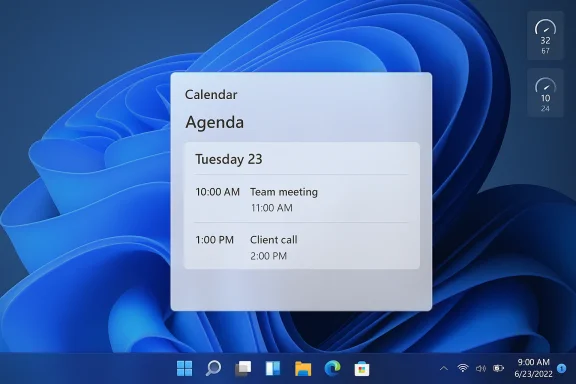
Microsoft has confirmed the highly anticipated Agenda view for the Windows 11 taskbar calendar has been delayed from its originally stated preview window, and the company says it is taking extra time to “refine the foundational aspects” of the experience before it reaches customers. ([windowscentral.comcentral.com/microsoft/windows-11/microsoft-confirms-that-a-highly-anticipated-new-taskbar-feature-coming-to-windows-11-in-2026-has-been-delayed-promises-to-ensure-it-meets-our-quality-standards)
When Microsoft announced at Ignite 2025 that Windows 11 would regain a compact, chronological Agenda view inside the Taskbar calendar flyout, many enterprise and power users celebrated a restoration of a small but productivity-critical convenience that Windows 10 provided. The company initially said the feature would enter Windows Insider preview in December 2025; that timeline has since slipped without public explng showed the December target was quietly removed from Microsoft’s original announcement, leaving users uncertain whether the feature was delayed or canceled.
Microsoft’s more recent, explicit statement to Windows Central reaffirms the Agenda view is not canceled. A spokesperson told Windows Central the company is “actively refining the foundational aspects of the experience to ensure it meets our quality standards before it reaches customers,” and that the feature will enter preview with Windows Insiders “in the coming months.” That phrasing replaces the prior December 2025 commitment and likely pushes public preview out by at least several weeks.
Because the feature restores a functionality Windows 11 removed in its 2021 redesign, the announcement was framed as a course-correction and a sign Microsoft is listening. That political and emotional weight amplifies the disappointment when timelines slip; users interpret delays as either organizational indecision or technical problems. The vagueness of the “coming months” timeline replaces a concrete commitment with a broader promise, which drives speculation and skepticism in equal measure.
That strategy accelerates feature parity and reduces duplicate engineering effort—but it runs the risk of alienating users who expect highly optimized, native interactions in the Windows shell. The Agenda view sits at the intersection of those tensions: a small but highly visible surface that users expect to be fast, integrated, and low-impact.
If Microsoft subsequently reworks the feature into a native shell component, the timeline and engineering cost would grow substantially. If it doubles down on WebView2, the company must solve the resource and visual fit issues. The delay signals Microsoft is weighing those paths.
For users and IT teams, the prudent stance is one of cautious optimism: the feature is still coming, but expect a measured preview that prioritizes enterprise readiness, clearer policy controls, and performance tuning. The company’s explicit focus on quality is the right move, provided it follows with transparent preview details, robust enterprise controls, and measurable improvements to any WebView2-specific issues identified in early testing.
In short: the Agenda view’s delay stings for those who wanted a quick fix, but the pause also creates a valuable opportunity—if Microsoft uses it to deliver a fast, well-integrated, and manageable experience, the feature will have been worth the wait.
Source: Windows Central Microsoft delays preview of Windows 11's new Taskbar agenda view
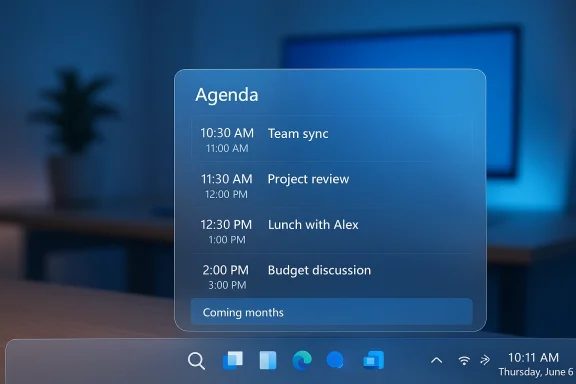 Background
When Microsoft announced at Ignite 2025 that Windows 11 would regain a compact, chronological Agenda view inside the Taskbar calendar flyout, many enterprise and power users celebrated a restoration of a small but productivity-critical convenience that Windows 10 provided. The company initially said the feature would enter Windows Insider preview in December 2025; that timeline has since slipped without public explng showed the December target was quietly removed from Microsoft’s original announcement, leaving users uncertain whether the feature was delayed or canceled.Microsoft’s more recent, explicit statement to Windows Central reaffirms the Agenda view is not canceled. A spokesperson told Windows Central the company is “actively refining the foundational aspects of the experience to ensure it meets our quality standards before it reaches customers,” and that the feature will enter preview with Windows Insiders “in the coming months.” That phrasing replaces the prior December 2025 commitment and likely pushes public preview out by at least several weeks.
What Microsoft said — the official line
Microsoft’s public position is focused on two points:- The Agenda view is still planned and has not been canceled.
- The company wants the experience to meet a high quality bar and is refining foundational aspects before wider release; preview access for Windows Insiders will arrive “in the coming months” rather than the previously stated December 2025 window.
Why the delay reaction is strong)
The Agenda view is a small surface with outsized day‑to‑day impact. For users who juggle meetings and deadlines, being able to glance at upcoming items from the Taskbar clock—without opening a full calendar or mail client—saves friction and time. Enterprises, help desks, and productivity teams also treat this as a usability win: less context-switching, fewer accidental “I’m late” moments, and fewer calls to support for calendar‑related confusion.Because the feature restores a functionality Windows 11 removed in its 2021 redesign, the announcement was framed as a course-correction and a sign Microsoft is listening. That political and emotional weight amplifies the disappointment when timelines slip; users interpret delays as either organizational indecision or technical problems. The vagueness of the “coming months” timeline replaces a concrete commitment with a broader promise, which drives speculation and skepticism in equal measure.
Technical anatomy: WebView2 vs. native UI
What elevated the public reaction from mere disappointment to vocal concern was the technical detail uncovered in early preview builds and reporting: the Agenda view appears to be implemented using WebView2—an embedded Edge/Chromium runtime—rather than as a native shell control. Multiple outlets and early tests show the Agenda surface rendering Outlook/Calendar content inside a WebView2 host. That implementation choice carries real trade-offs.What WebView2 brings
- Rapid development: Teams can reuse web components and existing Outlook web surfaces, moving faster than rewriting native UI.
- Consistent cross-device rendering: Web standards ensure content looks the same across platforms where WebView2 is supported.
- Easy integration with web services: Pulling Outlook/Microsoft 365 content directly into a web host simplifies some code paths.
What WebView2 costs
- Resource overhead: Embedding a Chromium-based runtime increases memory and CPU usage compared with a lightweight native control. Early tests reported additional memory usage in the dozens to low hundreds of megabytes while the flyout is active.
- Visual fit and polish: Web content inside shell surfaces can feel visually inconsistent with native Windows chrome, especially when animations, fonts, and accessibility hooks differ.
- Manageability and security surface: IT teams weigh WebView content differently for patching, telemetry, and compatibility than native apps. Policies that block web content or restrict embedded browsers could affect the feature’s availability in locked-down environments.
UX and performance analysis: trade-offs and early evidence
Early hands-on previews and community benchmarks indicate that the Agenda view works functionally but exposes trade-offs that matter at scale.- Responsiveness: The Agenda flyout provides the expected chronological list and join actions, but small UI lags were reported when opening the flyout and interacting with items—likely tied to WebView2 initialization and the Shell integration layer.
- Resource profile: Reports from preview testing community posts and a few European outlets measured memory consumption increases in the neighborhood of ~100–150 MB while the WebView-backed Agenda pane was open. That is modest for modern hardware but meaningful on constrained devices, and it influences battery life on laptops.
- Visual consistency: Some users noticed differences in font rendering, spacing, and animation fluidity—the WebView-rendered content does not perfectly match native shell controls. These differences are small in isolation but visible in a UI element users interact with dozens of times a day.
Enterprise, manageability, and security implications
For IT admins and enterprise customers, the Agenda view is more than a cosmetic improvement—it intersects with policy, telemetry, and identity flows.- Identity and access: The Agenda pulls data from Microsoft 365/Outlook. Enterprises that enforce Conditional Access, strict session tokens, or service isolation need assurance that the flyout will respect organizational identity policies and not bypass security controls. Early reports show the Agenda surface interacting with Outlook web content inside a WebView2 shell, which raises questions about how credentials and tokens are handled when that surface is surfaced by the Windows shell.
- Update and patching model: WebView2 depends on the Microsoft Edge runtime. Enterprises that manage Edge updates tightly will need guidance on whether Agenda will require a minimum Edge/WebView2 version and how compatibility will be managed across Windows servicing cycles.
- Telemetry and privacy: Any component that renders cloud-hosted content brings telemetry considerations. Administrators will want clear documentation on what data the Agenda view sends to Microsoft (e.g., diagnostic signals, content fetch telemetry) and whether any of that is optional or subject to enterprise-level controls.
- Group Policy and Intune controls: Organizations will expect options to disable or manage the Agenda flyout centrally—especially those with privacy or security constraints that prevent embedded web content from auto-refreshing calendar data in the shell.
Product strategy: why Microsoft might prefer WebView2
There’s a broader platform strategy that helps explain the WebView2 choice. Microsoft has been progressively speriences to web-driven, service-integrated components where it provides faster developer iteration and easier feature parity across platforms. WebView2 also lets Microsoft weave Microsoft 365 and Copilot hooks into OS surfaces with less native rework.That strategy accelerates feature parity and reduces duplicate engineering effort—but it runs the risk of alienating users who expect highly optimized, native interactions in the Windows shell. The Agenda view sits at the intersection of those tensions: a small but highly visible surface that users expect to be fast, integrated, and low-impact.
If Microsoft subsequently reworks the feature into a native shell component, the timeline and engineering cost would grow substantially. If it doubles down on WebView2, the company must solve the resource and visual fit issues. The delay signals Microsoft is weighing those paths.
What the delay likely means (practical expectations)
Parsing Microsoft’s phrasing and the reporting that followed, here’s a practical timeline to keep in mind:- In the coming weeks to months: Windows Insiders will receive a preview build that includes the Agenda view behind a controlled toggle or rollout ring. This aligns with Microsoft’s “coming months” phrasing.
- Preview period: Expect several preview flights as Microsoft iterates on performance, visuals, and enterprise controls; WebView2-specific optimizations (e.g., shared runtime warm starts) may be implemented during this phase.
- General availability (GA): Public rollout will likely follow a measured validation window; if the company is focused on performance and management scenarios, GA could be scheduled later in 2026 rather than immediately after the first preview.
Strengths of Microsoft’s approach
- Focus on quality: Explicitly pausing to refine foundational elements is consistent with shipping a reliable user experience—especially for a feature that will surface frequently in workflows. Microsoft’s public reassurance that the feature is not canceled helps curb rumor-driven panic.
- Faster iteration via WebView2: If Microsoft can address performance and integration problems, a WebView2 approach allows the company to iterate quickly on Copilot and Microsoft 365 integrations down the road.
- Opportunity to align with enterprise needs: Delaying gives Microsoft time to produce enterprise-grade policy controls, documentation, and compatibility guidance that IT teams need before they allow new shell surfaces on managed devices.
Risks and downsides
- User trust: Repeating timeline shifts—especially after public commitments—erodes user confidence and fuels speculation about organizational priorities.
- Performance and power: WebView2’s resource footprint may negatively impact battery life and responsiveness on entry-level laptops and tablets, creating a real-world usability regression for some users.
- Manageability complexity: Enterprises could face an increased support burden if the feature behaves differently across environments with differing Edge/WebView2 policies.
- Visual inconsistency: Users expect shell surfaces to match system chrome. A web-hosted pane that looks or behaves differently risks being perceived as a "second-class" experience.
What Windows Insiders and IT teams should watch for
- Preview ring details: Microsoft should specify which channel (Canary/Dev/Beta) and which build will first include Agenda. Insiders should watch official flight notes and Feedback Hub posts for those signals.
- Policy controls: Look for Group Policy templates and Intune settings that let admins enable/disable the Agenda flyout, restrict embedded web content, or control Microsoft 365 account access from shell surfaces.
- Edge/WebView2 dependency notes: Expect documentation on the minimum supported WebView2 runtime version and guidance for managed update scenarios. This will be central to enterprise readiness.
- Performance telemetry: Microsoft should publish (or provide in-flight diagnostics) the resource profile for the Agenda view and any mitigations it has implemented to reduce warm‑start and memory overhead. Early community tests showing ~100–150 MB of memory usage should be validated or improved.
- Accessibility and localization: Given the flyout’s frequency of use, accessibility improvements and full localization must be verified in preview builds.
Recommendations for admins and everyday users
For IT administrators:- Prepare to test the preview in a controlled ring before broader deployment. Use lab hardware that mirrors the lower-end devices in your fleet to validate performance and battery impacts.
- Validate identity and Conditional Access behavior with supervised test accounts to ensure there are no unintended token or session leaks.
- Watch Microsoft’s documentation for Group Policy/Intune controls and incorporate those into your change management plan before approving mass deployment.
- If you rely on a low-power laptop or have a managed device, don’t expect the feature to be immediately available—check Insider channels and wait for the official rollout notice.
- If you want early access, join the Windows Insider Program and opt into the channel that receives new shell experiences first (watch Microsoft’s flight notes). Be prepared for iterative changes during preview.
What to expect next and how Microsoft can reduce friction
To restore user confidence and minimize rollout friction, Microsoft should consider the following as it prepares the preview:- Publish a short technical note that explains the implementation choice (WebView2 vs native) and the rationale, along with expected trade-offs and mitigation plans.
- Deliver explicit enterprise controls at preview time, or at least a clear timeline for when management policies will be made available.
- Optimize the WebView startup sequence—or provide a lightweight native host that warms WebView2—to reduce both resource spikes and perceived latency.
- Commit to a narrower preview timeline with concrete milestones so users and admins can plan for the change rather than guessing when it will land.
Conclusion
The return of the Agenda view to the Windows 11 Taskbar calendar is a broadly positive product decision: it restores a practical productivity surface many users missed. Microsoft’s stated delay—framed as a commitment to quality—appears driven by real technical and UX trade-offs, primarily the decision to implement the feature with WebView2 and the subsequent performance, visual, and manageability implications that raised community concern.For users and IT teams, the prudent stance is one of cautious optimism: the feature is still coming, but expect a measured preview that prioritizes enterprise readiness, clearer policy controls, and performance tuning. The company’s explicit focus on quality is the right move, provided it follows with transparent preview details, robust enterprise controls, and measurable improvements to any WebView2-specific issues identified in early testing.
In short: the Agenda view’s delay stings for those who wanted a quick fix, but the pause also creates a valuable opportunity—if Microsoft uses it to deliver a fast, well-integrated, and manageable experience, the feature will have been worth the wait.
Source: Windows Central Microsoft delays preview of Windows 11's new Taskbar agenda view