

Microsoft has quietly extended another layer of AI to Windows 11 users — this time in a way that doesn’t strictly require cutting‑edge hardware — while keeping the faster, private, and offline variants reserved for machines with dedicated neural silicon.
Microsoft’s ongoing strategy for Windows 11 is resolutely hybrid: deliver broadly useful AI experiences to as many users as possible via cloud-backed services, and deliver lower-latency, privacy-preserving variants on machines equipped with dedicated AI accelerators (so‑called Copilot+ PCs). This two‑track approach lets Microsoft ship feature parity across the ecosystem while still using on‑device inference to differentiate premium hardware for performance and offline capability.
The recent announcement (summarized in industry coverage) emphasizes two important facts. First, several new AI features will be available to all Windows 11 machines in preview through cloud services. Second, the same features will run on‑device with improved responsiveness and offline capability on PCs that meet Copilot+ hardware criteria — specifically devices with Neural Processing Units (NPUs) and targeted performance thresholds.
What matters to users is practical: on Copilot+ hardware these features offer near‑instant responses and offline operation for supported flows; on other devices they remain usable via cloud processing but with higher latency and a need for connectivity.
At the same time, the two‑tier model aligns with how major cloud providers and platform companies are balancing reach and performance: broad usability from the cloud plus premium on‑device experiences where hardware allows.
Users gain immediate access to richer writing, dictation, and accessibility features without mandatory hardware upgrades, but those seeking the premium experience — near‑instant local inference, offline workflows, and reduced cloud dependency — will still need to adopt Copilot+ hardware that meets the practical NPU and system resource guidelines outlined by Microsoft’s partners. The approach balances inclusion with innovation, but it also raises valid questions about experience fragmentation, enterprise governance, and upgrade pressure — issues Microsoft, OEMs, and IT departments must manage carefully as the Windows AI era matures.
Source: Neowin https://www.neowin.net/news/microso...-windows-11-devices-without-special-hardware/
 Background
Microsoft’s ongoing strategy for Windows 11 is resolutely hybrid: deliver broadly useful AI experiences to as many users as possible via cloud-backed services, and deliver lower-latency, privacy-preserving variants on machines equipped with dedicated AI accelerators (so‑called Copilot+ PCs). This two‑track approach lets Microsoft ship feature parity across the ecosystem while still using on‑device inference to differentiate premium hardware for performance and offline capability.The recent announcement (summarized in industry coverage) emphasizes two important facts. First, several new AI features will be available to all Windows 11 machines in preview through cloud services. Second, the same features will run on‑device with improved responsiveness and offline capability on PCs that meet Copilot+ hardware criteria — specifically devices with Neural Processing Units (NPUs) and targeted performance thresholds.
Overview of the newly extended AI features
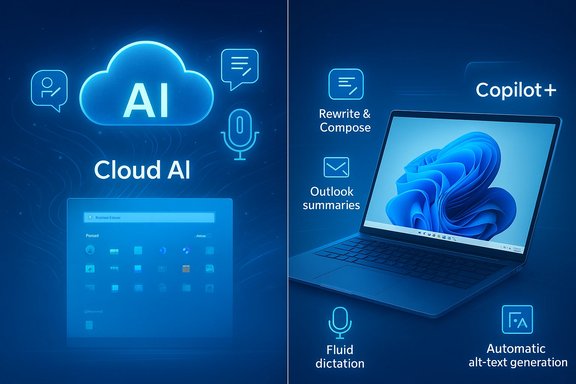
Microsoft’s feature wave centers on productivity and accessibility improvements that span text, speech, and image workflows. Key items in this rollout include:- Writing assistance / Rewrite & Compose — a system-level capability that rewrites or generates text across any text input field in Windows. It will be available broadly, but on‑device execution is supported on Copilot+ hardware.
- Outlook summaries — glanceable AI summaries inside Outlook to triage messages faster; available in preview to Windows 11 users.
- Word auto alt‑text — automatic generation of descriptive alt text for images inserted into Word documents to improve accessibility and reduce manual tagging.
- Fluid dictation (voice typing upgrade) — a real‑time speech‑to‑text experience that not only transcribes but polishes utterances (punctuation, filler removal, grammar). On Copilot+ devices this can run locally for low latency.
How the hybrid architecture actually works
Cloud-first, device‑accelerated
Microsoft’s model is pragmatic: put the heavy contextual reasoning and large language model capabilities in the cloud where big models can run, and keep latency‑sensitive primitives (speech polishing, short-form rewriting, image alt‑text generation, small summarizations) available for on‑device execution via small language models (SLMs) and compact vision models when hardware allows. Devices without neural silicon default to cloud execution for these same features, so functionality is broadly available even on older hardware.Copilot+ PCs and NPUs
Copilot+ PCs are a certified hardware tier that pairs CPU and GPU performance with an NPU that can run optimized inference workloads locally. Industry reporting and Microsoft’s partner guidance typically describe an NPU performance baseline in the “40+ TOPS” range as sufficient to run the targeted SLMs responsively; this number has been referenced consistently across announcements and analysis but is presented as a guideline rather than an immutable standard.What matters to users is practical: on Copilot+ hardware these features offer near‑instant responses and offline operation for supported flows; on other devices they remain usable via cloud processing but with higher latency and a need for connectivity.
On‑device models and runtimes
Microsoft is shipping smaller distilled variants of language and vision models (for example, distilled 7B/14B variants and other distilled models) that are quantized and optimized for NPU inference. These are delivered and managed via a Windows AI runtime — often described as Windows Copilot Runtime (WCR) — and a developer AI toolkit that integrates with tools like Visual Studio Code. The aim is to make local inference efficient while conserving battery life and storage. Typical device guidance mentioned in the documentation and reviews suggests a minimum of 16GB RAM and about 256GB storage for practical local model use, particularly for the heavier on‑device variants.What “available to all devices” really means
The headline that Microsoft has “brought another AI feature to all Windows 11 devices without special hardware” needs careful unpacking.- In one sense, Microsoft made the feature available in preview to all Windows 11 users via cloud services — that is, you don’t need a Copilot+ PC to access the capability at a base level. This is the heart of the claim and is accurate: cloud‑backed AI enables feature parity in preview form across the Windows 11 installed base.
- In the other, performance and privacy differ. If you want offline operation, lower latency, or local inference that does not send data to the cloud, you still need a Copilot+ machine with an NPU capable of running the optimized SLMs locally. In that sense, special hardware unlocks an enhanced experience — not the basic feature itself.
Technical specifics and verification
Several technical claims deserve explicit verification and context.- NPUs and the 40+ TOPS guideline: multiple manufacturer and reporting summaries reference a 40 TOPS+ threshold as a practical baseline for on‑device models to run with acceptable performance. This number is often cited but should be understood as an operational guideline tied to specific model sizes and quantization strategies, not a universal certification metric published as a strict minimum.
- Model sizes and on‑device variants: Microsoft and partner reporting describe distilled model variants (7B and 14B, plus smaller distilled/custom variants) for on‑device use and larger cloud models in Azure for heavier workloads. These distilled models are converted to runtime-optimized formats (for example ONNX QDQ) and quantized to fit NPU memory and throughput characteristics. That approach is consistent across product notes and independent reporting.
- Hardware recommendations: published guidance in the briefings and hardware notes consistently suggests higher memory (16GB or more) and generous storage (256GB or more) for devices intended to run more substantial on‑device models and caches. These figures appear across multiple briefings and technical summaries, but they should be treated as practical recommendations rather than rigid prerequisites.
Strengths: Why this approach makes sense
- Broad accessibility with an upgrade path: delivering features through the cloud to every Windows 11 machine keeps the OS competitive and avoids leaving the majority of users behind while still offering a clear incentive to buy Copilot+ hardware for better performance. This two‑tier approach balances inclusion and innovation.
- Practical privacy controls via local inference: for users and enterprises with strict privacy requirements, the ability to run certain AI tasks locally on an NPU — without sending raw data to cloud servers — is a meaningful win. On‑device models enable offline operation for speech, rewriting, and small vision tasks, reducing data exposure.
- Reduced latency and better UX on Copilot+ PCs: the responsiveness improvements from local inference make generative and interactive features feel native rather than remote, which is crucial for frictionless productivity experiences such as fluid dictation and Click to Do.
- Developer toolkits and runtime standardization: a consistent runtime and ONNX‑style optimizations help developers target multiple hardware vendors and deliver apps that leverage local AI without needing bespoke integrations for each NPU. This can accelerate the ecosystem.
Risks and tradeoffs
- Fragmentation of user experience: the hybrid delivery model can cause confusion where the same feature behaves differently depending on hardware and connection state. Users may expect uniform speed or offline capability and be disappointed if their machine lacks NPU acceleration.
- Privacy nuance and opt‑in complexity: while on‑device processing can reduce cloud exposure, many features still rely on cloud models for context or extended reasoning. Differentiating what runs locally vs. what is sent to cloud services — and ensuring transparent, user‑friendly controls — is essential for trust. Some features that capture context (eg. Recall) require careful opt‑in and access controls to avoid privacy shocks.
- Enterprise governance and manageability: IT teams will need clear policy controls, updated security baselines, and guidance on what data is processed locally versus in the cloud. Enterprises must decide whether Copilot features align with compliance requirements and how to manage device fleet readiness.
- Hardware upgrade pressure: tying the best experience to Copilot+ hardware implicitly encourages device refresh cycles. While that drives market demand for newer silicon, it risks excluding users on mid‑range or older devices — an affordability and sustainability concern.
- Unclear performance guarantees: NPU TOPS guidance and memory/storage recommendations are useful but not absolute. Model performance depends on model quantization, runtimes, driver and firmware maturity, and other variables. Early buyers may face variability across OEMs and chip vendors.
Practical advice for users and IT administrators
For everyday Windows 11 users
- If you see a new Copilot or AI feature in preview, try it — the cloud variant will work on most systems and demonstrates the capability even if local speed is unavailable.
- If you value offline AI, lower latency, or on‑device privacy, consider a Copilot+ PC that meets the guidance for NPUs and memory/storage; check OEM documentation for certified Copilot+ models.
- Review privacy and opt‑in settings when a feature asks to enable access to microphone, camera, or activity history. Features like Recall or Copilot Vision should be explicitly controlled.
For IT managers and security teams
- Evaluate Copilot features against data governance policies — determine which features are acceptable for managed endpoints and which should be restricted.
- Prepare deployment guidance for device procurement: if low-latency on‑device AI is required, specify Copilot+ certification and minimum RAM/storage in procurement documents.
- Test app compatibility and update management: on‑device runtimes and AI toolkits introduce new dependency vectors (drivers, firmware, WCR updates) that must be validated prior to broad deployment.
What this means for the Windows ecosystem and hardware makers
Microsoft’s approach reduces the short‑term barrier to entry for AI features while creating significant incentive for hardware manufacturers to produce Copilot+ certified designs. For silicon vendors, the NPU is an opportunity to capture value by enabling local inference; for OEMs, Copilot+ certification becomes a market differentiator. That dynamic pushes the industry toward more specialized silicon in consumer devices, even if the majority of AI reasoning will continue to live in the cloud for now.At the same time, the two‑tier model aligns with how major cloud providers and platform companies are balancing reach and performance: broad usability from the cloud plus premium on‑device experiences where hardware allows.
Remaining unknowns and what to watch
- Exact compatibility lists and per‑OEM performance metrics: until PC manufacturers publish certified Copilot+ lists and NPUs ship at scale, expect variability in performance and feature availability. The 40+ TOPS guidance is helpful, but hardware implementations (and driver support) will differ.
- Cloud/local decision boundaries: more transparency is needed on which parts of a given flow (for instance, a “rewrite” that needs broader context) will be processed locally versus in the cloud. Users and admins deserve clear, accessible explanations and toggle controls.
- Long‑term developer surface: how quickly third‑party developers adopt on‑device runtimes and optimize apps for NPU acceleration will shape the real value of Copilot+ hardware beyond the core Microsoft apps. The maturity of WCR and AI toolkits will be pivotal.
Conclusion
Microsoft’s latest push extends an understandable compromise: make useful AI features available to everyone through cloud services, while reserving faster, offline, and more private variants to machines with dedicated neural accelerators. That strategy keeps Windows 11 broadly relevant and competitive while accelerating demand for Copilot+ PCs and NPU-capable silicon.Users gain immediate access to richer writing, dictation, and accessibility features without mandatory hardware upgrades, but those seeking the premium experience — near‑instant local inference, offline workflows, and reduced cloud dependency — will still need to adopt Copilot+ hardware that meets the practical NPU and system resource guidelines outlined by Microsoft’s partners. The approach balances inclusion with innovation, but it also raises valid questions about experience fragmentation, enterprise governance, and upgrade pressure — issues Microsoft, OEMs, and IT departments must manage carefully as the Windows AI era matures.
Source: Neowin https://www.neowin.net/news/microso...-windows-11-devices-without-special-hardware/
