

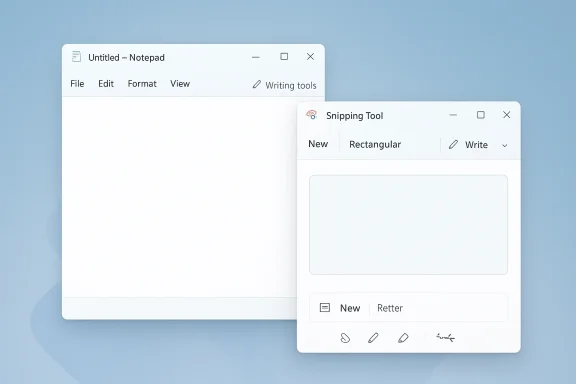
Microsoft is quietly rewriting the visual language of Windows 11 AI, and the first casualties are two of the most familiar built-in apps on the platform. In the latest Insider builds, Notepad and Snipping Tool are shedding their Copilot badges in favor of more neutral labels such as Writing tools, while the underlying AI features remain in place. The change looks cosmetic on the surface, but it signals a broader reset in how Microsoft wants Windows users to perceive on-device and cloud-assisted AI. It is also a rare example of a company stepping back from the branding that once dominated its own product story.
For much of the last two years, Microsoft’s Windows strategy has been inseparable from Copilot branding. The company pushed the name across the OS, across consumer marketing, and into everyday utilities that were once defined by simplicity and restraint. Notepad, a text editor long associated with plain utility, became one of the most surprising places to see AI features framed as part of the Copilot umbrella. Snipping Tool followed a similar path, as Microsoft tried to turn screenshot capture into an entry point for smarter extraction, annotation, and image-related assistance. Microsoft’s own support documentation still describes Notepad’s AI features as Rewrite, Summarize, and Write, and notes that these tools were available to Windows Insiders with Microsoft account sign-in requirements and AI credits for certain subscriptions
That earlier strategy made sense in one respect: Copilot gave Microsoft a single, easily marketable identity for a sprawling set of AI features. But it also created a branding problem. Windows users increasingly saw Copilot not as a helpful assistant, but as an intrusive label stamped onto nearly every corner of the operating system. The result was a tension between utility and promotion. If an app is supposed to help you write a note or crop a screenshot, the user experience can start to feel overmanaged when a big AI badge is constantly asking for attention.
The current shift appears to be a course correction. According to reporting on the latest Insider updates, Notepad’s toolbar no longer highlights the Copilot icon in the same way, and the related menu has been reworded as Writing tools. That is a subtle but important distinction. Microsoft is not abandoning the AI capability itself; instead, it is trying to de-emphasize the brand and make the feature feel native to the app rather than imported from a larger corporate AI campaign
This is also consistent with a broader pattern in Microsoft’s recent Windows messaging. In January 2026, Microsoft was still describing Notepad and Paint as AI-enhanced Insider experiences, but the language leaned more toward feature utility than brand evangelism. The company framed capabilities like Write, Rewrite, Summarize, and Coloring book in terms of workflow, access, and sign-in requirements rather than as an all-consuming Copilot identity
In practical terms, the branding change matters because Windows is not just a product; it is an operating environment used by hundreds of millions of people with very different tolerance levels for AI, cloud services, and product nudges. The plainest apps in Windows often carry the heaviest trust burden. When Microsoft changes those apps, even a small visual adjustment can feel like a philosophy shift.
Snipping Tool appears to be moving in the same direction, even if the exact user-facing details differ by build. The larger story is not that Microsoft is removing AI features from these apps, but that it is stripping away the corporate logo treatment that made them stand out so aggressively. In Windows terms, that is the equivalent of repainting the dashboard without changing the engine.
The underlying functions have not disappeared. Microsoft’s support guidance still documents Notepad features such as Rewrite and Summarize, and notes that they help users fine-tune tone, shorten text, and generate content from prompts. What has changed is the visual claim being made on the user’s behalf.
There is also a competitive logic here. Microsoft has plenty of reasons to keep AI deeply integrated into Windows, but not every feature needs to feel like a billboard. In a crowded PC market, intrusive branding can undermine the perceived quality of the platform. If users associate Copilot with clutter rather than help, the brand starts to weaken the product instead of strengthening it.
That does not mean Microsoft is backing away from AI. Far from it. The company continues to evolve the Copilot app, expand Windows Insider features, and bundle AI experiences into both consumer and business products. What appears to be changing is the presentation layer. Microsoft seems to be learning that every AI feature does not need to wear the same badge.
Windows Insider posts from late 2024 and 2025 show how Notepad and Paint were gradually transformed into AI showcase apps. Microsoft introduced write, rewrite, and summarize functions, along with other AI-enhanced creative tools, and described them as part of a next-generation Windows experience. At that stage, Copilot was not just a product name; it was the organizing principle for Microsoft’s consumer AI narrative.
Microsoft also had to contend with a difference between enterprise reality and consumer storytelling. In the enterprise, features are usually judged on security, policy, compliance, and return on investment. In consumer Windows, they are judged on convenience and annoyance. Copilot branding may have tested well in demos, but the daily experience of seeing it everywhere is a different matter entirely.
Microsoft’s newer language around Notepad and other apps suggests a recognition of that split. It is easier to sell a feature called Writing tools to a broad audience than it is to sell another all-purpose assistant brand for everything. It is also easier to preserve the value of the Copilot name where it truly matters, such as in higher-end productivity products and premium AI services.
That distinction matters in everyday computing. People are more likely to tolerate AI when it appears to be assisting a task they already intended to do. They are less likely to tolerate AI when it feels like it has inserted itself into every workflow. Notepad is a classic example: users want a text editor first and foremost. Any AI feature has to earn its place by feeling lightweight, not dominant.
This is especially relevant for less technical users, who may be more comfortable with a function description than with a platform label. It is also relevant for privacy-sensitive users who are still uncertain about how AI features access content, what is processed in the cloud, and what account requirements apply. Microsoft’s support page for Notepad explicitly notes Microsoft account sign-in requirements and AI credits for use of certain features, reinforcing that there is still a service layer behind the simple UI.
That said, the enterprise challenge is not just visual. It is policy-driven. Microsoft has been expanding administrative control over Copilot on managed devices, and recent reporting indicates that admins on some Windows 11 Pro, Enterprise, and EDU builds can uninstall or disable certain Copilot components under specific conditions. That suggests Microsoft understands a key reality of business deployment: control matters more than branding.
But the governance problem remains. Enterprises will still want to know whether a feature requires a Microsoft account, whether content is processed locally or in the cloud, what usage limits apply, and how data flows through the service. Microsoft’s own support materials already show that Notepad AI features require sign-in and access to AI credits for certain subscriptions, which means the policy burden does not disappear just because the icon changes.
The branding pivot may improve acceptance, but it does not solve the underlying governance conversation. It simply makes that conversation less noisy.
That recalibration matters because user sentiment can spill over into competitive perception. If Windows becomes associated with AI clutter, the brand takes a hit even if the underlying tools are strong. By toning down the Copilot badge in humble apps like Notepad, Microsoft is effectively trying to preserve the credibility of its AI investment without letting the brand become a liability.
That has broader market implications. If Microsoft is scaling back the visual presence of Copilot in core Windows apps, rivals may conclude that the market is entering a more mature phase where usefulness matters more than logo placement. In that phase, the winners are likely to be the platforms that make AI feel integrated, efficient, and unobtrusive.
This is a classic product-design principle: if a feature is truly helpful, it should feel like part of the natural workflow. The moment a feature starts shouting for attention, it risks becoming self-defeating. Windows users do not generally open Notepad to be sold an ecosystem vision. They open it to write something down quickly. Design has to respect that intent.
Microsoft’s own support documentation already frames Notepad AI as a set of task-oriented actions: Rewrite, Summarize, and Write. That language is more durable than Copilot branding because it describes what the user can actually do. The product is, in effect, becoming more honest about its purpose.
That honesty may also help Microsoft avoid feature bloat in the long term. Once the brand burden is reduced, the company can make better decisions about which tools deserve to remain in built-in apps and which should live in larger AI surfaces such as the Copilot app, Microsoft 365, or web-based workflows.
The company also needs to show that it can keep the features useful enough to justify their presence. That means fast performance, clear controls, predictable behavior, and transparent account requirements. A cleaner label can buy goodwill, but only actual quality can keep it.
This is where Microsoft’s long-term credibility is on the line. The company has spent years telling users that AI belongs everywhere. Now it must prove that “everywhere” does not have to mean everywhere in your face.
Microsoft also has to balance consumer simplicity against its subscription strategy. The company clearly still wants users to sign in, use AI credits, and eventually move deeper into the Copilot ecosystem. The challenge is to make those steps feel earned rather than forced. That balance will define whether Windows AI becomes a durable advantage or just another branding cycle that users eventually tune out.
Source: VideoCardz.com https://videocardz.com/newz/microso...notepad-and-snipping-tool-lose-copilot-icons/
Source: thewincentral.com Windows Notepad Update Removes Copilot Branding - WinCentral
Source: gHacks Microsoft Removes Copilot Branding From Notepad in Windows 11, Replaces It With New “Writing Tools” Menu - gHacks Tech News
Source: GameGPU https://en.gamegpu.com/news/zhelezo/microsoft-ubiraet-upominaniya-brenda-copilot-iz-windows-11/
 Overview
For much of the last two years, Microsoft’s Windows strategy has been inseparable from Copilot branding. The company pushed the name across the OS, across consumer marketing, and into everyday utilities that were once defined by simplicity and restraint. Notepad, a text editor long associated with plain utility, became one of the most surprising places to see AI features framed as part of the Copilot umbrella. Snipping Tool followed a similar path, as Microsoft tried to turn screenshot capture into an entry point for smarter extraction, annotation, and image-related assistance. Microsoft’s own support documentation still describes Notepad’s AI features as Rewrite, Summarize, and Write, and notes that these tools were available to Windows Insiders with Microsoft account sign-in requirements and AI credits for certain subscriptionsThat earlier strategy made sense in one respect: Copilot gave Microsoft a single, easily marketable identity for a sprawling set of AI features. But it also created a branding problem. Windows users increasingly saw Copilot not as a helpful assistant, but as an intrusive label stamped onto nearly every corner of the operating system. The result was a tension between utility and promotion. If an app is supposed to help you write a note or crop a screenshot, the user experience can start to feel overmanaged when a big AI badge is constantly asking for attention.
The current shift appears to be a course correction. According to reporting on the latest Insider updates, Notepad’s toolbar no longer highlights the Copilot icon in the same way, and the related menu has been reworded as Writing tools. That is a subtle but important distinction. Microsoft is not abandoning the AI capability itself; instead, it is trying to de-emphasize the brand and make the feature feel native to the app rather than imported from a larger corporate AI campaign
This is also consistent with a broader pattern in Microsoft’s recent Windows messaging. In January 2026, Microsoft was still describing Notepad and Paint as AI-enhanced Insider experiences, but the language leaned more toward feature utility than brand evangelism. The company framed capabilities like Write, Rewrite, Summarize, and Coloring book in terms of workflow, access, and sign-in requirements rather than as an all-consuming Copilot identity
In practical terms, the branding change matters because Windows is not just a product; it is an operating environment used by hundreds of millions of people with very different tolerance levels for AI, cloud services, and product nudges. The plainest apps in Windows often carry the heaviest trust burden. When Microsoft changes those apps, even a small visual adjustment can feel like a philosophy shift.
What Changed in Notepad and Snipping Tool
The most visible update in Notepad is the replacement of the Copilot-branded control with a more general Writing tools label. The functionality behind the feature remains largely the same, but the framing is softer and more descriptive. That matters because Notepad’s value proposition has always been clarity and minimalism. A button labeled Writing tools sounds like an extension of the app’s purpose; a Copilot badge sounds like a marketing initiative.Snipping Tool appears to be moving in the same direction, even if the exact user-facing details differ by build. The larger story is not that Microsoft is removing AI features from these apps, but that it is stripping away the corporate logo treatment that made them stand out so aggressively. In Windows terms, that is the equivalent of repainting the dashboard without changing the engine.
The difference between feature and brand
The change highlights a longstanding product tension inside Microsoft: should AI be a named platform layer, or just another feature class inside familiar apps? For the past couple of years, the company leaned hard into the first idea. Now it seems to be testing the second. That is a meaningful shift, because it changes how users interpret the same capability before they even click it.The underlying functions have not disappeared. Microsoft’s support guidance still documents Notepad features such as Rewrite and Summarize, and notes that they help users fine-tune tone, shorten text, and generate content from prompts. What has changed is the visual claim being made on the user’s behalf.
- The Copilot icon is being de-emphasized.
- The feature is being renamed or regrouped as Writing tools.
- The AI capability itself is still present.
- The user experience is being made less overtly promotional.
Why Microsoft Is Doing This Now
The timing strongly suggests that Microsoft is responding to feedback, not just polishing visuals. Over the last year, Copilot branding in Windows has often been criticized for being too broad and too persistent. Users were asked to accept AI in places where they had not necessarily asked for it, and that pressure created fatigue. Microsoft’s decision to scale back visual Copilot references in low-stakes utilities looks like an attempt to reduce resistance without conceding the strategic importance of AI.There is also a competitive logic here. Microsoft has plenty of reasons to keep AI deeply integrated into Windows, but not every feature needs to feel like a billboard. In a crowded PC market, intrusive branding can undermine the perceived quality of the platform. If users associate Copilot with clutter rather than help, the brand starts to weaken the product instead of strengthening it.
A softer Windows AI strategy
The shift also fits a broader trend toward less aggressive AI integration across Windows. Microsoft has already been testing more selective placements for Copilot and more deliberate wording around features. Windows Central reported earlier that Microsoft had quietly shelved some plans to bring Copilot into notifications and Settings, describing the move as part of a broader reduction in AI bloat across the OS. Seen in that light, Notepad’s rebranding is not an isolated tweak; it is part of a larger retreat from saturation branding.That does not mean Microsoft is backing away from AI. Far from it. The company continues to evolve the Copilot app, expand Windows Insider features, and bundle AI experiences into both consumer and business products. What appears to be changing is the presentation layer. Microsoft seems to be learning that every AI feature does not need to wear the same badge.
- Branding overload can create user fatigue.
- Simpler labels improve perceived usefulness.
- Less prominent AI can feel more trustworthy.
- Native app language reduces friction.
- Microsoft can keep the technology while softening the marketing.
The Longer History of Copilot in Windows
To understand why this update matters, it helps to remember how quickly Microsoft accelerated Copilot across its ecosystem. The company first pushed the Copilot name into Windows as a broad assistant concept, then expanded it into app-level features, then tied it to subscription models, account sign-in, and cloud services. In many cases, the branding came before the user asked for it. That sequence created momentum, but it also created backlash.Windows Insider posts from late 2024 and 2025 show how Notepad and Paint were gradually transformed into AI showcase apps. Microsoft introduced write, rewrite, and summarize functions, along with other AI-enhanced creative tools, and described them as part of a next-generation Windows experience. At that stage, Copilot was not just a product name; it was the organizing principle for Microsoft’s consumer AI narrative.
From assistant to umbrella brand
The challenge with umbrella branding is that it can become too successful. Once Copilot was attached to Windows, Office, web experiences, mobile apps, and device-level features, the term started losing precision. It no longer described one assistant so much as an entire Microsoft AI philosophy. That made it harder for users to understand what was genuinely useful and what was simply branded overlap.Microsoft also had to contend with a difference between enterprise reality and consumer storytelling. In the enterprise, features are usually judged on security, policy, compliance, and return on investment. In consumer Windows, they are judged on convenience and annoyance. Copilot branding may have tested well in demos, but the daily experience of seeing it everywhere is a different matter entirely.
Microsoft’s newer language around Notepad and other apps suggests a recognition of that split. It is easier to sell a feature called Writing tools to a broad audience than it is to sell another all-purpose assistant brand for everything. It is also easier to preserve the value of the Copilot name where it truly matters, such as in higher-end productivity products and premium AI services.
What the Change Means for Everyday Windows Users
For ordinary users, the practical impact is fairly modest. If you opened Notepad hoping that the Copilot icon would vanish completely, that is not what is happening. The AI capability is still there, and Microsoft is still treating it as a feature worth offering. What changes is how intrusive it feels. The new naming and iconography make the feature look less like a mandate and more like an optional helper.That distinction matters in everyday computing. People are more likely to tolerate AI when it appears to be assisting a task they already intended to do. They are less likely to tolerate AI when it feels like it has inserted itself into every workflow. Notepad is a classic example: users want a text editor first and foremost. Any AI feature has to earn its place by feeling lightweight, not dominant.
Consumer trust and the plain-language test
The move toward Writing tools is also a test of language. Plain language often wins in Windows because it matches how users think. “Writing tools” tells you what the feature does. “Copilot” tells you Microsoft wants you to think about the brand. Those are not the same thing.This is especially relevant for less technical users, who may be more comfortable with a function description than with a platform label. It is also relevant for privacy-sensitive users who are still uncertain about how AI features access content, what is processed in the cloud, and what account requirements apply. Microsoft’s support page for Notepad explicitly notes Microsoft account sign-in requirements and AI credits for use of certain features, reinforcing that there is still a service layer behind the simple UI.
- Fewer brand cues can reduce apprehension.
- Descriptive labels improve feature discoverability.
- Simpler UI makes AI feel more optional.
- Account prompts still matter behind the scenes.
- Trust may improve even if the feature set stays the same.
Enterprise Implications and Policy Questions
In enterprise environments, branding changes can be more important than they first appear. IT administrators are already navigating questions around Copilot app deployment, policy control, user consent, and licensing. Reducing brand clutter in low-level apps may help Microsoft present a more coherent story to enterprise customers who want AI features without the consumer-style hype.That said, the enterprise challenge is not just visual. It is policy-driven. Microsoft has been expanding administrative control over Copilot on managed devices, and recent reporting indicates that admins on some Windows 11 Pro, Enterprise, and EDU builds can uninstall or disable certain Copilot components under specific conditions. That suggests Microsoft understands a key reality of business deployment: control matters more than branding.
The governance angle
If Notepad’s Copilot badge becomes Writing tools, enterprise IT may find it easier to position the feature as a productivity enhancement rather than a mandatory AI layer. That could reduce user resistance in organizations where AI adoption is encouraged but not universally embraced. It also gives Microsoft more room to present AI as a configurable service rather than a rigid identity stamped on every app.But the governance problem remains. Enterprises will still want to know whether a feature requires a Microsoft account, whether content is processed locally or in the cloud, what usage limits apply, and how data flows through the service. Microsoft’s own support materials already show that Notepad AI features require sign-in and access to AI credits for certain subscriptions, which means the policy burden does not disappear just because the icon changes.
The branding pivot may improve acceptance, but it does not solve the underlying governance conversation. It simply makes that conversation less noisy.
The Competitive Landscape
Microsoft is not making these changes in a vacuum. Every major platform company is trying to normalize AI inside everyday tools, and each is struggling with the balance between utility and overexposure. Apple tends to emphasize privacy and system integration. Google pushes AI through search and productivity surfaces. Microsoft has chosen the most aggressive route, embedding AI across Windows and Office, but now appears to be recalibrating the tone.That recalibration matters because user sentiment can spill over into competitive perception. If Windows becomes associated with AI clutter, the brand takes a hit even if the underlying tools are strong. By toning down the Copilot badge in humble apps like Notepad, Microsoft is effectively trying to preserve the credibility of its AI investment without letting the brand become a liability.
Why this matters to rivals
Competitors should read this as a signal that aggressive AI branding has limits. You can introduce a compelling assistant and still lose goodwill if you overuse the name. Microsoft’s move implies that the company sees value in selective restraint, especially in places where users want a calm, familiar interface.That has broader market implications. If Microsoft is scaling back the visual presence of Copilot in core Windows apps, rivals may conclude that the market is entering a more mature phase where usefulness matters more than logo placement. In that phase, the winners are likely to be the platforms that make AI feel integrated, efficient, and unobtrusive.
- Brand saturation can backfire.
- Utility-first design may outperform AI spectacle.
- Native-feeling features build trust.
- Consumers prefer control over constant prompts.
- Enterprise buyers reward restraint.
The Product Design Signal
Notepad is one of the most iconic Windows apps precisely because it does so little. That minimalism has given it endurance across generations of the operating system. By moving away from Copilot branding and toward Writing tools, Microsoft is acknowledging that the visual language of the app matters just as much as the features inside it.This is a classic product-design principle: if a feature is truly helpful, it should feel like part of the natural workflow. The moment a feature starts shouting for attention, it risks becoming self-defeating. Windows users do not generally open Notepad to be sold an ecosystem vision. They open it to write something down quickly. Design has to respect that intent.
Less branding, more utility
A more restrained treatment also reduces the chance that AI features will age badly. Branding tied too tightly to a specific buzzword can become a liability when market perception shifts. By contrast, a label like Writing tools has a longer shelf life. It may be less exciting, but it is also less brittle.Microsoft’s own support documentation already frames Notepad AI as a set of task-oriented actions: Rewrite, Summarize, and Write. That language is more durable than Copilot branding because it describes what the user can actually do. The product is, in effect, becoming more honest about its purpose.
That honesty may also help Microsoft avoid feature bloat in the long term. Once the brand burden is reduced, the company can make better decisions about which tools deserve to remain in built-in apps and which should live in larger AI surfaces such as the Copilot app, Microsoft 365, or web-based workflows.
What Microsoft Still Needs to Prove
The real test is whether this branding adjustment leads to a better Windows experience, not just a quieter one. If Microsoft simply swaps logos while keeping the same level of intrusion, users will quickly see through the change. If, however, the company continues to make AI features optional, descriptive, and task-specific, it may finally start to reduce the sense that Copilot is being forced into places where it does not belong.The company also needs to show that it can keep the features useful enough to justify their presence. That means fast performance, clear controls, predictable behavior, and transparent account requirements. A cleaner label can buy goodwill, but only actual quality can keep it.
User experience is the proof point
In the near term, the strongest evidence that Microsoft is serious will be how consistently it applies this thinking across Windows. If Notepad is de-branded but other apps remain overly promotional, users will notice the inconsistency. If the company follows through across Snipping Tool, Paint, and other built-in experiences, then the message becomes clearer: Copilot is becoming a feature layer, not a visual assault.This is where Microsoft’s long-term credibility is on the line. The company has spent years telling users that AI belongs everywhere. Now it must prove that “everywhere” does not have to mean everywhere in your face.
- Consistency across apps will matter.
- Optional controls must remain easy to find.
- Performance must justify the feature.
- Feature labels should stay descriptive.
- Microsoft must avoid simply renaming clutter.
Strengths and Opportunities
The smartest thing about Microsoft’s move is that it preserves the AI investment while correcting the optics. That gives the company room to keep improving Windows without alienating the users who value simplicity most. It also opens the door to a more mature product narrative around practical assistance rather than brand dominance.- Reduces brand fatigue without removing functionality.
- Makes AI features feel more native to Windows apps.
- Improves the odds of user acceptance in Notepad and Snipping Tool.
- Gives Microsoft a cleaner enterprise story around productivity tools.
- Helps separate useful AI features from broader Copilot marketing.
- Lowers the risk of backlash from users who dislike forced AI placement.
- Supports a more task-first design philosophy across Windows.
Risks and Concerns
The biggest risk is that this turns into a cosmetic fix rather than a real change in direction. If users still encounter the same number of prompts, sign-ins, subscriptions, and AI nudges, the new label will not matter very much. There is also a danger that Microsoft creates confusion by using different labels for similar AI capabilities across products.- Users may see this as mere rebranding.
- Confusing terminology could fragment the Windows AI story.
- Feature discoverability might suffer if labels are too generic.
- Microsoft could alienate users who wanted deeper removal, not relabeling.
- Account and subscription requirements may still feel intrusive.
- Inconsistent treatment across apps could weaken trust.
- Overcorrection might leave Copilot with a weaker identity overall.
Looking Ahead
The next few Insider builds will show whether Microsoft is committed to a broader cleanup or just reacting to a specific wave of criticism. If the company continues reducing Copilot branding in utility apps, the direction is clear: AI will remain in Windows, but it will be presented with more restraint. If the changes stop with Notepad, then this may simply be a limited reset rather than a philosophical one.Microsoft also has to balance consumer simplicity against its subscription strategy. The company clearly still wants users to sign in, use AI credits, and eventually move deeper into the Copilot ecosystem. The challenge is to make those steps feel earned rather than forced. That balance will define whether Windows AI becomes a durable advantage or just another branding cycle that users eventually tune out.
- Watch for Snipping Tool updates and whether similar branding changes spread.
- Monitor whether Paint and other apps follow the same naming pattern.
- Pay attention to whether Microsoft keeps reducing AI prompts and badges.
- See if enterprise policy controls expand further in managed environments.
- Track whether Microsoft’s messaging shifts from Copilot everywhere to Copilot where it helps.
Source: VideoCardz.com https://videocardz.com/newz/microso...notepad-and-snipping-tool-lose-copilot-icons/
Source: thewincentral.com Windows Notepad Update Removes Copilot Branding - WinCentral
Source: gHacks Microsoft Removes Copilot Branding From Notepad in Windows 11, Replaces It With New “Writing Tools” Menu - gHacks Tech News
Source: GameGPU https://en.gamegpu.com/news/zhelezo/microsoft-ubiraet-upominaniya-brenda-copilot-iz-windows-11/
Last edited:
