

Microsoft’s Windows 11 roadmap is rolling out a tightly focused set of AI productivity tools that aim to make writing, dictation, message triage, and image accessibility faster and less painful — and they’re arriving with a split delivery model that uses cloud AI for broad compatibility and on‑device neural processing for speed, privacy, and offline use on Copilot+ hardware.
Microsoft has pushed Windows 11 from a traditional OS into an “AI‑first” platform over the past year, embedding Copilot and a growing set of generative features across core apps and the shell. That strategy pairs two parallel tracks: cloud‑backed AI services available to nearly all supported Windows 11 devices, and richer, low‑latency on‑device AI that runs on a new class of machines Microsoft calls Copilot+ PCs — devices equipped with dedicated Neural Processing Units (NPUs) capable of running small language and vision models locally. This article explains the new productivity features announced for Windows 11, verifies the technical claims where possible, examines how the hybrid cloud/local model works in practice, and evaluates the benefits and risks for everyday users and IT teams.
For users, the immediate takeaway is simple: expect smarter writing and dictation tools that can save time, but validate the output and understand whether your device will run the models locally or rely on cloud services. For organizations, plan for staged pilots, clear permissioning, and updates to governance to get the productivity upside without unnecessary risk.
Source: Windows Central https://www.windowscentral.com/micr...tivity-features-in-2026-heres-what-to-expect/
 Background
Microsoft has pushed Windows 11 from a traditional OS into an “AI‑first” platform over the past year, embedding Copilot and a growing set of generative features across core apps and the shell. That strategy pairs two parallel tracks: cloud‑backed AI services available to nearly all supported Windows 11 devices, and richer, low‑latency on‑device AI that runs on a new class of machines Microsoft calls Copilot+ PCs — devices equipped with dedicated Neural Processing Units (NPUs) capable of running small language and vision models locally. This article explains the new productivity features announced for Windows 11, verifies the technical claims where possible, examines how the hybrid cloud/local model works in practice, and evaluates the benefits and risks for everyday users and IT teams.What Microsoft announced — the new productivity features
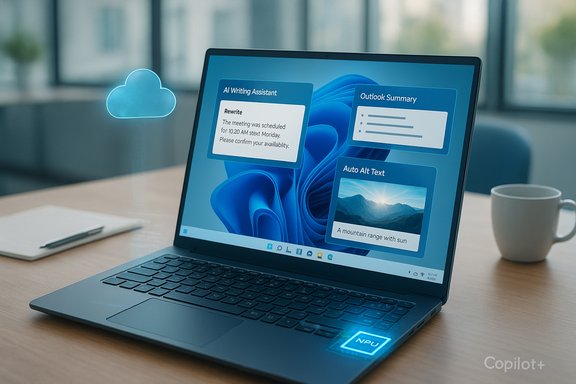
Microsoft’s latest feature wave for Windows 11 introduces four headline items focused on written and spoken input, plus accessibility improvements:- Writing assistance (preview) — A system‑level “rewrite and compose” capability that can generate or rewrite text inside any text box across the OS. On Copilot+ PCs the rewrite/composition can be processed locally using the device NPU, enabling offline use.
- Outlook summary (preview) — AI‑generated, glanceable summaries inside the built‑in Outlook app to help prioritize inbox items and surface the most relevant threads or action items.
- Word auto alt‑text (preview) — Automatic generation of descriptive alt text for images inserted into Word documents to improve accessibility and reduce manual tagging time.
- Fluid dictation (preview) — A major upgrade to voice typing (part of Voice Access) called fluid dictation that turns spoken words into edited, polished text in real time: grammar and punctuation are corrected, filler words are removed, and the result is close to ready for publication without heavy editing. This runs on-device on Copilot+ PCs using small language models for low latency.
Technical overview: how the hybrid model works
Copilot+ PCs and NPUs: the hardware gate
Copilot+ PCs are a certified hardware tier that combine CPU, GPU, and a dedicated NPU to handle AI inference on the device. Microsoft and partners have repeatedly referenced an NPU performance threshold (commonly quoted as a baseline in the 40+ TOPS range) and minimum RAM/storage recommendations to ensure on‑device models run responsively. The practical result is a two‑tier user experience:- Devices without a qualifying NPU rely on cloud models for the same features and will see higher latency and require an internet connection.
- Copilot+ devices can run small, optimized models locally for near‑instant responses and offline operation for supported flows.
Small Language Models (SLMs), NPUs and offline execution
Features like fluid dictation and local writing assistance use on‑device SLMs running on the NPU. Those SLMs are compact, quantized models optimized for inference on specialized hardware. Microsoft’s Insider and support documentation clarify that these models are downloaded and managed by Windows when the feature is enabled, and that the model files may be stored locally and used without routing data to the cloud for inference. That’s the core technical reason these features can run offline on Copilot+ machines.Fall‑back to cloud
When local models are not available (non‑Copilot+ PC, language not supported by the local model, or the task requires a larger reasoning model), the system will route the request to Microsoft’s cloud LLMs. Users should expect variable latency and potential policy differences (for example, cloud processing is subject to Microsoft’s service terms and logging). Microsoft frames this as an explicit hybrid choice rather than a stealthy fallback.Feature deep‑dives
Writing assistance: universal rewrite and compose
What it does- Offers a context‑aware rewrite or compose UI accessible in any text box — email fields, browser forms, chat inputs, document editors, and more.
- Provides tone, length, and style options (e.g., shorter, formal, casual), plus rewrite suggestions that edit the selected text in place.
- It converts a system of ad‑hoc tools (browser extensions, app‑specific editors) into a native, consistent editing layer across Windows.
- For everyday tasks — drafting emails, shortening customer responses, or rephrasing chat messages — the convenience is significant.
- Microsoft has published previews and developer notes showing the capability in Insiders builds, and independent coverage confirms a preview rollout that can run locally on Copilot+ hardware or in the cloud otherwise. Expect differences in responsiveness and offline support depending on hardware.
- The feature is being deployed as a preview and so will mature. Expect controls to opt out, undo changes, and manage privacy settings.
Outlook summary: AI triage for your inbox
What it does- Creates concise, AI‑generated summaries of conversations or long threads so you can see the gist without reading every message.
- May surface suggested actions (reply, schedule meeting, follow up) and highlight people or deadlines.
- For power email users, a reliable summary can save minutes per message — time that accumulates significantly over a day.
- The Outlook summary feature is listed in Microsoft’s preview notes and in third‑party previews of Windows 11 features; it’s being rolled out by stages as part of the Copilot integration into inbox apps. Administrators should expect controls for enterprise environments.
- Summaries are approximate and depend on the models and available context. Users handling sensitive legal or compliance material should treat summaries as starting points, not definitive legal advice or contract interpretation.
Word auto alt‑text: removing a tedious accessibility burden
What it does- Automatically generates descriptive alt text for images placed inside Word documents to improve screen reader compatibility and accessibility compliance.
- Alt‑text is essential for users with vision impairment, but it’s routinely omitted because it’s time‑consuming. Automatic alt‑text reduces friction and raises baseline accessibility.
- Auto alt‑text is typically generated by vision models that inspect the image and create a compact description. Microsoft’s previews indicate a local option on Copilot+ hardware for faster, private inference, and cloud fallbacks for non‑supported hardware or languages. Users and IT should plan to verify and edit auto‑generated alt text for accuracy and sensitivity in professional documents.
Fluid dictation: “speak once, publish later”
What it does- Fluid dictation is an AI‑powered voice typing mode inside Voice Access that automatically edits speech into polished, punctuated text in real time.
- It removes filler words and fixes grammar while you speak, reducing the need for later cleanup.
- Dictation becomes practical for longer, more formal content. For reporters, students, or accessibility use cases, fluid dictation dramatically reduces friction.
- Initially available on Copilot+ PCs in English locales; Microsoft has been expanding language support in Insider builds. The small on‑device model downloads and activation process is managed by Windows.
- The feature disables itself in secure fields (passwords, PINs) and runs locally on Copilot+ hardware, reducing the likelihood of raw audio leaving the device unless the service explicitly escalates to cloud processing.
Availability and rollout: who gets what, and when
- Microsoft is previewing these features via Windows Insider channels and staged rollouts to the general Windows 11 population.
- Microsoft’s messaging and independent reporting emphasize that the capabilities themselves will be broadly available to Windows 11 users, but richer on‑device behavior and offline operation require Copilot+ PC hardware with an NPU and the appropriate model downloads.
- Expect incremental region and language rollouts; features like fluid dictation arrived in English locales first and expanded from there in Insider builds.
- Ensure Windows 11 is updated to the latest public or Insider build that includes the preview.
- If offline, confirm you’re on a Copilot+ PC and that the SLMs required have finished downloading.
- Sign in with a Microsoft account where needed; some features (and cloud fallbacks) require account sign‑in and may be subject to AI credit or licensing rules in related apps.
Security, privacy, and enterprise considerations
Privacy model: local by default for Copilot+ flows, cloud otherwise
Microsoft’s approach is explicit: run privacy‑sensitive, latency‑sensitive workloads locally on Copilot+ NPUs when possible; otherwise, route to cloud LLMs. For features that operate on screen content or microphone input, the company emphasizes session opt‑in, visible UI indicators, and disabled operation in secure fields. However, the hybrid model introduces complexity for IT and privacy officers because the location of inference can vary by device, language, and feature.Data handling and logging
- Cloud processing is subject to Microsoft’s cloud terms and may be logged for service quality, policy enforcement, and safety.
- On‑device processing minimizes cloud telemetry but still involves model downloads and local storage of small models and possibly intermediate transcripts — organizations should review enterprise telemetry and model update policies.
Attack surface and misuse
- Agentic features that can act across apps introduce new security vectors: an agent with permission to manipulate files or UI could be abused if permission models are misconfigured.
- Enterprises should configure policies to throttle or block agentic automations and ensure least‑privilege defaults are enforced. Microsoft’s previews indicate admin controls will be available, but deployment plans should include testing and policy definition.
Strengths and practical benefits
- Speed and efficiency: Local SLMs on Copilot+ hardware can deliver near‑instant text generation/editing and cleaned dictation with no network delay.
- Accessibility boost: Auto alt‑text and fluid dictation lower barriers for users with disabilities and for content creators who previously skipped alt tagging or manual transcribing.
- Consistency: A universal writing layer reduces the need for app‑specific extensions and creates predictable editing tools across the OS.
Trade‑offs and risks
- Hardware fragmentation: The two‑tier model means not all users will get the same experience; older devices will continue to rely on cloud processing and therefore see higher latency and require internet connectivity.
- Accuracy and hallucination: AI‑generated summaries and alt‑text can be wrong, incomplete, or misleading. These tools are aids — they require human verification in professional or regulated contexts.
- Privacy complexity: Hybrid inference complicates simple messaging like “your data never leaves the device.” That statement is only true for specific on‑device flows; cloud fallbacks do exist and will be in play for many users.
- Admin burden: IT must design policies for which AI features are permissible, how agent permissions are granted, and where logs are stored to satisfy compliance obligations.
Practical recommendations
For home users- Try the preview features in an Insider build or when they reach your update channel to see if the workflow matches your needs.
- If you care about offline privacy and instant responses, consider upgrading to a Copilot+ PC — but verify manufacturer claims on NPU performance rather than assuming every new laptop qualifies.
- Use rewriting assistance to speed drafts, but always review AI edits for tone and factual accuracy.
- Fluid dictation can be a major time saver for long drafts — test it head‑to‑head with your usual dictation workflow to understand editing differences.
- Audit and test agentic features in a controlled environment before broad rollout.
- Define default deny policies for agent permissions, require explicit consent, and monitor logs for anomalous automation.
- Update privacy and vendor contracts to address hybrid inference and model updates.
How to validate claims and what to watch next
- Confirm Copilot+ device eligibility with OEM documentation and Microsoft’s Copilot+ hardware guidelines before buying for on‑device AI needs; published hardware thresholds (NPU TOPS, RAM, storage) have been used as gateposts but can change as Microsoft and OEMs iterate.
- When testing previews, check language support lists and model download status (Windows shows model download progress for on‑device SLMs in Voice Access and related setup flows).
- For enterprises, validate retention, telemetry, and data routing rules using controlled pilot deployments before enabling AI features broadly.
Conclusion
The next wave of Windows 11 AI productivity features — universal writing assistance, Outlook summaries, Word auto alt‑text, and fluid dictation — represents a concrete evolution in how Microsoft is embedding AI into everyday computing. The approach is pragmatic and hybrid: cloud models provide broad availability, while Copilot+ NPUs unlock faster, private, and offline execution for latency‑sensitive tasks. These features promise real productivity gains and accessibility improvements, but they also introduce new choices for buyers and new responsibilities for IT teams around privacy, verification, and policy.For users, the immediate takeaway is simple: expect smarter writing and dictation tools that can save time, but validate the output and understand whether your device will run the models locally or rely on cloud services. For organizations, plan for staged pilots, clear permissioning, and updates to governance to get the productivity upside without unnecessary risk.
Source: Windows Central https://www.windowscentral.com/micr...tivity-features-in-2026-heres-what-to-expect/
