

Microsoft began testing movable Windows 11 taskbar positions on May 15, 2026, in new Windows Insider Preview builds, restoring the ability to dock the taskbar to the top, left, right, or bottom edge of the desktop after removing that flexibility at Windows 11’s 2021 launch. That is the small, stubborn fact at the center of a much larger Windows story. Five years after Windows 11 asked users to accept a cleaner but narrower desktop, Microsoft is now admitting that polish was not a substitute for choice. The taskbar is coming back to its older, more flexible self because Windows users never stopped noticing what had been taken away.
Windows 11’s taskbar was supposed to be the visual anchor for a modernized operating system. Centered icons, a simplified tray, a reworked Start button, and softened surfaces gave Microsoft a cleaner canvas after years of Windows 10’s utilitarian sprawl. The company did not merely repaint the old shell; it rebuilt parts of the experience and used that rebuild to cut away behaviors it considered legacy.
That decision aged badly. The missing ability to move the taskbar was never the only complaint, but it became a symbol for the broader frustration with Windows 11: Microsoft had made the desktop prettier by making it less accommodating. For a user who has spent years with a vertical taskbar on a wide monitor, or a top-mounted taskbar that matches an old muscle-memory workflow, the new design did not feel streamlined. It felt confiscated.
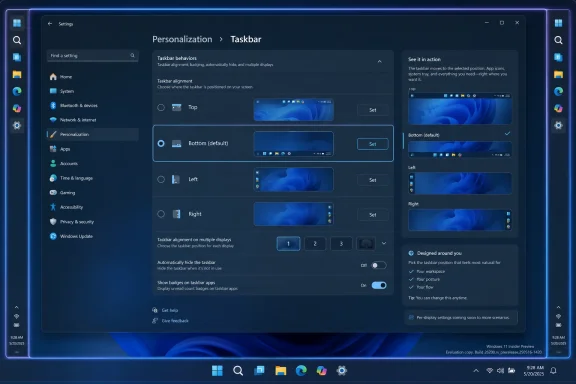
The latest Insider work reverses one of those choices. In Settings, testers can now select the taskbar’s position along the bottom, top, left, or right edge of the screen. Microsoft is also testing per-position behavior, so icon alignment, labels, and grouping choices can vary depending on where the taskbar sits.
That last detail matters. A left-side taskbar is not just a bottom taskbar rotated 90 degrees; it changes how app icons, labels, flyouts, and peripheral UI need to behave. If Microsoft gets this right, it will not merely restore an old checkbox. It will acknowledge that different screen shapes and working styles deserve first-class treatment.
Windows 11 disrupted that expectation. At launch, the taskbar could not be moved to the top or sides. Drag-and-drop support was missing. Context-menu behavior was reduced. Labels and ungrouping options were gone. For many users, the desktop had become less powerful in ways that had little to do with security, performance, or modern hardware.
Some of those omissions were fixed relatively quickly. Others lingered through multiple annual update cycles, leaving the impression that Microsoft had underestimated how much advanced users cared about the shell. The taskbar is not decorative trim. It is the launchpad, the switcher, the notification surface, the system tray, and the always-visible map of what a user is doing.
The technical explanation has always been understandable but unsatisfying. Windows 11’s taskbar was not a simple continuation of the Windows 10 implementation. Rebuilding a core shell component means old behaviors often have to be reimplemented rather than merely re-enabled. But users do not experience architectural debt as architecture; they experience it as a missing feature.
That is why this change lands with a strange mixture of relief and irritation. It is good that Microsoft is doing the work. It is also fair to ask why one of the most basic forms of desktop customization needed half a decade to become testable again.
Modern displays are wide. Ultrawide monitors are common in developer, financial, creative, and administrative setups. Even ordinary laptop panels have trended toward layouts where vertical space is more precious than horizontal space. A bottom taskbar consumes height from documents, terminals, browsers, spreadsheets, remote desktop sessions, and management consoles.
A left or right taskbar uses the part of the screen many users can better spare. It also creates a natural stack for window labels, particularly when labels are enabled and apps are not combined. For people juggling many windows in the same application family, this is not cosmetic; it changes how quickly they can identify and switch work.
Top-mounted taskbars have their own constituency. Some users prefer having controls near browser tabs, menu bars, and application ribbons. Others simply built years of muscle memory around a top taskbar and never found Windows 11’s bottom-only design comfortable. The point is not that one arrangement is objectively best. The point is that Windows historically did not force a single answer.
This is where Microsoft’s current implementation sounds more serious than a grudging restoration. Remembering different settings for different positions suggests the company understands that taskbar placement affects the whole interaction model. A vertical taskbar with centered icons, grouped windows, and no labels is a different thing from a vertical taskbar with top-aligned icons and visible names.
Those caveats are not trivial. Auto-hide is a core behavior for users who want maximum screen space. Touch support matters on convertibles and tablets, where a side-mounted or top-mounted shell element can create entirely different reach and gesture problems. The Search box is one of Microsoft’s preferred entry points into Windows services, cloud search, and increasingly AI-assisted flows.
The multi-monitor issue may be the most revealing. Power users do not merely want to move the taskbar; many want different taskbars to behave differently on different screens. A vertical taskbar on an ultrawide primary display and a bottom taskbar on a laptop panel is a perfectly sensible arrangement. If Microsoft stops at one global setting, it will have restored the headline feature while leaving a chunk of the pro audience unsatisfied.
Still, unfinished is not the same as unserious. Shell work is full of edge cases: flyouts, notification toasts, system-tray overflow, clock placement, language indicators, accessibility tools, focus behavior, drag targets, snapped windows, remote sessions, and tablet posture changes. The fact that Microsoft is exposing the work now through Insider builds is an implicit request for the community to find the weird parts before they reach production.
That is the right venue for this kind of change. A movable taskbar is not the sort of feature that can be validated by a few internal demos. It has to be lived with by people who have unusual monitor layouts, old workflows, third-party tools, enterprise restrictions, and strong opinions about pixels.
That does not mean Microsoft is abandoning its Windows 11 design language. Rounded corners, centered layouts, translucent panels, and simplified surfaces are still the baseline. The shift is subtler and more important: Microsoft appears to be separating modern appearance from reduced agency. A cleaner UI does not have to mean fewer choices.
The Start menu is a good example of the tension. Windows 11 replaced Live Tiles with a more static grid and a recommendation area, pushing the experience toward launcher-plus-feed rather than the customizable dashboard Windows 10 offered. Some users appreciated the cleaner structure. Others saw it as yet another place where Microsoft had traded density and control for a more managed, less expressive interface.
The new taskbar options do not solve every Start complaint, but they indicate a broader course correction. Windows users are willing to accept new defaults. They are much less forgiving when Microsoft removes the ability to reject those defaults. In a platform this old and this widely deployed, personalization is not clutter. It is compatibility with human behavior.
That is why the timing matters. Windows 11 is no longer new. It is the mainstream Windows release, and Windows 10’s consumer support deadline has already forced many holdouts to make migration plans. Microsoft is trying to improve the experience not at launch, but at the moment when more reluctant users are being pushed toward it.
The company has also spent the last two years talking aggressively about AI PCs, Copilot integration, Recall, and new silicon requirements. Those are strategically important to Microsoft, but they are not always the things everyday Windows users ask for first. The return of movable taskbars is modest by comparison, yet it may do more for goodwill than another AI surface in the shell.
That is because this is a feature whose value is immediately legible. Users do not need to understand a model, a cloud service, or a subscription bundle. They know whether the taskbar can sit where they want it. They know whether labels are back. They know whether Windows respects the way they work.
The Insider rollout lets Microsoft position the change as collaborative rather than apologetic. But the subtext is obvious: the community was right to complain. The old behavior was useful, and removing it made Windows worse for a meaningful group of users.
A movable taskbar may seem minor compared with patch compliance or identity security, but desktop consistency matters in large organizations. If employees can position taskbars differently, support teams may face more variation when walking users through instructions. If admins lock the experience down, they may inherit complaints from users who know the option exists at home.
Microsoft will need to expose the right management controls if this reaches general availability. Group Policy, MDM settings, provisioning behavior, and default layout tooling all matter. Enterprises will not want a personalization improvement to become another unmanaged variable during a broader Windows 11 rollout.
There is also the question of release cadence. Insider features can appear, shift, disappear, or arrive later than enthusiasts expect. IT shops should not plan production standards around a preview capability until Microsoft documents its channel path and administrative controls. The correct enterprise reaction is interest, not immediate dependency.
Still, the direction is useful. Windows 11 adoption in business settings has been slowed by hardware requirements, application validation, user training, and the simple reality that Windows 10 worked well enough. Restoring familiar shell options removes one more small but emotionally charged objection.
A left or right taskbar can reduce pointer travel for some setups. A top taskbar can make controls easier to reach depending on window placement and input device. Visible labels can help users who struggle to distinguish icons quickly. Ungrouped windows can reduce cognitive load when many documents or sessions are open.
This is where Microsoft’s missing touch and tablet support becomes more than a checklist item. If the company wants alternate taskbar positions to be a full Windows feature rather than a desktop enthusiast feature, it has to work across input modes. Windows is still used on laptops, convertibles, tablets, kiosks, shared workstations, and remote environments. Shell flexibility that collapses outside the classic mouse-and-keyboard desktop will feel unfinished.
The best version of this restoration treats personalization as an accessibility-adjacent principle. Users should be able to make the interface fit their bodies, screens, attention patterns, and jobs. That is a stronger argument than nostalgia, and it is one Microsoft should embrace more openly.
That contrast is not embarrassing because the old feature is small. It is embarrassing because it reveals how often platform companies overestimate the value of strategic narratives and underestimate the value of daily ergonomics. AI may change how people use PCs. But every one of those AI experiences still has to live inside a shell that users either trust or resent.
A better taskbar also matters for AI integration itself. If Microsoft wants Copilot and related features to become ambient parts of Windows, the taskbar and Start menu will be prime real estate. Users who already feel that Microsoft uses the shell to promote services rather than serve workflows will be skeptical of new buttons, badges, and feeds. Restoring user control is a prerequisite for earning permission to add more.
That is why the return of taskbar positioning is not merely a backward-looking repair. It is a test of whether Microsoft can modernize Windows without treating the user’s desktop as a company-owned billboard. If the shell becomes more flexible at the same time it becomes more intelligent, Microsoft has a chance to make Windows 11 feel less imposed and more adaptable.
The company’s recent moves around quieter Widgets and taskbar behavior point in the same direction. Less noise, more control, and fewer forced assumptions are exactly what Windows needs if Microsoft wants users to accept larger changes elsewhere.
Windows 11 launched with a confidence that sometimes bordered on paternalism. The centered taskbar, simplified Start menu, and reduced options suggested that Microsoft believed it could define a more modern desktop by trimming the old one. That belief was not entirely wrong; Windows did need visual and structural cleanup. But the company confused cleanup with constraint.
The restored taskbar options show a more mature approach. Make the default clean. Make the advanced paths available. Let the person who never touches Settings enjoy the simplified desktop, and let the person with three monitors and twenty open windows build the workspace they need.
That should be the model for Windows more broadly. The operating system is too large, too old, and too widely used for one ideal workflow. Microsoft can guide, but it should be cautious about forbidding. Every time it removes an old affordance, it should be certain the replacement is not merely prettier but genuinely better.
This episode is a reminder that regressions have long tails. A feature removed in 2021 can still shape perception in 2026. For some users, Windows 11 has spent its entire life feeling like an upgrade that asked them to give something up.
 Microsoft Finally Learns That Familiarity Is a Feature
Windows 11’s taskbar was supposed to be the visual anchor for a modernized operating system. Centered icons, a simplified tray, a reworked Start button, and softened surfaces gave Microsoft a cleaner canvas after years of Windows 10’s utilitarian sprawl. The company did not merely repaint the old shell; it rebuilt parts of the experience and used that rebuild to cut away behaviors it considered legacy.That decision aged badly. The missing ability to move the taskbar was never the only complaint, but it became a symbol for the broader frustration with Windows 11: Microsoft had made the desktop prettier by making it less accommodating. For a user who has spent years with a vertical taskbar on a wide monitor, or a top-mounted taskbar that matches an old muscle-memory workflow, the new design did not feel streamlined. It felt confiscated.
The latest Insider work reverses one of those choices. In Settings, testers can now select the taskbar’s position along the bottom, top, left, or right edge of the screen. Microsoft is also testing per-position behavior, so icon alignment, labels, and grouping choices can vary depending on where the taskbar sits.
That last detail matters. A left-side taskbar is not just a bottom taskbar rotated 90 degrees; it changes how app icons, labels, flyouts, and peripheral UI need to behave. If Microsoft gets this right, it will not merely restore an old checkbox. It will acknowledge that different screen shapes and working styles deserve first-class treatment.
The Windows 11 Taskbar Was a Rebuild With a Memory Problem
The original Windows 11 taskbar was controversial because it broke a long bargain between Microsoft and its most loyal desktop users. Windows has always carried an enormous amount of behavioral baggage, and much of that baggage is exactly why people trust it. You can dislike the inconsistency of Windows and still depend on the fact that old habits usually survive the next version.Windows 11 disrupted that expectation. At launch, the taskbar could not be moved to the top or sides. Drag-and-drop support was missing. Context-menu behavior was reduced. Labels and ungrouping options were gone. For many users, the desktop had become less powerful in ways that had little to do with security, performance, or modern hardware.
Some of those omissions were fixed relatively quickly. Others lingered through multiple annual update cycles, leaving the impression that Microsoft had underestimated how much advanced users cared about the shell. The taskbar is not decorative trim. It is the launchpad, the switcher, the notification surface, the system tray, and the always-visible map of what a user is doing.
The technical explanation has always been understandable but unsatisfying. Windows 11’s taskbar was not a simple continuation of the Windows 10 implementation. Rebuilding a core shell component means old behaviors often have to be reimplemented rather than merely re-enabled. But users do not experience architectural debt as architecture; they experience it as a missing feature.
That is why this change lands with a strange mixture of relief and irritation. It is good that Microsoft is doing the work. It is also fair to ask why one of the most basic forms of desktop customization needed half a decade to become testable again.
A Vertical Taskbar Is Not Nostalgia on an Ultrawide Monitor
The easiest mistake is to treat movable taskbars as a sentimental request from people who simply dislike change. There is some nostalgia here, as there always is with Windows. But the functional argument for alternate taskbar positions has only become stronger since Windows 11 launched.Modern displays are wide. Ultrawide monitors are common in developer, financial, creative, and administrative setups. Even ordinary laptop panels have trended toward layouts where vertical space is more precious than horizontal space. A bottom taskbar consumes height from documents, terminals, browsers, spreadsheets, remote desktop sessions, and management consoles.
A left or right taskbar uses the part of the screen many users can better spare. It also creates a natural stack for window labels, particularly when labels are enabled and apps are not combined. For people juggling many windows in the same application family, this is not cosmetic; it changes how quickly they can identify and switch work.
Top-mounted taskbars have their own constituency. Some users prefer having controls near browser tabs, menu bars, and application ribbons. Others simply built years of muscle memory around a top taskbar and never found Windows 11’s bottom-only design comfortable. The point is not that one arrangement is objectively best. The point is that Windows historically did not force a single answer.
This is where Microsoft’s current implementation sounds more serious than a grudging restoration. Remembering different settings for different positions suggests the company understands that taskbar placement affects the whole interaction model. A vertical taskbar with centered icons, grouped windows, and no labels is a different thing from a vertical taskbar with top-aligned icons and visible names.
The Missing Pieces Show How Hard the Shell Still Is
The preview is not complete. Microsoft says alternate taskbar positions do not yet support auto-hide. The tablet-optimized taskbar is not supported in those positions either. Touch gestures and the Search box are also missing for now, and Microsoft is still evaluating additional capabilities such as different taskbar positions per monitor.Those caveats are not trivial. Auto-hide is a core behavior for users who want maximum screen space. Touch support matters on convertibles and tablets, where a side-mounted or top-mounted shell element can create entirely different reach and gesture problems. The Search box is one of Microsoft’s preferred entry points into Windows services, cloud search, and increasingly AI-assisted flows.
The multi-monitor issue may be the most revealing. Power users do not merely want to move the taskbar; many want different taskbars to behave differently on different screens. A vertical taskbar on an ultrawide primary display and a bottom taskbar on a laptop panel is a perfectly sensible arrangement. If Microsoft stops at one global setting, it will have restored the headline feature while leaving a chunk of the pro audience unsatisfied.
Still, unfinished is not the same as unserious. Shell work is full of edge cases: flyouts, notification toasts, system-tray overflow, clock placement, language indicators, accessibility tools, focus behavior, drag targets, snapped windows, remote sessions, and tablet posture changes. The fact that Microsoft is exposing the work now through Insider builds is an implicit request for the community to find the weird parts before they reach production.
That is the right venue for this kind of change. A movable taskbar is not the sort of feature that can be validated by a few internal demos. It has to be lived with by people who have unusual monitor layouts, old workflows, third-party tools, enterprise restrictions, and strong opinions about pixels.
Start Menu Repair Is Part of the Same Retreat From Minimalism
The taskbar grabs the headline because it is visible all day, but Microsoft’s broader theme is personalization. The company is also continuing to adjust Start, Widgets, taskbar badging, and other shell behaviors that have drawn criticism since Windows 11 arrived. The pattern is clear: the first version of Windows 11 emphasized visual coherence, while the current wave of changes tries to give back control.That does not mean Microsoft is abandoning its Windows 11 design language. Rounded corners, centered layouts, translucent panels, and simplified surfaces are still the baseline. The shift is subtler and more important: Microsoft appears to be separating modern appearance from reduced agency. A cleaner UI does not have to mean fewer choices.
The Start menu is a good example of the tension. Windows 11 replaced Live Tiles with a more static grid and a recommendation area, pushing the experience toward launcher-plus-feed rather than the customizable dashboard Windows 10 offered. Some users appreciated the cleaner structure. Others saw it as yet another place where Microsoft had traded density and control for a more managed, less expressive interface.
The new taskbar options do not solve every Start complaint, but they indicate a broader course correction. Windows users are willing to accept new defaults. They are much less forgiving when Microsoft removes the ability to reject those defaults. In a platform this old and this widely deployed, personalization is not clutter. It is compatibility with human behavior.
The Insider Program Becomes a Sentiment Barometer
Microsoft’s Insider Program has always been a strange hybrid of testing lab, marketing channel, and public suggestion box. For major shell changes, it now serves another purpose: a sentiment barometer. If a taskbar feature lights up Insider forums, Reddit threads, and tech sites, Microsoft gets a fast read on whether it is rebuilding trust or reopening old wounds.That is why the timing matters. Windows 11 is no longer new. It is the mainstream Windows release, and Windows 10’s consumer support deadline has already forced many holdouts to make migration plans. Microsoft is trying to improve the experience not at launch, but at the moment when more reluctant users are being pushed toward it.
The company has also spent the last two years talking aggressively about AI PCs, Copilot integration, Recall, and new silicon requirements. Those are strategically important to Microsoft, but they are not always the things everyday Windows users ask for first. The return of movable taskbars is modest by comparison, yet it may do more for goodwill than another AI surface in the shell.
That is because this is a feature whose value is immediately legible. Users do not need to understand a model, a cloud service, or a subscription bundle. They know whether the taskbar can sit where they want it. They know whether labels are back. They know whether Windows respects the way they work.
The Insider rollout lets Microsoft position the change as collaborative rather than apologetic. But the subtext is obvious: the community was right to complain. The old behavior was useful, and removing it made Windows worse for a meaningful group of users.
Enterprise IT Will Welcome the Choice and Fear the Timing
For administrators, the return of taskbar flexibility is both welcome and faintly exhausting. On one hand, restoring familiar behaviors can reduce friction for Windows 10 migrations. On the other hand, shell changes are never just shell changes in managed environments. They affect training, documentation, support scripts, screenshots, help-desk playbooks, accessibility accommodations, and user expectations.A movable taskbar may seem minor compared with patch compliance or identity security, but desktop consistency matters in large organizations. If employees can position taskbars differently, support teams may face more variation when walking users through instructions. If admins lock the experience down, they may inherit complaints from users who know the option exists at home.
Microsoft will need to expose the right management controls if this reaches general availability. Group Policy, MDM settings, provisioning behavior, and default layout tooling all matter. Enterprises will not want a personalization improvement to become another unmanaged variable during a broader Windows 11 rollout.
There is also the question of release cadence. Insider features can appear, shift, disappear, or arrive later than enthusiasts expect. IT shops should not plan production standards around a preview capability until Microsoft documents its channel path and administrative controls. The correct enterprise reaction is interest, not immediate dependency.
Still, the direction is useful. Windows 11 adoption in business settings has been slowed by hardware requirements, application validation, user training, and the simple reality that Windows 10 worked well enough. Restoring familiar shell options removes one more small but emotionally charged objection.
Accessibility Was Always Part of the Taskbar Argument
Alternate taskbar placement is often framed as a power-user preference, but accessibility is part of the story. Not every user interacts with a desktop in the same physical way. A taskbar at the bottom of a screen may be inconvenient for users with certain motor patterns, display arrangements, magnification settings, or assistive workflows.A left or right taskbar can reduce pointer travel for some setups. A top taskbar can make controls easier to reach depending on window placement and input device. Visible labels can help users who struggle to distinguish icons quickly. Ungrouped windows can reduce cognitive load when many documents or sessions are open.
This is where Microsoft’s missing touch and tablet support becomes more than a checklist item. If the company wants alternate taskbar positions to be a full Windows feature rather than a desktop enthusiast feature, it has to work across input modes. Windows is still used on laptops, convertibles, tablets, kiosks, shared workstations, and remote environments. Shell flexibility that collapses outside the classic mouse-and-keyboard desktop will feel unfinished.
The best version of this restoration treats personalization as an accessibility-adjacent principle. Users should be able to make the interface fit their bodies, screens, attention patterns, and jobs. That is a stronger argument than nostalgia, and it is one Microsoft should embrace more openly.
The AI Era Still Needs a Better Taskbar
The timing of this change is almost comic. Microsoft is pushing Windows as an AI platform, talking about Copilot, local models, neural processing units, and a future in which the PC becomes more context-aware. Yet one of the most celebrated new Windows developments in 2026 is the return of a taskbar behavior that existed long before Windows 11.That contrast is not embarrassing because the old feature is small. It is embarrassing because it reveals how often platform companies overestimate the value of strategic narratives and underestimate the value of daily ergonomics. AI may change how people use PCs. But every one of those AI experiences still has to live inside a shell that users either trust or resent.
A better taskbar also matters for AI integration itself. If Microsoft wants Copilot and related features to become ambient parts of Windows, the taskbar and Start menu will be prime real estate. Users who already feel that Microsoft uses the shell to promote services rather than serve workflows will be skeptical of new buttons, badges, and feeds. Restoring user control is a prerequisite for earning permission to add more.
That is why the return of taskbar positioning is not merely a backward-looking repair. It is a test of whether Microsoft can modernize Windows without treating the user’s desktop as a company-owned billboard. If the shell becomes more flexible at the same time it becomes more intelligent, Microsoft has a chance to make Windows 11 feel less imposed and more adaptable.
The company’s recent moves around quieter Widgets and taskbar behavior point in the same direction. Less noise, more control, and fewer forced assumptions are exactly what Windows needs if Microsoft wants users to accept larger changes elsewhere.
The Real Win Is Not the Left Taskbar, but the Admission
The most important thing about this preview is not that the taskbar can move left. It is that Microsoft has conceded, in product form, that Windows 11’s original simplification went too far. Companies rarely say that plainly. They say they are responding to feedback, improving quality, or making experiences more personal. The result is what matters.Windows 11 launched with a confidence that sometimes bordered on paternalism. The centered taskbar, simplified Start menu, and reduced options suggested that Microsoft believed it could define a more modern desktop by trimming the old one. That belief was not entirely wrong; Windows did need visual and structural cleanup. But the company confused cleanup with constraint.
The restored taskbar options show a more mature approach. Make the default clean. Make the advanced paths available. Let the person who never touches Settings enjoy the simplified desktop, and let the person with three monitors and twenty open windows build the workspace they need.
That should be the model for Windows more broadly. The operating system is too large, too old, and too widely used for one ideal workflow. Microsoft can guide, but it should be cautious about forbidding. Every time it removes an old affordance, it should be certain the replacement is not merely prettier but genuinely better.
This episode is a reminder that regressions have long tails. A feature removed in 2021 can still shape perception in 2026. For some users, Windows 11 has spent its entire life feeling like an upgrade that asked them to give something up.
The Five-Year Wait Leaves Microsoft With a Short Checklist
The preview build is a promising turn, but Microsoft has not finished the job simply by putting the taskbar on four edges. The restored feature needs to arrive broadly, behave predictably, and respect the messy reality of Windows hardware and workplaces. A half-return would only remind users why they were annoyed in the first place.- Microsoft is now testing top, bottom, left, and right taskbar positions in Windows 11 Insider Preview builds released on May 15, 2026.
- The new implementation can remember different taskbar behaviors for different positions, including alignment, labels, and grouping preferences.
- Auto-hide, tablet-optimized mode, touch gestures, and the Search box are not yet supported in alternate taskbar positions.
- Multi-monitor users may still have to wait for per-display taskbar positioning, which Microsoft says it is evaluating.
- The change is best understood as part of a larger Windows 11 course correction toward restoring user control after several launch-era regressions.
- Enterprises should watch the feature closely but wait for production documentation and management controls before building standards around it.
References
- Primary source: Ars Technica
Published: Mon, 18 May 2026 16:03:02 GMT
Five years later, Windows 11 brings back much-missed taskbar options (and more)
Microsoft is also testing a smaller taskbar and more customizable Start menu. arstechnica.com
- Related coverage: windowscentral.com

The movable taskbar is finally back in Windows 11 — and yes, you can try it right now
Windows 11 Build 26300.8493 introduces the ability to move the Taskbar and resize icons, reversing a major launch-day limitation. www.windowscentral.com
- Official source: blogs.windows.com

Improving Windows quality: Making Taskbar and Start more personal
In our commitment to Windows quality, we outlined our plans to deliver improvements in performance, reliability, and craft. We are also committed to blogs.windows.com
- Related coverage: windowslatest.com
Microsoft rolls out Windows 11's movable and smaller taskbar 5 years after killing it (hands on experience)
Microsoft is finally rolling out two of the most requested features in Windows 11: the ability to move the taskbar and make it smaller. www.windowslatest.com
- Related coverage: techradar.com
