

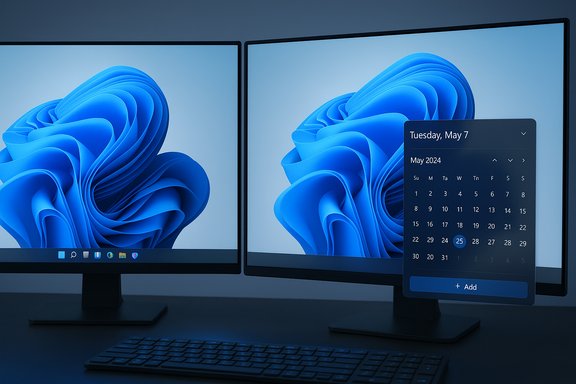
Microsoft quietly gave millions of frustrated Windows 11 users a reminder that not every useful OS improvement needs generative AI: the long-missing calendar flyout — the quick, agenda-style popup from the taskbar clock — is being restored to the Windows 11 notification area, and it’s the most immediately practical change in a sea of agentic features revealed at Ignite 2025.
Background: why a tiny calendar matters more than you think
The calendar flyout is a small UI affordance with outsized daily value: click the date/time in the bottom-right corner and see a chronological agenda, scheduled meetings, and quick access to create events — tasks that used to require opening the full Calendar or Outlook apps in Windows 10. Microsoft’s shift to Windows 11 removed much of that functionality in 2021, replacing an actionable flyout with a visually simplified clock and a less useful notification center. The absence produced a vibrant ecosystem of third-party “restore” apps and sustained community demand.Restoring the agenda view is a seemingly minor UX move, but it signals something broader: as Microsoft threads Copilot and agentic capabilities into the shell, the company is also trying — after more than four years — to close glaring usability gaps Windows users have pointed out repeatedly. The restoration was bundled with October/Release Preview updates and the Ignite 2025 narrative that recast Windows as an agentic platform.
Overview: Ignite 2025 and the agentic Windows pitch
Microsoft used Ignite 2025 to present a unified strategy: turn Windows into an “agentic” OS where long‑running AI agents live in the taskbar, Copilot is a first‑class system feature, and a hybrid cloud/on‑device model routes work to either Microsoft’s cloud or local NPUs depending on hardware. The announcements included:- Taskbar-level Copilot integration — an “Ask Copilot” composer and visible agent icons that show progress and status.
- File Explorer and search hooks for Copilot, including one-click summarization and content-aware actions.
- A developer platform for agents with a Model Context Protocol (MCP) to standardize agent‑to‑app interactions.
- The Copilot+ PC hardware tier using local NPUs to run small language and vision models on device for speed and privacy.
The calendar flyout comeback: why this is the one genuinely useful non‑AI change
What returned and how it behaves
The restored calendar flyout brings back a compact agenda inside the Notification Center and taskbar clock, showing upcoming events and links to add new entries — the classic quick‑glance behavior Windows 10 users relied on. On multi‑monitor setups, the notification center and calendar flyout can be opened from any display, and the flyout received minor visual and usability refinements such as a larger clock and optional seconds display. These changes arrived as part of the October preview/Release Preview updates (notably, KB5067036 for 24H2/25H2 binaries) and are being enabled server‑side for subsets of users.Why this matters more than the AI buzz
- Immediate productivity: Checking your next meeting or adding a quick appointment no longer requires multi‑step navigation. That saves dozens of small interruptions that add up each day.
- Low friction and low risk: Unlike agents that need permissions and can act autonomously across apps, the calendar flyout is a single, confined UI behavior with minimal privacy surface.
- Restoring expected behavior: Many users judge an OS by the small, habitual actions it supports; restoring a missing affordance improves perceived polish and coherence.
The AI glut: Copilot everywhere, and why most of it won’t feel useful to everyone
Taskbar as AI front door
Microsoft is converting the taskbar into the desktop’s primary AI surface: the search pill becomes an “Ask Copilot” composer that accepts typed, voice (wake word “Hey, Copilot”), and visual inputs. Copilot Vision can OCR or analyze selected windows when given permission, and Copilot Actions (agents) can perform multi‑step tasks by interacting with apps. The idea is to reduce friction between intent and result, letting agents fetch, summarize, and act across local files and cloud services.File Explorer and summaries
Copilot is being threaded into File Explorer search and hover UX to offer quick document summarization and context-aware actions (e.g., “Extract table to Excel”). These integrations promise to accelerate document triage but are often tied to Microsoft 365 subscriptions and Copilot licensing, and some capabilities are limited to Copilot+ devices.Fluid dictation: the one AI feature that may actually help many users
Among the new AI features, Fluid Dictation stands out as pragmatically useful: it’s a speech‑to‑text mode inside Voice Access that inserts punctuation, corrects light grammar, and removes filler words in real time. Unlike generative text that composes new content, Fluid Dictation produces cleaner transcriptions for emails, notes, and documents — a clear win for accessibility and input efficiency. Microsoft positions Fluid Dictation as on‑device for Copilot+ hardware, with cloud fallback on legacy machines.Copilot+ PCs, NPUs, and the hardware gating problem
What Copilot+ means in practice
Copilot+ PCs combine CPU, GPU, and a dedicated Neural Processing Unit (NPU) capable of running quantized small language and vision models locally. Microsoft has suggested baseline NPU performance thresholds to ensure on‑device models are responsive, and many advanced flows (low‑latency writing assistance, fluid dictation, image generation) are routed to these local runtimes when available. Devices lacking an NPU or meeting performance thresholds will use cloud inference instead.The real-world consequences
- Uneven experience: Two otherwise identical user workflows can behave differently depending on device age and whether the machine qualifies as Copilot+. That complicates support and rollout planning for teams.
- Upgrade impetus: Microsoft’s two‑tier model nudges upgrades to newer hardware that includes NPUs — which benefits device OEMs and Microsoft’s ecosystem but fragments the user base.
- Privacy tradeoffs: Local NPU inference reduces cloud round trips and can keep sensitive inputs on device; however, many richer tasks still require cloud assistance or cloud-trained retrieval, keeping some data moving off device.
Privacy, security, and governance — particularly for agentic features
Agentic Windows — where Copilot agents can operate in background workspaces and interact with apps and files — brings both productivity potential and governance headaches. Microsoft emphasizes permissioned, auditable agents in an isolated Agent Workspace and is rolling enterprise governance tooling (Agent 365, security guardrails), but the operational risks remain:- Data exposure: Agents that access mail, files, and photos must be carefully constrained. Default opt‑in settings, least-privilege agent identities, and audit trails are essential.
- Automation errors: Agents that “click, type, and scroll” can make irreversible changes if poorly constrained. Administrators must pilot agents in controlled groups.
- Licensing and telemetry: Some agent features require Microsoft 365 or Copilot entitlements, and enterprise flags may ship server‑side, complicating predictable behavior across an organization.
The economics and experience tradeoffs: more ads, more upsell
A practical downside of deep Copilot integration is the commercial optics: Windows is becoming a distribution surface for Microsoft 365 upsells. When File Explorer, taskbar, and Office apps offer AI enhancements that require paid subscriptions, the OS increasingly nudges paid services at every friction point. For users who don’t use Microsoft 365 extensively, those banners and prompts will feel like monetization, not help. This dynamic feeds the perception that Windows 11’s priorities tilt toward subscription-based features rather than broad, platform-level polish.Alternatives and workarounds: what users can do now
If you want the calendar flyout today
- Check Windows Update for optional preview packages (Release Preview ring) and look for October/preview builds tied to KB5067036 family. Installing the preview package may place updated binaries on your device, but feature activation can be server‑side and phased.
- If you don’t want to run preview builds, reputable third‑party apps like Calendar Flyout restore the Windows 10–style agenda in Windows 11 and offer additional integrations (Google Calendar, Meet). These apps are community‑developed and have been iterated over multiple releases. Expect to pay a small fee for premium features in some cases.
If you want to limit Copilot and agent creep
- Keep Copilot and voice wake-word disabled until features are mature. Microsoft positions many AI functions as opt‑in; accept that default where available.
- For organizations, pilot agent features in a tightly controlled OU and use Intune/Group Policy to limit feature exposure during evaluation.
If you want better dictation now
- Try the Fluid Dictation mode inside Voice Access on eligible devices or use third‑party speech‑to‑text tools if you need multi‑language support or platform independence. Fluid Dictation yields cleaner transcriptions by removing filler words and adding punctuation.
Desktop user experience vs. platform pivot: who benefits?
Power users and enterprise customers with Microsoft 365 subscriptions and Copilot+ hardware stand to gain from a tightly integrated agentic OS: faster document triage, automated workflows, and low‑latency on‑device processing for key tasks. However, everyday consumers and long‑time Windows 10 holdouts will probably value the calendar flyout, Start menu fixes, and taskbar quality‑of‑life changes more than Copilot’s broad brush of features.The truth is hybrid: the calendar flyout is the kind of micro‑improvement that reliably improves daily workflows, while agentic features are higher‑variance bets — powerful in some hands, confusing in others. Microsoft’s challenge is balancing an AI-first roadmap with pragmatic, visible UX wins that serve everyone.
Risk checklist for IT and power users
- Plan staged pilots and user education before enabling agents enterprise-wide.
- Audit data flows when agent features are activated; confirm whether processing stays on device for Copilot+ hardware and whether cloud fallback is used.
- Verify licensing dependencies (Microsoft 365, Copilot) for features you intend to use.
- Expect device heterogeneity to cause feature discrepancies; document expected behavior per hardware class.
Final analysis: small fixes matter — and Microsoft still needs to earn trust
Microsoft’s Ignite 2025 message was loud and clear: Windows is being remade around agents and Copilot. That narrative will shape the platform’s next chapter, but the calendar flyout’s return is a reminder that usability is not the same as novelty. Restoring a stripped yet essential tool demonstrates that Microsoft still listens to long-standing user pain points — even if the bulk of its marketing energy today goes into AI and agentics.There are real productivity gains in agentic features — especially for teams standardized on Microsoft 365 and for users with Copilot+ hardware. But the rollout is uneven, gated by hardware and subscriptions, and raises governance and privacy questions that deserve attention before broad adoption. For everyday users, the best immediate outcome of Ignite 2025 is pragmatic: a restored agenda flyout and improved Voice Access dictation make daily work smoother without requiring an AI subscription or a new NPU-equipped laptop.
Microsoft should treat this as a twofold lesson: keep innovating in agentic automation, but don’t forget the small, dependable features that keep users productive every hour of every day. The calendar flyout’s return proves those tiny restorations can be the most useful changes of all.
Source: Gizmodo Windows 11's Only New Useful Feature Has Nothing to Do With AI
