

Microsoft has begun rolling out Windows 11 Insider Preview Build 27982 to the Canary Channel, bringing a trio of user-facing experiments—lock screen widgets, a redesigned Widgets dashboard with multiple dashboards, and a new drag-and-share tray for faster file sharing—alongside a handful of stability fixes and a few Canary‑typical regressions Insiders should know about.
Microsoft’s Canary Channel is the earliest public testbed for Windows platform work: features appear here first, often gated by server-side flags, and may change or vanish as Microsoft collects telemetry and feedback. Build 27982 continues the ongoing theme visible across 2025 updates—making Windows more glanceable, personalized, and frictionless for common tasks—while deliberately accepting higher instability than Beta or Dev channels. These builds are not guaranteed to map to a specific public release and frequently use staged rollouts so not every Insider will see every feature immediately. This article summarizes what Build 27982 delivers, validates the key technical points against official notes and independent reporting, analyzes benefits and risks (privacy, enterprise governance, developer impact), and offers guidance for testers, IT teams, and power users who want to evaluate the new experiences safely.
Build 27982 is a concise but telling preview of Microsoft’s current UX priorities: unify glance surfaces, reduce friction for common tasks, and make Windows more modular and personally curated. The features are promising—lock screen widgets and the drag tray in particular address long-standing desktop friction points—but they also reopen classic desktop questions about privacy, gesture consistency, and enterprise governance. As always with Canary, the recommendation is to test on non‑critical hardware, watch how Microsoft tunes the experience in response to Insider feedback, and prepare administrators for policy and DLP validation as these capabilities migrate closer to production channels.
Source: Techgenyz Windows 11 Build 27982: Exciting New Lock Screen Widgets & Smart Sharing Tweaks
 Background / Overview
Microsoft’s Canary Channel is the earliest public testbed for Windows platform work: features appear here first, often gated by server-side flags, and may change or vanish as Microsoft collects telemetry and feedback. Build 27982 continues the ongoing theme visible across 2025 updates—making Windows more glanceable, personalized, and frictionless for common tasks—while deliberately accepting higher instability than Beta or Dev channels. These builds are not guaranteed to map to a specific public release and frequently use staged rollouts so not every Insider will see every feature immediately. This article summarizes what Build 27982 delivers, validates the key technical points against official notes and independent reporting, analyzes benefits and risks (privacy, enterprise governance, developer impact), and offers guidance for testers, IT teams, and power users who want to evaluate the new experiences safely.What’s new in Build 27982 — quick snapshot
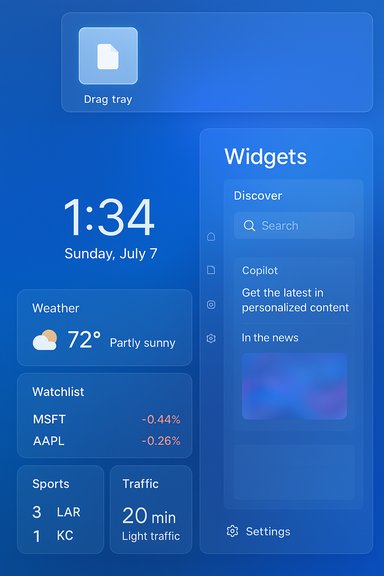
- Lock screen widgets: Replaces the older “Weather and more” surface with a widgetized lock screen that accepts small-sized widgets (Weather, Watchlist, Sports, Traffic, and suggested widgets). Customize via Settings > Personalization > Lock screen. Availability is staged.
- Redesigned Widgets dashboard: Widgets now support multiple dashboards, enabling users to group widgets (for example, work vs. personal) and switch between them via a left-side navigation bar; the Discover feed (Copilot‑curated content) remains available.
- Drag‑and‑Share tray (Drag Tray): When dragging a file from File Explorer or the desktop toward the top of the screen, a floating tray surfaces likely share targets (Nearby Share, Outlook, Teams, Edge tabs, etc.. Drop on a target to start sharing; “More…” opens the full Windows share sheet.
- Stability fixes: Targeted fixes addressing Visio crashes with some IMEs, an ARM64-specific error (0x0) affecting some gaming flows, explorer.exe crashes after long uptime, and text rendering issues in multi-line input boxes.
- Known issues: Reports include Start menu scroll resets and intermittent sleep/shutdown failures on some hardware; Microsoft recommends filing feedback via Feedback Hub.
Deep dive: Lock screen widgets
What changed and why it matters
The old “Weather and more” lock screen is replaced by a small‑widget model that adopts the same size/interaction contract used elsewhere in Widgets. Users can add, remove, and reorder widgets from Settings > Personalization > Lock screen; Microsoft will only allow widgets that support the small sizing contract to appear there. The net effect is to make the lock screen a more useful glance surface—you can see weather, scores, and watchlist snippets without unlocking the device. This mirrors mobile OS behavior (Android/iOS) and aligns Windows’ glanceable UX across locked and unlocked states. The parity reduces cognitive friction for users who already rely on Widgets while raising the bar for discoverability and consistency across the system.How to customize it
- Open Settings → Personalization → Lock screen.
- Look for the new Your widgets (or similar) control area.
- Add, remove, or reorder small widgets; suggested widgets may appear to help discovery.
Privacy and enterprise controls
Exposing app content before authentication reintroduces pre‑sign‑in exposure concerns. Microsoft has added a Group Policy to disable Widgets on the lock screen without turning off Widgets system‑wide—an important administrative control for shared devices, kiosks, or regulated environments. Administrators should evaluate:- Which widgets are permitted on managed devices.
- Whether calendar or mail snippets should be restricted.
- Interaction with corporate DLP and conditional access policies.
Developer implications
Developers who target the Widgets host must ensure their widgets support the small sizing contract if they want lock screen presence. The trend toward PWA and WinAppSDK-hosted widgets increases opportunities for third-party and enterprise apps to appear on the lock screen—but server gating means testing must cover multiple rollout states.Redesigned Widgets board: multiple dashboards and Discover
What the redesign does
The Widgets host is moving from a single, scroll-heavy feed into a dashboarded, modular surface:- Multiple dashboards let users group widgets by context (Work / Personal / Travel).
- A left-side navigation bar makes switching between dashboards and the Discover feed quicker.
- Discover remains a Copilot‑curated feed of news, summaries, and videos, but can now live alongside distinct widget dashboards to reduce noise.
Benefits for users
- Less clutter: Separate dashboards reduce scrolling and improve focus.
- Personalization: Pin only the widgets required for a particular context.
- Discoverability: Left navigation surfaces other dashboards and the Discover feed more clearly.
Risks and UX caveats
- If Microsoft defaults users into a Discover-heavy dashboard, utility widgets may still be buried; administrative or user opt-in controls are essential.
- Visual coherence matters: inconsistent corner radii, padding, or typography across dashboards can create a fragmented feel. Early mockups suggested new squircle-like tiles, but final in‑OS styling can differ.
Drag-and-Share tray: how it works and what it changes
The new flow
When you drag a file from File Explorer or your Desktop and pause near the top of the screen, a compact drag tray appears, surfacing likely targets such as:- Nearby Share
- Outlook mail composer
- Microsoft Teams chat
- Edge tabs or web apps
- A “More…” button that opens the full Windows Share sheet
Productivity gains
- Fewer clicks: Drag → drop replaces multiple open/attach steps.
- Touch-friendly: Larger targets at the top of the screen are easier to hit on tablets.
- Consistency with mobile: Mirrors the mental model of mobile share sheets and drag‑to‑target gestures.
Practical pitfalls and governance
- Accidental triggers: Users who frequently drag files into floating windows or canvas areas may find the tray intrusive; it intercepts a well‑established desktop gesture.
- DLP and conditional access: Because the tray surfaces share targets, organizations must validate that the tray honors existing DLP and conditional access controls for cloud targets (OneDrive, Teams, Outlook). Early community feedback has urged Microsoft to ensure policy respect and provide admin toggles.
- Gated availability: The tray’s behavior can vary by build and stage; developers should not assume stable integration until the feature reaches broader channels.
Stability fixes and known issues
Microsoft lists targeted fixes in Build 27982 that aim to improve day‑to‑day reliability for Insiders:- Fixed an issue causing Visio to crash with certain Input Method Editors (IME).
- Resolved an ARM64-specific system error (0x0) reported in some gaming scenarios.
- Addressed explorer.exe crashes that could occur after long uptimes.
- Corrected text rendering problems in multi-line input boxes.
- Start menu scrolling anomalies (Start may jump to top unexpectedly).
- Sleep/shutdown irregularities on certain hardware configurations.
Enterprise and IT guidance
Policy controls and rollout strategy
- Use the Group Policy to disable Widgets on the lock screen for managed fleets where pre‑sign‑in data exposure is a concern. Test policy behavior in lab environments before rolling out.
- Canary builds should not be deployed to production endpoints. IT teams should use isolated test beds or virtual machines to exercise new UX surfaces and evaluate DLP/conditional access interactions with the drag tray and Discover feed.
DLP & security validation checklist
- Confirm that the drag tray respects existing DLP rules for cloud targets (upload/block behavior).
- Validate that lock screen widgets do not expose sensitive calendar or mail content when configured.
- Test user experience when the Discover feed is enabled/disabled; ensure network/telemetry settings comply with organizational policy.
Deployment recommendations
- Pilot on a small set of devices before broader internal testing.
- Ensure rollback and recovery procedures are documented (Canary → Beta/Dev downgrades require clean installs in many cases).
- File issues via Feedback Hub and collect telemetry in test environments to share with product teams.
Guidance for power users and developers
How to try Build 27982 safely
- Join Windows Insider Program (Settings → Windows Update → Windows Insider Program).
- Set the device to the Canary Channel.
- Back up important data and use a non-primary test machine or virtual machine.
- Check Settings → Personalization → Lock screen for widget controls; to test the drag tray, drag a file upward from File Explorer and pause near the top of the screen.
Vivetool and force‑flags: proceed with caution
Community researchers have used tools such as ViVeTool to expose hidden flags for early features in previous flights. This approach is unsupported, can destabilize systems, and may change between builds. Use such methods only on disposable test devices and avoid them in managed or production environments.Developer action items
- If your app provides widgets or integrates with the Windows Share contract, test interactions with the new drag tray and small-widget lock screen contract.
- Expect behavior to be server‑gated—implement robust fallback handling and don’t assume universal feature availability across devices or channels.
- Pay attention to localization and accessibility—early drops have shown partial localization gaps, which may affect global deployments.
Critical analysis: strengths, risks, and likely evolution
Strengths
- Meaningful micro‑efficiency gains: The Drag Tray reduces interaction steps for everyday sharing, which can compound into measurable time savings for frequent tasks.
- Consistent glanceability: Lock screen widgets and the multi‑dashboard Widgets board create a unified model for glanceable information, improving predictability and personalization.
- Developer extensibility: The Widgets host evolution to support PWAs and WinAppSDK widgets opens opportunities for third‑party and enterprise widgets.
Risks and trade‑offs
- Privacy exposure: Lock screen widgets by definition surface content before authentication—sensible defaults and admin controls are essential to avoid inadvertent data leakage.
- Workflow interference: The drag tray’s intercept of drag gestures can break more complex drag workflows (drag into canvas, multi-window placements) and may cause user frustration if it triggers erroneously.
- Fragmented availability: Server gating and staged rollouts create inconsistent experiences for users and developers; expect test overhead and edge cases.
- Stability costs: Canary builds trade stability for early access. Known issues (Start menu jumps, sleep/shutdown problems) remain material for daily drivers.
Likely evolution
Microsoft is refining the UX iteratively: the lock screen widget model and dashboarded Widgets suggest a move toward a modular, persistent workspace that blends Copilot‑driven content with utility widgets. The drag tray is an attempt to normalize mobile sharing metaphors on desktop—expect Microsoft to tune sensitivity, add richer policy controls, and surface settings to opt the feature in/out. If feedback supports it, these experiments will migrate to Beta/Dev and eventually broader channels, likely with more administrative and accessibility controls.Final recommendations
- For everyday users: Wait for Beta/Stable channels before adopting if stability matters; otherwise try Build 27982 on a spare machine and report feedback via Feedback Hub.
- For IT and security teams: Test in an isolated environment, validate DLP and conditional access interactions, and use the lock‑screen Widgets Group Policy to enforce acceptable defaults.
- For developers: Test widget sizing contracts and Share contract behavior across gated and ungated states, and prepare for UI/interaction changes as Microsoft refines the models.
Build 27982 is a concise but telling preview of Microsoft’s current UX priorities: unify glance surfaces, reduce friction for common tasks, and make Windows more modular and personally curated. The features are promising—lock screen widgets and the drag tray in particular address long-standing desktop friction points—but they also reopen classic desktop questions about privacy, gesture consistency, and enterprise governance. As always with Canary, the recommendation is to test on non‑critical hardware, watch how Microsoft tunes the experience in response to Insider feedback, and prepare administrators for policy and DLP validation as these capabilities migrate closer to production channels.
Source: Techgenyz Windows 11 Build 27982: Exciting New Lock Screen Widgets & Smart Sharing Tweaks
