

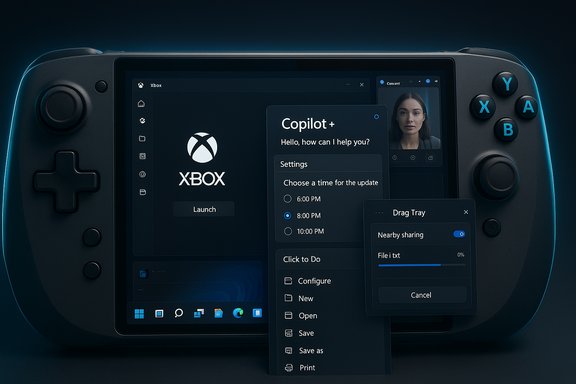
Microsoft’s latest Canary-channel drop — Windows 11 Insider Preview Build 28020.1362 (KB5073095) — extends the company’s experimental platform work with a mix of visible user-facing features and a broad set of reliability fixes aimed at gamers, Copilot+ devices, and power users testing handheld scenarios. This build expands the Xbox-led Full Screen Experience (FSE) to more handheld PCs, tightens Copilot-driven actions such as the new Click to Do context menu and an agent in Settings, and polishes core shell areas including File Explorer dark mode while rolling out several targeted fixes across Taskbar, Start, display, and sign-in flows.
Microsoft uses the Canary Channel as the earliest public laboratory for platform changes that may never reach general release. Canary builds like 28020.1362 are predominantly experimental: they combine low-level enablement (for new silicon and runtime models) with staged, device-gated features that are turned on selectively using controlled feature rollout technology. That means the exact experience you see depends on hardware, OEM entitlements, and server-side flags. Expect variability in availability and behavior.
Two themes stand out in this flight. First, Microsoft is continuing to weave AI and agentic interactions into the shell — not just as Copilot chat but as context-aware actions surfaced in places like the context menu and Settings. Second, Microsoft is refining Windows for new usage models such as handheld gaming, where session posture and runtime optimizations matter. Many of these experiences are marked as Copilot+ PC features and will only be available on hardware Microsoft recognizes as capable of running local models or otherwise meeting specific NPU/driver prerequisites.
However, the Canary Channel’s experimental nature, device gating, and privacy/telemetry implications around agentic features recommend caution. Enterprises should keep Canary off production hardware; consumers should expect uneven feature availability and be ready for iterative changes. The most important signals to track in coming releases are: wider OEM enablement for FSE (which devices are certified), the exact execution and consent model for Copilot/agent actions, and how telemetry from early adopters informs the performance and compatibility tuning for handhelds.
Source: thewincentral.com Windows 11 Insider Preview Build 28020.1362 (Canary Channel)
 Background / Overview
Microsoft uses the Canary Channel as the earliest public laboratory for platform changes that may never reach general release. Canary builds like 28020.1362 are predominantly experimental: they combine low-level enablement (for new silicon and runtime models) with staged, device-gated features that are turned on selectively using controlled feature rollout technology. That means the exact experience you see depends on hardware, OEM entitlements, and server-side flags. Expect variability in availability and behavior.Two themes stand out in this flight. First, Microsoft is continuing to weave AI and agentic interactions into the shell — not just as Copilot chat but as context-aware actions surfaced in places like the context menu and Settings. Second, Microsoft is refining Windows for new usage models such as handheld gaming, where session posture and runtime optimizations matter. Many of these experiences are marked as Copilot+ PC features and will only be available on hardware Microsoft recognizes as capable of running local models or otherwise meeting specific NPU/driver prerequisites.
What’s new in Build 28020.1362 — headline features
Full Screen Experience (FSE) on more handhelds
- Microsoft has expanded the console-style Full Screen Experience (FSE) beyond its initial ASUS ROG Ally and ROG Ally X launches to more Windows 11 handheld devices. FSE presents a controller-first, full-screen shell (typically using the Xbox PC app as the home app) that suppresses many desktop ornaments and deprioritizes background tasks to free resources for gaming.
- How it behaves: FSE boots a nominated home app full-screen, trims Explorer ornamentation (delays wallpaper and some startup items), mutes desktop interruptions, and provides a controller-optimized Task View and Game Bar. This is implemented as a layered session posture — the kernel, drivers, anti-cheat and DRM remain unchanged.
- Reported benefits: Early community tests and Microsoft’s notes indicate directional memory savings and improved sustained responsiveness on thermally constrained handheld APUs — commonly observed around the 1–2 GB reclaimed RAM range on tuned devices — but results vary widely by device, drivers, and background services. Treat these numbers as device-dependent observations rather than guarantees.
- How to enable (official path): Settings > Gaming > Full screen experience — choose Xbox (or another supported home app) and optionally set FSE to start on login. Entry and exit points include Task View, Game Bar, and hardware/controller shortcuts when available. OEM entitlements or firmware updates may be required for the toggle to appear.
Click to Do: streamlined context actions on Copilot+ PCs
- The Click to Do context menu is being updated on Copilot+ PCs with a simplified design that makes common actions — Copy, Save, Share, Open — easier to access. The context menu can also auto-pop when large images or tables are detected, offering immediate actionability. This is being rolled out gradually to Copilot+ devices.
Agent in Settings (Copilot+): inline recommended actions
- An agent in Settings aims to make modifications faster by surfacing inline agent actions for recently modified settings and expanding the number of search flyout results, allowing users to change settings directly from the search pane when possible. When inline modification isn’t possible, the agent gives a dialog with the reason and suggested next steps. This functionality is staged for Copilot+ hardware.
Windows Studio Effects on additional cameras (Copilot+)
- Windows Studio Effects — Microsoft’s on-device AI camera enhancements — can now be applied to an alternate camera (for example, a USB webcam or a laptop’s rear camera) on supported Copilot+ PCs. The setting appears under Settings > Bluetooth & devices > Cameras, where an advanced option toggles “Use Windows Studio Effects.” Devices need the required NPU and vendor support for this to appear.
Drag Tray and Nearby Sharing enhancements
- The Drag Tray now supports multi-file sharing, suggests more relevant apps, enables moving files into chosen folders, and adds a toggle in Settings > System > Nearby sharing to turn Drag Tray on/off. This improves ad-hoc transfers but introduces more system surface area that warrants privacy and discoverability reviews.
File Explorer dark mode and UX polish
- File Explorer receives deeper dark-mode coverage extending to copy/move/delete dialogs, progress bars, chart views, and multiple confirmation/error dialogs. Hovering over files in File Explorer Home surfaces quick actions — including Ask Copilot and Open file location — now supported for work and school accounts (Entra ID), although some region-specific limitations apply.
Mobile Devices page in Settings
- A new Mobile Devices page under Settings > Bluetooth & devices allows you to add and manage phones directly from Windows, configure connected camera usage, and access phone files in File Explorer. This centralizes cross-device management for Insiders testing connected experiences.
Quick Machine Recovery (QMR) enhancements
- Quick Machine Recovery (QMR) now runs a one-time scan on PCs when Quick machine recovery and Automatically check for solutions are enabled. If an immediate fix isn’t available, QMR will guide users to the most appropriate recovery options. This aims to reduce recovery time after serious issues.
Other UI and productivity touches
- Updated OneDrive icon placements in Settings, Paint app toolbar auto-hide/collapse feature, improved keyboard backlight performance on supported HID-compliant keyboards, and localization/integration refinements across the shell.
Fixes and stability improvements (selected)
This Canary build is packed with stability fixes across many day-to-day areas:- File Explorer: fixes for video thumbnails failing with certain EXIF, a stray white toolbar, generic icons in context menus, custom view resets when opening folders from other apps, and a fix for catastrophic errors when extracting very large archives (1.5 GB+).
- Settings: fixes for hangs when navigating to Network & Internet, overlapping search bar with title bar buttons, and truncated processor names in About.
- Taskbar and Start: fixes for auto-hide misbehaving, Voice Access taskbar interactions, icon scaling issues, and taskbar previews dismissing instead of bringing windows forward. Start/Windows Search panel sizing was also aligned with the new Start menu in select Insider builds.
- Display & Graphics: better monitor mode query performance to reduce stutter on very high-resolution monitors, all-in-one PC brightness slider fixes, and resolution of false “unsupported graphics card detected” messages in certain games.
- Login and Lock screens: performance improvements for taskbar loading after unlocking from sleep, fixes to improve first-time sign-in speed for new accounts, and memory leak fixes for slideshow lock screens.
- Task Manager and other: fixes for Task Manager remaining in background after close, Open/Save Dialog app unresponsiveness, and unexpected invocation of Task View when interacting with the desktop.
Deep analysis: what matters to users, OEMs, and admins
For handheld gamers and enthusiasts
FSE is the most visible change in this flight and marks Microsoft’s continued push to make Windows handhelds behave more like consoles while preserving the underlying PC compatibility model. Because FSE is a session posture, it preserves anti-cheat, DRM, and third‑party storefront compatibility while giving a controller-first experience and trimming desktop overhead. On well-tuned devices this can result in measurable gains for battery and sustained framerate, but outcomes vary and depend heavily on drivers, running services, and OEM thermal profiles. Users should:- Verify their device is listed by OEM as supported or wait for OEM enablement.
- Update the Xbox PC app and any OEM firmware/drivers before enabling FSE.
- Test using representative workloads and monitor temperature, battery, and frame stability.
For creators and hybrid workers
The ability to run Windows Studio Effects on an alternate camera can materially improve video quality for hybrid work and content creation — especially when using a higher-quality external webcam. However, this requires hardware with the necessary on-device AI capabilities and vendor driver support. IT admins and creators should validate hardware prerequisites before relying on this functionality for meetings or streams.For privacy-conscious users
The expansion of Copilot-driven surfaces — Click to Do, agent in Settings, and Ask Copilot entries in File Explorer — brings more local automation but also more telemetry touchpoints and potential for confusion about what data is used where. Features described in this build are largely staged for Copilot+ PCs, which implies device-level entitlements and sometimes on‑device model execution, yet the rollout still depends on server flags. Any claim about local vs. cloud processing should be validated per-device; if privacy or data residency is critical, hold off enabling Copilot surfaces until you can confirm the execution model and consent mechanisms for your environment. The build notes indicate agent access and actions will include consent and explainability flows in some dialogs, but these are still evolving. Flag any unverifiable claims about complete local execution until device-specific documentation confirms it.For enterprise admins and IT
- Canary builds are experimental and should not be used on production endpoints. Microsoft explicitly warns that Canary-channel builds can be unstable and that moving off Canary may require a clean install. Plan testbed devices accordingly and treat this build as an early validation platform for OEM enablement and app compatibility testing.
- The QMR enhancements and improved recovery guidance can be valuable, but admins should test the one-time scan behavior in controlled environments before depending on it for enterprise recovery workflows.
For OEMs and hardware partners
FSE and Copilot+ features are gated by OEM entitlements and driver readiness. OEMs must validate button mappings, thermal profiles, and firmware interactions before enabling FSE on shipping hardware. The staged rollout model reduces risk but shifts early testing responsibility to partners. OEMs should coordinate driver updates and documentation for customers and ensure that enablement paths are clearly communicated to end users.Potential risks, limitations, and open questions
- Stability and volatility: This is a Canary build. Features are experimental and may be altered or removed; Insiders should expect abrupt changes and possible regressions. Recovery to a lower channel may require a clean install.
- Hardware gating and fragmentation: Many features are Copilot+ PC gated or OEM-entitled. That leads to inconsistent availability across devices and may create confusion among users who install the same build but don’t see the same toggles. Expect fragmentation until features graduate or OEMs broadly enable them.
- Privacy and telemetry concerns: As more AI-driven agent actions surface across system surfaces, users must be able to understand what data is used locally vs. in the cloud and how consent is obtained. Microsoft’s agent in Settings provides explanations in some cases, but comprehensive, device-specific transparency remains an outstanding need. Flag claims of purely local model execution until verified per-device.
- Anti-cheat and DRM interactions: Microsoft emphasizes FSE does not alter driver or kernel-level enforcement, but any session posture that changes process timing and background activity can still interact subtly with anti‑cheat and DRM systems. Game publishers and anti-cheat vendors will need to validate compatibility on FSE-enabled devices.
- Regional and account gating: Some features — quick actions in File Explorer Home, for example — don’t apply in certain regions (the European Economic Area was explicitly mentioned as an exception). Enterprises and international users should test region-specific behaviors.
- Localization and UI completeness: Canary previews often ship with incomplete localization and UI polish; vendors and testers should expect language and UX inconsistencies during this phase.
Practical how‑tos and testing checklist
How to enable Full Screen Experience (FSE) — official steps
- Ensure your handheld is running a build that includes FSE plumbing (Insider builds or OEM-enabled releases).
- Update the Xbox PC app from the Microsoft Store.
- Open Settings > Gaming > Full screen experience. Select Xbox or another supported home app and toggle “Enter full screen experience on startup” if desired.
- Use Task View or Game Bar to enter/exit FSE during testing. Monitor thermal behavior, battery, and frame pacing.
How to enable Windows Studio Effects on an alternate camera
- Confirm your PC is a supported Copilot+ device and that the camera supports the feature.
- Go to Settings > Bluetooth & devices > Cameras, select the preferred camera, and open advanced camera options.
- Toggle “Use Windows Studio Effects” and adjust the effects in Camera settings or Quick Settings. Test for CPU/NPU load and visual quality.
Drag Tray toggle and testing
- Settings > System > Nearby sharing — enable or disable Drag Tray.
- Test multi-file transfers to different targets and observe suggested apps and folder movement accuracy.
Pre-flight checklist for Insiders and IT
- Back up important data before upgrading to a Canary build.
- Use a non-production device for Canary testing.
- Confirm OEM driver and firmware versions are current.
- Record baseline performance metrics (CPU/GPU temps, battery, frame rates) before toggling FSE.
- Report issues with Feedback Hub (WIN + F) under the relevant categories indicated in the build notes.
Verdict: Why this matters and what to watch next
Build 28020.1362 is a concentrated example of where Microsoft is steering Windows: deeper AI-assisted system actions for Copilot+ devices, a deliberate push to make Windows more friendly for handheld gaming via the full-screen Xbox-led shell, and pragmatic shell polish to reduce friction in everyday file and settings workflows. For enthusiasts and OEM partners, the expansion of FSE and camera Studio Effects are notable steps toward broader device scenarios that blur the lines between console usability and PC openness.However, the Canary Channel’s experimental nature, device gating, and privacy/telemetry implications around agentic features recommend caution. Enterprises should keep Canary off production hardware; consumers should expect uneven feature availability and be ready for iterative changes. The most important signals to track in coming releases are: wider OEM enablement for FSE (which devices are certified), the exact execution and consent model for Copilot/agent actions, and how telemetry from early adopters informs the performance and compatibility tuning for handhelds.
Final takeaways
- Build 28020.1362 (KB5073095) delivers a blend of experimental features and practical fixes: FSE expansion, Click to Do, Settings agent, Studio Effects on alternate cameras, File Explorer dark-mode polish, Drag Tray improvements, and many reliability fixes.
- The Full Screen Experience is a layered session posture that can deliver meaningful resource headroom for handheld gaming but is not a kernel-level replacement; outcomes vary by hardware and drivers.
- Copilot-driven UI actions are deepening in the OS, but privacy, consent, and local-versus-cloud execution models remain important open questions; verify device-specific documentation and consent flows.
- Canary remains experimental: use it for testing and feedback, not production. Plan for variability, staged rollouts, and the likelihood that features may change or be removed based on telemetry and Insider feedback.
Source: thewincentral.com Windows 11 Insider Preview Build 28020.1362 (Canary Channel)
