

Microsoft's latest Canary‑channel preview, delivered as KB5077230 (Windows 11 Insider Preview Build 28020.1619), quietly stitches a set of practical, user‑facing niceties into the OS while continuing a steady march toward stronger device continuity, accessibility customization, and broader biometric coverage. Among the most visible touches are freeform rotate in the rebuilt Paint app and a refreshed SCOOBE (Second Chance Out‑of‑Box Experience) review screen; behind those items sit deeper platform moves — expanded Cross‑Device Resume scenarios, configurable Narrator announcements, new voice‑timing controls, and the first previewed extension of Windows Hello Enhanced Sign‑in Security (ESS) to certain peripheral fingerprint readers. These changes arrived for Insiders on February 20, 2026 as Build 28020.1619 (KB5077230) and are being rolled out with controlled feature gating. ([blogs.windows.com].com/windows-insider/2026/02/20/announcing-windows-11-insider-preview-build-28020-1619-canary-channel/)
Microsoft is using the Canary Channel to trial targeted increments rather than sweeping redesigns. KB5077230 follows that pattern: the release concentrates on refining flows and enabling hardware- and ecosystem-dependent capabilities that matter in day‑to‑day productivity and security. The Canary track remains experimental by design, so features in this build are being toggled on gradually and will appear for only a subset of Insiders even after the update installs. That staging lets Microsoft gather telemetry and user feedback before moving items to Dev, Beta, or broader release rings.
Why that matters: a feature flag can mean your machine is fully patched yet still won’t show a capability until Microsoft flips the server‑ry builds trade stability for early access — a crucial caveat for anyone testing on production machines.
Benefits include:
That strategy has clear benefits: it produces tangible improvements for day‑to‑day tasks and gives Microsoft the telemetry it needs to move features responsibly into broader channels. But the work is unfinished. Resume will need broad ecosystem buy‑in, ESS depends on vendor attestation and firmware hygiene, and SCOOBE’s evolution will require careful wording to avoid alienating users who are sensitive to in‑OS promotions. The net effect, however, is positive: these are practical, usable changes that — once flighted and refined — will make Windows a slightly smoother, slightly safer place to get work done.
In short: if you’re an Insider willing to tolerate Canary instability, KB5077230 is worth testing — Paint finally gains the freeform rotate many users have wanted, SCOOBE receives a clearer review surface, and a handful of accessibility and security improvements hint at substantive long‑term gains. For admins and cautious users, treat this build as a lab for future features and validate peripheral hardware, enrollment flows, and user guidance before enabling anything broadly.
Source: Windows Report https://windowsreport.com/kb5077230-adds-freeform-rotate-in-windows-11-paint-updated-scoobe-screen/
 Background / Overview
Microsoft is using the Canary Channel to trial targeted increments rather than sweeping redesigns. KB5077230 follows that pattern: the release concentrates on refining flows and enabling hardware- and ecosystem-dependent capabilities that matter in day‑to‑day productivity and security. The Canary track remains experimental by design, so features in this build are being toggled on gradually and will appear for only a subset of Insiders even after the update installs. That staging lets Microsoft gather telemetry and user feedback before moving items to Dev, Beta, or broader release rings.Why that matters: a feature flag can mean your machine is fully patched yet still won’t show a capability until Microsoft flips the server‑ry builds trade stability for early access — a crucial caveat for anyone testing on production machines.
What KB5077230 brings (at a glance)
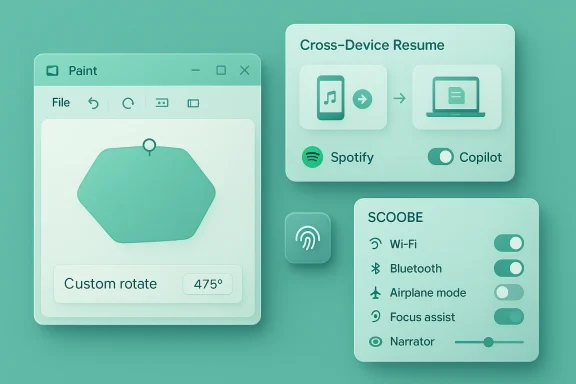
- Paint: freeform rotate for shapes, text, and active selections (Paint v11.2601.391.0). This introduces a rotate handle for free rotation and a Custom Rotate option for exact angles.
- SCOOBE: a refreshed Second‑Chance Out‑of‑Box Experience screen for reviewing recommended privacy and personalization settings that some Insiders will see during setup flows.
- Cross‑Device Resume: expanded Android → PC handoffs for selected apps and scenarios (Spotify playback, Copilot‑opened Microsoft 365 files, and select phone browsers).
- Narrator: user‑configurable announcement settings, letting screen‑reader users choose which properties are spoken and the order in which they are announced.
- Voice Typing / Voice Access: a “wait time before acting” setting and a simplified setup flow to reduce accidental activations.
- Windows Hello ESS: preview extension to supported peripheral fingerprint readers, enabling higher assurance biometric sign‑in on desktops and external sensors when vendor firmware and drivers meet ESS attestation requirements.
Paint gets freeform rotate — why the feature matters
The change
Paint’s new rotate behavior lets you select a shape, text box, or any active selection and manipulate a rotate handle to rotate freely to any angle. For precision, Paint exposes a Custom rotate command where an exact numeric angle can be entered. The update s1.391.0 and is rolling to Insiders in Canary and Dev.Practical benefits
- For quick edits (annotations, screenshots, ad‑hoc diagrams), freeform rotate removes the need to jump to heavier editors just to tilt an object. That lowers friction for common tasks like adding an angled callout or aligning screenshots inside documentation.
- The combination of on‑canvas handles plus a numeric Custom rotate option covers bodjustments and exact, reproducible rotations for repeatable workflows.
- Paint continues its repositioning from nostalgic “toy” to a pragmatic lightweight editor with session features, opacity controls, and export improvements introduced in prior Insider flights. Freeform rotate is consistent with that trajectory.
Limitations and technical realities
- This is an in‑app UI enhancement — it doesn’t change image file internals oect models. Rotations are rasterized when saved into typical bitmap formats, so repeated rotate → save cycles will still degrade quality unless you retain a project file that preserves edit state. Prior Paint updates added a native .paint project container for precisely this reason; if you need lossless iteration, use the new project save flow where available.
- The capability is gated by app version and feature flighting. Even after installing the update, Insiders may not immediately seet toggles the feature for that account or device. Testers should confirm Paint’s version and file a Feedback Hub bug if the UI differs from the documentation.
SCOOBE refresh — subtle UX change or a slippery slope?
What changed
KB5077230 introduces a refreshed SCOOBE screen — the post‑setup “second chance” flow that re‑surfaces privacy, personalization, and recommended settings to a user who skipped them during OOBE. The redesign aims to be more intuitive and streamlined, presenting recommended toggles in a focused review step for some Insiders.Why Microsoft is doing this
SCOOBE exists to give users an easy path to revisit choices they may have skipped during initial device setup. Making that screen clearer can improve baseline privacy and security by increasing the chance users opt into important protections (or, conversely, explicitly decline data sharing). A cleaner SCOOBE may also reduce post‑setup support calls when users ask why certain defaults were enabled.Where concerns arise
- The SCOOBE flow is also a natural space for in‑OS suggestions, including Microsoft 365 or Microsoft account prompts. Repurposing canvas space in setup flows to highlight subscription nudges or value propositions raises legitimate UX and trust questions: when does helpful guidance become in‑OS marketing? Several community observers have already raised that debate with earlier Insider experiments that surfaced subscription-related reminders in post‑setup flows.
- Because the screen is staged to Insiders, behavior you see today may not reflect the eventual public rollout. Microsoft frequently experiments with different wording, placement, and emphasis; the final design may soften or amplify any perceived promotional tone.
Practical advice
- Organizations deploying devices at scale should test the SCOOBE flow during imaging and enrollment to ensure recommended settings align with organizational policy.
- For end users, pay attention during the SCOOBE review: the settings are real toggles that affect diagnostics, personalization, and account linkages.
Cross‑Device Resume expands in real, useful ways
The expansion
KB5077230 broadens the Cross‑Device Resume feature, enabling additional handoff scenarios from Android phones to PCs: resuming Spotify playback, continuing Copilot‑opened Microsoft 365 files, and carrying certain phone browser sessions forward (Vivo Browser is explicitly mentioned). Resume uses cloud or metadata handoffs so the PC can pick up an activity and, where available, prefer a native desktop app over a browser fallback.Why this is meaningful
- Resume addresses a common friction: doing work on a phone that you'd like to continue on a bigger screen. Adding support for popular consumer scenarios (music, browsing, Copilot/365) makes the feature tangibly useful beyond demo slides.
- Vendor cooperation (phone OEMs, app developers) is required; Microsoft’s list of supported partners matters in practice. The experience will be hit‑or‑miss unless app developers and OEMs fully integrate the necessary intents and metadata.
Practical caveats
- Resume depends on the app and OEM integration. If the phone app doesn’t implement the handoff intents, Resume won’t work.
- Offline‑only content on the phone is not supported; Resume expects cloud‑reachable metadata or files.
- Expect inconsistent behavior when a desktop app is not installed — the feature will fall back to the browser, which can feel jarring.
Accessibility: Narrator personalization and voice timing
Narrator — finally, configurable verbosity
KB5077230 introduces user‑level Narrator customization: screen‑reader users can choose which properties are spoken (labels, control roles, states, values) and the order in which they’re announced. This reduces verbosity and helps advanced users shape output to their navigation habits. The change reflects a long‑standing accessibility need: one size doesn’t fit all for spoken interfaces.Benefits include:
- Reduced cognitive overload for power users who prefer succinct readouts.
- The ability to reorder announcements to match personal workflows or app patterns.
- Better parity for users who rely on speed and concise speech output.
Voice Typing and Voice Access
The build also adds a “wait time before acting” setting for voice typing, and simplifies Voice Access setup. These tweaks reduce accidental activations and make speech input more predictable, particularly for users with variable speech cadence. For environments where accidental commands are disruptive (e.g., shared spaces), making the wait time configurable is a pragmatic improvement.Security headline: Windows Hello ESS for peripheral fingerprint readers
What changed
KB5077230 previewed ESS support for certain peripheral fingerprint readers. ESS requires match‑on‑sensor behavior and vendor attestation so the fingerprint template and matching occur in secure hardware or a protected boundary, raising the overall assurance of biometric sign‑ins to the same level expected from integrated sensors. This extension enables desktops, kiosks, and shared devices with supported external readers to benefit from ESS protections.Why this is consequential
- Historically, high‑assurance biometric protection was tied to integrated hardware. Extending ESS to peripherals unlocks stronger security options for a broader device population — particularly important in enterprise, healthcare, and public‑facing scenarios where external readers are common.
- The caveat is veheral vendors must implement the ESS contract and provide signed drivers and correct firmware to participate. Without vendor support, a plugged‑in external reader will continue to operate under legacy, lower‑assurance models.
Administrative and deployment implications
- IT teams should validate peripheral firmware and vendor attestation before deploying ESS in production.
- Procurement should require ESS support and attestation evidence for external fingerprint hardware if the organization expects to enforce ESS policies.
- Test devices in a controlled environment: mismatched firmware, drivers, or attestation flows can cause enrollment failures and support headaches.
Controlled rollout and the practical tester’s checklist
Microsoft’s feature gating means your mileage will vary. If you want to experiment with KB5077230 safely, follow this checklist:- Enroll a non‑production machine or VM in the Windows Insider Program set to the Canary Channel.
- Update to Build 28020.1619 (KB5077230) via Windows Update and reboot.
- Verify Paint’s app version (Paint v11.2601.391.0) for freeform rotate, and check whether the rotate handle appears on selected objects. Report discrepancies in Feedback Hub.
- Link a supported Android phone via Settings > Bluetooth & devices > Mobile devices and test Cross‑Device Resume with Spotify or a supported browser. Document reproducible steps for any failures.
- Test peripheral ESS with a vendor‑supported fingerprint reader and verify match‑on‑sensor behavior in Settings > Accounts > Sign‑in options; follow vendor guidance for firmware updates and attestation. ([windowsforum.com](Windows Hello ESS Now Supports External Peripherals in Feb 2026 Update Narrator personalization to tune verbosity and test in real apps and web pages to confirm ordering and reduced cognitive load.
Risks, trade‑offs, and open questions
- Canary stability: Canary builds are experimental. Do not install on production devices unless you have a rollback plan. Feature behavior may change between flights.
- Feature gating confusion: because Microsoft uses server‑side toggles, having the right build doesn’t guarantee visible features. That can complicate testing and internal documentation.
- Privacy and UX balance in SCOOBE: a more prominent SCOOBE could improve security defaults but may also be shaped into a vector for subscription nudges. Review the exact wording and placement during deployment testing.
- Supply‑chain realities for ESS: peripheral support hinges on vendors shipping attested firmware and correct drivers. Procurement and firmware update processes become part of the security story.
- Developer adoption for Resume: Cross‑Device Resume’s usefulness depends on app and OEM cooperation. Expect a bumpy, incremental adoption curve.
Strengths and notable positives
- Incrementalism that solves friction: KB5077230 focuses on reducing real user friction — rotating an object in Paint, customizing Narrator verbosity, or reducing accidental voice commands — rather than flashy, low‑utility experiments.
- Security‑first extension of ESS: enabling ESS for peripherals is a meaningful way to raise baseline biometric assurance without forcing hardware replacement.
- Thoughtful accessibility improvements: giving screen‑reader users control over announcements recognizes the diversity of needs within that community.
- Practical cross‑device scenarios: Resume support for widely used consumer flows (music, Copilot‑opened docs) drives immediate value for everyday users.
Recommendations — for IT admins, power users, and everyday Insiders
- IT admins:
- Test KB5077230 on lab hardware before approving any wider pilot. Validate peripheral ESS with the exact models you plan to deploy and require vendor‑provided attestation documentation.
- Update user guidance and support scripts to include new Resume scenarios and potential browser fallbacks.
- Assess whether the SCOOBE flow matches corporate privacy and provisioning policies and, if necessary, block or script it for corporate images.
- Power users and creators:
- Try the Paint freeform rotate and the project‑file workflow to see whether Paint now fits more of your lightweight editing needs.
- Use project saves (.paint) when iterating or working non‑destructively to avoid repeated rasterization losses.
- Everyday Insiders:
- If you want the features early, use a spare device or VM in the Canary Channel and file detailed Feedback Hub reports when behavior differs from expectations.
- Be mindful: install Canary builds on non‑critical machines and back up important data before experimenting.
Final analysis — incremental polish with consequential underpinnings
KB5077230 (Build 28020.1619) is emblematic of Microsoft’s current approach: modest, user‑centered polish at the surface — like Paint’s freeform rotate and the SCOOBE refresh — paired with incremental platform investments that enable safer, more seamless experiences across devices and peripherals. The release doesn’t rewrite the rules of the road; instead, it removes practical annoyances and lays marked lines for the next phase: stronger peripheral biometrics, better cross‑device continuity, and a more configurable accessibility experience.That strategy has clear benefits: it produces tangible improvements for day‑to‑day tasks and gives Microsoft the telemetry it needs to move features responsibly into broader channels. But the work is unfinished. Resume will need broad ecosystem buy‑in, ESS depends on vendor attestation and firmware hygiene, and SCOOBE’s evolution will require careful wording to avoid alienating users who are sensitive to in‑OS promotions. The net effect, however, is positive: these are practical, usable changes that — once flighted and refined — will make Windows a slightly smoother, slightly safer place to get work done.
In short: if you’re an Insider willing to tolerate Canary instability, KB5077230 is worth testing — Paint finally gains the freeform rotate many users have wanted, SCOOBE receives a clearer review surface, and a handful of accessibility and security improvements hint at substantive long‑term gains. For admins and cautious users, treat this build as a lab for future features and validate peripheral hardware, enrollment flows, and user guidance before enabling anything broadly.
Source: Windows Report https://windowsreport.com/kb5077230-adds-freeform-rotate-in-windows-11-paint-updated-scoobe-screen/
