

A Neowin writer reported in June 2026 that two Windows 11 clean installs failed to continue after the first reboot until Secure Boot was temporarily disabled, Windows setup completed, updates were installed, and Secure Boot was then turned back on. The story matters because it turns a quiet platform-maintenance deadline into a very visible failure mode: the machine does not explain cryptographic trust chains; it simply refuses to boot. The likely culprit is not Windows 11’s installer in isolation, but the awkward transition from Microsoft’s 2011 Secure Boot certificates to the newer 2023 certificate authorities. For Windows users and administrators, the practical lesson is blunt: install media, firmware, and Secure Boot policy now form one boot-time contract, and any stale part of that contract can strand a perfectly serviceable PC.
The reported failure pattern is familiar to anyone who has spent a weekend rebuilding a PC: setup copies files, reboots, and then the system should hand off from USB installation media to Windows Boot Manager on the internal drive. Instead, the machine fell back to the boot-device picker, and choosing Windows Boot Manager only returned it to the same place. Removing the USB drive led not to the second phase of Windows setup, but to UEFI with no apparent path forward.
That detail is important. This was not the classic “wrong disk selected” installation mistake, nor the old Legacy BIOS versus UEFI mismatch that haunted Windows 7-era rebuilds. The author says the system was configured for Windows 11’s modern assumptions: UEFI, GPT partitioning, TPM, and Secure Boot were all in place. The USB installer was created with Microsoft’s official Media Creation Tool.
The temporary fix was almost offensively simple. Disable Secure Boot, allow setup to continue, finish the out-of-box experience, install updates, and then re-enable Secure Boot. The same pattern reportedly appeared later on a laptop, this time with the firmware explicitly complaining about a Secure Boot violation.
That makes the story more than a personal workaround. It is a small field report from the edge of a much larger migration Microsoft has been warning about: the retirement of long-lived Secure Boot certificates first issued in the Windows 8 era.
That opacity is part of the frustration. The machine is not weighing the user’s intent; it is validating signatures against databases stored in firmware. A Windows installer, a Windows Boot Manager binary, an EFI application on a USB stick, and the platform’s allowed-signature database all have to agree on what is trusted.
Microsoft’s 2011 Secure Boot certificates are now reaching the end of their planned life. The transition to 2023-era certificates is meant to preserve boot-level security for the next generation of Windows devices. But certificate migrations are not normal application updates. They touch firmware variables, OEM implementation details, revocation lists, boot managers, and recovery behavior.
That is why this sort of failure can feel nonsensical. A system can be “Windows 11 compatible” in the broad consumer sense and still have stale or mismatched Secure Boot state at exactly the moment a fresh install tries to cross from install media into the newly laid-down OS. Secure Boot has not failed open; it may be failing closed.
That message is accurate, but it is not comforting when a clean install hits a boot loop. “Many devices update automatically” is a lifecycle statement, not a rescue plan. A PC that has just had its partitions deleted is no longer in the same happy servicing path as a fully patched Windows installation that can quietly receive remediation in the background.
The Neowin account lands right in that gap. The user is not merely updating an existing PC. They are rebuilding the machine from external media, during a period when Secure Boot trust anchors are changing. If the USB media, boot manager, firmware database, and post-install update state are not aligned, the first reboot becomes the point of failure.
This is the sort of problem that will disproportionately punish people who do exactly what power users have long been told to do: perform a clean install to rule out cruft, corruption, and bad upgrades. In 2026, a clean install is no longer just an OS operation. It is also a firmware-trust compatibility test.
If an installer relies on older boot components or assumes older Secure Boot authorities, it may collide with newer firmware trust stores. Conversely, if a device has not received the newer certificates, newer boot media may not be trusted in future scenarios. The old advice to “just keep a Windows USB stick in a drawer” now deserves a caveat: recreate it periodically, especially during boot-security transitions.
This is not merely about Windows 11 24H2 or 25H2 branding. It is about the pre-OS pieces that make the installer boot and make the installed OS boot after setup’s first restart. Microsoft’s Media Creation Tool is the right source, but the timing of when the media was created can still matter.
For enthusiasts, the fix is manageable. Download the current tool, rebuild the USB drive, check firmware updates, and retry. For a help desk supporting remote users, classrooms, lab benches, or branch-office PCs, the same issue becomes a documentation nightmare. “Use the latest ISO” stops being generic hygiene and becomes an operational requirement.
Windows 11’s hardware requirements turned Secure Boot into a culture-war checkbox, but the feature itself is not decorative. It is part of the system that helps block untrusted bootloaders and boot-level malware before the OS can defend itself. The reason Microsoft is refreshing certificates is precisely because old trust anchors cannot be treated as immortal.
The risk is that frustrated users will stop at the first half of the workaround. They will disable Secure Boot, get Windows installed, and never go back. That solves the immediate boot problem while quietly weakening the machine’s security posture.
The better reading is narrower. Temporarily disabling Secure Boot can be a bridge across a setup-time trust mismatch, provided the user promptly installs all firmware and Windows updates, verifies the machine is current, and turns Secure Boot back on. In enterprise environments, even that bridge should be tested and documented, not improvised across a fleet.
That shared model works tolerably well when changes are incremental. It is messier when the root of trust is being refreshed across a global installed base of devices from many vendors and many years. Firmware bugs that were invisible yesterday can become boot blockers tomorrow because a new certificate, revocation, or boot manager exposes assumptions in the platform.
Microsoft’s own guidance acknowledges higher-risk scenarios: outdated firmware, Secure Boot validation errors, startup hangs, BitLocker recovery prompts, and devices failing to boot. That is not scaremongering; it is the predictable result of moving a cryptographic foundation underneath a heterogeneous PC ecosystem.
The PC industry likes to market UEFI as a standard, but standards still leave room for vendor-specific behavior. Anyone who has watched two otherwise similar laptops respond differently to the same BIOS setting knows this. Secure Boot certificate renewal is a reminder that Windows is not just an operating system sitting on hardware. It is a negotiated truce with firmware.
A corporate fleet may include supported Windows 11 devices that have never received a critical firmware update because BIOS updates were excluded from normal patching. It may include machines that were reimaged from old task-sequence media. It may include BitLocker-protected laptops whose recovery keys are not where the technician expects them to be. Each of those small gaps becomes more dangerous when Secure Boot state changes.
The immediate operational move is not panic; it is inventory. Administrators should know which devices have the 2023 Secure Boot certificates, which models need OEM firmware updates, which deployment images contain current boot components, and which recovery workflows have been tested. A pilot group matters here because the failure domain is hardware-specific.
The larger move is cultural. Firmware can no longer be treated as a once-a-year maintenance annoyance. If boot trust, virtualization-based security, credential protection, and kernel isolation are all part of the modern Windows security story, then firmware servicing is part of Windows servicing.
But support problems rarely arrive in the clean form described by lifecycle guidance. Users do not experience “a degraded boot-level protection state.” They experience a black screen, a boot loop, a Secure Boot violation, or a machine demanding BitLocker recovery. They search for “Windows 11 clean install won’t boot,” not “UEFI DB certificate trust mismatch.”
That is why field reports like this matter. They translate a platform-security migration into the human vocabulary of broken PCs. Even if the specific causal chain in this case remains unproven, the workaround maps closely enough to the certificate-transition landscape that it should not be dismissed as coincidence.
Microsoft has a difficult balance to strike. Over-warning consumers risks creating a self-inflicted wave of BIOS tinkering. Under-warning them creates exactly the scenario described here: a user discovers the issue only after wiping a working system.
That solved Microsoft’s adoption gate, but not user understanding. Secure Boot remained a magical firmware switch that made Windows 11 approve or disapprove of a machine. Now that the certificates behind that switch are expiring, the abstraction is leaking.
The Neowin case shows why that matters. The author did many of the “right” things and still had to discover through experimentation that Secure Boot was the variable. Most ordinary users will not have the spare laptop, alternate USB drive, and patience to isolate the issue.
This is where Windows could do better. Firmware-level failures are hard to explain from inside an OS that has not booted, but installer media could be more explicit about Secure Boot certificate state. A clearer preflight check before partition deletion would be far better than a boot-device carousel after the first restart.
If the system is already stuck, the Neowin workaround is reasonable: temporarily disable Secure Boot, complete setup, install all available Windows and firmware updates, and re-enable Secure Boot. Users should then confirm Secure Boot is actually on, not merely supported. On BitLocker-enabled systems, they should also make sure recovery keys are backed up before experimenting with firmware settings.
The delicate point is the note that disabling Secure Boot after Windows has already started setup may affect how the installer evaluates hardware requirements. Windows 11’s setup logic and firmware state are intertwined enough that changing settings midstream can produce misleading compatibility errors. That again argues for planning the install path rather than flipping switches randomly.
For administrators, this should be folded into standard operating procedures. Deployment shares, USB sticks, PXE images, recovery media, and golden images all deserve review. A clean install process that worked flawlessly in January 2026 may be a trap by June if its boot components are stale.
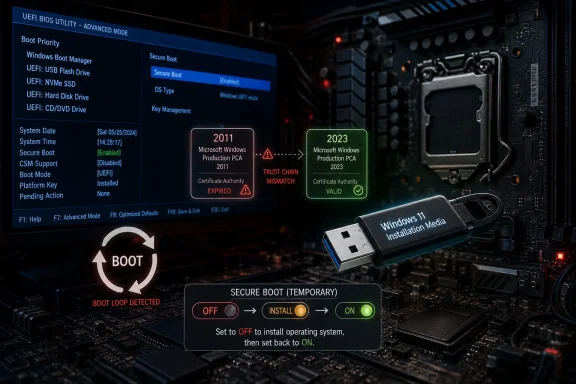 The Clean Install Was the Canary in the Firmware Mine
The reported failure pattern is familiar to anyone who has spent a weekend rebuilding a PC: setup copies files, reboots, and then the system should hand off from USB installation media to Windows Boot Manager on the internal drive. Instead, the machine fell back to the boot-device picker, and choosing Windows Boot Manager only returned it to the same place. Removing the USB drive led not to the second phase of Windows setup, but to UEFI with no apparent path forward.That detail is important. This was not the classic “wrong disk selected” installation mistake, nor the old Legacy BIOS versus UEFI mismatch that haunted Windows 7-era rebuilds. The author says the system was configured for Windows 11’s modern assumptions: UEFI, GPT partitioning, TPM, and Secure Boot were all in place. The USB installer was created with Microsoft’s official Media Creation Tool.
The temporary fix was almost offensively simple. Disable Secure Boot, allow setup to continue, finish the out-of-box experience, install updates, and then re-enable Secure Boot. The same pattern reportedly appeared later on a laptop, this time with the firmware explicitly complaining about a Secure Boot violation.
That makes the story more than a personal workaround. It is a small field report from the edge of a much larger migration Microsoft has been warning about: the retirement of long-lived Secure Boot certificates first issued in the Windows 8 era.
Secure Boot Is Doing Its Job, Which Is Why the Failure Looks So Dumb
Secure Boot is often described as a checkbox in firmware, but that undersells it. It is a trust system that decides, before Windows has even loaded, whether the boot components presented to the machine are signed by authorities the firmware trusts. When everything lines up, the user never sees it. When it does not, the experience can look indistinguishable from a broken installer, a bad SSD, or a botched boot order.That opacity is part of the frustration. The machine is not weighing the user’s intent; it is validating signatures against databases stored in firmware. A Windows installer, a Windows Boot Manager binary, an EFI application on a USB stick, and the platform’s allowed-signature database all have to agree on what is trusted.
Microsoft’s 2011 Secure Boot certificates are now reaching the end of their planned life. The transition to 2023-era certificates is meant to preserve boot-level security for the next generation of Windows devices. But certificate migrations are not normal application updates. They touch firmware variables, OEM implementation details, revocation lists, boot managers, and recovery behavior.
That is why this sort of failure can feel nonsensical. A system can be “Windows 11 compatible” in the broad consumer sense and still have stale or mismatched Secure Boot state at exactly the moment a fresh install tries to cross from install media into the newly laid-down OS. Secure Boot has not failed open; it may be failing closed.
Microsoft’s Certificate Deadline Has Become a User-Support Problem
Microsoft has been clear that the original Secure Boot certificates issued in 2011 begin expiring in June 2026, with additional certificate expirations later in the year. The company’s guidance has emphasized that many supported Windows devices will receive updated certificates automatically through Windows Update, while some systems may also depend on OEM firmware updates or managed deployment controls.That message is accurate, but it is not comforting when a clean install hits a boot loop. “Many devices update automatically” is a lifecycle statement, not a rescue plan. A PC that has just had its partitions deleted is no longer in the same happy servicing path as a fully patched Windows installation that can quietly receive remediation in the background.
The Neowin account lands right in that gap. The user is not merely updating an existing PC. They are rebuilding the machine from external media, during a period when Secure Boot trust anchors are changing. If the USB media, boot manager, firmware database, and post-install update state are not aligned, the first reboot becomes the point of failure.
This is the sort of problem that will disproportionately punish people who do exactly what power users have long been told to do: perform a clean install to rule out cruft, corruption, and bad upgrades. In 2026, a clean install is no longer just an OS operation. It is also a firmware-trust compatibility test.
Old Install Media Is Now a Security Liability, Not Just an Inconvenience
For years, stale Windows install media was mostly a time penalty. You installed an older build, endured a long run of cumulative updates, and eventually arrived at the current patch level. That model is becoming less safe as the boot chain itself changes.If an installer relies on older boot components or assumes older Secure Boot authorities, it may collide with newer firmware trust stores. Conversely, if a device has not received the newer certificates, newer boot media may not be trusted in future scenarios. The old advice to “just keep a Windows USB stick in a drawer” now deserves a caveat: recreate it periodically, especially during boot-security transitions.
This is not merely about Windows 11 24H2 or 25H2 branding. It is about the pre-OS pieces that make the installer boot and make the installed OS boot after setup’s first restart. Microsoft’s Media Creation Tool is the right source, but the timing of when the media was created can still matter.
For enthusiasts, the fix is manageable. Download the current tool, rebuild the USB drive, check firmware updates, and retry. For a help desk supporting remote users, classrooms, lab benches, or branch-office PCs, the same issue becomes a documentation nightmare. “Use the latest ISO” stops being generic hygiene and becomes an operational requirement.
Temporarily Disabling Secure Boot Is a Workaround, Not a Philosophy
The Neowin workaround is sensible in context: disable Secure Boot, complete installation, patch the system, and re-enable Secure Boot. It matches the observed behavior and avoids leaving the machine permanently downgraded. But it should not be mistaken for a general recommendation to run Windows 11 with Secure Boot off.Windows 11’s hardware requirements turned Secure Boot into a culture-war checkbox, but the feature itself is not decorative. It is part of the system that helps block untrusted bootloaders and boot-level malware before the OS can defend itself. The reason Microsoft is refreshing certificates is precisely because old trust anchors cannot be treated as immortal.
The risk is that frustrated users will stop at the first half of the workaround. They will disable Secure Boot, get Windows installed, and never go back. That solves the immediate boot problem while quietly weakening the machine’s security posture.
The better reading is narrower. Temporarily disabling Secure Boot can be a bridge across a setup-time trust mismatch, provided the user promptly installs all firmware and Windows updates, verifies the machine is current, and turns Secure Boot back on. In enterprise environments, even that bridge should be tested and documented, not improvised across a fleet.
Firmware Is the Part of Windows Servicing Nobody Wants to Own
The boot chain is a shared responsibility problem. Microsoft signs Windows boot components and publishes certificate guidance. OEMs ship firmware and decide how those trust databases are provisioned and updated. Users and administrators are left to coordinate Windows Update, BIOS updates, BitLocker recovery keys, install media, and boot settings.That shared model works tolerably well when changes are incremental. It is messier when the root of trust is being refreshed across a global installed base of devices from many vendors and many years. Firmware bugs that were invisible yesterday can become boot blockers tomorrow because a new certificate, revocation, or boot manager exposes assumptions in the platform.
Microsoft’s own guidance acknowledges higher-risk scenarios: outdated firmware, Secure Boot validation errors, startup hangs, BitLocker recovery prompts, and devices failing to boot. That is not scaremongering; it is the predictable result of moving a cryptographic foundation underneath a heterogeneous PC ecosystem.
The PC industry likes to market UEFI as a standard, but standards still leave room for vendor-specific behavior. Anyone who has watched two otherwise similar laptops respond differently to the same BIOS setting knows this. Secure Boot certificate renewal is a reminder that Windows is not just an operating system sitting on hardware. It is a negotiated truce with firmware.
The Enterprise Version of This Story Is Fleet Drift
For home users, the incident is annoying. For administrators, it is a warning about drift. The machines most likely to surprise you are not necessarily the oldest ones; they are the machines whose firmware, Windows image, update policy, and recovery process have diverged from the assumed baseline.A corporate fleet may include supported Windows 11 devices that have never received a critical firmware update because BIOS updates were excluded from normal patching. It may include machines that were reimaged from old task-sequence media. It may include BitLocker-protected laptops whose recovery keys are not where the technician expects them to be. Each of those small gaps becomes more dangerous when Secure Boot state changes.
The immediate operational move is not panic; it is inventory. Administrators should know which devices have the 2023 Secure Boot certificates, which models need OEM firmware updates, which deployment images contain current boot components, and which recovery workflows have been tested. A pilot group matters here because the failure domain is hardware-specific.
The larger move is cultural. Firmware can no longer be treated as a once-a-year maintenance annoyance. If boot trust, virtualization-based security, credential protection, and kernel isolation are all part of the modern Windows security story, then firmware servicing is part of Windows servicing.
Microsoft’s Messaging Is Technically Correct and Still Too Gentle
Microsoft has generally said that devices without the updated certificates may continue to boot and receive regular Windows updates, but may not receive future boot-level protections. That distinction is important. The sky does not fall for every PC on the certificate expiration date.But support problems rarely arrive in the clean form described by lifecycle guidance. Users do not experience “a degraded boot-level protection state.” They experience a black screen, a boot loop, a Secure Boot violation, or a machine demanding BitLocker recovery. They search for “Windows 11 clean install won’t boot,” not “UEFI DB certificate trust mismatch.”
That is why field reports like this matter. They translate a platform-security migration into the human vocabulary of broken PCs. Even if the specific causal chain in this case remains unproven, the workaround maps closely enough to the certificate-transition landscape that it should not be dismissed as coincidence.
Microsoft has a difficult balance to strike. Over-warning consumers risks creating a self-inflicted wave of BIOS tinkering. Under-warning them creates exactly the scenario described here: a user discovers the issue only after wiping a working system.
Windows 11’s Requirements Made Secure Boot Visible, but Not Understandable
Windows 11 made Secure Boot famous in the wrong way. During the operating system’s launch, millions of users learned that their PC needed TPM 2.0 and Secure Boot capability, often through blunt compatibility checkers and motherboard menus full of vendor jargon. Many enabled the setting once and never thought about it again.That solved Microsoft’s adoption gate, but not user understanding. Secure Boot remained a magical firmware switch that made Windows 11 approve or disapprove of a machine. Now that the certificates behind that switch are expiring, the abstraction is leaking.
The Neowin case shows why that matters. The author did many of the “right” things and still had to discover through experimentation that Secure Boot was the variable. Most ordinary users will not have the spare laptop, alternate USB drive, and patience to isolate the issue.
This is where Windows could do better. Firmware-level failures are hard to explain from inside an OS that has not booted, but installer media could be more explicit about Secure Boot certificate state. A clearer preflight check before partition deletion would be far better than a boot-device carousel after the first restart.
The Right Fix Starts Before the Reinstall
The practical advice is straightforward, but the order matters. Before wiping a Windows 11 machine in mid-2026, users should update the existing installation fully, check for OEM firmware updates, and recreate installation media using the current Media Creation Tool or current ISO. That gives both Windows and the firmware the best chance to negotiate the new trust chain before setup begins.If the system is already stuck, the Neowin workaround is reasonable: temporarily disable Secure Boot, complete setup, install all available Windows and firmware updates, and re-enable Secure Boot. Users should then confirm Secure Boot is actually on, not merely supported. On BitLocker-enabled systems, they should also make sure recovery keys are backed up before experimenting with firmware settings.
The delicate point is the note that disabling Secure Boot after Windows has already started setup may affect how the installer evaluates hardware requirements. Windows 11’s setup logic and firmware state are intertwined enough that changing settings midstream can produce misleading compatibility errors. That again argues for planning the install path rather than flipping switches randomly.
For administrators, this should be folded into standard operating procedures. Deployment shares, USB sticks, PXE images, recovery media, and golden images all deserve review. A clean install process that worked flawlessly in January 2026 may be a trap by June if its boot components are stale.
The June 2026 Boot Lesson Windows Users Should Actually Remember
This incident should not be read as proof that every Windows 11 clean install is broken, nor as proof that Secure Boot should be disabled. It should be read as an early warning that the Windows boot chain is in a transition period, and clean installation exposes weak links faster than normal servicing does.- Users should recreate Windows 11 installation media with the latest available release before attempting a clean install during the Secure Boot certificate transition.
- Systems should receive available Windows updates and OEM firmware updates before being wiped, because a running OS has more ways to receive certificate remediation than a blank disk does.
- Temporarily disabling Secure Boot can be a valid recovery step when setup is blocked, but Secure Boot should be re-enabled after Windows is installed and updated.
- Administrators should inventory Secure Boot certificate status and firmware versions instead of assuming Windows 11 compatibility means certificate readiness.
- Old USB installers, old PXE images, and old recovery media should be treated as suspect until they are rebuilt or validated against current Secure Boot requirements.
- A boot loop after the first setup restart may be a trust-chain problem, not a storage failure or a bad Windows installer.
References
- Primary source: Neowin
Published: Sun, 14 Jun 2026 16:28:00 GMT
Here is how I fixed Windows 11 not booting after clean installation - Neowin
If your PC cannot boot after a clean install of Windows 11, here are a couple of things you should try in light of Microsoft's Secure Boot certificate updates. www.neowin.net
- Official source: learn.microsoft.com
Update Secure Boot Certificates for Windows Devices - Windows Client | Microsoft Learn
Update your Windows devices to maintain Secure Boot protection with 2023 certificates before they expire in June 2026.learn.microsoft.com - Official source: support.microsoft.com
Windows Secure Boot certificate expiration and CA updates - Microsoft Support
 support.microsoft.com
- Related coverage: windowscentral.com
Microsoft warns Secure Boot certificates will expire in 2026 | Windows Central
After 15 years, the original Secure Boot certificates that keep your PC secure during boot are expiring. Here's what you need to know.www.windowscentral.com - Related coverage: windowslatest.com
Microsoft reveals what happens to Windows 11 PCs if you ignore the Secure Boot deadline in June 2026
Microsoft warns Windows 11 PCs without the new Secure Boot certificates may lose future protections, boot security updates, and upgrades. www.windowslatest.com
- Official source: blogs.windows.com
Refreshing the root of trust: industry collaboration on Secure Boot certificate updates
Secure Boot is a foundational security feature of the Windows and Windows Server experience, providing protection from the moment a device powers on. Introduced in 2011, Secure Boot runs at startup – before Windows loads – and hblogs.windows.com
- Related coverage: tomshardware.com
Microsoft is refreshing Secure Boot certificates to plug security holes before they happen — if you bought a PC last year, you should be set | Tom's Hardware
Be sure to keep Windows 11 systems updated to get refreshed security certificates.www.tomshardware.com - Related coverage: pcgamer.com
Secure Boot certificates used by anti-cheat software are set to expire in June but new ones are already in the mail | PC Gamer
You shouldn't have to worry about expired certificates if you keep your PC up-to-date.www.pcgamer.com - Related coverage: tomsguide.com
Windows 10 users warned to upgrade now or risk a ‘degraded security state’ as Microsoft ends Secure Boot support | Tom's Guide
Support for Windows 10 officially ended in October 2025, and Microsoft says devices that don’t upgrade could enter a degraded security state — leaving them vulnerable to threats. Here’s what it means for your PC and how to protect it.www.tomsguide.com - Related coverage: techradar.com
Microsoft confirms why Windows 11 updates might be weird right now, and look like they're failing — but it's nothing to worry about | TechRadar
You'll need to be patient with updates packing Secure Boot changes, thoughwww.techradar.com
