

Microsoft has quietly — and decisively — moved Copilot out of its chat-box corner and into the center of the Windows 11 experience, turning the assistant into a hands‑free, screen‑aware productivity layer you can summon with the wake words “Hey, Copilot”, let view the exact window you’re working in, and (with explicit permission) allow to perform chained tasks on your behalf.
Since its debut, Copilot has evolved from an add‑on chat helper into a cross‑product assistant in Microsoft 365, Edge, and the Copilot mobile app. The October 2025 wave for Windows 11 represents a strategic pivot: Microsoft is treating voice and visual context as first‑class inputs on the PC, and it is experimenting with agentic automation that can perform multi‑step work flows inside a visible, permissioned workspace. This change is positioned as the company’s push to make “every Windows 11 PC an AI PC” while steering users away from Windows 10 as that product reached its end of mainstream servicing. Microsoft frames the update around three interlocking capabilities:
The immediate imperative is straightforward: pilot conservatively, validate hardware and connector claims, and require explicit consent and auditing before letting agents act on sensitive data. Done right, Copilot can be a force multiplier; done without discipline, it could become a costly set of surprises. The next months of Insider previews and enterprise deployments will decide whether Copilot becomes the trusted, hands‑free partner Microsoft envisions or the feature set that prompts a fresh round of controls and skepticism.
Source: Neowin Bye, Copilot: Microsoft is making Copilot a hands-free experience on Windows
 Background
Since its debut, Copilot has evolved from an add‑on chat helper into a cross‑product assistant in Microsoft 365, Edge, and the Copilot mobile app. The October 2025 wave for Windows 11 represents a strategic pivot: Microsoft is treating voice and visual context as first‑class inputs on the PC, and it is experimenting with agentic automation that can perform multi‑step work flows inside a visible, permissioned workspace. This change is positioned as the company’s push to make “every Windows 11 PC an AI PC” while steering users away from Windows 10 as that product reached its end of mainstream servicing. Microsoft frames the update around three interlocking capabilities:- Copilot Voice — hands‑free invocation and multi‑turn spoken conversations via the wake phrase “Hey, Copilot.”
- Copilot Vision — session‑bound, user‑initiated screen analysis (selected windows, screenshots, or desktop regions) for OCR, UI identification and contextual guidance.
- Copilot Actions — experimental, permissioned agents that can execute multi‑step tasks across local apps and web services inside a transparent Agent Workspace.
What’s actually new — feature by feature
Copilot Voice: “Hey, Copilot”
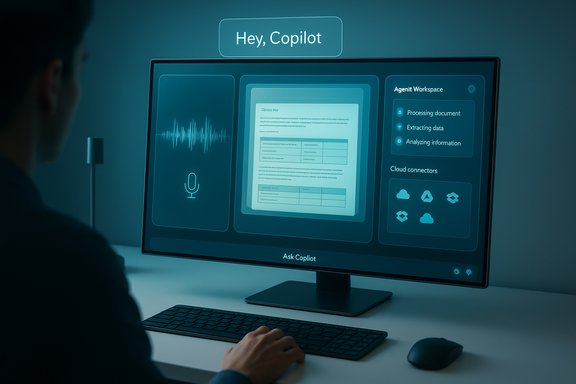
The headline: you can enable a wake‑word that activates Copilot hands‑free while your PC is on and unlocked. The UX includes a floating microphone overlay and audible chimes to indicate session start and stop, and sessions can be ended with a spoken “Goodbye,” UI controls, or timeouts. Microsoft emphasizes that the wake‑word feature is opt‑in — it does not run unless the user enables it. Technically, the system uses a small on‑device “spotter” model that keeps a short, transient audio buffer (commonly described as around 10 seconds) so it can detect the wake phrase locally. Full speech‑to‑text and LLM reasoning typically run in Microsoft’s cloud unless the machine is a Copilot+ device capable of on‑device inference. That hybrid architecture is central to Microsoft’s privacy and latency messaging.Copilot Vision: the PC that can “see”
Copilot Vision lets users explicitly share one or more windows, a selected desktop region, or a screenshot with the assistant so it can perform OCR, extract tables, identify UI elements, summarize documents, and even visually point at controls you should click. Vision sessions are session‑bound and revocable, and Microsoft says images and captured audio tied to a session are deleted when the session ends. The functionality is being expanded to all markets where Copilot is offered, with text‑in/text‑out support available in Insider channels. Practical examples include extracting a table from a PDF into Excel, getting step‑by‑step guidance inside a complex app by visually highlighting controls, and quickly summarizing long documents visible on screen.Copilot Actions: agents, with guardrails
This is the most ambitious — and riskiest — piece. Copilot Actions (sometimes shown in early previews as Manus or agent workflows) are intended to perform chained operations on your behalf: edit photos in batch, fill multi‑page forms, assemble documents, or interact with web services. Microsoft positions Actions as experimental, off by default, gated through Copilot Labs / Insiders, and engineered with visible step logs, least‑privilege permissioning, and revocable scopes. Unlike background automation, Actions run inside a sandboxed Agent Workspace so users can monitor progress and abort steps as needed. Connectors (OAuth‑style) enable Copilot to reach into cloud accounts like OneDrive, Outlook, Gmail and Google Drive — but only after explicit consent.Taskbar, File Explorer and connectors
Copilot is also more visible: an “Ask Copilot” field on the taskbar acts as a unified entry for search, typing, voice and Vision flows. File Explorer gains AI shortcuts that can, for example, help build a website from local files or batch‑edit media using third‑party tools. Connectors let Copilot surface and act on cloud content after authorization. These integrations are meant to reduce friction in common tasks and to make Copilot the central discovery point on Windows 11.How it works under the hood — verified technical contours
Microsoft’s documentation and hands‑on reporting converge on a few verifiable implementation points:- Wake‑word spotting runs locally with a transient audio buffer; the buffer is not persisted to disk and is used only to detect the trigger. After a wake event, audio captured around the trigger is typically forwarded to cloud services for transcription and reasoning.
- Hybrid inference model: on ordinary Windows 11 machines the heavier LLM processing is cloud‑based; Copilot+ PCs with dedicated NPUs (the public guidance circles around ~40+ TOPS NPUs) can offload more inference on‑device for lower latency and potentially greater privacy. Verify exact NPU claims on OEM product pages before assuming a device is Copilot+ certified.
- Vision sessions are user‑initiated and session‑bound; Microsoft states session artifacts are deleted post‑session and transcripts may remain in chat history until the user deletes them. This reduces the risk of always‑on visual surveillance, but requires user attention to permission prompts and history controls.
Why this matters: benefits and strategic aims
- Reduced friction: voice + vision remove repetitive context‑switching. Instead of copy/pasting text into a chat box, you can show the app window and ask Copilot to summarize or act. This promises real time savings in tasks like data extraction, triage and repetitive content edits.
- Accessibility gains: hands‑free invocation and visual guidance broaden the PC’s usefulness to people with mobility or dexterity limitations, and to scenarios where typing is impractical.
- Platform differentiation: the Copilot+ hardware story gives OEMs a new axis to compete on — NPU performance, local inference capabilities, and bundled experiences — potentially driving PC refresh cycles and premium device marketing.
- Productivity multiplier: agentic Actions, if reliable, could automate multi‑step admin and creative workflows that today require stitching together apps, scripts and manual steps. Early demos show promise for tasks like batch edits and document assembly.
The tradeoffs and risks IT teams must evaluate
The convenience of a listening, seeing, and acting assistant comes with real, concrete tradeoffs. Organizations must treat Copilot’s new capabilities as a policy and governance problem as much as a technical one.Privacy and data flow
Even with a small local spotter, a wake‑word model implies an always‑ready audio path; the moment voice sessions escalate to transcription and LLM reasoning, data moves off‑device unless processed locally on Copilot+ hardware. For regulated data (PHI, financial records, IP) that upstreaming is a compliance concern. Microsoft states artifacts are session‑bound and deletable, but audit logging, retention defaults, and connector scopes must be validated by admins before broad enablement.Agentic automation — a new attack surface
Allowing an AI to act across apps introduces chances for unintended actions, privilege escalation, or credential misuse. Microsoft’s visible step logs and revocable permissions are good initial controls, but enterprise security teams need:- Clear enablement policies (who can use Actions; under what conditions).
- Audit trails showing the exact steps an agent executed.
- Role‑based governance and connectors that honor conditional access.
Reliability, hallucinations and user trust
Agentic automations depend on accurate understanding of UI and context. Early previews show the assistant can make mistakes — clicking wrong buttons, mis‑extracting data, or misinterpreting web forms. Organizations should treat Actions as assistive automation at first: require human review before any mission‑critical operations are completed.Privacy perception and UX traps
Microsoft’s prior misstep with a screenshotting feature (Recall) taught the industry that perceived invasiveness damages trust faster than technical fixes restore it. Even if Copilot Vision is session‑bound, repeated permission prompts, unclear indicators, or opaque history handling can lead to user backlash. Visible microphone and screen indicators, explicit permission flows, and easy clear/delete options will be essential to regain or sustain trust.Enterprise guidance: practical steps for IT
- Review and map where Copilot will touch corporate data. Identify apps, cloud connectors, and high‑risk data flows.
- Pilot with a small group under strict logging and human‑in‑the‑loop rules. Use Copilot Labs channels for early testing.
- Configure admin controls and policy — block connectors for sensitive tenants, require conditional access policies, and set retention rules for Copilot histories.
- Train users on explicit consent behaviors: how Vision sessions work, when Actions can act, and how to review agent step logs.
- Validate vendor / OEM claims for Copilot+ hardware if on‑device inference matters for latency or data residency; ask for detailed NPU specs and proof of performance.
Hardware and OEM implications
The Copilot+ tier — devices with dedicated NPUs capable of roughly 40+ TOPS (trillions of operations per second) in public guidance — marks Microsoft’s attempt to create a premium hardware category that delivers low‑latency, on‑device AI experiences. OEMs are already packaging Galaxy Book and other lines as AI PCs, and buyers should treat Copilot+ claims as a spec to verify rather than a marketing slogan. Confirm memory, storage, and NPU metrics directly with device manufacturers. For many users and organizations, cloud‑backed Copilot functionality will be adequate. But where latency, offline capabilities, or stronger data residency are required, Copilot+ certification and local inference become meaningful differentiators.Accessibility and UX: real positives, real polish needed
Voice as a third input alongside keyboard and mouse can be transformative for accessibility, hands‑free scenarios, and multitasking. Early telemetry Microsoft cites suggests voice doubles user engagement compared with typed inputs — a strong signal that voice reduces friction for many tasks. However, usability gaps remain: long transcripts are hard to extract via voice alone; switching between voice and text may be awkward in mixed‑mode environments; and the microphone/UI indicators must be crystal clear to avoid confusion. These are solvable UX problems, but they matter for adoption.What’s unverifiable or needs ongoing scrutiny
- Exact NPU performance thresholds and the ways OEMs will certify Copilot+ devices can vary; public guidance mentions ~40+ TOPS but device implementations and marketing claims differ. Buyers should verify specific on‑device model availability and NPU throughput with manufacturers.
- How long Microsoft will retain transcripts by default, and granular default retention settings for Vision artifacts, vary across regional and tenant settings. Admins should check tenant defaults and data handling controls in the Microsoft 365 and Copilot admin centers.
Practical user tips (home and power users)
- Keep the wake‑word off until you understand the permissions model; use press‑to‑talk if you prefer stricter control.
- When using Vision, treat the permission prompt like a gate: only share windows you intend to and revoke sessions when finished.
- Use Agent Workspace for tasks you can supervise. Don’t hand over credentialed or irreversible actions to an agent without audit‑grade logs.
- If privacy is paramount, consider Copilot+ machines that perform more inference locally — but verify OEM claims and local model coverage.
The longer view: platform shift or incremental UX tweak?
This update is both evolutionary and strategic. On the one hand, it represents a logical next step in making AI features more discoverable and useful on the PC: voice invocation, screen context, and automated workflows are natural extensions of prior Copilot capabilities. On the other hand, Microsoft is signaling a broader architectural shift: the OS as an agentic platform rather than a passive toolset. That shift has ramifications for procurement, privacy, security policy, and even how users mentally model their machines. If the company gets the guardrails, logging, transparency, and UX right, Copilot’s shift toward voice, vision, and actions could deliver material productivity gains and accessibility benefits. If it miscalculates — leaving opaque defaults, weak admin controls, or brittle agent behavior — the result will be user confusion, privacy pushback, and slow enterprise uptake.Conclusion
Microsoft’s decision to make Copilot a hands‑free, screen‑aware companion on Windows 11 is a clear bet that voice and visual context will become primary PC inputs. The combination of Hey, Copilot wake words, session‑bound Vision, and experimental Actions creates a potent mix of convenience and risk. For individual users, the new features can reduce friction and broaden accessibility. For IT leaders, they introduce governance and compliance choices that must be planned and controlled.The immediate imperative is straightforward: pilot conservatively, validate hardware and connector claims, and require explicit consent and auditing before letting agents act on sensitive data. Done right, Copilot can be a force multiplier; done without discipline, it could become a costly set of surprises. The next months of Insider previews and enterprise deployments will decide whether Copilot becomes the trusted, hands‑free partner Microsoft envisions or the feature set that prompts a fresh round of controls and skepticism.
Source: Neowin Bye, Copilot: Microsoft is making Copilot a hands-free experience on Windows
