

Windows 11’s newest Copilot app is doing the opposite of what Microsoft’s AI pitch needs most: calming users down. Instead of feeling like a lean assistant, it now looks to many like a browser-heavy wrapper that carries a bigger memory footprint and a more confusing identity than before. That combination is turning a routine app refresh into a broader argument about Windows design, Edge’s expanding role, and whether Microsoft can honestly call something “native” when it behaves like a private web shell.
Copilot on Windows has already been through enough identity changes to make even patient users dizzy. Microsoft first sold it as a built-in, always-available assistant, then moved it through PWA-like packaging, native app experiments, and various Windows Insider-era adjustments that kept changing how the feature was delivered and where it lived. The result is that Copilot has never settled into a single stable form for long, which is why the latest switch lands with more force than a normal update would.
That history matters because the debate is not really about one icon on the taskbar. It is about whether Microsoft wants Copilot to be a Windows feature, a web service, or a platform layer that simply happens to appear inside Windows. The company’s own trajectory suggests the third option is winning. WindowsForum’s aggregated coverage notes that Microsoft has already been deepening Copilot’s role across Windows, Edge, and Microsoft 365, even while trimming some of the more intrusive Copilot placements in inbox apps.
The latest Copilot build appears to be a step toward a more web-centered architecture. According to the reporting reflected in the forum material, the new app is no longer a WinUI-native shell in any meaningful sense; it now behaves like a hybrid web experience built on Edge components, with Microsoft apparently preferring tighter consistency and faster feature rollout over a lighter desktop footprint. That is a perfectly rational product choice in abstract terms. It is also exactly the kind of choice Windows power users tend to resent when the RAM meter starts climbing.
This tension is especially sharp because Microsoft has been talking about Windows quality, responsiveness, and cleanup at the same time that Copilot seems to be getting heavier. That contradiction is what gives the issue political weight inside the Windows community. If Microsoft is promising a leaner, more refined Windows 11, then a memory-hungry AI assistant that rides on browser machinery feels like a symbolic step in the wrong direction.
At the same time, this is not just a consumer grumble. Copilot is increasingly part of a broader Microsoft platform story in which Edge, cloud services, and AI features all reinforce one another. That means every technical choice around Copilot has implications for trust, supportability, and the future shape of the Windows desktop itself. The app may be changing form, but the stakes are becoming more consistent: more control for Microsoft, less certainty for users.
The deeper change is architectural. The app now appears to ship with a more complete Edge-based runtime rather than relying on a slimmer native wrapper. In practical terms, that makes Copilot feel like a browser session packaged as an app, with browser-grade machinery hidden behind a Windows icon. Microsoft may view that as a way to standardize behavior across machines. Users are much more likely to view it as bloat wearing a nicer coat.
There is also a subtle trust problem. If the Store listing suggests a straightforward app install but the payload behaves more like a browser bootstrapper, then the experience feels less transparent. Windows users are usually forgiving when complexity is obvious. They are far less forgiving when it is hidden under a familiar label. That is why the installation flow itself has become part of the criticism.
Key points worth keeping in view:
That kind of logic is common in 2026 software design. Content-driven services increasingly prefer web runtimes because they simplify deployment, authentication, and interface consistency. For Microsoft, that also dovetails neatly with a larger platform ambition: Edge becomes not just a browser but a delivery layer for services, and Copilot becomes one of the most visible examples of that strategy. In other words, the app is not just an app; it is a vehicle for a broader ecosystem play.
Microsoft also appears to want a tighter update cadence. A web shell can be changed more quickly than a deeply native app with a more rigid release cycle. That matters for AI products, where feature velocity is part of the competitive story and a delay of even a few weeks can make a surface feel out of date. The trade-off is clear: the more Microsoft optimizes for agility, the more the app starts to feel like it was assembled for convenience rather than designed for frugality.
Why this approach appeals to Microsoft:
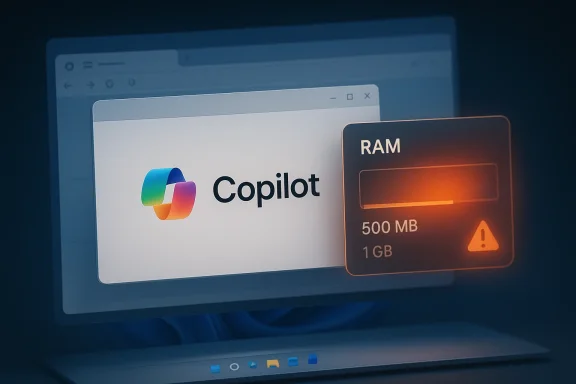
That is why the RAM complaint resonates so strongly. A feature that is supposed to make Windows feel smarter and more elegant instead appears to make it heavier. Even if the app is smoother in use, a background footprint of roughly 500MB and a burst toward 1GB feels hard to justify on 8GB or 16GB systems. The emotional reaction is not irrational; it reflects how users experience the whole machine, not just the one app in isolation.
There is also a practical annoyance factor. If the assistant is rarely used, then keeping it resident in the background feels wasteful. If it is always present, it becomes part of the desktop whether users asked for it or not. That is the core tension: Copilot is trying to be persistent without being intrusive, and the heavier architecture makes that balancing act harder to defend.
What users are really objecting to:
A browser inside an app is not automatically bad. A browser-sized thing pretending to be a lightweight desktop assistant is much harder to defend. The forum material suggests the package includes browser binaries, codecs, and supporting files that make it resemble a self-contained Edge installation rather than a small wrapper over existing system components. That changes the conversation from “web app versus native app” to “why is Microsoft shipping a second browser stack for a chat assistant?”
There is an irony here. Microsoft has spent years positioning Edge as more than a browser, and Copilot fits that effort neatly. But the more Microsoft blurs the line between browser and desktop app, the easier it becomes for critics to say the company is hiding the browser inside everything. That is a useful platform strategy for Microsoft. It is a far less flattering story for Windows users trying to keep a laptop light and responsive.
For Microsoft, that creates a messaging problem as much as a technical one. The company cannot easily tell users to care about AI efficiency while shipping a visibly heavier AI app. The contradiction may be tolerable in the abstract, but the Task Manager window makes it concrete. That is where the hidden browser problem becomes a trust problem.
On a desktop with plenty of RAM and a big SSD, the difference may not matter much day to day. On a thin-and-light laptop, a managed fleet, or a machine already crowded with Teams, OneDrive, browser tabs, and security tools, the overhead is more visible. Windows users rarely judge a feature on one number alone; they judge it on how much it contributes to the general feeling of drag. Copilot’s new form is making that drag more noticeable.
Microsoft’s broader platform messaging makes the contradiction more visible. The company has been talking up quality and responsiveness in Windows 11, while also pushing an AI assistant that looks heavier than the thing it replaced. That does not make Copilot unusable. It does make the company’s “efficient Windows” narrative harder to sell without caveats.
The practical trade-offs are easy to summarize:
But transparency matters more than Microsoft sometimes seems willing to admit. Consumers are getting savvier about the cost of “free” cloud features and always-ready AI surfaces. If an app looks like a first-party Windows tool but behaves like a packaged browser, that mismatch can feel deceptive even when the functionality is legitimate. The problem is not just performance; it is expectation management.
That means Microsoft is partly depending on habit. If users start using Copilot often enough, the resource cost becomes easier to rationalize. If they do not, the app becomes another resident icon that seems to justify itself only when it is launched, not while it sits quietly in the background. That is a hard position to defend in a consumer market that is already skeptical of bloat.
A few consumer takeaways stand out:
But the enterprise upside comes with equally obvious costs. Larger packages mean more deployment overhead, more disk usage on managed endpoints, and more to support when something changes. Admins care about every one of those details because they multiply across tens of thousands of devices. A heavier Copilot is not just a user-experience issue in that context; it is an operational line item.
The policy issue is especially important because Copilot is no longer just a chatbot. Microsoft’s support materials now describe broader capabilities such as file search, screenshot interaction, voice use, and Copilot Vision-like workflows. Once the assistant can interact with more parts of the PC, enterprises naturally ask sharper questions about governance, user training, and data handling. A browser-heavy shell may make the feature easier to ship, but it also makes it harder to treat as a simple optional extra.
For IT teams, the main trade-offs are:
The opportunity for Microsoft is to turn Copilot into a stable platform surface rather than a constantly shifting wrapper. If the company can reduce the sense of churn while making the app easier to understand, users may eventually stop caring so much about the plumbing. But that will require the app to feel less like a moving target and more like a product with a clear identity.
There is also a trust problem. Copilot has changed shape so many times that some users may no longer believe the current version is the final one. When an app feels like a perpetual beta, people become reluctant to grant it attention, space, or tolerance. That is dangerous for an assistant, because assistants depend on habitual use and a sense of reliability.
There is also the broader strategic risk that Windows begins to feel less like the main product and more like the hosting environment for Microsoft’s services. That would be a dangerous impression for a platform whose identity has always depended on being the place where work happens. If users start thinking of Windows as just the wrapper around Microsoft’s web layer, the company will have bigger problems than Copilot’s RAM usage.
Main risks to watch:
The bigger question is whether Microsoft can keep pushing Copilot as the centerpiece of its AI strategy without making the desktop feel crowded by that ambition. The company clearly wants Copilot to be a persistent layer across Windows, Edge, and Microsoft 365. The challenge is that persistent layers become controversial the moment they stop feeling invisible. In Windows, invisible is often another word for respectful.
Watch for a few things in the near term:
Source: TechRadar https://www.techradar.com/computing...-11s-new-copilot-app-is-quite-the-memory-hog/
 Background
Copilot on Windows has already been through enough identity changes to make even patient users dizzy. Microsoft first sold it as a built-in, always-available assistant, then moved it through PWA-like packaging, native app experiments, and various Windows Insider-era adjustments that kept changing how the feature was delivered and where it lived. The result is that Copilot has never settled into a single stable form for long, which is why the latest switch lands with more force than a normal update would.That history matters because the debate is not really about one icon on the taskbar. It is about whether Microsoft wants Copilot to be a Windows feature, a web service, or a platform layer that simply happens to appear inside Windows. The company’s own trajectory suggests the third option is winning. WindowsForum’s aggregated coverage notes that Microsoft has already been deepening Copilot’s role across Windows, Edge, and Microsoft 365, even while trimming some of the more intrusive Copilot placements in inbox apps.
The latest Copilot build appears to be a step toward a more web-centered architecture. According to the reporting reflected in the forum material, the new app is no longer a WinUI-native shell in any meaningful sense; it now behaves like a hybrid web experience built on Edge components, with Microsoft apparently preferring tighter consistency and faster feature rollout over a lighter desktop footprint. That is a perfectly rational product choice in abstract terms. It is also exactly the kind of choice Windows power users tend to resent when the RAM meter starts climbing.
This tension is especially sharp because Microsoft has been talking about Windows quality, responsiveness, and cleanup at the same time that Copilot seems to be getting heavier. That contradiction is what gives the issue political weight inside the Windows community. If Microsoft is promising a leaner, more refined Windows 11, then a memory-hungry AI assistant that rides on browser machinery feels like a symbolic step in the wrong direction.
At the same time, this is not just a consumer grumble. Copilot is increasingly part of a broader Microsoft platform story in which Edge, cloud services, and AI features all reinforce one another. That means every technical choice around Copilot has implications for trust, supportability, and the future shape of the Windows desktop itself. The app may be changing form, but the stakes are becoming more consistent: more control for Microsoft, less certainty for users.
What Changed in the New Copilot
The most obvious complaint is also the easiest to understand: the new Copilot app consumes far more memory than the older native build. Windows Latest’s testing, as summarized in the forum material, found the app sitting around 500MB of RAM in the background and rising to roughly 1GB when actively used. By comparison, the previous native WinUI version reportedly stayed under 100MB. That is not a subtle shift; it is the kind of jump users notice immediately once they begin watching Task Manager.The deeper change is architectural. The app now appears to ship with a more complete Edge-based runtime rather than relying on a slimmer native wrapper. In practical terms, that makes Copilot feel like a browser session packaged as an app, with browser-grade machinery hidden behind a Windows icon. Microsoft may view that as a way to standardize behavior across machines. Users are much more likely to view it as bloat wearing a nicer coat.
The packaging shift
Packaging matters because it changes what the user is really installing. A classic native app asks the operating system for resources it already manages. A browser-heavy app quietly duplicates parts of the browser stack inside its own package. That duplication may improve consistency and reduce compatibility headaches, but it also means the machine is carrying more code than it technically needs to.There is also a subtle trust problem. If the Store listing suggests a straightforward app install but the payload behaves more like a browser bootstrapper, then the experience feels less transparent. Windows users are usually forgiving when complexity is obvious. They are far less forgiving when it is hidden under a familiar label. That is why the installation flow itself has become part of the criticism.
Key points worth keeping in view:
- The new Copilot is not just a UI refresh.
- Its RAM use is materially higher than the earlier native build.
- The package appears to include substantial Edge components.
- The installation flow makes the app feel more like a managed bootstrap than a simple Store app.
- Microsoft gains control, but users lose the sense of lightness.
Why Microsoft Might Prefer Web-First Copilot
Microsoft’s likely argument is easy to infer, even if the company does not spell it out in the blunt language users would prefer. A web-first Copilot is easier to update, easier to align with the Copilot.com experience, and easier to keep feature parity across platforms. If the same codebase or most of the same frontend stack can power the browser and the Windows app, then Microsoft can ship faster and avoid the fragmentation that often comes with a purely native desktop strategy.That kind of logic is common in 2026 software design. Content-driven services increasingly prefer web runtimes because they simplify deployment, authentication, and interface consistency. For Microsoft, that also dovetails neatly with a larger platform ambition: Edge becomes not just a browser but a delivery layer for services, and Copilot becomes one of the most visible examples of that strategy. In other words, the app is not just an app; it is a vehicle for a broader ecosystem play.
The case for control
A self-contained browser runtime can reduce dependency on whatever browser state already exists on the machine. That is especially attractive for Microsoft because it lowers the odds that Copilot behaves differently depending on installed versions, stale caches, or mismatched components. In enterprise environments, that predictability can be a real advantage. Consistency often matters more than elegance when thousands of endpoints are involved.Microsoft also appears to want a tighter update cadence. A web shell can be changed more quickly than a deeply native app with a more rigid release cycle. That matters for AI products, where feature velocity is part of the competitive story and a delay of even a few weeks can make a surface feel out of date. The trade-off is clear: the more Microsoft optimizes for agility, the more the app starts to feel like it was assembled for convenience rather than designed for frugality.
Why this approach appeals to Microsoft:
- Faster feature rollout.
- More consistent behavior across Windows devices.
- Less dependence on local runtime variance.
- Better alignment with the web version of Copilot.
- Simpler maintenance of a fast-moving AI feature set.
Why Users Are Reacting So Badly
The pushback is not just about raw megabytes. It is about what those megabytes symbolize. Windows users have spent years watching the operating system become more layered, more cloud-linked, and more full of background services that quietly compete for attention and resources. Copilot, especially in this new form, looks like one more example of that trend, only now it arrives as the company’s flagship AI companion rather than a minor utility.That is why the RAM complaint resonates so strongly. A feature that is supposed to make Windows feel smarter and more elegant instead appears to make it heavier. Even if the app is smoother in use, a background footprint of roughly 500MB and a burst toward 1GB feels hard to justify on 8GB or 16GB systems. The emotional reaction is not irrational; it reflects how users experience the whole machine, not just the one app in isolation.
The psychology of “native”
Users still attach a special meaning to the word native. It implies an app that belongs to the platform, respects the system, and uses resources in a disciplined way. A browser-backed Copilot may perform well, but once users learn what is happening under the hood, the branding starts to feel aspirational rather than descriptive. That gap between label and reality is what makes the reaction sharper than a simple performance complaint would be.There is also a practical annoyance factor. If the assistant is rarely used, then keeping it resident in the background feels wasteful. If it is always present, it becomes part of the desktop whether users asked for it or not. That is the core tension: Copilot is trying to be persistent without being intrusive, and the heavier architecture makes that balancing act harder to defend.
What users are really objecting to:
- Always-on AI with an always-on memory bill.
- The feeling that Windows is becoming browser-hosted by stealth.
- A flagship feature that does not look resource-conscious.
- The churn from sidebar to PWA to native to web-heavy again.
- The sense that Microsoft is optimizing for strategy, not for the machine in front of them.
Edge, WebView, and the Hidden Browser Problem
This story would be less inflammatory if it were only about WebView2. Microsoft has long supported WebView2 as a sensible way to embed modern web content in desktop apps, and that model can be very effective when done lightly. The problem here is that the Copilot package appears to go beyond a thin runtime and into something much closer to a full browser distribution. That is where the criticism turns from technical to philosophical.A browser inside an app is not automatically bad. A browser-sized thing pretending to be a lightweight desktop assistant is much harder to defend. The forum material suggests the package includes browser binaries, codecs, and supporting files that make it resemble a self-contained Edge installation rather than a small wrapper over existing system components. That changes the conversation from “web app versus native app” to “why is Microsoft shipping a second browser stack for a chat assistant?”
Duplication is the hidden cost
Duplication is one of those software sins that users can feel even when they cannot see it. It shows up in install size, RAM use, update complexity, and support friction. In a world where the PC may already have Edge, WebView2, and a pile of background components, bundling more browser machinery inside Copilot creates the impression of excess. Microsoft may gain version control. Users lose the sense that the machine is being treated efficiently.There is an irony here. Microsoft has spent years positioning Edge as more than a browser, and Copilot fits that effort neatly. But the more Microsoft blurs the line between browser and desktop app, the easier it becomes for critics to say the company is hiding the browser inside everything. That is a useful platform strategy for Microsoft. It is a far less flattering story for Windows users trying to keep a laptop light and responsive.
Why the hidden browser feels like a bigger deal now
The issue lands harder in 2026 because PC buyers are more memory-conscious than they were a few years ago. Many mainstream machines still ship with 8GB or 16GB of RAM, and users on those systems are more sensitive to every resident process. In that environment, an assistant that quietly eats several hundred megabytes in the background starts to look less like a productivity tool and more like a privilege.For Microsoft, that creates a messaging problem as much as a technical one. The company cannot easily tell users to care about AI efficiency while shipping a visibly heavier AI app. The contradiction may be tolerable in the abstract, but the Task Manager window makes it concrete. That is where the hidden browser problem becomes a trust problem.
Memory, Storage, and the Reality of Modern Windows
The RAM complaint is the headline, but storage matters too. Forum coverage suggests the new Copilot package is far larger than the older native build, with an installation footprint that feels outsized for an assistant whose core job is to answer questions, summarize content, and launch a few AI-driven workflows. In practical terms, that size is not catastrophic. In symbolic terms, it is awkward.On a desktop with plenty of RAM and a big SSD, the difference may not matter much day to day. On a thin-and-light laptop, a managed fleet, or a machine already crowded with Teams, OneDrive, browser tabs, and security tools, the overhead is more visible. Windows users rarely judge a feature on one number alone; they judge it on how much it contributes to the general feeling of drag. Copilot’s new form is making that drag more noticeable.
Why this matters more than a benchmark score
A benchmark can tell you whether an app opens fast or renders smoothly. It cannot fully capture what it feels like to have yet another permanent resident on the system. That is why background RAM use becomes such an emotional issue on Windows. It affects multitasking, battery life, and even the perceived seriousness of the product. Users may not know the exact architecture, but they know when a feature starts feeling expensive.Microsoft’s broader platform messaging makes the contradiction more visible. The company has been talking up quality and responsiveness in Windows 11, while also pushing an AI assistant that looks heavier than the thing it replaced. That does not make Copilot unusable. It does make the company’s “efficient Windows” narrative harder to sell without caveats.
The practical trade-offs are easy to summarize:
- Background RAM use can affect multitasking even when the app is idle.
- Storage overhead becomes more significant on compact SSD setups.
- A smoother app can still feel like a worse deal if it is visibly heavier.
- Users on 8GB systems feel the pain more quickly than users on high-end desktops.
- The resource bill undermines Microsoft’s claim that this is a refined Windows experience.
Consumer Impact: Convenience Versus Transparency
For casual users, the new Copilot may still be perfectly acceptable. If the app opens quickly, behaves consistently, and keeps the latest features aligned with the web version, many people will simply use it and move on. They are unlikely to care whether the app is native in the classic sense if it does the job and does not crash. Convenience still wins a lot of arguments.But transparency matters more than Microsoft sometimes seems willing to admit. Consumers are getting savvier about the cost of “free” cloud features and always-ready AI surfaces. If an app looks like a first-party Windows tool but behaves like a packaged browser, that mismatch can feel deceptive even when the functionality is legitimate. The problem is not just performance; it is expectation management.
The casual user’s calculation
Most consumers do not want to inspect process trees or compare runtime layers. They want to know whether the tool is quick, safe, and worth the space it occupies. Copilot’s web-heavy form may still satisfy that test for people who use AI regularly. For everyone else, the background overhead will probably feel like an unnecessary tax on an already crowded desktop.That means Microsoft is partly depending on habit. If users start using Copilot often enough, the resource cost becomes easier to rationalize. If they do not, the app becomes another resident icon that seems to justify itself only when it is launched, not while it sits quietly in the background. That is a hard position to defend in a consumer market that is already skeptical of bloat.
A few consumer takeaways stand out:
- Regular users may accept the trade-off if the experience feels smoother.
- Occasional users will see the app as unnecessarily persistent.
- The Store install makes the app feel easy to get, but not necessarily easy to trust.
- The resource hit becomes more annoying the smaller the laptop is.
- The brand promise of a “Windows assistant” is now harder to reconcile with a browser-heavy runtime.
Enterprise Impact: Control, Policy, and Standardization
Enterprises may react differently from consumers, and in some ways more positively. A self-contained runtime can be easier to standardize because Microsoft controls more of the rendering environment. That reduces the chance that Copilot behaves unpredictably across devices with different browser states or mismatched local components. In a managed fleet, predictability often outranks elegance.But the enterprise upside comes with equally obvious costs. Larger packages mean more deployment overhead, more disk usage on managed endpoints, and more to support when something changes. Admins care about every one of those details because they multiply across tens of thousands of devices. A heavier Copilot is not just a user-experience issue in that context; it is an operational line item.
Standardization is not free
There is a reason IT departments like controlled runtimes and dislike surprise changes. The more a desktop feature resembles a managed browser appliance, the easier it is for Microsoft to keep it consistent. But the more it resembles a managed browser appliance, the more it inherits the same patching, policy, and support questions that come with browser software. That can be useful. It can also become one more thing admins have to explain.The policy issue is especially important because Copilot is no longer just a chatbot. Microsoft’s support materials now describe broader capabilities such as file search, screenshot interaction, voice use, and Copilot Vision-like workflows. Once the assistant can interact with more parts of the PC, enterprises naturally ask sharper questions about governance, user training, and data handling. A browser-heavy shell may make the feature easier to ship, but it also makes it harder to treat as a simple optional extra.
For IT teams, the main trade-offs are:
- Better consistency across endpoints.
- More deployment and storage overhead.
- Potentially fewer runtime surprises.
- More policy and governance questions.
- Greater support burden if users complain about performance.
Strengths and Opportunities
Despite the criticism, the new Copilot does have genuine strengths. If Microsoft can keep the experience fast while trimming the footprint over time, the app could become a more polished and dependable assistant for users who actually rely on Copilot features. The company also gains a more controlled runtime, which can help with consistency, feature rollout, and cross-device alignment. That is a real strategic advantage, even if it is not a particularly elegant one.The opportunity for Microsoft is to turn Copilot into a stable platform surface rather than a constantly shifting wrapper. If the company can reduce the sense of churn while making the app easier to understand, users may eventually stop caring so much about the plumbing. But that will require the app to feel less like a moving target and more like a product with a clear identity.
- Stronger feature parity with the web version.
- Faster and more predictable updates.
- A smoother feel for frequent Copilot users.
- Better cross-device consistency.
- More control over compatibility issues.
- A chance to standardize Microsoft’s AI story.
- Potentially better enterprise reliability if managed well.
Risks and Concerns
The risks are just as clear. Shipping a browser-sized runtime inside a system-adjacent assistant invites bloat accusations, especially when Microsoft is simultaneously talking about Windows quality and responsiveness. If the RAM footprint stays high, users are likely to read the update as proof that the company values AI branding more than responsible engineering. That perception can linger long after the technical details change.There is also a trust problem. Copilot has changed shape so many times that some users may no longer believe the current version is the final one. When an app feels like a perpetual beta, people become reluctant to grant it attention, space, or tolerance. That is dangerous for an assistant, because assistants depend on habitual use and a sense of reliability.
The perception risk
Microsoft may be right that a web-backed Copilot is easier to maintain. It may even be right that users will not notice the trade-off on most modern hardware. But perception has its own logic on Windows. A product that looks bloated, feels overpackaged, or installs like a browser bootstrapper will be treated as bloat whether or not the engineering team has a good explanation.There is also the broader strategic risk that Windows begins to feel less like the main product and more like the hosting environment for Microsoft’s services. That would be a dangerous impression for a platform whose identity has always depended on being the place where work happens. If users start thinking of Windows as just the wrapper around Microsoft’s web layer, the company will have bigger problems than Copilot’s RAM usage.
Main risks to watch:
- Persistent accusations of Windows bloat.
- Confusion over what the app really installs.
- Higher background memory use on smaller systems.
- More support friction for IT teams.
- A shrinking sense of trust in Microsoft’s Copilot roadmap.
- The danger of making Windows feel browser-hosted rather than desktop-native.
Looking Ahead
What happens next will depend on whether Microsoft treats this as a final architecture or just another transitional step. If later builds reduce background RAM, simplify the installation flow, and make the app feel more transparent, the backlash could fade. If not, the current reaction will likely harden into a broader narrative about Windows 11 becoming heavier precisely when Microsoft says it wants it to feel cleaner.The bigger question is whether Microsoft can keep pushing Copilot as the centerpiece of its AI strategy without making the desktop feel crowded by that ambition. The company clearly wants Copilot to be a persistent layer across Windows, Edge, and Microsoft 365. The challenge is that persistent layers become controversial the moment they stop feeling invisible. In Windows, invisible is often another word for respectful.
Watch for a few things in the near term:
- Whether Microsoft reduces the background memory footprint in a subsequent update.
- Whether the Microsoft Store flow becomes clearer about what it installs.
- Whether the bundled Edge stack is pared back or disguised less aggressively.
- Whether enterprise administrators gain better controls over Copilot behavior.
- Whether Microsoft’s quality-and-efficiency messaging starts matching the code it ships.
Source: TechRadar https://www.techradar.com/computing...-11s-new-copilot-app-is-quite-the-memory-hog/
Last edited:
