

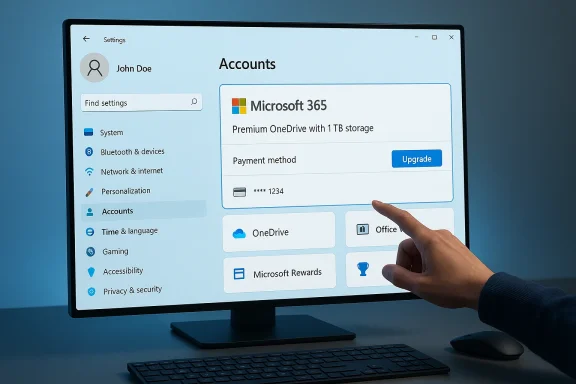
Microsoft’s latest Dev-channel rollup — listed by community mirrors as KB5079464 — is quietly expanding the Settings app’s account surface, bringing deeper Microsoft 365 integration and more visible subscription controls directly into Windows 11’s Accounts area. Insiders who’ve seen the build report a set of UX and policy changes that elevate Microsoft 365 subscription management, expose payment and upgrade options in Settings, and continue the broader effort to make account-level services (OneDrive, Office Web apps, Microsoft Rewards) discoverable inside the OS rather than behind a browser.
Microsoft’s long game has been to make the Windows Settings experience an entry point to Microsoft services. The company first tested a dedicated “Your Microsoft account” settings page in early Insider flights (Build 22489), which surfaced subscriptions, order history, and OneDrive storage inside Settings rather than forcing users to visit account.microsoft.com in a browser. That early rollout was deliberate and phased: Microsoft used Insider builds and Once Packs to iterate the experience outside of major OS feature releases.
Subsequent Dev Channel builds pushed that idea further: in one follow-up flight Microsoft moved Microsoft 365 subscription management higher up in Settings and added payment details so users could be notified when billing information needed updatinitly aimed to remove friction for continuing paid subscriptions and to present free Microsoft account benefits (Office Web Apps, OneDrive storage) more clearly to non-subscribers.
These prior trials established the foundation for the experience now appearing in the KB5079464 flight: a Settings experience designed to treat Microsoft account and Microsoft 365 data as first-class OS content instead of external web-managed properties.
Key visible changes reported in the Dev-channel build tied to KB5079464:
These are the core trade-offs end users (and privacy-conscious admins) should evaluate.
For general users and Insiders:
The rollout remains phased and documented primarily in Insider notes and community-captured posts at the time of reporting, so organizations should treat these changes as a preview: useful to evaluate now, but subject to final polishing and official documentation before broad deployment. If you manage Windows devices, prioritize lab testing of account policies and token behavior; if you’re an individual user, check Settings > Accounts after updating and be prepared to manage promotional prompts according to your comfort level with cloud integration.
Source: Windows Report https://windowsreport.com/windows-11-kb5079464-dev-update-improves-microsoft-365-account-settings/
 Background
Microsoft’s long game has been to make the Windows Settings experience an entry point to Microsoft services. The company first tested a dedicated “Your Microsoft account” settings page in early Insider flights (Build 22489), which surfaced subscriptions, order history, and OneDrive storage inside Settings rather than forcing users to visit account.microsoft.com in a browser. That early rollout was deliberate and phased: Microsoft used Insider builds and Once Packs to iterate the experience outside of major OS feature releases.Subsequent Dev Channel builds pushed that idea further: in one follow-up flight Microsoft moved Microsoft 365 subscription management higher up in Settings and added payment details so users could be notified when billing information needed updatinitly aimed to remove friction for continuing paid subscriptions and to present free Microsoft account benefits (Office Web Apps, OneDrive storage) more clearly to non-subscribers.
These prior trials established the foundation for the experience now appearing in the KB5079464 flight: a Settings experience designed to treat Microsoft account and Microsoft 365 data as first-class OS content instead of external web-managed properties.
What KB5079464 appears to change (summary of the build)
Note: official Microsoft support pages for this exact KB were not publicly traceable at the time of reporting; community-captured release notes and Insider posts give the clearest view of what’s included. Treat the below as a synthesis of documented Insider notes and community reports; I flag unverifiable or still-rolling items where appropriate.Key visible changes reported in the Dev-channel build tied to KB5079464:
- Accounts page UX: The Accounts (Settingsw prominently surfaces Microsoft 365 subscription status, with an upgraded “subscription card” that includes payment method details and upgrade prompts for Microsoft 365 Family and other plans. Insiders report a direct option to upgrade or change plans from inside Settings.
- “Your Microsoft account” page expansion: Continued rollout of the unified account page that aggregates OneDrive storage, Microsoft Rewards links, order history, and subscription metadata inside Settings rather than relying on the browser-based account portal. This mirrors earlier tests starting in builds like 22489 and later expansions.
- Policy and management hooks: The Dev release includes items that matter to administrators, such as Group Policy and MDM-facing flags to control account-related behaviors and package deployment (community notes point to administrative templates and package removal policies appearing alongside the build). This indicates Microsoft is thinking about manageability as these account surfaces reach enterprise devices.
- Additional setup and personalization options: Outside accounts spei improvements like the ability to choose a custom name for the user folder during OOBE (Out-Of-Box Experience) and small refinements to device setup flows. These are part of the broader enablement of the 25H2 development branch rolling through Insider channels.
Why this matters: a user and ecosystem perspective
Bringing Microsoft 365 controls into the Settings app is more than a cosmetic change. It shifts the locus of subscription visibility and management into the OS, with practical consequences:- Friction reduction for subscriptions. Users who see billing warnings or “update payment method” notices inside Settings are less likely to experience service disruptions because they’ll receive prompts at a location they already visit for device configuration. Microsoft has tested payment-card visibility in earlier builds, and KB5079464 continues that trend.
- Native discoverability of cloud services. By surfacing Office Web Apps, OneDrive storage, and Microsoft Rewards alongside device settings, Microsoft reduces the discovery gap between device and cloud. For casual users this can be beneficial; for privacy-conscious users it increases the visibility of cloud tie-ins at the OS level.
- Upsell vector consolidation. Packaging upgrade prompts into a native OS card is ahanism. Microsoft 365 Family offers will now appear inside Settings in the same UI surface where users manage accounts, rather than solely through email or the web portal. This raises UX and antitrust attention points worth monitoring.
- Unified experience for work and personal accounts. For users signed in with work or school accounts (Entra ID), several features (like Live Persona Cards in File Explorer’s Activity column) tie desktop content to Microsoft 365 identity. That deeper integration aids productivity but increases the coupling between device UX and cloud identity services.
Enterprise, admin, and security implications
This Dev flight is more than cosmetic: it includes elements that matter for enterprise IT, conditional-access scenarios, and device management.Manageability and policy control
The community-captured notes for the build indicate new Group Policy/MDM entries and administrative templates are present or being updated. That suggests Microsoft expects organizations to want to control these account surfaces — for example, whether subscription prompts are shown or whether account-driven features can be disabled on managed devices. Admin-focused controls reduce surprise for IT teams but also add a layer of policy complexity that needs documentation.Authentication and federation behaviors
Previous Insider notes and servicing updates fixed or adjusted enterprise authentication issues — for example, fixes to Primary Refresh Token (PRT) behavior in offline VPN sign‑in scenarios, and FIDO2 credential handling — which shows Microsoft is aware of how account changes ripple into authentication flows. Any expansion of account UI must be coupled andling to avoid login storms, stale tokens, or unnecessary prompts on managed systems. Those fixes were documented in other Dev releases and are relevant context for KB5079464.Entra ID / Live Persona Card exposure
For Entra ID (work/school) accounts, Windows can expose Live Persona Cards and people activity in File Explorer and Recommended/Activity surfaces. For organizations that handle sensitive contacts or proprietary document metadata, that desktop-level exposure is helpful for collaboration but raises governance and DLP (Data Loss Prevention) questions. IT must validate policies that govern what profile data and presence information a## Privacy, telemetry, and user choice — the trade-offsThese are the core trade-offs end users (and privacy-conscious admins) should evaluate.
- Increased visibility vs. increased telemetry: By pushing account metadata into Settings, Microsoft gains richer signals about subscription state and device-to-cloud relationships. That’s useful for support automation and product continuity but also concentrates telemetry in the OS experience. Users should be aware of what data is surfaced and how it’s used. The build’s UX shows subscription and payment prompts inside Settings, creating a direct path for billing telemetry to influence OS UIs.
- Upsell design vs. discoverability: For users who pay for Microsoft 365, having subscription health visible at the OS layer is undeniably convenient. For others, the integration may feel like a persistent upsell. These are design choices that have commercial benefits and customer benefits; they also require transparent controls so users can opt out of promotional nudges where appropriate.
- Local account friction: Over the last couple of years Microsoft has tightened the setup flow, making Microsoft Account sign-ins more common — and sometimes mandatory — in newer builds and SKU flows. Community reports and coverage have documented removal of long-standing workarounds that previously allowed local account creation during OOBE. Any expansion of “Your Microsoft account” in Settings should be assessed in light of whether it changes the ease of creating or using local, offline accounts.g has flagged Microsoft’s move to phase out certain account workarounds. Administrators and privacy-focused users should take note.
Stability, known issues, and compatibility
Insider and Dev-channel builds are experimental by design. Based on the pattern of prior Insider releases, the following practical points are important:- Phased rollout and toggles: Microsoft has used gradual rollout toggles for services like the account settings experience and File Explorer persona features. That means not every Insider will see the changes immediately, and some features are gated behind toggles you can enable from Windows Update > Insider settings. Earlier build notes emphasize the phased nature of these deployments.
- Compatibility testing on managed devices: Because the build introduces UI surfaces that interact with billing and account services, IT admins should validate any Intune/CSP policies and Group Policy templates that govern account behavior before broad deployment. Community posts for this and recent builds show administrators encountering varied device experiences when account-related features are enabled on managed em]())
- Unverified details and caution: Some specifics associated with KB5079464 at the time of reporting rely on community-captured release notes rather than a formal Microsoft KB page. That means the exact wording, availability per OS channel, and the final scope of features may change before a public release. Treat build-level details as provisional until confirmed by Microsoft’s official release notes or Support pages.
Practical guidance: what to do now (users and admins)
If you’re an enthusiast or administrator assessing this Dev update, here are pragmatic steps you can take now.For general users and Insiders:
- Check Settings > Accounts after installing the update to see the new Your Microsoft account card and any subscription/payment prompts. This is the most visible place Microsoft is surfacing the feature.
- If you prefer to keep subscription management in the bt settings and opt to dismiss any UI hints or promotional banners; watch for any “manage payment” or “upgrade” callouts.
- If you rely on a local account or want to avoid Microsoft Account sign-in, verify your setup flow post-update —hows setup behavior has changed in recent flights and workarounds have been removed in some Dev builds. Make backups before testing OOBE changes.
- Review your MDM/Intune policies for account and app-package deployment controls; the build appears to include administrative hooks that can control account-related behavior. Validate those policies in a lab before wider deployment. ([reddit.com]m/r/windowsinsiders/comments/1rstna1/announcing_windows_11_insider_preview_build/)
- Audit conditional access and PRT refresh behavior in off-network scenarios. Apply any recommended fixes for VPN/Windows Hello for Business token handling that Microsoft documented in prior servicing notes. These authentication areas have been the subject of fixes in other Dev updates and are relevant here as account surfaces expand.
- If you manage devices with sensitive document-handling requirements, review the Live Persona Card and File Explorer integration (people/activity surfaces) and decide whether to allow or suppress these features for Entra ID devices.
Critical analysis — strengths, weaknesses, and risks
Strengths
- Better discoverability for account services: Users get quicker access to subscription status, storage meto without switching to a browser. That is practically useful for avoiding service interruptions.
- Unified identity surface: For organizations and Microsoft 365 subscribers the unified account page reduces friction and makes device-to-cloud identity relationships clearer. This is especially useful when troubleshooting device access to Microsoft 365 resources.
- Administrative controls are appearing in tandem: The presence of Group Policy/MDM hooks alongside the changes signals that Microsoft expects enterprises to control these features, reducing the risk of unmanaged promotional surfaces on corporate endpoints.
Weaknesses and risks
- Perception of upsell/annoyance: Embedding subscription upsells inside Settings risks user frustration and potential regulatory scrutiny in regions sensitive to native OS-level product promotion. Expect debate about whether an OS should be a marketing channel.
- Privacy and telemetry concentration: Surface-level integration can centralize account telemetry into the OS, complicating user consent models and privacy controls. Transparent controls and clear documentation about what is collected and why will be critical.
- Local-account friction: Continued tightening of setup flows and removal of account workarounds may harm users who prefer local accounts for privacy or governance reasons. That’s a design and policy decision that will polarize some segments of Windows users. Independent reporting notes Microsoft removing previously used workarounds in recent builds.
What to watch next
- Watch Microsoft’s official release notes and Support KB pages for a formal description of KB5079464 (or its successor KB identifier) to confirm the exact scope and any documented enterprise controls; community mirrors are useful but official documentation will ultimately govern enterprise rollout. The Windows Release Health and Windows Insider Blog are the authoritative places for that confirmation.
- Monitor admin feedback: as the account surfaces roll from Dev into Beta and Release Preview channels, expect IT-admin-driven feedback to appear quickly. If organizations adopt the new controls, Microsoft will likely add clarifications and additional Group Policy/MDM settings.
- Keep an eye on privacy disclosures: when subscription and payment prompts move into an OS surface, Microsoft should update privacy documentation and user-facing policies; look for updated privacy pages or Settings disclosures tied to these features.
Conclusion
KB5079464’s Dev-channel changes — a deeper, more visible Microsoft 365 presence inside Windows Settings — represent a logical next step in Microsoft’s strategy to tie device identity, cloud subscriptions, and productivity services closer to the operating system. For everyday subscribers this makes account health and billing easier to manage; for IT administrators it demands review of policies and conditional-access behavior; for privacy-focused users it raises questions about telemetry concentration and the evolving role of the OS as a storefront.The rollout remains phased and documented primarily in Insider notes and community-captured posts at the time of reporting, so organizations should treat these changes as a preview: useful to evaluate now, but subject to final polishing and official documentation before broad deployment. If you manage Windows devices, prioritize lab testing of account policies and token behavior; if you’re an individual user, check Settings > Accounts after updating and be prepared to manage promotional prompts according to your comfort level with cloud integration.
Source: Windows Report https://windowsreport.com/windows-11-kb5079464-dev-update-improves-microsoft-365-account-settings/
