

Microsoft began rolling out Windows 11 Experimental build 26300.8493 on May 15, 2026, giving Windows Insiders the ability to place the taskbar on the top, left, right, or bottom edge of the screen and to enable a smaller taskbar button mode. The change is not just a nostalgic checkbox for Windows 10 holdouts. It is Microsoft admitting, belatedly but unmistakably, that Windows 11’s clean-sheet taskbar design took away too much agency from the people who use Windows most intensely. The real story is less about where the taskbar sits and more about whether Microsoft has learned to treat customization as infrastructure rather than clutter.
Windows 11 arrived with a taskbar that looked simpler, fresher, and more centered — literally and philosophically. It also arrived with a shorter fuse for anyone who had built years of muscle memory around vertical layouts, small buttons, labels, and a desktop shaped by work rather than by marketing screenshots. For many users, the bottom-only taskbar was not a design opinion; it was a demotion.
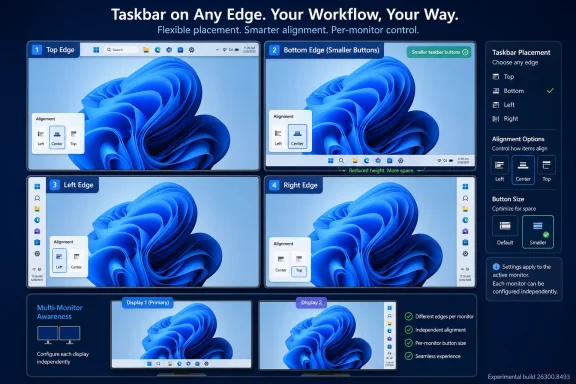
The new Experimental Channel rollout restores the ability to position the taskbar on any edge of the screen. That means top, bottom, left, and right placements are now part of the official Insider story again, not just a registry hack, third-party shell replacement, or forum thread full of workarounds. Microsoft is also pairing the change with alignment controls for each orientation, so a vertical taskbar can be top-aligned or centered while a horizontal taskbar can be left-aligned or centered.
That detail matters because it suggests Microsoft is not merely bolting a legacy behavior back onto the Windows 11 shell. The company is trying to make the Windows 11-era taskbar model work across orientations, with Start, Search, and flyouts appearing relative to the taskbar’s location. If the taskbar is at the top, Start opens from the top. If it is on the side, Windows needs to behave as though that side is a first-class home for the shell rather than an awkward exception.
The return is gradual, and it is limited to Insiders on the Experimental Channel for now. That caveat should temper expectations. Experimental builds are where Microsoft can test, retract, and revise without making a promise to the broader Windows 11 installed base.
That is why the missing Windows 11 taskbar options generated such durable frustration. Users were not simply asking for retro styling. They were asking for a layout that matched ultrawide monitors, coding workflows, dense multitasking, remote desktop sessions, vertical document work, and multi-monitor setups where a bottom bar can feel like wasted space.
A vertical taskbar is especially useful on modern displays because horizontal pixels are usually more abundant than vertical ones. Developers, spreadsheet users, writers, and admins staring at logs often care about seeing a few more rows of content. On a laptop, a shorter or side-mounted taskbar can feel less like customization and more like reclaiming screen real estate Microsoft had appropriated.
The original Windows 11 design treated consistency as the higher virtue. The new Experimental work suggests Microsoft has reached a more mature conclusion: consistency is useful only when it does not flatten legitimate differences in how people use PCs. Windows is not a phone OS with one dominant posture. It is a sprawling workbench, and the taskbar is one of its load-bearing beams.
Microsoft’s new “Show smaller taskbar buttons” option is meant to reduce the height of the taskbar and shrink the icons. Crucially, the company says the mode does not require a restart or sign-out, which makes it feel like a real preference rather than a hidden system personality. Users can move between spacious and compact layouts depending on device, context, and tolerance for density.
This is the kind of option Windows 11 needed from the beginning. Microsoft often frames simplification as a way to reduce confusion, but the absence of a setting does not make the underlying need disappear. It merely pushes users toward unsupported tools, brittle tweaks, and resentment.
There is also a subtle shift in tone here. Microsoft is not saying the roomier Windows 11 taskbar was wrong. It is saying that one size does not fit every device or every user. That is a healthier design posture for a platform whose strength has always been its range.
That fragmentation is not necessarily a problem, but it does mean testers need to read the fine print. Windows Insider builds are increasingly less like a simple ladder from risky to stable and more like a set of controlled experiments with different code bases, feature flags, and rollout rings. A feature appearing in one Experimental build does not guarantee that it appears in every branch with the word “Experimental” attached.
Microsoft is also rolling the feature out gradually. Some Insiders may install the right build and still not see the option immediately. That is frustrating for enthusiasts who expect a build number to equal a feature set, but it is now normal Windows development practice. Feature rollout is as much about telemetry and staged exposure as it is about shipping bits.
The unfinished pieces are significant. Auto-hide and the tablet-optimized taskbar are not yet supported in alternate positions. Touch gestures are still in progress. Search boxes are not supported in alternate positions and appear as a search icon for now. Those omissions are not cosmetic; they reveal how deeply the bottom taskbar assumption had been baked into the Windows 11 shell.
This is where Microsoft’s language about avoiding accidental taskbar movement becomes revealing. The company says it is focused on delivering core functionality while keeping the experience simple, predictable, and free from accidental movement. That is a reasonable product goal, but it also explains how Windows 11 got here in the first place.
Legacy Windows allowed a kind of casual malleability that could be both empowering and chaotic. Users could unlock the taskbar, drag it around, resize it, and sometimes accidentally strand it somewhere they did not intend. Windows 11 overcorrected by making the taskbar feel like a fixed appliance. The new approach appears to split the difference: movement through Settings, not by accidental drag.
That choice will annoy some veterans who liked the old direct manipulation model. Still, it is a defensible compromise if Microsoft executes it well. Settings-based customization is discoverable, reversible, and less likely to generate support calls from someone who unknowingly dragged the taskbar to the side while cleaning a trackpad.
The risk is that Microsoft uses “predictable” as a euphemism for “limited.” The company says it is evaluating different taskbar positions per monitor and drag and drop. Those are not fringe requests. Multi-monitor users often want different layouts on different screens, and drag-and-drop behavior remains part of how many people expect a desktop shell to work.
That may sound unrelated to taskbar placement, but the philosophy is the same. Windows 11’s Start menu has long been a battleground between user intent and Microsoft’s desire to curate, suggest, and surface. The more the Start menu behaves like a promotional or algorithmic space, the less it feels like the user’s own command center.
A pinned-only Start menu is not a radical idea. It is the logical endpoint for users who know what they launch and do not want Windows guessing. For enterprise environments, shared machines, privacy-sensitive users, and anyone who records screens or presents frequently, hiding personal identity elements also makes practical sense.
Microsoft’s renewed attention to Start and taskbar personalization suggests the company understands that the shell is where trust is won or lost. Users may forgive a hidden settings page or a redesigned dialog. They are less forgiving when the elements they touch hundreds of times a day feel less under their control.
The inability to reproduce familiar layouts has been one of Windows 11’s quiet adoption irritants. Some organizations standardize heavily and may not care where individual users want the taskbar. Others support specialized teams with multi-monitor desks, engineering workstations, trading setups, or accessibility needs where layout flexibility is not optional.
The Experimental rollout does not immediately solve that. Admins should not treat build 26300.8493 as a deployment signal for production. But it does indicate that Microsoft is investing engineering time in one of the most visible sources of Windows 11 resistance. That matters for long-term migration planning, especially as Windows 10’s consumer and mainstream support story continues to push organizations toward Windows 11.
The enterprise question will eventually become policy. Can these taskbar positions be managed cleanly? Can organizations set defaults while allowing user override? Will layout choices roam consistently? Will multi-monitor behavior be stable enough for hot-desking, docking stations, and remote sessions? The feature is welcome, but the administrative story will determine whether it is merely pleasing or operationally useful.
The important distinction is that Experimental is not a promise of imminent release. It is a place where Microsoft can try features that may land, change, or disappear. The taskbar work feels more likely than many experiments because Microsoft has publicly framed it as a response to sustained user demand, but timing remains uncertain.
Windows enthusiasts have learned not to treat Insider features as guarantees. Microsoft has previewed, paused, redesigned, and abandoned ideas before. The safer reading is that alternate taskbar positions are now on an official path, not that they are certain to arrive in the next general Windows 11 update exactly as tested.
That distinction matters because taskbar behavior touches too many surfaces to rush. Start, Search, notifications, system tray behavior, animations, snapping, touch, accessibility, and multi-monitor logic all intersect with taskbar placement. A buggy vertical taskbar would not feel like a beta blemish; it would feel like the shell itself had lost its bearings.
That ecosystem is both a strength and an embarrassment for Microsoft. It shows the vitality of Windows as a modifiable platform, but it also highlights how many basic preferences were missing from the official product. When moving a taskbar requires trusting unsupported code or waiting for a third-party update after every Windows change, the operating system has failed at something fundamental.
Microsoft does not need to clone every Windows 10 behavior. Some old features were messy, underused, or difficult to maintain. But the company does need to recognize the difference between cruft and capability. Taskbar placement was capability.
The broader lesson is that removing a power-user feature is not free just because most users never touch it. The users who do touch it are often the people others rely on: admins, developers, enthusiasts, support staff, and the family member who fixes everyone’s PC. Annoying that cohort has consequences beyond telemetry percentages.
Microsoft says users will be able to use “Never combine” with labels in vertical mode, allowing each app window to appear as a separate labeled button. That is an especially important concession to productivity users. Icons alone may look cleaner, but labels are faster when several windows from the same app are open.
The search box limitation shows the complexity. On a horizontal taskbar, a search box can consume width. On a vertical taskbar, that model does not translate cleanly, so Microsoft is falling back to a search icon for now. That is the right interim decision, but it underscores that alternate orientation cannot simply rotate the existing design.
Animation and flyout direction also matter more than they sound. If the Start menu opens from the wrong visual anchor, the desktop feels uncanny. If tooltips or jump lists appear awkwardly, the feature feels like a compatibility mode. For alternate taskbar positions to survive beyond Insider testing, they need to feel designed, not merely permitted.
Today’s announcement does not deliver per-monitor positioning. It merely says Microsoft is evaluating it. But that evaluation is essential if the company wants to satisfy the users most likely to care about alternate positions in the first place.
A single global taskbar position is better than bottom-only. It is not the end state for serious desktop setups. A developer may want a vertical taskbar on a landscape ultrawide and a bottom taskbar on a laptop display. An admin may want the primary monitor clean and the secondary monitor to carry status and switching. A trader or analyst may want labels on one display and compact icons on another.
The hard part is making that configurable without creating a settings maze. Microsoft’s post-Windows 11 design instincts push toward simplicity, but the hardware reality pushes toward nuance. The quality of the final implementation will depend on whether Microsoft can expose the right amount of control without burying users in abstract display-management logic.
This is not necessarily a failure. Operating systems age through correction. The first version expresses a product team’s priorities; later versions reveal what users actually needed. Windows 11 is now far enough into its life that Microsoft can no longer frame missing taskbar options as transitional rough edges.
The correction phase is also happening under pressure. Enthusiasts have grown more skeptical of Windows changes that appear to prioritize promotion, cloud hooks, or AI surfaces over everyday usability. In that climate, a taskbar option becomes symbolic proof that Microsoft is still listening to mundane feedback.
That symbolism can be powerful, but only if it is followed by follow-through. The company cannot declare victory because a feature reaches the Experimental Channel. It needs to carry the work through reliability testing, accessibility polish, policy support, and stable release.
That distinction will define the next phase of Windows customization. Users may get more choices, but those choices will likely be mediated through structured settings rather than free-form desktop manipulation. Microsoft wants personalization without chaos, and it wants flexibility without support nightmares.
That is understandable. Windows runs on too many devices, in too many environments, for every legacy interaction to remain sacred. But Microsoft should be careful not to confuse controlled customization with meaningful customization. A checkbox that arrives three years late is useful; a system that respects user agency from the beginning is better.
The taskbar’s return to the screen edges is therefore both welcome and cautionary. It is welcome because it restores a practical feature that should never have disappeared. It is cautionary because it shows how long it can take for obvious user pain to overcome a design simplification.
The limits are equally important. Alternate positions do not yet support every taskbar mode. Touch behavior is incomplete. Some taskbar experiences are icon-only in alternate orientations. Other Experimental builds released the same day do not necessarily include the feature.
That is the nature of this moment: exciting, but not settled. Anyone installing an Experimental build on a daily driver should understand what they are signing up for. The point of this channel is to expose unfinished work to users willing to tolerate rough edges.
Still, the direction is meaningful. Microsoft is investing in desktop ergonomics rather than merely adding another feed, prompt, or cloud-connected surface. For Windows users who have spent years asking for the operating system to focus again on the basics, that is no small thing.
Source: Thurrott.com Windows Insiders on the Experimental Channel Can Try Alternative Taskbar Positions
 Microsoft Reopens a Door It Should Not Have Closed
Windows 11 arrived with a taskbar that looked simpler, fresher, and more centered — literally and philosophically. It also arrived with a shorter fuse for anyone who had built years of muscle memory around vertical layouts, small buttons, labels, and a desktop shaped by work rather than by marketing screenshots. For many users, the bottom-only taskbar was not a design opinion; it was a demotion.The new Experimental Channel rollout restores the ability to position the taskbar on any edge of the screen. That means top, bottom, left, and right placements are now part of the official Insider story again, not just a registry hack, third-party shell replacement, or forum thread full of workarounds. Microsoft is also pairing the change with alignment controls for each orientation, so a vertical taskbar can be top-aligned or centered while a horizontal taskbar can be left-aligned or centered.
That detail matters because it suggests Microsoft is not merely bolting a legacy behavior back onto the Windows 11 shell. The company is trying to make the Windows 11-era taskbar model work across orientations, with Start, Search, and flyouts appearing relative to the taskbar’s location. If the taskbar is at the top, Start opens from the top. If it is on the side, Windows needs to behave as though that side is a first-class home for the shell rather than an awkward exception.
The return is gradual, and it is limited to Insiders on the Experimental Channel for now. That caveat should temper expectations. Experimental builds are where Microsoft can test, retract, and revise without making a promise to the broader Windows 11 installed base.
The Taskbar Became a Symbol Because It Was Never Just a Bar
The Windows taskbar is one of those interface elements that becomes invisible only when it works. It is a launcher, a switcher, a notification surface, a clock, a system status strip, and a persistent map of the user’s current work. When Microsoft changes it, the company is not rearranging furniture; it is rewiring a daily habit.That is why the missing Windows 11 taskbar options generated such durable frustration. Users were not simply asking for retro styling. They were asking for a layout that matched ultrawide monitors, coding workflows, dense multitasking, remote desktop sessions, vertical document work, and multi-monitor setups where a bottom bar can feel like wasted space.
A vertical taskbar is especially useful on modern displays because horizontal pixels are usually more abundant than vertical ones. Developers, spreadsheet users, writers, and admins staring at logs often care about seeing a few more rows of content. On a laptop, a shorter or side-mounted taskbar can feel less like customization and more like reclaiming screen real estate Microsoft had appropriated.
The original Windows 11 design treated consistency as the higher virtue. The new Experimental work suggests Microsoft has reached a more mature conclusion: consistency is useful only when it does not flatten legitimate differences in how people use PCs. Windows is not a phone OS with one dominant posture. It is a sprawling workbench, and the taskbar is one of its load-bearing beams.
The Smaller Taskbar Is the Quietly Practical Half of the Update
The smaller taskbar option may generate less nostalgic energy than top and side placement, but it may prove just as important. Windows 11’s default taskbar is visually calm, but it is also physically expensive on smaller screens. The larger hit targets and spacing make sense for touch and modern design language, yet they can feel indulgent on 13-inch laptops and compact tablets running desktop applications.Microsoft’s new “Show smaller taskbar buttons” option is meant to reduce the height of the taskbar and shrink the icons. Crucially, the company says the mode does not require a restart or sign-out, which makes it feel like a real preference rather than a hidden system personality. Users can move between spacious and compact layouts depending on device, context, and tolerance for density.
This is the kind of option Windows 11 needed from the beginning. Microsoft often frames simplification as a way to reduce confusion, but the absence of a setting does not make the underlying need disappear. It merely pushes users toward unsupported tools, brittle tweaks, and resentment.
There is also a subtle shift in tone here. Microsoft is not saying the roomier Windows 11 taskbar was wrong. It is saying that one size does not fit every device or every user. That is a healthier design posture for a platform whose strength has always been its range.
Experimental Means Real, Not Finished
The Experimental Channel label is doing a lot of work. Microsoft’s May 15 build lineup included Experimental build 26300.8493 for the taskbar changes, while other Experimental-branded builds such as 28020.2134 for 26H1 and 29591.1000 for future platforms did not include the same taskbar work. In other words, even inside the new Insider structure, the feature matrix is not uniform.That fragmentation is not necessarily a problem, but it does mean testers need to read the fine print. Windows Insider builds are increasingly less like a simple ladder from risky to stable and more like a set of controlled experiments with different code bases, feature flags, and rollout rings. A feature appearing in one Experimental build does not guarantee that it appears in every branch with the word “Experimental” attached.
Microsoft is also rolling the feature out gradually. Some Insiders may install the right build and still not see the option immediately. That is frustrating for enthusiasts who expect a build number to equal a feature set, but it is now normal Windows development practice. Feature rollout is as much about telemetry and staged exposure as it is about shipping bits.
The unfinished pieces are significant. Auto-hide and the tablet-optimized taskbar are not yet supported in alternate positions. Touch gestures are still in progress. Search boxes are not supported in alternate positions and appear as a search icon for now. Those omissions are not cosmetic; they reveal how deeply the bottom taskbar assumption had been baked into the Windows 11 shell.
Microsoft Is Relearning the Difference Between Simplicity and Control
Windows 11’s early taskbar strategy reflected a familiar Microsoft impulse: simplify the visible surface, remove edge cases, and rebuild later if enough people complain. The problem is that desktop users often live in those edge cases. The power of Windows has always come from its ability to adapt to messy, specific, long-lived workflows.This is where Microsoft’s language about avoiding accidental taskbar movement becomes revealing. The company says it is focused on delivering core functionality while keeping the experience simple, predictable, and free from accidental movement. That is a reasonable product goal, but it also explains how Windows 11 got here in the first place.
Legacy Windows allowed a kind of casual malleability that could be both empowering and chaotic. Users could unlock the taskbar, drag it around, resize it, and sometimes accidentally strand it somewhere they did not intend. Windows 11 overcorrected by making the taskbar feel like a fixed appliance. The new approach appears to split the difference: movement through Settings, not by accidental drag.
That choice will annoy some veterans who liked the old direct manipulation model. Still, it is a defensible compromise if Microsoft executes it well. Settings-based customization is discoverable, reversible, and less likely to generate support calls from someone who unknowingly dragged the taskbar to the side while cleaning a trackpad.
The risk is that Microsoft uses “predictable” as a euphemism for “limited.” The company says it is evaluating different taskbar positions per monitor and drag and drop. Those are not fringe requests. Multi-monitor users often want different layouts on different screens, and drag-and-drop behavior remains part of how many people expect a desktop shell to work.
Start Menu Changes Point to a Larger Retreat From Forced Curation
The taskbar is not the only shell component under reconsideration. Microsoft is also preparing to simplify Start menu customization, including easier ways to turn off the “Recommended” and “All” sections and keep a more pinned-app-focused layout. Privacy-conscious users will also be able to hide their name and profile picture in Start.That may sound unrelated to taskbar placement, but the philosophy is the same. Windows 11’s Start menu has long been a battleground between user intent and Microsoft’s desire to curate, suggest, and surface. The more the Start menu behaves like a promotional or algorithmic space, the less it feels like the user’s own command center.
A pinned-only Start menu is not a radical idea. It is the logical endpoint for users who know what they launch and do not want Windows guessing. For enterprise environments, shared machines, privacy-sensitive users, and anyone who records screens or presents frequently, hiding personal identity elements also makes practical sense.
Microsoft’s renewed attention to Start and taskbar personalization suggests the company understands that the shell is where trust is won or lost. Users may forgive a hidden settings page or a redesigned dialog. They are less forgiving when the elements they touch hundreds of times a day feel less under their control.
The Enterprise Angle Is Less Nostalgia Than Predictability
For IT departments, alternate taskbar positions are not primarily about taste. They are about user support, migration friction, and whether Windows 11 can absorb the habits of a Windows 10 fleet without forcing every employee through unnecessary retraining. A small change multiplied across thousands of desktops becomes a help desk story.The inability to reproduce familiar layouts has been one of Windows 11’s quiet adoption irritants. Some organizations standardize heavily and may not care where individual users want the taskbar. Others support specialized teams with multi-monitor desks, engineering workstations, trading setups, or accessibility needs where layout flexibility is not optional.
The Experimental rollout does not immediately solve that. Admins should not treat build 26300.8493 as a deployment signal for production. But it does indicate that Microsoft is investing engineering time in one of the most visible sources of Windows 11 resistance. That matters for long-term migration planning, especially as Windows 10’s consumer and mainstream support story continues to push organizations toward Windows 11.
The enterprise question will eventually become policy. Can these taskbar positions be managed cleanly? Can organizations set defaults while allowing user override? Will layout choices roam consistently? Will multi-monitor behavior be stable enough for hot-desking, docking stations, and remote sessions? The feature is welcome, but the administrative story will determine whether it is merely pleasing or operationally useful.
The Insider Channel Shuffle Makes the Signal Harder to Read
The arrival of this feature also lands during Microsoft’s transition to a new Windows Insider channel structure. The company has been moving toward clearer Beta and Experimental experiences, but the short-term effect is a landscape where labels, build numbers, and feature availability require careful parsing. That is not unusual for Insider testing, but it complicates coverage and user expectations.The important distinction is that Experimental is not a promise of imminent release. It is a place where Microsoft can try features that may land, change, or disappear. The taskbar work feels more likely than many experiments because Microsoft has publicly framed it as a response to sustained user demand, but timing remains uncertain.
Windows enthusiasts have learned not to treat Insider features as guarantees. Microsoft has previewed, paused, redesigned, and abandoned ideas before. The safer reading is that alternate taskbar positions are now on an official path, not that they are certain to arrive in the next general Windows 11 update exactly as tested.
That distinction matters because taskbar behavior touches too many surfaces to rush. Start, Search, notifications, system tray behavior, animations, snapping, touch, accessibility, and multi-monitor logic all intersect with taskbar placement. A buggy vertical taskbar would not feel like a beta blemish; it would feel like the shell itself had lost its bearings.
Third-Party Tweaks Filled the Gap Microsoft Left Behind
One reason this announcement has weight is that users did not wait patiently for Microsoft. The Windows customization ecosystem has spent the Windows 11 era patching holes left by the redesigned taskbar and Start menu. Shell tools, registry tweaks, and commercial utilities became the practical answer for users who wanted old affordances back.That ecosystem is both a strength and an embarrassment for Microsoft. It shows the vitality of Windows as a modifiable platform, but it also highlights how many basic preferences were missing from the official product. When moving a taskbar requires trusting unsupported code or waiting for a third-party update after every Windows change, the operating system has failed at something fundamental.
Microsoft does not need to clone every Windows 10 behavior. Some old features were messy, underused, or difficult to maintain. But the company does need to recognize the difference between cruft and capability. Taskbar placement was capability.
The broader lesson is that removing a power-user feature is not free just because most users never touch it. The users who do touch it are often the people others rely on: admins, developers, enthusiasts, support staff, and the family member who fixes everyone’s PC. Annoying that cohort has consequences beyond telemetry percentages.
The Design Challenge Is Making Vertical Feel Native
Restoring a vertical taskbar is easy to describe and hard to execute. A vertical bar changes the geometry of the desktop. It changes where users expect flyouts, how labels fit, how app groups expand, how badges display, how touch targets work, and how system tray elements occupy space.Microsoft says users will be able to use “Never combine” with labels in vertical mode, allowing each app window to appear as a separate labeled button. That is an especially important concession to productivity users. Icons alone may look cleaner, but labels are faster when several windows from the same app are open.
The search box limitation shows the complexity. On a horizontal taskbar, a search box can consume width. On a vertical taskbar, that model does not translate cleanly, so Microsoft is falling back to a search icon for now. That is the right interim decision, but it underscores that alternate orientation cannot simply rotate the existing design.
Animation and flyout direction also matter more than they sound. If the Start menu opens from the wrong visual anchor, the desktop feels uncanny. If tooltips or jump lists appear awkwardly, the feature feels like a compatibility mode. For alternate taskbar positions to survive beyond Insider testing, they need to feel designed, not merely permitted.
The Multi-Monitor Problem Is Waiting in the Wings
Microsoft’s mention of different taskbar positions per monitor may be the most interesting future-looking detail. Multi-monitor setups are where taskbar philosophy gets complicated. A laptop panel, a portrait monitor, and an ultrawide display do not necessarily want the same shell layout.Today’s announcement does not deliver per-monitor positioning. It merely says Microsoft is evaluating it. But that evaluation is essential if the company wants to satisfy the users most likely to care about alternate positions in the first place.
A single global taskbar position is better than bottom-only. It is not the end state for serious desktop setups. A developer may want a vertical taskbar on a landscape ultrawide and a bottom taskbar on a laptop display. An admin may want the primary monitor clean and the secondary monitor to carry status and switching. A trader or analyst may want labels on one display and compact icons on another.
The hard part is making that configurable without creating a settings maze. Microsoft’s post-Windows 11 design instincts push toward simplicity, but the hardware reality pushes toward nuance. The quality of the final implementation will depend on whether Microsoft can expose the right amount of control without burying users in abstract display-management logic.
The Windows 11 Shell Is Entering Its Correction Phase
The taskbar change fits a broader pattern in Windows 11’s maturation. Microsoft launched with a strong visual thesis: cleaner surfaces, centered defaults, simplified menus, and a more modern design system. Over time, the company has had to restore, rework, or rethink pieces where that thesis collided with desktop reality.This is not necessarily a failure. Operating systems age through correction. The first version expresses a product team’s priorities; later versions reveal what users actually needed. Windows 11 is now far enough into its life that Microsoft can no longer frame missing taskbar options as transitional rough edges.
The correction phase is also happening under pressure. Enthusiasts have grown more skeptical of Windows changes that appear to prioritize promotion, cloud hooks, or AI surfaces over everyday usability. In that climate, a taskbar option becomes symbolic proof that Microsoft is still listening to mundane feedback.
That symbolism can be powerful, but only if it is followed by follow-through. The company cannot declare victory because a feature reaches the Experimental Channel. It needs to carry the work through reliability testing, accessibility polish, policy support, and stable release.
The Most Important Button Is the One Microsoft Did Not Add
There is a temptation to read the new taskbar controls as a pure restoration story: Windows 11 lost something, Windows 11 is getting it back, users win. The better reading is more complicated. Microsoft is not restoring the past wholesale; it is deciding which old freedoms fit inside a more managed, settings-driven Windows shell.That distinction will define the next phase of Windows customization. Users may get more choices, but those choices will likely be mediated through structured settings rather than free-form desktop manipulation. Microsoft wants personalization without chaos, and it wants flexibility without support nightmares.
That is understandable. Windows runs on too many devices, in too many environments, for every legacy interaction to remain sacred. But Microsoft should be careful not to confuse controlled customization with meaningful customization. A checkbox that arrives three years late is useful; a system that respects user agency from the beginning is better.
The taskbar’s return to the screen edges is therefore both welcome and cautionary. It is welcome because it restores a practical feature that should never have disappeared. It is cautionary because it shows how long it can take for obvious user pain to overcome a design simplification.
The Build Number Matters Less Than the Direction of Travel
For testers who want the feature now, the practical detail is straightforward: the alternate taskbar position options are rolling out with Experimental build 26300.8493, found under Settings, Personalization, Taskbar, and Taskbar behaviors. The smaller taskbar button option lives in the same general neighborhood. The rollout is gradual, so availability may not be immediate even on the correct build.The limits are equally important. Alternate positions do not yet support every taskbar mode. Touch behavior is incomplete. Some taskbar experiences are icon-only in alternate orientations. Other Experimental builds released the same day do not necessarily include the feature.
That is the nature of this moment: exciting, but not settled. Anyone installing an Experimental build on a daily driver should understand what they are signing up for. The point of this channel is to expose unfinished work to users willing to tolerate rough edges.
Still, the direction is meaningful. Microsoft is investing in desktop ergonomics rather than merely adding another feed, prompt, or cloud-connected surface. For Windows users who have spent years asking for the operating system to focus again on the basics, that is no small thing.
The Edge of the Screen Is Now a Test of Trust
Microsoft’s taskbar reversal gives Windows users something concrete to watch over the next several months.- Windows 11 Experimental build 26300.8493 restores official testing for taskbar placement on the top, bottom, left, and right edges of the screen.
- The smaller taskbar option is aimed at users who want more vertical space, especially on laptops and smaller displays.
- Alternate positions remain unfinished, with auto-hide, tablet-optimized behavior, touch gestures, and search box support still limited or in progress.
- The feature is rolling out gradually, so not every Insider on the right build will necessarily see it at once.
- Microsoft is also preparing Start menu personalization changes that point to a wider retreat from one-size-fits-all shell design.
- The long-term value for IT pros will depend on stability, multi-monitor support, policy controls, and whether the feature graduates from Experimental without losing its usefulness.
Source: Thurrott.com Windows Insiders on the Experimental Channel Can Try Alternative Taskbar Positions