

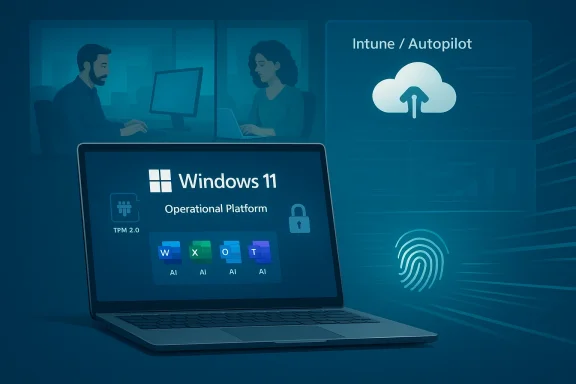
Running a modern business on Windows 11 is no longer just about getting from desktop to desktop with a familiar Start menu. It is about enforcing identity, protecting data, managing fleets of devices remotely, and squeezing more productivity out of every login, sync, and update. The features businesses rely on most are not flashy consumer novelties; they are the quietly essential capabilities that reduce risk, cut support overhead, and keep workers moving. In that sense, Windows 11 has become less of an operating system and more of an operational platform for the Microsoft-centered workplace.
Windows 11 arrived with a clear message: security would no longer be an optional add-on or a post-installation best practice. Microsoft tied the platform to modern hardware expectations, including TPM 2.0, and positioned the operating system around stronger identity protection, better device integrity, and more manageable defaults. That shift was controversial among consumers, but for businesses it reflected a broader industry reality: endpoint security had become inseparable from the endpoint itself.
The commercial story of Windows 11 is also inseparable from the Microsoft 365 ecosystem. In the enterprise, the operating system rarely stands alone. It is typically paired with Microsoft Intune, Entra ID, Windows Autopilot, Windows Update for Business, and increasingly Microsoft 365 Copilot. Together, those services define the real value proposition: centralized control, secure access, and faster onboarding with fewer hands-on IT touchpoints.
Microsoft’s own documentation reinforces that commercial Windows 11 is built around layered security. The company positions the platform as one that uses hardware-backed protections, device encryption, passwordless sign-in, and cloud-based management to reduce the attack surface. In practical terms, that means Windows 11 is designed to help businesses do three things at once: protect data, reduce friction, and standardize administration. Those goals are often in tension, which is why the most important features are the ones that balance all three.
The business case for Windows 11 has also changed with the rise of hybrid work. Employees are no longer sitting on the same internal network every day, and IT teams are no longer managing only office-bound PCs. That has increased the importance of zero-touch provisioning, remote policy enforcement, and encryption that remains effective even when a device is lost outside company premises. Windows 11’s enterprise features are valuable precisely because they assume devices will be mobile, distributed, and sometimes out of sight.
Another reason these features matter now is the accelerating move toward AI-enhanced workflows. Microsoft has folded Copilot into more parts of the Windows and Microsoft 365 experience, but AI only becomes operationally useful when the underlying identity, device, and data controls are strong. A company will not embrace AI at scale if it cannot trust where data lives, who can access it, or how it is governed. That is why business buyers increasingly evaluate Windows 11 not just as a user interface, but as a control plane for productivity and compliance.
The strategic value here is not only convenience. Passwordless sign-in cuts down on phishing exposure and support tickets tied to resets and lockouts. It also aligns neatly with broader zero-trust principles, where identity is verified continually and locally protected credentials matter more than legacy passwords.
The catch is that productivity gains depend on governance. Companies will only use AI broadly if access, retention, and data boundaries are clear. Microsoft has been very deliberate about packaging Copilot with enterprise data protections because AI that cannot be governed is an expensive liability.
That makes Recall a useful case study in how AI features can become enterprise features only after they are made trustworthy enough. The concept is powerful: a user can search across prior activity in natural language instead of remembering filenames or app states. But businesses will judge it by the implementation, not the promise.
The benefits are even more meaningful in remote and hybrid environments. A new hire does not need to visit an office to get a machine imaged. A contractor does not need special manual setup every time. That is a real cost saver, not just a convenience story.
This matters because modern businesses need consistency more than cleverness. A feature is only as valuable as its ability to apply evenly across hundreds or thousands of endpoints. Intune is what turns Windows 11 from a good individual workstation into a governable corporate platform.
This matters because the modern threat model assumes devices will be exposed. A laptop left in a taxi is no longer just a hardware loss; it is a potential data incident. BitLocker reduces the blast radius.
The layered approach is important because no single control is enough. Full-disk encryption, identity-bound decryption, and policy enforcement each solve a different part of the problem. Together, they create a stronger posture than any one feature could deliver alone.
The enterprise implication is straightforward: better battery behavior lowers friction for mobile employees and can reduce support complaints. If a platform feels efficient, people waste less time working around it.
Of course, boot speed is only part of the picture. A business may value consistency and reliability more than raw startup seconds, particularly if it is managing encrypted devices or strict sign-in policies. That is why these tweaks should be seen as one layer of the experience, not the whole story.
Windows 11’s strongest commercial argument is that it packages consumer polish with enterprise-grade controls. That combination is hard to replicate on competing platforms without extra tooling or added complexity.
This also affects rivals in endpoint management and productivity software. Competing products must now justify not only their standalone capabilities but also the integration cost of leaving the Microsoft path. That is a high bar.
Businesses should also expect more segmentation between mainstream Windows 11 devices and Copilot+ hardware. That divide will likely become more visible as AI capabilities mature and as Microsoft continues to push local, secure inference on-device. The winners will be the organizations that can upgrade deliberately, govern carefully, and avoid chasing every new feature just because it exists.
Source: Windows Central A closer look at the Windows 11 features businesses rely on most
 Background
Windows 11 arrived with a clear message: security would no longer be an optional add-on or a post-installation best practice. Microsoft tied the platform to modern hardware expectations, including TPM 2.0, and positioned the operating system around stronger identity protection, better device integrity, and more manageable defaults. That shift was controversial among consumers, but for businesses it reflected a broader industry reality: endpoint security had become inseparable from the endpoint itself.The commercial story of Windows 11 is also inseparable from the Microsoft 365 ecosystem. In the enterprise, the operating system rarely stands alone. It is typically paired with Microsoft Intune, Entra ID, Windows Autopilot, Windows Update for Business, and increasingly Microsoft 365 Copilot. Together, those services define the real value proposition: centralized control, secure access, and faster onboarding with fewer hands-on IT touchpoints.
Microsoft’s own documentation reinforces that commercial Windows 11 is built around layered security. The company positions the platform as one that uses hardware-backed protections, device encryption, passwordless sign-in, and cloud-based management to reduce the attack surface. In practical terms, that means Windows 11 is designed to help businesses do three things at once: protect data, reduce friction, and standardize administration. Those goals are often in tension, which is why the most important features are the ones that balance all three.
The business case for Windows 11 has also changed with the rise of hybrid work. Employees are no longer sitting on the same internal network every day, and IT teams are no longer managing only office-bound PCs. That has increased the importance of zero-touch provisioning, remote policy enforcement, and encryption that remains effective even when a device is lost outside company premises. Windows 11’s enterprise features are valuable precisely because they assume devices will be mobile, distributed, and sometimes out of sight.
Another reason these features matter now is the accelerating move toward AI-enhanced workflows. Microsoft has folded Copilot into more parts of the Windows and Microsoft 365 experience, but AI only becomes operationally useful when the underlying identity, device, and data controls are strong. A company will not embrace AI at scale if it cannot trust where data lives, who can access it, or how it is governed. That is why business buyers increasingly evaluate Windows 11 not just as a user interface, but as a control plane for productivity and compliance.
Security Is the Foundation, Not the Add-On
The most important Windows 11 feature set for business is still the one Microsoft has been talking about the longest: security. TPM 2.0, BitLocker, and Windows Hello for Business are not isolated features; they are part of a layered model that makes stolen credentials, compromised endpoints, and exposed storage much harder to exploit. Microsoft’s security guidance for Windows 11 explicitly highlights these capabilities as core components of the commercial stack.Why TPM 2.0 matters
TPM 2.0 is often misunderstood as a hardware gatekeeping requirement, but in business terms it is a trust anchor. Microsoft and its documentation frame TPM as a way to protect keys and help ensure that sensitive information is bound to trusted hardware rather than loose software secrets. That matters when laptops are traveling between offices, homes, and shared workspaces. It is far more difficult to defend endpoints if the device itself cannot attest to its own integrity.Windows Hello for Business and passwordless access
Windows Hello for Business is one of the clearest examples of how Windows 11 turns security into usability. Microsoft’s documentation says Intune can configure Windows Hello for Business tenant-wide during enrollment, including support for Autopilot out-of-box experience. In other words, a company can ship a device to an employee and have it enroll into a managed, passwordless workflow with the right policies already in place. That reduces friction while also reducing reliance on passwords, which remain one of the weakest links in enterprise security.The strategic value here is not only convenience. Passwordless sign-in cuts down on phishing exposure and support tickets tied to resets and lockouts. It also aligns neatly with broader zero-trust principles, where identity is verified continually and locally protected credentials matter more than legacy passwords.
BitLocker and the stolen-device problem
BitLocker remains one of the most practical security features in Windows 11 because it solves a very common problem: what happens if a laptop is lost or stolen? Microsoft says Intune can configure BitLocker and Personal Data Encryption on Windows devices, and its guidance makes clear that encryption can be enforced across managed fleets. That turns device loss from a catastrophic breach into a contained incident, assuming keys and policies are properly managed.- TPM 2.0 helps protect cryptographic material.
- Windows Hello for Business strengthens identity with passwordless methods.
- BitLocker protects data at rest if hardware goes missing.
- Intune gives IT teams a way to enforce and monitor those settings centrally.
AI Productivity Is Now a Business Feature
AI in Windows 11 is not just about fun consumer demos or novelty wallpaper tools. For businesses, the most important development is the way Microsoft 365 Copilot is being woven into the daily workflow across Word, Excel, Outlook, and Teams. Microsoft’s own positioning is clear: the goal is to reduce context switching and help workers summarize, draft, analyze, and communicate faster. That makes AI a productivity layer rather than a separate destination.Copilot inside the workflow
The real enterprise advantage of Copilot is that it lives where work already happens. Employees do not need to leave Outlook to draft a response, then switch to Word to refine a proposal, then open Excel to interpret a table. If the AI assistant can move with the user through those tools, then the organization gains time at scale. That is especially valuable in teams that spend much of their day on repetitive writing, reporting, or summarization tasks.The catch is that productivity gains depend on governance. Companies will only use AI broadly if access, retention, and data boundaries are clear. Microsoft has been very deliberate about packaging Copilot with enterprise data protections because AI that cannot be governed is an expensive liability.
Why semantic search matters
One of the more interesting Windows 11 developments is Windows Recall, which was designed to create searchable snapshots of activity on Copilot+ PCs. Microsoft eventually changed the rollout model after privacy criticism, making it opt-in and pairing it with stronger authentication and encryption controls. According to Windows Central’s reporting, Recall stores its data locally, is tied to Windows Hello, and is designed for Copilot+ hardware with a dedicated NPU.That makes Recall a useful case study in how AI features can become enterprise features only after they are made trustworthy enough. The concept is powerful: a user can search across prior activity in natural language instead of remembering filenames or app states. But businesses will judge it by the implementation, not the promise.
The Copilot+ PC divide
Recall also exposes an important market split. It is not a universal Windows 11 feature; it is tied to Copilot+ PCs, which means advanced hardware and a dedicated NPU. That creates a two-tier story for businesses. Organizations with newer hardware can explore a richer AI workflow, while others remain on traditional Windows 11 devices and the broader Microsoft 365 Copilot stack.- Copilot helps automate drafting and analysis.
- Recall aims to make memory and search more semantic.
- Copilot+ hardware unlocks AI features that standard devices cannot match.
- Enterprise trust remains the deciding factor for broad adoption.
Device Management Has Become a Core Value Proposition
For IT departments, Windows 11’s biggest business appeal may be how it reduces administrative pain. Windows Autopilot and Microsoft Intune turn device setup, configuration, and policy enforcement into mostly cloud-driven processes. Microsoft’s documentation describes Autopilot as a way to provision devices with minimal hands-on work and Intune as the control plane for policies, apps, and compliance. That is a major operational shift from the old model of imaging, local provisioning, and manual touch labor.Autopilot and zero-touch deployment
Autopilot is one of those features that sounds incremental until you think about the logistics of scaling it. Instead of staging laptops in a warehouse, IT can ship devices directly to employees and let them enroll on first boot. If the policies are set correctly, the device arrives already aligned with company requirements. That can shorten onboarding time and dramatically reduce the burden on internal support teams.The benefits are even more meaningful in remote and hybrid environments. A new hire does not need to visit an office to get a machine imaged. A contractor does not need special manual setup every time. That is a real cost saver, not just a convenience story.
Intune as the policy engine
Microsoft Intune is the enforcement layer that makes Autopilot and Windows security features useful at scale. Microsoft documentation shows that Intune can configure Windows encryption, Windows Hello for Business, compliance settings, and policy-based security controls. It is the bridge between device capability and company rules. Without it, Windows 11’s security story becomes much harder to manage consistently.This matters because modern businesses need consistency more than cleverness. A feature is only as valuable as its ability to apply evenly across hundreds or thousands of endpoints. Intune is what turns Windows 11 from a good individual workstation into a governable corporate platform.
Update control without chaos
Windows Update for Business also plays a bigger role than many organizations realize. Microsoft positions it as a cloud-based way for admins to control when and how updates are deployed. That helps businesses keep systems patched without triggering broad disruption on the same morning sales, operations, and finance all need their devices to behave predictably. Managed update rings are not glamorous, but they are essential.- Autopilot reduces onboarding time.
- Intune centralizes configuration and compliance.
- Update control reduces downtime from surprise patching.
- Cloud management makes distributed work more manageable.
Encryption and Data Protection Are Moving Closer to the User
Windows 11 is also changing the point at which protection happens. Instead of waiting until after the machine is in use, Microsoft has been pushing encryption and data safeguards earlier and deeper into the platform. That is especially visible in the way BitLocker, Device Encryption, and Personal Data Encryption are being integrated with Intune and Windows Hello. Microsoft states that Personal Data Encryption does not release keys until a user signs in using Windows Hello for Business, which tightens the relationship between identity and access.BitLocker is becoming operational infrastructure
In a consumer sense, BitLocker is often presented as a checkbox. In a business context, it is operational infrastructure. It protects company data stored on endpoints and helps organizations comply with security expectations around lost devices and mobile workers. Microsoft’s Intune documentation makes clear that companies can enforce BitLocker through policy and monitor encryption as part of broader compliance frameworks.This matters because the modern threat model assumes devices will be exposed. A laptop left in a taxi is no longer just a hardware loss; it is a potential data incident. BitLocker reduces the blast radius.
Personal Data Encryption adds another layer
Personal Data Encryption is a more targeted approach. Microsoft says it encrypts files rather than full volumes and does not release keys until the user signs in with Windows Hello for Business. That makes it a useful complement to BitLocker rather than a replacement. The practical effect is to add another checkpoint between an attacker and user data.The layered approach is important because no single control is enough. Full-disk encryption, identity-bound decryption, and policy enforcement each solve a different part of the problem. Together, they create a stronger posture than any one feature could deliver alone.
The business significance of recovery
Encryption is often discussed only in terms of protection, but businesses care about recovery too. A system that is too rigid to recover from can become a support nightmare. That is why Microsoft and Intune focus so heavily on policy control, key management, and deployment design. The goal is not simply to lock things down; it is to keep them manageable when people forget passwords, replace hardware, or migrate to new devices.- BitLocker protects data at rest.
- Personal Data Encryption strengthens file-level protection.
- Windows Hello for Business ties access to strong identity.
- Intune helps organizations manage recovery and policy.
Performance and Battery Life Still Matter
It is easy to talk about enterprise security as if it eclipses everything else, but businesses still buy PCs for day-to-day usability. Windows 11 power management and battery optimization features are important because they affect how often a worker can stay productive without hunting for a charger. Microsoft’s own Windows 11 security and product materials also emphasize that existing features are being improved for both security and performance.Adaptive power management
Windows 11 includes smarter energy management behavior that can help laptops preserve battery life based on workload. That is not a headline feature, but it matters in meetings, travel, field work, and hot-desking environments. A laptop that survives more of the day without intervention is a laptop that generates fewer interruptions.The enterprise implication is straightforward: better battery behavior lowers friction for mobile employees and can reduce support complaints. If a platform feels efficient, people waste less time working around it.
Boot speed and the startup experience
Fast Startup is another good example of a small feature with broad consequences. By reducing shutdown-to-ready time, it helps employees get back to work faster. That may sound trivial until you multiply it across hundreds of employees and many boots per week. Tiny delays become real productivity drag at scale.Of course, boot speed is only part of the picture. A business may value consistency and reliability more than raw startup seconds, particularly if it is managing encrypted devices or strict sign-in policies. That is why these tweaks should be seen as one layer of the experience, not the whole story.
The user experience still influences adoption
Microsoft has also spent time improving the overall feel of Windows 11 in response to feedback, including changes to the taskbar and other interface details. That is relevant to businesses because employees are more likely to accept a managed platform if it feels modern and easy to use. A clunky system creates resistance, and resistance creates shadow IT.- Battery life affects mobile worker productivity.
- Fast Startup reduces time lost at the beginning of the day.
- UI refinements help improve employee satisfaction.
- Perceived efficiency influences adoption as much as policy does.
Enterprise Versus Consumer Value Is Not the Same
One of the biggest mistakes people make when discussing Windows 11 is assuming that a feature’s consumer value and enterprise value are identical. They are not. A tool like Recall may attract consumer attention because it feels futuristic, but businesses will evaluate it through the lens of governance, hardware standards, and trust. Likewise, a feature like BitLocker may be invisible to home users while being mission-critical in a managed fleet.Consumer appeal versus commercial necessity
For consumers, Windows 11 features often matter when they are obvious: interface improvements, AI helpers, and faster sign-in. For businesses, the decisive factors are usually less visible: policy enforcement, device attestation, encryption, and update control. That distinction shapes purchasing behavior. CIOs and IT managers are not buying charisma; they are buying measurable operational resilience.Windows 11’s strongest commercial argument is that it packages consumer polish with enterprise-grade controls. That combination is hard to replicate on competing platforms without extra tooling or added complexity.
Why Microsoft’s ecosystem matters
The deeper reason businesses lean into Windows 11 is interoperability with Microsoft’s broader stack. Entra ID, Intune, Microsoft 365, Teams, and Autopilot all reinforce one another. When these pieces line up, the result is less manual administration and more consistent policy. That is a strong sales proposition because it reduces both staffing pressure and configuration drift.A note on hardware refresh cycles
Features like Recall also reveal a second-order effect: software can influence hardware refresh timing. If a business wants AI-powered local experiences, it may need newer Copilot+ PCs rather than simply upgrading Windows on existing machines. That can push capital planning in Microsoft’s direction, but it also raises the cost of adoption. The upside is capability; the downside is capex pressure.- Consumers care about ease of use and visible improvements.
- Businesses care about control, compliance, and fleet management.
- Microsoft’s ecosystem increases platform stickiness.
- New AI features may accelerate hardware replacement cycles.
Competition, Lock-In, and the Broader Market
Windows 11’s business features also have competitive consequences. By tying stronger security and AI features to Microsoft-managed identity and cloud services, Microsoft strengthens the case for staying inside its ecosystem. That creates convenience for customers, but it also makes switching harder. The more a company standardizes on Intune, Autopilot, Windows Hello for Business, and Microsoft 365 Copilot, the more it relies on Microsoft’s architecture as a whole.A tighter Microsoft stack
That dependency is not necessarily bad. Many businesses want a tightly integrated stack because it simplifies support and lowers the number of vendors involved. But it does mean the competitive field shifts from individual product features to platform gravity. Microsoft gains leverage when its security, endpoint, and productivity layers work best together.This also affects rivals in endpoint management and productivity software. Competing products must now justify not only their standalone capabilities but also the integration cost of leaving the Microsoft path. That is a high bar.
Security as a differentiator
Security has become a branding advantage for Microsoft, not just a technical necessity. With Windows 11, the company can argue that modern hardware requirements and cloud-managed controls are a feature, not a burden. For enterprise buyers under pressure from ransomware and compliance demands, that message is compelling. It reframes strict requirements as risk reduction.AI as a second platform battle
AI adds another layer to the competition. Microsoft is not merely competing on operating systems anymore; it is competing on the location and governance of intelligence. If Copilot and Recall can be made secure enough to trust, they become sticky differentiators. If they are not, they become cautionary tales.- Platform integration is Microsoft’s biggest competitive asset.
- Switching costs rise as businesses standardize on the stack.
- Security is a selling point as much as a requirement.
- AI features are becoming part of platform competition.
Strengths and Opportunities
Windows 11’s business appeal comes from the fact that it blends security, manageability, and productivity into one coherent platform. The best opportunities are not single features in isolation, but the way those features can be orchestrated to reduce risk and overhead while improving employee output. The platform is especially strong when a company is already invested in Microsoft 365 and wants a more unified operating model.- Hardware-backed security with TPM 2.0 and modern boot trust.
- Passwordless sign-in through Windows Hello for Business.
- Centralized policy control with Intune and Autopilot.
- Strong device encryption through BitLocker and related tools.
- AI-assisted productivity via Microsoft 365 Copilot.
- Better remote onboarding for hybrid and distributed teams.
- Improved battery and performance behavior for mobile work.
Risks and Concerns
The same features that make Windows 11 compelling for business also create real concerns. Some are technical, some are organizational, and some are strategic. Businesses need to understand that tighter integration can improve efficiency while also increasing dependence on Microsoft’s cloud and hardware assumptions. That tradeoff is manageable, but it is not trivial.- Hardware requirements can accelerate replacement costs.
- AI features raise governance, privacy, and trust questions.
- Recall-style functionality may face user resistance despite security changes.
- Vendor lock-in can deepen as more services are adopted together.
- Misconfiguration risk remains high if policies are not designed carefully.
- Update management can still disrupt workflows if not staged properly.
- Encryption recovery can become burdensome without strong admin processes.
Looking Ahead
The next phase of Windows 11 in business will likely be defined by three forces: AI hardware, tighter security expectations, and a continuing shift toward cloud-managed endpoints. Microsoft has already shown that it wants AI features to live inside the operating system rather than beside it. At the same time, it is clear that enterprise trust will determine which of those features become standard and which remain experimental.Businesses should also expect more segmentation between mainstream Windows 11 devices and Copilot+ hardware. That divide will likely become more visible as AI capabilities mature and as Microsoft continues to push local, secure inference on-device. The winners will be the organizations that can upgrade deliberately, govern carefully, and avoid chasing every new feature just because it exists.
- Expect more AI features tied to hardware capabilities.
- Watch for broader enterprise adoption of passwordless workflows.
- Track changes to Recall and similar tools as Microsoft refines trust controls.
- Monitor Intune and Autopilot for more automation and policy depth.
- Follow update and encryption improvements as Microsoft continues hardening the platform.
Source: Windows Central A closer look at the Windows 11 features businesses rely on most
