

Meta description: Microsoft is still refining Windows 11’s hidden modern Run dialog, and its slimmer new design shows why legacy UI modernization remains tricky.
Microsoft is still experimenting with a modern version of the Windows 11 Run dialog, and the latest hidden design makes it look less like an old utility box and more like a compact floating launcher.
The Run dialog is one of those Windows features that many people do not think about until they need it. Press Win + R, type a command, press Enter, and Windows opens whatever tool, folder, executable, Control Panel item, or system location you asked for. It is simple, fast, predictable, and deeply familiar to anyone who has used Windows for years.
That is also why changing it is not as easy as it might look.
Windows 11 has spent years moving pieces of the operating system toward a more modern design language. Microsoft has updated Settings, redesigned parts of File Explorer, refreshed Task Manager, added new system flyouts, changed context menus, and slowly brought dark mode to more areas. But a lot of small system dialogs still look like they belong to a much older version of Windows.
Run is one of them.
The current Run dialog still has the old rectangular layout, classic buttons, and legacy visual style. It works, but it does not really look like Windows 11. It feels like a preserved utility from another era, which is exactly what many power users like about it. It is small, quick, and free from unnecessary visual decoration.
Now, Microsoft appears to be testing two separate paths for Run. One is a more conservative update: dark mode support for the existing classic Run dialog. The other is more ambitious: a hidden modern Run experience that can be enabled as an optional feature from Advanced Settings.
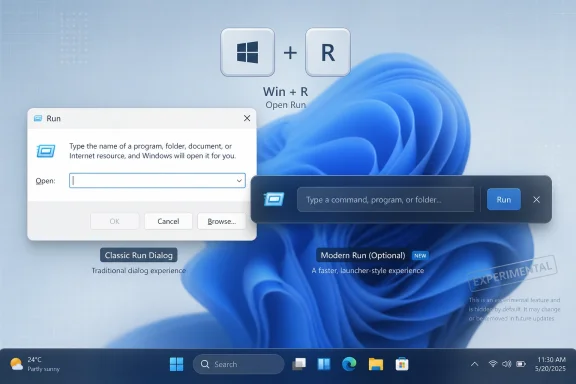
The newer hidden version has now received a slimmer visual refresh. Instead of looking like a traditional dialog box, it has moved closer to the shape of a floating search bar. The command field is more central, the Run icon has been moved to the left, and the Run button is placed on the right side. The overall result is cleaner, narrower, and more aligned with Windows 11’s Fluent-style surfaces.
That does not mean it is ready for everyone. In fact, the most important part of this story is that the modern Run dialog is still not rolling out broadly. It remains hidden, optional, and unfinished from the perspective of ordinary users.
For casual users, it may only appear once in a while. For administrators, developers, troubleshooters, and longtime Windows users, it can be part of daily muscle memory. Commands such as
It is not just a launcher. It is a shortcut into Windows’ older administrative and diagnostic layers.
That makes the feature awkward to modernize. Microsoft can redesign the surface, but it cannot afford to break expectations. Run has to open quickly. It has to accept the same commands. It has to respect the same execution behavior. It has to remain keyboard-friendly. It has to feel instant.
If a redesigned Run dialog looks prettier but adds friction, power users will reject it immediately.
This is the larger challenge with modernizing legacy Windows UI. Many old dialogs are not loved because they are beautiful. They are loved because they are reliable. They do exactly what users expect and they rarely change. When Microsoft touches one of those areas, even a visual-only change can cause concern.
That is why the optional nature of the modern Run dialog matters. If Microsoft keeps it as a toggle, users who want a modern experience can enable it, while those who prefer the classic dialog can keep using the old one.
The classic Run window has a familiar form: title, explanatory text, input field, and buttons such as OK, Cancel, and Browse. It looks like a miniature utility window because that is what it is. The newer modern version appears to be designed less as a dialog and more as a compact command launcher.
That is an important visual shift.
A launcher-style Run interface suggests Microsoft may be thinking beyond a simple skin. A modern Run could eventually become a more flexible command surface. It could remain basic, but its layout leaves room for future additions such as better suggestions, command history, richer results, or integrations with developer-focused Windows tools.
There is no guarantee Microsoft will add those features, and the current hidden experience should not be treated as a promise. But the design direction is interesting. A compact, centered bar is a more natural foundation for search-like behavior than the old Run box.
The new icon placement also helps the design feel more intentional. The Run icon sitting on the left gives the control a clear identity, while the command field takes visual priority. The Run button on the right makes the whole thing feel more like a submit bar than a legacy modal prompt.
It is a small change, but it makes the interface feel less cluttered.
The older modern Run version already looked different from the classic dialog, but the slimmer refresh suggests Microsoft is still iterating. That means the feature is likely not abandoned. It also means Microsoft probably has not settled on the final form.
This is the kind of modernization most users can accept. It does not change the workflow. It does not move buttons around. It does not introduce new behavior. It simply allows Run to match the rest of Windows 11 when the system is using a dark theme.
That may sound minor, but it matters for consistency.
One of the long-running complaints about Windows 11 is that dark mode is incomplete. You can set the operating system to dark mode, open a modern app, and everything looks coherent. Then you open an older dialog and suddenly get a bright white window. The experience feels unfinished, especially at night or on OLED displays.
Run is one of the obvious examples because it is frequently invoked directly from the keyboard. If you use dark mode everywhere else, the classic Run dialog standing out in light mode feels jarring.
Adding dark mode to the classic Run dialog is therefore a useful step even if Microsoft never ships the modern Run replacement to everyone. It preserves the familiar feature while making it fit better visually.
This is probably the path most enterprise and power users would prefer: update the old dialog just enough to respect Windows 11’s theme, but do not change its behavior.
Instead, it may keep the traditional dialog as the default while offering modern Run as an optional experience for users who want it. That approach makes sense for several reasons.
First, Run has a long history. Replacing it outright would create unnecessary backlash, especially among users who rely on it for administrative work.
Second, the classic Run dialog already works. It is not a broken feature waiting for rescue. It may look old, but it is fast and functional.
Third, the modern Run dialog may be connected to Microsoft’s broader Advanced Settings work. Advanced Settings is aimed more at developers, power users, and people who customize Windows beyond the basics. If modern Run remains there, it is naturally positioned as an optional productivity feature rather than a forced redesign.
Fourth, Microsoft has been more cautious with certain Windows 11 changes after years of feedback about removed functionality and inconsistent redesigns. The company has learned that modernizing Windows is not just about making everything look new. It is also about not damaging workflows.
Keeping both versions would be the most practical compromise.
Classic Run can continue serving users who want speed and familiarity. Modern Run can evolve separately and potentially gain new capabilities over time.
Advanced Settings, formerly associated with developer-focused settings, is becoming a place where Windows collects more power-user controls. It includes options that are not necessarily useful for every consumer but are valuable for people who manage, develop on, or deeply customize Windows.
That makes it a sensible home for a modern Run toggle.
Run is not a consumer-facing feature in the same way Start, Widgets, Copilot, or File Explorer are. It is a utility. Most users never open it intentionally. The people who care about Run are more likely to know their way around Settings and more likely to appreciate an optional switch.
This also gives Microsoft a safer testing path. If modern Run has bugs or missing features, it can remain hidden behind an opt-in control. Users who enable it are more likely to understand that it is experimental. Users who do not care will never see it.
That matters because Windows has a very broad audience. A change that feels obvious to one group can feel disruptive to another. Optional features let Microsoft modernize without forcing every user into the same experience at once.
The operating system contains modern WinUI surfaces, older Win32 dialogs, Control Panel pages, Microsoft Management Console snap-ins, shell extensions, app-specific windows, and decades of compatibility layers. It is not a single design system. It is a collection of eras.
That is why small updates like a modern Run dialog attract attention. They show Microsoft is still trying to close the visual gap between new Windows 11 experiences and old Windows infrastructure.
But consistency is not always the same as improvement.
A modern Run dialog that looks beautiful but opens slower would be worse. A version that hides important behavior would be worse. A version that breaks command compatibility would be unacceptable. A version that interferes with keyboard-only use would miss the point of Run entirely.
For this feature, the goal should not be reinvention for its own sake. The goal should be modernization without penalty.
The slimmer design is encouraging because it does not appear to overcomplicate the experience. It still looks focused on entering a command and running it. That is the right priority.
Windows already has Start search. It already has Windows Search. It already has Copilot integrations in some areas. It already has command-line tools, Terminal, PowerShell, and various launcher-style utilities. Run does not need to become another place where Windows tries to guess what the user wants.
Run works because it is direct.
You type a command. Windows executes it. There is very little interpretation. There are no feeds, no recommendations, no web results, no promotional cards, and no waiting for cloud-backed intelligence.
If Microsoft adds advanced features, they should respect that simplicity. Useful additions could include local command history, better path completion, smarter local suggestions, and clearer error handling. Less welcome additions would include web search, ads, forced Copilot behavior, or anything that delays execution.
A modern Run should be faster and more useful, not more distracting.
The best version of this feature would feel like the old Run dialog with a cleaner shell and optional enhancements. It should preserve the low-friction behavior that made Run valuable in the first place.
It is compact. It opens quickly. It is familiar. Its buttons are predictable. It has decades of user trust behind it. It also fits a certain type of Windows workflow where the user does not want animation, suggestion panes, or visual flourish.
Many power users do not care if a system utility looks dated. They care if it is dependable.
That is why Microsoft has to be careful with any replacement strategy. The company has previously faced criticism when Windows 11 redesigned components while removing useful behavior from the older versions. The first Windows 11 context menu is a good example: it looked cleaner, but many users disliked the extra click needed to access legacy options.
Run cannot afford that kind of mistake.
If Microsoft ships modern Run as the default one day, it should be because it is at least as fast and functional as the classic dialog. If it cannot meet that standard, it should remain optional.
A slimmer launcher-style interface could support more advanced functionality in the future. For example, it could offer context-aware suggestions after typing part of a command. It could show matching installed apps, settings pages, shell locations, or recent commands. It could integrate with developer tools in Advanced Settings. It could provide cleaner handling for paths and environment variables.
It could also become a bridge between classic Run and a more powerful local command palette.
Windows has never had a built-in command palette equivalent to what many developer tools offer. PowerToys Run exists for users who want a richer launcher, but it is separate from the built-in Windows Run dialog. A modern Run could theoretically borrow some of that philosophy while staying much simpler.
The key word is “theoretically.” Right now, users should not assume that the hidden modern Run is becoming a full command palette. The current evidence points mostly to UI refinement, not a confirmed expansion of functionality.
Still, Microsoft does not usually maintain a separate modern version of a legacy utility for no reason. If the feature continues to evolve, there may be more behind it than a cosmetic redesign.
This is the kind of feature Microsoft can afford to test slowly. Run is not a headline consumer feature. It is not going to sell new PCs. It is not urgent. It is also risky to change because the users who rely on it tend to be very sensitive to workflow disruptions.
There are several likely reasons Microsoft is holding back.
The first is polish. The interface may still need refinement, especially around sizing, scaling, accessibility, keyboard navigation, and compatibility with different themes.
The second is behavior. Microsoft needs to ensure every command, path, and shortcut that works in classic Run also works in modern Run.
The third is enterprise compatibility. Organizations may depend on predictable Windows behavior, and even a small shell change can raise support concerns.
The fourth is user feedback. Microsoft may be testing whether users actually want a modern Run dialog or whether dark mode for the classic version is enough.
The fifth is rollout strategy. Microsoft may decide to ship it first as an opt-in feature, then later expand availability if feedback is positive.
A hidden feature being actively refined does not necessarily mean it is weeks away from release. It means Microsoft is experimenting.
Some of this work is obvious, such as new Settings pages and redesigned system apps. Some of it is subtle, such as dark mode support for older dialogs or small visual adjustments to legacy components.
This slow approach can be frustrating, but it is also understandable. Windows is old, enormous, and heavily dependent on backward compatibility. Microsoft cannot simply replace every old dialog overnight. Many of them are tied to older frameworks and administrative tools. Some have enterprise dependencies. Some are rarely used but still important.
Run is a good example of why the process is slow. It looks small, but it sits at the intersection of shell behavior, command execution, user habits, and administrative workflows.
Modernizing Windows is not just a design project. It is a compatibility project.
That is why users often see a mix of new and old elements in Windows 11. Microsoft can update one surface, but the deeper legacy layers remain. The result is a gradual patchwork modernization rather than a clean break.
If Microsoft wants to modernize Run, it should continue doing so behind a toggle. If users want the classic dialog with dark mode, they should have it. If users want the new slim launcher-style Run, they should be able to enable it. If organizations want to lock one behavior down, they should be able to manage it.
Windows works best when it respects different user types.
A casual user may never notice Run. A developer may use it constantly. An IT admin may rely on it for quick access to management tools. A Windows enthusiast may want the modern interface because it looks cleaner. A longtime power user may reject it because the old dialog is muscle memory.
All of those preferences are valid.
Microsoft does not need to win everyone over with a forced redesign. It only needs to make the modern version good enough that people choose it voluntarily.
That is exactly the kind of redesign legacy Windows utilities need.
But until Microsoft publicly announces it or begins a wider rollout, it should be treated as an experimental feature. Hidden Windows features can change, disappear, or remain in testing for a long time. Some eventually ship. Others never do.
For now, the practical takeaway is simple: the classic Run dialog is not going away for everyone, dark mode support is the safer near-term improvement, and the hidden modern Run experience remains an optional experiment for users who want to try a more Windows 11-like version.
If Microsoft keeps the feature lightweight and optional, modern Run could be a welcome update. If it becomes slower or tries to do too much, users will probably return to the classic dialog immediately.
Run is one of those Windows features where less is more. The new slimmer design seems to understand that.
Source: Windows Latest Windows 11’s hidden modern Run dialog (Win+R) gets a slimmer design, but it’s still not rolling out
 Windows 11’s hidden modern Run dialog (Win+R) gets a slimmer design, but it’s still not rolling out
Microsoft is still experimenting with a modern version of the Windows 11 Run dialog, and the latest hidden design makes it look less like an old utility box and more like a compact floating launcher.The Run dialog is one of those Windows features that many people do not think about until they need it. Press Win + R, type a command, press Enter, and Windows opens whatever tool, folder, executable, Control Panel item, or system location you asked for. It is simple, fast, predictable, and deeply familiar to anyone who has used Windows for years.
That is also why changing it is not as easy as it might look.
Windows 11 has spent years moving pieces of the operating system toward a more modern design language. Microsoft has updated Settings, redesigned parts of File Explorer, refreshed Task Manager, added new system flyouts, changed context menus, and slowly brought dark mode to more areas. But a lot of small system dialogs still look like they belong to a much older version of Windows.
Run is one of them.
The current Run dialog still has the old rectangular layout, classic buttons, and legacy visual style. It works, but it does not really look like Windows 11. It feels like a preserved utility from another era, which is exactly what many power users like about it. It is small, quick, and free from unnecessary visual decoration.
Now, Microsoft appears to be testing two separate paths for Run. One is a more conservative update: dark mode support for the existing classic Run dialog. The other is more ambitious: a hidden modern Run experience that can be enabled as an optional feature from Advanced Settings.
The newer hidden version has now received a slimmer visual refresh. Instead of looking like a traditional dialog box, it has moved closer to the shape of a floating search bar. The command field is more central, the Run icon has been moved to the left, and the Run button is placed on the right side. The overall result is cleaner, narrower, and more aligned with Windows 11’s Fluent-style surfaces.
That does not mean it is ready for everyone. In fact, the most important part of this story is that the modern Run dialog is still not rolling out broadly. It remains hidden, optional, and unfinished from the perspective of ordinary users.
A small Windows feature with a surprisingly big legacy
Run is not flashy, but it is one of the oldest and most dependable shortcuts in Windows.For casual users, it may only appear once in a while. For administrators, developers, troubleshooters, and longtime Windows users, it can be part of daily muscle memory. Commands such as
cmd, powershell, regedit, msconfig, services.msc, appwiz.cpl, control, shell:startup, and %temp% are all common examples of why Run still matters.It is not just a launcher. It is a shortcut into Windows’ older administrative and diagnostic layers.
That makes the feature awkward to modernize. Microsoft can redesign the surface, but it cannot afford to break expectations. Run has to open quickly. It has to accept the same commands. It has to respect the same execution behavior. It has to remain keyboard-friendly. It has to feel instant.
If a redesigned Run dialog looks prettier but adds friction, power users will reject it immediately.
This is the larger challenge with modernizing legacy Windows UI. Many old dialogs are not loved because they are beautiful. They are loved because they are reliable. They do exactly what users expect and they rarely change. When Microsoft touches one of those areas, even a visual-only change can cause concern.
That is why the optional nature of the modern Run dialog matters. If Microsoft keeps it as a toggle, users who want a modern experience can enable it, while those who prefer the classic dialog can keep using the old one.
The slimmer modern Run looks more like a launcher than a dialog
The latest hidden design moves the modern Run dialog away from the traditional Windows dialog-box model.The classic Run window has a familiar form: title, explanatory text, input field, and buttons such as OK, Cancel, and Browse. It looks like a miniature utility window because that is what it is. The newer modern version appears to be designed less as a dialog and more as a compact command launcher.
That is an important visual shift.
A launcher-style Run interface suggests Microsoft may be thinking beyond a simple skin. A modern Run could eventually become a more flexible command surface. It could remain basic, but its layout leaves room for future additions such as better suggestions, command history, richer results, or integrations with developer-focused Windows tools.
There is no guarantee Microsoft will add those features, and the current hidden experience should not be treated as a promise. But the design direction is interesting. A compact, centered bar is a more natural foundation for search-like behavior than the old Run box.
The new icon placement also helps the design feel more intentional. The Run icon sitting on the left gives the control a clear identity, while the command field takes visual priority. The Run button on the right makes the whole thing feel more like a submit bar than a legacy modal prompt.
It is a small change, but it makes the interface feel less cluttered.
The older modern Run version already looked different from the classic dialog, but the slimmer refresh suggests Microsoft is still iterating. That means the feature is likely not abandoned. It also means Microsoft probably has not settled on the final form.
Dark mode for classic Run is the safer change
The more immediate and less controversial update is dark mode support for the existing Run dialog.This is the kind of modernization most users can accept. It does not change the workflow. It does not move buttons around. It does not introduce new behavior. It simply allows Run to match the rest of Windows 11 when the system is using a dark theme.
That may sound minor, but it matters for consistency.
One of the long-running complaints about Windows 11 is that dark mode is incomplete. You can set the operating system to dark mode, open a modern app, and everything looks coherent. Then you open an older dialog and suddenly get a bright white window. The experience feels unfinished, especially at night or on OLED displays.
Run is one of the obvious examples because it is frequently invoked directly from the keyboard. If you use dark mode everywhere else, the classic Run dialog standing out in light mode feels jarring.
Adding dark mode to the classic Run dialog is therefore a useful step even if Microsoft never ships the modern Run replacement to everyone. It preserves the familiar feature while making it fit better visually.
This is probably the path most enterprise and power users would prefer: update the old dialog just enough to respect Windows 11’s theme, but do not change its behavior.
Why Microsoft may keep both versions
The interesting possibility is that Microsoft may not be trying to replace classic Run immediately.Instead, it may keep the traditional dialog as the default while offering modern Run as an optional experience for users who want it. That approach makes sense for several reasons.
First, Run has a long history. Replacing it outright would create unnecessary backlash, especially among users who rely on it for administrative work.
Second, the classic Run dialog already works. It is not a broken feature waiting for rescue. It may look old, but it is fast and functional.
Third, the modern Run dialog may be connected to Microsoft’s broader Advanced Settings work. Advanced Settings is aimed more at developers, power users, and people who customize Windows beyond the basics. If modern Run remains there, it is naturally positioned as an optional productivity feature rather than a forced redesign.
Fourth, Microsoft has been more cautious with certain Windows 11 changes after years of feedback about removed functionality and inconsistent redesigns. The company has learned that modernizing Windows is not just about making everything look new. It is also about not damaging workflows.
Keeping both versions would be the most practical compromise.
Classic Run can continue serving users who want speed and familiarity. Modern Run can evolve separately and potentially gain new capabilities over time.
Advanced Settings is the right place for an optional Run experiment
The fact that the hidden modern Run can be toggled from Advanced Settings is notable.Advanced Settings, formerly associated with developer-focused settings, is becoming a place where Windows collects more power-user controls. It includes options that are not necessarily useful for every consumer but are valuable for people who manage, develop on, or deeply customize Windows.
That makes it a sensible home for a modern Run toggle.
Run is not a consumer-facing feature in the same way Start, Widgets, Copilot, or File Explorer are. It is a utility. Most users never open it intentionally. The people who care about Run are more likely to know their way around Settings and more likely to appreciate an optional switch.
This also gives Microsoft a safer testing path. If modern Run has bugs or missing features, it can remain hidden behind an opt-in control. Users who enable it are more likely to understand that it is experimental. Users who do not care will never see it.
That matters because Windows has a very broad audience. A change that feels obvious to one group can feel disruptive to another. Optional features let Microsoft modernize without forcing every user into the same experience at once.
The design makes Windows 11 feel more consistent, but consistency has limits
Windows 11’s biggest design challenge has always been consistency.The operating system contains modern WinUI surfaces, older Win32 dialogs, Control Panel pages, Microsoft Management Console snap-ins, shell extensions, app-specific windows, and decades of compatibility layers. It is not a single design system. It is a collection of eras.
That is why small updates like a modern Run dialog attract attention. They show Microsoft is still trying to close the visual gap between new Windows 11 experiences and old Windows infrastructure.
But consistency is not always the same as improvement.
A modern Run dialog that looks beautiful but opens slower would be worse. A version that hides important behavior would be worse. A version that breaks command compatibility would be unacceptable. A version that interferes with keyboard-only use would miss the point of Run entirely.
For this feature, the goal should not be reinvention for its own sake. The goal should be modernization without penalty.
The slimmer design is encouraging because it does not appear to overcomplicate the experience. It still looks focused on entering a command and running it. That is the right priority.
What modern Run should not become
There is one obvious concern: Microsoft should not turn Run into another bloated search or AI surface.Windows already has Start search. It already has Windows Search. It already has Copilot integrations in some areas. It already has command-line tools, Terminal, PowerShell, and various launcher-style utilities. Run does not need to become another place where Windows tries to guess what the user wants.
Run works because it is direct.
You type a command. Windows executes it. There is very little interpretation. There are no feeds, no recommendations, no web results, no promotional cards, and no waiting for cloud-backed intelligence.
If Microsoft adds advanced features, they should respect that simplicity. Useful additions could include local command history, better path completion, smarter local suggestions, and clearer error handling. Less welcome additions would include web search, ads, forced Copilot behavior, or anything that delays execution.
A modern Run should be faster and more useful, not more distracting.
The best version of this feature would feel like the old Run dialog with a cleaner shell and optional enhancements. It should preserve the low-friction behavior that made Run valuable in the first place.
The classic Run dialog still has advantages
Even if the modern version looks better, the classic Run dialog has strengths that should not be underestimated.It is compact. It opens quickly. It is familiar. Its buttons are predictable. It has decades of user trust behind it. It also fits a certain type of Windows workflow where the user does not want animation, suggestion panes, or visual flourish.
Many power users do not care if a system utility looks dated. They care if it is dependable.
That is why Microsoft has to be careful with any replacement strategy. The company has previously faced criticism when Windows 11 redesigned components while removing useful behavior from the older versions. The first Windows 11 context menu is a good example: it looked cleaner, but many users disliked the extra click needed to access legacy options.
Run cannot afford that kind of mistake.
If Microsoft ships modern Run as the default one day, it should be because it is at least as fast and functional as the classic dialog. If it cannot meet that standard, it should remain optional.
The new design may hint at bigger plans
The modern Run interface could simply be a visual refresh. But the design makes it reasonable to wonder whether Microsoft has broader plans.A slimmer launcher-style interface could support more advanced functionality in the future. For example, it could offer context-aware suggestions after typing part of a command. It could show matching installed apps, settings pages, shell locations, or recent commands. It could integrate with developer tools in Advanced Settings. It could provide cleaner handling for paths and environment variables.
It could also become a bridge between classic Run and a more powerful local command palette.
Windows has never had a built-in command palette equivalent to what many developer tools offer. PowerToys Run exists for users who want a richer launcher, but it is separate from the built-in Windows Run dialog. A modern Run could theoretically borrow some of that philosophy while staying much simpler.
The key word is “theoretically.” Right now, users should not assume that the hidden modern Run is becoming a full command palette. The current evidence points mostly to UI refinement, not a confirmed expansion of functionality.
Still, Microsoft does not usually maintain a separate modern version of a legacy utility for no reason. If the feature continues to evolve, there may be more behind it than a cosmetic redesign.
Why it is still not rolling out
The lack of broad rollout is not surprising.This is the kind of feature Microsoft can afford to test slowly. Run is not a headline consumer feature. It is not going to sell new PCs. It is not urgent. It is also risky to change because the users who rely on it tend to be very sensitive to workflow disruptions.
There are several likely reasons Microsoft is holding back.
The first is polish. The interface may still need refinement, especially around sizing, scaling, accessibility, keyboard navigation, and compatibility with different themes.
The second is behavior. Microsoft needs to ensure every command, path, and shortcut that works in classic Run also works in modern Run.
The third is enterprise compatibility. Organizations may depend on predictable Windows behavior, and even a small shell change can raise support concerns.
The fourth is user feedback. Microsoft may be testing whether users actually want a modern Run dialog or whether dark mode for the classic version is enough.
The fifth is rollout strategy. Microsoft may decide to ship it first as an opt-in feature, then later expand availability if feedback is positive.
A hidden feature being actively refined does not necessarily mean it is weeks away from release. It means Microsoft is experimenting.
This is part of a bigger Windows 11 cleanup effort
The modern Run dialog fits into a broader pattern: Microsoft is slowly cleaning up old Windows surfaces.Some of this work is obvious, such as new Settings pages and redesigned system apps. Some of it is subtle, such as dark mode support for older dialogs or small visual adjustments to legacy components.
This slow approach can be frustrating, but it is also understandable. Windows is old, enormous, and heavily dependent on backward compatibility. Microsoft cannot simply replace every old dialog overnight. Many of them are tied to older frameworks and administrative tools. Some have enterprise dependencies. Some are rarely used but still important.
Run is a good example of why the process is slow. It looks small, but it sits at the intersection of shell behavior, command execution, user habits, and administrative workflows.
Modernizing Windows is not just a design project. It is a compatibility project.
That is why users often see a mix of new and old elements in Windows 11. Microsoft can update one surface, but the deeper legacy layers remain. The result is a gradual patchwork modernization rather than a clean break.
Optional modernization is the best compromise
The best outcome is choice.If Microsoft wants to modernize Run, it should continue doing so behind a toggle. If users want the classic dialog with dark mode, they should have it. If users want the new slim launcher-style Run, they should be able to enable it. If organizations want to lock one behavior down, they should be able to manage it.
Windows works best when it respects different user types.
A casual user may never notice Run. A developer may use it constantly. An IT admin may rely on it for quick access to management tools. A Windows enthusiast may want the modern interface because it looks cleaner. A longtime power user may reject it because the old dialog is muscle memory.
All of those preferences are valid.
Microsoft does not need to win everyone over with a forced redesign. It only needs to make the modern version good enough that people choose it voluntarily.
The slimmer design is a good sign, but not a finished story
The latest modern Run design is a positive step because it shows restraint. It is slimmer, cleaner, and closer to the Windows 11 visual language without appearing overloaded.That is exactly the kind of redesign legacy Windows utilities need.
But until Microsoft publicly announces it or begins a wider rollout, it should be treated as an experimental feature. Hidden Windows features can change, disappear, or remain in testing for a long time. Some eventually ship. Others never do.
For now, the practical takeaway is simple: the classic Run dialog is not going away for everyone, dark mode support is the safer near-term improvement, and the hidden modern Run experience remains an optional experiment for users who want to try a more Windows 11-like version.
If Microsoft keeps the feature lightweight and optional, modern Run could be a welcome update. If it becomes slower or tries to do too much, users will probably return to the classic dialog immediately.
Run is one of those Windows features where less is more. The new slimmer design seems to understand that.
Source: Windows Latest Windows 11’s hidden modern Run dialog (Win+R) gets a slimmer design, but it’s still not rolling out
