

Microsoft began testing Windows 11 Insider Experimental build 26300.8493 on May 15, 2026, adding taskbar repositioning while separate reporting says Start menu size controls and section toggles are entering the same preview pipeline for Insiders. The change is small in the way UI toggles are always small: a few settings, a few menu states, a few more ways to say no. But it matters because Windows 11’s central design problem has never been that Microsoft lacks taste. It is that Microsoft too often treats taste as a policy engine.
Windows 11 arrived with a Start menu and taskbar that felt less like configurable work surfaces and more like a declaration from Redmond: this is how Windows should look now. Five years later, Microsoft appears to be conceding what power users, enterprise admins, and ordinary laptop owners have been saying since launch. The Windows desktop is not an appliance interface. It is a habitat.
The most symbolically important part of the current Insider flight is not the Start menu at all. It is the taskbar. Microsoft’s Experimental channel release notes say users can now choose the taskbar’s edge of the screen: bottom, top, left, or right.
That sentence would have sounded absurdly mundane in the Windows 10 era. In Windows 11, it reads like a restoration of civil liberties. The original Windows 11 taskbar famously arrived centered, simplified, and pinned to the bottom, with a long list of former behaviors missing or delayed. For a product used by hundreds of millions of people across ultrawide monitors, tablets, laptops, docking stations, kiosks, and remote desktops, “bottom only” was never a neutral default. It was a constraint pretending to be polish.
Microsoft is not yet claiming victory. The official notes caution that support for touch gestures, the Search box, Ask Copilot, auto-hidden taskbars, and touch-optimized taskbars in alternate positions is still incomplete. That caveat matters. A movable taskbar that breaks half the surrounding shell is not a finished feature; it is a preview of an architectural repair job.
Still, the direction is unmistakable. Windows 11 is inching away from the “we know best” posture of its launch years and back toward the older Windows bargain: Microsoft sets defaults, users adapt them, and the operating system survives because it is willing to be many things to many people.
That variability is the key. Windows 11 already has small and large Start menu layouts, but users do not meaningfully choose between them. Windows decides. That decision may be logical in a design review, where screen size, DPI, and layout density can be reduced to neat rules. It is less convincing when a user opens Start on a 14-inch laptop and feels as if the OS has dropped a billboard onto the desktop.
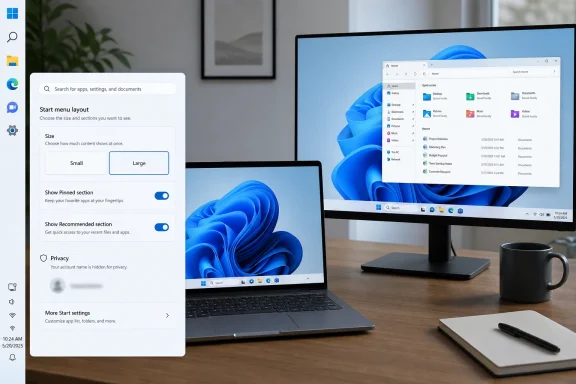
Reported changes would allow users to choose Small or Large Start menu sizes directly. That is not the same as the old Windows 10-style drag-to-resize behavior, and some users will still find it too limited. But even a binary setting changes the power relationship. The Start menu stops being something inflicted by a layout heuristic and becomes something the user can deliberately set.
The distinction matters more in multi-monitor setups. A designer’s “adaptive” UI can become unpredictable when a laptop panel, a 1080p external display, and a 4K monitor all enter the same workflow. If Microsoft maintains Start size preferences consistently across displays, as reported, it will be acknowledging that consistency is sometimes more valuable than clever adaptation.
The Recommended area has always carried a faint air of corporate ambition. At its best, it surfaces recent files and useful context. At its worst, it feels like space reserved for Microsoft’s idea of productivity rather than the user’s. The frustration has not merely been that recommendations exist. It is that they occupied prime real estate in a menu many users still think of as a launcher.
The reported section-level toggles would let users build a Start menu that shows only pinned apps, or only the app list, or some combination that makes sense for their workflow. That is precisely the kind of boring, obvious control Windows enthusiasts have been asking for. It is also the kind of control Microsoft tends to rediscover after a product team has spent years defending a cleaner default.
There is an important nuance in the newer reporting: Microsoft may separate disabling Start menu recommendations from disabling recent items elsewhere, such as File Explorer Home or jump lists. That would be a better model. Users should not have to choose between a quieter Start menu and useful recents throughout the rest of the system. Privacy and productivity are not opposites; bad settings design makes them opposites.
A Start menu that exposes account identity is not a catastrophic privacy failure. But it is one more small disclosure in an environment already full of them. Windows increasingly blends personal accounts, work accounts, cloud files, recent activity, widgets, search, and AI-adjacent surfaces. Each small identity cue can become visible at exactly the wrong moment.
This is where Microsoft’s design instincts have often lagged behind user reality. The company is very good at enterprise policy frameworks and admin controls, but some privacy needs are much simpler: do not show my name on screen when I open a menu during a call. A toggle for that is not glamorous. It is humane.
For streamers, trainers, teachers, and help desk staff, this type of control is often more useful than a sweeping privacy manifesto. The best privacy settings are sometimes not about deep telemetry architecture. They are about preventing accidental exposure in the visible interface.
That is especially true here because the public facts are split between official release notes and reporting about Start menu work in progress. Microsoft has officially documented taskbar repositioning, smaller taskbar behavior, widget badging changes, search relevance improvements, and other build details. The Start menu size and section-toggle changes are described in reporting from Windows-focused outlets, with Microsoft’s broader direction aligning with earlier statements about customization and performance improvements.
That does not make the Start menu reporting implausible. Quite the opposite: it fits a visible pattern. Microsoft has been moving through a cleanup phase for Windows 11, returning long-requested controls, sanding down unpopular shell decisions, and trying to make the desktop feel less rigid. But an Insider feature is still not a servicing update, and a reported plan is still not a committed release date.
For IT departments, that distinction is everything. A movable taskbar in Experimental builds is interesting; it is not a deployment plan. A Start menu setting under test is worth tracking; it is not something to build training materials around yet. The prudent posture is curiosity, not assumption.
That does not mean enterprise IT should oppose these changes. In fact, many admins will welcome them if they reduce the need for third-party shell tools, registry workarounds, or user complaints after feature updates. A native setting is easier to explain and support than a customization hack. The question is whether Microsoft exposes these controls cleanly through policy, provisioning, and management surfaces.
The Start menu is not just a convenience feature in managed environments. It is where organizations pin business apps, direct users toward approved tools, and reduce help desk friction. If users can hide Pinned, Recommended, or All sections, admins will want to know which choices are user-level preferences and which can be governed. The same is true for taskbar placement, especially in shared-device, education, frontline, and kiosk-adjacent scenarios.
There is also a documentation burden. If the taskbar can live on any edge and Start can appear in multiple configurations, support scripts that say “click the icon at the bottom” become less reliable. That is manageable, but it is not free. Customization always trades uniformity for agency.
The better enterprise answer is not to freeze Windows in one approved layout. It is to make customization predictable, policy-aware, and reversible. If Microsoft treats these new controls as first-class settings rather than half-hidden experiments, admins can absorb the complexity.
The lesson of the Start menu is that simplicity imposed at the wrong layer becomes friction. Users do not necessarily want a chaotic interface. They want the ability to remove the parts that interrupt them and preserve the parts that accelerate them. A Start menu with only pinned apps is simpler than Microsoft’s default. A left-side taskbar on a portrait display may be simpler for that user than a bottom taskbar.
This is why the “customization versus simplicity” framing is misleading. The absence of settings does not automatically make software simpler. Sometimes it just transfers complexity from the settings panel into daily annoyance, workarounds, forum threads, and third-party utilities.
Microsoft appears to be relearning that the Windows audience does not object to defaults. It objects to defaults that cannot be negotiated. The Start menu and taskbar are not decorative surfaces; they are muscle memory engines. Changing them is one thing. Denying users a way back is another.
That comparison has been politically awkward for Microsoft. Windows 11 needed a visual identity, and the centered taskbar plus simplified Start menu gave it one. But identity became rigidity. Every missing option reminded users that the new OS was not merely different; in some workflows, it was less capable.
The new Insider work suggests Microsoft is no longer treating that criticism as nostalgia. It is treating it as product feedback. That is an important shift. The Windows community has plenty of reflexive resistance to change, but not every complaint is reactionary. Sometimes users are simply right.
The hard part for Microsoft is incorporating that feedback without turning Windows 11 into a museum of old behaviors. The goal should not be to recreate Windows 10 pixel for pixel. It should be to restore the principle that made Windows durable: the shell can evolve, but users get a vote in how it lands on their desk.
Not every Windows PC is a 27-inch monitor at a desk. Windows lives on compact laptops, handhelds, virtual machines, remote sessions, cramped airline tray tables, and old displays repurposed for second-screen duty. A few pixels of vertical space still matter. The web browser, IDE, spreadsheet, and remote desktop window all compete for the same rectangle.
The smaller taskbar also shows why customization should not be treated as indulgence. For some users, density is accessibility. For others, larger targets are accessibility. A single default cannot satisfy both. The operating system should not pretend otherwise.
Microsoft’s note that it is still working on taskbar settings to make resizing easier hints at a broader clean-up still to come. The company knows the taskbar remains one of the most scrutinized parts of Windows 11. Every improvement there will be measured not against abstract design ideals, but against the remembered flexibility of older Windows releases.
That does not mean every forum demand should become a product requirement. If Microsoft built Windows solely from comment threads, the result would be a settings labyrinth held together by nostalgia and edge cases. But the company’s mistake with Windows 11 was not ignoring every complaint. It was underestimating how many of those complaints represented mainstream friction.
The Start menu size issue is a perfect example. What began as enthusiast grumbling became harder to dismiss once mainstream Windows sites, Reddit threads, and ordinary users converged on the same observation: the menu was too large on too many systems, and Windows did not offer a direct way to fix it. That is the kind of feedback loop the Insider program is supposed to catch before broad rollout, not after.
If these new controls ship, the lesson should not be that Microsoft “caved.” It should be that the shell team listened late but not too late. Windows is too large an ecosystem for purity. The feedback channels are noisy because the installed base is noisy.
Users who feel the OS is fighting them over taskbar position or Start menu size are less likely to welcome more ambitious interventions. If Microsoft cannot be trusted to let the Start menu get smaller, why should users trust it to mediate files, suggestions, identity, and AI actions? Shell humility is not a cosmetic matter. It is a prerequisite for platform ambition.
The Recommended section illustrates the tension. Microsoft wants Windows to be context-aware. Users want Windows to be predictable and respectful. Those goals can coexist only if the user has meaningful control over what appears, where it appears, and how easily it can be turned off.
In that sense, Start menu customization is not a retreat from Microsoft’s future. It is groundwork for it. An AI-flavored Windows that cannot absorb user preference will feel invasive. One that offers clear defaults and equally clear exits has a better chance of being tolerated, maybe even useful.
Microsoft needs to make these settings boring in the best possible way. They should live where users expect them, sync or persist where appropriate, respect multi-monitor setups, and expose policy hooks for managed environments. They should not require registry spelunking, feature IDs, or third-party tools to behave reliably.
The company also needs to resist the temptation to use customization as a pressure valve while continuing to add clutter elsewhere. Letting users hide Recommended in Start is good. Filling another surface with prompts, badges, or promotional content would undercut the point. Windows does not need infinite minimalism, but it does need restraint.
The strongest version of this update would make Windows 11 feel less like a fixed composition and more like a set of coherent defaults. That is the line Microsoft should walk: opinionated enough to be usable out of the box, flexible enough to stop annoying people who know what they want.
Windows 11 arrived with a Start menu and taskbar that felt less like configurable work surfaces and more like a declaration from Redmond: this is how Windows should look now. Five years later, Microsoft appears to be conceding what power users, enterprise admins, and ordinary laptop owners have been saying since launch. The Windows desktop is not an appliance interface. It is a habitat.
 Microsoft Finally Lets the Desktop Move Again
The most symbolically important part of the current Insider flight is not the Start menu at all. It is the taskbar. Microsoft’s Experimental channel release notes say users can now choose the taskbar’s edge of the screen: bottom, top, left, or right.That sentence would have sounded absurdly mundane in the Windows 10 era. In Windows 11, it reads like a restoration of civil liberties. The original Windows 11 taskbar famously arrived centered, simplified, and pinned to the bottom, with a long list of former behaviors missing or delayed. For a product used by hundreds of millions of people across ultrawide monitors, tablets, laptops, docking stations, kiosks, and remote desktops, “bottom only” was never a neutral default. It was a constraint pretending to be polish.
Microsoft is not yet claiming victory. The official notes caution that support for touch gestures, the Search box, Ask Copilot, auto-hidden taskbars, and touch-optimized taskbars in alternate positions is still incomplete. That caveat matters. A movable taskbar that breaks half the surrounding shell is not a finished feature; it is a preview of an architectural repair job.
Still, the direction is unmistakable. Windows 11 is inching away from the “we know best” posture of its launch years and back toward the older Windows bargain: Microsoft sets defaults, users adapt them, and the operating system survives because it is willing to be many things to many people.
The Start Menu Became Too Big to Ignore
The new Start menu controversy has been less about pixels than control. Microsoft’s redesigned Windows 11 Start menu grew more ambitious in late 2025, placing pinned apps, recommendations, and app lists into a broader layout that adapts based on screen size, resolution, and scaling. On some machines that adaptation worked. On others it produced a menu that felt comically large, consuming a startling amount of screen space for what should be a quick launcher.That variability is the key. Windows 11 already has small and large Start menu layouts, but users do not meaningfully choose between them. Windows decides. That decision may be logical in a design review, where screen size, DPI, and layout density can be reduced to neat rules. It is less convincing when a user opens Start on a 14-inch laptop and feels as if the OS has dropped a billboard onto the desktop.
Reported changes would allow users to choose Small or Large Start menu sizes directly. That is not the same as the old Windows 10-style drag-to-resize behavior, and some users will still find it too limited. But even a binary setting changes the power relationship. The Start menu stops being something inflicted by a layout heuristic and becomes something the user can deliberately set.
The distinction matters more in multi-monitor setups. A designer’s “adaptive” UI can become unpredictable when a laptop panel, a 1080p external display, and a 4K monitor all enter the same workflow. If Microsoft maintains Start size preferences consistently across displays, as reported, it will be acknowledging that consistency is sometimes more valuable than clever adaptation.
The Recommended Feed Was Always the Flashpoint
The most revealing reported Start menu change is not sizing. It is the ability to hide entire sections: Pinned, Recommended, and All. That sounds like customization housekeeping, but it cuts straight into the argument Windows 11 has been having with its users since 2021.The Recommended area has always carried a faint air of corporate ambition. At its best, it surfaces recent files and useful context. At its worst, it feels like space reserved for Microsoft’s idea of productivity rather than the user’s. The frustration has not merely been that recommendations exist. It is that they occupied prime real estate in a menu many users still think of as a launcher.
The reported section-level toggles would let users build a Start menu that shows only pinned apps, or only the app list, or some combination that makes sense for their workflow. That is precisely the kind of boring, obvious control Windows enthusiasts have been asking for. It is also the kind of control Microsoft tends to rediscover after a product team has spent years defending a cleaner default.
There is an important nuance in the newer reporting: Microsoft may separate disabling Start menu recommendations from disabling recent items elsewhere, such as File Explorer Home or jump lists. That would be a better model. Users should not have to choose between a quieter Start menu and useful recents throughout the rest of the system. Privacy and productivity are not opposites; bad settings design makes them opposites.
Privacy Moves From Policy Page to Screen Share
The ability to hide a user’s name and profile picture from Start sounds minor until you remember how people actually use computers in 2026. Screens are shared constantly: in Teams calls, livestreams, classrooms, IT support sessions, incident reviews, and training videos. The desktop is no longer private space interrupted by occasional sharing. For many workers, sharing is part of the normal workday.A Start menu that exposes account identity is not a catastrophic privacy failure. But it is one more small disclosure in an environment already full of them. Windows increasingly blends personal accounts, work accounts, cloud files, recent activity, widgets, search, and AI-adjacent surfaces. Each small identity cue can become visible at exactly the wrong moment.
This is where Microsoft’s design instincts have often lagged behind user reality. The company is very good at enterprise policy frameworks and admin controls, but some privacy needs are much simpler: do not show my name on screen when I open a menu during a call. A toggle for that is not glamorous. It is humane.
For streamers, trainers, teachers, and help desk staff, this type of control is often more useful than a sweeping privacy manifesto. The best privacy settings are sometimes not about deep telemetry architecture. They are about preventing accidental exposure in the visible interface.
The Experimental Channel Is Not a Promise
There is a trap in every Insider story: treating preview code as destiny. Microsoft’s official build notes are clear that Experimental channel features roll out gradually and may reach only a subset of testers at first. The channel itself is designed for work that may change, stall, or never ship in its current form.That is especially true here because the public facts are split between official release notes and reporting about Start menu work in progress. Microsoft has officially documented taskbar repositioning, smaller taskbar behavior, widget badging changes, search relevance improvements, and other build details. The Start menu size and section-toggle changes are described in reporting from Windows-focused outlets, with Microsoft’s broader direction aligning with earlier statements about customization and performance improvements.
That does not make the Start menu reporting implausible. Quite the opposite: it fits a visible pattern. Microsoft has been moving through a cleanup phase for Windows 11, returning long-requested controls, sanding down unpopular shell decisions, and trying to make the desktop feel less rigid. But an Insider feature is still not a servicing update, and a reported plan is still not a committed release date.
For IT departments, that distinction is everything. A movable taskbar in Experimental builds is interesting; it is not a deployment plan. A Start menu setting under test is worth tracking; it is not something to build training materials around yet. The prudent posture is curiosity, not assumption.
Enterprise IT Will Care Less About Nostalgia Than Drift
For enthusiasts, the story is emotional: Microsoft took away controls and is now giving some back. For administrators, the story is operational: every new shell state is another thing that can vary across users, support tickets, screenshots, and documentation.That does not mean enterprise IT should oppose these changes. In fact, many admins will welcome them if they reduce the need for third-party shell tools, registry workarounds, or user complaints after feature updates. A native setting is easier to explain and support than a customization hack. The question is whether Microsoft exposes these controls cleanly through policy, provisioning, and management surfaces.
The Start menu is not just a convenience feature in managed environments. It is where organizations pin business apps, direct users toward approved tools, and reduce help desk friction. If users can hide Pinned, Recommended, or All sections, admins will want to know which choices are user-level preferences and which can be governed. The same is true for taskbar placement, especially in shared-device, education, frontline, and kiosk-adjacent scenarios.
There is also a documentation burden. If the taskbar can live on any edge and Start can appear in multiple configurations, support scripts that say “click the icon at the bottom” become less reliable. That is manageable, but it is not free. Customization always trades uniformity for agency.
The better enterprise answer is not to freeze Windows in one approved layout. It is to make customization predictable, policy-aware, and reversible. If Microsoft treats these new controls as first-class settings rather than half-hidden experiments, admins can absorb the complexity.
The Real Retreat Is From Forced Simplicity
Windows 11’s early shell design was built around a familiar modern software belief: reduce visible options, simplify the interface, and guide users toward a clean default. That philosophy works well in narrow contexts. It is less successful in an operating system whose user base includes gamers, accountants, domain admins, developers, students, designers, and people still running line-of-business apps old enough to vote.The lesson of the Start menu is that simplicity imposed at the wrong layer becomes friction. Users do not necessarily want a chaotic interface. They want the ability to remove the parts that interrupt them and preserve the parts that accelerate them. A Start menu with only pinned apps is simpler than Microsoft’s default. A left-side taskbar on a portrait display may be simpler for that user than a bottom taskbar.
This is why the “customization versus simplicity” framing is misleading. The absence of settings does not automatically make software simpler. Sometimes it just transfers complexity from the settings panel into daily annoyance, workarounds, forum threads, and third-party utilities.
Microsoft appears to be relearning that the Windows audience does not object to defaults. It objects to defaults that cannot be negotiated. The Start menu and taskbar are not decorative surfaces; they are muscle memory engines. Changing them is one thing. Denying users a way back is another.
The Windows 10 Shadow Still Hangs Over Windows 11
It is impossible to separate these changes from the long afterlife of Windows 10. Even as Windows 11 matures, many users continue to judge it against a predecessor that, for all its flaws, offered a familiar and flexible desktop model. The Windows 10 Start menu was not universally loved, but it could be resized, shaped, and made to feel personal in ways Windows 11 initially rejected.That comparison has been politically awkward for Microsoft. Windows 11 needed a visual identity, and the centered taskbar plus simplified Start menu gave it one. But identity became rigidity. Every missing option reminded users that the new OS was not merely different; in some workflows, it was less capable.
The new Insider work suggests Microsoft is no longer treating that criticism as nostalgia. It is treating it as product feedback. That is an important shift. The Windows community has plenty of reflexive resistance to change, but not every complaint is reactionary. Sometimes users are simply right.
The hard part for Microsoft is incorporating that feedback without turning Windows 11 into a museum of old behaviors. The goal should not be to recreate Windows 10 pixel for pixel. It should be to restore the principle that made Windows durable: the shell can evolve, but users get a vote in how it lands on their desk.
A Smaller Taskbar Carries a Bigger Message
The official Experimental build also introduces a smaller taskbar option, with reduced icon size and height for users who want more screen space. On paper, this is another modest setting. In practice, it acknowledges a recurring mismatch between Microsoft’s default visual scale and the devices people actually use.Not every Windows PC is a 27-inch monitor at a desk. Windows lives on compact laptops, handhelds, virtual machines, remote sessions, cramped airline tray tables, and old displays repurposed for second-screen duty. A few pixels of vertical space still matter. The web browser, IDE, spreadsheet, and remote desktop window all compete for the same rectangle.
The smaller taskbar also shows why customization should not be treated as indulgence. For some users, density is accessibility. For others, larger targets are accessibility. A single default cannot satisfy both. The operating system should not pretend otherwise.
Microsoft’s note that it is still working on taskbar settings to make resizing easier hints at a broader clean-up still to come. The company knows the taskbar remains one of the most scrutinized parts of Windows 11. Every improvement there will be measured not against abstract design ideals, but against the remembered flexibility of older Windows releases.
The Forum Crowd Was the Early Warning System
Windows enthusiasts can be exhausting, but they are often useful. The complaints about the oversized Start menu, immovable taskbar, and overbearing Recommended section did not emerge from nowhere. They came from the people who notice when a shell change adds a click, breaks a habit, or wastes space on a display Microsoft’s designers may not have tested as a daily driver.That does not mean every forum demand should become a product requirement. If Microsoft built Windows solely from comment threads, the result would be a settings labyrinth held together by nostalgia and edge cases. But the company’s mistake with Windows 11 was not ignoring every complaint. It was underestimating how many of those complaints represented mainstream friction.
The Start menu size issue is a perfect example. What began as enthusiast grumbling became harder to dismiss once mainstream Windows sites, Reddit threads, and ordinary users converged on the same observation: the menu was too large on too many systems, and Windows did not offer a direct way to fix it. That is the kind of feedback loop the Insider program is supposed to catch before broad rollout, not after.
If these new controls ship, the lesson should not be that Microsoft “caved.” It should be that the shell team listened late but not too late. Windows is too large an ecosystem for purity. The feedback channels are noisy because the installed base is noisy.
Microsoft’s AI Era Still Needs a Trustworthy Desktop
There is a larger strategic point hiding beneath the Start menu. Microsoft is trying to make Windows the front door for Copilot, cloud services, AI-assisted search, cross-device experiences, and subscription-connected productivity. That ambition depends on trust in the basic desktop.Users who feel the OS is fighting them over taskbar position or Start menu size are less likely to welcome more ambitious interventions. If Microsoft cannot be trusted to let the Start menu get smaller, why should users trust it to mediate files, suggestions, identity, and AI actions? Shell humility is not a cosmetic matter. It is a prerequisite for platform ambition.
The Recommended section illustrates the tension. Microsoft wants Windows to be context-aware. Users want Windows to be predictable and respectful. Those goals can coexist only if the user has meaningful control over what appears, where it appears, and how easily it can be turned off.
In that sense, Start menu customization is not a retreat from Microsoft’s future. It is groundwork for it. An AI-flavored Windows that cannot absorb user preference will feel invasive. One that offers clear defaults and equally clear exits has a better chance of being tolerated, maybe even useful.
The Settings That Would Make This More Than a Gesture
The next test is implementation. If the Start menu options are buried, inconsistent, or limited to a subset of hardware, the goodwill will evaporate quickly. If taskbar repositioning ships with persistent caveats, users will rightly view it as unfinished.Microsoft needs to make these settings boring in the best possible way. They should live where users expect them, sync or persist where appropriate, respect multi-monitor setups, and expose policy hooks for managed environments. They should not require registry spelunking, feature IDs, or third-party tools to behave reliably.
The company also needs to resist the temptation to use customization as a pressure valve while continuing to add clutter elsewhere. Letting users hide Recommended in Start is good. Filling another surface with prompts, badges, or promotional content would undercut the point. Windows does not need infinite minimalism, but it does need restraint.
The strongest version of this update would make Windows 11 feel less like a fixed composition and more like a set of coherent defaults. That is the line Microsoft should walk: opinionated enough to be usable out of the box, flexible enough to stop annoying people who know what they want.
The Concrete Wins Hidden Inside the Preview Noise
For now, users should treat the current moment as a promising preview rather than a finished settlement. The direction is encouraging, but the details still determine whether this becomes a real quality-of-life improvement or another Insider feature that arrives slowly, partially, or not at all.- Windows 11 Insider Experimental build 26300.8493 officially tests moving the taskbar to the bottom, top, left, or right edges of the screen.
- Microsoft says some taskbar behaviors remain unfinished in alternate positions, including support around touch gestures, auto-hide, and touch-optimized modes.
- Reporting indicates Microsoft is preparing Small and Large Start menu choices so users no longer have to accept an automatically selected layout.
- Reported Start menu section toggles would let users hide Pinned, Recommended, or All sections, including configurations focused only on pinned apps.
- A separate privacy-oriented control reportedly lets users hide their account name and profile picture from the Start menu.
- IT administrators should watch for management policy support before assuming these preview-era controls are ready for standardized deployments.
References
- Primary source: Dataconomy
Published: Mon, 18 May 2026 09:07:42 GMT

Windows 11 update adds major Start menu customization options
Microsoft is testing updates for Windows 11 that will enhance customization options for the Start menu and taskbar, with rollouts dataconomy.com
- Related coverage: windowslatest.com

Microsoft is making Windows 11's Start menu resizable after years of complaints, adds Small and Large options
Microsoft says it's finally killing Windows 11's one-size-fits-all Start menu, adding resize options after years of complaints. www.windowslatest.com
- Related coverage: pcworld.com

Windows 11's newly revamped Start menu design is annoyingly large
The new Start menu is being rolled out to all users on Windows 11 25H2 with no option to keep using the old design. www.pcworld.com
- Related coverage: windowscentral.com
- Official source: learn.microsoft.com

Experimental Preview Build 26300.8493 - Windows Insider Program
Release notes for Experimental Preview Build 26300.8493learn.microsoft.com - Related coverage: pureinfotech.com

Windows 11 is finally fixing the Start menu with long‑overdue resizing options
Windows 11 will soon let users resize the Start menu, hide sections, and separate recommendations from recent files. pureinfotech.com
- Related coverage: abit.ee
Windows 11 Will Finally Let You Move the Taskbar and Resize the Start Menu
Microsoft is testing taskbar repositioning and Start menu resizing in Windows 11, currently available in the Windows Insider Experimental channel.abit.ee
- Related coverage: windowsnews.ai
Windows 11 Experimental: Resizable Start Menu, Hide Sections, and Move Taskbar Anywhere
Windows Insiders in the Experimental channel can now test a resizable Start menu, hide Start sections, and move the taskbar to any screen edge—features long...windowsnews.ai
- Related coverage: moneycontrol.com
- Related coverage: techradar.com
- Related coverage: tomsguide.com
- Related coverage: scscc.club