

Microsoft’s latest Insider release, Windows 11 Build 25115, lands in the Dev Channel with a single visible feature — Suggested Actions — alongside a long list of stability fixes, UI polish, and a handful of known issues that Insiders should weigh before installing.
Microsoft delivers two Insider streams for most preview work: the Dev Channel, where builds are experimental and can diverge from shipping releases, and the Beta Channel, which is closer to what will reach general release. Build 25115 was released to the Dev Channel and is paired with a separate Beta-channel flight (Build 22621) in the same timeframe. Insiders should remember that moving between channels is constrained: once a device installs a higher Dev build, you generally have a ten-day rollback window to revert and switch channels without a clean install.
This particular Dev build intentionally excludes ARM64 devices for now; Microsoft states it hopes to offer ARM64 builds later. That exclusion affects Surface Pro X owners and other ARM-based PCs that many enthusiasts and some enterprise deployments use.
Insiders who want to try new UX advances should use a dedicated test device or VM, file clear feedback in Feedback Hub, and watch for Microsoft’s expanded availability and privacy guidance. Enterprises should treat Suggested Actions as an upcoming convenience to evaluate rather than a feature to immediately enable across managed endpoints.
Source: BetaNews Microsoft releases Windows 11 Build 25115 with one new feature and lots of fixes
 Background
Microsoft delivers two Insider streams for most preview work: the Dev Channel, where builds are experimental and can diverge from shipping releases, and the Beta Channel, which is closer to what will reach general release. Build 25115 was released to the Dev Channel and is paired with a separate Beta-channel flight (Build 22621) in the same timeframe. Insiders should remember that moving between channels is constrained: once a device installs a higher Dev build, you generally have a ten-day rollback window to revert and switch channels without a clean install.This particular Dev build intentionally excludes ARM64 devices for now; Microsoft states it hopes to offer ARM64 builds later. That exclusion affects Surface Pro X owners and other ARM-based PCs that many enthusiasts and some enterprise deployments use.
What’s new (high level)
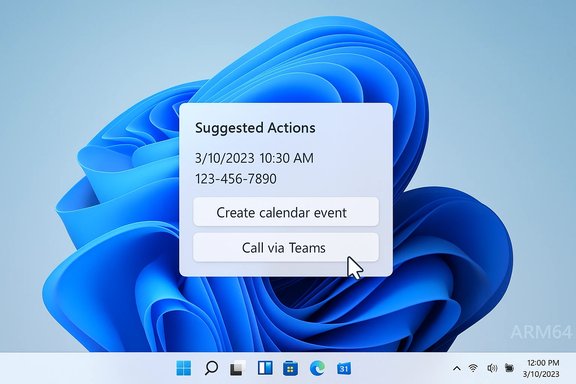
- One new feature for Insiders: Suggested Actions — an inline suggestion UI that triggers when you copy dates, times, or phone numbers. It offers actions such as creating a calendar event or launching a click-to-dial call in compatible apps.
- Updated icons in the Windows Recovery Environment (WinRE).
- A broad set of fixes across speech services, Taskbar, File Explorer, Settings, Task Manager, Windows Security, and the update stack. Several stability issues and explorer.exe crashes were addressed.
Suggested Actions — a closer look
What it does
Suggested Actions is designed to reduce friction when you copy common, actionable text from anywhere in Windows — for example:- Copy a phone number → a small inline UI appears suggesting call options through Teams or other installed click-to-dial apps.
- Copy a date/time → the UI suggests creating an event in a supported calendar app, auto-filling the date and/or time.
Regional rollout and availability
When the feature first shipped it was limited; Microsoft flagging meant Suggested Actions initially targeted Insiders in the United States before being broadened to additional regions in later builds. Subsequent Insider flights expanded availability to Canada and Mexico, showing Microsoft’s staged rollout pattern for new user-facing features.How it integrates with apps
Suggested Actions is not a standalone dialer or calendar — it relies on installed apps that expose the appropriate entry points (click-to-dial, calendar event creation). For phone calls, Windows surfaces apps that support click-to-dial (for example, Microsoft Teams or third-party softphones). For calendar events, the platform launches the chosen calendar app’s event-creation UI with the date/time pre-filled. That means behavior depends on app support and the handlers registered on the system.UX trade-offs
- Benefits:
- Faster context switching: Copying a date or phone number and acting immediately saves manual paste-and-switch steps.
- Consistency: A single OS-level affordance reduces reliance on individual app heuristics.
- Limitations:
- App-dependent: If the installed apps don't register the required handlers, suggestions will be limited or absent.
- Regional gating and staged rollouts mean many Insiders may not see the feature immediately.
Fixes and improvements in detail
Microsoft’s release notes for Build 25115 list numerous fixes that aim to improve day-to-day stability for Insiders. The most notable categories:Speech and accessibility
- The underlying speech platform was updated to improve voice activity detection for Voice Access, Live Captions, and Voice Typing, and to address punctuation recognition issues. This targets noticeable failures in dictation and captioning where punctuation or pauses were handled poorly.
Taskbar and Settings
- Fixed a bug where loading system tray icons in Settings → Personalization → Taskbar could crash Settings and potentially lead to explorer.exe crashes.
- Addressed a Settings suspension issue that could lock up explorer.exe.
File Explorer
- Resolved an error (0x800703E6) that occurred when copying files from Google Drive.
- Improved File Explorer Home load performance and fixed sporadic explorer.exe crashes when closing windows.
- Addressed a crash triggered by opening the context menu then pressing CTRL + ALT + DEL and cancelling.
Task Manager and UI
- Fixed access-key behavior issues in Task Manager (ALT shortcuts) and dark-mode readability for the CPU column header when CPU usage hits 100%.
Windows Security and integrity
- Fixed an issue where Smart App Control could block correctly signed applications.
- Addressed cases where Memory Integrity could get turned off unexpectedly after rebooting. Both fixes matter for security-conscious users.
Update Stack
- Fixed an install error (0xc4800010) shown by the Update Stack Package. This is important for update reliability in preview flights.
Known issues Insiders should know
Microsoft and reporting outlets list multiple known issues in Build 25115 lineage — the ones called out immediately are:- Some games using Easy Anti-Cheat (EAC) may crash or cause a bugcheck (blue screen). This is a serious problem for gamers and requires caution when testing this build while playing EAC-protected titles.
- Live captions can be blocked by full-screen apps (video players), and certain apps closed and reopened may re-launch behind the captions window. Workarounds include using the system menu (ALT + Spacebar) to reposition windows.
The ARM64 exclusion and channel switching caveat
Two practical deployment notes for those running preview builds:- ARM64 devices were not offered Build 25115 — Microsoft explicitly excluded ARM64 in this flight and communicated intent to bring an appropriate build later. That means Insiders on Surface Pro X and other ARM-based PCs should not expect Suggested Actions in this release.
- Dev-to-Beta switching window — When a device installs a higher Dev build, it can be difficult to move back to Beta without a clean install. Microsoft notes you have a limited rollback window (roughly ten days) to return to the previous release if you change channels, otherwise you’ll need to reinstall Windows to switch. This is a critical operational detail for testers who want to leave the Dev Channel after trying a build.
Critical analysis — strengths
- Practical, focused feature: Suggested Actions is not an all-encompassing AI feature; it's a modest, pragmatic convenience that addresses a real, repetitive workflow (date/phone recognition + action). The limited scope reduces risk and makes it easier to test and refine.
- Accessibility improvements: The speech platform updates and improved Narrator behavior show continued attention to users who rely on assistive tech—an important and sometimes overlooked area of system updates.
- Stability-focused fixes: The wide set of explorer.exe, Settings, File Explorer, and update-stack fixes indicate Microsoft is still prioritizing stability improvements even while experimenting with new UI affordances. For Insiders, this is reassuring.
- Incremental rollout model: Microsoft’s staged activation (regional gating and CFR — control feature rollout) allows the company to monitor telemetry and limit blast radius if a regression appears. That’s sensible for a platform as diverse as Windows.
Critical analysis — risks and caveats
- Clipboard privacy and telemetry concerns: Suggested Actions requires on-device parsing of clipboard strings to detect dates, times, and phone numbers. Although this can be implemented locally, the introduction of any feature that inspects clipboard contents naturally raises privacy questions — especially for enterprise users who copy sensitive data or use shared terminals. Microsoft has not published detailed privacy documentation for Suggested Actions in this build, and those details matter for IT policies. Treat initial claims of local-only processing as plausible but verify with Microsoft’s privacy docs for production rollout.
- Dependency on app handlers: The feature’s usefulness depends on installed apps exposing click-to-dial and calendar creation entry points. In environments using legacy or custom enterprise apps that do not register these handlers, Suggested Actions will be of limited value.
- Regressions in gaming and accessibility: The Easy Anti-Cheat issue and live captions quirks are non-trivial. A bugcheck or blocked caption can ruin a session for gamers and users who rely on captions; those cases are reason enough to avoid installing Dev Channel builds on production machines.
- Hardware fragmentation: The ARM64 exclusion highlights the continuing fragmentation of Windows target hardware. Feature parity across x86/x64 and ARM remains imperfect for preview builds, complicating testing matrices for developers and OEMs.
Enterprise and IT considerations
For IT administrators and power users evaluating whether to test this build:- Do not deploy Dev Channel previews on systems used for work, especially where Easy Anti-Cheat-protected apps, specialized peripherals, or production-critical software run. The bugcheck risk and the ongoing exploratory nature of Dev builds make them unsuitable for primary work machines.
- Use virtual machines or secondary test hardware for experimentation. If you install on a physical device, be aware of the 10-day rollback window to revert safely to a prior channel without a clean install.
- Evaluate privacy controls: organizations with strict clipboard and data-handling policies should audit Suggested Actions behavior, confirm if any telemetry leaves the device, and use Group Policy or MDM controls to restrict clipboard features until the implementation is documented for enterprise use.
- Track Smart App Control and Memory Integrity fixes: the build includes important security fixes that may affect signing and virtualization-based security workflows; validate these behaviors against internal policies for signed apps and driver requirements.
Recommendations for Insiders
- If you are an average Insider who wants new features but relies on your machine for daily work, prefer the Beta Channel rather than Dev.
- If you test the build, keep a full backup and be prepared to reinstall if you miss the rollback window.
- Report issues via Feedback Hub under Desktop Environment → Suggested actions on copy if you encounter incorrect parsing or privacy concerns — labelling repro steps and screenshots helps engineers triage fast.
- For gamers, avoid installing this Dev build while playing EAC-protected titles until Microsoft and Easy Anti-Cheat confirm a fix.
What to watch next
- Regional expansion and app coverage: Whether Suggested Actions becomes widely available beyond North America and how many third-party apps add the required click-to-dial/calendar handlers.
- Privacy documentation and controls: Microsoft’s published guidance on whether clipboard parsing is strictly local, whether any telemetry is collected, and what administrative controls will be available.
- ARM64 parity: When Microsoft issues a comparable ARM64 build; parity here is important as more ARM PCs enter mainstream use.
- Stability in gaming and live captions: quick resolution of EAC crashes and Live Captions quirks will be top priorities for users who were blocked by these issues.
Conclusion
Build 25115 is a classic example of Microsoft’s incremental approach to modernizing Windows: a modest, focused user-facing feature — Suggested Actions — paired with a raft of hardening and quality fixes. For Insiders, it’s a low-risk way to preview a small usability improvement that — if executed cleanly and rolled out with appropriate privacy controls — will save users tiny slices of time many times per day. But the build is not without its practical downsides: ARM64 exclusion, gaming regressions tied to Easy Anti-Cheat, and the general instability profile typical of Dev Channel flights make this unsuitable for production machines.Insiders who want to try new UX advances should use a dedicated test device or VM, file clear feedback in Feedback Hub, and watch for Microsoft’s expanded availability and privacy guidance. Enterprises should treat Suggested Actions as an upcoming convenience to evaluate rather than a feature to immediately enable across managed endpoints.
Source: BetaNews Microsoft releases Windows 11 Build 25115 with one new feature and lots of fixes
