

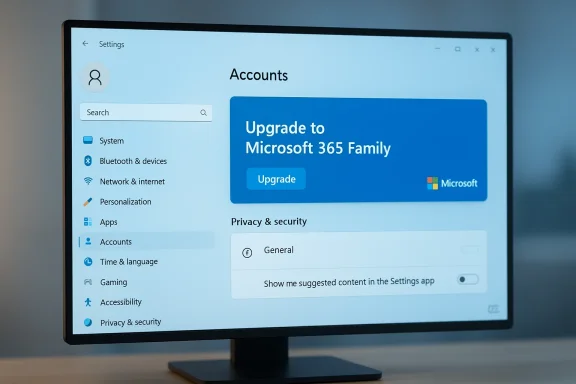
Microsoft has quietly shipped a maintenance-focused Beta Channel update — Windows 11 Insider Preview Build 26220.7859 (KB5077223) — that pairs a handful of reliability fixes with a notable user-facing test: a Microsoft 365 upgrade prompt surfaced in the Settings app for some Microsoft 365 Family subscribers. The flight is light on features, but the appearance of subscription promotion inside Settings > Accounts has reignited debate over where product marketing belongs in the OS and how admins and users can control it.
Microsoft delivered Build 26220.7859 to the Beta Channel as an enablement-package style update that targets Windows 11, version 25H2. The company is using the familiar Controlled Feature Rollout (CFR) model: platform binaries are pushed broadly while new UI experiences and other user-facing features are gated server-side and rolled out to subsets of Insiders — typically those who have enabled the Get the latest updates as soon as they’re available toggle. That means simply installing the KB5077223 package doesn't guarantee you will immediately see every change; some experiences are gradually switched on from Microsoft's servers.
The official changelog emphasizes reliability improvements and a handful of targeted fixes. The only explicitly called-out novelty is the Microsoft 365 upgrade suggestion for Family-plan subscribers, surfaced as suggested content inside the Settings app. Microsoft also points to an in-OS opt-out for the suggestion: disabling Show me suggested content in the Settings app will remove the prompt from Settings.
For Insiders and administrators, the guiding principle remains the same: treat CFR-driven UI experiments as tests, not permanent changes. If you manage devices, assume new prompts may appear in Settings and build validation and policy checks into your test plans before broader rollouts. For individuals, the privacy/general toggle offers a one-click remedy.
In short: the engineering fixes are welcome; the commercial test is small but strategically significant. Keep an eye on rollout scale and telemetry disclosures — and, if you’d rather not be nudged, the toggle in Privacy & security > General is a simple and supported way to keep Settings focused on settings.
Source: Neowin Windows 11 Beta build 26220.7859 arrives with a new Microsoft 365 upgrade prompt in Settings
 Background / Overview
Microsoft delivered Build 26220.7859 to the Beta Channel as an enablement-package style update that targets Windows 11, version 25H2. The company is using the familiar Controlled Feature Rollout (CFR) model: platform binaries are pushed broadly while new UI experiences and other user-facing features are gated server-side and rolled out to subsets of Insiders — typically those who have enabled the Get the latest updates as soon as they’re available toggle. That means simply installing the KB5077223 package doesn't guarantee you will immediately see every change; some experiences are gradually switched on from Microsoft's servers.The official changelog emphasizes reliability improvements and a handful of targeted fixes. The only explicitly called-out novelty is the Microsoft 365 upgrade suggestion for Family-plan subscribers, surfaced as suggested content inside the Settings app. Microsoft also points to an in-OS opt-out for the suggestion: disabling Show me suggested content in the Settings app will remove the prompt from Settings.
What’s included in Build 26220.7859 (KB5077223)
The new Microsoft 365 upgrade prompt
- Microsoft 365 Family subscribers who are part of the gradual rollout may see an option to upgrade to a different Microsoft 365 plan on the Accounts page within Settings.
- The item appears as a Suggested content tile (the same mechanism that shows tips and promotional tiles in Settings).
- Microsoft documents an explicit opt-out: users can hide this content by turning off Show me suggested content in the Settings app under Settings > Privacy & security > General.
Reliability fixes and minor improvements
Microsoft lists the following fixes rolling out with the build:- Taskbar / System tray: Improved reliability of showing app icons when the taskbar is set to auto-hide.
- File Explorer: Corrected a bug where all open File Explorer windows and tabs could unexpectedly jump focus to Desktop or Home.
- Nearby Sharing: Increased stability when sending larger files.
- Settings: Improved reliability when configuring options in Settings > Bluetooth & Devices > Wheel.
Why the Microsoft 365 tile matters (beyond a single prompt)
On its face, the tile is a small, reversible UI nudge. But its implications are broader:- Commercialization of control surfaces: Settings is perceived by many users as the OS control plane — the place for configuration and privacy controls, not marketing. Inserting subscription upsells into that environment shifts the perception of Settings from neutral tool to a commercial surface. This is the central user-experience tension raised by the prompt.
- Server-side variability and reproducibility: Because the tile is enabled through CFR and account targeting, two Beta Channel Insiders on identical builds may see different behavior. That complicates helpdesk troubleshooting and enterprise testing, and makes community reporting inconsistent unless the rollout is carefully tracked. Microsoft explicitly warns that CFR means features will ramp to subsets of Insiders first.
- Privacy and signal usage questions: Suggested content in Settings is controlled via privacy switches — the official guidance confirms you can disable suggested content — but it’s reasonable to ask what signals (account type, subscription state, device telemetry) drive which suggestions appear. Microsoft’s published privacy controls allow disabling suggested content, and Microsoft Learn documents the Group Policy and MDM options to suppress consumer experiences for managed fleets. Still, the specific heuristics Microsoft uses to choose recipients are not public, so there is a legitimate demand for transparency.
- Enterprise and admin consequences: Organizations that expect a non-commercial control plane will need to test how this pattern scales and decide whether to block these signals via policy. Microsoft provides Group Policy and MDM hooks that suppress many consumer experiences, but those controls are broad and can have side effects — administrators should validate any policy before deploying widely.
The opt-out and administrative controls — practical guidance
If you see the Microsoft 365 suggestion and prefer not to, there are multiple ways to remove it depending on your role and environment.For individual users — quick steps
- Open Settings (Win + I).
- Navigate to Privacy & security > General.
- Toggle Show me suggested content in the Settings app to Off.
For IT admins and power users — system-wide options
- Group Policy (Pro/Education/Enterprise)
- Path: Computer Configuration → Administrative Templates → Windows Components → Cloud Content.
- Policy: Turn off Microsoft consumer experiences (or related ADMX entries in CloudContent). Enabling this policy suppresses a variety of Microsoft consumer/advertising surfaces, including suggestion content in many cases. Use this to block the behavior across managed fleets, but test carefully because the policy is broad.
- Registry (all editions)
- Many community guides document registry keys under
HKEY_CURRENT_USER\Software\Microsoft\Windows\CurrentVersion\ContentDeliveryManager(for per-user controls) or policy keys underHKEY_LOCAL_MACHINE\SOFTWARE\Policies\Microsoft\Windows\CloudContent(for enforced settings). Keys likeContentDeliveryAllowedandDisableWindowsConsumerFeatureshave been used to suppress recommended content and consumer experiences. Back up the registry before making changes and validate behavior after reboot/sign-out. - MDM (Intune and other platforms)
- Microsoft’s Policy CSPs include experience controls — admins can set the relevant Experience/CloudContent policies via MDM to suppress consumer experiences across devices managed by an organization. Refer to your management platform’s policy catalog for the precise CSP or configuration path.
Security, privacy, and telemetry considerations
Microsoft’s suggested content infrastructure is designed to surface in-context recommendations, which can be helpful for feature discovery and troubleshooting tips. The company provides explicit privacy toggles and management controls to disable those suggestions, but a few practical concerns remain for users and administrators.- Turning off suggested content in Settings is a demonstrated, supported control; Microsoft documents that action in its privacy settings guidance. That reduces the practical risk for individual users who want a clean, non-promotional Settings experience.
- The rollout model — account- and server-side gating — means Microsoft may target suggestions using account signals (for example, whether an account is on Microsoft 365 Family) and device telemetry. While it’s reasonable to expect some combination of account and device signals is involved, the exact signal set and thresholds are not public. Where we make that inference, note it is an inference based on how CFR and personalization systems typically operate; Microsoft’s public notes do not enumerate every signal. Treat claims about the internal heuristics as plausible but not verified. Flag: unverifiable without internal Microsoft documentation.
- Enterprise controls exist but tend to be coarse. The Turn off Microsoft consumer experiences policy blocks a broad class of promotional surfaces; that may be appropriate for organizations but will also remove some consumer-facing conveniences for users where those are beneficial. Test before mass-enforcing.
How this fits into Microsoft’s broader pattern
The Settings prompt is not a one-off. Over recent Windows releases, Microsoft has increasingly experimented with surfacing subscription and Store content in OS-level surfaces: setup flows, the Start menu, and Settings have all been used to promote apps, services, and subscription tiers. The 26220.7859 flight is consistent with that pattern — but it also includes the company’s nod to user control: explicit toggles and policy settings to remove suggestions. This dual approach (experiment + opt-out) is typical of Microsoft’s Insider-driven feature discovery model.For Insiders and administrators, the guiding principle remains the same: treat CFR-driven UI experiments as tests, not permanent changes. If you manage devices, assume new prompts may appear in Settings and build validation and policy checks into your test plans before broader rollouts. For individuals, the privacy/general toggle offers a one-click remedy.
Testing recommendations for Insiders and admins
If you’re testing Build 26220.7859 or preparing to deploy updates that include it, follow a short checklist to validate both the reliability fixes and the presence or absence of the Microsoft 365 tile.- Check your build and update state:
- Settings → System → About — confirm Build 26220.7859 and that KB5077223 is installed.
- If you are an individual Insider:
- Toggle the CFR opt-in: Settings → Windows Update → turn on Get the latest updates as soon as they’re available to increase the chance of seeing CFR-enabled experiences. Remember that even with the toggle on, not every CFR feature is visible to every device immediately.
- If you manage devices:
- Pilot the update on representative hardware and with representative account types (personal Microsoft accounts, organization-managed AAD accounts, Microsoft 365 Family subscriptions) to understand who sees the prompt.
- Validate Group Policy or MDM settings (CloudContent policies) in a pilot group before organization-wide deployment.
- Test the reliability fixes:
- Reproduce scenarios that exposed the flaky behavior before the update: File Explorer tab focus transitions, taskbar auto-hide icon visibility, and large-file Nearby Sharing transfers. Log results and file Feedback Hub reports if issues persist.
Critical analysis — strengths, risks, and what to watch
Strengths
- The build addresses real, high-frequency reliability complaints that matter to everyday usage: taskbar icon visibility and File Explorer focus jumps are annoyances that degrade productivity. Tackling these in smaller, targeted maintenance flights is the pragmatic approach many Insiders prefer.
- Microsoft retained an explicit, discoverable opt-out for suggested content. That preserves user agency and keeps the change reversible without deep technical work. For everyday users, a few taps in Settings removes the tile.
Risks and concerns
- The main risk is perceived erosion of OS neutrality. When Settings becomes a vector for upsells, trust frays: users may wonder whether control surfaces are being used to influence purchasing behavior. Even a small, reversible tile can feel like an encroachment if the pattern repeats and spreads.
- The server-side, account-targeted rollout complicates reproducibility and troubleshooting. Administrators and support teams need to be aware that not all devices will show the same UI at the same time — that can make bug reports and helpdesk guidance inconsistent.
- The opaque nature of targeting heuristics invites privacy scrutiny. While Microsoft provides a switch to disable suggested content, the lack of published detail about which signals prompt which suggestions leaves room for questions. Any inference about telemetry or account signals should be treated cautiously unless Microsoft publishes specifics. Flag: unverifiable without internal documentation.
Bottom line
Windows 11 Build 26220.7859 (KB5077223) is a compact maintenance flight with practical bug fixes and one user-facing experiment: a Microsoft 365 upgrade tile appearing as suggested content on the Accounts page for some Microsoft 365 Family subscribers. The update underscores two parallel truths about modern Windows development: Microsoft is still iterating on reliability issues reported by Insiders, and the company continues to treat the OS as a surface for controlled experiments — including commercial ones — delivered via server-side rollouts. Users can remove the suggestion through Settings > Privacy & security > General or, for managed environments, via Group Policy or MDM policies. Administrators should pilot the update and relevant policies before wider deployment, and everyone should treat CFR experiences as staged experiments rather than guaranteed platform changes.In short: the engineering fixes are welcome; the commercial test is small but strategically significant. Keep an eye on rollout scale and telemetry disclosures — and, if you’d rather not be nudged, the toggle in Privacy & security > General is a simple and supported way to keep Settings focused on settings.
Source: Neowin Windows 11 Beta build 26220.7859 arrives with a new Microsoft 365 upgrade prompt in Settings
