

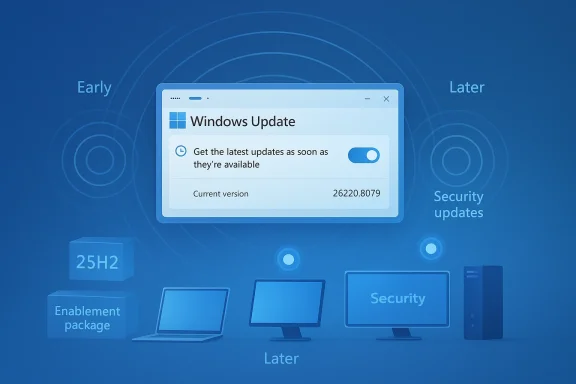
Windows 11 Insider Preview Build 26220.8079 is another sign that Microsoft’s Beta Channel has become less about dramatic one-shot changes and more about a carefully staged delivery system for Windows 11 version 25H2. The most visible message in this flight is not a flashy feature headline, but the same increasingly important control lever: the “Get the latest updates as soon as they’re available” toggle in Windows Update, which determines whether Insiders receive gradual rollouts earlier or later. That matters because Microsoft is using the Beta Channel to validate not just features, but also the machinery of phased delivery itself. (blogs.windows.com)
Microsoft’s Windows Insider program has always served two missions at once: previewing new features and pressure-testing the company’s update strategy. In 2026, the Beta Channel is doing even more of the latter. The channel is now explicitly positioned around Controlled Feature Rollout behavior, with features landing in waves, not universally, and with a user-facing toggle controlling whether Insiders are in the earliest wave or a slower one. (blogs.windows.com)
That approach is not new, but it has become more central. Microsoft Support now describes the toggle as the way to get the latest non-security and feature updates “as soon as they’re available,” while also noting that devices with the toggle on may see more restarts because they receive changes earlier. In other words, the company has turned update timing into a deliberate product choice rather than an incidental side effect. (support.microsoft.com)
Build 26220.8079 lands in a long sequence of 26220-series Beta flights during early 2026. Just weeks earlier, Build 26220.7934 emphasized batch-file security and shared audio refinements, while Build 26220.7961 highlighted Administrator Protection, File Explorer improvements, and other incremental changes. The pattern is clear: Microsoft is shipping smaller, more targeted adjustments while preserving a strong safety valve through staged rollout. (blogs.windows.com)
Equally important is the platform base. Microsoft states that Beta Channel builds in this branch are based on Windows 11, version 25H2, delivered via an enablement package. That means Insiders are not just testing isolated features; they are testing the next Windows release family, the servicing model around it, and the post-RTM behavior Microsoft intends to keep refining. (blogs.windows.com)
That is a meaningful change in how preview programs work. Traditionally, preview builds implied a more uniform set of changes: everyone on a build got roughly the same package. Now, Microsoft’s model is more fluid, with feature visibility determined by rollout rings, feature flags, and the user toggle. The result is a Beta Channel that behaves less like a monolith and more like a continuously tuned experiment. (blogs.windows.com)
This is especially important for a build line like 26220, which is clearly serving as a staging ground for Windows 11 version 25H2. Because this branch is tied to an enablement package, Microsoft can keep the underlying platform stable while shifting individual feature lights on and off. That is much easier to iterate on than shipping a giant, all-or-nothing release. (blogs.windows.com)
This matters because enterprise administrators and power users have different tolerance levels for change. Microsoft’s dual-path rollout structure gives cautious users a way to slow down, while still preserving an early-adopter lane for people who want to see what is coming sooner. It’s a compromise, but a strategically useful one. (support.microsoft.com)
That is why the Beta Channel’s practical success is about more than feature count. It’s about whether the company can keep shipping small improvements, preserve reliability, and avoid the perception that preview users are unpaid QA on a moving target. The more Microsoft leans into measured rollout, the more those expectations matter. (support.microsoft.com)
Build 26220.7961 then added Administrator Protection, File Explorer voice typing during renaming, reduced white flashes in File Explorer, and improved reliability for unblocking internet-downloaded files. Those are not blockbuster features, but they are exactly the sort of refinements that matter in day-to-day use. They also reveal where Microsoft sees friction in the current Windows experience. (blogs.windows.com)
This also shapes how Insiders should interpret build numbers. A new build does not necessarily mean a new platform architecture; it can simply mean new feature states, servicing changes, or staged improvements layered over the same core. That distinction is easy to miss, but it is central to understanding modern Windows development. (blogs.windows.com)
For consumers, that usually translates into quicker access to improvements with less disruption. For enterprises, the picture is more nuanced: the same mechanism can be beneficial, but only if admin policy, validation, and support processes are ready for more frequent feature activation. (support.microsoft.com)
The upside for consumers is obvious. Earlier access means earlier visibility into File Explorer tweaks, accessibility refinements, and interface adjustments that may eventually reach the stable channel. The downside is that the early path may be rougher, with behavior changing under your feet as Microsoft adjusts the rollout. (blogs.windows.com)
At the same time, the Beta Channel’s message remains clear: preview features may never reach public release, may change, and may be removed. That creates a planning challenge for IT teams that use Insiders to prepare helpdesk documentation, application compatibility checks, or user training materials. (blogs.windows.com)
That creates a balancing act. Move too slowly and Windows looks stagnant; move too quickly and it looks unreliable. The current Beta Channel strategy is Microsoft’s answer to that tension, and Build 26220.8079 is another proof point that the company is leaning into controlled acceleration rather than broad, simultaneous disruption. (blogs.windows.com)
The broader market implication is that users now judge operating systems not just by the OS they ship, but by how gracefully they evolve. Windows 11’s Insider and CFR machinery is clearly designed for that reality. (support.microsoft.com)
This also changes the psychology of participation. Users are not merely testing a finished feature; they are testing a feature’s rollout suitability. That is a subtler ask, and it arguably makes feedback more valuable because it speaks not just to whether something works, but whether it works at scale. (support.microsoft.com)
The other thing to watch is whether Microsoft expands the practical footprint of the toggle model. If more users and more organizations embrace the idea that update timing is something to manage intentionally, then the company’s continuous innovation model becomes easier to sustain. If not, the model risks feeling like a clever system that only power users fully understand. (support.microsoft.com)
Source: Microsoft - Windows Insiders Blog Announcing Windows 11 Insider Preview Build 26220.8079 (Beta Channel)
 Background
Microsoft’s Windows Insider program has always served two missions at once: previewing new features and pressure-testing the company’s update strategy. In 2026, the Beta Channel is doing even more of the latter. The channel is now explicitly positioned around Controlled Feature Rollout behavior, with features landing in waves, not universally, and with a user-facing toggle controlling whether Insiders are in the earliest wave or a slower one. (blogs.windows.com)That approach is not new, but it has become more central. Microsoft Support now describes the toggle as the way to get the latest non-security and feature updates “as soon as they’re available,” while also noting that devices with the toggle on may see more restarts because they receive changes earlier. In other words, the company has turned update timing into a deliberate product choice rather than an incidental side effect. (support.microsoft.com)
Build 26220.8079 lands in a long sequence of 26220-series Beta flights during early 2026. Just weeks earlier, Build 26220.7934 emphasized batch-file security and shared audio refinements, while Build 26220.7961 highlighted Administrator Protection, File Explorer improvements, and other incremental changes. The pattern is clear: Microsoft is shipping smaller, more targeted adjustments while preserving a strong safety valve through staged rollout. (blogs.windows.com)
Equally important is the platform base. Microsoft states that Beta Channel builds in this branch are based on Windows 11, version 25H2, delivered via an enablement package. That means Insiders are not just testing isolated features; they are testing the next Windows release family, the servicing model around it, and the post-RTM behavior Microsoft intends to keep refining. (blogs.windows.com)
Why the toggle matters
The toggle is not cosmetic. It decides whether an Insider is among the first to see features that Microsoft is gradually rolling out, or whether those features arrive later once Microsoft considers them ready for broader exposure. That creates two parallel experiences inside the same channel, which is a very Microsoft way of balancing eagerness and caution. (blogs.windows.com)- Toggle on means earlier access to staggered features.
- Toggle off means slower arrival, but still eventual delivery.
- Both states still receive security updates normally.
- Managed devices can have the behavior controlled by policy.
- Earlier access may come with additional restarts and instability. (support.microsoft.com)
What Build 26220.8079 Represents
The key story in Build 26220.8079 is not a single headline feature, at least from the announcement pattern Microsoft has been using in this branch. It is the continuing normalization of gradual rollout as the default operating model for Beta Channel experimentation. Microsoft is training Insiders to expect that what they see today may not be what their neighbor on the same build sees today. (blogs.windows.com)That is a meaningful change in how preview programs work. Traditionally, preview builds implied a more uniform set of changes: everyone on a build got roughly the same package. Now, Microsoft’s model is more fluid, with feature visibility determined by rollout rings, feature flags, and the user toggle. The result is a Beta Channel that behaves less like a monolith and more like a continuously tuned experiment. (blogs.windows.com)
A release built around pacing
Microsoft’s announcement language, as reflected in recent Beta posts, consistently splits changes into two buckets: those gradually rolled out to toggle-on Insiders and those rolling out to everyone in the channel. That split lets the company A/B test features against real-world usage while preserving a cleaner experience for users who prefer less churn. (blogs.windows.com)This is especially important for a build line like 26220, which is clearly serving as a staging ground for Windows 11 version 25H2. Because this branch is tied to an enablement package, Microsoft can keep the underlying platform stable while shifting individual feature lights on and off. That is much easier to iterate on than shipping a giant, all-or-nothing release. (blogs.windows.com)
- Build 26220 is part of the 25H2 Beta track.
- Rollout speed is now user-influenced through Windows Update settings.
- Feature exposure can differ even among devices running the same build number.
- Staged delivery reduces blast radius when something goes wrong.
- Feedback loops become more actionable because rollout scope is smaller. (blogs.windows.com)
The Beta Channel’s New Normal
Microsoft’s current Beta Channel philosophy reflects a broader shift in Windows servicing. The company wants Windows 11 to feel more continuous, more modular, and less tied to the old expectation of a single annual transformation. That makes the Beta Channel less like a “preview of next year” and more like a test harness for ongoing product evolution. (support.microsoft.com)This matters because enterprise administrators and power users have different tolerance levels for change. Microsoft’s dual-path rollout structure gives cautious users a way to slow down, while still preserving an early-adopter lane for people who want to see what is coming sooner. It’s a compromise, but a strategically useful one. (support.microsoft.com)
The importance of incremental trust
Each staged preview builds trust in the update system itself. If Microsoft can prove that toggle-on users are getting early features without creating unacceptable instability, it strengthens the argument for more frequent innovation on Windows. If not, the toggle becomes a warning label instead of a value proposition. (support.microsoft.com)That is why the Beta Channel’s practical success is about more than feature count. It’s about whether the company can keep shipping small improvements, preserve reliability, and avoid the perception that preview users are unpaid QA on a moving target. The more Microsoft leans into measured rollout, the more those expectations matter. (support.microsoft.com)
What Changed in the Branch Leading Up to 26220.8079
Recent 26220 flights show Microsoft using Beta as a place to tune both obvious UI behavior and deeper platform mechanics. Build 26220.7934 introduced enhanced security controls for batch files and CMD scripts, and also expanded shared audio controls with independent sliders for two listeners. That mix is instructive: Microsoft is pairing low-level hardening with consumer-facing convenience. (blogs.windows.com)Build 26220.7961 then added Administrator Protection, File Explorer voice typing during renaming, reduced white flashes in File Explorer, and improved reliability for unblocking internet-downloaded files. Those are not blockbuster features, but they are exactly the sort of refinements that matter in day-to-day use. They also reveal where Microsoft sees friction in the current Windows experience. (blogs.windows.com)
The pattern behind the patchwork
The takeaway is that Beta Channel innovation is being spread across many small fixes rather than a few dramatic announcements. That suggests Microsoft values continuous polish almost as much as new capability, especially in the 25H2 line where the base OS is already mature. (blogs.windows.com)- Security is being treated as a product feature, not just a compliance layer.
- Accessibility and productivity tools continue to get incremental attention.
- File Explorer remains a major focus area for performance and polish.
- Audio and sharing continue to reflect real-world collaboration scenarios.
- The build cadence suggests Microsoft is iterating toward stability, not spectacle. (blogs.windows.com)
Why the 25H2 Base Matters
The repeated reminder that Beta builds are based on Windows 11, version 25H2 via an enablement package is more than release-note boilerplate. It tells us Microsoft wants a lighter-weight transition path, one that can activate features without forcing a deep platform reboot. That gives the company flexibility while reducing some of the disruption associated with major-version updates. (blogs.windows.com)This also shapes how Insiders should interpret build numbers. A new build does not necessarily mean a new platform architecture; it can simply mean new feature states, servicing changes, or staged improvements layered over the same core. That distinction is easy to miss, but it is central to understanding modern Windows development. (blogs.windows.com)
Enablement packages in practice
Enablement packages are valuable because they let Microsoft “flip on” features that have already been staged in the codebase. That can shorten delivery time and reduce upgrade pain, but it also means the actual user experience depends heavily on Microsoft’s feature flags and rollout controls. (blogs.windows.com)For consumers, that usually translates into quicker access to improvements with less disruption. For enterprises, the picture is more nuanced: the same mechanism can be beneficial, but only if admin policy, validation, and support processes are ready for more frequent feature activation. (support.microsoft.com)
Consumer Impact
For enthusiasts, Build 26220.8079 reinforces a simple message: if you want the newest features first, you need to actively opt into being early. That sounds obvious, but it is a meaningful shift from older Windows eras, when preview participation felt more binary and less personalized. (support.microsoft.com)The upside for consumers is obvious. Earlier access means earlier visibility into File Explorer tweaks, accessibility refinements, and interface adjustments that may eventually reach the stable channel. The downside is that the early path may be rougher, with behavior changing under your feet as Microsoft adjusts the rollout. (blogs.windows.com)
What typical Insiders should expect
If you leave the toggle on, you should expect a more volatile but more current Windows experience. If you leave it off, you still get the build, but you’re more likely to receive changes later and with fewer surprises. That is a pretty elegant compromise for hobbyists, testers, and power users who want some control without leaving the Insider ecosystem. (support.microsoft.com)- Early adopters get more immediate access.
- Casual testers can keep the toggle off for a calmer ride.
- UI refinements may show up before deeper platform changes.
- Behavior can differ from one device to another on the same build.
- Feedback Hub remains central to influencing what sticks. (blogs.windows.com)
Enterprise Impact
Enterprises are the audience that makes this rollout model truly interesting. Microsoft’s support guidance notes that the toggle can be managed on managed devices, which means IT can align preview behavior with policy rather than leaving it to individual users. That is essential for organizations that want visibility without chaos. (support.microsoft.com)At the same time, the Beta Channel’s message remains clear: preview features may never reach public release, may change, and may be removed. That creates a planning challenge for IT teams that use Insiders to prepare helpdesk documentation, application compatibility checks, or user training materials. (blogs.windows.com)
Policy, validation, and timing
For administrators, the biggest benefit is timing control. The biggest risk is assuming a preview feature’s current behavior is a contract rather than a test. That is why Microsoft’s staged language is so important; it tells IT to treat these features as provisional assets, not guaranteed roadmap items. (support.microsoft.com)- Managed devices can be governed by policy.
- Validation windows may need to be longer because rollout states differ.
- Training materials should avoid overcommitting to preview behavior.
- Support teams should track whether toggle-on users are seeing a different feature set.
- Application testing benefits from closer alignment with the 25H2 branch. (support.microsoft.com)
Competitive Positioning
Microsoft’s staged update model also has competitive implications. By making Windows feel more continuously improved, the company is borrowing some of the cadence advantages that cloud-first products have long enjoyed. The difference is that Windows still has to support a huge install base, diverse hardware, and enterprise governance at the same time. (support.microsoft.com)That creates a balancing act. Move too slowly and Windows looks stagnant; move too quickly and it looks unreliable. The current Beta Channel strategy is Microsoft’s answer to that tension, and Build 26220.8079 is another proof point that the company is leaning into controlled acceleration rather than broad, simultaneous disruption. (blogs.windows.com)
Why rivals should care
Even when individual features are small, the release process itself can become a competitive differentiator. If Windows can deliver visible improvements more frequently without major regressions, that strengthens its position against platforms that may be simpler but less flexible for enterprise and power users. (support.microsoft.com)The broader market implication is that users now judge operating systems not just by the OS they ship, but by how gracefully they evolve. Windows 11’s Insider and CFR machinery is clearly designed for that reality. (support.microsoft.com)
The Role of Feedback Hub
Microsoft continues to position Feedback Hub as the mechanism by which preview users can shape the final product. That sounds routine, but it matters more in a staged rollout world, where feedback from a small cohort can determine whether a feature ramps up or stalls. (blogs.windows.com)This also changes the psychology of participation. Users are not merely testing a finished feature; they are testing a feature’s rollout suitability. That is a subtler ask, and it arguably makes feedback more valuable because it speaks not just to whether something works, but whether it works at scale. (support.microsoft.com)
Feedback as a gating mechanism
When Microsoft says features are gradually rolled out while it monitors feedback, it is implicitly saying that feedback can gate the next step. That makes Insider engagement part of the product’s delivery pipeline rather than a side channel. (blogs.windows.com)- Bug reports can affect rollout speed.
- Usability complaints can trigger design refinements.
- Localization issues can delay wider deployment.
- Telemetry and feedback work together in the decision to expand reach.
- User comments may influence whether a concept survives beyond Insider builds. (blogs.windows.com)
Strengths and Opportunities
The strongest thing about Build 26220.8079 is that it fits a coherent long-term Windows strategy rather than feeling like a one-off patch. Microsoft is using the Beta Channel to refine rollout mechanics, sharpen UX details, and validate a faster innovation loop without abandoning caution. That gives both enthusiasts and IT teams clearer expectations, even if it also asks them to be patient with incomplete features. (blogs.windows.com)- More controlled innovation through gradual rollout.
- Better alignment with Windows 11 version 25H2.
- Earlier access for Insiders who want it.
- Less disruption for users who leave the toggle off.
- Improved confidence in staged feature delivery.
- Useful enterprise policy controls on managed devices.
- Incremental UX polish that improves day-to-day Windows usability. (blogs.windows.com)
Risks and Concerns
The biggest concern is that staged rollout can make Windows feel inconsistent, even within the same build number. That can frustrate testers who expect reproducibility, and it can complicate support for organizations trying to validate behavior across a fleet. The model is smart, but it is also inherently messy. (blogs.windows.com)- Feature inconsistency across supposedly identical builds.
- Unclear expectations for casual Insiders.
- Extra restarts for users on earlier rollout paths.
- Preview features may disappear or change before release.
- Enterprise validation gets harder when states differ by device.
- Localization gaps may affect active-development features.
- Feedback fatigue can set in if changes feel too fragmented. (blogs.windows.com)
Looking Ahead
The next phase for the 26220 line will likely be less about raw feature count and more about which features survive the rollout funnel. Microsoft has made clear that preview features can be changed, removed, or delayed, so the real question is which experiments become durable parts of the 25H2 story. That is especially true now that the Beta Channel has become a proving ground for rollout strategy itself. (blogs.windows.com)The other thing to watch is whether Microsoft expands the practical footprint of the toggle model. If more users and more organizations embrace the idea that update timing is something to manage intentionally, then the company’s continuous innovation model becomes easier to sustain. If not, the model risks feeling like a clever system that only power users fully understand. (support.microsoft.com)
- Which 26220 features stick and move closer to broad release.
- Whether more admin controls appear for staged feature delivery.
- How much variance Microsoft tolerates between toggle-on and toggle-off devices.
- Whether 25H2 remains primarily an enablement-based evolution.
- How quickly Insider feedback leads to visible changes in subsequent flights. (blogs.windows.com)
Source: Microsoft - Windows Insiders Blog Announcing Windows 11 Insider Preview Build 26220.8079 (Beta Channel)
