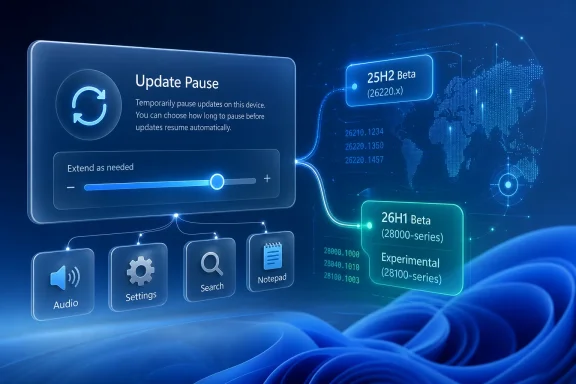
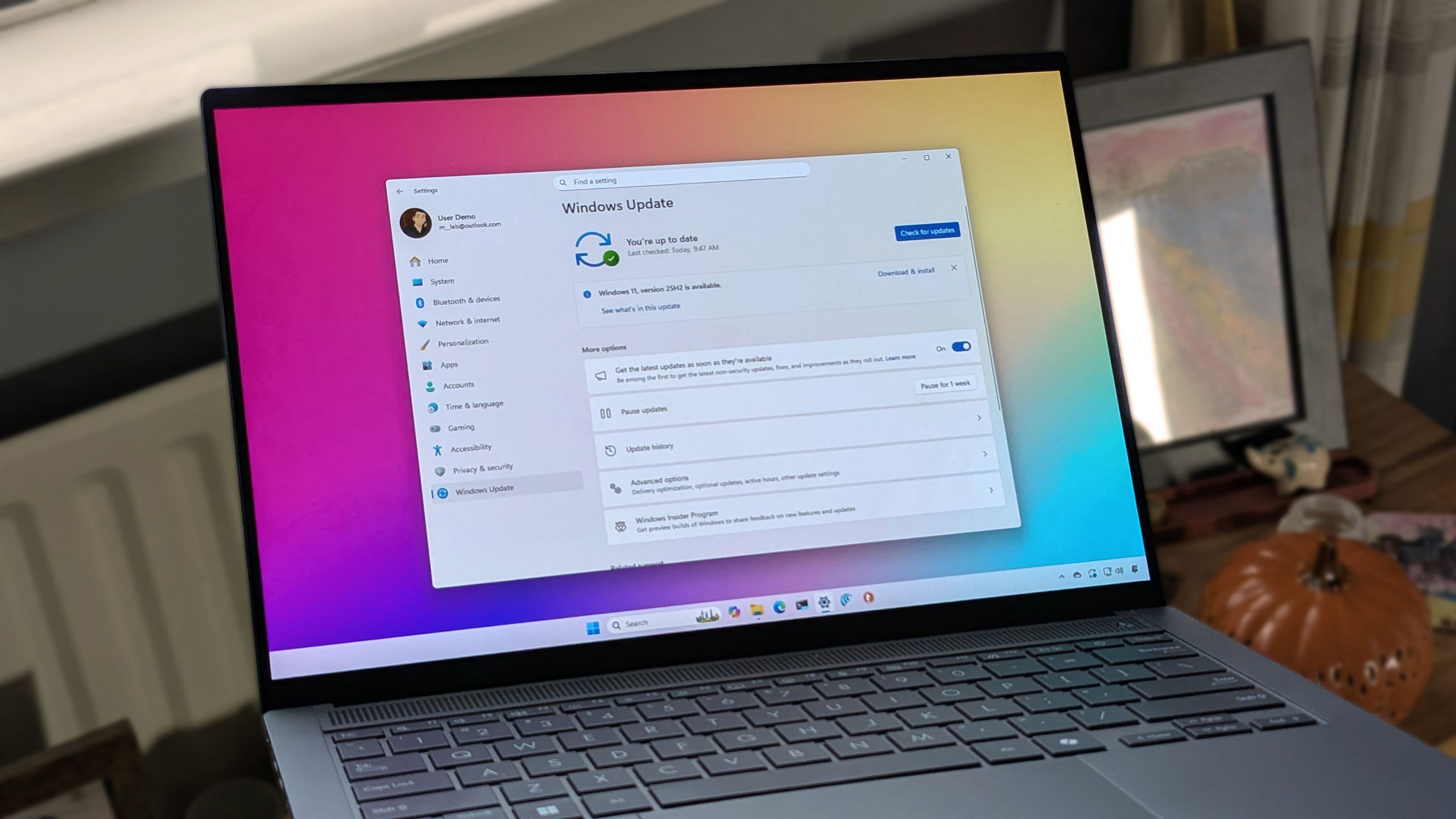
Microsoft released Windows 11 Insider Preview Build 26220.8575 to the Beta Channel on June 8, 2026, adding the ability for testers to extend Windows Update pauses repeatedly instead of being forced back onto Microsoft’s update schedule after a fixed pause window expires. The change looks small in a release note, but it pokes directly at one of the oldest arguments in modern Windows: who gets the final say over when a PC changes. For years, Microsoft has treated update timing as a security problem first and a user-control problem second. This build suggests Redmond is at least testing a different bargain.
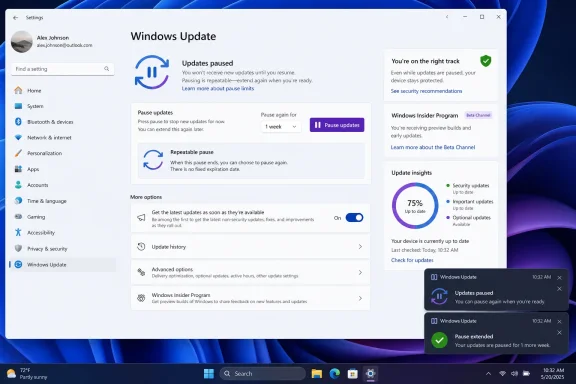
The headline is simple: Windows 11 Insiders in the Beta Channel can now extend update pauses “as many times as you need.” In practical terms, the old pause model remains recognizable, but the hard stop becomes less absolute. Users still pause updates from Windows Update, still work within pause intervals, and still see Microsoft’s preferred route toward installation. What changes is the moment when Windows previously said, in effect, you have delayed long enough.
That moment has mattered more than Microsoft often admits. For casual users, a forced update may be a nuisance. For developers, admins, testers, streamers, lab operators, travelers, or anyone depending on a machine in a known-good state, it can become a productivity risk. The issue is not that updates are unnecessary; it is that Windows often acts as though the timing cost is negligible.
Build 26220.8575 does not abolish Windows Update pressure. It does not turn Windows 11 into a fully manual-update operating system. It does, however, acknowledge that a pause button with an expiration trap has never felt like real control to the people most likely to understand what updates can break.
That is why this Beta Channel build deserves more attention than a typical maintenance flight. The feature is not flashy, not AI-branded, and not a redesign of the Start menu. It is a change to the trust relationship between Windows and the person sitting in front of it.
That model made sense from Microsoft’s perspective. Unpatched Windows machines are not just a problem for their owners. They can become part of larger security events, botnets, ransomware outbreaks, and enterprise compliance nightmares. Microsoft has spent two decades learning that optional patching, left entirely to user discipline, produces ugly outcomes.
But the rigid pause limit also made a blunt assumption: that Microsoft’s update cadence is almost always more rational than the user’s local context. That is not always true. A user may be traveling with limited connectivity. A developer may be holding a known configuration for a release candidate. A small business may be waiting for a line-of-business vendor to certify a patch. An enthusiast may simply want to avoid changing a gaming or workstation setup before a major task.
The old pause wall treated those situations as temporary exceptions. Build 26220.8575 treats them more like legitimate operating modes. That distinction matters.
Microsoft is not saying users should remain unpatched indefinitely. Nor should they. But allowing repeated pause extensions concedes that “secure by default” does not have to mean “inflexible by design.” The better Windows Update becomes, the less it should need coercion as its main enforcement mechanism.
That caveat is not boilerplate. Microsoft increasingly uses the Insider Program not only to test code quality, but to test user tolerance. New Windows behaviors arrive in controlled rings, telemetry speaks, feedback accumulates, and only then does the company decide whether a change is worth pushing into the wider installed base.
In that sense, unlimited pause extension is both a feature and a referendum. Microsoft is asking whether more visible user control reduces frustration without causing unacceptable update deferral. If telemetry shows that users pause forever and create support or security drag, the company could still adjust the model. If the feature proves popular without obvious harm, it becomes a strong candidate for broader release.
The Beta Channel placement is notable because this is not a wild Canary experiment. Beta builds are still previews, but they generally sit closer to the version of Windows that ordinary users may eventually see. Build 26220.8575 is tied to Windows 11 version 25H2 development, which means this is not merely a speculative UI sketch.
The safer reading is that Microsoft is seriously exploring a softer Windows Update posture. The bolder reading is that the company has realized the Windows 11 audience has grown tired of being managed like a risky endpoint even when the machine is a personal PC.
For IT administrators, the complication is familiar. They already think in rings, deferrals, deployment windows, rollback plans, known issues, and compatibility blocks. Enterprise tooling exists because businesses cannot run on hope. Windows Update for Business, Intune, WSUS, Autopatch, and Group Policy all reflect the same truth: update timing is operational policy.
Consumers and enthusiasts have lived with a thinner version of that control. Windows 11 Home and Pro users get a Settings page, a pause menu, active hours, and a handful of restart notifications. That is enough for many households, but it has never been enough for the technically literate user who understands that a driver change or cumulative update can alter performance, stability, or peripheral behavior.
The new pause extension feature narrows that gap slightly. It gives power users a simpler version of what enterprise administrators already demand: the ability to decide that now is not the window. That does not make a home PC equivalent to a managed fleet, but it recognizes that unmanaged does not mean unserious.
There is also a psychological shift here. Windows Update has often been designed around preventing bad user decisions. Build 26220.8575 quietly admits that preventing bad vendor timing is also part of the job.
Microsoft knows this better than anyone. Windows remains one of the world’s largest attack surfaces, and patch adoption is not an abstract metric. When vulnerabilities are exploited in the wild, every unpatched system becomes part of the blast radius. From that view, making update pauses easier to renew can look like a step backward.
But the argument is not as one-sided as it appears. Forced update timing can also create risk. A badly timed reboot can interrupt forensic work, corrupt a fragile workflow, break a production-adjacent workstation, or push a problematic driver onto hardware that was stable yesterday. Users who fear Windows Update may disable services, use unsupported workarounds, block network access, or cling to outdated builds in more dangerous ways than simply pressing Pause.
A visible, supported pause extension mechanism may be safer than the underground alternatives. When users are given a clean control, Microsoft can still message risk, surface pending security updates, and preserve telemetry. When users resort to registry hacks and service tampering, Microsoft loses both influence and visibility.
That is the real trade. Unlimited pause extension is not a declaration that patching is optional. It is an attempt to keep update deferral inside the operating system’s own guardrails.
Those fixes matter, especially to Insiders who live on preview code and absorb the breakage before everyone else. Audio failures are not cosmetic. Settings crashes are not minor when Settings is now the control center for so much of Windows. Search and Notepad hangs are exactly the kind of low-level friction that makes a system feel unreliable even when the kernel is doing its job.
Still, the update pause change is the part with broader meaning. Bug fixes improve this build. Update control changes the relationship between builds. It affects whether users feel comfortable taking updates in the first place.
That matters because Microsoft’s Windows strategy depends on a steady servicing rhythm. Windows 11 is not a boxed product that changes every few years; it is a living platform that shifts constantly. If users mistrust that motion, they resist it. If they feel some agency over the motion, they may accept more of it.
The paradox is that letting people delay updates can make them less hostile to updating. A door that opens from the inside feels less like a cage.
Underneath those complaints is a consistent theme: Windows users do not want to be surprised by their own PCs. They can tolerate patches. They can tolerate restarts. They can even tolerate the occasional flawed update if they believe they had a fair chance to prepare. What they resent is the sense that the operating system is negotiating with Microsoft first and the owner second.
Build 26220.8575 speaks directly to that resentment. It does not solve every update complaint, but it removes one of the most symbolic constraints. If the pause can be extended again, the user has not merely postponed Microsoft’s decision; the user has made one.
That is why the feature will likely be welcomed by enthusiasts even if many never use it indefinitely. Control settings often matter most as reassurance. The fact that the exit exists changes how people feel about entering the room.
For sysadmins, the reaction will be more mixed. On managed devices, policy should still dominate. Organizations do not want every user freelancing patch decisions on machines subject to compliance rules. But admins also understand staged deployment, and many will see the consumer-side change as a belated admission that timing is not a trivial detail.
This is partly because PCs have changed roles. A home Windows machine may be a gaming rig, a remote-work endpoint, a creator workstation, a school device, a home lab server, or all of those at once. The old consumer assumption — that a PC is idle often enough and low-stakes enough for automated maintenance to dominate — is increasingly shaky.
Remote work made this obvious. So did cloud development, online exams, livestreaming, creator workflows, and small businesses running on consumer hardware. The boundary between “personal PC” and “important endpoint” is porous now. Windows Update policy has been slow to reflect that.
Unlimited pause extensions are a crude but meaningful response. They do not ask the user to define deployment rings or maintenance windows. They simply make the existing pause control less paternalistic. In consumer UX terms, that is probably the right level of complexity.
Microsoft still has to avoid turning Windows Update into a choose-your-own-risk maze. Most people should install updates promptly. Most people should not be invited to micromanage servicing. But the users who go looking for pause controls are already making an intentional decision, and Windows can afford to treat them as adults.
The best version of this feature would not merely allow repeated deferrals. It would distinguish risk levels. A critical security patch should not be visually equivalent to a minor feature tweak. A firmware update should not be buried under the same vague phrasing as a cumulative quality update. Driver updates should be identified clearly enough that users can make informed choices.
Microsoft has already been moving in this direction by improving update presentation in Insider builds. The company has experimented with clearer grouping of available updates and more descriptive driver labeling. Those changes belong in the same conversation as unlimited pause extensions because control without information is only half a feature.
There is a trust opportunity here. Windows Update could become less of a black box and more of a dashboard. Users would still be nudged toward staying current, but the nudge would be accompanied by a clearer explanation of what is waiting and why it matters.
That is harder than it sounds. Too much detail overwhelms normal users. Too little detail enrages power users. Microsoft has spent years trying to find a middle path, and Windows 11 has not always landed gracefully. Build 26220.8575 is one more attempt to redraw that line.
Reputation lags reality. Even when Microsoft improves update reliability, users remember the one time a patch derailed a workday. They remember the reboot before a presentation. They remember the GPU driver that changed behavior. They remember the cumulative update that failed three times and offered a cryptic error code.
That memory shapes how people interpret every update control. A pause extension is not seen as a convenience; it is seen as protection. Microsoft may view Windows Update as a security pipeline. Many users view it as an unpredictable maintenance event that must be managed defensively.
This is why small UX changes can carry oversized meaning. A calendar picker, a clearer update title, a better restart warning, or a repeatable pause option all tell users that Microsoft is listening to the complaints beneath the memes. The company does not need to surrender update discipline to improve the relationship. It needs to stop acting surprised that users want leverage.
Build 26220.8575 does not erase the old reputation. But it chips away at the assumption that Windows Update is a one-way command channel.
For Insiders, repeated pause extensions may be especially useful around known-bad flights. If a build is causing audio failures, Search hangs, Settings crashes, or other regressions, the ability to hold position can prevent a test machine from becoming a moving target. That is valuable for bug reporting as much as for convenience. Stable reproduction matters.
At the same time, Insider machines are not meant to be frozen forever. The whole program depends on movement. Microsoft needs testers to take builds, report issues, and validate fixes. If too many Insiders pause too aggressively, feedback quality could suffer.
That tension may explain why the feature is being tested rather than loudly celebrated. Microsoft wants to give testers relief without undermining the testing pipeline. The company is likely watching not just whether users like the feature, but how they use it.
The result could shape the final implementation. Microsoft may preserve unlimited extensions, add stronger warnings, treat some security updates differently, or vary behavior by edition and management state. The current build is a signal, not the last word.
A repeatable pause is still a pause. It exists inside Windows Update. It can be surfaced, messaged, expired, adjusted, or overridden by policy in managed environments. It is not the same as disabling the update service, blocking Microsoft servers, or using unsupported tools to strip servicing components out of the OS.
That distinction is exactly why the change is sensible. Microsoft can offer flexibility without endorsing neglect. Users can delay without breaking the servicing model. The operating system can continue to show pending updates and encourage installation. Everyone stays inside the supported path.
The danger is that some users will treat the feature as permission to ignore patching indefinitely. Microsoft will need to design against that. A machine that has missed months of security updates should not look normal. The UI should make the risk visible without becoming hysterical.
The better analogy is not a permanent off switch. It is a snooze button that can be pressed again, with the alarm still visible. That may frustrate security purists, but it is closer to how real people manage real machines.
Against that backdrop, update pause flexibility is a modest but strategically useful concession. It says that Microsoft can still move Windows aggressively while giving users more control over the timing. That matters because the company needs goodwill as it pushes Windows 11 deeper into AI features, cloud-connected services, and more frequent platform changes.
The Windows 10 transition makes this especially important. Millions of users and organizations have already had to evaluate hardware compatibility, upgrade timing, extended security options, and application readiness. A Windows 11 update model that feels less coercive may help reduce resistance among holdouts who associate newer Windows with reduced control.
Microsoft’s challenge is that it wants Windows to be both a managed service and a personal computer operating system. Those identities pull in different directions. A service wants consistency, telemetry, rapid remediation, and uniform adoption. A personal computer wants owner agency, local context, and the right to say not today.
Build 26220.8575 does not resolve that conflict. It simply moves one slider toward the owner.
The change also does not reduce the importance of updates. Security fixes, reliability improvements, and compatibility changes still need to land eventually. The feature gives users more discretion over timing, not immunity from consequences.
For enthusiasts, the value is obvious: fewer forced moments of change. For IT pros, the feature is a reminder that Microsoft is rethinking update experience across channels, even if managed environments will continue to rely on policy. For Microsoft, it is a test of whether trust can replace some amount of pressure.
The other fixes in Build 26220.8575 should not be overlooked. Audio failures, Settings instability, Search hangs, and Notepad freezes are exactly the kind of regressions that make update timing controversial in the first place. A build that both fixes those problems and gives users more ability to delay future ones is thematically tidy, whether Microsoft intended it or not.
 Microsoft Loosens the Update Leash Without Cutting It
The headline is simple: Windows 11 Insiders in the Beta Channel can now extend update pauses “as many times as you need.” In practical terms, the old pause model remains recognizable, but the hard stop becomes less absolute. Users still pause updates from Windows Update, still work within pause intervals, and still see Microsoft’s preferred route toward installation. What changes is the moment when Windows previously said, in effect, you have delayed long enough.That moment has mattered more than Microsoft often admits. For casual users, a forced update may be a nuisance. For developers, admins, testers, streamers, lab operators, travelers, or anyone depending on a machine in a known-good state, it can become a productivity risk. The issue is not that updates are unnecessary; it is that Windows often acts as though the timing cost is negligible.
Build 26220.8575 does not abolish Windows Update pressure. It does not turn Windows 11 into a fully manual-update operating system. It does, however, acknowledge that a pause button with an expiration trap has never felt like real control to the people most likely to understand what updates can break.
That is why this Beta Channel build deserves more attention than a typical maintenance flight. The feature is not flashy, not AI-branded, and not a redesign of the Start menu. It is a change to the trust relationship between Windows and the person sitting in front of it.
The 35-Day Wall Was Always a Policy Statement
Windows Update pauses have long carried a built-in ceiling. On mainstream Windows 11 systems, users could pause updates for a limited period, commonly up to five weeks, before Windows required updates to resume. Only after the device checked in and installed pending updates could the pause cycle begin again.That model made sense from Microsoft’s perspective. Unpatched Windows machines are not just a problem for their owners. They can become part of larger security events, botnets, ransomware outbreaks, and enterprise compliance nightmares. Microsoft has spent two decades learning that optional patching, left entirely to user discipline, produces ugly outcomes.
But the rigid pause limit also made a blunt assumption: that Microsoft’s update cadence is almost always more rational than the user’s local context. That is not always true. A user may be traveling with limited connectivity. A developer may be holding a known configuration for a release candidate. A small business may be waiting for a line-of-business vendor to certify a patch. An enthusiast may simply want to avoid changing a gaming or workstation setup before a major task.
The old pause wall treated those situations as temporary exceptions. Build 26220.8575 treats them more like legitimate operating modes. That distinction matters.
Microsoft is not saying users should remain unpatched indefinitely. Nor should they. But allowing repeated pause extensions concedes that “secure by default” does not have to mean “inflexible by design.” The better Windows Update becomes, the less it should need coercion as its main enforcement mechanism.
The Insider Program Becomes the Negotiating Table
It is important to keep the channel context straight. Build 26220.8575 is an Insider Preview release in the Beta Channel, not a general availability update for every Windows 11 PC. Features tested in Insider builds can change, roll out gradually, move between channels, or disappear before they reach stable releases.That caveat is not boilerplate. Microsoft increasingly uses the Insider Program not only to test code quality, but to test user tolerance. New Windows behaviors arrive in controlled rings, telemetry speaks, feedback accumulates, and only then does the company decide whether a change is worth pushing into the wider installed base.
In that sense, unlimited pause extension is both a feature and a referendum. Microsoft is asking whether more visible user control reduces frustration without causing unacceptable update deferral. If telemetry shows that users pause forever and create support or security drag, the company could still adjust the model. If the feature proves popular without obvious harm, it becomes a strong candidate for broader release.
The Beta Channel placement is notable because this is not a wild Canary experiment. Beta builds are still previews, but they generally sit closer to the version of Windows that ordinary users may eventually see. Build 26220.8575 is tied to Windows 11 version 25H2 development, which means this is not merely a speculative UI sketch.
The safer reading is that Microsoft is seriously exploring a softer Windows Update posture. The bolder reading is that the company has realized the Windows 11 audience has grown tired of being managed like a risky endpoint even when the machine is a personal PC.
Control Is Returning Because Updates Have Become More Complicated
The modern Windows update stack is no longer just a monthly patch bundle. It carries security fixes, servicing stack updates, .NET changes, drivers, firmware, feature enablement packages, Store-delivered components, AI features, and sometimes behavior changes that users did not consciously request. Microsoft has tried to make this machinery quieter, but quieter does not always mean less consequential.For IT administrators, the complication is familiar. They already think in rings, deferrals, deployment windows, rollback plans, known issues, and compatibility blocks. Enterprise tooling exists because businesses cannot run on hope. Windows Update for Business, Intune, WSUS, Autopatch, and Group Policy all reflect the same truth: update timing is operational policy.
Consumers and enthusiasts have lived with a thinner version of that control. Windows 11 Home and Pro users get a Settings page, a pause menu, active hours, and a handful of restart notifications. That is enough for many households, but it has never been enough for the technically literate user who understands that a driver change or cumulative update can alter performance, stability, or peripheral behavior.
The new pause extension feature narrows that gap slightly. It gives power users a simpler version of what enterprise administrators already demand: the ability to decide that now is not the window. That does not make a home PC equivalent to a managed fleet, but it recognizes that unmanaged does not mean unserious.
There is also a psychological shift here. Windows Update has often been designed around preventing bad user decisions. Build 26220.8575 quietly admits that preventing bad vendor timing is also part of the job.
Security Still Wins, But It No Longer Gets Every Tie
The obvious objection is security. If users can extend pauses repeatedly, some will delay important patches far longer than they should. That is not hypothetical; it is how people behave when inconvenience and invisible risk collide.Microsoft knows this better than anyone. Windows remains one of the world’s largest attack surfaces, and patch adoption is not an abstract metric. When vulnerabilities are exploited in the wild, every unpatched system becomes part of the blast radius. From that view, making update pauses easier to renew can look like a step backward.
But the argument is not as one-sided as it appears. Forced update timing can also create risk. A badly timed reboot can interrupt forensic work, corrupt a fragile workflow, break a production-adjacent workstation, or push a problematic driver onto hardware that was stable yesterday. Users who fear Windows Update may disable services, use unsupported workarounds, block network access, or cling to outdated builds in more dangerous ways than simply pressing Pause.
A visible, supported pause extension mechanism may be safer than the underground alternatives. When users are given a clean control, Microsoft can still message risk, surface pending security updates, and preserve telemetry. When users resort to registry hacks and service tampering, Microsoft loses both influence and visibility.
That is the real trade. Unlimited pause extension is not a declaration that patching is optional. It is an attempt to keep update deferral inside the operating system’s own guardrails.
The Feature Is Bigger Than the Build That Carries It
Build 26220.8575 also includes fixes for several Insider pain points. Microsoft says it addressed an issue that caused audio to stop working for some testers after recent flights. It also fixed a reliability problem under Settings > Apps > Installed Apps, where users had seen instability while managing applications. The build further addresses hangs involving Windows Search, Notepad, and related scenarios.Those fixes matter, especially to Insiders who live on preview code and absorb the breakage before everyone else. Audio failures are not cosmetic. Settings crashes are not minor when Settings is now the control center for so much of Windows. Search and Notepad hangs are exactly the kind of low-level friction that makes a system feel unreliable even when the kernel is doing its job.
Still, the update pause change is the part with broader meaning. Bug fixes improve this build. Update control changes the relationship between builds. It affects whether users feel comfortable taking updates in the first place.
That matters because Microsoft’s Windows strategy depends on a steady servicing rhythm. Windows 11 is not a boxed product that changes every few years; it is a living platform that shifts constantly. If users mistrust that motion, they resist it. If they feel some agency over the motion, they may accept more of it.
The paradox is that letting people delay updates can make them less hostile to updating. A door that opens from the inside feels less like a cage.
Windows Enthusiasts Have Been Asking for This Without Saying It This Way
The Windows enthusiast community rarely asks for “unlimited pause extensions” in those exact words. The demand usually appears as anger about forced restarts, complaints about drivers arriving through Windows Update, frustration with feature changes landing mid-workflow, or nostalgia for older update models where the user felt more in command.Underneath those complaints is a consistent theme: Windows users do not want to be surprised by their own PCs. They can tolerate patches. They can tolerate restarts. They can even tolerate the occasional flawed update if they believe they had a fair chance to prepare. What they resent is the sense that the operating system is negotiating with Microsoft first and the owner second.
Build 26220.8575 speaks directly to that resentment. It does not solve every update complaint, but it removes one of the most symbolic constraints. If the pause can be extended again, the user has not merely postponed Microsoft’s decision; the user has made one.
That is why the feature will likely be welcomed by enthusiasts even if many never use it indefinitely. Control settings often matter most as reassurance. The fact that the exit exists changes how people feel about entering the room.
For sysadmins, the reaction will be more mixed. On managed devices, policy should still dominate. Organizations do not want every user freelancing patch decisions on machines subject to compliance rules. But admins also understand staged deployment, and many will see the consumer-side change as a belated admission that timing is not a trivial detail.
The Consumer PC Is Starting to Borrow Enterprise Logic
One of the quiet trends in Windows 11 is the seepage of enterprise concepts into consumer UX. Not the tooling itself, but the philosophy: clearer update descriptions, better driver labels, restart coordination, backup nudges, device health messaging, and now more flexible pausing. Microsoft is gradually admitting that ordinary users need operational context, not just buttons.This is partly because PCs have changed roles. A home Windows machine may be a gaming rig, a remote-work endpoint, a creator workstation, a school device, a home lab server, or all of those at once. The old consumer assumption — that a PC is idle often enough and low-stakes enough for automated maintenance to dominate — is increasingly shaky.
Remote work made this obvious. So did cloud development, online exams, livestreaming, creator workflows, and small businesses running on consumer hardware. The boundary between “personal PC” and “important endpoint” is porous now. Windows Update policy has been slow to reflect that.
Unlimited pause extensions are a crude but meaningful response. They do not ask the user to define deployment rings or maintenance windows. They simply make the existing pause control less paternalistic. In consumer UX terms, that is probably the right level of complexity.
Microsoft still has to avoid turning Windows Update into a choose-your-own-risk maze. Most people should install updates promptly. Most people should not be invited to micromanage servicing. But the users who go looking for pause controls are already making an intentional decision, and Windows can afford to treat them as adults.
The Real Test Is How Microsoft Explains the Risk
If this feature reaches stable Windows 11 releases, the interface language will matter. “Pause updates” is simple, but simplicity can hide consequences. A user extending pauses for months should understand whether they are missing security fixes, driver updates, firmware updates, feature enablement, or all of the above.The best version of this feature would not merely allow repeated deferrals. It would distinguish risk levels. A critical security patch should not be visually equivalent to a minor feature tweak. A firmware update should not be buried under the same vague phrasing as a cumulative quality update. Driver updates should be identified clearly enough that users can make informed choices.
Microsoft has already been moving in this direction by improving update presentation in Insider builds. The company has experimented with clearer grouping of available updates and more descriptive driver labeling. Those changes belong in the same conversation as unlimited pause extensions because control without information is only half a feature.
There is a trust opportunity here. Windows Update could become less of a black box and more of a dashboard. Users would still be nudged toward staying current, but the nudge would be accompanied by a clearer explanation of what is waiting and why it matters.
That is harder than it sounds. Too much detail overwhelms normal users. Too little detail enrages power users. Microsoft has spent years trying to find a middle path, and Windows 11 has not always landed gracefully. Build 26220.8575 is one more attempt to redraw that line.
The Old Windows Update Reputation Is Hard to Kill
Microsoft’s problem is not only technical. It is historical. Windows Update has accumulated years of user stories about surprise restarts, broken printers, driver regressions, failed installs, long reboot loops, and poorly timed feature changes. Some of those stories are outdated. Some are exaggerated. Some are painfully current.Reputation lags reality. Even when Microsoft improves update reliability, users remember the one time a patch derailed a workday. They remember the reboot before a presentation. They remember the GPU driver that changed behavior. They remember the cumulative update that failed three times and offered a cryptic error code.
That memory shapes how people interpret every update control. A pause extension is not seen as a convenience; it is seen as protection. Microsoft may view Windows Update as a security pipeline. Many users view it as an unpredictable maintenance event that must be managed defensively.
This is why small UX changes can carry oversized meaning. A calendar picker, a clearer update title, a better restart warning, or a repeatable pause option all tell users that Microsoft is listening to the complaints beneath the memes. The company does not need to surrender update discipline to improve the relationship. It needs to stop acting surprised that users want leverage.
Build 26220.8575 does not erase the old reputation. But it chips away at the assumption that Windows Update is a one-way command channel.
Insiders Get the Benefit and the Burden
Windows Insiders are the right group to test this because they already live inside the contradiction. They want the newest Windows bits, but they also experience the instability those bits can bring. They are more likely to understand why updates matter and more likely to know when an update is inconvenient.For Insiders, repeated pause extensions may be especially useful around known-bad flights. If a build is causing audio failures, Search hangs, Settings crashes, or other regressions, the ability to hold position can prevent a test machine from becoming a moving target. That is valuable for bug reporting as much as for convenience. Stable reproduction matters.
At the same time, Insider machines are not meant to be frozen forever. The whole program depends on movement. Microsoft needs testers to take builds, report issues, and validate fixes. If too many Insiders pause too aggressively, feedback quality could suffer.
That tension may explain why the feature is being tested rather than loudly celebrated. Microsoft wants to give testers relief without undermining the testing pipeline. The company is likely watching not just whether users like the feature, but how they use it.
The result could shape the final implementation. Microsoft may preserve unlimited extensions, add stronger warnings, treat some security updates differently, or vary behavior by edition and management state. The current build is a signal, not the last word.
This Is Not “Disable Updates,” and That Distinction Matters
It is tempting to describe the feature as a way to pause Windows updates forever. In everyday language, that is close enough to capture the appeal. Technically and politically, however, it is an important oversimplification.A repeatable pause is still a pause. It exists inside Windows Update. It can be surfaced, messaged, expired, adjusted, or overridden by policy in managed environments. It is not the same as disabling the update service, blocking Microsoft servers, or using unsupported tools to strip servicing components out of the OS.
That distinction is exactly why the change is sensible. Microsoft can offer flexibility without endorsing neglect. Users can delay without breaking the servicing model. The operating system can continue to show pending updates and encourage installation. Everyone stays inside the supported path.
The danger is that some users will treat the feature as permission to ignore patching indefinitely. Microsoft will need to design against that. A machine that has missed months of security updates should not look normal. The UI should make the risk visible without becoming hysterical.
The better analogy is not a permanent off switch. It is a snooze button that can be pressed again, with the alarm still visible. That may frustrate security purists, but it is closer to how real people manage real machines.
Microsoft’s Broader Windows 11 Strategy Needs Less Friction
Windows 11 has spent much of its life trying to pull users forward. Hardware requirements, TPM mandates, feature rollouts, account nudges, Copilot integration, Store updates, Settings migrations, and the looming Windows 10 end-of-support pressure have all contributed to a feeling that Microsoft’s preferred future arrives whether users are ready or not.Against that backdrop, update pause flexibility is a modest but strategically useful concession. It says that Microsoft can still move Windows aggressively while giving users more control over the timing. That matters because the company needs goodwill as it pushes Windows 11 deeper into AI features, cloud-connected services, and more frequent platform changes.
The Windows 10 transition makes this especially important. Millions of users and organizations have already had to evaluate hardware compatibility, upgrade timing, extended security options, and application readiness. A Windows 11 update model that feels less coercive may help reduce resistance among holdouts who associate newer Windows with reduced control.
Microsoft’s challenge is that it wants Windows to be both a managed service and a personal computer operating system. Those identities pull in different directions. A service wants consistency, telemetry, rapid remediation, and uniform adoption. A personal computer wants owner agency, local context, and the right to say not today.
Build 26220.8575 does not resolve that conflict. It simply moves one slider toward the owner.
The Small Print Windows Users Should Actually Notice
The practical meaning of this build is narrower than the excitement around it, but still important. This is a Beta Channel Insider feature, not a universal consumer rollout. Users on stable Windows 11 should not assume they can open Settings today and extend pauses without the old limits.The change also does not reduce the importance of updates. Security fixes, reliability improvements, and compatibility changes still need to land eventually. The feature gives users more discretion over timing, not immunity from consequences.
For enthusiasts, the value is obvious: fewer forced moments of change. For IT pros, the feature is a reminder that Microsoft is rethinking update experience across channels, even if managed environments will continue to rely on policy. For Microsoft, it is a test of whether trust can replace some amount of pressure.
The other fixes in Build 26220.8575 should not be overlooked. Audio failures, Settings instability, Search hangs, and Notepad freezes are exactly the kind of regressions that make update timing controversial in the first place. A build that both fixes those problems and gives users more ability to delay future ones is thematically tidy, whether Microsoft intended it or not.
A Beta Build Turns the Pause Button Into a Promise
Build 26220.8575 is worth reading less as a feature drop and more as a statement of direction. Microsoft is not abandoning automatic servicing, and Windows users should not pretend that deferred patching is cost-free. But the company is testing a model in which user timing carries more weight.- Windows 11 Insider Preview Build 26220.8575 brings repeatable update pause extensions to the Beta Channel.
- The feature effectively removes the old practical wall that forced users to resume updates before pausing again.
- The change is currently for Insiders, so stable Windows 11 users should wait for broader rollout before assuming the behavior applies to their PCs.
- Microsoft also fixed audio problems, Settings reliability issues, and hangs involving Search, Notepad, and related scenarios in this build.
- The feature is best understood as supported deferral, not as a safe reason to ignore security updates indefinitely.
- The long-term importance depends on whether Microsoft brings the same control to mainstream Windows 11 releases and how clearly it communicates update risk.
References
- Primary source: thewincentral.com
Published: 2026-06-09T08:50:09.615615

New Windows 11 Build Lets Users Extend Windows Update Pauses Without Limits - WinCentral
Microsoft's latest Windows 11 Beta build introduces unlimited Windows Update pause extensions, giving users more control over update timing alongside several bug fixes. - Read in Windows 11 News on WinCentral thewincentral.com
- Related coverage: elevenforum.com

KB5094981 Windows 11 Insider Beta (25H2) build 26220.8575 - June 8
Windows Insider Blog: [Windows Update] We’re adding the ability to extend update pauses as many times as you need https://www.elevenforum.com/t/pause-and-resume-updates-for-windows-11.447/ Audio Fixed an issue resulting in audio not working for some Insiders after the latest flights... www.elevenforum.com
- Related coverage: techspot.com

Windows Insiders can now pause updates indefinitely, in 35-day increments
A new Windows update, currently rolling out to Dev Channel and Experimental Channel Insiders, overhauls how users manage system updates. Windows Update now allows indefinite postponements, the... www.techspot.com
- Official source: blogs.windows.com

Announcing Windows 11 Insider Preview Build 26220.5770 (Dev Channel)
Hello Windows Insiders, today we are releasing Windows 11 Insider Preview Build 26220.5770 (KB5064089) to the Dev Channel. Please note the major build number has incremented to Build 26220 with this flight. This bui blogs.windows.com
- Related coverage: windowslatest.com

Microsoft is finally giving you full control over Windows 11 updates (hands on)
Microsoft is overhauling Windows 11 updates with options to pause indefinitely, skip updates during setup, and restart without installing. www.windowslatest.com
- Related coverage: windowscentral.com
A major shift for Windows 11 updates gives users the power to skip releases and avoid disruptive restarts
Windows 11 is adding new update controls, including skipping updates during setup, longer pause options, clearer restart choices, and fewer monthly reboots. www.windowscentral.com
- Related coverage: technews.city
Microsoft Finally Lets You Pause Windows 11 Updates Forever
Microsoft Finally Lets You Tell Windows 11 Updates to Wait For the first time since Windows 10 shipped in 2015, Microsoft is handing real up...www.technews.city
- Related coverage: notebookcheck.net

Windows 11 lets you pause updates indefinitely, ends forced restarts for Insiders
Microsoft is rolling out new Windows 11 update controls that let Insiders pause updates with no set limit and always choose to shut down without installing. www.notebookcheck.net
- Related coverage: computerworld.com

Windows 11 Insider Previews: What’s in the latest build?
Get the latest info on new preview builds of Windows 11 as they roll out to Windows Insiders. Now updated for Build 26220.8544 for the Beta Channel, Build 26300.8553 for the Experimental Channel, Build 28020.2207 for the Experimental 26H1 Channel, and Build 29599.1000 for the Experimental Future... www.computerworld.com