

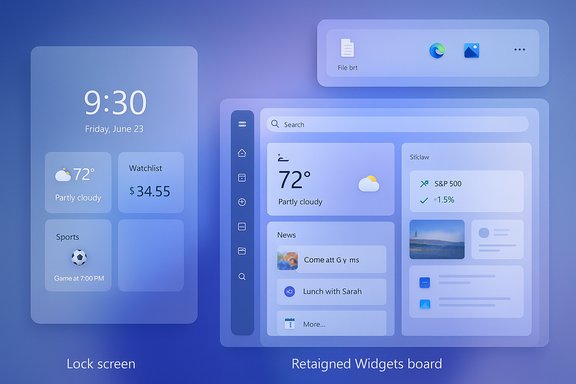
Microsoft’s newest Canary‑channel flight, reported as Windows 11 Insider Preview Build 27982, pushes three tightly linked UI experiments into the wild: a reworked lock screen widget model that replaces the old “Weather and more” surface, a major Widgets board redesign with multiple dashboards and left‑hand navigation, and a refined drag‑to‑share tray that surfaces sharing targets while you drag files from File Explorer or the desktop.
Windows Insider Canary builds are a deliberate testbed for early platform ideas, and Build 27982 follows a pattern Microsoft has maintained throughout 2025: incremental, user‑facing experiments delivered via staged, server‑side rollouts rather than a single “big launch.” That means the experience you see may differ from another Insider’s device, features can be gated or A/B tested, and elements may evolve or disappear entirely as Microsoft collects telemetry and feedback.
This release isn’t a kernel or driver overhaul — it’s a user‑experience-focused update intended to make everyday glimpses (the lock screen and Widgets), and the common task of sharing files, feel faster and more personalized. The changes also align with the broader Windows 11 25H2 / Copilot-era refinements that emphasize glancable information and frictionless AI/UX integration.
That said, Canary‑channel status means these features are still experimental: availability will be staggered, behavior may change, and there are realistic privacy and workflow tradeoffs to address. Administrators, developers, and accessibility teams should engage with caution — test on isolated machines, validate policy impacts, and provide Microsoft with focused feedback so the features can mature responsibly.
For anyone tracking the evolution of Windows 11 UX, Build 27982 is a compact but telling chapter: Microsoft is trying to make the OS feel more immediate, personal, and mobile‑inspired — and the way it handles rollout, privacy controls, and accessibility will determine whether these experiments land as polished improvements or become another set of abandoned prototypes.
Source: Windows Report Windows 11 Latest Canary Build 27982 Revamps Lock Screen, Widgets, and File Sharing
 Background
Windows Insider Canary builds are a deliberate testbed for early platform ideas, and Build 27982 follows a pattern Microsoft has maintained throughout 2025: incremental, user‑facing experiments delivered via staged, server‑side rollouts rather than a single “big launch.” That means the experience you see may differ from another Insider’s device, features can be gated or A/B tested, and elements may evolve or disappear entirely as Microsoft collects telemetry and feedback.This release isn’t a kernel or driver overhaul — it’s a user‑experience-focused update intended to make everyday glimpses (the lock screen and Widgets), and the common task of sharing files, feel faster and more personalized. The changes also align with the broader Windows 11 25H2 / Copilot-era refinements that emphasize glancable information and frictionless AI/UX integration.
What’s new in Build 27982 — an overview
- Lock screen widgets: The legacy “Weather and more” quick content is now a widgetized surface. Users can add, remove, and reorder small widgets (Weather, Watchlist, Sports, Traffic, etc. directly from Settings > Personalization > Lock screen. Suggested widgets can surface to aid discovery. This is rolling out in stages to Canary Insiders.
- Widgets board redesign: Widgets can now be organized into multiple dashboards (for example, a personal dashboard vs. a Discover feed), and a left‑hand navigation bar makes switching between dashboards or opening the Discover feed quicker and less cluttered. The intent is to separate utility widgets from content feeds, improving focus and discoverability.
- Drag Tray (drag‑to‑share): When you drag a file from File Explorer or the desktop toward the top of the screen, a compact tray appears with shortcuts to compatible apps and a More… option that opens the full Windows Share UI. The design aims to make sharing one step closer to mobile sharing flows (drag → drop onto target). This feature has been visible in Insider subsets for months and has been refined across Beta, Dev, and Canary flights.
Deep dive: Lock screen widgets — what changed and why it matters
What changed
The lock screen’s previous “Weather and more” panel — a mostly passive news/weather surface — has been replaced by a small‑widget model. Any widget that supports the small sizing contract can be added to the lock screen, and users can reorder or remove widgets using the Settings path: Settings > Personalization > Lock screen. Suggested widgets are surfaced to help discovery of useful items. Rollout is staged; not every Insider will see it immediately.Why the change matters
- Personalization: Users can now curate which glanceable items appear before sign‑in — similar to the fine‑grained lock‑screen widgets mobile platforms introduced years ago.
- Consistency: The lock screen now shares a widget model with the main Widgets board, offering visual and interaction parity between locked and unlocked glance surfaces.
- Efficiency: For quick checks (weather, sports scores, stock tickers) the new model reduces the need to unlock the device.
Enterprise & privacy considerations
Putting widgets on the lock screen resurrects pre‑sign‑in exposure questions — calendar snippets or financial tickers are visible without authentication. Recognizing this, Microsoft has added a Group Policy to disable Widgets on the lock screen independently from the rest of the Widgets experience, useful for admins who manage fleet privacy policies. Administrators can find this under the Local Group Policy Editor path for Widgets policies.Widgets board: multi‑dashboard organization and the Discover feed
Design changes
The Widgets host is evolving from a single linear feed to a dashboarded, modular surface:- Multiple dashboards let users isolate productivity widgets (calendar, tasks, notes) from content feeds (Discover/Copilot‑curated stories).
- A left navigation bar provides fast switching between dashboards, reducing cognitive load and making the Widgets area feel less “news wall” and more like a customizable home screen.
Developer opportunities
Microsoft’s push includes technical primitives so Progressive Web Apps (PWAs) and WinAppSDK-based widgets can host on the new Widgets platform. This improves third‑party extensibility and gives web developers a path to appear as first‑class widget content. However, because of server gating, devs must expect inconsistent visibility while the feature rolls out.Product and UX analysis
- Strengths: Separating utility widgets from feed content reduces noise and improves scanning. Copilot‑curated Discover content can be useful for users who value summarized news and video picks.
- Risks: If the Discover feed dominates the default dashboard, utility widgets may be buried again. Visual inconsistencies (different corner radii, padding) between promotional imagery and actual in‑OS renderings could create a "stuck‑on" feel if not handled consistently.
Drag Tray — the new share surface when you drag files
How it behaves
- Start dragging a local file (mouse or touch) from File Explorer or the Desktop.
- A drag tray appears at the top of the screen showing a short list of likely app targets and a More… option that opens the complete Windows Share dialog (with Nearby Share and other targets).
- Dropping the file onto an app launches or switches to that app and begins a share/move flow depending on the integration.
Origin and availability
The Drag Tray first appeared in earlier Insider flights (notably in 22635‑series Beta builds) and has been iterated across Beta, Dev, and now Canary channels. Community researchers documented Vivetool flags that could expose early implementations (example IDs documented in community writeups), but Microsoft has been gradually rolling the feature via staged controls rather than a universal enablement.Practical benefits
- Faster sharing: Single drag then drop reduces multiple clicks and context switches.
- Touch and pen friendliness: The top‑of‑screen target area is easier to hit on tablets than tiny context menus.
- Consistency with mobile: Mirrors share sheet metaphors familiar to smartphone users.
Practical pitfalls
- Interference with normal drag/drag‑drop workflows: Users who drag files into floating windows or docked canvases may find the tray intrusive.
- Potential accessibility gaps: Early reports emphasized mouse/touch flows; documented keyboard and screen‑reader interactions remain sparse.
- Policy and DLP interaction: Enterprises should verify how the tray surfaces targets (particularly cloud endpoints) with existing DLP and sharing governance.
Verifying key technical claims and specifics
- The Settings path for customizing the lock screen is confirmed as Settings > Personalization > Lock screen, and Microsoft’s staged rollout language is consistent across Insider notes and community coverage.
- The drag tray behavior (top‑of‑screen tray, app targets, More… opening the full Share dialog) has been independently documented by multiple outlets and community researchers and has a history in earlier Insider builds. Vivetool flags used in the wild to expose early versions (for advanced testers) have been published in community reports; those same reports caution that using third‑party tools is unsupported and risky.
- The Widgets board dashboard model and left navigation are reflected in Microsoft messaging around 25H2-era updates and in third‑party hands‑on reporting, though the exact visual treatments remain subject to change as the feature rolls.
Accessibility and developer considerations
For developers
- Test widgets against the small lock‑screen size contract and the newer Widgets host APIs; expect behavior to differ between server‑gated and local‑flagged devices.
- Don't assume consistent visibility: because Microsoft uses Control Feature Rollouts, APIs or widget hosting behaviors you see on one device may not match another. Plan for feature detection and graceful degradation.
For accessibility engineers
- Verify keyboard equivalents and screen‑reader announcements for both the Widgets dashboards and the drag tray.
- Ensure that the drag tray has a discoverable and operable keyboard flow; unaddressed gaps here will harm users who don’t rely on mouse/touch. Community reporting so far emphasizes mouse and touch interactions; formal accessibility docs are still maturing.
Security, privacy, and enterprise impact
- Lock screen data exposure: The lock screen surfaces data before authentication; admins should evaluate privacy risk and use the provided Group Policy to disable lock screen widgets on managed devices where necessary.
- Drag Tray and DLP: The tray surfaces sharing targets and can expedite sharing to cloud apps. Organizations must confirm the tray respects conditional access and DLP controls for OneDrive, Teams, and other enterprise endpoints. Early community reports flagged the need for validation, not alarm — the control surface ties into existing Windows share contracts, but policy interactions should be tested.
- Gated rollouts and support complexity: Staged enables create inconsistent end‑user experiences across an organization. IT support teams should avoid deploying Canary channel builds to production machines and should prepare clear rollback and testing plans.
How to try it (for Insiders and testers)
- Join the Windows Insider Program and switch the test device to the Canary Channel via Settings > Windows Update > Windows Insider Program.
- Install the latest flight that contains Build 27982 if it’s available to your device.
- Check lock screen customization at Settings > Personalization > Lock screen for the new widget controls.
- To test the drag tray, start a drag from File Explorer toward the top of the screen and observe whether the tray appears. Note: some builds may gate the feature; community‑published Vivetool flags have been used to force earlier variants, but these are unsupported and may risk system stability.
Balanced verdict — strengths, tradeoffs, and risks
Strengths
- Real productivity gains: The drag tray and lock‑screen widgets remove friction from everyday flows — checking info and sharing files are now closer to one or two actions.
- Better widget organization: Multiple dashboards and left navigation make Widgets more modular and useful for different contexts (work vs. personal).
- Developer extensibility: PWA and WinAppSDK support opens the widgets ecosystem to more third‑party content and enterprise PWAs.
Tradeoffs and risks
- Privacy vs convenience: Lock‑screen widgets create a tension between glanceable utility and data exposure before unlock; enterprise controls help but don’t negate the risk.
- Workflow interference: Drag tray’s placement can disrupt complex drag interactions, and some users report it feels intrusive. Microsoft must balance speed for simple shares with non‑intrusive behavior for advanced workflows.
- Fragmented rollout and support burden: Server gating and staged enables complicate documentation, developer testing, and IT support. Expect variability during the feature’s ramp.
Recommended actions for different audiences
- Administrators: Keep Canary builds off production devices. Evaluate the new Group Policy for disabling lock‑screen widgets and test how the drag tray interacts with your DLP and conditional access policies on a test fleet.
- Power users and enthusiasts: Test the features on a spare machine. Report issues via Feedback Hub and, if tempted to use community tools to enable hidden flags, weigh the stability risks carefully.
- Developers: Start testing widgets for the small lock‑screen size contract and validate widget behavior across server‑gated states. Build graceful fallback for cases where dashboarding isn’t available.
- Accessibility teams: Audit keyboard, narration, and focus management for both the Widgets dashboards and the drag tray. File formal feedback where gaps are found.
Conclusion
Build 27982 is emblematic of Microsoft’s current Windows 11 strategy: small, user‑visible experiments that reshape daily micro‑interactions rather than sweeping, monolithic changes. The lock‑screen widget model, Widgets multi‑dashboards, and the Drag Tray converge on a single goal — surface what matters sooner and make moving information between contexts easier. For users who value quick glances and one‑step sharing, these are meaningful improvements.That said, Canary‑channel status means these features are still experimental: availability will be staggered, behavior may change, and there are realistic privacy and workflow tradeoffs to address. Administrators, developers, and accessibility teams should engage with caution — test on isolated machines, validate policy impacts, and provide Microsoft with focused feedback so the features can mature responsibly.
For anyone tracking the evolution of Windows 11 UX, Build 27982 is a compact but telling chapter: Microsoft is trying to make the OS feel more immediate, personal, and mobile‑inspired — and the way it handles rollout, privacy controls, and accessibility will determine whether these experiments land as polished improvements or become another set of abandoned prototypes.
Source: Windows Report Windows 11 Latest Canary Build 27982 Revamps Lock Screen, Widgets, and File Sharing
