

Microsoft’s January Insider build quietly delivers three small-but-significant developments that matter to administrators, power users and everyday Windows consumers: a narrowly scoped Group Policy that can uninstall the consumer Microsoft Copilot app, expanded table and streaming-AI support in Notepad, and another reminder that modern AI models come with unexpected cultural backstories — witness Google’s viral “Nano Banana” nickname and how it stuck.
Microsoft, Google and the wider platform ecosystem keep folding AI into core experiences. That integration brings convenience, but it also creates new management, privacy and user-experience trade-offs. The recent Windows 11 Insider release (Build 26220.7535, KB5072046) is a good snapshot of where the tension sits today: Microsoft has added a supported, one-time uninstall path for the consumer Copilot app aimed at managed machines, shipped Notepad improvements designed for small-structure work and faster AI feedback, and the industry continues to see AI models become cultural phenomena — sometimes because of an off‑hand codename that the public loves. This feature set is small in absolute scope but large in operational impact. Administrators who’ve beenstic control over Copilot now have a documented tool — albeit a conservative one. Users who want a smarter lightweight editor get table insertion and streaming AI responses in Notepad. And the Nano Banana story underlines how product naming and community reaction can shape adoption and perception of AI tooling.
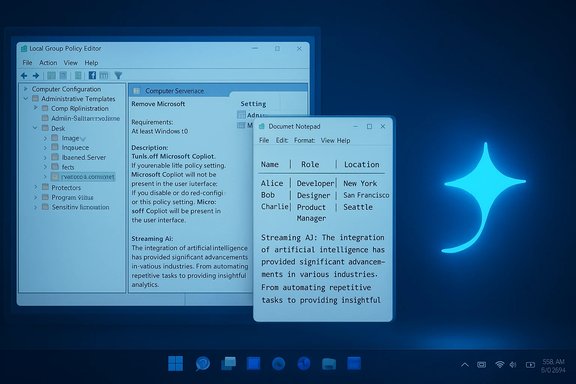
User Configuration → Administrative Templates → Windows AI → Remove Microsoft Copilot App
It’s currently available only in Insider Dev/Beta channels and for Pro, Enterprise, and Education SKUs. Home and unmanaged consumer devices are out of scope for this control in its preview state.
For administrators, the message is pragmatic: test, combine controls, and verify. For users, the takeaway is equally practical: expect smarter default experiences, but also expect to be asked to consent, manage, or re-evaluate them. The future of desktop AI will be shaped as much by product policy and governance as it is by raw model performance.
Source: PCMag Australia https://au.pcmag.com/ai/115401/you-...the-final-addition-to-my-favorite-little-app]
 Background
Microsoft, Google and the wider platform ecosystem keep folding AI into core experiences. That integration brings convenience, but it also creates new management, privacy and user-experience trade-offs. The recent Windows 11 Insider release (Build 26220.7535, KB5072046) is a good snapshot of where the tension sits today: Microsoft has added a supported, one-time uninstall path for the consumer Copilot app aimed at managed machines, shipped Notepad improvements designed for small-structure work and faster AI feedback, and the industry continues to see AI models become cultural phenomena — sometimes because of an off‑hand codename that the public loves. This feature set is small in absolute scope but large in operational impact. Administrators who’ve beenstic control over Copilot now have a documented tool — albeit a conservative one. Users who want a smarter lightweight editor get table insertion and streaming AI responses in Notepad. And the Nano Banana story underlines how product naming and community reaction can shape adoption and perception of AI tooling. RemoveMicrosoftCopilotApp: what changed and why it matters
The feature, in plain terms
A new Group Policy named RemoveMicrosoftCopilotApp appears in Windows 11 Insider Preview Build 26220.7535 (KB5072046). When enabled on managed, supported SKUs (Pro, Enterprise, Education) the policy will attempt a one‑time uninstall of the consumer Microsoft Copilot app for a targeted user — but only if a strict set of conditions are all satisfied. The uninstall is not persistent: users may reinstall the app later via the Microsoft Store, tenant provisioning, or image updates.The gating conditions — deliberate conservatism
For the policy to act, every one of the following must be true:- Microsoft 365 Copilot (tenant-managed) and the consumer Microsoft Copilot app are both installed on the device. This guard prevents removing the only Copilot experience used by paid tenants.
- The consumer Copilot app was not installed by the user — it must be provisioned, pushed via tenant tooling, or preinstalled by OEM image. This prevents surprising end-users who intentionally installed the app.
- The consumer Copilot app has not been launched in the last 28 days. Microsoft enforces this inactivity window as a safety check so active users are not silently stripped of software they use.
Where you find it (and who gets it)
The policy is surfaced in Group Policy at:User Configuration → Administrative Templates → Windows AI → Remove Microsoft Copilot App
It’s currently available only in Insider Dev/Beta channels and for Pro, Enterprise, and Education SKUs. Home and unmanaged consumer devices are out of scope for this control in its preview state.
Why Microsoft designed it this way
The uninstall policy balances two objectives:- Preserve tenant-managed Microsoft 365 Copilot workflows for organizations that paid for them.
- Give IT a supported, auditable way to clean up provisioned — and unused — consumer Copilot frontends on images, kiosks or classroom devices.
Practical implications and a hard-nosed operational checklist
The single biggest friction point: the 28‑day inactivity clock
In practice, the 28‑day inactivity requirement is the most common blocker. Many Copilot installations default to auto‑start on login, which resets the inactivity clock every time a user signs in. To make the policy usable, administrators commonly must:- Disable Copilot auto-start for target accounts (via managed startup lists or startup policy).
- Prevent users from launching Copilot for 28 consecutive days (which may be unrealistic on general-purpose devices).
Recommended layered strategy for durable control
If your aim is to ensure Copilot never returns to a set of endpoints, follow a layered model:- Use RemoveMicrosoftCopilotApp as a surgical cleanup for provisioned, unused copies.
- Apply AppLocker or Windows Defender Application Control (WDAC) policies to block thly for durable enforcement.
- Disable tenant auto‑provisioning where tenant controls permit.
- Remove the Copilot package from provisioning images and rebuild images where appropriate.
- Automate periodic verification (PowerShell/Intune compliance scripts) to detect reinstalls after feature updates and store restores.
Risks and caveats administrators must document
- Not a permanent ban: The policy’s one‑time uninstall leaves restore paths open (Store, tenant provisioning, OS image updates). Plan for verification after each feature update.
- Accessibility and workflow impact: Test deeply with assistive technologies before broad deployment. Copilot‑powered accessibility features (for example, Narrator image descriptions) were also part of the Insider release; removing Copilot may affect these experiences.
- Server-side gating and regional differences: Insider features can be server-gated and rollout behavior may vary by region, so results can be inconsistent across a global fleet. Treat the preview as an early-stage capability.
Notepad: tables for real notes, streaming for faster feedback
What arrived
Notepad version 11.2510.6.0 (rolling to Canary and Dev Insiders) adds two notable features:- Table support — lightweight table insertion and editing (visual toolbar + Markdown-first approach). The rendering is a formatting layer: when formatting is off, the underlying file remains as plain Markdown (pipe-delimited). This keeps files portable and VCS-friendly while making small structured content easier to edit.
- Streaming AI results — Write, Rewrite and Summarize responses now appear incrementally rather than only after the full response completes. Streaming reduces perceived latency and makes iterative prompts feel faster. Note: streaming for Rewrite is currently limited to results generated locally on Copilot+ PCs (on-device models), and all AI features require a Microsoft account sign-in.
Why the implementation matters
The Notepad table UI is deliberately not a spreadsheet engine. There are no formulas, sorting or pivot features. Instead, Microsoft prefers a Markdown-first model that renders as a table when formatting is enabled. That choice preserves Notepad’s historic portability while offering a pragmatic editing convenience for short tables: checklists, comparison notes, simple reports, and so on. Streaming AI responses are an important UX improvement. When AI results appear token-by-token or word-by-word, users get an earlier preview and can often cancel, refine or copy partial answers sooner. On-device streaming (Copilot+ PCs) also changes the privacy and latency calculus: token streaming from local models keeps data on-device and can be dramatically faster than cloud round trips.Trade-offs and the “Notepad is not Word” debate
Not everyone welcomed these changes. Critics argue the introduction of tables and richer AI behavior blurs Notepad’s historic role as a minimalist plain‑text editor. There’s a broader cultural tension: Should a legacy utility evolve into a more capable hub, or should simplicity be preserved at all costs? The implementation’s Markdown-first design is a pragmatic compromise, but maintainers should watch for feature creep and community pushback.Nano Banana: how a late-night codename became a global brand
The naming story (short)
Google’s exceptionally popular Gemini image model — technically “Gemini 2.5 Flash Image” — carried the internal codename Nano Banana during anonymous testing on crowdsourced evaluation platforms. The story is simple and human: a product manager, pressed for a placeholder at 2:30 a.m., mashed together personal nicknames into “Nano Banana.” The name stuck when testers on the evaluation platform and social media adopted the quirky moniker. Google eventually leaned into it, adding banana-themed UI signposts and embracing the meme-like identity. Multiple outlets and a Google post corroborate the same origin: the name started as an anonymous placeholder for LM Arena testing and spread organically because it was memorable and playful. The public-facing branding choice highlights a broader point: inside jokes and placeholder names can shape product perception and adoption in surprising ways.Why the story matters beyond the meme
- Branding matters for adoption. A whimsical name can accelerate awareness and invite experimentation from curious users who otherwise would have treated the model as just another technical release.
- Transparency and testing channels shape outcomes. Using anonymous testing platforms like LM Arena helps teams gather raw evaluations; codenames shield attribution during testing but risk becoming public if the community coalesces around them.
- Technical substance still wins. The nickname would not have resonated if the model didn’t deliver strong results for multi-image edits, subject consistency and photorealistic generation. The playful name served as a vector for virality, but technical capabilities drove sustained adoption.
Risks and governance notes
As Nano Banana demonstrates, viral popularity can outpace governance considerations. Where models produce realistic images, platforms must also think about watermarking, provenance signals and misuse mitigations. Google’s model family includes SynthID-style watermarking and other provenance tools, but teams and customers should treat these as complementary to policy and moderation, not replacements for them. The moral: a catchy name catches attention, but technical controls and governance determine long-term trust.Cross-cutting analysis: three small signals about platform strategy
- Concession, not retreat: Microsoft’s RemoveMicrosoftCopilotApp is a pragmatic concession to admin requests — a documented, supported tool for surgical cleanups. It is not a retreat from Copilot’s place in Windows. The one‑time, gated uninstall preserves tenant workflows while giving admins a supported way to handle poorly provisioned images. Expect Microsoft to continue offering nuanced, layered controls rather than blunt toggles.
- Feature differentiation via hardware and locality: Notepad’s streaming eparate path for Copilot+ on‑device models — highlights a continuing platform bifurcation: on‑device AI offers privacy and latency benefits, but it depends on hardware certification. Cloud models offer broader capability but different trade-offs. Administrators and power users must map devices against these capabilities when deciding where to enable or restrict AI features.
- Community shapes product trajectories: The Nano Banana example shows how community channels and simple naming choices can amplify a model’s profile. That virality changes the dynamics of release, adoption, and public expectation, and it can force companies to adopt community-driven terminology or even product tweaks to match perception. Product teams must be prepared to lean into or manage emergent branding.
What administrators and power users should do now — actionable steps
- Validate builds and policy visibility:
- Confirm devices are on Windows 11 Insider Build 26220.7535 / KB5072046 if you want to test RemoveMicrosoftCopilotApp.
- Run a pilot:
- Create a small pilot OU or Intune group, disable Copilot auto-start for pilot devices, and coordinate a 28‑day quiet window before enabling the uninstall policy.
- Layer defenses for durability:
- If permanence is required, combine the one‑time uninstall with AppLocker/WDAC rules and image deprovisioning; disable tenant auto-provisioning where possible.
- Verify accessibility and tenant features:
- Test assistive-tech scenarios and Microsoft 365 workflows before wider rollout. The Insider build also includes accessibility improvements tied to Copilot.
- For Notepad adoption:
- Train users on Markdown-first table editing and note the difference between formatting-on view and raw Markdown; limit Notepad’s use for small tables, not spreadsheets.
- Track provenance and moderation for image AI:
- If using Nano Banana / Gemini image features in production, enable provenance watermarking where available and draft usage policies for sensitive content.
Unverifiable or evolving points — flagged and explained
- Regional rollout and server-side gating for RemoveMicrosoftCopilotApp can vary. Some Insider devices may not see the policy immediately even after installing the build; Microsoft uses server-side gating and staged rollouts. Treat behavior as preview-grade and validate on your exact device estate.
- Exact telemetry retention and linkage between consumer Copilot, Microsoft 365 Copilot and other cloud artifacts are governed by Microsoft’s privacy documentation and tenant agreements; administrators with compliance requirements must consult those official materials and Microsoft support for retention windows. Public blogs and coverage summarize behavior, but detailed retention tables are best obtained from vendor documentation.
Conclusion
The latest Insider release is a reminder of the state of modern platform engineering: incremental, policy-driven refinements that try to balance enterprise governance, consumer convenience and rapid AI innovation. The new RemoveMicrosoftCopilotApp Group Policy is a useful and supported tool — but it’s deliberately conservative and operationally awkward in places. Notepad’s table and streaming-AI updates show Microsoft pushing AI into everyday tools while preserving portability through Markdown-first choices. And the Nano Banana saga shows how a late-night placeholder can become an unexpected cultural accelerant for an AI model.For administrators, the message is pragmatic: test, combine controls, and verify. For users, the takeaway is equally practical: expect smarter default experiences, but also expect to be asked to consent, manage, or re-evaluate them. The future of desktop AI will be shaped as much by product policy and governance as it is by raw model performance.
Source: PCMag Australia https://au.pcmag.com/ai/115401/you-...the-final-addition-to-my-favorite-little-app]
