

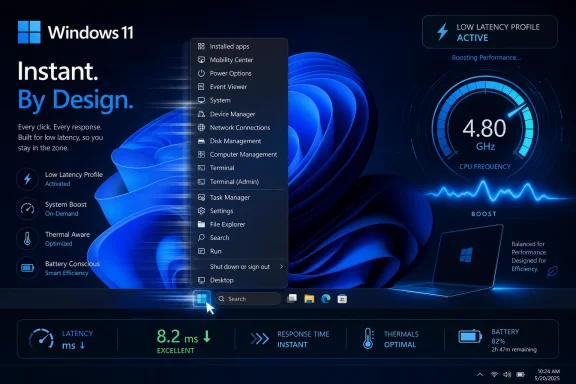
Microsoft is testing a Windows 11 “Low Latency Profile” that briefly pushes the CPU to maximum frequency for one to three seconds during high-priority actions such as opening apps, launching Start, showing flyouts, or invoking context menus in current Insider builds. The early numbers are striking enough to matter: up to 40 percent faster launches for some built-in apps and up to 70 percent faster interface actions, according to reporting and hands-on testing. But the bigger story is not that Windows has discovered turbo boost. It is that Microsoft is finally treating perceived latency as a first-class operating-system problem rather than a nuisance to be hidden behind animation polish.
For years, Windows performance has been discussed in the language of throughput: multicore scores, storage bandwidth, GPU acceleration, and how quickly a machine can chew through a large task once it is already underway. That framing flatters modern PCs, which are absurdly powerful by historical standards and yet still capable of feeling oddly sluggish when asked to do something embarrassingly simple. Opening the Start menu is not a rendering farm job; it is a promise that the operating system will respond when summoned.
Low Latency Profile appears to target precisely that gap between available power and felt responsiveness. The reported mechanism is simple: when Windows detects a high-priority user-facing action, it briefly asks the CPU to run at its highest frequency so the work finishes before the user notices the delay. In practical terms, this means Windows is not waiting for normal power-management heuristics to decide that a tiny burst of work deserves more clock speed.
That distinction matters because many of Windows 11’s irritations are not classic “slow computer” problems. They are micro-latency problems: the half-second hesitation before a menu appears, the delay before a flyout animates, the lag between clicking an icon and seeing meaningful activity. Those pauses are too short to show up as a disaster in most benchmarks, but long enough to make the machine feel less direct.
The reported testing gives this feature the kind of credibility that generic “performance improvements” usually lack. A 40 percent improvement in launching built-in apps such as Edge or Outlook is not subtle if it holds across real machines. A 70 percent improvement in Start menu and context-menu responsiveness would be even more important, because those are the gestures users repeat dozens or hundreds of times a day.
Microsoft has spent the past several release cycles clawing back that perception. Faster right-click menus, Quick Settings improvements, File Explorer tuning, and broader responsiveness work all point to the same diagnosis: Windows 11 does not merely need features; it needs to feel less like it is negotiating with itself before obeying the user. Low Latency Profile fits into that campaign because it attacks the moment of interaction rather than the steady-state workload.
This is also why comparisons with macOS sting. Apple’s platform is not magically faster at every task, and Windows still has unmatched breadth across hardware, gaming, enterprise management, and backward compatibility. But macOS often feels more predictable in the short path between click and response, partly because Apple controls the hardware stack and partly because the system is aggressively tuned around perception.
Windows has a harder job. It must run on ultraportables, gaming rigs, corporate fleets, mini PCs, workstations, and bargain laptops with wildly different firmware, drivers, storage, and thermal behavior. A feature like Low Latency Profile is Microsoft trying to impose a more consistent responsiveness policy across that chaos.
That is a shift from letting the system infer urgency after the fact. If a laptop is sitting in a low-power state and the user opens the Start menu, the total work may be small enough that conventional management does not instantly treat it as a major performance event. By the time the CPU ramps, the annoying part may already have happened. Low Latency Profile seems designed to front-load the response.
There is a reason this can work especially well for app launches and shell UI. Many launches are dominated by short bursts: process creation, library loading, initialization, rendering the first window, checking settings, waking services, and drawing interface elements. If those steps finish quickly, the user perceives the app as faster even if the app’s later background work continues as before.
It is also why the feature could be more valuable on budget and midrange machines than on elite desktops. A high-end system already has thermal headroom, fast storage, and aggressive boost behavior. A thin-and-light laptop or inexpensive PC may be more likely to linger in conservative power states, especially on battery. If Microsoft can safely inject a brief “wake up now” signal at the right moments, lower-cost machines could feel disproportionately better.
The danger is that blunt tools can overfire. If Windows boosts the CPU for every minor animation, notification, background-triggered UI event, or app that claims urgency, the feature could become a power and heat liability. The reported one-to-three-second burst window is reassuring only if the trigger discipline is good.
A processor that completes a small task quickly can often return to idle sooner. In some cases, “race to idle” behavior is more efficient than stretching the same work across a longer period at a lower frequency. If the system spends one second working hard instead of three seconds working half-awake, the energy math is not automatically worse.
But laptop power is never just about the CPU. Short bursts can affect thermals, fan curves, skin temperature, battery drain, and the way firmware interprets repeated demand. On modern systems, boosting one component may influence package power, memory behavior, and background scheduling. A single Start-menu launch is nothing; a full morning of app switching, search, Teams calls, browser tabs, and shell interactions is the real test.
This is where Microsoft will have to be conservative. Enthusiasts may want a visible toggle and the ability to force the mode on, but the average user wants the computer to feel faster without becoming warmer, louder, or less reliable. If Low Latency Profile arrives as a hidden policy controlled by Windows, the company needs to tune it well enough that users never have to learn its name.
Enterprise administrators will be even less forgiving. Fleet devices are judged by battery consistency, support tickets, thermal comfort, and predictable behavior under management profiles. A performance feature that looks wonderful in a demo but creates uneven battery reports across hardware models will quickly become another setting IT wants to disable until the dust settles.
Windows 11’s Start menu also carries more responsibilities than a simple app list. It has search integration, recommendations, account surfaces, cloud-aware elements, policy-driven behaviors, and a visual design that relies on modern UI frameworks. Each layer may be justifiable on its own, but the combined effect can make a basic action feel heavier than it should.
That is the broader pattern with Windows 11’s shell. Microsoft has been modernizing the interface while preserving decades of compatibility and management assumptions. The result is a system where old and new components often coexist awkwardly. Low Latency Profile does not remove that complexity, but it may mask the most visible cost of carrying it.
Masking is not inherently bad. Operating systems are full of mechanisms that hide latency from users: caching, prefetching, speculative work, asynchronous rendering, and prioritization. The question is whether the mask becomes a substitute for simplification. If Windows needs a CPU sprint every time it opens a menu, that should prompt Microsoft to keep asking why the menu needs so much help in the first place.
Both readings can be true. Windows is old, broad, deeply compatible, and commercially obligated to support a universe of software that no rival desktop OS matches. Some amount of complexity is the price of that ecosystem. But users do not experience complexity as an abstraction; they experience it as waiting.
A CPU boost can improve the first impression of responsiveness, but it will not fix every kind of slowness. If File Explorer stalls because a network location is misbehaving, if a shell extension blocks a context menu, if an app performs too much work on the UI thread, or if a security product intercepts every launch, more clock speed may help only at the margins. Windows still needs better isolation, better diagnostics, and fewer cases where one slow component can make the shell feel stuck.
The feature also raises a fairness question for third-party apps. Microsoft’s own in-box apps and shell components are likely to be the easiest to optimize because the company controls both sides of the equation. But Windows users live in Chrome, Steam, Discord, Adobe apps, Visual Studio Code, line-of-business tools, launchers, utilities, and legacy Win32 software. If Low Latency Profile primarily makes Microsoft-controlled surfaces feel faster, the gain will be real but incomplete.
The best version of this feature would be platform-wide and policy-driven rather than hand-tuned only for favored surfaces. Windows should understand that a user-initiated launch deserves urgency whether the app comes from Microsoft, the Store, a corporate deployment system, or a decades-old installer. Anything less risks improving the showroom while leaving the workshop unchanged.
Insider features can change, disappear, or arrive months later in altered form. Microsoft may adjust the trigger conditions, shorten or lengthen the boost window, limit it to certain power modes, or expose it only on hardware that meets specific requirements. It may also decide that the feature should be invisible, controlled through internal heuristics rather than a user-facing switch.
That invisibility would be consistent with how modern operating systems increasingly behave. Users do not usually choose exactly when the scheduler boosts a workload or how the system balances responsiveness against efficiency. They choose broad modes such as balanced, best performance, or battery saver, while the OS and firmware negotiate the details.
Still, transparency matters. If users see brief CPU frequency spikes after an update, they will ask why. If admins see changed power behavior across a managed fleet, they will need documentation. If reviewers test battery life and find differences, Microsoft will need to explain the tradeoff in terms better than “trust us.”
Microsoft’s challenge is reputational as much as technical. Windows 11 arrived with strict hardware requirements, a redesigned shell, controversial taskbar limitations, more visible promotion surfaces, and a gradual migration of old control surfaces into new Settings pages. Many of those decisions had defensible logic. Taken together, they made the OS feel like it was asking users to accept friction in exchange for Microsoft’s preferred future.
Performance work is a way of repaying that debt. If the OS becomes visibly faster at the actions people repeat constantly, users may be more forgiving of larger strategic changes. If it remains sluggish while Microsoft keeps adding AI features, ads, account prompts, or cloud hooks, every new surface becomes evidence for the prosecution.
That is why a seemingly small feature has outsized editorial weight. Low Latency Profile is not a headline feature like Copilot, Recall, or a redesigned Start menu. It is plumbing. But plumbing is exactly where Windows 11 needs credibility.
Windows is disadvantaged because the PC workload is messier. Users attach peripherals, run background services, install drivers, keep dozens of startup apps, sync cloud folders, mount network shares, and run software written across several decades of Windows API history. The operating system cannot assume a clean appliance-like environment.
But users do not care about those excuses when they click Start and wait. They know the hardware is powerful. They know the SSD is fast. They know the processor can boost to absurd frequencies. If the system still hesitates, the operating system takes the blame.
Low Latency Profile is Microsoft acknowledging that perception is not cosmetic. Responsiveness is a feature. It is part of trust. A system that reacts immediately feels under control; a system that hesitates feels like it belongs to someone else.
The industry has had years to learn this lesson from the web. Metrics such as first contentful paint and time to interactive exist because users judge performance by the moment something useful appears. Native desktop apps need the same discipline. Launching a process is not enough; the app must become meaningfully usable quickly.
Windows can help by boosting the processor, improving scheduling, and refining shell behavior. But developers still control how much work they put on the critical path. If an app insists on loading every plugin, checking every service, initializing every account, and rendering every promotional panel before showing the main window, Low Latency Profile will be pushing against a wall of bad priorities.
This is especially relevant for Electron apps, enterprise clients, launchers, and collaboration tools that already have a reputation for feeling heavier than their function suggests. The operating system may soon make the first step faster. It will not absolve software that wastes the advantage.
But the best implementation may not be a simple on/off toggle. Responsiveness policy should probably adapt to power source, thermal state, battery saver, device class, workload, and user behavior. A workstation plugged into the wall can afford different burst behavior than a fanless tablet at 12 percent battery. A gaming laptop in performance mode is not the same as an ultraportable in a conference room.
The more useful control would be clear integration with existing power modes and administrative policy. Users should know that “Best performance” favors responsiveness, “Balanced” applies careful bursts, and “Battery saver” restricts them. Administrators should be able to manage the feature without spelunking through unsupported hacks.
Microsoft also needs to avoid creating another placebo setting. Windows already contains enough toggles whose effects are unclear, build-dependent, or overridden by hardware vendor utilities. If Low Latency Profile ships, it should be measurable, documented, and predictable enough that users can trust the mode they choose.
Windows has lived through this cycle before. Faster hardware made inefficient startup items more tolerable. SSDs masked poor I/O habits. More RAM softened the blow of bloated background services. Multicore CPUs allowed software to spread out rather than slim down.
Low Latency Profile should not become permission for the shell to grow more elaborate. If anything, it should buy Microsoft time to keep simplifying the path between user intent and system response. The goal should be a Windows that needs fewer emergency boosts over time, not one that normalizes them as the permanent price of modern UI.
That is the difference between optimization and dependency. A well-designed low-latency mode makes a good system feel excellent. A poorly governed one makes a bloated system feel acceptable until the battery runs down, the thermals rise, or the next layer of features consumes the headroom.
Source: Digital Trends Windows 11 is testing a low-latency mode and it visibly speeds up app launch
 Microsoft Is Finally Optimizing for the Click, Not the Benchmark
For years, Windows performance has been discussed in the language of throughput: multicore scores, storage bandwidth, GPU acceleration, and how quickly a machine can chew through a large task once it is already underway. That framing flatters modern PCs, which are absurdly powerful by historical standards and yet still capable of feeling oddly sluggish when asked to do something embarrassingly simple. Opening the Start menu is not a rendering farm job; it is a promise that the operating system will respond when summoned.Low Latency Profile appears to target precisely that gap between available power and felt responsiveness. The reported mechanism is simple: when Windows detects a high-priority user-facing action, it briefly asks the CPU to run at its highest frequency so the work finishes before the user notices the delay. In practical terms, this means Windows is not waiting for normal power-management heuristics to decide that a tiny burst of work deserves more clock speed.
That distinction matters because many of Windows 11’s irritations are not classic “slow computer” problems. They are micro-latency problems: the half-second hesitation before a menu appears, the delay before a flyout animates, the lag between clicking an icon and seeing meaningful activity. Those pauses are too short to show up as a disaster in most benchmarks, but long enough to make the machine feel less direct.
The reported testing gives this feature the kind of credibility that generic “performance improvements” usually lack. A 40 percent improvement in launching built-in apps such as Edge or Outlook is not subtle if it holds across real machines. A 70 percent improvement in Start menu and context-menu responsiveness would be even more important, because those are the gestures users repeat dozens or hundreds of times a day.
The Old Windows Problem Was Never Just Speed
Windows 11’s reputation for heaviness did not come from one broken component. It came from the accumulation of small waits in places where users expect immediacy. The redesigned context menu looked cleaner than the old one, but for many users it also felt like an extra layer between intent and action. File Explorer gained a modernized interface, tabs, and integration work, but also became a symbol of how “modern” Windows sometimes meant more indirection.Microsoft has spent the past several release cycles clawing back that perception. Faster right-click menus, Quick Settings improvements, File Explorer tuning, and broader responsiveness work all point to the same diagnosis: Windows 11 does not merely need features; it needs to feel less like it is negotiating with itself before obeying the user. Low Latency Profile fits into that campaign because it attacks the moment of interaction rather than the steady-state workload.
This is also why comparisons with macOS sting. Apple’s platform is not magically faster at every task, and Windows still has unmatched breadth across hardware, gaming, enterprise management, and backward compatibility. But macOS often feels more predictable in the short path between click and response, partly because Apple controls the hardware stack and partly because the system is aggressively tuned around perception.
Windows has a harder job. It must run on ultraportables, gaming rigs, corporate fleets, mini PCs, workstations, and bargain laptops with wildly different firmware, drivers, storage, and thermal behavior. A feature like Low Latency Profile is Microsoft trying to impose a more consistent responsiveness policy across that chaos.
A CPU Burst Is a Blunt Tool, but Sometimes Blunt Tools Work
The engineering idea behind Low Latency Profile is not exotic. Modern processors already ramp frequencies dynamically, and Windows already participates in power management through scheduler decisions, power plans, processor performance states, and hardware hints. The interesting part is that Microsoft appears to be tying a short-lived performance burst directly to user-visible events.That is a shift from letting the system infer urgency after the fact. If a laptop is sitting in a low-power state and the user opens the Start menu, the total work may be small enough that conventional management does not instantly treat it as a major performance event. By the time the CPU ramps, the annoying part may already have happened. Low Latency Profile seems designed to front-load the response.
There is a reason this can work especially well for app launches and shell UI. Many launches are dominated by short bursts: process creation, library loading, initialization, rendering the first window, checking settings, waking services, and drawing interface elements. If those steps finish quickly, the user perceives the app as faster even if the app’s later background work continues as before.
It is also why the feature could be more valuable on budget and midrange machines than on elite desktops. A high-end system already has thermal headroom, fast storage, and aggressive boost behavior. A thin-and-light laptop or inexpensive PC may be more likely to linger in conservative power states, especially on battery. If Microsoft can safely inject a brief “wake up now” signal at the right moments, lower-cost machines could feel disproportionately better.
The danger is that blunt tools can overfire. If Windows boosts the CPU for every minor animation, notification, background-triggered UI event, or app that claims urgency, the feature could become a power and heat liability. The reported one-to-three-second burst window is reassuring only if the trigger discipline is good.
Battery Life Is the Argument Microsoft Has to Win
The obvious objection is battery life. A feature that briefly maxes the CPU sounds like the sort of thing that makes benchmarks look better while punishing people who use laptops away from a wall. Microsoft and its sources are reportedly betting that the bursts are too short to matter much, and there is a plausible technical argument behind that claim.A processor that completes a small task quickly can often return to idle sooner. In some cases, “race to idle” behavior is more efficient than stretching the same work across a longer period at a lower frequency. If the system spends one second working hard instead of three seconds working half-awake, the energy math is not automatically worse.
But laptop power is never just about the CPU. Short bursts can affect thermals, fan curves, skin temperature, battery drain, and the way firmware interprets repeated demand. On modern systems, boosting one component may influence package power, memory behavior, and background scheduling. A single Start-menu launch is nothing; a full morning of app switching, search, Teams calls, browser tabs, and shell interactions is the real test.
This is where Microsoft will have to be conservative. Enthusiasts may want a visible toggle and the ability to force the mode on, but the average user wants the computer to feel faster without becoming warmer, louder, or less reliable. If Low Latency Profile arrives as a hidden policy controlled by Windows, the company needs to tune it well enough that users never have to learn its name.
Enterprise administrators will be even less forgiving. Fleet devices are judged by battery consistency, support tickets, thermal comfort, and predictable behavior under management profiles. A performance feature that looks wonderful in a demo but creates uneven battery reports across hardware models will quickly become another setting IT wants to disable until the dust settles.
The Start Menu Has Become a Performance Test
It is fitting that the Start menu is one of the reported beneficiaries. In Windows, Start is more than a launcher; it is a symbolic contract. If that menu hesitates, the whole operating system feels hesitant, even if the underlying machine is powerful.Windows 11’s Start menu also carries more responsibilities than a simple app list. It has search integration, recommendations, account surfaces, cloud-aware elements, policy-driven behaviors, and a visual design that relies on modern UI frameworks. Each layer may be justifiable on its own, but the combined effect can make a basic action feel heavier than it should.
That is the broader pattern with Windows 11’s shell. Microsoft has been modernizing the interface while preserving decades of compatibility and management assumptions. The result is a system where old and new components often coexist awkwardly. Low Latency Profile does not remove that complexity, but it may mask the most visible cost of carrying it.
Masking is not inherently bad. Operating systems are full of mechanisms that hide latency from users: caching, prefetching, speculative work, asynchronous rendering, and prioritization. The question is whether the mask becomes a substitute for simplification. If Windows needs a CPU sprint every time it opens a menu, that should prompt Microsoft to keep asking why the menu needs so much help in the first place.
This Is the Right Fix, but Not the Whole Fix
There are two ways to read Low Latency Profile. The generous reading is that Microsoft has identified a real problem and is finally attacking it at the level where users feel it. The skeptical reading is that Windows 11 has grown heavy enough that Microsoft now needs a turbo button to paper over architectural drag.Both readings can be true. Windows is old, broad, deeply compatible, and commercially obligated to support a universe of software that no rival desktop OS matches. Some amount of complexity is the price of that ecosystem. But users do not experience complexity as an abstraction; they experience it as waiting.
A CPU boost can improve the first impression of responsiveness, but it will not fix every kind of slowness. If File Explorer stalls because a network location is misbehaving, if a shell extension blocks a context menu, if an app performs too much work on the UI thread, or if a security product intercepts every launch, more clock speed may help only at the margins. Windows still needs better isolation, better diagnostics, and fewer cases where one slow component can make the shell feel stuck.
The feature also raises a fairness question for third-party apps. Microsoft’s own in-box apps and shell components are likely to be the easiest to optimize because the company controls both sides of the equation. But Windows users live in Chrome, Steam, Discord, Adobe apps, Visual Studio Code, line-of-business tools, launchers, utilities, and legacy Win32 software. If Low Latency Profile primarily makes Microsoft-controlled surfaces feel faster, the gain will be real but incomplete.
The best version of this feature would be platform-wide and policy-driven rather than hand-tuned only for favored surfaces. Windows should understand that a user-initiated launch deserves urgency whether the app comes from Microsoft, the Store, a corporate deployment system, or a decades-old installer. Anything less risks improving the showroom while leaving the workshop unchanged.
The Insider Build Caveat Is Doing a Lot of Work
It is important to keep the current state of the feature in proportion. Low Latency Profile is reportedly in testing in Windows Insider builds, and Microsoft has not yet turned it into a fully announced consumer feature with final controls, documentation, or rollout timing. That means the numbers circulating now are promising, not definitive.Insider features can change, disappear, or arrive months later in altered form. Microsoft may adjust the trigger conditions, shorten or lengthen the boost window, limit it to certain power modes, or expose it only on hardware that meets specific requirements. It may also decide that the feature should be invisible, controlled through internal heuristics rather than a user-facing switch.
That invisibility would be consistent with how modern operating systems increasingly behave. Users do not usually choose exactly when the scheduler boosts a workload or how the system balances responsiveness against efficiency. They choose broad modes such as balanced, best performance, or battery saver, while the OS and firmware negotiate the details.
Still, transparency matters. If users see brief CPU frequency spikes after an update, they will ask why. If admins see changed power behavior across a managed fleet, they will need documentation. If reviewers test battery life and find differences, Microsoft will need to explain the tradeoff in terms better than “trust us.”
Windows K2 Is Starting to Look Like an Apology Tour
Low Latency Profile also appears to fit into a broader Windows 11 performance push that has been described in reporting as part of Microsoft’s 2026 effort to make the OS faster, more reliable, and less annoying. That effort matters because it acknowledges something users have been saying since Windows 11’s launch: polish is not the same as speed.Microsoft’s challenge is reputational as much as technical. Windows 11 arrived with strict hardware requirements, a redesigned shell, controversial taskbar limitations, more visible promotion surfaces, and a gradual migration of old control surfaces into new Settings pages. Many of those decisions had defensible logic. Taken together, they made the OS feel like it was asking users to accept friction in exchange for Microsoft’s preferred future.
Performance work is a way of repaying that debt. If the OS becomes visibly faster at the actions people repeat constantly, users may be more forgiving of larger strategic changes. If it remains sluggish while Microsoft keeps adding AI features, ads, account prompts, or cloud hooks, every new surface becomes evidence for the prosecution.
That is why a seemingly small feature has outsized editorial weight. Low Latency Profile is not a headline feature like Copilot, Recall, or a redesigned Start menu. It is plumbing. But plumbing is exactly where Windows 11 needs credibility.
The Real Competition Is the Phone in Your Pocket
Desktop operating systems no longer compete only with each other. They compete with the responsiveness expectations set by phones and tablets. A modern smartphone may be less flexible than a Windows PC, but it often feels instant in the actions users perform most often. Tap, animate, open, switch, search: the feedback loop is tight.Windows is disadvantaged because the PC workload is messier. Users attach peripherals, run background services, install drivers, keep dozens of startup apps, sync cloud folders, mount network shares, and run software written across several decades of Windows API history. The operating system cannot assume a clean appliance-like environment.
But users do not care about those excuses when they click Start and wait. They know the hardware is powerful. They know the SSD is fast. They know the processor can boost to absurd frequencies. If the system still hesitates, the operating system takes the blame.
Low Latency Profile is Microsoft acknowledging that perception is not cosmetic. Responsiveness is a feature. It is part of trust. A system that reacts immediately feels under control; a system that hesitates feels like it belongs to someone else.
Developers Should Read This as a Warning
There is a lesson here for Windows application developers, too. If Microsoft is willing to spend CPU budget to hide launch latency, app makers should treat startup time and first-interaction time as competitive metrics. Users may tolerate heavy background work after an app opens, but they are increasingly unforgiving of blank windows, splash screens, delayed menus, and first-run stalls.The industry has had years to learn this lesson from the web. Metrics such as first contentful paint and time to interactive exist because users judge performance by the moment something useful appears. Native desktop apps need the same discipline. Launching a process is not enough; the app must become meaningfully usable quickly.
Windows can help by boosting the processor, improving scheduling, and refining shell behavior. But developers still control how much work they put on the critical path. If an app insists on loading every plugin, checking every service, initializing every account, and rendering every promotional panel before showing the main window, Low Latency Profile will be pushing against a wall of bad priorities.
This is especially relevant for Electron apps, enterprise clients, launchers, and collaboration tools that already have a reputation for feeling heavier than their function suggests. The operating system may soon make the first step faster. It will not absolve software that wastes the advantage.
The Toggle Debate Will Miss the Point
If Low Latency Profile becomes public, enthusiasts will immediately ask for a switch. They will want it in Settings, in PowerToys, in Group Policy, in the registry, and possibly in a tray utility with graphs. That impulse is understandable, especially among Windows users who have spent decades learning that the OS often hides useful controls behind vague defaults.But the best implementation may not be a simple on/off toggle. Responsiveness policy should probably adapt to power source, thermal state, battery saver, device class, workload, and user behavior. A workstation plugged into the wall can afford different burst behavior than a fanless tablet at 12 percent battery. A gaming laptop in performance mode is not the same as an ultraportable in a conference room.
The more useful control would be clear integration with existing power modes and administrative policy. Users should know that “Best performance” favors responsiveness, “Balanced” applies careful bursts, and “Battery saver” restricts them. Administrators should be able to manage the feature without spelunking through unsupported hacks.
Microsoft also needs to avoid creating another placebo setting. Windows already contains enough toggles whose effects are unclear, build-dependent, or overridden by hardware vendor utilities. If Low Latency Profile ships, it should be measurable, documented, and predictable enough that users can trust the mode they choose.
The Hidden Cost of Feeling Fast
There is a philosophical cost to this kind of optimization. When systems become better at hiding latency, developers and product teams sometimes feel less pressure to reduce the underlying complexity. A faster mask can enable a heavier face.Windows has lived through this cycle before. Faster hardware made inefficient startup items more tolerable. SSDs masked poor I/O habits. More RAM softened the blow of bloated background services. Multicore CPUs allowed software to spread out rather than slim down.
Low Latency Profile should not become permission for the shell to grow more elaborate. If anything, it should buy Microsoft time to keep simplifying the path between user intent and system response. The goal should be a Windows that needs fewer emergency boosts over time, not one that normalizes them as the permanent price of modern UI.
That is the difference between optimization and dependency. A well-designed low-latency mode makes a good system feel excellent. A poorly governed one makes a bloated system feel acceptable until the battery runs down, the thermals rise, or the next layer of features consumes the headroom.
The Fastest Windows 11 Is the One That Stops Making Users Wait
The most concrete takeaway is that Microsoft appears to be attacking Windows 11’s responsiveness problem where users actually feel it: the tiny pauses around launching, opening, and switching. That does not make Low Latency Profile a miracle fix, but it does make it one of the more interesting Windows performance changes in testing right now.- Low Latency Profile reportedly boosts the CPU to maximum frequency for one to three seconds during high-priority user actions.
- Early testing claims up to 40 percent faster launch times for some built-in Microsoft apps and up to 70 percent faster shell interactions such as Start and context menus.
- The battery and thermal impact may be small if Microsoft limits the boost carefully, but that remains the key real-world test.
- The feature is still in Insider testing and may change before any broad release.
- The biggest win would come if Microsoft applies the responsiveness model broadly across the Windows app ecosystem, not only to its own shell and in-box apps.
- The feature should complement deeper cleanup work in File Explorer, Start, app launch paths, and background services rather than excuse more complexity.
Source: Digital Trends Windows 11 is testing a low-latency mode and it visibly speeds up app launch
