

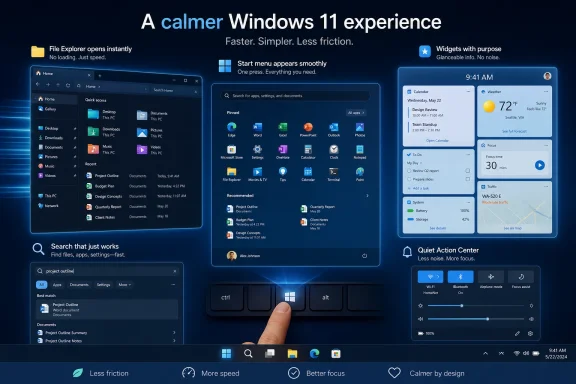
Microsoft is rolling out Windows 11 Insider changes in May 2026 that target File Explorer responsiveness, Start and Search performance, calmer Widgets, and lower-friction system behavior after months of criticism that the operating system feels slower and noisier than it should. The important word is feels, because Microsoft is no longer talking only about benchmark wins or AI features. It is trying to repair the everyday texture of Windows: the half-second delays, the jarring transitions, the feeds that intrude when the user asked for a tool. That is the right fight, and it is also the fight Microsoft should have picked years ago.
For a company that can discuss kernel scheduling, silicon partnerships, and cloud inference capacity in the same breath, Microsoft has often seemed oddly clumsy about one of the simplest truths in personal computing: users judge an operating system by how quickly it responds to their intent. Not how many features it ships. Not how many surfaces can summon an assistant. Not how beautifully the marketing deck says the platform integrates productivity, creativity, and intelligence.
They judge it by whether File Explorer opens without a sulk. They judge it by whether Start appears when summoned, whether Search finds the thing it was asked to find, whether the notification layer behaves like a servant rather than a carnival barker. Windows 11 has rarely been unusable in the literal sense, but it has often felt less direct than the machines it runs on deserve.
That distinction matters. A modern laptop can post excellent synthetic benchmark scores and still feel oddly viscous if the shell drops frames, if context menus hesitate, or if common surfaces redraw with visible uncertainty. Microsoft’s latest Windows 11 messaging, echoed in the Insider program changes now coming into view, suggests the company has internalized that latency is not just a number. It is a mood.
The new focus on File Explorer, Start, Search, Action Center, Widgets, CPU scheduling, and memory behavior reads like a list assembled from user irritation rather than product strategy theater. That is encouraging. It also says something unflattering about the last few years of Windows development, when Microsoft too often chased the next platform story before finishing the one millions of people already lived inside every day.
Microsoft’s promise of “foundational architectural improvements” to reduce hangs and improve responsiveness is the sort of phrase Windows veterans have learned to treat with suspicion. File Explorer has been rewritten, reskinned, modernized, connected to cloud services, taught tabs, given new command bars, and blessed with design language updates. Yet the recurring complaint has remained stubbornly basic: why does this core utility sometimes feel less immediate than it did on older hardware running older Windows?
The answer is not one thing. Explorer is a shell surface, a file browser, a preview host, a cloud sync front end, a search gateway, and a compatibility museum. It has to speak fluent NTFS while also accommodating network shares, removable drives, zip files, thumbnails, indexing, OneDrive states, context menu extensions, and decades of expectations from software that assumes Explorer will behave in a particular way.
But complexity is not an excuse users can do anything with. If a $1,500 laptop pauses before showing a folder, the owner does not care which extension, provider, indexer, thumbnail cache, or UI layer was involved. The operating system took too long. That is the whole experience.
Microsoft’s more modest language this time is actually useful. Instead of promising a magical new Explorer, the company is talking about incremental rollout, fewer hangs, more stable Home behavior, smoother navigation, and visual polish. That sounds small until you remember that Windows’ biggest daily problems are often small frictions multiplied by billions of interactions.
A faster Start menu would help, but speed alone will not fix the deeper resentment. Users want Start to be predictable. They want it to respect muscle memory. They want personalization that means “I decide what belongs here,” not “the system has inferred an opportunity to engage me.”
Microsoft’s reported work on responsiveness in Start and Search therefore lands in a broader context. The company is trying to make Windows feel calmer after years of nudging people toward Microsoft accounts, Edge, OneDrive, Copilot, Microsoft 365, recommended files, web results, cloud-backed discovery, and whatever else the growth apparatus decided could be routed through a shell surface. Each individual prompt may have had a product rationale. Together, they created a feeling that Windows was no longer a neutral workspace.
The irony is that Windows became dominant because it was promiscuously useful. It ran nearly everything, tolerated messy workflows, and let users build their own habits. Windows 11’s challenge is that it arrived in an era when every platform owner wants the operating system to become an engagement engine. That instinct is profitable in the short term and corrosive in the long term.
A Start menu that opens faster is welcome. A Start menu that asks less of the user, sells less to the user, and returns more authority to the user would be more important.
In practice, Windows Widgets have often felt like a side door into Microsoft’s content funnel. The experience has mixed useful cards with a Discover feed that can resemble a noisy airport television: celebrity items, outrage bait, generalized news aggregation, and algorithmic suggestions flattened into a tile grid. It is not that all of the content is bad. It is that the surface often feels misaligned with the job the user came to Windows to do.
Microsoft’s plan to separate Widgets and Discover into more distinct destinations is therefore a real improvement if it holds. The weather card should not have to share a psychological contract with a feed engineered to harvest attention. A productivity surface and a content surface can coexist, but pretending they are the same thing has been one of Windows 11’s more annoying category errors.
There is also a journalism problem hiding inside this interface debate. PCWorld’s concern about AI-summarized Discover content is not special pleading from media people who resent technology. It is part of a broader shift in which platform owners increasingly extract, condense, and re-present information while pushing the original creators further away from the user’s path. If Widgets become calmer by hiding the mess but Discover becomes more extractive behind the curtain, Microsoft will have solved one user-experience problem by worsening another ecosystem problem.
Windows does not need to become a charity for publishers. But it should not turn the desktop into another place where the open web is mined for summaries that make visiting the source optional. If Microsoft wants trust, it has to treat content surfaces as part of the operating system’s ethics, not just its engagement math.
Some of that made sense. Generative AI can be useful, and Windows is an obvious place to expose system-level assistance. The problem was not that Microsoft brought AI to Windows. The problem was that Microsoft often appeared more interested in proving that it could put AI everywhere than in proving that users wanted it in those places.
Notepad did not need to become a stage for a platform thesis. Paint did not need to serve as a referendum on Microsoft’s OpenAI investment. The shell did not need every productivity irritation reframed as an opportunity for an assistant. Users who were asking for a more reliable Explorer or a less cluttered Start menu were not secretly asking for another AI affordance.
This is where the new emphasis on fewer distractions and more control matters. If Microsoft can restrain itself, Copilot may become more useful precisely by becoming less omnipresent. An assistant that appears when it is contextually valuable is software. An assistant that appears because the company needs to justify a strategic narrative is clutter.
The next version of Windows does not need to be anti-AI. It needs to be anti-desperation. Users can tell the difference between a tool that helps and a feature that was inserted to satisfy an investor-day slide.
Modern PCs are heterogeneous, bursty, thermally constrained machines. They juggle performance cores, efficiency cores, integrated NPUs, sleep states, foreground tasks, background sync, browser tabs, endpoint security, Teams, cloud storage, and the ancient truth that somebody has 47 tray utilities installed. The operating system’s job is not merely to allocate work correctly in the abstract. It has to make the machine feel ready at the moment the user asks for something.
Apple has turned this into a competitive advantage. The Mac’s reputation for smoothness is not magic; it is the product of tight hardware-software integration, disciplined platform control, and years of tuning for the felt experience of interaction. Windows has a harder assignment because it runs across an enormous range of hardware, firmware, drivers, OEM utilities, and user modifications. But that difficulty does not make the comparison go away.
If Microsoft can tune Windows so common interactions get priority at the right time without wrecking battery life, it can improve the perceived quality of millions of PCs without requiring users to buy new machines. That is the kind of platform work that rarely produces a flashy keynote demo but changes daily sentiment. A Start menu that opens instantly on a midrange laptop is worth more to most users than a futuristic feature that requires ideal conditions and a Copilot+ badge.
Memory management sits in the same category. Windows 11 has often been criticized for feeling heavy, especially on machines with 8GB of RAM that still exist in the real world no matter how much enthusiasts wish they did not. Reducing footprint and improving responsiveness under pressure would do more for mainstream users than another round of premium AI demos.
That matters because Windows enthusiasts have long memories. They remember promised improvements that arrived half-finished. They remember features that appeared without a clear opt-out. They remember regressions hidden under design updates. They remember the feeling of being drafted into experiments whose benefits flowed upward to Microsoft while the annoyances landed on the desktop.
The revised Insider program can help only if Microsoft treats feedback as more than telemetry with adjectives. The Windows community does not merely want to report crashes. It wants to see evidence that complaints about friction, control, and defaults can change the product. That is a higher bar than bug fixing.
There is risk here, too. Incremental performance work can be hard to evaluate in the Insider channels because early builds contain their own instability. A tweak that makes Explorer smoother for one hardware class may do little for another. A “calmer” default may still feel noisy to users who define calm as “leave me alone unless I ask.” Microsoft will need patience, transparency, and a willingness to roll back ideas that test well internally but irritate real people.
Still, this is the right venue. If Microsoft wants Windows enthusiasts to believe the company has changed course, it cannot simply announce a vibe shift. It has to ship builds that make the old complaints less true.
The enterprise Windows story has always been split between power and nuisance. On one hand, Windows remains the default business desktop because of application compatibility, management tooling, identity integration, hardware choice, and institutional inertia. On the other, admins have had to spend too much time suppressing consumer-ish experiences that do not belong on managed devices.
Widgets, feeds, prompts, account nudges, Edge pushes, Copilot placements, and cloud-content surfaces all become more complicated in a business setting. Even when they are controllable through policy, the fact that they must be controlled is itself a cost. Every new surface asks IT to decide whether it is useful, risky, distracting, supportable, compliant, or simply irrelevant.
That is why Microsoft’s language about fewer distractions could resonate beyond the enthusiast crowd. A professional operating system should not require admins to wage a constant defensive campaign against its defaults. The closer Windows gets to a restrained baseline, the easier it becomes for organizations to layer their own policies without feeling as though they are fighting the vendor.
The timing is also important. Windows 10’s end-of-support pressure has already forced many organizations to confront Windows 11 migration plans, hardware eligibility, application testing, and user training. A more responsive, less intrusive Windows 11 gives IT departments a better story to tell. A noisy one makes migration feel like a tax.
Microsoft does not need to make Windows austere. It needs to make it governable by default. That is a different product philosophy, and one enterprise customers will notice.
That is a difficult emotional equation. If an upgrade takes something away before it gives something meaningful back, users notice the loss first. Centered icons, rounded corners, and a cleaner settings app were not enough to offset missing taskbar behaviors or the sense that the OS was becoming more interested in Microsoft services than user preference.
The promised return of more configurable taskbar behavior, along with broader usability work, suggests Microsoft understands that Windows 11’s early minimalism sometimes crossed into stubbornness. Design coherence is valuable. But on a platform as old and widely used as Windows, flexibility is not clutter; it is compatibility with human habit.
This is where Microsoft’s current pivot could have real impact. If Windows 11 becomes the version that restores control, improves responsiveness, and sands down the AI-and-feed excesses, it may finally escape the perception that it is Windows 10 with stricter requirements and worse defaults. That perception is not entirely fair, but it has been powerful because it contains enough truth.
The company does not have unlimited time. As Windows 10 exits mainstream life for more users, Windows 11 will inherit people who did not choose it enthusiastically. First impressions during that forced march will matter. A faster Explorer and a calmer desktop are not luxuries in that context; they are migration diplomacy.
That trust compounds. If the trackpad is consistent, the animations are smooth, the file picker appears promptly, sleep and wake behave, and system surfaces do not constantly advertise unrelated priorities, users attribute quality to the whole machine. They may never know which component deserves credit. They simply feel that the computer is on their side.
Windows has historically won a different argument: breadth. It runs the weird app, supports the old peripheral, lets the OEM build the strange workstation, lets the gamer upgrade the GPU, lets the business keep its legacy workflow alive. That breadth is still valuable. But breadth does not excuse avoidable friction.
Microsoft cannot and should not turn Windows into macOS. The PC ecosystem’s diversity is the point. But it can learn from the Mac’s insistence that responsiveness is part of product identity, not merely an engineering backlog item.
If Windows is going to remain the world’s most important general-purpose desktop platform, it must feel excellent on hardware that is not handpicked for a keynote. That means Microsoft’s scheduler work, memory tuning, shell cleanup, and default restraint are not separate projects. They are all pieces of the same trust repair.
AI summaries sharpen that tension. Users often like summaries because summaries save time. Platforms like summaries because summaries keep users inside the platform. Creators fear summaries because they can strip away context, traffic, brand identity, and the economic reason to produce the work being summarized.
In a Windows context, this is not a side issue. The operating system is privileged real estate. A news experience surfaced through Windows or Edge does not compete on equal footing with a publication’s own site, newsletter, app, or RSS feed. It arrives bundled with the platform, wrapped in Microsoft’s design, and governed by Microsoft’s ranking and summarization choices.
If Microsoft wants to separate Widgets from Discover, it should go further and clarify the values of each surface. Widgets should be glanceable utilities controlled by the user. Discover, if it exists, should send readers to sources, label AI-generated summaries clearly, and avoid turning journalism into undifferentiated feed paste. Anything less will make “calm” feel like a euphemism for hiding the machinery.
This is not nostalgia for an older web. It is a practical warning. A platform that devalues the sources it depends on eventually makes its own information experience worse. Windows users may not frame it that way, but they will notice when feeds become generic, repetitive, and untrustworthy.
None of those instincts came from nowhere. Microsoft is a cloud company, an AI company, an advertising-adjacent company, a productivity software company, a gaming company, and a platform company. Windows is the surface where those ambitions can meet. The temptation to make the OS serve every corporate priority is enormous.
But Windows cannot be healthy if it is treated as a billboard for the rest of Microsoft. It has to be a place where users do their work, run their tools, play their games, manage their files, and trust that the system’s first loyalty is to the task at hand. The more Windows behaves like an operating system again, the more room Microsoft will have to offer optional services without provoking reflexive hostility.
That is the lesson the company should take from the backlash. People are not universally opposed to Copilot, Widgets, OneDrive integration, Microsoft accounts, or cloud-connected convenience. They are opposed to being cornered by them. They are opposed to defaults that feel like ambushes. They are opposed to a PC that seems to pause, shimmer, recommend, and upsell before it obeys.
A faster Windows 11 will help. A less presumptuous Windows 11 will help more.
There are reasons for cautious optimism. File Explorer performance, Start responsiveness, Search, Action Center, memory use, power behavior, and notification noise are not fringe concerns. They are core OS quality issues. Addressing them suggests the Windows team is not merely rearranging decorative surfaces.
There are also reasons to remain skeptical. Microsoft’s internal incentives have not magically changed. AI remains central to the company’s strategy. Edge, Bing, Microsoft 365, OneDrive, and Copilot will continue to seek privileged placement. The Windows team may want calm, but other parts of Microsoft will still want engagement.
The question is whether Windows leadership can say no often enough. No to unnecessary prompts. No to feed creep. No to AI placements that do not earn their keep. No to designs that remove customization in the name of elegance. No to shipping performance regressions because the feature calendar demands motion.
If the answer is yes, Windows 11 could become meaningfully better in the places users actually feel. If the answer is no, the current campaign will become another round of well-worded intent swallowed by familiar habits.
Microsoft’s faster, calmer Windows 11 is coming into focus, but focus is not the same thing as follow-through. The company has identified the right enemy: not macOS, not Linux, not even Windows 10 nostalgia, but the accumulated friction that made users feel their PCs were serving someone else’s agenda. If Microsoft keeps cutting that friction instead of finding new ways to monetize it, Windows 11 may finally become the upgrade it was supposed to be — not because it dazzles, but because it gets out of the way.
Source: PCWorld Microsoft’s faster, less annoying Windows 11 is coming into focus
 Microsoft Finally Admits That Vibes Are a Performance Metric
For a company that can discuss kernel scheduling, silicon partnerships, and cloud inference capacity in the same breath, Microsoft has often seemed oddly clumsy about one of the simplest truths in personal computing: users judge an operating system by how quickly it responds to their intent. Not how many features it ships. Not how many surfaces can summon an assistant. Not how beautifully the marketing deck says the platform integrates productivity, creativity, and intelligence.They judge it by whether File Explorer opens without a sulk. They judge it by whether Start appears when summoned, whether Search finds the thing it was asked to find, whether the notification layer behaves like a servant rather than a carnival barker. Windows 11 has rarely been unusable in the literal sense, but it has often felt less direct than the machines it runs on deserve.
That distinction matters. A modern laptop can post excellent synthetic benchmark scores and still feel oddly viscous if the shell drops frames, if context menus hesitate, or if common surfaces redraw with visible uncertainty. Microsoft’s latest Windows 11 messaging, echoed in the Insider program changes now coming into view, suggests the company has internalized that latency is not just a number. It is a mood.
The new focus on File Explorer, Start, Search, Action Center, Widgets, CPU scheduling, and memory behavior reads like a list assembled from user irritation rather than product strategy theater. That is encouraging. It also says something unflattering about the last few years of Windows development, when Microsoft too often chased the next platform story before finishing the one millions of people already lived inside every day.
File Explorer Became the Symbol Because Everyone Touches It
File Explorer is not glamorous software, which is precisely why its problems have been so damaging. It is the corridor through which almost every Windows user passes: office workers looking for a spreadsheet, developers moving project files, photographers sorting raw images, admins hopping through logs, installers, shares, downloads, OneDrive folders, archives, and all the clutter of real computing. When that corridor feels slow, the whole house feels cheap.Microsoft’s promise of “foundational architectural improvements” to reduce hangs and improve responsiveness is the sort of phrase Windows veterans have learned to treat with suspicion. File Explorer has been rewritten, reskinned, modernized, connected to cloud services, taught tabs, given new command bars, and blessed with design language updates. Yet the recurring complaint has remained stubbornly basic: why does this core utility sometimes feel less immediate than it did on older hardware running older Windows?
The answer is not one thing. Explorer is a shell surface, a file browser, a preview host, a cloud sync front end, a search gateway, and a compatibility museum. It has to speak fluent NTFS while also accommodating network shares, removable drives, zip files, thumbnails, indexing, OneDrive states, context menu extensions, and decades of expectations from software that assumes Explorer will behave in a particular way.
But complexity is not an excuse users can do anything with. If a $1,500 laptop pauses before showing a folder, the owner does not care which extension, provider, indexer, thumbnail cache, or UI layer was involved. The operating system took too long. That is the whole experience.
Microsoft’s more modest language this time is actually useful. Instead of promising a magical new Explorer, the company is talking about incremental rollout, fewer hangs, more stable Home behavior, smoother navigation, and visual polish. That sounds small until you remember that Windows’ biggest daily problems are often small frictions multiplied by billions of interactions.
The Start Menu Must Stop Acting Like a Negotiation
The Start menu has been one of Windows 11’s most contested surfaces because it is both practical and symbolic. It is the place users go when they want to begin, and too often it has behaved like a place where Microsoft wants to suggest, promote, recommend, or redirect. The fight over Start has never been only about pixels; it has been about control.A faster Start menu would help, but speed alone will not fix the deeper resentment. Users want Start to be predictable. They want it to respect muscle memory. They want personalization that means “I decide what belongs here,” not “the system has inferred an opportunity to engage me.”
Microsoft’s reported work on responsiveness in Start and Search therefore lands in a broader context. The company is trying to make Windows feel calmer after years of nudging people toward Microsoft accounts, Edge, OneDrive, Copilot, Microsoft 365, recommended files, web results, cloud-backed discovery, and whatever else the growth apparatus decided could be routed through a shell surface. Each individual prompt may have had a product rationale. Together, they created a feeling that Windows was no longer a neutral workspace.
The irony is that Windows became dominant because it was promiscuously useful. It ran nearly everything, tolerated messy workflows, and let users build their own habits. Windows 11’s challenge is that it arrived in an era when every platform owner wants the operating system to become an engagement engine. That instinct is profitable in the short term and corrosive in the long term.
A Start menu that opens faster is welcome. A Start menu that asks less of the user, sells less to the user, and returns more authority to the user would be more important.
Widgets Reveal the Difference Between Calm and Capture
The Widgets panel is the perfect test of Microsoft’s new “calm” language because it sits at the intersection of utility, distraction, personalization, and content economics. In theory, Widgets should be one of the least controversial parts of Windows. Weather, calendar, stocks, traffic, sports scores, reminders, and quick-glance personal information all make sense in an operating system.In practice, Windows Widgets have often felt like a side door into Microsoft’s content funnel. The experience has mixed useful cards with a Discover feed that can resemble a noisy airport television: celebrity items, outrage bait, generalized news aggregation, and algorithmic suggestions flattened into a tile grid. It is not that all of the content is bad. It is that the surface often feels misaligned with the job the user came to Windows to do.
Microsoft’s plan to separate Widgets and Discover into more distinct destinations is therefore a real improvement if it holds. The weather card should not have to share a psychological contract with a feed engineered to harvest attention. A productivity surface and a content surface can coexist, but pretending they are the same thing has been one of Windows 11’s more annoying category errors.
There is also a journalism problem hiding inside this interface debate. PCWorld’s concern about AI-summarized Discover content is not special pleading from media people who resent technology. It is part of a broader shift in which platform owners increasingly extract, condense, and re-present information while pushing the original creators further away from the user’s path. If Widgets become calmer by hiding the mess but Discover becomes more extractive behind the curtain, Microsoft will have solved one user-experience problem by worsening another ecosystem problem.
Windows does not need to become a charity for publishers. But it should not turn the desktop into another place where the open web is mined for summaries that make visiting the source optional. If Microsoft wants trust, it has to treat content surfaces as part of the operating system’s ethics, not just its engagement math.
The Copilot Comedown Was Inevitable
The shift toward fundamentals also marks a quiet retreat from the most exhausting phase of Microsoft’s AI push. For much of the last two years, Copilot seemed destined to become less a feature than a gravitational field. It appeared in Windows, Office, Edge, search experiences, developer tools, and marketing narratives with a kind of corporate inevitability.Some of that made sense. Generative AI can be useful, and Windows is an obvious place to expose system-level assistance. The problem was not that Microsoft brought AI to Windows. The problem was that Microsoft often appeared more interested in proving that it could put AI everywhere than in proving that users wanted it in those places.
Notepad did not need to become a stage for a platform thesis. Paint did not need to serve as a referendum on Microsoft’s OpenAI investment. The shell did not need every productivity irritation reframed as an opportunity for an assistant. Users who were asking for a more reliable Explorer or a less cluttered Start menu were not secretly asking for another AI affordance.
This is where the new emphasis on fewer distractions and more control matters. If Microsoft can restrain itself, Copilot may become more useful precisely by becoming less omnipresent. An assistant that appears when it is contextually valuable is software. An assistant that appears because the company needs to justify a strategic narrative is clutter.
The next version of Windows does not need to be anti-AI. It needs to be anti-desperation. Users can tell the difference between a tool that helps and a feature that was inserted to satisfy an investor-day slide.
The Scheduler Is Where the Marketing Meets the Silicon
The most technically interesting part of Microsoft’s current pitch is not the UI cleanup. It is the promise of targeted performance and power tuning, including scheduler adjustments for different power states and improved memory management. That is less visible than a redesigned panel, but it may matter more.Modern PCs are heterogeneous, bursty, thermally constrained machines. They juggle performance cores, efficiency cores, integrated NPUs, sleep states, foreground tasks, background sync, browser tabs, endpoint security, Teams, cloud storage, and the ancient truth that somebody has 47 tray utilities installed. The operating system’s job is not merely to allocate work correctly in the abstract. It has to make the machine feel ready at the moment the user asks for something.
Apple has turned this into a competitive advantage. The Mac’s reputation for smoothness is not magic; it is the product of tight hardware-software integration, disciplined platform control, and years of tuning for the felt experience of interaction. Windows has a harder assignment because it runs across an enormous range of hardware, firmware, drivers, OEM utilities, and user modifications. But that difficulty does not make the comparison go away.
If Microsoft can tune Windows so common interactions get priority at the right time without wrecking battery life, it can improve the perceived quality of millions of PCs without requiring users to buy new machines. That is the kind of platform work that rarely produces a flashy keynote demo but changes daily sentiment. A Start menu that opens instantly on a midrange laptop is worth more to most users than a futuristic feature that requires ideal conditions and a Copilot+ badge.
Memory management sits in the same category. Windows 11 has often been criticized for feeling heavy, especially on machines with 8GB of RAM that still exist in the real world no matter how much enthusiasts wish they did not. Reducing footprint and improving responsiveness under pressure would do more for mainstream users than another round of premium AI demos.
The Insider Program Is Becoming a Trust Instrument Again
Microsoft’s decision to surface these changes through the overhauled Windows Insider program is not incidental. Insider builds are not just a testing mechanism; they are a credibility mechanism. They let Microsoft show whether its rhetoric survives contact with users who know where the bodies are buried.That matters because Windows enthusiasts have long memories. They remember promised improvements that arrived half-finished. They remember features that appeared without a clear opt-out. They remember regressions hidden under design updates. They remember the feeling of being drafted into experiments whose benefits flowed upward to Microsoft while the annoyances landed on the desktop.
The revised Insider program can help only if Microsoft treats feedback as more than telemetry with adjectives. The Windows community does not merely want to report crashes. It wants to see evidence that complaints about friction, control, and defaults can change the product. That is a higher bar than bug fixing.
There is risk here, too. Incremental performance work can be hard to evaluate in the Insider channels because early builds contain their own instability. A tweak that makes Explorer smoother for one hardware class may do little for another. A “calmer” default may still feel noisy to users who define calm as “leave me alone unless I ask.” Microsoft will need patience, transparency, and a willingness to roll back ideas that test well internally but irritate real people.
Still, this is the right venue. If Microsoft wants Windows enthusiasts to believe the company has changed course, it cannot simply announce a vibe shift. It has to ship builds that make the old complaints less true.
Enterprise IT Will Read “Calm” as “Governable”
For consumers, a calmer Windows means fewer interruptions. For enterprise IT, it means something adjacent but more specific: fewer variables to manage, fewer user-facing surprises, and fewer support tickets generated by operating system behavior that looks different on Tuesday than it did on Monday.The enterprise Windows story has always been split between power and nuisance. On one hand, Windows remains the default business desktop because of application compatibility, management tooling, identity integration, hardware choice, and institutional inertia. On the other, admins have had to spend too much time suppressing consumer-ish experiences that do not belong on managed devices.
Widgets, feeds, prompts, account nudges, Edge pushes, Copilot placements, and cloud-content surfaces all become more complicated in a business setting. Even when they are controllable through policy, the fact that they must be controlled is itself a cost. Every new surface asks IT to decide whether it is useful, risky, distracting, supportable, compliant, or simply irrelevant.
That is why Microsoft’s language about fewer distractions could resonate beyond the enthusiast crowd. A professional operating system should not require admins to wage a constant defensive campaign against its defaults. The closer Windows gets to a restrained baseline, the easier it becomes for organizations to layer their own policies without feeling as though they are fighting the vendor.
The timing is also important. Windows 10’s end-of-support pressure has already forced many organizations to confront Windows 11 migration plans, hardware eligibility, application testing, and user training. A more responsive, less intrusive Windows 11 gives IT departments a better story to tell. A noisy one makes migration feel like a tax.
Microsoft does not need to make Windows austere. It needs to make it governable by default. That is a different product philosophy, and one enterprise customers will notice.
Windows 10’s Shadow Still Shapes the Argument
Windows 11’s reputation problem cannot be separated from Windows 10’s long tail. Many users did not reject Windows 11 because they are allergic to change. They rejected it because Windows 10, for all its flaws, became familiar, stable enough, and compatible with their habits. Windows 11 asked for new hardware requirements, changed the taskbar, rearranged muscle memory, and then spent years layering on experiences that did not always feel requested.That is a difficult emotional equation. If an upgrade takes something away before it gives something meaningful back, users notice the loss first. Centered icons, rounded corners, and a cleaner settings app were not enough to offset missing taskbar behaviors or the sense that the OS was becoming more interested in Microsoft services than user preference.
The promised return of more configurable taskbar behavior, along with broader usability work, suggests Microsoft understands that Windows 11’s early minimalism sometimes crossed into stubbornness. Design coherence is valuable. But on a platform as old and widely used as Windows, flexibility is not clutter; it is compatibility with human habit.
This is where Microsoft’s current pivot could have real impact. If Windows 11 becomes the version that restores control, improves responsiveness, and sands down the AI-and-feed excesses, it may finally escape the perception that it is Windows 10 with stricter requirements and worse defaults. That perception is not entirely fair, but it has been powerful because it contains enough truth.
The company does not have unlimited time. As Windows 10 exits mainstream life for more users, Windows 11 will inherit people who did not choose it enthusiastically. First impressions during that forced march will matter. A faster Explorer and a calmer desktop are not luxuries in that context; they are migration diplomacy.
The Mac Comparison Hurts Because It Is About Trust
PCWorld’s comparison to macOS lands because it is not really about benchmark supremacy. Windows PCs can be faster than Macs in countless workloads. They can be cheaper, more configurable, better for gaming, more varied in form factor, and more open to specialized hardware. The Mac’s advantage, when it has one, is often in the trust that ordinary interactions will feel polished.That trust compounds. If the trackpad is consistent, the animations are smooth, the file picker appears promptly, sleep and wake behave, and system surfaces do not constantly advertise unrelated priorities, users attribute quality to the whole machine. They may never know which component deserves credit. They simply feel that the computer is on their side.
Windows has historically won a different argument: breadth. It runs the weird app, supports the old peripheral, lets the OEM build the strange workstation, lets the gamer upgrade the GPU, lets the business keep its legacy workflow alive. That breadth is still valuable. But breadth does not excuse avoidable friction.
Microsoft cannot and should not turn Windows into macOS. The PC ecosystem’s diversity is the point. But it can learn from the Mac’s insistence that responsiveness is part of product identity, not merely an engineering backlog item.
If Windows is going to remain the world’s most important general-purpose desktop platform, it must feel excellent on hardware that is not handpicked for a keynote. That means Microsoft’s scheduler work, memory tuning, shell cleanup, and default restraint are not separate projects. They are all pieces of the same trust repair.
The Creator Problem Is the Warning Light on the Dashboard
The most uncomfortable part of the Widgets and Discover conversation is that Microsoft’s idea of a calmer Windows may still depend on moving more mediation into Microsoft-controlled surfaces. Less visible chaos is not the same as less platform power. A cleaner feed can still be a more extractive feed.AI summaries sharpen that tension. Users often like summaries because summaries save time. Platforms like summaries because summaries keep users inside the platform. Creators fear summaries because they can strip away context, traffic, brand identity, and the economic reason to produce the work being summarized.
In a Windows context, this is not a side issue. The operating system is privileged real estate. A news experience surfaced through Windows or Edge does not compete on equal footing with a publication’s own site, newsletter, app, or RSS feed. It arrives bundled with the platform, wrapped in Microsoft’s design, and governed by Microsoft’s ranking and summarization choices.
If Microsoft wants to separate Widgets from Discover, it should go further and clarify the values of each surface. Widgets should be glanceable utilities controlled by the user. Discover, if it exists, should send readers to sources, label AI-generated summaries clearly, and avoid turning journalism into undifferentiated feed paste. Anything less will make “calm” feel like a euphemism for hiding the machinery.
This is not nostalgia for an older web. It is a practical warning. A platform that devalues the sources it depends on eventually makes its own information experience worse. Windows users may not frame it that way, but they will notice when feeds become generic, repetitive, and untrustworthy.
Microsoft’s Real Opponent Is Its Own Habit of Overreach
The story here is not simply that Microsoft is making Windows 11 faster. The deeper story is that Microsoft appears to be rediscovering restraint after a period of product overreach. That overreach took several forms: service promotion, AI saturation, web-content injection, opinionated defaults, and design decisions that sometimes privileged coherence over user agency.None of those instincts came from nowhere. Microsoft is a cloud company, an AI company, an advertising-adjacent company, a productivity software company, a gaming company, and a platform company. Windows is the surface where those ambitions can meet. The temptation to make the OS serve every corporate priority is enormous.
But Windows cannot be healthy if it is treated as a billboard for the rest of Microsoft. It has to be a place where users do their work, run their tools, play their games, manage their files, and trust that the system’s first loyalty is to the task at hand. The more Windows behaves like an operating system again, the more room Microsoft will have to offer optional services without provoking reflexive hostility.
That is the lesson the company should take from the backlash. People are not universally opposed to Copilot, Widgets, OneDrive integration, Microsoft accounts, or cloud-connected convenience. They are opposed to being cornered by them. They are opposed to defaults that feel like ambushes. They are opposed to a PC that seems to pause, shimmer, recommend, and upsell before it obeys.
A faster Windows 11 will help. A less presumptuous Windows 11 will help more.
The May Builds Are a Down Payment, Not a Redemption Arc
The changes now appearing through Insider channels should be treated as a down payment rather than a finished turnaround. Microsoft has made the correct noises before. The company’s challenge is to sustain this discipline across months of builds, OEM deployments, cumulative updates, and feature waves.There are reasons for cautious optimism. File Explorer performance, Start responsiveness, Search, Action Center, memory use, power behavior, and notification noise are not fringe concerns. They are core OS quality issues. Addressing them suggests the Windows team is not merely rearranging decorative surfaces.
There are also reasons to remain skeptical. Microsoft’s internal incentives have not magically changed. AI remains central to the company’s strategy. Edge, Bing, Microsoft 365, OneDrive, and Copilot will continue to seek privileged placement. The Windows team may want calm, but other parts of Microsoft will still want engagement.
The question is whether Windows leadership can say no often enough. No to unnecessary prompts. No to feed creep. No to AI placements that do not earn their keep. No to designs that remove customization in the name of elegance. No to shipping performance regressions because the feature calendar demands motion.
If the answer is yes, Windows 11 could become meaningfully better in the places users actually feel. If the answer is no, the current campaign will become another round of well-worded intent swallowed by familiar habits.
The New Windows Bargain Is Measured in Half-Seconds
The most concrete signs of progress will not require a manifesto. They will show up in ordinary moments: opening a folder, pressing the Windows key, searching for an app, waking a laptop, dismissing a notification, checking the weather without falling into a feed, or moving through the desktop without wondering why an expensive machine feels momentarily unsure of itself.- File Explorer is the credibility test because it is both universal and historically irritating.
- Start and Search need to become faster, but they also need to become less promotional and more predictable.
- Widgets can be useful if Microsoft keeps glanceable tools separate from attention-seeking content feeds.
- Scheduler, power, and memory improvements matter because perceived speed is often created below the visible interface.
- The Windows Insider program will only rebuild trust if user feedback changes defaults, not just bug counts.
- Microsoft’s biggest risk is reverting to the habit of using Windows as a delivery vehicle for every other Microsoft priority.
Microsoft’s faster, calmer Windows 11 is coming into focus, but focus is not the same thing as follow-through. The company has identified the right enemy: not macOS, not Linux, not even Windows 10 nostalgia, but the accumulated friction that made users feel their PCs were serving someone else’s agenda. If Microsoft keeps cutting that friction instead of finding new ways to monetize it, Windows 11 may finally become the upgrade it was supposed to be — not because it dazzles, but because it gets out of the way.
Source: PCWorld Microsoft’s faster, less annoying Windows 11 is coming into focus
