

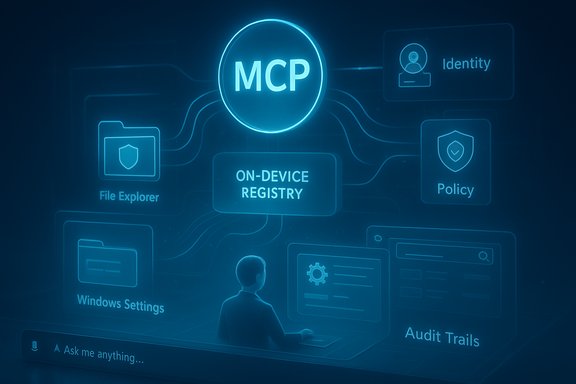
Microsoft has begun quietly threading the Model Context Protocol (MCP) into Windows 11, shipping a public preview of native MCP support to Windows Insiders in build 26220.7344 — a move that turns a long-theorized “agentic OS” from concept toward real‑world testing. The release includes two built‑in agent connectors — File Explorer and Windows Settings — and a Windows on‑device registry (ODR) that contains connectors in a sandboxed environment with identity and audit trails. For Insiders and enterprise customers, this is the clearest sign yet that Microsoft intends to make AI agents a first‑class, OS‑level capability rather than a userland add‑on.
Microsoft has opened a door to a new OS‑level capability. The important question now is whether the company and the broader ecosystem can walk through it with discipline, clarity, and respect for user agency.
Source: theregister.com Windows Insiders get a glimpse of Redmond’s agentic future
 Background
Why MCP matters: the N×M problem for AI connectors
AI agents become useful only when they can reach tools, data, and services. Historically, every LLM-based assistant required bespoke connectors to each application, datasource, or API — an N×M integration problem that made scaling agent functionality expensive and fragile. The Model Context Protocol (MCP) is an open protocol designed to standardize those integrations, essentially acting as a single interface that any compliant agent can use to access any compliant tool. This reduces duplication for developers and creates the possibility of a pluggable ecosystem of agent connectors. MCP’s emergence and rapid adoption by major AI vendors have given it momentum as a practical interoperability layer for agents.Microsoft’s agentic OS vision
Microsoft has publicly embraced the idea of an “agentic” Windows — an operating system that can host, authorize, and manage AI agents that act on behalf of users. The company has discussed agent workspaces, taskbar integration, and deeper Copilot experiences that can proactively help with tasks like file retrieval, device settings, content generation, and background assistance. Making MCP a native OS capability is a logical step in that roadmap: it lets Microsoft provide discoverability, controls, and enterprise management at the operating‑system layer rather than leaving those responsibilities solely to third‑party applications.What shipped in build 26220.7344
The headline features
- Native MCP support on Windows: A public preview is available in the Dev and Beta channels. The OS exposes a Windows on‑device agent registry (ODR) that lists MCP servers available locally and remotely, and provides discovery, identity, and auditing for agent connectors.
- Two built‑in connectors: The initial release includes a File Explorer connector, which allows agents to discover, search, read, and (with consent) manage local files, and a Windows Settings connector, which allows agents to inspect and change settings or navigate to specific settings pages using natural language. These are presented as packaged, sandboxed connectors in the ODR.
- Security and containment by default: Microsoft says agent connectors are, by default, contained in a secure environment with their own identity and audit trail. The ODR is intended to enforce consistent controls and to be manageable by IT through settings and management tooling like Microsoft Intune.
- Other goodies in the same build: The preview also flips on Quick Machine Recovery for non‑domain‑joined Windows Professional devices and includes the production release of modern Windows MIDI Services including MIDI 2.0 support — details that matter for system admins and creative professionals.
How the ODR works, in practice
The ODR exposes a mechanism for registering MCP servers (local or remote) and for agents to discover and connect to them. Microsoft ships an odr.exe command‑line utility for inspection and management, and Windows provides policy and settings hooks so administrators and users can control which agents can use which connectors and what resources those connectors may access. The architecture separates agent identity from connector identity so that logs and audit trails can attribute actions to a distinct principal.What MCP on Windows actually enables
For end users
- Natural‑language file search and retrieval that leverages descriptions, metadata, and image classification to locate content.
- An agent that can navigate to the Settings page you need or change basic device settings when permitted.
- UI affordances that may show agent activity on the taskbar or in a dedicated Agent Workspace, designed to isolate agent activity from the main desktop.
For developers
- A standard target for connectors: write one MCP server and it can be discovered and used by MCP‑aware agents on Windows.
- SDKs and documentation in the Microsoft stack (.NET, Semantic Kernel, Copilot integrations) to build MCP servers and agents that interact with the Windows ODR.
For IT and security teams
- A centralized place to audit agent actions and grant or revoke access at an enterprise scale.
- Policy controls via Windows Settings and Intune to limit agents to explicit folders or to deny certain connectors entirely.
- A containerized execution model for connectors intended to reduce risk from tool‑level vulnerabilities or cross‑prompt injection attacks.
Security and privacy: what Microsoft is promising and what to watch
The good: built‑in containment, identity, and auditability
Microsoft’s messaging emphasizes containment: connectors live in a separate, secure environment by default, and each connector has a distinct identity and an audit trail. Those are basic but essential controls when you let AI agents access local files and system settings. The presence of a command‑line management tool and Intune integration means enterprises will be able to impose policy centrally rather than relying on ad‑hoc app prompts. These choices address many of the architectural mistakes that make ad‑hoc connectors dangerous.The remaining risk vectors
- Privilege creep and consent fatigue: Even when connectors are sandboxed, granting read/write access to local folders creates risk. Users — and administrators — may suffer consent fatigue when multiple agents and apps request similar rights. The devil is in the defaults and in how permissions are presented in the UI. Poor UX here could push users toward blanket allow decisions that compromise safety.
- Cross‑prompt attacks and data leaks: MCP standardizes how tools expose functionality and data; that reduces developer friction but also centralizes a new attack surface. A malicious MCP server or a compromised connector that can be discovered by legitimate agents could funnel sensitive data outward. Microsoft’s audit trail and containerization mitigate but don’t eliminate that risk.
- Supply‑chain and model behavior: Agents may use local model runtimes or remote models. If an agent issues commands to a tool based on misinterpreted or adversarial prompts, the consequences could be unexpected device changes. This becomes more acute when agents can perform system actions such as toggling settings or modifying files. Effective logging and conservative defaults will be essential.
Practical mitigations Microsoft and admins should prioritize
- Default to read‑only access for file connectors; require explicit elevation for writes or deletions.
- Make permission scopes granular and discoverable: show the exact folders, file types, and settings an agent can access before granting consent.
- Provide an easy, one‑click "revoke all agent access" control for end users and a bulk‑audit capability for admins.
- Treat MCP servers and connectors like any other service in your security assessments and Include them in endpoint security monitoring and EDR policies.
The reputational context: why users are skittish
Recall, Copilot promises, and a culture of skepticism
Microsoft’s AI journey hasn’t been smooth. The company withdrew or delayed some earlier initiatives — notably the Recall feature, which stored searchable personal activity and drew significant privacy concern — and Copilot demos have sometimes attracted ridicule when they overpromised. That context has primed public skepticism: users worry less about the technical feasibility of agents and more about how intrusive and reliable they will be. Microsoft’s own AI leadership has publicly pushed back on critics, with executives calling portions of the pushback “mind‑blowing,” which only amplified debate about priorities and tone.Why MCP changes the calculus for trust
MCP makes connectors ubiquitous and discoverable. That’s powerful for productivity but raises the stakes: instead of each app building its own guarded bridge to local data, a single registry makes it trivially simple for many agents to find and consume tools. Trust will depend on how well Microsoft enforces isolation, logs activity, surfaces transparent controls, and helps users make informed choices. Without clear, user‑centric UX and conservative defaults, MCP could quickly become a focal point for privacy objections.Enterprise implications
Manageability and governance
For organizations, the upside is compelling: central registry, Intune control, audit logs, and the ability to standardize connectors across the fleet. An enterprise can now build a single MCP server that exposes protected internal services — databases, ticketing systems, document stores — with a managed surface area for agents to consume. That can accelerate workflows (automated ticket triage, document summarization, cross‑system updates) if IT applies proper access controls.Compliance and data residency
Regulated industries will need to treat MCP connectors like any other integration: ensure data residency requirements are met, require encryption in transit and at rest for connectors that export data, and insist on strong authentication for MCP servers. Microsoft’s audit trail helps, but organizations must validate logs and integrate them into SIEM systems. Default containment is helpful, but compliance teams will demand clear proofs of separation and dataflow.Deployment considerations
- Start with a controlled pilot on non‑production devices and a narrowly scoped MCP connector exposing read‑only access to a single dataset.
- Evaluate connector behavior under typical user prompts and under adversarial input patterns.
- Integrate ODR logs with existing monitoring and create incident playbooks for misuse or data exfiltration indicators.
- Extend rollout only after attestation and positive security validation.
Developer and ecosystem effects
Easier connector development, broader distribution
MCP makes it faster to write a connector once and have it usable across agents and platforms. Microsoft has SDKs and guidance — for example, .NET and Semantic Kernel integration — which lowers the barrier for teams already in the Microsoft ecosystem. Third‑party and open‑source MCP server implementations mean an ecosystem can grow quickly if the standard proves robust.The business model question
Standardization can commoditize connectors, shifting value to the agent designer and the hosting model (local vs cloud), or to premium connectors that provide deeper enterprise integrations. Platform maintainers that offer trusted connector registries and hardened, signed connector packages may find a market for managed connector catalogs. Microsoft’s ODR could evolve into a curated store for enterprise‑grade connectors, with signing, attestation, and support guarantees.Comparison to earlier Microsoft missteps: Recall vs. a more pragmatic rollout
The Recall episode exposed a mismatch between engineering ambition and social license: technical capability (a system‑level activity store) outpaced user comfort and trust controls. This time, Microsoft appears to be intentionally conservative: MCP support is initially a preview with connectors containing identity and audit trails and is being rolled out via the Insider channels with feature toggles and controlled feature rollout. That suggests learning from past missteps: Microsoft is shepherding agent functionality behind governance and administrative hooks rather than unleashing it unilaterally. Whether that will be sufficient to rebuild trust is an open question.Practical advice for Insiders, power users, and admins
- If you’re an Insider: Treat MCP as experimental. Turn on the preview toggle only on test machines or devices where you can tolerate changes. Inspect odr.exe and the registry entries to understand which connectors are present and which agents are discovering them.
- For IT admins: Start a controlled pilot with scoped, read‑only connectors. Integrate ODR logging into your SIEM and require signed connectors. Use Intune or policy to restrict write permissions until you have clear behavioral baselines.
- For developers: Build minimal, purpose‑specific MCP servers first, and include robust authorization and auditing. Design connectors under the assumption they will be discoverable by multiple agents and treat every request as untrusted input.
Strengths, weaknesses, and the tug of war between utility and risk
Notable strengths
- Interoperability at scale: MCP tackles the integration problem head‑on, enabling agents to reuse connectors rather than re‑implementing them.
- OS‑level management: The ODR and policy hooks give administrators central control, a necessary step for enterprise adoption.
- Developer momentum: Microsoft’s SDKs and backing mean a fast start for connector and agent builders on the Windows platform.
Key weaknesses and risks
- User perception and consent models: The technical assurances mean little if users don’t understand and trust the permission model. UX design for consent and revocation will be decisive.
- Attack surface consolidation: Standardizing connectors can both reduce developer effort and concentrate new security risks in the ODR and connector implementations.
- Operational complexity: Enterprises must now manage another layer of infrastructure, audits, and incident response workflows tied to agent activity.
Where this is likely to go next
- Expansion of built‑in connectors: Expect Microsoft to add connectors for Mail, Calendar, Edge history, and Microsoft 365 services, with Copilot integrations using MCP servers to perform cross‑app actions.
- Tighter controls and attestation: Signed connector packages, attestation, and possibly a Microsoft‑curated connector catalog for enterprises are likely to appear as trust mechanisms scale.
- Local model hosting plus hybrid execution: Windows may increasingly support local model runtimes for offline agenting while still allowing cloud models via configured MCP servers, enabling low‑latency and privacy‑sensitive scenarios.
Final assessment
Microsoft’s introduction of native MCP support in Windows as a public preview is a significant milestone on the path to an “agentic OS.” Technically, the choices — an on‑device registry, sandboxed connectors, identity and audit trails, and management integration — are sensible foundations for a secure, manageable agent architecture. For developers and enterprises, MCP reduces friction and opens productive new workflows. But the win is far from guaranteed. User trust, consent UX, and rigorous operational controls will determine whether MCP becomes an enabling standard or a new source of privacy and security headaches. Microsoft’s decision to push the preview through Insider channels, keep defaults locked down, and include administrative controls shows an awareness of these pitfalls. The next phase will be telling: whether Microsoft can demonstrate transparent, conservative defaults, clear auditability, and an intuitive permission model that reassures users without neutering agent utility. If it can, MCP on Windows could be the plumbing that finally makes agents genuinely useful at scale; if it can’t, the backlash that followed Recall could repeat on a larger stage.Microsoft has opened a door to a new OS‑level capability. The important question now is whether the company and the broader ecosystem can walk through it with discipline, clarity, and respect for user agency.
Source: theregister.com Windows Insiders get a glimpse of Redmond’s agentic future
