

Microsoft released the optional Windows 11 preview update KB5089573 on May 26, 2026, for Windows 11 versions 24H2 and 25H2, moving systems to builds 26100.8524 and 26200.8524 while beginning a gradual rollout of performance changes that make core shell interactions feel faster. The headline is not that Windows suddenly discovered more CPU power. It is that Microsoft is now willing to spend short bursts of that power more aggressively to hide the rough edges users feel every day. That makes the so-called Low Latency Profile less a benchmark story than a trust story: Windows 11 is trying to feel immediate again.
For years, Windows performance arguments have orbited around the wrong numbers. Boot time, synthetic scores, memory footprint, background services, game frame rates, and storage throughput all matter, but they are not the moments that define whether a PC feels fast. The moments users remember are smaller and more irritating: clicking Start and waiting, invoking Search and watching it hesitate, opening a context menu and feeling the shell collect itself before responding.
KB5089573 takes aim at exactly those moments. Microsoft’s public changelog frames the change under general performance, saying the update accelerates app launches and core shell experiences such as Start, Search, and Action Center. The company does not prominently market “Low Latency Profile” as a consumer-facing brand in the official notes, but reporting from Windows-focused outlets and testing builds points to the same mechanism that has been discussed in recent Insider releases.
That mechanism is simple in concept and politically complicated in practice. When Windows detects common interactive actions, it can briefly push the CPU into a higher-performance state so the operation completes sooner. Instead of waiting for normal power management and scheduling behavior to catch up, the OS gives the foreground interaction a short shove.
This is not the same as making the operating system lighter, and that distinction matters. Windows 11 is not being rewritten into a leaner desktop overnight. Microsoft is adding a performance intervention that says, in effect, if the user is waiting on the shell, spend a little more energy now and return to normal afterward.
There is nothing inherently scandalous about this. Modern operating systems already make constant tradeoffs among power, heat, responsiveness, and background efficiency. Mobile platforms have long treated touch input as a priority event deserving immediate resources, and desktop operating systems have their own layers of scheduling, boosting, and foreground prioritization.
The difference here is perception. Windows 11 has spent much of its life being accused of taking more than it gives: more visual chrome, more account nudges, more web-connected surfaces, more requirements, more background behavior. A CPU burst that makes the Start menu open faster can be technically sensible and still invite skepticism from users who wonder why the menu needed help in the first place.
That skepticism is not irrational. If the shell is slow because it is doing too much, boosting the CPU can look like treating the symptom rather than the disease. But if the shell is slow because modern hardware is often parked in power-saving states until a foreground action demands work, then a short boost is exactly the kind of operating-system-level nudge that users should want.
The truth is probably both. Windows 11’s user interface still carries design and architectural baggage that cannot be solved by frequency alone. But latency is experienced at the boundary between software design and hardware behavior, and Microsoft is right to attack that boundary directly.
That distinction is important because many users who install the update may not immediately see the advertised behavior. Microsoft’s controlled feature rollout system can gate features after the bits arrive, so two machines on the same build number may not behave identically on day one. That is not a bug in the narrow servicing sense, but it is an experience problem.
For enthusiasts, this has created the predictable ViveTool subplot. Reports indicate that the Low Latency Profile can be force-enabled with a hidden feature ID, but that is not an official setting and should not be treated as one. It is one thing for testers and forum regulars to experiment with staged features; it is another for ordinary users or managed fleets to start flipping undocumented switches because a performance headline made the rounds.
The preview-update model gives Microsoft a safer runway, but it also muddies accountability. If a user installs KB5089573 and sees nothing, was the update overhyped, was the feature gated, was the workload unaffected, or was the machine already fast enough that the benefit is hard to notice? The answer may differ from PC to PC, which is precisely why feature rollouts can feel less like engineering caution and more like a shell game.
The Start menu is not merely a launcher. It is a referendum on whether the machine is ready for the user. Search is not merely an index front end. It is the moment a user decides whether Windows is helping them find something or making them negotiate with a cloud-connected suggestion panel.
Action Center, notification flyouts, right-click menus, File Explorer surfaces, and taskbar interactions occupy the same psychological space. A delay of 150 milliseconds can be tolerable in isolation but corrosive in repetition. A delay of half a second can make a high-end PC feel strangely cheap.
That is why this update is more significant than its plain changelog wording suggests. Microsoft is not just chasing benchmark deltas; it is trying to shave the delays that make Windows 11 feel less responsive than its hardware should allow. If a Core Ultra, Ryzen, or Snapdragon X-class machine hesitates on a menu, users do not blame an idle-state transition. They blame Windows.
The more interesting question is why Windows users are so primed to read a responsiveness feature cynically. Part of the answer is history. Windows 11 has delivered real improvements, but it has also trained users to expect tradeoffs they did not ask for: a redesigned context menu that hid familiar commands, Start menu layouts that felt less flexible than Windows 10, more prominent Microsoft account pressure, and a growing sense that the desktop is a delivery channel for services as much as a workspace.
Against that backdrop, “we will boost your CPU so the shell feels faster” lands differently than it would from a vendor with more accumulated goodwill. It sounds like clever engineering to some users and an admission of bloat to others. Both reactions are understandable.
Microsoft’s defenders have pointed out that short foreground boosts are normal in modern systems. They are right. But users are not grading Microsoft against an abstract operating-systems textbook; they are grading it against the lived experience of clicking things in Windows 11 for the past several years. A technically valid feature can still be a reputational repair job.
Laptops complicate the story. Thin-and-light machines live inside narrow thermal and acoustic envelopes, and user interactions happen constantly. If Windows boosts too often, too aggressively, or at the wrong times, the effect could show up as fan noise, surface warmth, or battery drain rather than delight.
That does not mean the feature is dangerous. It means Microsoft’s tuning matters more than the concept. The OS has to know when a boost is worth it, how long it should last, which cores should take the work, and how to behave differently on battery, plugged-in power, performance mode, efficiency mode, and vendor-tuned firmware profiles.
Hybrid CPU designs add another layer. On Intel systems with performance and efficiency cores, the question is not just how fast the CPU runs but where the foreground task lands. On AMD systems, boosting behavior interacts with firmware, chipset drivers, and power plans. On Arm-based Windows PCs, especially Copilot+ systems, the calculus changes again because responsiveness, battery life, and instant-on behavior are central to the product promise.
The best version of Low Latency Profile will be invisible. Users should not see oscillating clocks and think about scheduler policy. They should click Start, get Start, and move on.
App launches are where Windows exposes decades of compatibility and ecosystem diversity. A modern desktop app may touch storage, networking, registry entries, GPU initialization, font caches, security products, update checkers, plug-ins, shell extensions, and cloud sign-in components before it becomes useful. A CPU burst can help with some of that, but it cannot erase poor app design or slow I/O.
Still, app launch latency is one of the most valuable places for Microsoft to intervene. Many PCs today have fast NVMe storage and powerful CPUs, yet applications can still feel oddly sticky at launch because the path from click to usable window is full of small waits. If Windows can identify the foreground launch path and prioritize it without starving the rest of the system, the perceived improvement could be larger than the raw milliseconds suggest.
That is also where Microsoft must be careful with claims. Reports of large percentage improvements can be real and still misleading if the baseline is narrow, the test system is specific, or the workload favors the new behavior. A flyout that opens 70 percent faster sounds dramatic, but users ultimately care whether the difference is visible, consistent, and achieved without new side effects.
A security update can be assessed against known vulnerabilities, compliance requirements, and regression risk. A responsiveness update is slipperier. It may improve the experience for users, but the benefit is harder to measure across a fleet, and the downside may only appear on certain hardware models, battery profiles, or line-of-business applications.
That does not mean enterprises should ignore it. In fact, shell and launch latency have real productivity implications at scale. A slow Start menu is not merely an annoyance when multiplied across thousands of employees and millions of daily interactions. But enterprise IT will want telemetry, pilot rings, and vendor validation before treating the optional preview as a must-have.
There is also a support angle. If users read headlines about a faster Windows 11 update and then ask why their corporate laptop does not have it, help desks may need to explain controlled rollouts, update deferrals, and optional content policies. Microsoft’s feature delivery model creates flexibility for administrators, but it can also create expectation gaps among users who assume “released” means “available to me now.”
For admins, the sane path is boring: test KB5089573 on representative hardware, watch for thermal and battery behavior, validate critical apps, and wait for the same improvements to mature into the regular cumulative update stream if no urgent need exists.
There may be indirect benefits for gaming-adjacent workflows. Launchers, overlays, capture tools, driver control panels, and game libraries are still desktop applications. A snappier shell can make a gaming PC feel better outside the game itself, especially on systems with aggressive power-saving behavior.
But users should not expect KB5089573 to turn a midrange GPU into a high-end one, fix shader compilation stutter, or bypass CPU bottlenecks inside actual games. If anything, gamers should be more alert than most to the distinction between latency domains. Menu responsiveness, application startup, input-to-photon latency, network latency, and memory latency are different problems with overlapping terminology.
That distinction is worth making because Windows performance headlines often collapse into wishful thinking. Low Latency Profile may be useful and legitimate without being a gaming revolution. The better claim is narrower and more credible: Windows is trying to reduce the little pauses that make the desktop feel slower than the hardware underneath it.
In this case, the temptation is obvious. If the update contains a performance improvement and Microsoft is rolling it out gradually, why not flip the hidden bit and get the faster shell today? On a spare test machine, that is a reasonable enthusiast experiment. On a daily driver, it is a calculated risk. On a managed or mission-critical machine, it is hard to justify.
Undocumented feature IDs are not product settings. They may expose code paths Microsoft is still gating for compatibility, telemetry, sequencing, or regional reasons. They may also change, disappear, or interact strangely with future cumulative updates. The fact that a command works does not make it an endorsed configuration.
The better pressure to put on Microsoft is not “give us the hidden ID.” It is “give us clearer rollout visibility.” Users should be able to tell whether a feature is present, enabled, staged, or unavailable on their device without spelunking through third-party tools. That would reduce frustration while preserving Microsoft’s ability to roll out carefully.
The less encouraging part is that Microsoft still struggles to communicate these changes cleanly. The official changelog is restrained, the reporting ecosystem uses a more memorable internal-sounding name, the feature rollout is gradual, and the enthusiast workaround is unofficial. The result is a familiar fog in which everyone is technically looking at the same update but not necessarily the same experience.
This is a recurring Windows problem. Microsoft wants the safety of staged deployment, the marketing benefit of visible improvement, and the flexibility of hidden feature plumbing. Users want to know whether their PCs are faster after installing the update. Those desires are not mutually exclusive, but Microsoft often behaves as if clarity is an optional feature.
The company deserves credit for working on latency rather than merely talking about “AI experiences” and new surfaces. But credibility will come from consistency. If the shell keeps getting faster, if app launches improve across real workloads, and if battery life does not suffer, users will notice without needing a brand name.
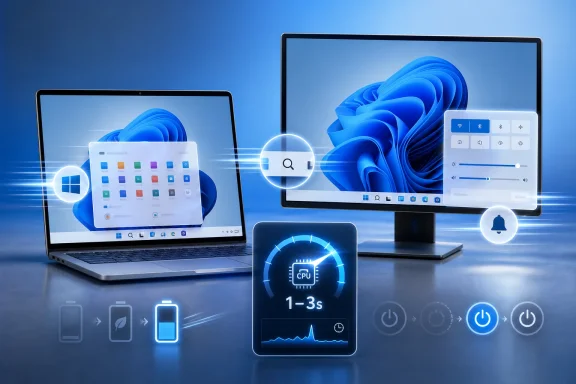 Microsoft Is Finally Optimizing for the Moment You Notice
For years, Windows performance arguments have orbited around the wrong numbers. Boot time, synthetic scores, memory footprint, background services, game frame rates, and storage throughput all matter, but they are not the moments that define whether a PC feels fast. The moments users remember are smaller and more irritating: clicking Start and waiting, invoking Search and watching it hesitate, opening a context menu and feeling the shell collect itself before responding.KB5089573 takes aim at exactly those moments. Microsoft’s public changelog frames the change under general performance, saying the update accelerates app launches and core shell experiences such as Start, Search, and Action Center. The company does not prominently market “Low Latency Profile” as a consumer-facing brand in the official notes, but reporting from Windows-focused outlets and testing builds points to the same mechanism that has been discussed in recent Insider releases.
That mechanism is simple in concept and politically complicated in practice. When Windows detects common interactive actions, it can briefly push the CPU into a higher-performance state so the operation completes sooner. Instead of waiting for normal power management and scheduling behavior to catch up, the OS gives the foreground interaction a short shove.
This is not the same as making the operating system lighter, and that distinction matters. Windows 11 is not being rewritten into a leaner desktop overnight. Microsoft is adding a performance intervention that says, in effect, if the user is waiting on the shell, spend a little more energy now and return to normal afterward.
The CPU Boost Is a Latency Trick, Not a Miracle Cure
The reported Low Latency Profile works by briefly raising CPU clocks during interactive tasks, often for roughly one to three seconds. The obvious targets are app launches, the Start menu, system flyouts, right-click menus, Search, and notification surfaces. Those are not exotic workloads; they are the everyday seams where Windows 11’s polish either holds or splits.There is nothing inherently scandalous about this. Modern operating systems already make constant tradeoffs among power, heat, responsiveness, and background efficiency. Mobile platforms have long treated touch input as a priority event deserving immediate resources, and desktop operating systems have their own layers of scheduling, boosting, and foreground prioritization.
The difference here is perception. Windows 11 has spent much of its life being accused of taking more than it gives: more visual chrome, more account nudges, more web-connected surfaces, more requirements, more background behavior. A CPU burst that makes the Start menu open faster can be technically sensible and still invite skepticism from users who wonder why the menu needed help in the first place.
That skepticism is not irrational. If the shell is slow because it is doing too much, boosting the CPU can look like treating the symptom rather than the disease. But if the shell is slow because modern hardware is often parked in power-saving states until a foreground action demands work, then a short boost is exactly the kind of operating-system-level nudge that users should want.
The truth is probably both. Windows 11’s user interface still carries design and architectural baggage that cannot be solved by frequency alone. But latency is experienced at the boundary between software design and hardware behavior, and Microsoft is right to attack that boundary directly.
Optional Preview Updates Are Where Windows Features Go to Be Half-Present
KB5089573 is an optional preview update, which means it is production-quality in Microsoft’s servicing language but not the same as a mandatory Patch Tuesday security release. Users on Windows 11 24H2 and 25H2 can find it through Windows Update, but it does not automatically land on every system in the same way as a regular cumulative security update. It is the familiar Windows staging area: real enough to matter, cautious enough to be confusing.That distinction is important because many users who install the update may not immediately see the advertised behavior. Microsoft’s controlled feature rollout system can gate features after the bits arrive, so two machines on the same build number may not behave identically on day one. That is not a bug in the narrow servicing sense, but it is an experience problem.
For enthusiasts, this has created the predictable ViveTool subplot. Reports indicate that the Low Latency Profile can be force-enabled with a hidden feature ID, but that is not an official setting and should not be treated as one. It is one thing for testers and forum regulars to experiment with staged features; it is another for ordinary users or managed fleets to start flipping undocumented switches because a performance headline made the rounds.
The preview-update model gives Microsoft a safer runway, but it also muddies accountability. If a user installs KB5089573 and sees nothing, was the update overhyped, was the feature gated, was the workload unaffected, or was the machine already fast enough that the benefit is hard to notice? The answer may differ from PC to PC, which is precisely why feature rollouts can feel less like engineering caution and more like a shell game.
Faster Shell Surfaces Matter More Than Microsoft Usually Admits
Windows enthusiasts sometimes underestimate how much the shell defines the operating system. Kernel improvements, driver models, security mitigations, and scheduler refinements all matter deeply, but users do not emotionally experience them unless something breaks. They experience the shell hundreds of times a day.The Start menu is not merely a launcher. It is a referendum on whether the machine is ready for the user. Search is not merely an index front end. It is the moment a user decides whether Windows is helping them find something or making them negotiate with a cloud-connected suggestion panel.
Action Center, notification flyouts, right-click menus, File Explorer surfaces, and taskbar interactions occupy the same psychological space. A delay of 150 milliseconds can be tolerable in isolation but corrosive in repetition. A delay of half a second can make a high-end PC feel strangely cheap.
That is why this update is more significant than its plain changelog wording suggests. Microsoft is not just chasing benchmark deltas; it is trying to shave the delays that make Windows 11 feel less responsive than its hardware should allow. If a Core Ultra, Ryzen, or Snapdragon X-class machine hesitates on a menu, users do not blame an idle-state transition. They blame Windows.
The Controversy Says More About Windows Than About CPU Frequency
The online backlash to Low Latency Profile has centered on the idea that Microsoft is “cheating” by boosting clocks instead of optimizing code. That criticism is emotionally satisfying, but technically incomplete. Operating systems have always shaped performance by deciding which work matters now and which work can wait.The more interesting question is why Windows users are so primed to read a responsiveness feature cynically. Part of the answer is history. Windows 11 has delivered real improvements, but it has also trained users to expect tradeoffs they did not ask for: a redesigned context menu that hid familiar commands, Start menu layouts that felt less flexible than Windows 10, more prominent Microsoft account pressure, and a growing sense that the desktop is a delivery channel for services as much as a workspace.
Against that backdrop, “we will boost your CPU so the shell feels faster” lands differently than it would from a vendor with more accumulated goodwill. It sounds like clever engineering to some users and an admission of bloat to others. Both reactions are understandable.
Microsoft’s defenders have pointed out that short foreground boosts are normal in modern systems. They are right. But users are not grading Microsoft against an abstract operating-systems textbook; they are grading it against the lived experience of clicking things in Windows 11 for the past several years. A technically valid feature can still be a reputational repair job.
Battery Life and Thermals Are the Fine Print
A one-to-three-second CPU boost sounds harmless, and on most desktop systems it probably will be. A burst that completes a task sooner can even be more efficient than letting the same operation drag out at lower clocks, depending on the hardware and workload. The old “race to idle” idea is not marketing nonsense; finishing quickly and returning to a low-power state is often a reasonable strategy.Laptops complicate the story. Thin-and-light machines live inside narrow thermal and acoustic envelopes, and user interactions happen constantly. If Windows boosts too often, too aggressively, or at the wrong times, the effect could show up as fan noise, surface warmth, or battery drain rather than delight.
That does not mean the feature is dangerous. It means Microsoft’s tuning matters more than the concept. The OS has to know when a boost is worth it, how long it should last, which cores should take the work, and how to behave differently on battery, plugged-in power, performance mode, efficiency mode, and vendor-tuned firmware profiles.
Hybrid CPU designs add another layer. On Intel systems with performance and efficiency cores, the question is not just how fast the CPU runs but where the foreground task lands. On AMD systems, boosting behavior interacts with firmware, chipset drivers, and power plans. On Arm-based Windows PCs, especially Copilot+ systems, the calculus changes again because responsiveness, battery life, and instant-on behavior are central to the product promise.
The best version of Low Latency Profile will be invisible. Users should not see oscillating clocks and think about scheduler policy. They should click Start, get Start, and move on.
App Launches Are the Bigger Promise and the Harder One
The shell improvements appear to be the first visible piece of the rollout, while broader app launch gains may arrive or become active more gradually. That sequencing matters. Making Microsoft’s own shell surfaces faster is difficult but bounded. Making arbitrary Win32, UWP, packaged, unpackaged, Electron, .NET, and web-backed applications launch faster is a messier problem.App launches are where Windows exposes decades of compatibility and ecosystem diversity. A modern desktop app may touch storage, networking, registry entries, GPU initialization, font caches, security products, update checkers, plug-ins, shell extensions, and cloud sign-in components before it becomes useful. A CPU burst can help with some of that, but it cannot erase poor app design or slow I/O.
Still, app launch latency is one of the most valuable places for Microsoft to intervene. Many PCs today have fast NVMe storage and powerful CPUs, yet applications can still feel oddly sticky at launch because the path from click to usable window is full of small waits. If Windows can identify the foreground launch path and prioritize it without starving the rest of the system, the perceived improvement could be larger than the raw milliseconds suggest.
That is also where Microsoft must be careful with claims. Reports of large percentage improvements can be real and still misleading if the baseline is narrow, the test system is specific, or the workload favors the new behavior. A flyout that opens 70 percent faster sounds dramatic, but users ultimately care whether the difference is visible, consistent, and achieved without new side effects.
Enterprises Will Treat This as a Servicing Signal, Not a Speed Hack
For managed environments, the most important part of KB5089573 may not be the Low Latency Profile itself. It is the reminder that Microsoft continues to use optional preview updates as the proving ground for changes that later enter broader deployment. IT administrators already understand this rhythm, but performance features create a different kind of evaluation problem than security fixes.A security update can be assessed against known vulnerabilities, compliance requirements, and regression risk. A responsiveness update is slipperier. It may improve the experience for users, but the benefit is harder to measure across a fleet, and the downside may only appear on certain hardware models, battery profiles, or line-of-business applications.
That does not mean enterprises should ignore it. In fact, shell and launch latency have real productivity implications at scale. A slow Start menu is not merely an annoyance when multiplied across thousands of employees and millions of daily interactions. But enterprise IT will want telemetry, pilot rings, and vendor validation before treating the optional preview as a must-have.
There is also a support angle. If users read headlines about a faster Windows 11 update and then ask why their corporate laptop does not have it, help desks may need to explain controlled rollouts, update deferrals, and optional content policies. Microsoft’s feature delivery model creates flexibility for administrators, but it can also create expectation gaps among users who assume “released” means “available to me now.”
For admins, the sane path is boring: test KB5089573 on representative hardware, watch for thermal and battery behavior, validate critical apps, and wait for the same improvements to mature into the regular cumulative update stream if no urgent need exists.
Gamers Should Not Confuse Shell Latency With Frame Latency
Because this story involves CPU boosting and the phrase “low latency,” it is easy for gaming communities to read too much into it. The current evidence points primarily to desktop responsiveness: app launches, flyouts, menus, and shell experiences. That is not the same as reducing game input latency, improving frame pacing, or raising frame rates.There may be indirect benefits for gaming-adjacent workflows. Launchers, overlays, capture tools, driver control panels, and game libraries are still desktop applications. A snappier shell can make a gaming PC feel better outside the game itself, especially on systems with aggressive power-saving behavior.
But users should not expect KB5089573 to turn a midrange GPU into a high-end one, fix shader compilation stutter, or bypass CPU bottlenecks inside actual games. If anything, gamers should be more alert than most to the distinction between latency domains. Menu responsiveness, application startup, input-to-photon latency, network latency, and memory latency are different problems with overlapping terminology.
That distinction is worth making because Windows performance headlines often collapse into wishful thinking. Low Latency Profile may be useful and legitimate without being a gaming revolution. The better claim is narrower and more credible: Windows is trying to reduce the little pauses that make the desktop feel slower than the hardware underneath it.
The Hidden Toggle Is a Symptom of Enthusiast Impatience
The ViveTool angle is almost inevitable in modern Windows coverage. Microsoft ships code behind feature flags, testers discover IDs, enthusiasts force-enable unfinished or staged behavior, and then screenshots and videos outrun the official rollout. This has become part of the Windows news ecosystem, but it is not always healthy.In this case, the temptation is obvious. If the update contains a performance improvement and Microsoft is rolling it out gradually, why not flip the hidden bit and get the faster shell today? On a spare test machine, that is a reasonable enthusiast experiment. On a daily driver, it is a calculated risk. On a managed or mission-critical machine, it is hard to justify.
Undocumented feature IDs are not product settings. They may expose code paths Microsoft is still gating for compatibility, telemetry, sequencing, or regional reasons. They may also change, disappear, or interact strangely with future cumulative updates. The fact that a command works does not make it an endorsed configuration.
The better pressure to put on Microsoft is not “give us the hidden ID.” It is “give us clearer rollout visibility.” Users should be able to tell whether a feature is present, enabled, staged, or unavailable on their device without spelunking through third-party tools. That would reduce frustration while preserving Microsoft’s ability to roll out carefully.
Windows 11 Needs More of This, and Less of the Theater Around It
The encouraging part of KB5089573 is that it targets something users actually feel. Not another promotional surface. Not another inbox app experiment. Not another settings migration that moves a control without improving it. A faster Start menu and quicker shell response are the kind of improvements Windows 11 should have been accumulating steadily since launch.The less encouraging part is that Microsoft still struggles to communicate these changes cleanly. The official changelog is restrained, the reporting ecosystem uses a more memorable internal-sounding name, the feature rollout is gradual, and the enthusiast workaround is unofficial. The result is a familiar fog in which everyone is technically looking at the same update but not necessarily the same experience.
This is a recurring Windows problem. Microsoft wants the safety of staged deployment, the marketing benefit of visible improvement, and the flexibility of hidden feature plumbing. Users want to know whether their PCs are faster after installing the update. Those desires are not mutually exclusive, but Microsoft often behaves as if clarity is an optional feature.
The company deserves credit for working on latency rather than merely talking about “AI experiences” and new surfaces. But credibility will come from consistency. If the shell keeps getting faster, if app launches improve across real workloads, and if battery life does not suffer, users will notice without needing a brand name.
The May Preview Draws a Line Between Faster Windows and Better Windows
The practical read on KB5089573 is straightforward: it is a promising optional update, not a magic patch. The most important thing is not whether every user can force the feature today. It is whether Microsoft keeps treating responsiveness as a first-class Windows quality.- KB5089573 is an optional preview update for Windows 11 24H2 and 25H2, released on May 26, 2026, with builds 26100.8524 and 26200.8524.
- The update begins rolling out performance improvements for app launches and core shell experiences, though availability can vary because Microsoft is using gradual feature rollout.
- The reported Low Latency Profile briefly raises CPU performance during common foreground actions such as opening Start, Search, Action Center, context menus, and apps.
- Users should not assume the feature is active immediately after installing the update, and forcing it with undocumented tools is best left to test machines.
- The likely benefit is improved perceived responsiveness, not a broad gaming performance uplift or a cure for every Windows 11 shell complaint.
- Administrators should evaluate the update through normal pilot rings, especially on laptops where battery life, thermals, and fan behavior matter.
References
- Primary source: videocardz.com
Published: Thu, 28 May 2026 08:09:41 GMT
- Related coverage: windowscentral.com
Windows 11's latest OS update is packing serious performance gains
Windows 11 update KB5089573 is now generally available as Microsoft's non-security preview update for May, and is packing genuinely notable performance improvements. www.windowscentral.com
- Related coverage: windowslatest.com

Windows 11 KB5089573 just made PCs more responsive, direct download links (.msu)
Windows 11 KB5089573 is a major update that bumps the OS to Build 26200.8524 and adds multiple new features. www.windowslatest.com
- Official source: support.microsoft.com
May 26, 2026—KB5089573 (OS Builds 26200.8524 and 26100.8524) Preview - Microsoft Support
 support.microsoft.com
- Related coverage: windowsreport.com
- Related coverage: xenospectrum.com

Windows 11の最新アップデートKB5089573で最大70%高速化されるCPUブースト機能が導入 | XenoSpectrum
MicrosoftはWindows 11のプレビューアップデート(KB5089573)にて、UI操作時にCPUクロックを瞬間的に最大化する新機能「Low Latency Profile」を導入した。「Race to Sleep」の設計思想のもと、OSの体感速度を劇的に向上させるこの技術のメカニズムから、一部ゲーム環境への影響、そしてネイティブUI化に向けた今後の展望までを詳しく解説。 xenospectrum.com
- Related coverage: windowsforum.com

Windows 11 KB5089573 Preview: Faster App Launches & Snappier Start Menu
Microsoft released the optional Windows 11 preview update KB5089573 on May 26, 2026, for Windows 11 versions 24H2 and 25H2, bringing OS builds 26100.8524 and 26200.8524 with performance changes aimed at faster app launches and snappier shell interactions. That is the plain news. The larger story... windowsforum.com
- Related coverage: computerbase.de
Optionales Mai-Update: Windows 11 lässt Apps mit CPU-Boost schneller starten
Mit dem optionalen Mai-Update erhält Windows 11 Neuerungen wie den CPU-Boost für schnellere App-Starts sowie Multi-Kamera-Unterstützung.www.computerbase.de
- Related coverage: games.gg

Windows 11 Low Latency Profile: Up to 70% Faster Load Times
Microsoft's rumored Windows 11 Low Latency Profile promises up to 70% faster interface loads and 40% quicker app launches by briefly maxing out your CPU.games.gg
- Related coverage: techradar.com
- Related coverage: fdaytalk.com

How to Enable Low Latency Profile (CPU Boost) on Windows 11
Windows 11 Low Latency Profile boosts your CPU for 1 to 3 seconds during app launches and Start menu interactions. Here is how to enable it now using ViveTool. www.fdaytalk.com
- Related coverage: pcgamer.com
'Let Windows cook': Microsoft defends new Low Latency mode and asks you 'see it yourself'
The new mode is reportedly snappier.www.pcgamer.com
- Official source: techcommunity.microsoft.com
- Related coverage: techrounder.com